
TL;DR: Quick Add is a global keyboard shortcut (
Cmd/Ctrl + Shift + Tby default) that pops up a capture box anywhere on your desktop, even outside the browser. Type a task, hit enter, and it lands in your default inbox project so a thought never gets lost. See Default Shortcuts to remap it.
How a thought travels from your keyboard to the right project:
Overview
The Quick Add shortcut lets you add tasks and notes to any project in seconds without navigating away from your current view. It is one of the fastest ways to capture ideas, to-dos, and notes as they come to mind.
💡 Note: Quick Add is also part of our desktop apps and browser extensions. Visit Quick Add Widget and Web Browser Extension to learn more.
Use the Quick Add Shortcut
- Press ⌨️ ⌘ + K (Mac) or ⌨️ Ctrl + K (Windows).
- Select ➕ Quick Add under Actions.
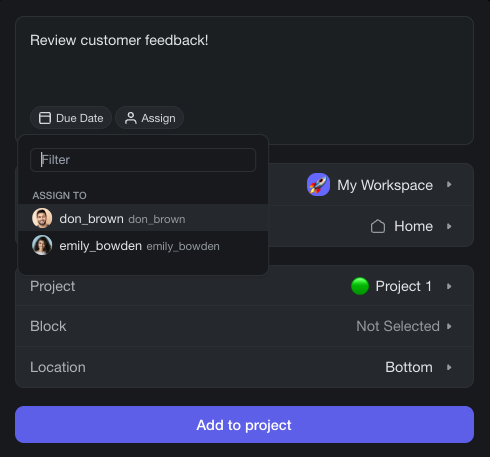
- Enter a task, thought, or idea.
- Select a Workspace, Folder, and target Project.
- Pick a Block and Location and click Add to Project.
- (optional) Assign a project member to the task.
💡 Note: The Quick Add widget supports Markdown syntax. Visit Markdown Support to learn how to use it in Taskade.
When to Use Quick Add
- During meetings: Capture action items instantly without switching tabs or projects.
- While browsing: Use the browser extension to add tasks from any webpage.
- Cross-project capture: Send a task to a different project than the one you are currently viewing.
- Inbox-zero workflow: Dump all incoming thoughts into a single project and organize them later.
Tips
- You can also open Quick Add from the ⚡ lightning bolt icon in the top navigation bar.
- Quick Add respects the block type of the target location, so tasks land as checkboxes, bullets, or numbered items depending on the project format.
- Combine Quick Add with Reminders to schedule a due date right after adding the task.
- Visit Keyboard Shortcuts for a full list of shortcuts available in Taskade.