

TL;DR: Devin AI runs async coding sessions in a virtual machine for engineers, now with a free tier and Pro at $20 a month month-to-month. Taskade Genesis builds a living application from one prompt, deployed and ready for users, with AI agents, automations, and 100+ integrations. Free Forever to start, Pro $10/mo billed annually. Try Taskade Genesis free →
See the alternative working, clone in 60 seconds
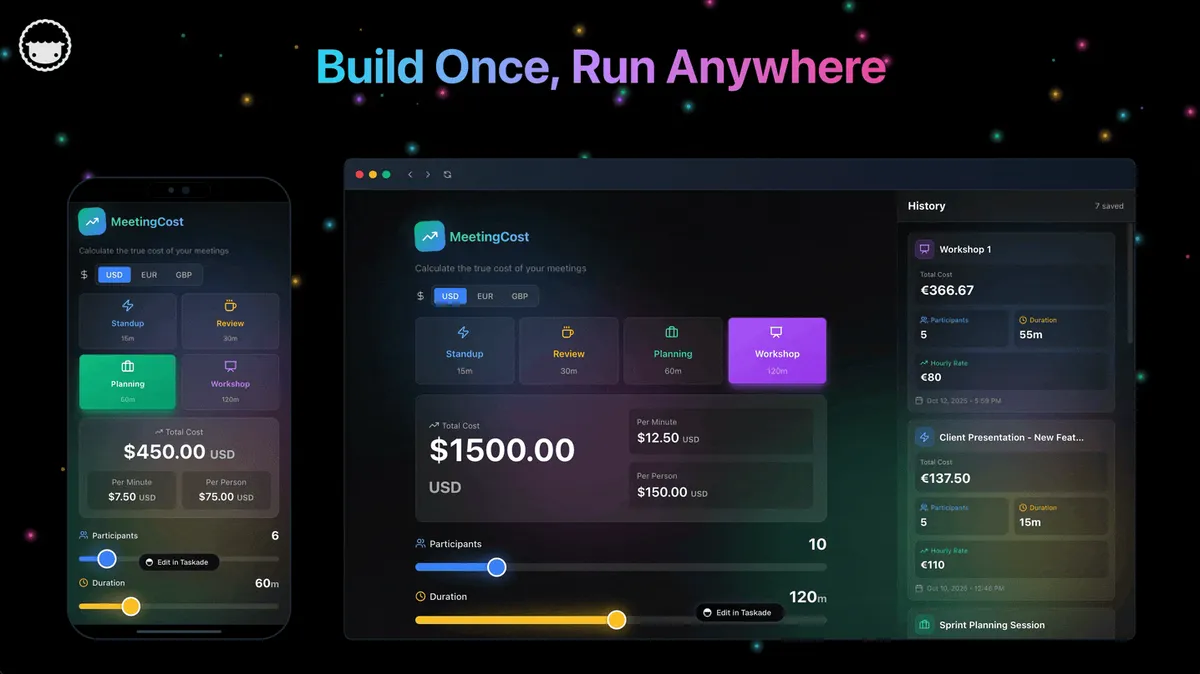
No signup, no credit card. Live AI dev workspace
| Capability | Devin AI | Taskade Genesis |
|---|---|---|
| Pricing (starting) | Free tier · Pro $20/mo month-to-month · Max $200/mo · Teams $80 base + $40/dev seat | $0 Free · $10/mo Pro billed annually (10 seats) |
| Cloneable live demo | ❌ | ✅ |
| Built-in AI agents | Code agent only | ✅ built-in tools |
| Automation engine | No workspace automation | ✅ Durable runtime, 100+ integrations |
| Workspace DNA loop | ❌ | ✅ ▲ Memory · ■ Intelligence · ● Execution |
Overall winner: ✅ Taskade Genesis: for anyone whose goal is shipping a working app, not delegating coding tickets to an autonomous engineer. Devin remains a strong pick for engineering teams that want async, parallel coding sessions.
Table of Contents
- Quick Comparison Table
- The fundamental difference
- What is Taskade Genesis?
- What is Devin AI?
- Feature-by-feature deep dive
- The Workspace DNA advantage
- Pricing and total cost of ownership
- Where Devin has the edge
- What developers say
- When to choose each
- Frequently asked questions
- Without permission
The fundamental difference
Devin is a genuinely autonomous AI software engineer. You message it like a teammate in Slack, hand it a whole coding task, and Devin spins up a sandboxed virtual machine with its own browser, terminal, and code editor to go solve it async, in parallel with other Devin sessions if you want. The output is commits, pull requests, and the occasional deploy to your hosting provider, all wrapped in a session log you can audit.
Taskade Genesis starts one step further along the pipeline. You describe what you want and Genesis returns a deployed, working application you own, with its own sign-in and custom domain, and with AI agents, real-time data, automation workflows, and team collaboration already wired in. No repository, no hosting account, no code. Your workspace is the backend. Your projects are the database. Your agents are the runtime.
Devin asks: "Which engineering ticket should I close next?" Genesis asks: "What app should exist?"
What is Taskade Genesis?
Taskade Genesis is the AI app builder inside the Taskade workspace. It is built on Workspace DNA, Memory (Projects), Intelligence (AI Agents), and Execution (Automations), a self-reinforcing loop where what your team does becomes the substrate the agents reason over. Founded by John Xie, Dionis Loire, and Stan Chang in 2017, Taskade is a Y Combinator-backed platform with over a million users and a public Community Gallery of apps anyone can clone.
A single prompt to Genesis can produce a customer support portal, an ops dashboard, a CRM, a knowledge base, a form-driven intake system, or an internal tool, all with built-in AI agents, automations, custom domains, password protection, and the option to embed publicly with GenesisAuth. No DevOps. No CI/CD. No infrastructure to maintain.
Genesis is for everyone, founders, marketers, ops, product managers, customer success, and yes, engineers who want to skip plumbing and focus on the idea.
What is Devin AI?
Devin is the autonomous software engineer from Cognition Labs (cognition.ai/devin). It launched in March 2024 with a now-famous demo of an end-to-end coding agent that resolves GitHub issues, browses the web, runs commands, and ships pull requests on its own. It is widely considered the longest-running autonomous coding agent on the market.
Devin at a glance (updated August 2026): Slack-style interface for assigning engineering work, sandboxed VM per session with browser + terminal + IDE, parallel sessions, GitHub/GitLab integration, Devin's Knowledge for cross-session memory. Pricing was overhauled: the old $500/month floor and public ACU rate card are gone, replaced by a free tier, Pro $20/month, Max $200/month (all month-to-month), and Teams at $80/month base plus $40 per developer seat. Plans are quota-based with daily and weekly refresh. SOC 2 Type II for enterprise.
The headline features engineering teams love about Devin: async, parallel runs (you can fire off five Devin sessions in five repos simultaneously), Devin's Knowledge base that lets the agent learn your codebase over time, end-to-end execution that includes browsing docs, running tests, and opening PRs, and a session replay log that lets you audit exactly what the agent did and why.
Devin is, for good reason, the canonical "autonomous engineer agent." It is also unambiguously a developer tool, your output is code in your repo and deploys on your hosting, and the work product still flows through the engineering review loop.
Feature-by-feature deep dive
App generation
- Taskade Genesis turns a single prompt into a deployed application with UI, data model, AI agents, and automations connected. You can iterate visually or in natural language. The output runs immediately at a shareable URL.
- Devin AI writes code in a repository and can deploy to your hosting, but the architecture is "engineer in a VM", you supply the repo, the hosting, the secrets, and the review process.
AI agents that take action
- Taskade ships AI Agents v2, first-class digital teammates with persistent memory, built-in tools (web search, file analysis, project management, image generation, code execution, and more), custom tools you define, and the ability to be embedded publicly inside Genesis Apps as customer-facing teammates.
- Devin is one autonomous engineer agent per session, optimized for coding work, resolving issues, writing tests, refactoring, opening PRs. It is not a teammate you embed in a customer-facing app.
Workflow automations and integrations
- Taskade includes durable Automations with branching, looping, and filtering across 100+ bidirectional integrations. Triggers pull external events in (Slack messages, Gmail, Sheets rows, Calendly events, webhooks). Actions push data out (Stripe checkouts, Shopify orders, Notion syncs, Salesforce updates, GitHub PRs).
- Devin does not run ongoing business workflows. Its async parallelism is for coding sessions, not for daily Slack-to-Stripe-to-Notion plumbing.
Team collaboration
- Taskade is workspace-native: real-time multiplayer editing, comments, chat, video calls, and granular role-based access (Owner to Viewer).
- Devin collaborates with engineers through Slack threads and pull requests. The "team" experience is reviewing what Devin did and merging it.
Project views and visual editing
- Taskade offers multiple project views, List, Board, Calendar, Table, Mind Map, Gantt, and Org Chart, plus visual app editing without writing code. The Timeline scrolling component lives inside the Gantt view.
- Devin shows session logs and diffs. Visual project planning lives in whatever issue tracker you connect.
Workspace memory and context
- Taskade's Workspace DNA gives every agent persistent context across projects, files, integrations, and the live state of your business.
- Devin's Knowledge persists context about a codebase across sessions, a real strength inside a single repo. It does not extend across the rest of your business surface (CRM, ops docs, customer data).
Async parallel execution
- Devin wins this one cleanly. Spinning up five sandboxed VMs to run five coding sessions in parallel is Devin's signature capability and it works.
- Taskade parallelism is shaped differently, Automations run continuously across integrations, and multiple agents can collaborate on a single project. The two products are async in different ways.
The Workspace DNA advantage
Devin's mental model is "the autonomous engineer closes the ticket, the human reviews and merges." Genesis's mental model is Workspace DNA: a self-reinforcing loop between three pillars.
- Memory (Projects): Your team's docs, tasks, files, and structured data become the substrate every agent reasons over. The longer you work, the smarter the workspace gets.
- Intelligence (Agents): Custom AI Agents with persistent memory, built-in tools, and custom tools you define, plus a hosted MCP server that Claude Desktop, Cursor, and VS Code connect into, while automations carry the work into the 100+ apps you already use. Agents are first-class teammates that live in the workspace, not floating chat sessions.
- Execution (Automations): Durable workflows triggered by external events (Slack, Gmail, Stripe, GitHub, Calendly, webhooks, schedules) that read from Memory and act through Intelligence, then write the results back into Memory. The loop closes.
Devin is brilliant at one slice of this loop, autonomously executing coding tasks. Genesis runs the entire loop continuously, so the longer you use it, the more your workspace itself becomes the thing that builds the next app.
Pricing and total cost of ownership
| Plan | Taskade Genesis | Devin AI |
|---|---|---|
| Free | Free Forever, limited AI credits, full app builder access | Free tier, light quota, unlimited inline edits and Tab |
| Entry | $10 / month billed annually, Pro, unlimited apps, 10 seats | Devin Pro $20 / month month-to-month |
| Team | $25 / month billed annually, Business, unlimited seats, higher AI capacity | Devin Teams $80 / month base plus $40 per developer seat |
| Max / Enterprise | $100–$250 / month billed annually, maximum AI capacity, custom SLA | Devin Max $200 / month; Enterprise pricing on request |
Devin's pricing was rebuilt in 2026. The old $500 per month floor and the published Agent Compute Unit rate card are both retired, replaced by quota-based plans that refresh on a daily and weekly cycle. Self-serve now starts at free, Pro is $20 per month, and Max is $200 per month, all month-to-month — Cognition does not publish an annual rate. What you still carry on top is your own hosting bill if Devin is shipping deploys for you.
Genesis is a single subscription that includes the AI, the hosting, the agents, the automations, and the team collaboration surface. For teams that want a predictable monthly number for the entire build-and-ship surface, not just the coding agent, Genesis is the more comfortable shape.
Where Devin has the edge
Honest list, no hedging:
- Longest-running autonomous coding agent. Devin has been doing async end-to-end coding longer than almost anyone, and the session-replay log is genuinely best-in-class for auditability.
- Browser + terminal + IDE in one VM. No other coding agent gives the LLM a full sandboxed development environment by default. For tasks that need to read docs, run tests, and ship the result, Devin's environment is purpose-built.
- Async parallel runs. Firing off multiple Devin sessions in parallel is a real productivity unlock for engineering teams that need to fan out routine work.
- Devin's Knowledge. Cross-session codebase memory means Devin gets better at your repo over time, which is a meaningful advantage on long-lived projects.
- Coding-first focus. If your need is "close more engineering tickets without hiring," Devin is purpose-built for exactly that.
Use Devin when the job is "give engineering more leverage on an existing codebase." Use Genesis when the job is "ship a working app for the rest of the company."
What developers say
Devin has earned a strong following for autonomous engineering work. Recurring themes across r/programming, Hacker News, and engineering Slack communities:
- "First agent that actually finishes a ticket.", Async end-to-end execution is the headline win.
- "Worth it on the right kind of task.", Routine refactors, test writing, dependency upgrades, and well-scoped issues are where Devin shines.
- "The session replay is incredible.", Being able to audit exactly what the agent did is rare in the agent space.
The honest critique: Devin's published autonomy benchmarks are contested and vary widely between sources, so the honest test is running it on your own repo. Early pricing scared off small teams (the new free tier and $20 Pro plan address that directly), the agent can struggle on ambiguous or under-specified tasks, and the output is still code that engineers have to review. None of these are bugs. They are consequences of the audience Devin serves.
Genesis users are usually one step removed from those threads. They show up because they want to ship a portal, a dashboard, a CRM, an internal tool, or a customer-facing app, and they want to do it without thinking about repositories, deploys, or autonomous agents in VMs. Browse the Community Gallery to see the apps people have shipped without ever opening a code editor.
When to choose each
Choose Devin AI if:
- You want a genuinely autonomous software engineer you can delegate a whole coding task to, running async and returning a pull request, and you want to try it on the free tier before committing.
- Your workflow centers on GitHub or GitLab issues that need to be closed end-to-end.
- You need an agent with its own browser + terminal + IDE in a sandboxed VM.
- You want session replay and audit logs on every autonomous run.
- The output you need is source code in a repository and deploys to your hosting, not a deployed system Genesis hosts for you.
Choose Taskade Genesis if:
- You want to ship a working app, not delegate coding tickets to an autonomous engineer.
- Your team includes non-engineers who need to build alongside engineers.
- You need AI agents that persist, have tools, and can be embedded for customers.
- You need workflow automations across Slack, Gmail, Stripe, Salesforce, Notion, and 100+ other integrations.
- You want one flat subscription that includes hosting, agents, automations, and team collaboration.
Use both if: Many engineering teams keep Devin for autonomous coding work on existing repositories and use Genesis to ship new internal tools, ops dashboards, customer portals, and AI-powered apps for the rest of the org.
Frequently asked questions
Is Devin better than Taskade Genesis for AI coding?
They are aimed at different jobs. Devin is the right tool for autonomous engineering work on a codebase. Genesis is the right tool for shipping deployed applications. The "better" answer depends entirely on whether your goal is closed engineering tickets or a running app.
How much does Devin AI cost?
Devin now starts with a free tier. Pro is $20/mo, Max is $200/mo, and Teams is $80/mo base plus $40 per developer seat — all month-to-month and quota-based. The $500/mo floor and the public per-ACU rate card have been retired. Genesis starts free, $10/mo on Pro billed annually, and $25/mo on Business billed annually with unlimited seats, and it includes hosting, agents, and automations in the same subscription.
Does Devin AI have a free tier now?
Yes. Devin added a free tier with a light quota, unlimited inline edits, and Tab completions. Guides claiming there is no way to try Devin without a large commitment are describing the old pricing.
Does Devin deploy applications?
Devin can ship code and trigger deploys to your hosting provider. Genesis ships a live application immediately at a shareable URL hosted by Taskade.
Does Taskade Genesis include workflow automations?
Yes, durable automations across 100+ bidirectional integrations. Devin focuses on coding, not on ongoing business workflows.
Which AI models does Taskade Genesis use?
Taskade includes access to 15+ frontier models from OpenAI, Anthropic, and open-weight providers. You never wire up API keys.
Can I use Devin and Taskade Genesis together?
Yes, keep Devin for autonomous engineering work, use Genesis for shipping new apps without infrastructure work.
Build without permission
Devin gives engineering teams an autonomous teammate that closes tickets in the background. Genesis lets everyone, engineers and non-engineers alike, ship the apps the business actually needs, finished and hosted on day one.
- Build with Genesis →, One prompt, one deployed app
- Browse the Community Gallery, Clone apps shipped by other Genesis builders
- Read the Workspace DNA explainer, How Memory, Intelligence, and Execution work together
Explore Taskade Genesis
- AI App Builder, Build complete apps from one prompt
- Vibe Coding, Natural-language app creation
- AI Agent Platform, Digital teammates that work 24/7
- AI Website Builder, Sites in seconds
- Workflow Automation, AI-powered business automation
Learn the Genesis architecture
Your living workspace includes:
- First-app guide, 5-minute tutorial
- Custom AI Agents, The Intelligence pillar
- Projects & Databases, The Memory pillar
- Automations & Workflows, The Execution pillar
Build without code
- AI App Generator, Full apps from prompts
- AI Dashboard Generator, Business dashboards
- AI Website Generator, Sites in seconds
- AI Form Generator, Smart intake forms
- Browse Community Apps, Clone and customize
Related reading
- The Build Without Permission article, Our manifesto
- How Workspace DNA Works, The architecture
- Origin of Living Software, The future of apps
- Best Devin AI Alternatives in 2026, Autonomous coding agents compared
- Best Cursor Alternatives in 2026, AI code editors compared
- Best Claude Code Alternatives in 2026, AI coding agents compared
- Best Vibe Coding Tools in 2026, AI coding tools compared
- Vibe Coding for Teams, Ship 10x faster
- Taskade vs Simular, Sai operates desktop software, Taskade Genesis ships a cloud app