

Quick answer
Taskade Genesis is the strongest Base44 alternative when you need a running business system with AI agents and automations, not only an app. Free includes 3 apps, Pro is $10 a month billed yearly (see plans and prices), and you can clone the sales pipeline app free to start.
The best Base44 alternatives in 2026
TL;DR: Taskade Genesis is the strongest Base44 alternative for operators who need a running system with agents, automations, and 100+ integrations. Free keeps three hosted apps and starts with no AI credits (earn free AI credits as you go); Pro is $10/mo billed annually for 10 seats. Base44 stays the same-day standalone-app pick. Try Taskade Genesis free →
The strongest Base44 alternatives in 2026 are Taskade Genesis for running a real business system, Lovable and Bolt.new for a codebase you own, Replit for building and hosting in one place, v0 for the front end, Bubble for complicated logic, Softr for a portal over data you already keep, and Cursor if you write code. Base44 is genuinely good at turning a prompt into a working full-stack app. People start shopping when the app stops being a prototype and becomes the thing the business depends on - when the second meter, the missing recurring work and the exit begin to matter.
Read the last column first. It decides how much of your week the app consumes six months from now.
Why operators look for a Base44 alternative
The meter has two dials, not one
Message credits meter you building the app. Integration credits meter your app running - and they are spent by the people using it, not by you. Neither balance rolls over.
The published unit costs make the second meter concrete: one credit per email your app sends, two from your own domain, and roughly 3 to 40 per in-app agent message depending on the model. Every automation run costs at least one, and there is no way to preview an action's cost before it runs.
Work that through for a portal with 200 clients on the Builder plan, which includes 10,000 integration credits a month. Two notification emails per client per week from your own domain is about 1,600 credits. An in-app assistant answering eight questions per client per month at roughly five credits each is another 8,000. That is the tier consumed by 200 people using it exactly as intended - and when the budget is gone, your users see a generic error. The failure is visible to your customers, not to you in a billing email.
Paying to iterate
Base44's terms state that credits are non-refundable for tool behavior and AI mistakes, since each prompt still requires work from the builder. Paid plans make automatic error fixes free, a genuine improvement on the free tier. But the messages you spend explaining a misunderstanding still draw on the balance that built the feature - and iteration is where most of a real build happens.
A generated app is only half a business system
Base44 gives you the app. The recurring work around it is a separate problem: the follow-up every Tuesday, the triage before a human sees the request, the monthly report. That work is the actual job. Base44 shipped Superagents in March 2026 and app workflows and automations on its Builder plan and up to address some of it, and both are real steps. Each run spends integration credits. With most other tools here you bolt the automation layer on later, with a second subscription.
The exit is narrower than it looks
Code export exists on Builder and above, and what you get is a conventional React front end. Base44's own developer docs are clear that it still ships with the Base44 SDK, points at your base44.app backend, and that your data entities are not in the repository. The front end travels; the database, sign-in, files and AI calls do not.
Choose Base44 if…
Three things Base44 genuinely does better than most of this list.
- It is the fastest honest path from idea to a working full-stack app. A database, user sign-in and hosting are configured from the very first prompt - no database to connect, no deployment step, no environment variables. For a non-developer that removes the three things that usually end a project.
- Seats are free. There is no per-user pricing: credits pool across a workspace and only the owner needs a plan, so inviting your whole team costs nothing. Very few tools here do that.
- It has Wix behind it and is still shipping. Wix acquired Base44 on 18 June 2025 for approximately $80 million plus earn-outs through 2029, and said it would keep operating as a distinct product and business - which it does, with its own plans and billing. Superagents launched in March 2026. This is not a project at risk of being abandoned.
If your project is a standalone app, you are its only administrator, and you want it live this afternoon, Base44 is a good answer and you do not need the rest of this page.
1. Taskade Genesis - best when the app has a job to do
Taskade Genesis is for people whose app is not the product. It is the client portal, the CRM, the dispatch board, the inspection tracker - the system a business runs on, built and operated by the person who needs it.
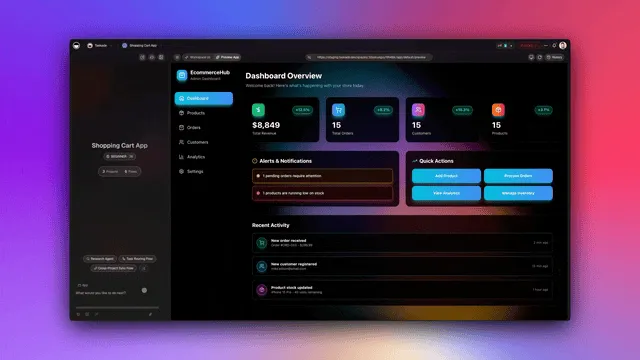
The difference from every code generator here is what arrives with the app. A code generator hands you a repository; you then choose a host, configure a database, wire up sign-in, point a domain at it, and own all of that forever. Taskade Genesis hands you the running thing: live at a real URL the moment it builds, with the data in your workspace and the agents and automations that do the recurring work part of the same system.
What you actually have running by Friday
- A live app on a real URL with sign-in for the people who use it on every plan, including Free. No hosting step, no deployment step.
- Your data in Taskade Projects, which double as the app's database, readable in multiple views: List, Board, Table and Mind Map in the toolbar, plus Docs (Beta), Calendar, Gantt Chart, Actionsheet and Org Chart under More Views. All views come with any paid plan; Free includes the basic set.
- AI agents with a large built-in toolkit reading and writing the same records the app uses - triaging a request, drafting the follow-up, scoring the lead.
- Automations firing on a schedule or on an event from 100+ bidirectional integrations, so the Tuesday follow-up happens without you.
- A client-facing portal with role-based access from Owner to Viewer. Sign-in confirms who the visitor is; you match their records to that login and test the filter with a second account.
- On Pro and above, your own domain in front of all of it.
Pricing. Free keeps three apps with hosting. You earn free AI credits as you go, and you can upgrade any time. Pro is $10/month billed annually ($120/year), or $20 month-to-month, covering 10 people with 50,000 AI credits a month and up to 10 custom domains. Business is $25/month billed annually ($300/year) and adds SSO/SAML. The number on the plan is the number you pay - and the people who use your published app never spend your credits.
Where it is not the answer. If you want source code you own, or to run it on your own servers, Bolt.new or Cursor is the right tool. Taskade Genesis is a platform for running systems, not for producing repositories.
What a Base44 builder can make in Taskade Genesis. One prompt builds the app with its own projects (Memory), AI agents (Intelligence), and automations (Execution). The prompts below follow the Taskade Genesis prompt guide. Each one is a starting point that you refine by chat with Taskade EVE.
| App | Starting prompt | Projects (Memory) | AI agent (Intelligence) | Automation (Execution) |
|---|---|---|---|---|
| Client portal | Build a client portal for a small accounting firm. Clients submit a request with documents. Show my team a board grouped by status. |
Client requests with status stages | Answers questions from the request history | Notifies the team when a request arrives |
| Lead tracker | Build a lead tracker for a wedding photographer. A public form collects name, date, venue and budget. Add an agent that scores each lead Hot, Warm or Cold. |
Leads | Lead scorer with a one-line reason | A form submission creates a lead record |
| Invoicing app | Build an invoicing app for a freelance designer. Log each job, create a Stripe invoice and email the payment link to the client. |
Jobs and invoices | Answers "who owes me money?" | A Stripe step creates the invoice and payment link |
| Inventory tool | Build an inventory tool for a coffee shop. Staff log deliveries. Flag any item under 10 units in red. Keep the app private. |
Stock levels | Reorder suggestions | A weekly low-stock digest on a schedule |
| Document intake | Build a document intake app. A form takes an upload, reads the page and returns one row per document. |
Extracted rows | Categorizer | A file upload starts the read step |
| Live dashboard | Build a sales dashboard from my Deals project. Refresh it every morning and show a weekly summary. |
Deals | Weekly summary writer | A schedule trigger refreshes the data |
  Base44 app                           Taskade Genesis app

  interface + database + sign-in       interface + projects (the database) + sign-in
        |                                    |
        v                                    +-- AI agents read and write the same records
  Superagents and workflows              +-- automations run on schedules and 100+ integrations
  (billed per run)                       +-- one plan price, visitors never spend your credits
2. Lovable - best for a polished web MVP
Lovable is the closest like-for-like swap for Base44. It generates a good-looking, coherent web application from a prompt, with a strong sense of design out of the box, and it syncs to GitHub so the code is genuinely yours.
Best for: a founder who wants an investor-ready web product quickly and has, or can hire, someone to take the code forward.
The operator caveat: you get a codebase. Hosting, a production database, sign-in and maintenance are yours to arrange, and it bills on a message-credit model - so the iteration-costs-money dynamic has not gone away. Details in our Lovable comparison.
3. Bolt.new - best if you want the code and mean it
Bolt.new builds full-stack applications in the browser and gives you real, portable source you can download or push to GitHub. Of everything here it is the most straightforward about code ownership, which is the most common single reason people give for leaving Base44.
Best for: technical and semi-technical builders who want no lock-in and are comfortable deploying.
The operator caveat: portability is the feature, and its price is that everything after generation is your job - hosting, config, auth, updates, security. Token-metered too. More in the Bolt.new comparison.
4. Replit - best for building and hosting in one window
Replit combines an AI builder, a full editor and hosting in one browser tab. When the app needs a fix the AI cannot make, you can open the file and make it yourself - a real advantage over prompt-only tools where every change means re-prompting and hoping.
Best for: people who can read a little code and want an escape hatch for when the AI gets stuck.
The operator caveat: usage-based pricing here has a reputation for producing bills that are hard to predict, so read the meter carefully before you point real traffic at it. See the Replit comparison.
5. v0 by Vercel - best for the front end
v0 turns a prompt or a screenshot into clean, modern interface code. Excellent for landing pages, dashboard layouts and component work, and a natural fit if you already deploy on Vercel.
Best for: the interface layer, particularly when a developer will connect it to something.
The operator caveat: v0 produces the front end. The database, the sign-in and the business logic are out of scope, so on its own it does not replace what Base44 was doing for you. More in the v0 comparison.
6. Bubble - best for genuinely complex logic
Bubble is the mature no-code platform here. It is visual rather than prompt-first, and handles multi-step logic, permissions and workflows that prompt-based generators still struggle to express reliably.
Best for: an application whose rules are complicated and need to be exactly right.
The operator caveat: Bubble is a skill. Expect to learn the tool rather than describe what you want, and expect workload-based pricing that scales with usage. See the Bubble comparison.
7. Softr - best for a portal over data you already have
Softr builds client portals and internal tools on top of a spreadsheet or database you already maintain. If your operation already lives in a base somewhere and you mostly need a clean, permissioned front door onto it, this is a short path.
Best for: turning existing structured data into a client-facing portal quickly.
The operator caveat: Softr is the front end. Your data platform is a separate product with a separate bill, and the AI and automation layer is thinner than in the prompt-first tools here. See the Softr comparison.
8. Cursor - best if you actually write code
Cursor is an AI-native code editor. It is the most capable tool on this page in the right hands and the least suitable in the wrong ones.
Best for: developers, and operators who have one.
The operator caveat: it assumes you can read what it produces and take responsibility for it. No hosting, no database and no sign-in are included. See the Cursor comparison.
Base44 pricing in 2026, and how to compare it fairly
Check the billing toggle first. Base44's pricing page defaults to Yearly, so the numbers you see on arrival are annual-equivalent - the per-month rate when you commit to a year. Annual billing saves 20%. This one detail is why two carefully researched comparisons will quote two different prices for the same Base44 plan; the toggle is easy to miss.
| Base44 plan | Billed annually | Month-to-month | Message credits/mo | Integration credits/mo |
|---|---|---|---|---|
| Free | $0 | $0 | 25 (5/day cap) | 100 |
| Starter | $16/mo ($192/yr) | $20/mo | 100 | 2,000 |
| Builder | $40/mo ($480/yr) | $50/mo | 250 | 10,000 |
| Pro | $80/mo ($960/yr) | $100/mo | 500 | 20,000 |
| Elite | $160/mo ($1,920/yr) | $200/mo | 1,200 | 50,000 |
Verified against base44.com/pricing on 29 September 2026 (the tiers matched the 11 August 2026 check). Builder is the first tier with code export; since 6 February 2026 new private apps require a paid plan.
What each Base44 plan unlocks, per the same pricing page:
| Plan | Apps | Custom domain | GitHub integration | Also adds |
|---|---|---|---|---|
| Free | Up to 5 | Not listed | Not listed | Authentication, database, analytics |
| Starter | Unlimited | Connect a domain | Not listed | In-app code edits |
| Builder | Unlimited | Connect a domain, free domain for 1 year | Yes | AI model select |
| Pro | Unlimited | Connect a domain, free domain for 1 year | Yes | Early access to beta features |
| Elite | Unlimited | Connect a domain, free domain for 1 year | Yes | Premium support |
Base44's pricing FAQ also says you own your code, data, and users, and that two-way GitHub sync exports the full source to your own repo. The section on moving off Base44 below explains what the export does and does not carry.
Side by side with Taskade Genesis:
| Base44 | Taskade Genesis | |
|---|---|---|
| Free plan | 25 message + 100 integration credits/mo, 5 apps, new private apps need a paid plan | 3 apps with hosting, free AI credits that you earn as you go, 1 agent, 10 automation runs/mo |
| Entry paid tier | Starter $16/mo billed annually ($20 month-to-month) | Pro $10/mo billed annually ($120/yr) or $20 month-to-month - 10 people, 50,000 credits/mo |
| Code export | Builder, $40/mo billed annually | Not needed - the app is already running, and data exports on any plan |
| What your app's users cost you | Their actions spend your integration credits | Nothing - visitors never spend your credits |
| If the budget runs out | Users see a generic error | Apps keep serving; only new AI work waits |
Six months of Taskade Pro is $60 billed annually. Six months of Base44 Builder - the first tier with code export - is $240 billed annually, or $300 month-to-month. The published gap is real, but it is the smaller half of the story: the plan is $60 whether ten people used the app or a thousand. Build turns draw on the plan's monthly AI credits, so a longer build uses more of them, and a credit pack adds more.
Base44 Superagents vs Taskade agents and automations
Base44 Superagents are personal agents that run around the clock, and Taskade agents are teammates inside a shared workspace. Base44 describes Superagents as agents you create by describing a job, with scheduled jobs, event triggers, memory across conversations, and channels such as WhatsApp, Telegram, Slack, and the browser. They connect to Gmail, Google Calendar, Drive, Slack, Discord, CRMs, and anything with an API or MCP. Each run spends integration credits.
| Base44 Superagents | Taskade agents and automations | |
|---|---|---|
| Shape | A personal agent you message | Agents in a workspace, plus automations that call them |
| Where you talk to it | WhatsApp, Telegram, Slack, browser | The workspace, or embedded in a published app for its users |
| Memory | Per agent, across conversations | One workspace memory shared by agents, projects, and apps |
| Triggers | Scheduled jobs and event triggers | Triggers from 100+ bidirectional integrations, plus schedules |
| Cost model | Integration credits per run | Included in the plan allowance |
| Best for | A personal assistant or a founder's inbox | A client portal or team process that runs weekly |
These two answer different questions. If you want an assistant that follows up on your behalf, a Superagent is a natural fit. If you want the system your clients log into, with agents and automations reading the same records, the shared workspace matters more than the channel.
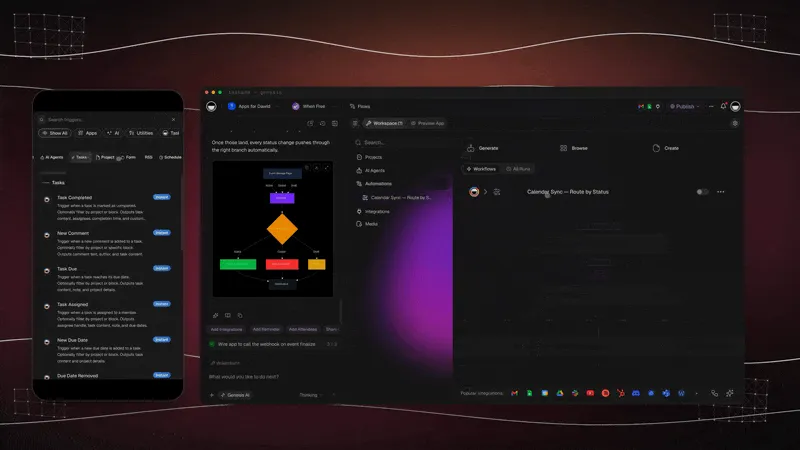
Background work in Taskade. Taskade agents and automations start from schedules and triggers such as a new email, a form response, or a new task, and they run whether you are online or not. Agents read the web, use your connected apps, keep persistent memory, and can wait for your approval before a risky step. Always-On AI Agents compares the hosted designs, with a cost model. When one job needs several specialists, AI Teams (Pro and above) share one workspace memory, and AI Subagents vs Agent Teams explains the trade-off.
Which alternative fits your situation
Moving off Base44: what you actually have to rebuild
Most articles say migration is not really possible and stop there. True, but not useful - nobody tells you which parts stay behind. Here they are.
| What lives on Base44 | Comes with the export? | What you rebuild |
|---|---|---|
| Interface and layout | Yes - React front end, Builder and above | The easiest part to describe again in a prompt |
| Database records | No - entities are managed in Base44, not in the repo | Export your data, then recreate the structure |
| User accounts and sign-in | No | Set sign-in up again on the new platform |
| Integrations and API keys | No | Reconnect each service and re-enter its credentials |
| Hosted URL and custom domain | No | Repoint DNS once the new app is live |
| Scheduled and automated behavior | No | Rebuild as automations on the new platform |
The exported project still depends on the Base44 SDK and talks to your base44.app backend, so it is a head start rather than a running app you can host elsewhere unchanged. Base44's own position is that you own your code, data, and users, and that GitHub sync exports the full source.
Order of operations. Export your data before you cancel anything - it is the only irreplaceable piece. Then describe the app you already have to a new builder; you understand the requirements far better now, so the rebuild is usually quicker than the original. Keep the old app live until DNS has moved. On Taskade Genesis an imported spreadsheet becomes a Project, and that Project is immediately the app's database - the data step and the schema step are one step.
See one running before you build one
These are live Taskade Genesis apps, not screenshots. Open one, click around, then clone it and make it yours.
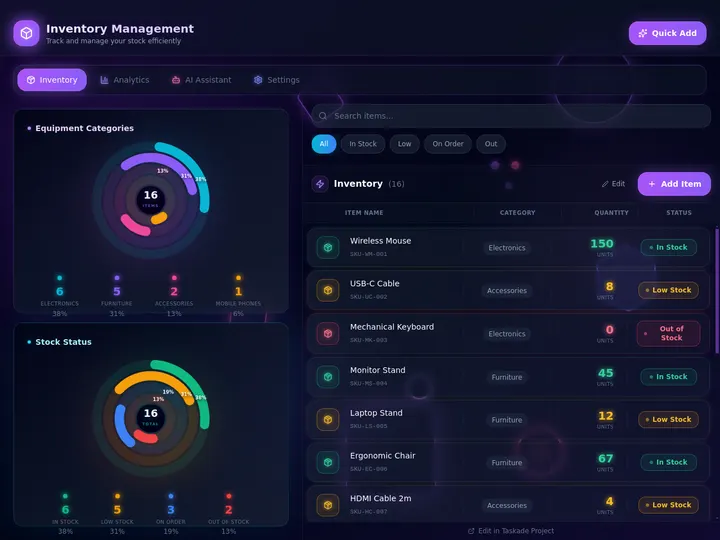
Inventory Management Dashboard: stock levels, status filters and an AI assistant tab. Clone it free.
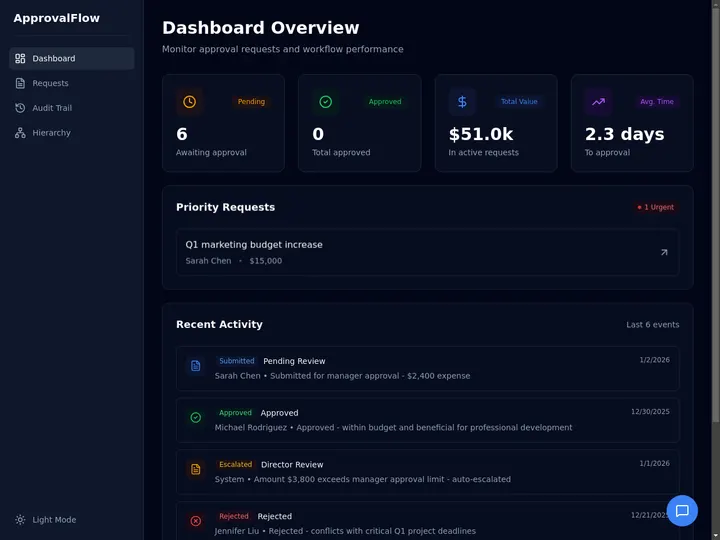
Approval Flow Tracker: pending requests, priority items and an audit trail. Clone it free.
- Client Portal - sign-in, per-client visibility, project status
- CRM Dashboard - pipeline, contacts, follow-up
- Inventory Management Dashboard - stock levels, reorder tracking
More in the Community Gallery: dashboards, tools, workflows.
Why teams choose Taskade Genesis
Code generators produce a repository you then host, secure and maintain; Taskade Genesis produces a running system with its data, agents, automations and client portal already attached. The plan price is the price, and the people who use your published app never draw on your AI allowance. Your data exports whenever you want it.
| Base44 | Taskade Genesis | |
|---|---|---|
| What arrives | A generated full-stack app | A running app plus the workspace that operates it |
| Cost of iterating | Draws on your message-credit balance | Included in the plan allowance |
| Cost of your users using it | Draws on your integration-credit budget | Free - visitors never spend your credits |
| Recurring work after launch | Superagents, plus workflows and automations on Builder and up (billed per run) | Automations across 100+ integrations, included |
| AI acting on your data | Memory scoped per agent | Agents share one workspace memory, built-in toolkit |
| Custom domain | Paid tier | Pro ($10/mo billed annually) |
| Getting your data out | Data export, plus front-end code on Builder+ | Full export |
Frequently asked questions
What is the best free Base44 alternative?
Taskade Genesis, if you want something running rather than a demo. Free keeps three apps with hosting, AI agents and automations. On Free, you earn free AI credits as you go, and you can upgrade any time. Base44 Free gives 25 message credits a month (5/day cap) and 100 integration credits, and since 6 February 2026 new private apps need a paid plan.
Are Base44's advertised prices monthly or annual?
Annual-equivalent. The pricing page defaults its toggle to Yearly, so the headline $16, $40, $80 and $160 tiers are the per-month rate when you commit to a year. Month-to-month is $20, $50, $100 and $200 - annual billing saves 20%. Taskade publishes both rates: Pro is $10/month billed annually, or $20 month-to-month.
Why do people look for a Base44 alternative?
Three reasons come up most. Credits meter both your building and your app's running, and neither balance rolls over. Credits are non-refundable for AI mistakes, so re-prompting your way out of a misunderstanding costs the same as building. And a generated app does not do recurring work on its own. Code export also starts later than people expect, on the Builder plan.
What are Base44 integration credits and why do they matter?
The second meter, spent by the people using your app rather than by you building it - roughly one credit per email, two from a custom domain, 3 to 40 per in-app agent message. The balance does not roll over, costs cannot be previewed before an action runs, and when it is exhausted your users see a generic error.
Can I migrate my Base44 app to another platform?
Not as a lift-and-shift. Code export starts on Builder, and what you get is a React front end still carrying the Base44 SDK and pointed at a base44.app backend - Base44's docs note the data entities are not in the repository. Export your data, then describe the app to a new builder.
Does Taskade Genesis charge credits when people use my app?
No. Your allowance covers the work you and your agents do; visitors to a published Taskade Genesis app never draw on it. Paid plans include 50,000 credits a month on Pro, 150,000 on Business.
What can Taskade Genesis do that a code generator cannot?
Run the work. Taskade Genesis produces the application plus the AI agents and automations that operate it - one workspace memory, a large built-in agent toolkit, 100+ bidirectional integrations. That is the difference between having a CRM and having one that chases the follow-up on Tuesday morning unasked.
What kinds of apps can I build with Taskade Genesis instead of Base44?
Client portals, lead trackers, invoicing apps, inventory tools, document intake apps, live dashboards, storefronts, and support agents for your website. Each app comes with its own projects as the database, AI agents that work on the same records, and automations across 100+ bidirectional integrations. You describe the app in plain English and refine it by chat with Taskade EVE. Free keeps three hosted apps, and Pro and above allow unlimited apps.
Do I need a developer to use Taskade Genesis?
No. Describe what you need in plain language and adjust it the same way. If you do want source code you own and can hand to a developer, Bolt.new or Cursor is the better fit.
Can I use my own domain for an app I build?
On Taskade, custom domains are on Pro and above ($10/month billed annually). Client sign-in works on every plan, including Free. Pro ($10/month billed annually) includes live web hosting on a Taskade URL; Free keeps three apps hosted. On Base44 a custom domain requires a paid tier.
How do Base44 Superagents compare with Taskade agents and automations?
Superagents, launched in March 2026, are personal agents that run around the clock and reach you on WhatsApp, Telegram, Slack, or the browser. Taskade agents live in the workspace, share one workspace memory, and can be embedded in a published app, while automations run on triggers from 100+ connected apps. Superagents suit a personal assistant; Taskade suits a business system that customers and teammates use.
Does the Base44 free plan include authentication and a database?
Yes. Base44's pricing page lists authentication, database functionality, and analytics on Free, with up to 5 apps, 25 message credits a month, and 100 integration credits. New private apps need a paid plan since 6 February 2026. Taskade Genesis Free keeps three hosted apps with sign-in on every plan, one agent, and two workspace members.
Which Base44 plan includes GitHub integration and a free domain?
Builder ($40/month billed annually, $50 month-to-month) and above. Starter can connect a domain but does not list GitHub integration. On Taskade, custom domains start on Pro at $10/month billed annually, and Pro can also export an app to GitHub.
When is Base44 still the right choice?
For a standalone app you alone will administer and want live the same day. The bundled database, sign-in and hosting make it one of the fastest honest routes from idea to working app, and seats are free. This page answers a different question: what to use when a business depends on the app weekly.
The bottom line
If what you want is the system itself - the portal your clients log into, the CRM that chases its own follow-ups, the tracker that files its own weekly report - then the app is only half of it. The half that matters is the agents and automations that keep it running, and that is the half Taskade Genesis ships in the same prompt, on a plan price that does not move when your app gets busy. ▲ Memory · ■ Intelligence · ● Execution
Clone a living business system (not a prototype)
Base44 is strong for a same-day standalone app. Operators need ops apps that keep running.
- From AI app builder to ops system
- Field service ops dashboard
- Client portal
- Or browse live kits to clone
Related reading
- Taskade vs Base44 (2026) - short head-to-head
- Free Emergent Alternative - a credit-based builder for web and mobile apps, compared
- Free Manus AI Alternative - an autonomous agent that also hosts web apps, compared
- Free Lovable Alternative - a code-first web builder, compared
- Always-On AI Agents - background agents compared, with a cost model
- AI Subagents vs Agent Teams - when a team of agents beats one agent
- What Are AI Agents? - agents explained, with examples
- Client portals without code
- Business apps without code
- Best AI app builders
- Best vibe coding tools in 2026
- What is vibe coding?
- How Workspace DNA works
- First app walkthrough · app sign-in · custom domains · automations · projects as databases