

TL;DR: Taskade Genesis ships deployed apps from one prompt with AI agents, automations, and 100+ integrations, and the AI allowance comes with the plan. Cursor is the best-in-class AI IDE for engineers, now sold with Grok and X from $8/mo, with Premium at $30/mo. Try Taskade Genesis free →
See the alternative working, clone in 60 seconds
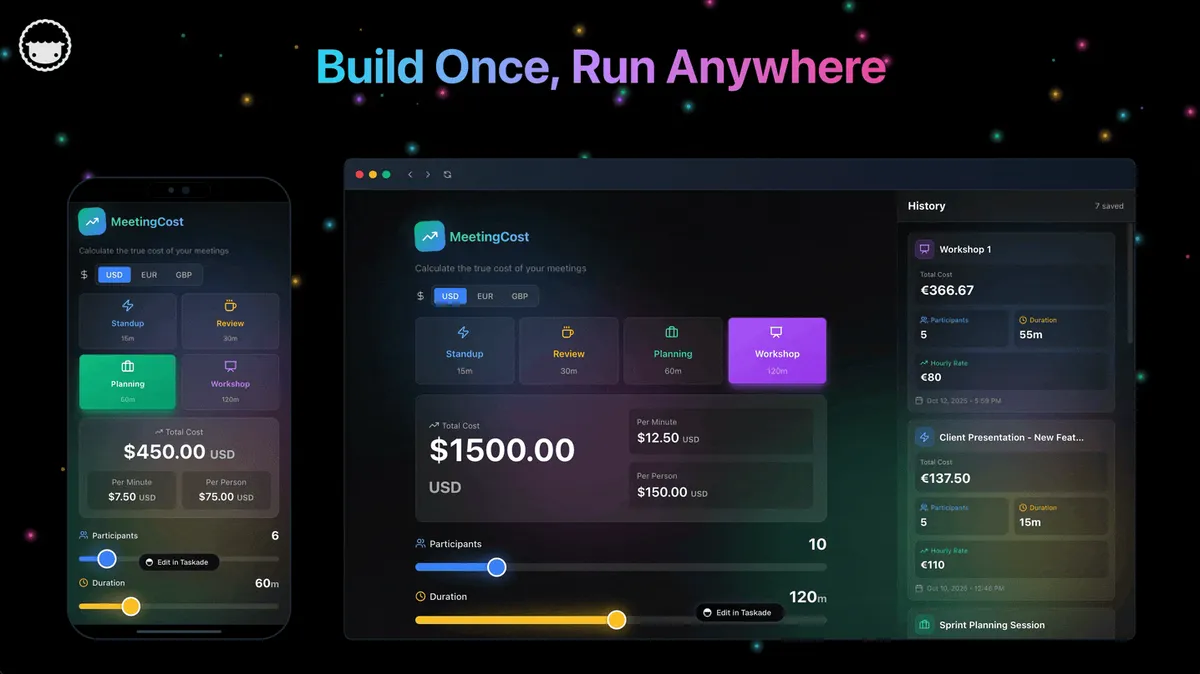
No signup, no credit card. Live AI dev workspace
| Capability | Cursor | Taskade Genesis |
|---|---|---|
| Pricing (starting) | Free · $8/mo Plus · $30/mo Premium · $100/mo Super · $200/mo Ultra | $0 Free · $10/mo Pro billed annually (10 seats) |
| AI cost model | Weekly pool, third-party models at API list price | ✅ Allowance included in the subscription |
| Cloneable live demo | ❌ | ✅ |
| Built-in AI agents | Code agent only | ✅ built-in tools |
| Automation engine | No workspace automation | ✅ Durable runtime, 100+ integrations |
| Workspace DNA loop | ❌ | ✅ ▲ Memory · ■ Intelligence · ● Execution |
What is Taskade?
Taskade is an AI-powered workspace where teams plan, build, and ship together. Organize projects across multiple flexible views (List, Board, Calendar, Table, Mind Map, Gantt, Org Chart), collaborate in real time with chat and video, and automate work with AI agents. Your workspace becomes the foundation for living software, no code, no IDE setup, no deploy step.
What is Taskade Genesis?
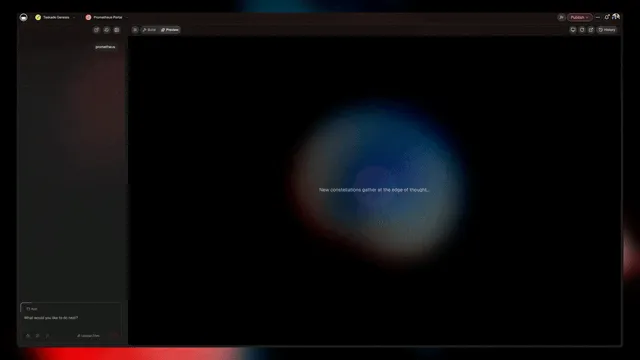
Taskade Genesis is our AI app generator that brings vibe coding to everyone. Describe what you want in plain English and get a live, working application in minutes. Your Taskade workspace becomes the backend with built-in data storage, AI agents, and agentic workflows.
One prompt = one app. No code required. No IDE needed.
What is Vibe Coding?
Vibe coding is a natural language approach to app creation. Instead of writing code, you describe the vibe of what you want. Taskade Genesis understands your intent and builds the complete application with UI, data connections, and automation logic.
Cursor at a Glance: Built by Anysphere, an AI startup founded by MIT researchers in 2022, Cursor became the breakout AI code editor of 2024-2025. SpaceX completed its acquisition of Cursor on August 14, 2026. Read the complete history of Cursor →
What is Cursor?
Cursor is an AI-powered code editor built by Anysphere and owned by SpaceX since August 2026, a fork of Visual Studio Code wrapped with Grok and Composer models, Tab completions, Cloud Agents, and MCP-based extensibility. Cloud Agents run in cloud VMs that clone a repo, branch, and ship a PR, with multiple agents working in parallel, and Cursor Projects (beta, September 2026) adds a coordinator agent for long-running work. Cursor ships new versions quickly and is one of the most-used AI-native code editors among working software engineers, with third-party models plus skills and hooks available in the editor.
Cursor at a glance (October 2026): Owned by SpaceX since August 14, 2026. Since October 2026, Cursor is sold with Grok and X Premium in one plan family: Free · Plus $8/mo · Premium $30/mo · Super $100/mo · Ultra $200/mo, or $80, $300, $1,000 and $2,000 a year. Teams seats cost $30, $100 or $200 a month. Paid plans share one weekly pool for Cursor models (Grok 4.7, Grok 4.6, Grok 4.5 and Composer 2.5). Third-party models such as Claude, GPT and Gemini are billed at API list price from prepaid credit on Premium and above. Hobby, Pro, Pro+ and the old Ultra continue for existing customers.
Best-in-class for engineers, complementary for everyone else
Cursor is an IDE. The user is a developer with a repo, a build pipeline, and a deployment story already in place. Cursor accelerates that workflow by writing code into existing files, Tab completions, multi-file Composer edits, codebase-aware refactors, and Cloud Agents shipping PRs from Slack or GitHub issues without a laptop open. For shipping production code in a real repo, Cursor is the best tool on the market.
Taskade Genesis is the opposite shape. You describe the outcome in plain English, and the platform delivers a live app with a database (Projects), an intelligence layer (Agents), an execution layer (Automations), and a public URL, no IDE, no build pipeline, no deploy step. The two products solve different problems for different audiences, and many engineering-led teams run both: Cursor for the core repo, Taskade Genesis for the dashboards, internal tools, and CRMs that surround it.
Context-window reality (honest)
Every agent IDE fights the same tradeoff: the usable context window is a fraction of the advertised maximum once system prompts, retrieval, and indexing overhead are accounted for, and retrieval quality degrades on large monorepos as important context gets lost in the middle. This is inherent to all agent IDEs, not a Cursor-specific failure. It is why Taskade Genesis intentionally scopes context to the workspace rather than an unbounded repo.
Why Teams Choose Taskade Genesis Over Cursor
The "No Code Required" Advantage
Cursor makes developers more productive by helping them write code faster. But what if you don't want to write code at all?
Taskade Genesis eliminates the entire coding layer:
- Prompt to production: Describe your app in plain language, get a live application
- No IDE needed: Build in your browser or mobile app
- No debugging: Taskade Genesis generates working apps, not code you need to fix
- No deployment: Apps are instantly live with shareable links
A Fixed Monthly Ceiling, Set Before the Month Starts
Cursor's October 2026 pricing is pool-based: each paid plan gets one weekly usage pool for Cursor models, and third-party models are billed at API list price from prepaid credit once you leave that pool. That is a defensible design (you pay what the outside models actually cost), but the seat price still does not predict the bill for a team that prefers Claude, GPT or Gemini. The 2025 repricing conversation was about the same gap:
"Think Cursor Pro is $20/month? Nope, it's $20 per week (or even less, it runs out faster)"
"Today, I only managed to get about an hour of coding with it before hitting the new rate limit"
"A heavy coder reported burning through two Cursor Pro accounts every week"
"Developers reported feeling blindsided by sudden pricing changes, trying to make sense of confusing credit systems, and getting hit with bills they didn't see coming"
Taskade includes the AI allowance in the subscription. Your credits arrive with the plan rather than being metered at API rates, so the monthly ceiling is fixed before the month starts. $10/month billed annually covers 10 seats; month-to-month is $20. This is the honest structural difference between the two products: Cursor passes model cost through to you, and Taskade absorbs it into the plan price.
A UI Built for Humans, Not for Compilers
Cursor's UI is the VS Code chrome, file tree on the left, editor in the middle, terminal at the bottom, AI chat in a side panel. The mental model is "edit the code, save the file, run the build." Effective for a developer; opaque for a product manager, an operations lead, or a founder who just wants the dashboard to exist.
Taskade Genesis presents the same building power as a workspace, not as an editor:
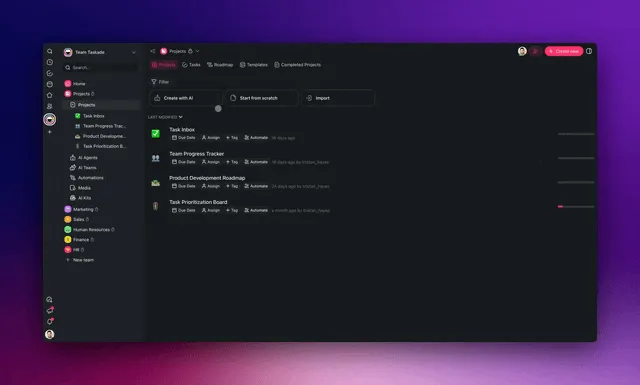
- Conversation as the primary interface. You describe what you want. Taskade EVE plans the work, builds the data model, wires the agents, and ships the live app. Same loop the user already runs with a teammate over chat.
- One Space holds everything. Projects (the database), Agents (the intelligence), Automations (the execution), Media, and the published app sit side by side. No alt-tabbing between IDE, terminal, deploy console, and dashboard.
- Multiple views on every dataset. List, Board, Calendar, Table, Mind Map, Gantt, Org Chart. Pick the lens that matches the moment instead of writing a
SELECTquery. - Mobile-first. Taskade Genesis runs in a browser and a native iOS / Android app. No "open the laptop and start the dev server" tax.
- Real-time multiplayer. Multiple humans and multiple agents collaborate on the same Space simultaneously. A code editor cannot do this; a workspace can.
Cursor optimizes for the time between "type the function name" and "see the autocomplete." Taskade Genesis optimizes for the time between "describe the outcome" and "watch the working app run."
Performance That Doesn't Crash
Cursor users report frequent crashes, freezes, and sluggish performance on larger codebases. Taskade Genesis is optimized for:
- Real-time collaboration without lag
- Instant app deployment
- Fast workspace indexing
- Low memory footprint
No crashes. No freezes. No codebase indexing loops.
Workspace DNA: Memory + Intelligence + Execution
Every Taskade Genesis app is powered by Workspace DNA, a three-pillar architecture that makes your apps living, intelligent systems.
Memory: Projects Are Your Database
Your Taskade projects become the app's structured data layer. Every task, document, and list is queryable, editable, and syncs in real time across all views and devices.
- Flexible schemas: List, board, table, calendar, mind map, org chart
- Real-time sync: Changes appear instantly for all users
- Built-in storage: Files, attachments, and media included
- Version history: Every change tracked automatically
Cursor requires you to set up databases separately (PostgreSQL, MongoDB, Supabase, etc.). Taskade Genesis apps ship with data persistence from day one.
Intelligence: AI Agents That Work 24/7
Custom AI agents are the intelligence pillar. Train agents on your processes, then let them execute work autonomously:
- Multi-agent orchestration: Agents collaborate to solve complex tasks
- Tool calling: Agents read, write, and transform workspace data
- Scheduled execution: Run agents on triggers or time-based schedules
- Context-aware: Agents understand your workspace structure and history
Cursor's AI assists with code completion and chat. Taskade Genesis AI agents execute entire workflows autonomously, drafting content, routing tasks, analyzing data, responding to customer requests.
Execution: Automations & Workflows
Automations are the execution pillar. Connect triggers to actions without code:
- Event-driven: New task → notify Slack, send email, update database
- Scheduled workflows: Daily reports, weekly summaries, monthly reviews
- Conditional logic: If/then rules based on task properties
- External integrations: Connect to 1,000+ apps via Zapier, Make, or direct API
Cursor requires you to write automation code manually. Taskade Genesis automations are visual, no-code, and included in every app.
Real-World Pricing Comparison
Let's compare costs for a small team building an internal CRM over 6 months.
Every figure below uses a published price (verified October 2026). Because third-party models in Cursor bill at API list price, we model the heavier half of the project on the published Super rung rather than inventing a top-up number.
Cursor Development Stack
- Cursor Premium (2 developers, 3 lighter months): $30/month/dev × 2 × 3 = $180
- Cursor Super (2 developers, 3 heavier months): $100/month/dev × 2 × 3 = $600
- Hosting (Vercel/Railway): $20/month × 6 = $120
- Database (Supabase Pro): $25/month × 6 = $150
- Auth service (Clerk): $25/month × 6 = $150
- File storage: $10/month × 6 = $60
- Development time: 80 hours @ $100/hour = $8,000
Total: $9,260 for 6 months
Taskade Genesis
- Pro plan (team of 5, billed annually): $10/month × 6 = $60
- Database: Included
- File storage: Included (up to 1TB)
- Hosting: Included
- Auth: Included
- AI agents: Included
- Automations: Included
- Development time: 2 hours (prompt to production)
Total: $60 for 6 months
Savings: $9,200 (99% less)
Choose Taskade If...
- ✅ You want to build apps without writing code
- ✅ You need AI agents that automate workflows
- ✅ You want real-time collaboration for your team
- ✅ You prefer flat-rate pricing over credit consumption
- ✅ You want instant deployment without infrastructure
- ✅ You need flexible views (List, Board, Calendar, Table, Mind Map, Gantt, Org Chart)
- ✅ You want a conversational workspace, not an IDE
- ✅ You want native iOS and Android apps for the whole team, not only for engineers
Choose Cursor If...
- ⚠️ You are a professional developer who writes code daily
- ⚠️ You want a free tier to evaluate first: Cursor Free gives you limited agent and chat requests
- ⚠️ You want the best-in-class agentic IDE with Tab, Composer, and codebase-aware multi-file edits
- ⚠️ You want Grok and Composer in a weekly pool, plus third-party models, MCP, skills, and hooks inside your editor
- ⚠️ You rely on Cloud Agents to clone a repo, branch, and ship a PR without a laptop open
- ⚠️ You prefer to own and maintain your own codebase
- ⚠️ You have an existing build pipeline and deployment story
Who is Taskade For?
Founders & Startups
- Build MVPs without hiring developers
- Launch internal tools in hours, not months
- Iterate based on user feedback without rewriting code
Business Teams
- Create dashboards, CRMs, and portals without IT
- Automate workflows across departments
- Collaborate in real time without Slack + Notion + Asana + Zoom
Agencies & Consultants
- Ship client apps in days, not quarters
- Deliver collaborative workspaces with custom branding
- No ongoing dev costs, clients manage apps themselves
Non-Technical Builders
- Turn ideas into working software without learning to code
- Experiment freely without pricing anxiety or credit drain
Common Taskade Genesis Use Cases
Customer Portals & Dashboards
- Project status boards with real-time updates
- File sharing with version control
- Automated status emails and Slack notifications
- Custom branding and domain mapping
AI-Powered CRMs
- Lead capture forms with smart routing
- AI agents for lead scoring and follow-ups
- Pipeline views (board, table, calendar)
- Automated email sequences and task creation
Knowledge Bases & Documentation
- Internal wikis where AI agents answer questions
- Collaborative editing with version history
- Search across all projects and documents
- Embed docs in apps or share as public sites
Project Management Hubs
- Multi-view project tracking (list, board, Gantt)
- Real-time collaboration with chat and video
- Automated task assignments and due date reminders
- Custom workflows without code
Content Calendars & Marketing Hubs
- Editorial calendars with AI drafting
- Social media scheduling with automations
- Campaign tracking across channels
- Multi-team collaboration in one workspace
The Bottom Line
Cursor is a powerful AI-assisted code editor, built for engineers who already write code every day and want a faster autocomplete inside an IDE.
If you want to build apps without writing code, skip the IDE entirely. Taskade Genesis delivers live, production-ready apps from a single prompt, with AI agents, automations, collaboration, and flat-rate pricing.
No code. No IDE. No pricing drama. Just working software.
Frequently Asked Questions
Can I build apps without any coding experience?
Yes. Taskade Genesis is designed for non-technical users. Describe your app in plain language, and Taskade Genesis builds it, no React knowledge, no database setup, no deployment configuration. Edit and extend apps visually using blocks and templates.
How is this different from using Cursor to write code?
Cursor helps developers write code faster with AI assistance. You still need to know how to code, debug, deploy, and maintain a codebase. Taskade Genesis eliminates the coding layer entirely, you describe what you want, and you get a live app instantly.
Do I need to deploy Taskade Genesis apps separately?
No. Taskade Genesis apps are instantly live and shareable. Get a link, embed it anywhere, or map a custom domain on Business+ plans. No Vercel setup, no CI/CD pipelines, no server management.
How does Cursor's 2026 pricing actually work?
Since October 2026, Cursor is sold with Grok and X Premium in one plan family: Free, Plus ($8/mo), Premium ($30/mo), Super ($100/mo) and Ultra ($200/mo), or $80, $300, $1,000 and $2,000 a year. Paid plans share one weekly pool for Cursor models, and third-party models are billed at API list price from prepaid credit on Premium and above. Teams seats cost $30, $100 or $200 a month (verified October 2026). Taskade includes the AI allowance in the subscription: $10/month billed annually for 10 seats, or $20 month-to-month, so the ceiling is fixed in advance and nothing changes mid-month.
Is Cursor usage unlimited on a paid plan?
No. Each paid plan includes one weekly usage pool for Cursor models: Premium has 4x the Plus allowance, Super 15x and Ultra 50x. When the pool runs out, you wait for the weekly reset, use prepaid credit, or upgrade. Third-party models never draw from the pool and bill at API list price.
Who is Cursor really for, and who is Taskade Genesis really for?
Cursor is for working software engineers who already write code every day and want a faster autocomplete. Taskade Genesis is for product managers, operators, founders, and teams who want the working application without writing or maintaining code. Many engineering-led teams use both: Cursor for the core repo, Taskade Genesis for the dashboards, internal tools, and CRMs that surround it.
Does Cursor crash frequently?
Users report Cursor crashing "more than 5 times a day", freezing on larger codebases, and suffering from high CPU and memory usage. Taskade is optimized for real-time collaboration and doesn't require heavy local processing.
Can Taskade Genesis apps scale like code-based apps?
Yes. Taskade Genesis apps run on Taskade's infrastructure with automatic scaling, global CDN, and 99.9% uptime SLA. You don't manage servers, Taskade handles scaling for you. Many teams replace 5-10 SaaS tools with a single Taskade Genesis workspace.
What if I need custom functionality?
Use custom AI agents to extend apps with logic, automations to connect external tools, or the Taskade API to build integrations. Most teams never need to write code, but the option is there if you need it.
Can I collaborate with my team in real time?
Absolutely. Every Taskade Genesis app includes real-time editing, chat, video conferencing, comments, and mentions. Your team works together in the app, no GitHub, no VS Code Live Share, no separate collaboration tools.
How does Workspace DNA make apps "living software"?
Workspace DNA combines three pillars: Memory (your projects as the database), Intelligence (AI agents that execute work), and Execution (automations that respond to events). Unlike static code, Taskade Genesis apps adapt, learn, and automate as your team works.
Can I use Taskade Genesis for professional/enterprise projects?
Yes. SSO and SAML are available from Business and up, not just Enterprise, and Enterprise adds SCIM user provisioning and a custom SLA. Many agencies, consultancies, and businesses use Taskade Genesis to build client portals, internal tools, and production apps.
What's the learning curve compared to learning to code?
Learning to code with tools like Cursor takes months to years. Taskade Genesis takes 5 minutes to build your first app. No syntax, no debugging, no deployment complexity. Just describe what you want in plain language.
Get Started with Taskade Genesis
Build your first app in minutes. No code, no IDE, no pricing drama.
Explore Taskade Genesis
- AI App Builder, Build complete apps from one prompt
- Vibe Coding, Natural language app creation
- AI Website Builder, Create websites without code
- AI Dashboard Builder, Real-time business intelligence
- AI Agent Platform, Digital teammates that work 24/7
- AI Automation Platform, Workflow automation without Zapier
- AI Project Management, Intelligent task orchestration
Learn the Taskade Genesis Architecture
Your living workspace includes:
- First-app guide, 5-minute tutorial
- Custom AI Agents, The intelligence pillar
- Projects & Databases, The memory pillar
- Automations & Workflows, The execution pillar
- How Workspace DNA Works, The architecture explained
- Origin of Living Software, The vision behind Taskade Genesis
Build Without Code
- AI App Generator, Full apps from prompts
- AI Dashboard Generator, Business dashboards
- AI Website Generator, Sites in seconds
- AI Form Generator, Smart intake forms
- AI Workflow Generator, Automation sequences
- Browse Community Apps, Clone and customize
Compare Taskade to Other AI Coding Tools
- Taskade vs Bolt.new, AI app builder comparison
- Taskade vs V0, No credit drain alternative
- Taskade vs Windsurf, Agentic IDE alternative
- Taskade vs Replit, Browser-based IDE alternative
- Taskade vs GitHub Copilot, AI code assistant comparison
Related Reading
- The Build Without Permission article, Our manifesto
- What is Vibe Coding?, The future of software development
- Best Cursor Alternatives in 2026, Full comparison guide
- Best Vibe Coding Tools in 2026, AI coding tools compared
- AI Dashboard Examples, Dashboard templates and inspiration
- AI App Beginner Examples, Start here if you're new
- What is Anysphere? The History Behind Cursor, AI-Powered Coding, and the Future of Development, Deep dive into Cursor's parent company