
TL;DR: Taskade uses role-based access that runs from Owner down to Viewer. Roles cascade from workspace to folder to project, and you can override a role at any level. Owner is the only role that can archive or delete the workspace itself. See Share a Project to set a role on a single project.
Overview
Give every teammate exactly the access they need, no more. A role controls who can view, comment, check off tasks, edit, and manage a workspace, folder, or project. Set a client to Viewer, a contractor to Checker, and a co-lead to Maintainer.
How permissions cascade
A user's effective role at any level is the most specific override. Workspace = baseline, folder = department override, project = per-document override.
What Are User Roles?
Are you a freelancer who works with multiple clients? Do you run your own business with multiple teams and departments? Taskade User Roles let you define the level of access other users have to your projects, workspaces, and folders.
Note: Visit Hierarchy Structure to learn how to organize your workflows.
Set Roles (Workspace/Folder)
- Navigate to a workspace/folder.
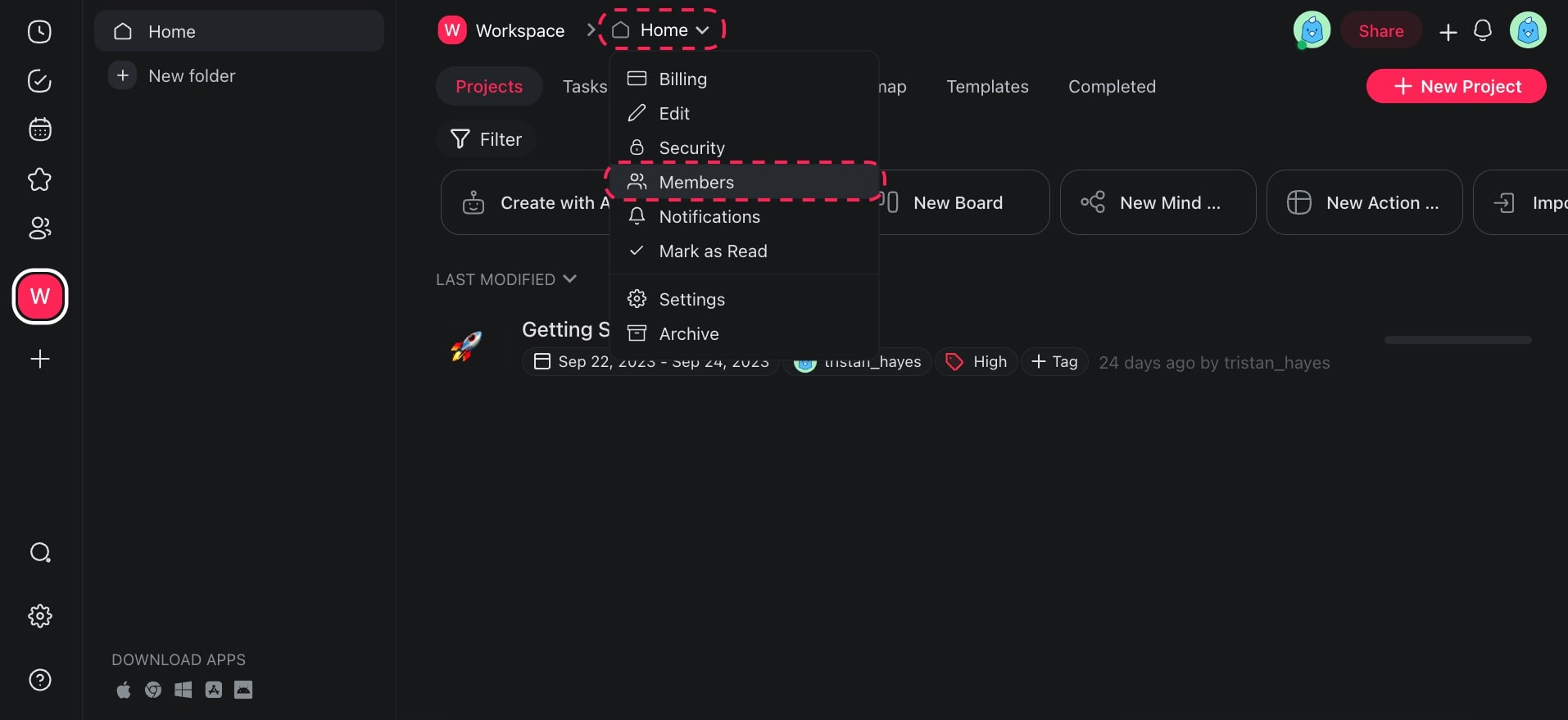
- Click the ˅ arrow next to your workspace name and select 👥 Members.
- Set roles for existing workspace members or invite others.
Set Roles (Projects)
- Navigate to a project.
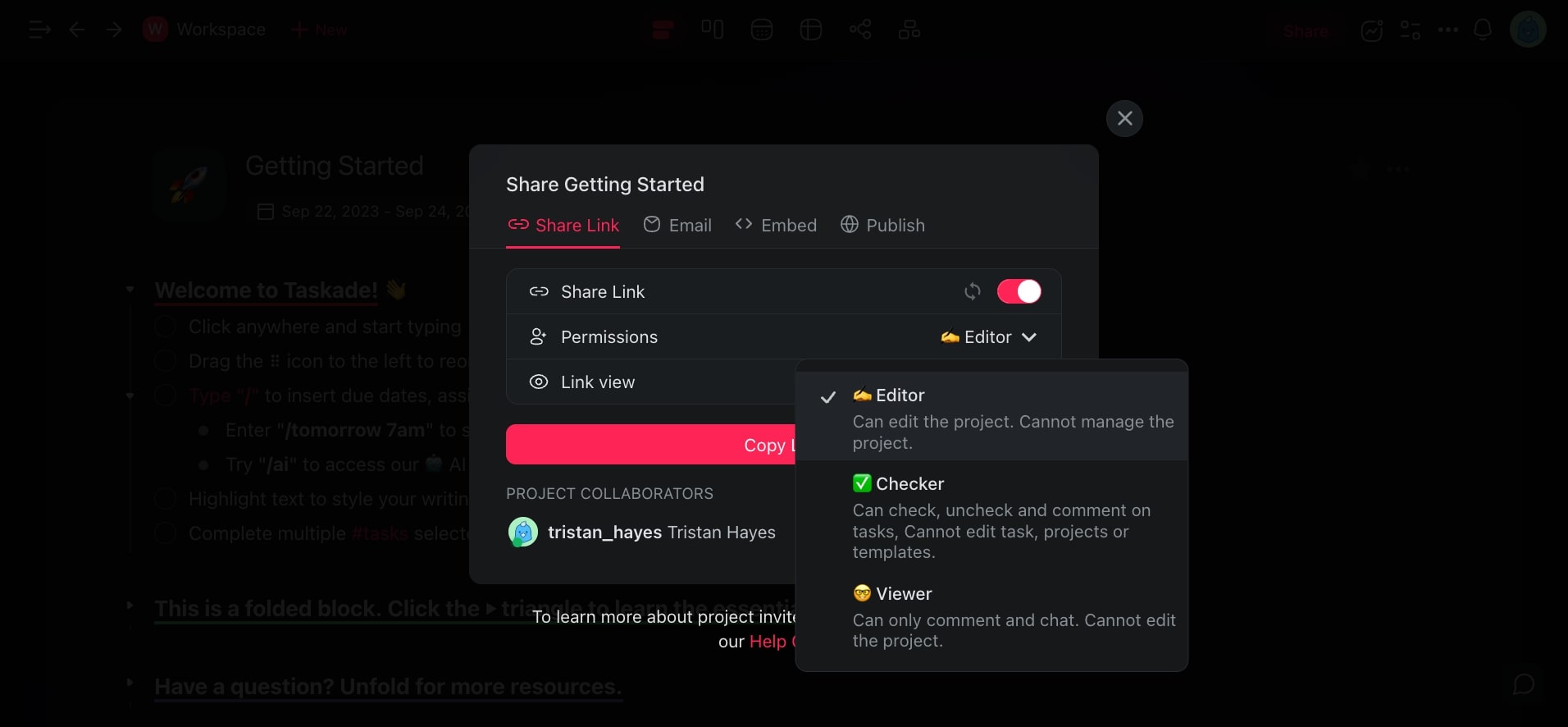
- Click your Profile Photo (to the left of the Share button).
- Set roles for existing Project members or invite others.
💡 Note: Team members with access to your main Workspace will not automatically have access to any Folders you create.
Compare the Roles
Roles cascade from workspace to folder to project, and you can override a role at any level:
| Role | View | Comment | Check off tasks | Edit content | Manage roles | Manage billing | Delete the workspace |
|---|---|---|---|---|---|---|---|
| Owner | ✅ | ✅ | ✅ | ✅ | ✅ | ✅ | ✅ |
| Maintainer | ✅ | ✅ | ✅ | ✅ | ✅ | ✅ | None |
| Editor | ✅ | ✅ | ✅ | ✅ | None | None | None |
| Checker | ✅ | ✅ | ✅ | None | None | None | None |
| Viewer | ✅ | ✅ | None | None | None | None | None |
The role menu in the app puts a small icon beside each name, and it labels the second rung with a shorter word than the one used here. The order of the ladder is the same, so pick by what the row can do rather than by the wording.
Key distinctions:
- Owner is the only role that can archive or delete the workspace, and the only role that can move or delete a folder. An Owner also cannot leave a workspace, because someone must hold the account.
- Maintainer runs the workspace day to day. A Maintainer manages members, roles, and billing, and cannot delete the workspace.
- Editor creates and edits projects, attaches dates, files, and assignments, and can invite people. An Editor cannot change anyone's role.
- Checker follows the work and checks tasks off, and cannot change project content.
- Viewer reads and comments, and cannot check tasks off.
Every role from Viewer upward can post a comment, so a stakeholder reviews without any edit access. Checking a task off counts as touching the work, which is why Viewer is the one role without it.
The Checker role is available on paid plans.
Tips
- Use the Viewer role for clients or stakeholders who only need to review progress without editing.
- Workspace-level roles set the baseline, but you can override permissions at the folder or project level for finer control.
- If you need to restrict access to specific folders within a shared workspace, remember that folders are private by default. Visit Create a Team (Folder) for details.
- Visit Hierarchy Structure to understand how permissions cascade across workspaces, folders, and projects.
Frequently Asked Questions
What can each role actually do?
Roles run from Owner down to Viewer. Owner has full control and is the only role that can archive or delete the workspace. Maintainer manages members, roles, and billing. Editor creates and edits projects. Checker checks tasks off without editing content. Viewer reads and comments.
How do I change someone's role?
You set roles in two places depending on the level. For a workspace or folder, click the ˅ arrow next to the workspace name and select 👥 Members, then pick a new role for each person. For a single project, click your Profile Photo to the left of the Share button and set roles there.
Who can edit a project, and who can only view it?
Owner, Maintainer, and Editor can edit a project. Checker and Viewer cannot change project content. A Checker still checks tasks off, and a Viewer cannot. Both can post comments, so a stakeholder reviews without any edit access. Set a Viewer role for clients who only need to follow progress.
What is the difference between a private and a shared project?
A private project is one only you can see until you invite someone or set roles on it. A shared project has members with assigned roles, so each person gets exactly the access you choose. Folders are private by default, so team members with access to your main workspace will not automatically reach folders you create.
Can I add people from outside my workspace?
Yes. You can invite others to a workspace, folder, or project and assign them a role when you do. Roles cascade from workspace to folder to project, so an outside guest you add only to one project gets access to that project, not your whole workspace.
Which role should I give a co-lead?
Give a co-lead the Maintainer role. A Maintainer manages members, roles, and billing, and runs the workspace day to day. A Maintainer cannot archive or delete the workspace, and cannot move or delete a folder. Those actions stay with the Owner, so the account itself stays protected.
Who controls billing for the workspace?
Owner and Maintainer can open billing and manage the subscription. Only the Owner can archive or delete the workspace itself. Editor, Checker, and Viewer cannot reach billing, so you can give teammates broad editing access without exposing the account.
Related guides
- Share a Project: Share individual projects
- Create a Workspace: Workspace-level role setup
- Team Folders: Folder-level overrides
- Invite Members: Add people to your workspace
- App Permissions: Role-based access to Taskade Genesis apps
- Hierarchy Structure: How roles cascade