






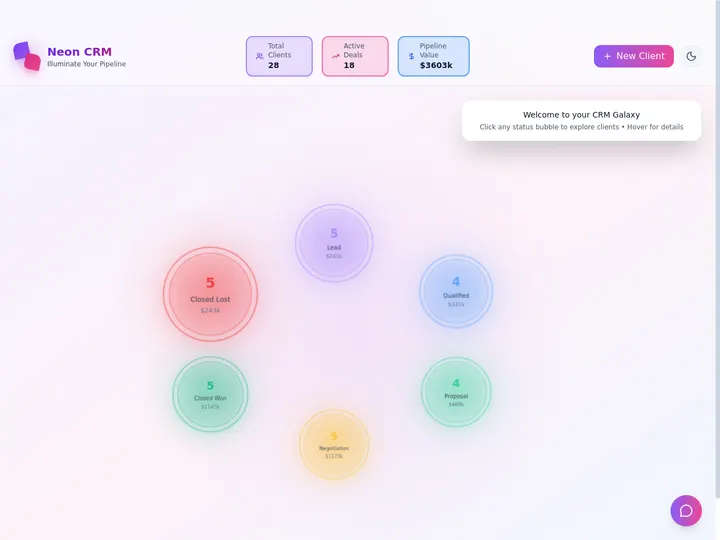
Need a CRM, an invoice tracker, or a dashboard? Describe it in one prompt, and Taskade Genesis builds a live app in your workspace. Now every automation can also stop and wait for a person to approve.
TL;DR: Every business works differently, and your software can too. Build a CRM, an invoice tracker, or a dashboard from one prompt, or clone an App Kit. New this week: add a Wait for approval step to any automation. The approver gets an email, then approves or rejects before the run goes on. Build yours →
What Can You Build From One Prompt?
One Prompt. One Live App. Type what your business needs, and Taskade EVE plans and builds the app in your workspace. No code and no setup. Here is the prompt from this week's product update:
Build a CRM for my business with leads, deals and follow-up dates. Include a sales pipeline and a way to track my next action for each customer.
Your CRM holds leads, deals, and follow-ups in one app. Change the words before you press Build, because your business is not a template. More first-prompt ideas live in Learn: App Starter Prompts.
Which Business Apps Can You Start Today?
Pick an App. Make It Yours. The table below lists the six starters from this week's update. Each Build link opens Taskade Genesis with the prompt typed in for you.
| App | What it tracks | Start |
|---|---|---|
| CRM | Leads, deals, and follow-ups. | Build → |
| Invoices | Payments and overdue bills. | Build → |
| Dashboard | Your numbers, on one screen. | Build → |
| Store | Orders, products, and stock. | Build → |
| Tasks | Who does what, and by when. | Build → |
| Scheduler | Let people book a time. | Build → |
Prefer a running start? Open Taskade App Factory and clone an App Kit. Each kit brings its own AI agents and automations. A kit with no price and no PRO badge clones free on every plan. Introducing Taskade App Factory lists 26 kits by category.
Start simple. Add AI agents, automations, and client sign-in as you grow. Client sign-in works on every plan, Free included. See App Users to add it.
What Is the Wait for Approval Step?
Automate. Review. Approve. Wait for approval is a new built-in step for any automation. The run pauses until a teammate you pick approves or rejects. Approve continues the run. Reject stops it.
Use it before a step that sends mail, posts a message, or pays an invoice. The automation does the work, and a person signs off before it goes out. This is human-in-the-loop work, with no code.
Each approver gets a Taskade notification and an email with a Review link. The table shows the three places where an approver can decide.
| Where | What the approver does |
|---|---|
| Opens the Review link, reads the details, then clicks Approve or Reject. | |
| Activity | Clicks Approve or Reject on the request row in Taskade. |
| Runs tab | Opens the automation and decides on the run that shows Waiting for approval. |
The first answer counts. When one approver decides, the request closes for everyone else. If no one answers in 1, 3, or 7 days, the step approves or rejects, as you set it. To see every run that waits, open All Runs in Automations and click the Waiting filter.
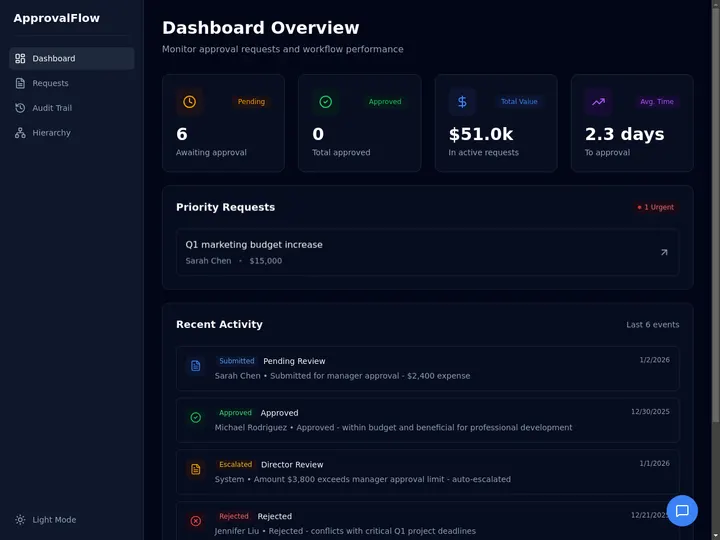
How Do You Add an Approval to an Automation?
Human Approval. Any Automation. You add the step in a few clicks, and it works on every plan.
- Open the automation and click Add step where the run must pause.
- Open the Approvals tab and pick Wait for approval.
- In Who approves, pick one or more teammates.
- In What they see, write one short line, for example "Send 4 overdue reminders".
- Under If no one answers, pick how long to wait and what happens then.
Keep Then on Reject before a step that sends mail or moves money. Then nothing goes out without a person. Learn: Wait for Approval covers every setting.
You can also ask Taskade EVE to build the whole app with the approval inside. This prompt builds an invoice tracker that drafts a reminder for each overdue invoice every Monday, then waits for you:
Does your team decide in Slack or by email? The Approvals tab also sends the request through Gmail, Outlook, Slack, Microsoft Teams, Telegram, Discord, SMS, or WhatsApp. These are premium integrations, available on paid plans. For an approval app with stages and a decision log, read How to Build an Approval Workflow Without Code.
Can You Run Taskade AI on Your Own API Key?
Bring Your Own AI Key. Yes. On Pro and up, add your own OpenAI, Anthropic, or Google key. Your AI agents and Taskade EVE then run on your own provider account. Keys from OpenRouter and other AI hosts need Business and up.
Learn: Bring Your Own AI Keys shows where to add a key. Compare plans on the pricing page.
Build Without Permission
You know your business better than anyone. Now you can build the software it needs. Start with a prompt, or clone an App Kit. Make it yours, publish it, and put it to work.
Build with AI → · Clone Apps →
Frequently Asked Questions
What is the Wait for approval step?
Wait for approval is a built-in automation step. It pauses the run until a teammate you pick approves or rejects. Approve continues the run, and Reject stops it. If no one answers in 1, 3, or 7 days, the step approves or rejects, as you set it.
How does an approver get the request?
Each approver gets a Taskade notification and an email with a Review link. They approve or reject from the review page, from the request row in Activity, or from the Runs tab of the automation. The first answer counts.
Which plans include the Wait for approval step?
Every plan, Free included. Wait for approval is a built-in step, and automations run on every plan. A request sent through Gmail, Outlook, Slack, Microsoft Teams, Telegram, Discord, SMS, or WhatsApp uses a premium integration, which needs a paid plan.
Can I build a CRM or an invoice tracker without code?
Yes. Describe the app in one prompt, and Taskade EVE builds it in your workspace with the projects, AI agents, and automations you ask for. Or clone an App Kit from Taskade App Factory. A kit with no price and no PRO badge clones free.
Can I run Taskade AI on my own API key?
Yes. On Pro and up, add your own OpenAI, Anthropic, or Google key, and your AI agents and Taskade EVE run on your own provider account. Keys from OpenRouter and other AI hosts need Business and up.
Read Next
- Introducing Taskade App Factory
- Your Data. Your Agent. Your Automation.
- How to Build an Approval Workflow Without Code
- Best BYOK AI App Builders in 2026
▲ ■ ● Automate it. Review it. Approve it.