






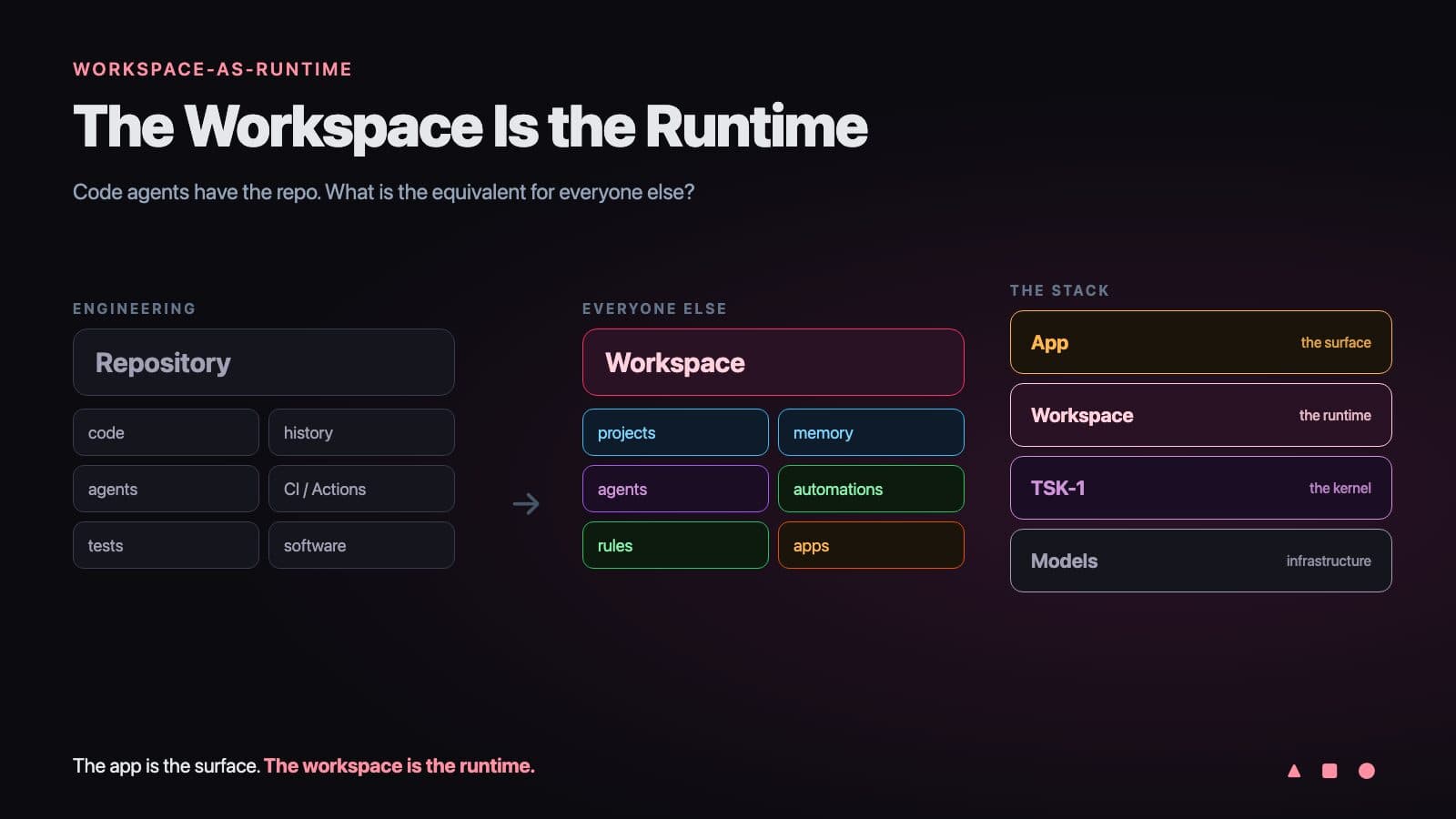
Code agents have something most business agents still do not: somewhere to work.
An engineer does not drop a model into an empty chat window and expect software to appear. A coding agent now gets a repository with years of history, a development environment with dependencies and secrets, tools, tests, a browser, and CI that checks every change before it ships. When the session ends, the work stays behind as commits, branches, and pull requests that the next person or agent can pick up.
Now think about everyone else. The operations lead. The recruiter. The account manager. The founder who is also the finance team. When we give them an "agent," we usually give them a chat window floating above a dozen disconnected tools. The conversation ends, and the agent's work evaporates with it.
So here is the question this essay tries to answer: code agents have the repo. What is the equivalent for everyone else?
I think it is the workspace. A persistent place where people and agents share context, memory accumulates, automations keep running, and the apps they use sit on top.
The app is the surface. The workspace is the runtime.
TL;DR: Coding agents work well because they get an environment: a repository, a dev environment, tools, and CI. Business agents need the same thing, a persistent AI agent runtime that holds state, memory, tools, execution, and interfaces. That runtime is the workspace. Taskade Genesis runs 150,000+ apps on it today. Build yours →
| Coding agents | Everyone else's agents today | Everyone else's agents with a workspace runtime | |
|---|---|---|---|
| Where state lives | The repository | Scattered across apps | Projects in one workspace |
| History | Every commit, forever | A chat transcript | Version history plus a shared memory |
| Where work runs | Dev environment and CI | Nowhere after the chat ends | Automations on triggers and schedules |
| How work is checked | Tests and CI | A human rereads the answer | Rules, roles, approvals, and results written back |
| What people use | The shipped software | The chat window | Apps generated on top of the workspace |
🧑💻 What Do Coding Agents Have That Business Agents Do Not?
Coding agents have an environment. In 2026, a serious coding agent works inside a cloned repository, in an isolated development machine with dependencies, secrets, tools, and tests, and it hands its work back as a reviewable change. Most business agents get a chat window. The difference is not model quality. The difference is where the agent works.
Look at how the two companies that define modern software development describe their agents.
Cursor's cloud agent documentation says its agents "run in isolated VMs in the cloud with full development environments instead of on your local machine." The environment is "similar to the setup on your laptop: cloned repos, installed dependencies, secrets, startup commands, and network access." The agents "can build, test, and interact with the changed software," and they "produce screenshots, videos, and logs so you can see exactly what changed and how the agent verified its work."
In May 2026, Cursor published a post titled Development environments for your cloud agents. Its central sentence could be the thesis of this essay: "An agent that can write code but can't run tests, query services, or reach APIs cannot close the loop."
GitHub says the same thing from the other side. Its documentation for the Copilot cloud agent explains that the agent "has access to its own ephemeral development environment, powered by GitHub Actions, where it can explore your code, make changes, execute automated tests and linters and more."
| What the coding agent gets | Cursor cloud agents | GitHub Copilot cloud agent | What it gives the agent |
|---|---|---|---|
| Durable state | Cloned repositories | The repository | Something true to start from |
| History | Git history and branches | Git history, issues, pull requests | Why things are the way they are |
| Execution | Isolated VM with dependencies | Ephemeral environment on GitHub Actions | A place to actually run the work |
| Tools | MCP servers, browser, desktop | Tests, linters, repository tools | A way to change the world |
| Verification | Tests, screenshots, videos, logs | Tests, linters, CI checks | Proof the work is right |
| Handoff | Branch and pull request | Draft pull request and session logs | Work that outlives the session |
| Rules | Hooks, scoped secrets, egress limits | Branch protections, review rules | A safe path that is easy to follow |
Read the right-hand column again. None of those rows is about intelligence. They are all about the environment.
Here is the whole loop a coding agent runs today, from an assigned issue to merged code:
The model generates. The environment makes the generation useful.
That sentence is the first half of the argument. The second half is a question: what is the repository, the development environment, and the CI of ordinary work?
🗂️ Why Was the Repository More Important Than We Realized?
The repository gave software teams continuity. GitHub's own definition is plain: "A repository is the most basic element of GitHub. It's a place where you can store your code, your files, and each file's revision history." State plus history is what lets many people, and now many agents, work on one thing over years.
It is easy to forget how much had to be invented before a coding agent could be useful. The repository did not arrive with agents. Agents arrived and found twenty years of environment waiting for them.
| Year | What engineering got | What it added to the environment |
|---|---|---|
| 2005 | Git | Durable state and complete history on every machine |
| 2008 | GitHub | A shared home for repositories, issues, and review |
| 2019 | GitHub Actions (generally available November 2019) | Execution: every change can trigger build, test, and deploy |
| 2025 | Copilot coding agent (May 19) | An agent that works inside that environment |
| 2025 | Agent HQ (October 28) | Many agents, one place to direct and review them |
| 2026 | Cursor cloud agent development environments (May 13) | The environment itself becomes the product |
SOFTWARE TEAM              repository
                  │
  ┌───────────────┼───────────────┐
  │               │               │
humans          agents         history
  │               │               │
  └──────── changes (commits) ────┘
                  │
                 CI  ── run the tests
                  │
                review
                  │
                ship
The repository does not merely store the result of engineering.
It gives engineering continuity.
When GitHub introduced Agent HQ, it put the principle in one line: "Agents shouldn't be bolted on. They should work the way you already work. That's why we're making agents native to the GitHub flow." Agents did not get their own world. They moved into the world people already worked in.
That is the lesson the rest of the business has not absorbed yet. Agents are only as good as the place they are invited into. Engineering spent two decades building that place. Everyone else is still inviting agents into a chat window.
🔍 How Did Agents Make the Environment Visible?
Agents made the environment visible because every missing piece of it shows up as an agent failure. When a coding agent cannot run the application, a human has to verify the work. When it cannot see the history, it repeats old mistakes. In 2026 the best engineering teams stopped asking for smarter models and started engineering the environment instead.
OpenAI named the practice. Its February 2026 post Harness engineering opens with four words, "Humans steer. Agents execute," and describes the engineer's new job: to "design environments, specify intent, and build feedback loops that allow Codex agents to do reliable work."
Anthropic had reached the same conclusion more than a year earlier. Building effective agents (December 2024) says it is "crucial for the agents to gain 'ground truth' from the environment at each step" and admits, "We actually spent more time optimizing our tools than the overall prompt."
Cursor says it about its own product. In Continually improving our agent harness (April 2026): "The harness and the model together determine how good the agent is."
The practitioners took it further. Lauren Tan, who built agent workflows at Cursor, packaged her approach as pstack, a plugin whose one-line description is "if you want to go fast, go deep first." Her public workshop on how Cursor turned agents into better engineers walks through a progression that has nothing to do with a bigger model: let the agent verify against the real running product, give it a map of how the product works, and turn repeated mistakes into structure so the next agent cannot make them.
| Lesson from agentic engineering | What it looked like in code | What it means for everyone else |
|---|---|---|
| Give the agent the real environment | Clone the repo, install dependencies, run the app | Give the agent the real business data, not a summary |
| Let it verify against reality | Run tests, drive the app, capture screenshots | Check results against real records and real outcomes |
| Map the territory | A feature map of how the product works | A clear structure of projects, fields, and roles |
| Encode lessons in structure | Types, lint rules, CI checks | Field types, required forms, automation conditions |
| Parallelize only after trust | Many agents on well-tested code | Many agents on well-structured workspaces |
Intelligence is portable. Environment compounds.
A better model helps every team equally, and every competitor gets it the same week. A better environment helps only the team that built it, and it gets better every time something goes wrong. That asymmetry is why the environment, not the model, is where durable advantage now lives. For the history of this idea, see the history of the agent harness and what an agent harness is.
🏢 Why Doesn't a Business Live in a Repository?
A business does not live in a repository because almost nobody outside engineering works in Git. Business state is spread across email, chat, spreadsheets, documents, CRMs, forms, and dashboards. So when a business gets an agent, the agent usually sits above that fragmented state with nothing to anchor it: no single source of truth, no history, and nowhere for its work to go.
Here is the uncomfortable picture.
TODAY: a business agent             agent (chat window)
                    │
 ┌──────────┬───────┼────────┬──────────┐
 ▼          ▼       ▼        ▼          ▼
email chat sheets CRM docs
│ │ │ │ │
? ? ? ? ?
└──────────┴── fragmented state ───────┘
WHAT A CODING AGENT GETS
                agent
                  │
                  ▼
         coherent environment
                  │
 repo + tools + history + tests + CI
| Where business work lives today | What an agent can do there | What is missing |
|---|---|---|
| Email and chat | Read and draft messages | Structure: a message is not a record |
| Spreadsheets | Read and write cells | History, roles, and events |
| Documents | Summarize and edit text | State that other tools can act on |
| CRMs and SaaS tools | Call an API, one tool at a time | A shared memory across tools |
| Forms and dashboards | Collect or display data | Execution when the data changes |
Business agents do not need another chat history. They do not need only a vector database. They do not need yet another connector layer. They need a place where the work itself persists.
That is the job a repository and a development environment do for code. The business equivalent has to do the same job, in a form an operations lead can use without learning Git. That is the gap agentic workspaces set out to close.
⚙️ What Is an AI Agent Runtime?
An AI agent runtime is the environment where an agent actually works: it holds state, provides tools, runs actions, responds to events, and keeps results after the session ends. The word "runtime" already has a precise meaning in computing, and the agent industry uses it in two different ways. One kind of runtime hosts the agent's code. The other holds the agent's work.
Start with the classic definition. Wikipedia describes a runtime system as providing "an environment for program execution," and a runtime environment as "the context in which a runtime operates." A runtime is not the program. It is everything the program can rely on while it runs.
Now look at how agent platforms use the word in 2026.
| Product | How it defines "runtime" | What the runtime holds |
|---|---|---|
| AWS Bedrock AgentCore Runtime | "A secure, serverless and purpose-built hosting environment for deploying and running AI agents or tools" | Each session in "a dedicated microVM with isolated CPU, memory, and filesystem resources" |
| Cloudflare Agents | "Durable infrastructure: the Agent class, state, sessions, routing, WebSockets, scheduling" | A durable identity, local SQL storage, and scheduled work per agent |
| LangSmith Deployment | "A workflow orchestration runtime purpose-built for agent workloads" | Managed infrastructure for long-running agent workflows |
| A workspace runtime | The shared environment where people and agents do the work | Business state, memory, automations, permissions, and the apps people use |
The first three are infrastructure runtimes. They answer the developer's question: where does my agent's code execute, safely and at scale? They matter, and engineering teams building their own agents need one.
The fourth is a work runtime. It answers a different question: where does the agent's work live, together with the people it works for? A micro-VM that is "terminated and memory is sanitized" after the session is the right design for running untrusted code. It is the wrong design for running a customer onboarding process that has to remember every customer.
There is also a useful distinction between a harness and a runtime. Cloudflare's documentation separates where agents run from the loop that drives them. The harness is the loop: call the model, pick a tool, read the result, decide again. The runtime is what the loop runs inside. A brilliant harness in an empty runtime still starts from zero every morning.
| Layer | Question it answers | Example |
|---|---|---|
| Model | How well can it reason? | 15+ frontier models |
| Harness | How does it decide what to do next? | The agent loop, tools, and context rules |
| Infrastructure runtime | Where does its code execute? | A sandbox, a micro-VM, a serverless host |
| Work runtime | Where does its work live and continue? | The workspace |
| Surface | How do people use it? | An app, a portal, a dashboard |
🧭 What Does It Mean for the Workspace to Be the Runtime?
The workspace becomes the runtime when it stops being a folder around the work and becomes the environment that runs the work. A database stores state. A workspace organizes work. A runtime is where the system actually runs. Once a workspace contains state, memory, agents, tools, permissions, events, workflows, and interfaces, it is all three.
Say it from first principles:
A database stores state.
A workspace organizes work.
A runtime is where the system actually runs.Put state, memory, agents, automations, permissions,
history, and interfaces in one place,
and the workspace stops being the folder around the work.
It becomes the environment executing the work.
This leads to the distinction that I think matters most in the entire AI app conversation:
The app is not the runtime. The app is one view into it.
Drawn as a data model, a workspace runtime looks like this. Notice that the app is only one of several things that read and write the same projects.
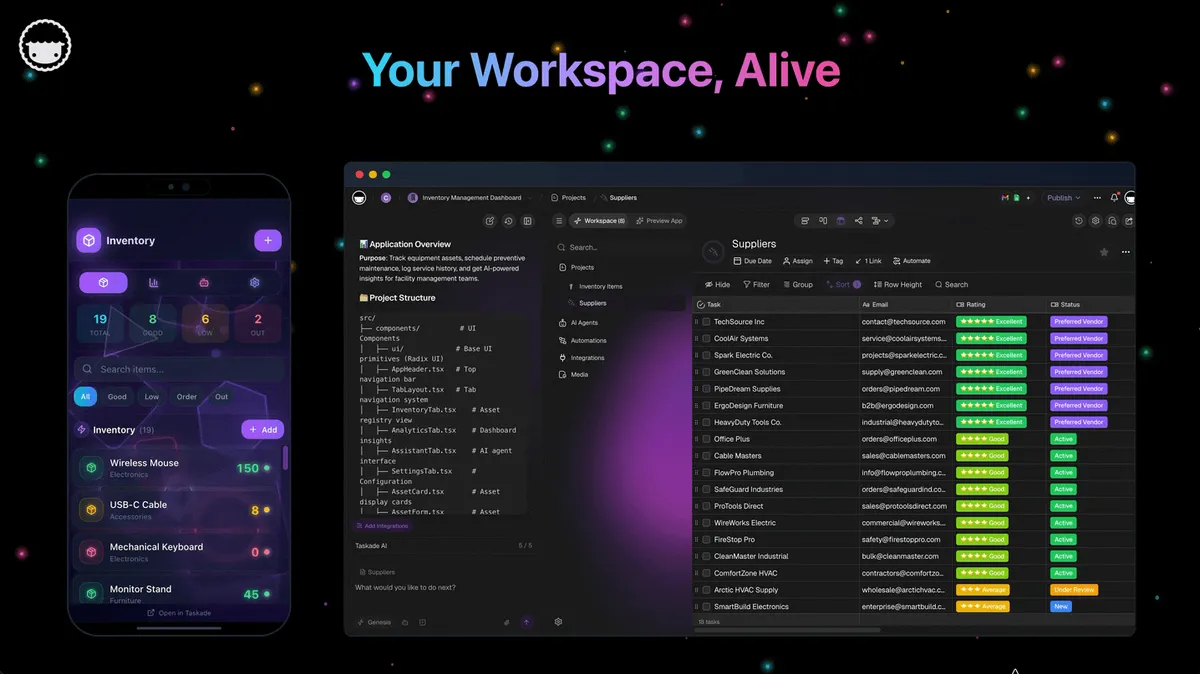
When an AI tool generates an app, the app feels like the product. It is the thing you can see and click. But an app without a runtime underneath is a screenshot that happens to be interactive. The customer record it shows has to live somewhere. The follow-up email it promises has to be sent by something. The agent in its chat panel has to remember the last conversation. All of that is the runtime. The app is the surface.
🗄️ Why Isn't "Workspace-as-Database" Enough?
A database answers "what is true right now?" A runtime also answers "what should happen next?" Calling the workspace a database captures state, but it misses intelligence, events, execution, interfaces, and coordination between actors. Workspace-as-runtime is the broader and more accurate idea, because the workspace does not only store the business. It runs it.
| Database | Runtime | |
|---|---|---|
| Stores state | Yes | Yes |
| Queries state | Yes | Yes |
| Interprets state | No | Yes, through agents |
| Responds to events | Only through triggers you write | Yes, through automations |
| Runs workflows | No | Yes |
| Changes state on its own | No | Yes, with rules and roles |
| Exposes interfaces | No | Yes, through apps |
| Coordinates people and agents | No | Yes |
The phrase "your workspace becomes the backend" has been part of how we describe Taskade Genesis since launch. It is true, and it is also too small. A backend is something a frontend calls. A runtime is something that keeps going when nobody is calling it: at 3 a.m., when a form is submitted, a schedule fires, an agent classifies the request, and a record changes before anyone wakes up.
🏗️ Why Isn't It Just Infrastructure or a Server?
Infrastructure keeps software available. A runtime is where the work happens. Servers, hosting, virtual machines, and cloud platforms solved the problem of where software runs. AI agents create the same problem one layer higher: where does the work of humans and agents run together? The answer to that question is not another server.
I spent my teenage years thinking about servers, because software needed somewhere to run. I wrote about it in From Web Hosting to AI Infrastructure. Twenty years later I think agents have the same problem, one layer up.
| Era | What needed a place to run | What we built | Who it served |
|---|---|---|---|
| 1990s–2000s | Websites and applications | Servers and hosting | Developers |
| 2010s | Services at scale | The cloud | Engineering teams |
| 2020s | Team collaboration | The workspace | Knowledge workers |
| 2026 onward | People and agents working together | The workspace as runtime | Everyone |
Your Workspace Is a Computer tells the infrastructure half of this story, through six waves of virtualization. This essay is about the half that sits above it. Infrastructure is underneath the work. The runtime is where the work lives.
🌐 Is the Market Converging on Workspace-as-Runtime?
Yes. Products that started from very different places are converging on the same architecture: persistent state, agents that use it, workflows that run without a prompt, and interfaces on top. Code editors, repositories, document tools, databases, internal-tool builders, and enterprise platforms are each discovering one piece of the runtime. Nobody is wrong. Each is starting from a different piece.
| Product | Starting point | What it is evolving toward | In its own words |
|---|---|---|---|
| Cursor | A code editor | Full development environments for autonomous agents | "Full development environments" in "isolated VMs" |
| GitHub | The repository | Repository, CI, and many agents in one flow | "Agents shouldn't be bolted on" |
| Notion | Documents and databases | Agents that work in the background on workspace context | "Notion Agents use your existing docs and databases as context" |
| Airtable | A relational database | A shared data layer for apps, agents, and workflows | "One relational source of truth for every app, agent, and workflow" |
| Retool | Internal apps on production data | Apps, workflows, and agents in one governed platform | "Build, test, and deploy in one governed environment" |
| Microsoft | Productivity and enterprise automation | Agents paired with multi-agent workflows | "Production-grade AI agents and multi-agent workflows" |
| Replit | A cloud coding environment | Idea to deployed app, built by an agent | Generation plus deployment |
| Taskade | A collaborative workspace | A persistent runtime for people and agents | "The app is the surface. The workspace is the runtime." |
Sources for the quotes: Cursor, GitHub, Notion, Airtable, Retool, Microsoft Agent Framework.
I want to be precise about what this table claims. It does not claim that nobody else has persistent agents, data, and workflows. In 2026 several products clearly do. The claim is architectural: they are all evidence of the same transition.
prompt       →  environment
session      →  state
assistant    →  participant
generation   →  execution
app          →  surface
workspace    →  runtime
The interesting question is no longer whether this transition happens. It is who builds the runtime that nontechnical people can actually operate, the way engineers operate a repository.
🧪 What Makes a Workspace a Runtime? The Seven Properties
A workspace is a runtime when it has seven properties: persistent state, shared memory, execution, tools, interfaces, feedback, and constraints. The first six make work continue after the prompt. The seventh makes the correct path easier than the wrong one. Each property has a direct equivalent in the environment that coding agents already rely on.
| # | Property | What it means | Coding-agent equivalent | Workspace equivalent |
|---|---|---|---|---|
| 1 | Persistent state | Work survives the session | The repository | Projects with structured fields |
| 2 | Shared memory | People and agents inherit the same history | Git history, issues, docs | Project history, agent knowledge, shared memory |
| 3 | Execution | Things continue without another prompt | CI and scheduled jobs | Automations on triggers and schedules |
| 4 | Tools | Agents can change the world outside | MCP servers, CLIs, APIs | Integrations, web search, agent tools |
| 5 | Interfaces | People use the system without talking to an agent | The shipped software | Generated apps, forms, dashboards |
| 6 | Feedback | What happens becomes context for what happens next | Test results, review comments | Results written back into projects |
| 7 | Constraints | The environment makes the right path easy | Types, lint, CI, branch rules | Field types, roles, approvals, automation conditions |
The seventh property is the one most people miss, and it comes straight from the lesson of agentic engineering. Engineers learned that a rule written in a prompt is a suggestion, and a rule written into the environment is a guarantee. A type system does not ask the agent to pass the right value. It refuses the wrong one.
For an operations workspace, constraints look different but work the same way:
- Schemas: a status field with fixed options cannot hold a typo.
- Roles: role-based access from Owner to Viewer decides who, and which agent, can change what.
- Forms: required fields make incomplete records impossible.
- Agent roles: an agent with clear instructions and a limited set of tools cannot wander.
- Automation conditions: a branch that checks a value before acting cannot fire on the wrong record.
- Approvals: a tool set to manual approval waits for a person before it sends anything.
A smarter worker helps. A better workplace compounds.
📦 Is the Workspace the Repo for the Rest of Us?
The workspace can become the repository for the rest of the business, with one important difference: a repository records changes, and a workspace runtime can also execute them. A repository is durable source plus history. A runtime is an execution environment. Workspace-as-runtime is both at once, in a form nontechnical people can operate.
Developers got Git.
Teams got SaaS.
Agents got models.Now people and agents need somewhere to work together.
repository           = durable source + history
runtime              = execution environment
workspace-as-runtime = durable source + history + execution
The analogy holds up surprisingly well when you map it concept by concept.
| In a repository | In a workspace runtime | In Taskade today |
|---|---|---|
| Files | Structured records | Projects with custom fields |
| Commit history | A history of every change | Version history for app files |
| README or AGENTS.md | Shared instructions and memory for agents | Taskade EVE's workspace memory, including a build ledger |
| Issues | Tasks | Tasks, assignees, and due dates |
| CI and Actions | Execution on every event | Automations with triggers and schedules |
| Code review | Human approval before an action | Manual approval for agent tools |
| Secrets | Credentials that never reach the client | App secrets behind a server-side proxy |
| Preview and release | Draft, then publish | Preview in the workspace, then publish |
| Clone | Copy the whole system | Clone an app from the Community Gallery |
The row I find most telling is the third one. When we wrote the instructions for Taskade EVE, the agent that builds Taskade Genesis apps, we gave it a workspace memory project called TASKS.md. It records what is being built, the open decisions, what is done, and what EVE learned in that workspace. Inside our own instructions, we describe it as the equivalent of a repository's CLAUDE.md or AGENTS.md, but for what is being built. We did not set out to copy the repository. We needed the same thing for the same reason.
There is also a literal bridge between the two worlds. A Taskade Genesis app can be exported to GitHub as a versioned bundle that carries its projects, agents, automations, and interface, and imported again into any workspace. Developers can reach a workspace from their own tools through the Taskade API and the hosted MCP server. The repository and the workspace are not rivals. They are the same idea serving two different kinds of work.
🧬 How Does Taskade Genesis Run on the Workspace?
Taskade Genesis runs every app on the workspace. Projects hold memory and state, AI Agents provide intelligence, Automations provide execution across 100+ integrations, and the generated app is the interface. TSK-1, the Taskade System Kernel, coordinates all of it. More than 150,000 apps run on this runtime today, each one a view into a living workspace.
This is where I stop describing the category and describe what we built. We call the structure Workspace DNA: memory, intelligence, and execution in a loop, with the app on top.
            TASKADE GENESIS APP
                    │
                interface
                    │
                    ▼
        ┌───────────────────────────┐
        │         WORKSPACE         │
        │                           │
        │   ▲ Projects              │
        │     memory + state        │
        │                           │
        │   ■ Agents                │
        │     intelligence          │
        │                           │
        │   ● Automations           │
        │     execution             │
        └───────────────────────────┘
                    │
                    ▼
                  TSK-1
          system coordination
                    │
                    ▼
      15+ frontier models, cloud services
That gives a clean stack, and I think it is more honest than calling everything an "AI operating system":
| Layer | Role | In Taskade |
|---|---|---|
| App | What people see | Taskade Genesis apps |
| Workspace | Where the system lives | Projects, agents, and automations |
| TSK-1 | How the system coordinates | The Taskade System Kernel |
| Models | Intelligence infrastructure | 15+ frontier models from OpenAI, Anthropic, and open-weight providers |
| Cloud | Compute infrastructure | Secure infrastructure you never manage |
Models are infrastructure. TSK-1 is the kernel. The workspace is the runtime. The app is the surface.
Here is how the seven runtime properties map to what ships in Taskade today.
| Runtime property | What Taskade provides | Learn more |
|---|---|---|
| Persistent state | Projects as structured databases with custom fields and multiple views | Memory graph |
| Shared memory | Agent knowledge, project history, and Taskade EVE's workspace memory | EVE memory |
| Execution | Automations on schedules, webhooks, forms, emails, and project changes, with branches, loops, and agent steps | Automation triggers |
| Tools | 100+ integrations, web search, reading web pages, and a shell for app files | Agent tools |
| Interfaces | Generated apps, public agents, forms, and custom domains | Publishing |
| Feedback | Automation results, form submissions, and agent outputs written back into projects | Workspace DNA |
| Constraints | Role-based access from Owner to Viewer, field types, automation conditions, manual tool approval, and app secrets | App secrets |
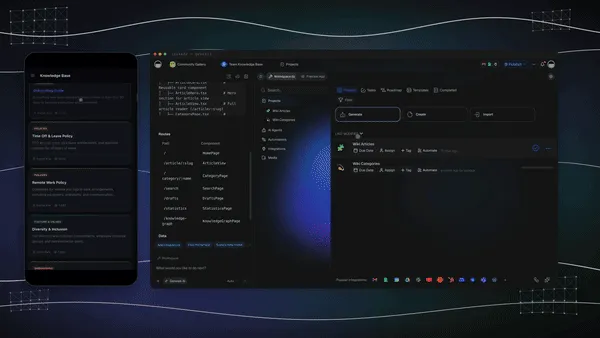
The way Taskade EVE builds is also shaped by the runtime. Before it changes anything in a workspace that already exists, EVE reads the current state of that workspace. It writes every change through the same projects, agents, and automations a person would edit by hand. It builds in dependency order: projects first, then agents, then knowledge, then automations, then the app. And it counts a requirement as done only when it has observed evidence, such as a record it found or a run it watched, not merely because it wrote the code. One rule in its instructions sums up the runtime idea: nothing it creates should ship orphaned. A project no page reads, an agent no page can reach, or an automation that never fires gets connected or deleted.
Here is what one ordinary morning looks like on a workspace runtime.
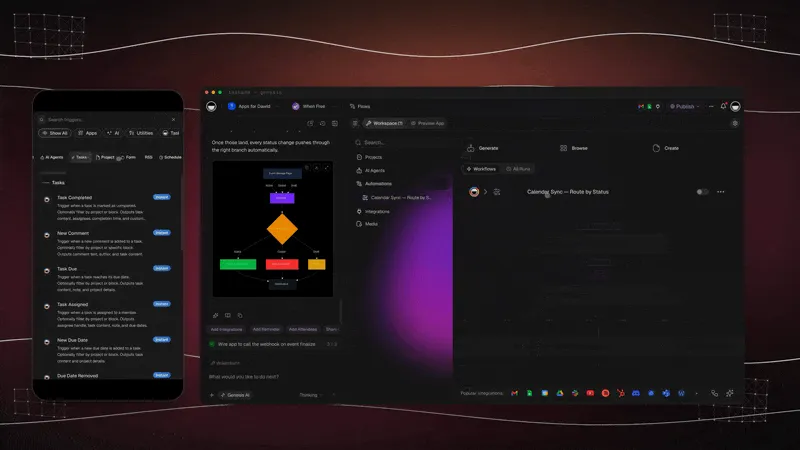
Nobody prompted anything at 3 a.m. The prompt happened weeks earlier, when someone described the app. Everything after that was the runtime.
⏱️ Why Is the Prompt Becoming the Least Interesting Part?
The prompt is becoming the least interesting part because it happens once, and the runtime happens every day after. The industry celebrates the moment a prompt produces an app. Durable value comes from what the app does for the next thousand days: state changes, memory grows, agents act, automations run, and people respond.
The industry's favorite demo looks like this:
prompt
  ↓
wow, an app
The value looks like this:
prompt
  ↓
workspace
  ↓
people use it
  ↓
state changes
  ↓
memory grows
  ↓
agents act
  ↓
automations run
  ↓
people respond
  ↓
more state
  ↓
...
A prompt is an initialization event. The runtime is everything afterward.
This is also why I think the code versus runtime debate matters more than it looks. Generation is becoming abundant. Every month it gets cheaper to produce an app, a document, or a workflow from a sentence. What stays scarce is persistence: a place where that generated thing can keep working, keep its memory, and keep improving. Generation is abundant. Persistence is scarce.
🛡️ What Should You Not Expect From a Workspace Runtime?
A workspace runtime is not a replacement for everything. It does not replace an engineering team's repository, it is not a code sandbox, and it does not make access control automatic. Being clear about these limits is part of the argument, because a runtime earns trust by being precise about what it guarantees.
| Expectation | The honest answer |
|---|---|
| It replaces my codebase | No. Engineers keep their repositories and CI. The workspace is the equivalent for the rest of the business, and the two connect through GitHub export, the API, and MCP. |
| It is a sandbox for running any code | No. Agents work with your app files through a limited shell, not a full machine where they can install software. For arbitrary code, engineering teams use a dedicated sandbox. |
| Agents can operate any website | No. Agents can search the web and read pages. They do not drive a browser through a live site. Integrations are how they act on other tools. |
| Every trigger fires instantly | Schedules, webhooks, forms, and emails start right away. Triggers that watch project changes run after a short delay, so edits can settle first. |
| Sign-in is all the access control an app needs | Sign-in confirms who someone is. Matching each user to their own records is a separate step you configure and test with a second account. |
These limits are not footnotes to hide. They are the same kind of honesty that makes a repository trustworthy: you know exactly what a commit guarantees and what it does not.
✅ Does Your Team's AI Have a Runtime? A 10-Question Test
Your AI has a runtime if its work persists, continues, and improves without you in the conversation. Ask these ten questions about any AI setup, whether it is Taskade or anything else. Each "no" marks a piece of the environment that a coding agent would have and your business agent does not.
| # | Question | If the answer is no |
|---|---|---|
| 1 | Does the agent's work still exist after you close the chat? | You have a conversation, not a runtime |
| 2 | Can a second agent pick up where the first one stopped? | There is no shared state |
| 3 | Can a teammate see what the agent changed, and when? | There is no history |
| 4 | Does something happen when a form is submitted at 3 a.m.? | There is no execution |
| 5 | Can the agent act in the tools your business already uses? | There are no tools |
| 6 | Can a customer use the result without talking to the agent? | There is no interface |
| 7 | Does the result of one run become context for the next? | There is no feedback |
| 8 | Can you stop an agent from changing a record it should not? | There are no constraints |
| 9 | Can you recover an earlier version after a bad change? | There is no version history |
| 10 | Would the system keep working if you swapped the model? | The model is the product, and it should not be |
If you want to see a runtime from the inside, open any app in the Community Gallery, clone it, and look at the workspace underneath: the projects that hold its data, the agents that reason over it, and the automations that keep it running.
The App Is the Surface. The Workspace Is the Runtime.
We spent the last few years making software easier to generate. The next question is where all that software goes to work.
For developers, the answer was the repository and the development environment. It took twenty years to build, and when agents arrived, it was waiting for them.
For agents working alongside the rest of us, I think the answer will be the workspace. A persistent place where people and agents share context, memory accumulates, automations keep running, and the apps they use sit on top.
Code agents have the repo.
Everyone else gets the workspace.
The app is the surface. The workspace is the runtime.
▲ ■ ● Memory, intelligence, execution. Start with Taskade Genesis →
— John Xie, CEO, Taskade
❓ Frequently Asked Questions
What is an AI agent runtime?
An AI agent runtime is the environment where an agent actually works: it holds state, gives the agent tools, runs its actions, and keeps the results after the session ends. Infrastructure runtimes such as AWS Bedrock AgentCore Runtime or Cloudflare Agents host the agent's code. A workspace runtime holds the agent's work, shared with the people it works for.
What does workspace-as-runtime mean?
Workspace-as-runtime means the workspace is not a folder around the work but the environment that runs it. Projects hold state and memory, AI agents reason over that state, automations execute when events happen, and apps are the interface. The app is the surface. The workspace is the runtime underneath it.
What do coding agents have that business agents do not?
Coding agents get a repository with the full history of the project, a development environment with dependencies and secrets, tools and tests, and CI that verifies every change. Most business agents get a chat window above scattered tools. The gap is the environment, not the model.
What is the difference between an agent harness and an agent runtime?
A harness is the loop around a model: how it calls tools, reads context, and decides the next step. A runtime is the environment the loop runs in: the state, memory, tools, events, and permissions that persist between runs. See what an agent harness is for the harness half.
Why do AI agents need a workspace instead of a chat window?
A chat window holds a conversation, and the conversation ends. A workspace holds structured data, history, people, permissions, and running automations, so an agent's work persists and others can build on it. Read agentic workspaces for the full definition.
Is a workspace the same as an AI agent sandbox?
No. A sandbox is an isolated place where an agent can run code safely, usually a container or micro-VM that is cleaned up after the session. A workspace runtime is persistent and shared. Engineering teams often need both.
What happens to an AI agent's work when you close the chat?
In a chat-only product, the work stays in the transcript. In a workspace runtime, the work was written into projects, so it is still there. Automations keep running on their schedules and triggers, and the next agent or person starts from the same state.
Do business AI agents need version control like coding agents?
Yes. Business agents change real records, so teams need to see what changed and recover earlier versions. Taskade Genesis apps keep version history, and whole apps can be exported to GitHub as a versioned bundle.
How does Taskade Genesis implement workspace-as-runtime?
Projects are the memory and state, AI Agents are the intelligence, Automations are the execution across 100+ integrations, and apps are the interface. TSK-1 coordinates them and picks a model for each task from 15+ frontier models. More than 150,000 apps run on this runtime.
Does workspace-as-runtime replace GitHub or a codebase?
No. Engineers keep their repositories, development environments, and CI. Workspace-as-runtime is the equivalent environment for the rest of the business, and the two connect through GitHub export, the Taskade API, and the hosted MCP server.
📖 Related Reading
The runtime argument
- They Generate Code. We Generate Runtime: why generated code is not the product
- Your Workspace Is a Computer: the infrastructure half of this story
- The Execution Layer: why the chatbot era is already over
- Software That Runs Itself: the Taskade Genesis thesis
- The Product We Didn't Know We Were Building: how the pieces of the runtime converged
Agents and their environments
- What Is an AI Agent Harness?
- History of the Agent Harness
- Agentic Workspaces
- Workspace-Native AI Agents
- The AI Agent Stack
- Context Engineering Field Guide
- Best MCP Servers
Build on the runtime
- AI App Builder: one prompt, one app on a live workspace
- AI Workspace: the workspace as the backend
- AI Agents: agents that live in your workspace
- Automations: execution across 100+ integrations
- Community Gallery: clone a running app and look underneath
📎 Sources
- Cursor, Cloud agent documentation.
- Cursor, "Development environments for your cloud agents," May 13, 2026.
- Cursor, "Continually improving our agent harness," April 30, 2026.
- Cursor, "Towards self-driving codebases," February 5, 2026.
- GitHub Docs, "About repositories" and "Understand GitHub Actions."
- GitHub Docs, "About GitHub Copilot cloud agent"; GitHub Changelog, "GitHub Copilot coding agent in public preview," May 19, 2025.
- GitHub, "Introducing Agent HQ: Any agent, any way you work," October 28, 2025.
- OpenAI, "Harness engineering: leveraging Codex in an agent-first world," February 11, 2026.
- Anthropic, "Building effective agents," December 19, 2024.
- Lauren Tan, pstack in the Cursor plugins repository.
- AWS, Amazon Bedrock AgentCore Runtime documentation.
- Cloudflare, Agents documentation.
- LangChain, LangSmith Deployment documentation.
- Wikipedia, "Runtime system."
- Notion Agents, Airtable platform, Retool AI, and Microsoft Agent Framework.
- Taskade, Taskade Genesis overview, Workspace DNA, TSK-1, and GitHub export and import.