
TL;DR: Bulk assign lets you select multiple tasks with Shift+Click or Ctrl/Cmd+Click and assign them to a teammate in one action, instead of assigning each task on its own. Combine with tags, due dates, and custom fields for fast workload balancing at the start of every sprint.
Here is how one action reaches every selected task.
Overview
Multi-Select lets you select multiple tasks at once and do bulk actions in a single operation: assign, move, delete, duplicate, or change status. This is a power-user feature that saves time when managing large projects.
How to Bulk-Assign Tasks
- Left-click and hold to select the first item in a series.
- Drag the mouse cursor up or down to select additional items.
- Click the 👤 Assign icon in the Multi-Select Toolbar that appears.
- Choose one or more project members from the dropdown.
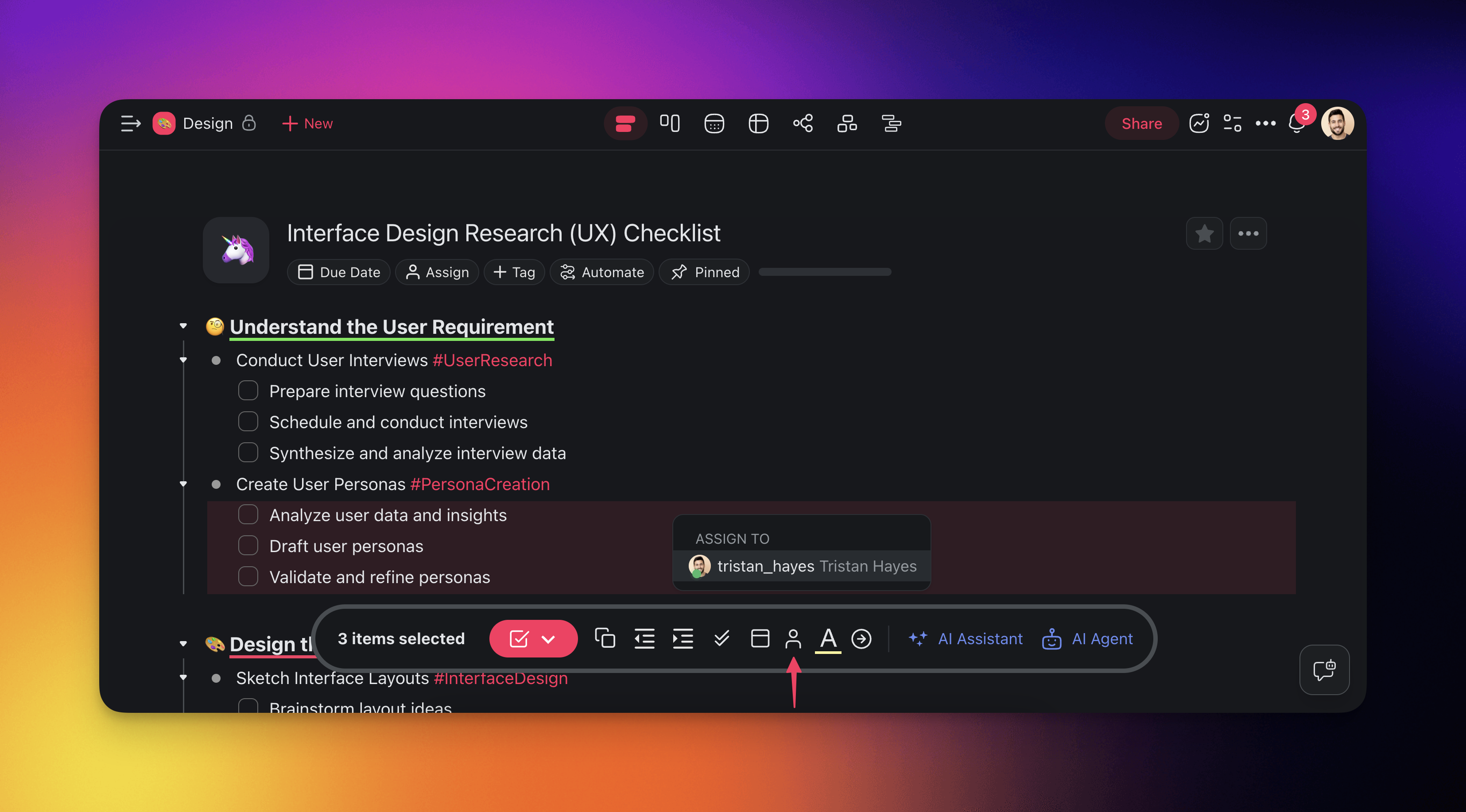
💡 Tip: You can also hold Shift and click to select a range of tasks, or hold Ctrl/Cmd and click to select individual tasks.
Multi-Select Toolbar Actions
When you select multiple tasks, a toolbar appears with these bulk actions:
| Action | Description |
|---|---|
| 👤 Assign | Assign all selected tasks to a member |
| 📁 Move | Move tasks to another project or section |
| 🗑️ Delete | Delete all selected tasks |
| 📋 Duplicate | Create copies of selected tasks |
| ✅ Complete | Mark all selected tasks as done |
| 📅 Due Date | Set a due date for all selected tasks |
Tips
- Bulk assign works in List, Board, and Table views.
- Combine with Custom Fields to tag multiple tasks at once.
- Use Automations to auto-assign tasks based on triggers instead of doing it manually.
- After a bulk assignment, switch to Table view to check the assignments. The assignee column shows the tasks you missed.
Related
- Manage Tasks & Multi-Select Toolbar
- Assign Tasks
- Due Dates & Reminders
- Project Views
- Tags
- Activity Feed