

See the alternative working — clone in 60 seconds
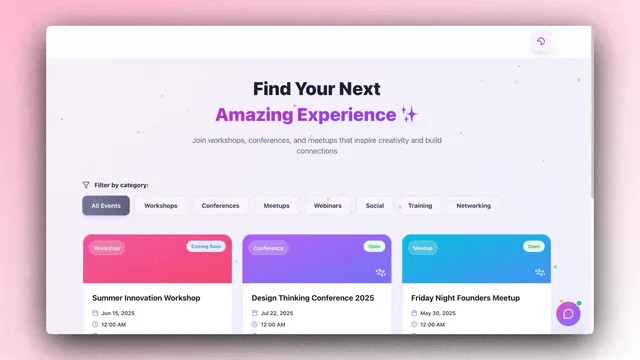
No signup, no credit card. Live real estate landing page
| Capability | WordPress | Taskade Genesis |
|---|---|---|
| Pricing (starting) | Free open source (hosting + plugins extra) | $0 Free · $10/mo Pro billed annually (10 seats) |
| Cloneable live demo | ❌ | ✅ |
| Built-in AI agents | None | ✅ built-in tools |
| Automation engine | Forms + plugins only | ✅ Durable runtime, 100+ integrations |
| Workspace DNA loop | ❌ | ✅ ▲ Memory · ■ Intelligence · ● Execution |
TL;DR: Taskade Genesis builds AI apps with agents, automations, and 100+ integrations included. Pro is $10/mo billed annually for 10 seats. WordPress core is free open source, with hosting typically $5 to $50 per month plus plugins. Try Taskade Genesis free →
What is Taskade Genesis?
Taskade Genesis is the AI app builder inside the Taskade workspace. Founded in 2017 by John Xie, Dionis Loire, and Stan Chang, Taskade is a Y Combinator-backed platform serving over a million users. Genesis is built on Workspace DNA — Memory (Projects), Intelligence (AI Agents), and Execution (Automations) — a self-reinforcing loop where the workspace gets smarter the more your team uses it.
A single prompt can produce a customer portal, an ops dashboard, a CRM, a knowledge base, a form-driven intake tool, or an internal app — with custom domains, password protection, built-in email-and-password app sign-in via GenesisAuth, and one-click publishing to the Community Gallery. No DevOps. No plugin compatibility checks. No hosting to manage.
What is WordPress?
WordPress was launched in 2003 by Matt Mullenweg and Mike Little as an open-source blogging platform. It evolved into the world's most widely used CMS, powering a substantial share of the public web. WordPress runs on a self-hosted model (WordPress.org) or a managed model (WordPress.com), and its strength is the vast ecosystem of themes and plugins that extend the core platform.
WordPress at a glance: Open-source CMS, MySQL database, PHP runtime, 60,000+ plugins, thousands of themes. Excellent for blogs and content sites; requires server management, plugin maintenance, and ongoing security patching when self-hosted.
Where each tool wins
Content sites and blogs — WordPress
If the goal is a content-heavy site — a blog, a news site, a publication, a documentation portal — WordPress's editorial workflow, taxonomy system, and template ecosystem are battle-tested at scale.
AI apps with real backend — Taskade Genesis
If the goal is a working application — a portal, a dashboard, a CRM, a customer intake system, an internal tool — Genesis ships the deployed app with backend, AI agents, automations, and integrations connected from the first prompt.
Lower maintenance burden — Taskade Genesis
WordPress requires ongoing core updates, plugin updates, theme updates, security patches, and backup management. Taskade is fully managed — every layer is handled, so the team can focus on the app itself.
The Workspace DNA advantage
WordPress's mental model is "themes render content from MySQL." Genesis's mental model is Workspace DNA: a self-reinforcing loop between three pillars.
- Memory (Projects) — Your team's docs, tasks, files, and structured data become the substrate every agent reasons over. Read How Workspace DNA Works.
- Intelligence (Agents) — AI Agents v2 with persistent memory, built-in tools, custom tools, and the option to embed publicly inside any Genesis App.
- Execution (Automations) — Durable workflows triggered by external events (Slack, Gmail, Stripe, GitHub, Calendly, webhooks, schedules) that read from Memory and act through Intelligence — then write the results back into Memory. The loop closes.
WordPress is a content engine. Genesis is a continuously running system where every action a team takes makes the workspace smarter and the next app faster to build.
Pricing comparison
| Plan | Taskade Genesis | WordPress |
|---|---|---|
| Free | Free Forever — full app builder, 3 Genesis apps | Free core (host it yourself) |
| Entry | Free Forever, upgrade to Pro anytime | $5-15/mo basic shared hosting |
| Most popular | Pro $10/mo annual (10 seats, unlimited apps) | $25-50/mo managed hosting + premium plugins |
| Team | Business $25/mo (unlimited seats) | $100+/mo serious managed hosting |
| High capacity | Max $100/mo | Custom (enterprise WordPress) |
Choose Taskade Genesis if
- You want to ship a working app, not maintain a CMS
- You need AI agents that persist, have tools, and can be embedded for customers
- You need workflow automations across Slack, Gmail, Stripe, HubSpot, Salesforce, Notion, Shopify, and 100+ other tools
- You want one flat subscription that includes hosting, agents, automations, and team collaboration
- You prefer fully managed infrastructure over plugin maintenance
Choose WordPress if
- You are running a content-heavy publication, blog, or documentation site
- You want full ownership of your stack (open source, self-hosted)
- You have the time or team to maintain core, plugin, and theme updates
- The site is content-led rather than application-led
Use both if: Many teams keep a WordPress blog for SEO content and use Genesis for the customer portal, internal dashboards, and AI-powered apps.
Frequently asked questions
Is Taskade Genesis a WordPress alternative?
When the job is a working app — portal, dashboard, CRM, internal tool — yes. When the job is a content-led site or blog, WordPress remains the better fit.
Does Taskade Genesis include AI agents and automations?
Yes — AI Agents v2 with built-in tools, plus durable workflows across 100+ bidirectional integrations.
Do I need to manage hosting with Taskade Genesis?
No. Hosting, scaling, security patches, and SSL are handled automatically.
Which AI models power Taskade Genesis?
Taskade provides access to 15+ frontier models from OpenAI, Anthropic, and open-weight providers.
Can I publish a Genesis app to a custom domain?
Yes — email-and-password sign-in via GenesisAuth is available on every plan, including Free; password protection is available on Pro and above; custom domains are available on Business+ plans.
Build without permission
WordPress gives publishers a sharper editorial system. Genesis gives every team — operators, founders, engineers, marketers — a workshop where the apps come out finished, hosted, and ready for users.
- Build with Genesis → — One prompt, one deployed app
- Browse the Community Gallery — Clone apps shipped by other Genesis builders
- Read the Workspace DNA explainer — How Memory, Intelligence, and Execution work together
Explore Taskade Genesis
- AI App Builder — Build complete apps from one prompt
- AI Website Builder — Sites in seconds
- AI Agent Platform — Digital teammates that work 24/7
- Workflow Automation — AI-powered business automation
- Vibe Coding — Natural language app creation
Build without code
- AI App Generator — Full apps from prompts
- AI Dashboard Generator — Business dashboards
- AI Website Generator — Sites in seconds
- AI Form Generator — Smart intake forms
- Browse Community Apps — Clone and customize
Related reading
- The Build Without Permission article — Our manifesto
- How Workspace DNA Works — The architecture
- Origin of Living Software — The future of apps
- Best Vibe Coding Tools in 2026 — AI coding tools compared
- Vibe Coding for Non-Developers — Build apps without code
- AI Tools Built With Taskade Genesis — Real apps from the gallery