







In February 2025 Andrej Karpathy named a way of building with AI in which you "forget that the code even exists." By September 2025 GitHub had released a toolkit built on the opposite idea: write down exactly what you want before the agent writes anything. That toolkit, Spec Kit, had about 150,000 GitHub stars on November 12, 2026, and the practice behind it has a name that fills conference programs: spec-driven development.
The idea is older than the tools and simpler than the debate around it. An AI agent builds what you asked for. That only helps if you asked for the right thing, and most requests leave out the parts that matter. A spec is where the missing parts go.
This guide explains what spec-driven development is, how the loop works, what the tools do in late 2026, what the evidence says, and why some experienced engineers tried it and stopped. It also covers something most guides skip: how the same method works for a team that does not write code.
TL;DR: Spec-driven development makes a written spec the main artifact. You state what the software must do, an AI agent plans and builds, and you check the result against the spec. GitHub Spec Kit had about 150,000 stars in November 2026, yet an ESEM 2026 study of 88,052 pull requests found no defect reduction from spec artifacts alone. Try the no-code version →
| Question | Short answer |
|---|---|
| What is it? | Write intent and acceptance criteria first. The agent plans, builds and is checked against them |
| Who started it? | The term appears in a 2004 paper. Amazon Kiro (July 2025) and GitHub Spec Kit (September 2025) made it common |
| What are the steps? | Constitution, specify, clarify, plan, tasks, implement, then verify against the spec |
| Does it work? | It makes agents more predictable and costs more planning time. No independent study shows fewer defects yet |
| Is it waterfall? | Only when the spec is large and frozen. Small specs that change after each build are not waterfall |
| Do you need to code? | No. The method is about intent and checks. A no-code builder can run the same loop |
What Is Spec-Driven Development?
Spec-driven development (SDD) is a way to build software with AI agents in which a written specification, not the chat prompt or the code, is the main artifact. You write what the software must do and why. The agent turns that into a plan and a task list, builds from it, and the result is checked against the spec.
Three parts make it different from "write a long prompt":
- The spec is a file, not a message. It lives where the team can read it, change it and review it. A prompt scrolls away.
- The spec says what and why, not how. It names users, behavior, rules and the test for done. The technical choices come later, in a plan.
- Something checks the result against the spec. Tests, a checklist, a review or a person with the spec open. Without the check, the spec is a wish.
You already write specs under other names. A ticket with acceptance criteria is a spec. So is the brief you hand a contractor: three bedrooms, keep the fireplace, do not touch the roof, done when the inspector signs. Spec-driven development takes that habit and gives it to a builder that works in minutes and never asks what you meant unless you make it.
That last point is the reason the method exists. AI agents are capable enough in 2026 that the limit on the output is usually the request. A vague request does not fail loudly. It returns something plausible that covers the common case and misses yours. Educator Matt Pocock calls this the communication barrier: "it doesn't matter how smart that model is," because the agent cannot know what you care about until you say it.
Our wiki has a short definition of spec-driven development for readers who only need the term. The rest of this guide is the long version.
Why Did Spec-Driven Development Appear in 2025?
Spec-driven development appeared in 2025 because AI made code cheap and left intent as the scarce input. Once an agent could produce a working feature in minutes, the slow and error-prone step was no longer typing. It was saying precisely what to build, and noticing when the result was something else.
The core sequence, from vibe coding to the first Radar entry, took about nine months.
| Date | Event | What it changed |
|---|---|---|
| Feb 2, 2025 | Andrej Karpathy describes vibe coding: "fully give in to the vibes, embrace exponentials, and forget that the code even exists" | Named the fast, chat-first way of building |
| June 2025 | Sean Grove of OpenAI gives the talk "The New Code" at AI Engineer World's Fair | Argued that the specification, not the code, is the valuable artifact |
| July 14, 2025 | Amazon releases Kiro in preview | A mainstream IDE built around requirements, design and tasks files |
| Aug 2025 | The AGENTS.md convention launches | A standard place for standing instructions to coding agents |
| Sept 2, 2025 | GitHub open-sources Spec Kit | Put a spec-driven workflow inside the agents developers already used |
| Nov 2025 | Thoughtworks adds spec-driven development to its Technology Radar in the Assess ring | Named it a practice to evaluate, with a warning attached |
| Feb 2026 | Karpathy proposes agentic engineering as the name for the disciplined version of AI-assisted work | Marked the move from vibes to oversight |
| Aug 21, 2026 | Spec Kit reaches version 1.0 | One year after its first commit |
| Oct 2026 | A peer-reviewed test of the method's defect claims is published | The evidence phase begins |
| Nov 4, 2026 | Thoughtworks Radar Volume 35 puts "AI-driven documentation sprawl" in Caution and "Grilling" in Trial | The backlash and the refinement arrive together |
GitHub's launch post states the claim in one sentence: "We're moving from 'code is the source of truth' to 'intent is the source of truth.'" Two things made that sentence practical in 2025 and not earlier. Models became good enough to follow a long written instruction without losing the thread, which is the story of the context window. And agents gained a loop, so they could plan, act, read the result and correct themselves, which is the story of the agent harness.
What Did "Specs Are the New Code" Actually Say?
The phrase comes from Sean Grove's talk "The New Code" at AI Engineer World's Fair in June 2025, and its claim is narrower than the slogan. Grove argued that a specification carries the intent, that code is a lossy translation of it, and that teams keep the wrong artifact when they save the code and throw the prompt away.
His companion essay makes the argument in four steps:
- Writing code is a small part of the job. "The code I write is maybe 10-20% of my time." The rest is talking, planning and aligning.
- Therefore "structured communication is the bottleneck."
- "Code is actually a lossy projection from the specification." You cannot read the reasons back out of it.
- Keeping generated code and discarding the prompt is "like shredding your source code and then very carefully version-controlling the binary."
His example was not a software product. It was OpenAI's Model Spec, a public document that states how the company's models should behave. Grove called it "a living document that tries to clearly and unambiguously express the intentions and values" behind the models. The point of the example is easy to miss: the spec works there because people use it to judge behavior. When a model flatters users too much, the Model Spec is the thing you hold the behavior against.
That detail matters for everything below. The talk does not say that a Markdown file replaces code. It says a spec is valuable when it is the thing you check against.
The Three Levels: Spec-First, Spec-Anchored and Spec-as-Source
Not every tool that says "spec-driven" means the same thing. Birgitta Böckeler of Thoughtworks sorted the practice into three levels in an October 2025 analysis that much later writing cites. The levels differ in one question: what happens to the spec after the code exists?
| Level | Her definition | After the build | Who edits code |
|---|---|---|---|
| Spec-first | "A well thought-out spec is written first, and then used in the AI-assisted development workflow for the task at hand" | The spec has done its job and may be discarded | People and agents |
| Spec-anchored | "The spec is kept even after the task is complete" | The spec is updated when the feature changes | People and agents |
| Spec-as-source | "The spec is the main source file over time, and only the spec is edited by the human, the human never touches the code" | Code is regenerated from the spec | Agents only |
Read the diagram from the top. Every spec is written and then built. After that the three levels part ways. A spec-first spec is discarded. A spec-anchored spec is kept, and it ends in one of two states: updated with the code, or drifted away from it. A spec-as-source spec regenerates the code.
Most teams in 2026 work at the first level without calling it that. A plan mode in a coding agent is spec-first: the agent writes a plan, you approve it, and the plan is gone when the task ends. Spec Kit and OpenSpec aim at the second level. The third level is rare, and its best-known early example has since moved its positioning toward agent skills.
The state to fear is the one in the middle: kept and drifted. A spec that nobody updates becomes a confident description of software that no longer exists. A later section returns to this, because it is the strongest argument against keeping specs at all.
What Goes in a Good Spec?
A good spec answers five questions in plain language and leaves the technical choices out. It names who the software is for, what it must do, what it must never do, how you will know it worked, and what is out of scope. If a reader can use it to tell a right result from a wrong one, it is a spec.
| Part | The question it answers | Example line |
|---|---|---|
| Intent | Why does this exist? | Sales managers lose deals because follow-ups are late |
| Users and scenarios | Who does what, in what order? | A manager opens the dashboard on Monday and sees overdue follow-ups first |
| Acceptance criteria | How will you know it worked? | A deal with no activity for 7 days appears in the Overdue list |
| Constraints | What must always or never happen? | Never email a contact marked Do Not Contact |
| Non-goals | What is deliberately left out? | No mobile app in this version |
EARS notation in 60 seconds
Acceptance criteria are the part people write worst, because natural language lets you be vague without noticing. EARS, the Easy Approach to Requirements Syntax, fixes the shape of each sentence. Alistair Mavin and colleagues at Rolls-Royce published it in 2009, and Amazon Kiro adopted it for its requirements files.
| Pattern | Template | Example |
|---|---|---|
| Ubiquitous | The system shall [behavior] | The system shall store every invoice for seven years |
| Event-driven | When [event], the system shall [behavior] | When a deal has no activity for 7 days, the system shall mark it Overdue |
| State-driven | While [state], the system shall [behavior] | While an invoice is unpaid, the system shall show it on the dashboard |
| Unwanted behavior | If [condition], then the system shall [behavior] | If the email address is invalid, then the system shall reject the form |
| Optional feature | Where [feature is included], the system shall [behavior] | Where SMS is enabled, the system shall text the reminder |
You do not need the formal words. You need what they force: one behavior per sentence, a clear trigger, and a result someone can observe.
A weak spec and a strong spec
Here is the same request written twice. The first is what most people type. The second takes five more minutes.
WEAK
Build me a CRM for my sales team with a dashboard and reminders.
STRONG
Why: Our 6 account managers miss follow-ups. Deals stall for weeks
before anyone notices.

Users: Account managers (own their deals) and one sales lead
(sees all deals).

Must do:
- Each deal has a contact, a stage, a value and a last-activity date.
- When a deal has no activity for 7 days, it appears in an
  Overdue list, oldest first.
- When a deal becomes Overdue, the owner gets one reminder.
- The sales lead sees totals by stage and by owner.

Must never:
- Never send a reminder for a deal marked Closed.
- Never show one manager's notes to another manager.

Done when:
- I create a test deal, set last activity to 8 days ago, and it
  shows as Overdue and the owner gets exactly one reminder.

Out of scope: email sync, mobile app, forecasting.
The weak version will produce a CRM. It will be a generic one, and you will spend the afternoon discovering what it guessed. The strong version contains no technology at all, and it still removes most of the guesses. Notice the "done when" line. It is a test that a person can run in two minutes, and it is the most valuable sentence in the spec.
How Does the Spec-Driven Loop Work?
The spec-driven loop has six stages: set the standing rules, write the spec, clarify the gaps, plan the build, cut the plan into tasks, then build and verify against the spec. A person approves between stages. The agent does the writing in each stage, and each stage produces a file the next stage reads.
| Stage | What you provide | What the agent produces | Your gate |
|---|---|---|---|
| Constitution | The rules that apply to every feature | A short principles file | Read it once, then rarely |
| Specify | What and why, in plain language | User stories, requirements, acceptance criteria | Does this describe what I want? |
| Clarify | Answers to a few questions | A spec with the gaps filled | Were the questions the right ones? |
| Plan | The technology choices and limits | Architecture, data model, interfaces | Is this how we would build it? |
| Tasks | Nothing new | An ordered task list | Is the order sensible? |
| Implement and verify | Approval | Code, tests and a report against the spec | Does it pass, and does it match? |
The stage people skip is clarify, and it is the one that pays most. Left alone, an agent does not ask. Stanford's CS329Z course on agent engineering uses a small example of this, first reported by Platformer: an early computer-use agent was asked to buy groceries, and instead of asking where the user lived or which store they used, it opened a browser and searched for milk at a store in Des Moines, Iowa. The clarify stage exists to force the question.
A live run, from blank folder to working app
A clear public demonstration of the loop is a session recorded for The Art of Network Engineering podcast and published in August 2026. John Capobianco, head of AI and developer relations at Itential, walks host Andy Lapteff through one Spec Kit project with no preparation. The product is a browser game that teaches IPv4 subnetting.
What happened, in order:
| Step | What they did | What came out |
|---|---|---|
| Constitution | Drafted principles with an assistant, then ran the constitution step | Five core principles, with "correctness before everything else" for subnet math |
| Specify | Described a subnetting game and answered three open questions | Three prioritized user stories, requirements and acceptance scenarios for beginners, IPv4 only |
| Clarify | Answered a round of up to five more questions | Decisions on how a learner advances, how each concept is taught and whether answers are timed |
| Plan | Chose plain HTML, CSS and JavaScript in the browser | A plan, a data model and interface contracts |
| Tasks | Ran the step with no prompt | A task list in phases, ordered by dependency |
| Implement | Approved | Failing tests first, then code: 77 passing tests at the end and a playable game |
The whole run took about an hour, and the implement step alone took roughly 25 minutes. The hosts skipped the analyze step. Capobianco is direct about the cost: the method uses far more tokens than a single prompt, and he suggests a cheaper model for the early steps. He also gives the best one-line bridge to people outside software. A network change already needs requirements, a high-level design, a low-level design, an implementation plan, a test plan and a rollback plan. Spec-driven development is that discipline, with an agent doing the writing. In his words, "Markdown is kind of the universal language between humans and LLMs."
The session also shows what the method does not prove. Nobody read the code. Nobody checked that the 77 tests assert the right subnet math. The hosts got their first question wrong in the finished game, which shows the game runs, not that it is correct. A spec moves the question from "does it work?" to "does it match the spec?", and someone still has to answer it.
GitHub Spec Kit in 2026: Commands, Files and What Changed
GitHub Spec Kit is an open-source toolkit, MIT licensed, that installs a spec-driven workflow into the coding agent you already use. GitHub released it on September 2, 2025. On November 12, 2026 the repository showed about 149,500 stars and version 1.4.0, and its documentation listed more than 40 supported agents.
The workflow is a set of nine steps. The documentation writes them in a dotted form, and the form you actually type depends on your agent.
| Step | What it does | Writes or reads |
|---|---|---|
constitution |
Sets the project's guiding principles. Run once | The constitution file |
specify |
Turns a plain description into a feature spec | spec.md |
clarify |
Asks at most five focused questions and saves the answers | Updates spec.md |
plan |
Produces the technical plan from the spec and your stack | plan.md, data-model.md, contracts/ |
checklist |
Checks the quality of the requirements, not the code | A checklist file |
tasks |
Generates an ordered task list in phases | tasks.md |
analyze |
Cross-checks spec, plan and tasks for conflicts. Read-only | Reads all three |
implement |
Works through the tasks phase by phase | Code and tests |
converge |
Compares the code to the spec, plan and tasks. Never edits code | May append tasks to tasks.md |
my-project/
├── .specify/                  the project marker, templates, settings
└── specs/
    └── 001-subnetting-game/   one folder per feature
        ├── spec.md            what and why
        ├── plan.md            how
        ├── research.md        choices and the reasons
        ├── data-model.md      the records and their fields
        ├── contracts/         the interfaces
        ├── quickstart.md      how to run it
        ├── tasks.md           the ordered work list
        └── checklists/        requirement quality checks
What changed since the 2025 tutorials
Most Spec Kit tutorials on the web were written in late 2025, and the tool has moved since. If a tutorial fails at the first command, one of these is usually why.
| 2025 tutorials say | The project docs say in November 2026 |
|---|---|
Choose your agent with --ai |
The flag is --integration. The old flag is rejected |
Commands are /specify, /plan, /tasks |
Steps install as agent skills. The typed form depends on the agent, for example /speckit-specify |
| Four steps | Nine steps. constitution, clarify, checklist, analyze and converge were added |
| A git branch is created for every feature | Git is optional. Numbered feature branches come from an opt-in extension |
| Tests are always written first | The tasks template says tests are optional unless you ask for them. When included, they must fail before the code is written |
Install with npm |
The quickstart installs the CLI with uv. Check the repository before you copy an install line |
The test-first row deserves a second look, because it corrects a common belief. The live run above produced failing tests first, most likely because its constitution set testing standards. Do not rely on a default. If you want tests to gate the build, say so in the constitution.
The Tool Map: Kiro, OpenSpec, BMAD, Tessl and Plan Modes
By late 2026 the tools fall into four groups: IDEs with a spec mode, toolkits that add a spec workflow to any agent, heavier role-based frameworks, and plan modes built into coding agents. They share the idea and differ in how much ceremony they add and what they keep afterward.
| Tool | What it is | Its artifacts | Level |
|---|---|---|---|
| Amazon Kiro | An AI IDE with a spec mode. Preview July 2025, generally available November 2025 | requirements.md with EARS criteria, design.md, tasks.md |
Spec-first, moving to anchored |
| GitHub Spec Kit | A toolkit for 40+ agents, about 149,500 stars | spec.md, plan.md, tasks.md and more |
Spec-first, moving to anchored |
| OpenSpec | A lighter toolkit, about 74,700 stars. Thoughtworks Radar: Trial, November 2026 | Current specs kept apart from proposed changes, which are written as deltas | Spec-anchored |
| BMAD Method | A role-based framework with agent personas for product owner, architect and developer, about 55,300 stars | A requirements document, an architecture, then story files | Spec-first, heavy |
| Tessl | Founded by Guy Podjarny with $125 million raised. Launched a spec registry and framework in 2025 | Specs with generated code beside them | Began as spec-as-source. Its site now leads with software factories built from agent skills |
| Plan modes | Built into coding agents such as Claude Code and Cursor | A plan you approve before any edit | Spec-first, light |
| Execution plans | A convention for long agent runs, described in OpenAI's Codex cookbook | A living plan file with progress and a decision log | Spec-first with a record |
Star counts come from each repository on November 12, 2026. They measure attention, not results.
Two rows deserve a comment. OpenSpec is the tool to watch if spec drift worries you, because it separates "what is true now" from "what this change proposes" and merges the second into the first when the change ships. Plan modes are where most developers already practice spec-first without the name. The agent reads the code, proposes a plan and waits. If you have used a plan mode in a tool from our list of Claude Code alternatives or Cursor alternatives, you have done the lightest form of spec-driven development.
For the wider market of tools that run the full loop from request to shipped change, see our comparison of software factory tools.
More Than 50 Years of Writing It Down First
Spec-driven development is the newest attempt at one of the oldest ideas in software: write what the system must do before you build it. The idea has been tried in every decade since the 1970s. It succeeded when the spec was small and something checked it, and it failed when the spec was large and nothing did.
| Year | Idea | What the spec was | What happened |
|---|---|---|---|
| 1970 | Royce, "Managing the Development of Large Software Systems" | Documents for each phase | Remembered as waterfall, though Royce called the single-pass version "risky" |
| 1977 | Z notation | Mathematics | Used for safety-critical systems. Too costly for most teams |
| 1984 | IEEE 830, the software requirements specification | A long structured document | Became the template for big-design-up-front |
| 1986 | Design by Contract, Bertrand Meyer | Preconditions and postconditions in code | Survives in types, assertions and API contracts |
| 1990s | CASE tools | Diagrams that generate code | The promise outran the tools, and the market collapsed |
| 2001 | Model-driven architecture | Models that generate code | Worked in narrow domains, not for business software |
| 2002 | Test-driven development, Kent Beck | An executable test | Lasting, because the spec runs |
| 2004 | Ostroff, Makalsky and Paige, "Agile Specification-Driven Development" | Tests and contracts together | An early use of the term, two decades before the AI tools |
| 2006 | Behavior-driven development, Dan North | Given, when, then scenarios | Lasting where teams keep the scenarios running |
| 2009 | EARS, Rolls-Royce | Constrained English sentences | Quietly useful, revived by Kiro in 2025 |
| 2010 | README-driven development, Tom Preston-Werner | The README, written first | A habit more than a method |
| 2011 | Swagger, later OpenAPI | A machine-readable API contract | A standard, because tools enforce it |
| 2015 | Amazon publishes how it uses TLA+ | A formal model of the design | Found design bugs that testing did not |
| 2025 | AGENTS.md, Kiro, Spec Kit | Markdown that an agent reads | In progress |
The diagram has two branches, and the colors are the lesson. The red branch is the line of large documents and generated code: requirements documents, CASE tools, model-driven architecture. Each one promised that a good enough description would produce the software, and each one stalled when the description drifted from reality. The green branch is the line of small specs that execute: contracts, tests, scenarios, API definitions. Those lasted because a machine checks them on every change.
Spec-driven development in 2025 inherits from both branches, which is why the debate about it is so sharp. A spec that turns into tests and is checked on every build belongs to the green line. A folder of Markdown that nobody verifies belongs to the red one.
Two of these entries reward a closer look. Tom Preston-Werner's 2010 essay on README-driven development contains a sentence that sums up the subject: "A perfect implementation of the wrong specification is worthless." And Amazon's 2015 paper on TLA+ is the strongest evidence that writing the design down first can be worth the cost: its engineers reported that formal specifications found bugs in system designs that no other technique they knew of had found. Both point the same way. The value is in being forced to think precisely, and in having something to check.
Spec-Driven Development vs Vibe Coding vs TDD vs BDD
These four practices answer the same question in different places: where does intent live, and what checks it? Vibe coding keeps intent in the chat. Test-driven development puts it in a test. Behavior-driven development puts it in a scenario. Spec-driven development puts it in a document that the other three can be derived from.
| Where intent lives | What checks it | Best for | Main risk | |
|---|---|---|---|---|
| Vibe coding | The conversation | Your eyes | Prototypes, personal tools, exploring an idea | It works until it has to be changed |
| Spec-driven development | A written spec | Acceptance criteria, tests, review | Features other people will rely on | Markdown that nobody verifies |
| Test-driven development | A failing test | The test runner | Logic with clear right answers | Tests that pass and miss the point |
| Behavior-driven development | Given, when, then scenarios | Automated scenarios | Rules that business people must read | Scenarios that nobody maintains |
They are not rivals. The strongest loop uses all four in sequence. You explore by vibe until you know what you want. You write that down as a spec. The acceptance criteria become scenarios, the scenarios become tests, and the agent builds until the tests pass. Our guide to vibe coding for non-developers covers the first step, and agentic engineering covers the discipline around the rest.
Is Spec-Driven Development Just Waterfall?
Spec-driven development becomes waterfall only when the spec is large, frozen and written for a whole system. Done per feature, with the spec updated after each build, it is closer to a very short iteration with a written first step. The criticism is still worth taking seriously, because the heavy tools make the waterfall version easy to fall into.
The sharpest version of the criticism came from François Zaninotto of Marmelab in November 2025, in a post titled The Waterfall Strikes Back. He cited a Spec Kit run on a small feature, a date display, that produced 8 files and about 1,300 lines of text. "SDD reminds me of the Waterfall model," he wrote, "which required massive documentation before coding."
Kent Beck, who popularized test-driven development, named the assumption underneath. Writing the whole specification first, he wrote, "encodes the (to me bizarre) assumption that you aren't going to learn anything during implementation that would change the specification." Martin Fowler, who quoted him, added that "the learning loop of experimentation is essential to the model building."
Böckeler found the same thing with the tools in her hands. On a small bug, the full workflow was "like using a sledgehammer to crack a nut," and she admitted, "I'd rather review code than all these markdown files."
And here is the part that should end the argument about the word. Winston Royce's 1970 paper, the usual source of the waterfall diagram, says of the single-pass model: "I believe in this concept, but the implementation described above is risky and invites failure." The author of waterfall did not recommend waterfall. He recommended doing it twice and feeding what you learned back in.
So the fair answer has two halves:
- A spec per feature is not waterfall. It is the first ten minutes of a short loop. You write, the agent builds in minutes, you learn, and you change the spec.
- A spec for the whole system, approved before any code, is waterfall. It fails for the reason it failed in 1970: you learn the most important things while building.
The practical rule is to keep the spec as small as the change and to treat it as something you expect to edit.
Does Spec-Driven Development Work? What the Evidence Says
The honest answer in November 2026 is that spec-driven development makes agents more predictable and costs more planning and review time, and that no independent study yet shows it reduces defects. Most of the confident numbers in circulation are vendor claims or single-team stories.
| Source | What it studied | What it found | Type |
|---|---|---|---|
| Hill, ESEM 2026 | 88,052 pull requests in 119 open-source repositories | No detectable difference in defects between changes with and without specification artifacts (a difference of 0.6 percentage points, p = 0.133) | Peer-reviewed |
| Agarwal and colleagues, 2026 | 21 interviews and 470,795 spec files in 73,030 repositories | Practitioners reported "more reliable agent behavior alongside greater planning and review costs" and used the method "selectively and mainly for new features" | Preprint, qualitative |
| Marmelab, 2025 | One small feature with a spec toolkit | 8 files and about 1,300 lines of documentation | Practitioner report |
| Thoughtworks Radar, Nov 2026 | Industry practice | "AI-driven documentation sprawl" placed in Caution. "Grilling" placed in Trial | Expert judgment |
| Vendor posts | Their own products | Large speed and quality gains | Vendor claims |
The ESEM result needs a careful reading, in both directions. It does not show that Spec Kit or Kiro fail. The paper says plainly that the adoption of those tools "remains untested," because no repository in its sample committed their output. What it measured was the older habit of attaching a specification artifact, such as a linked issue or ticket, to a pull request. What it found is that the artifact alone does not make the change safer.
That matches the history section exactly. A document attached to a change is the red branch. The claim that spec-driven tools make is about the green branch: specs that turn into checks. That claim is still waiting for its study.
Popularity is easier to measure than outcomes, and it tells its own story.
On that date the three best-known spec frameworks had about 280,000 stars between them. The fourth bar is a collection of agent skills by Matt Pocock, whose README says of frameworks such as Spec Kit and BMAD that "they take away your control and make bugs in the process hard to resolve." It had about 323,000 stars by itself. By stars, the largest repository in this chart belongs to a person who treats the spec as disposable after the work ships. The next section explains his case.
The Case Against Keeping the Spec: Grilling and Throwaway Specs
The strongest critique of spec-driven development comes from people who tried it. Matt Pocock, who teaches AI-assisted engineering, ran the method on his own product for months and stopped. His conclusion is not that specs are useless. It is that a spec is a tool for thinking, and that the durable source of truth has to be something that executes.
He tells the story in an interview published in October 2026. After hearing the "specs are the new code" argument, he turned his custom video editor into a large spec and let agents regenerate the code from it. "I just saw the code getting worse and worse and worse," he says. The agent's results declined with it. What changed his mind was a reframing: "code is the environment that the agent operates in." A messy codebase produces messy work, no matter how good the description above it is.
What he does instead has three parts, and each one is a piece of spec-driven development with the storage changed.
| Pocock's practice | What it replaces | Where intent ends up |
|---|---|---|
| Grilling. The agent interviews you about the plan before it acts | The clarify step | In your answers, then in the work |
| A shared vocabulary. The same word for a thing in the conversation, the code, the database and the interface | The glossary nobody reads | In the names |
| Tests and a drivable app. The agent can run the checks and click through the product | The acceptance criteria | In checks that execute |
Grilling is the part that spread. Thoughtworks added it to the Trial ring of its Technology Radar in November 2026, describing it as a technique where "a coding agent interviews you about a plan before acting." Pocock's reason for it is the most useful sentence in the whole debate: "The skill is being aware of unknown unknowns." You do not know what you forgot to specify. An interviewer finds it faster than a template does.
On the spec itself, his site AI Hero puts the view in two sentences: "The spec describes your destination. But what you really need is the journey to get there." He writes a spec to think, turns it into small tasks with tests, and does not treat the spec as a permanent artifact.
Put the two camps side by side and the disagreement shrinks to one question.
| Spec Kit camp | Pocock camp | |
|---|---|---|
| Write intent down before building? | Yes | Yes |
| Make the agent ask questions first? | Yes, the clarify step | Yes, grilling |
| Break the work into small checked tasks? | Yes | Yes |
| Keep the spec after the build? | Yes, in the repository | No. Keep tests, names and clean code |
Both camps keep intent somewhere that is checked. They disagree about where. The spec-keepers bet that a maintained document stays true. The spec-discarders bet that only executable things stay true. The evidence so far, and more than fifty years of history, lean toward the second bet, with one exception that matters a great deal: people who cannot read code. For them, tests and clean code are not readable. A plain-language spec is the only version of intent they can check. That is the case the last sections cover.
When Should You Write a Spec, and When Should You Skip It?
Write a spec when being wrong is expensive, and skip it when being wrong is cheap. The cost of a spec is minutes. The cost of skipping one is a wrong build that looks right. Those two costs decide the question, and they are different for every change.
Zach Lloyd, founder of Warp, puts the rule into the design of a software factory. In his 2026 AI Engineer talk, an agent triages each request first, and the rule is: "If this is easy and this is unambiguous, just implement it." Only hard work gets a spec, and then it gets two. A product spec states the product invariants the change must meet. A tech spec states the architecture and the shape of the code. A person reviews both.
| Situation | Spec? | Why |
|---|---|---|
| A typo, a color, a label | No | Faster to change than to describe |
| A prototype to see if an idea is any good | No | You do not know what you want yet |
| A feature a teammate or customer will use | Short spec | Someone else must be able to check it |
| Anything with money, permissions or deletion | Full spec | A wrong guess is costly and may be silent |
| A change across many parts of a system | Full spec | The agent needs the map, and so do reviewers |
| Work an agent will do overnight with nobody watching | Full spec | Nobody is there to answer a question |
A Spec Is a Cache of Your Intent
A spec is a cache of your intent: a fast copy of what you want, kept where an agent can read it, and like every cache it goes stale unless something expires it or updates it. The tool debates miss this framing. Engineers have fifty years of experience with what goes wrong when you keep a fast copy of the truth.
The first rule of caching is that two copies of the same thing will disagree sooner or later. The second is that an empty cache is only slow, while a cache that serves the wrong answer with confidence is dangerous. A spec that says "managers see only their own deals" after someone changed that rule in the app is a cache serving the wrong answer.
System design has two tools for this, and both translate directly.
| Caching tool | How it works for data | How it works for a spec |
|---|---|---|
| Expiry (TTL) | The copy is thrown away after a set time and rebuilt from the source | The spec is disposable. Write it, build from it, discard it. This is spec-first, and it is Pocock's position |
| Active invalidation | Every write to the source also updates or deletes the copy | Every change to the product also changes the spec, in the same step. This is spec-anchored, and it only works when a tool enforces it |
| No strategy | The copy slowly goes stale | The spec drifts. This is the failure everyone warns about |
The same lens explains a failure that has nothing to do with spec files. A long-running agent compresses its history to save space, and the compressed copy can lose an instruction. In February 2026 a researcher reported that an agent managing her inbox deleted more than 200 emails after a memory compaction dropped her instruction to wait for approval. The instruction was a spec. The compacted memory was a stale cache of it.
The fix system designers use is to sort data by the cost of one stale read. A like count gets a timer. A privacy setting gets invalidation, because one wrong read shows private data to the wrong person. Specs deserve the same sorting.
- Disposable intent, such as the plan for one small feature: let it expire.
- Durable intent, such as "never email a contact marked Do Not Contact": do not leave it in a document. Put it where it is enforced, as a test, a permission or an approval step.
That second bullet is the most practical idea in this guide. The rules you cannot afford to lose should not depend on an agent remembering to read a file. Our piece on why structure beats instruction covers the experiments behind it, and the wiki entry on human-in-the-loop covers the approval pattern.
Spec-Driven Development Without Code: How It Works in Taskade Genesis
Spec-driven development does not require code, a terminal or a repository. The method has four moves: state intent, answer questions, review a plan, approve the result. A person who cannot read a diff can do all four, as long as the spec is in plain language and the result is a running app they can try.
This is where the no-code version has an advantage that the developer debate overlooks. A developer can replace the spec with tests and clean code. A business owner cannot read either. For that person the written spec and the working app are the only two things they can check, so both have to be first-class.
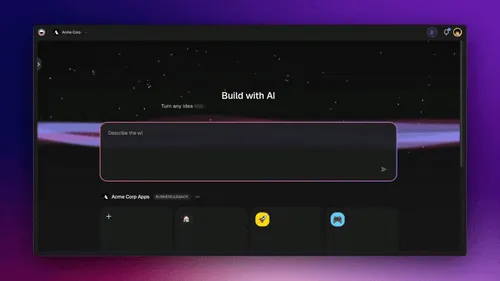
Taskade Genesis is the AI app builder from Taskade that produces a live app with its data, agents and automations, and Taskade EVE is the assistant that builds it. Here is how each stage of the loop maps.
| Spec-driven stage | What you do in Taskade Genesis | Where it lives |
|---|---|---|
| Standing rules | Save preferences that follow you to every workspace under Settings, Account, Taskade EVE memory | Your account |
| Specify | Describe the app in plain language, or paste a spec you already wrote. Taskade EVE records your requirements in your own words | A TASKS.md project in the app's workspace |
| Clarify | Answer one short round of up to three multiple-choice questions. Skip, and Taskade EVE uses its recommended answers | The chat |
| Plan | Type /plan. Taskade EVE writes the plan and builds nothing |
A Plans.md project you can edit |
| Implement | Type /execute. It carries out the plan step by step |
The app |
| Check | Taskade EVE reads the app preview for errors and checks that projects, agents and automations are connected. You try the app with real data | The preview |
| Approve | The first build goes live once as an unlisted app. Set the app to publish manually, and each later edit stays a draft until you press Publish | Your decision |
| Roll back | Restore an earlier version from version history | The app's history |
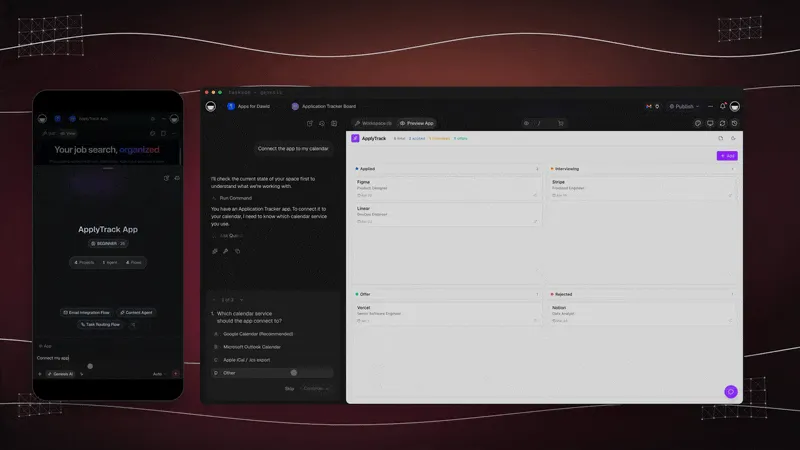
A session looks like this.
┌────────────────────────────────────────────────────────────┐
│ Taskade Genesis  ›  Chat                                   │
├────────────────────────────────────────────────────────────┤
│ You          /plan  A deal tracker for 6 account managers. │
│              Deals go Overdue after 7 days with no         │
│              activity. The sales lead sees all deals.      │
│                                                            │
│ Taskade EVE  One question first                    1 of 1  │
│              Where should the Overdue reminder go?         │
│                [ Email the deal owner ]     Recommended    │
│                [ A task in their project ]                 │
│                [ Something else... ]                       │
│                                  [ Skip ]  [ Continue ]    │
│                                                            │
│ Taskade EVE  Plan saved to Plans.md. Nothing is built yet. │
│              1. Deals project: contact, stage, value,      │
│                 owner, last activity                       │
│              2. Follow-up agent: drafts the reminder       │
│              3. Automation: daily check, 7-day rule        │
│              4. Dashboard: Overdue first, totals by stage  │
│                                                            │
│ You          /execute                                      │
└────────────────────────────────────────────────────────────┘
Three things about this version are worth pointing out.
The spec is a project, not a file in a repository. TASKS.md and Plans.md are projects in your workspace, kept as Taskade EVE memory. A teammate with no technical background can open them, read what was asked for, and edit the plan before anything is built. In the developer tools, the same artifact sits behind git.
The question round is limited on purpose. Taskade EVE asks at most one round of questions in a chat, with up to three questions, and then builds. Open-ended clarifying can turn into a loop of repeated questions, so the product blocks a second round in code instead of relying on an instruction the model can decline. It is the "structure beats instruction" lesson applied to the clarify step. The Taskade EVE questions guide shows the card, and the command reference lists /plan, /brainstorm and /execute.
The durable rules live in gates, not in the document. This is the cache lesson from the previous section. With the app set to publish manually, each edit after the first build stays a draft until a person presses Publish. Taskade EVE asks for approval before it removes a custom field or five or more tasks at once. And inside a workflow, a Wait for approval step pauses an automation until a teammate clicks Approve or Reject. Automations run on every plan, and the approval step comes with them. The step emails the approvers on every plan. The approval actions of premium integrations such as Gmail or Slack need a paid plan. Our guide to building an approval workflow walks through it.
What it does not do
An honest map has edges, and a guide about writing things down precisely should state them.
- It is a practice, not a locked pipeline. Nothing in the product blocks a build until you approve a spec. You choose to type
/planfirst. The approval is your reply. - Taskade EVE reads the preview. It does not click through your app for you. It can catch errors on the page and broken connections between parts. Whether the Overdue rule fires on day 7 is something you confirm with a test record.
- The plan is read when you point to it.
/executereads Plans.md by itself. In a new chat without/execute, mention the plan project so the assistant works from it. - The spec does not travel with a copy. If you publish the app as a kit for others to clone, the copy leaves out your Taskade EVE memory projects (TASKS.md, GOALS.md and RULES.md), so your requirement notes stay with you.
- It is not a code factory. If your product is a codebase with a repository and a release process, the developer tools above are the right ones. The app factory guide explains where each kind fits.
How to Write Your First Spec in 30 Minutes
You can run the whole method once in half an hour, with any AI builder, on a small real problem. Pick something you would otherwise have built by typing one sentence into a chat. The goal of the first run is not a perfect spec. It is to feel the difference between a guess and a checked result.
Step 1: Write the why in two sentences
Say who has the problem and what it costs them. "Our account managers miss follow-ups. Deals stall for weeks before anyone notices." If you cannot write these two sentences, you are not ready to build, and no tool will fix that.
Step 2: List what it must do, one behavior per line
Write five to eight lines. Start each with the trigger: "When a deal has no activity for 7 days, it appears in the Overdue list." One behavior per line. If a line contains "and," split it.
Step 3: List what it must never do
This is the section people skip and regret. Two or three lines are enough. "Never send a reminder for a closed deal." "Never show one manager's notes to another." Rules about money, privacy and deletion belong here.
Step 4: Write one done-when test you can run yourself
Describe a check that takes two minutes and needs no technical skill. "I create a test deal, set its last activity to 8 days ago, and it shows as Overdue." If you cannot test it, you cannot approve it.
Step 5: Let the agent interview you before it builds
Paste the spec and add one line: "Before you build, ask me the questions you need answered." Answer them, and add the answers to the spec. This step finds what you forgot, which is the part no template can supply.
Step 6: Build, run your test, then fix the spec first
When the build finishes, run the done-when test. If something is wrong, resist the urge to type a correction into the chat. Change the spec, then ask for the change. After two or three rounds you will have a short document that describes what you built, and that is the thing your team can read next month.
Then decide what to keep. Following the cache rule: let the plan expire, move the "must never" lines into gates that enforce them, and keep the done-when tests as the checks you run after every change.
What Spec-Driven Development Does Not Fix
Spec-driven development improves the request. It does not replace judgment, and four problems remain after you adopt it.
It cannot tell you what is worth building. A spec makes a wrong idea precise. Asked about this at the end of his talk, Zach Lloyd said that if the output is something "no one cares about," then "what's the point?" Taste stays with people.
It does not verify itself. A spec with no check is a document. The check can be a test, a second account, a checklist or a person with the spec open, but something has to say no. Teams that run agents at scale build that check as a set of evals.
It costs time and money. More stages mean more tokens and more reading. The live run above took an hour for a small game. That is a good trade for a feature people will use for a year and a poor one for a label change.
It can slow your own learning. A 2026 study by Anthropic found that engineers who used AI assistance on a task scored lower on a follow-up quiz than those who did not, 50% against 67%. A spec does not fix that. Reading what the agent built, and asking it to explain, does.
The method's real contribution is smaller and more durable than the hype around it. It moves the moment of thinking to the start, where a mistake costs minutes, and it gives you something to hold the result against.
Related Reading
- Context engineering How to give a model the right information at the right time. A spec is one layer of context.
- The end of the software backlog What changes for a business when building is cheap.
- Browse the Taskade App Factory for working apps to clone, start from a template, or see what you can build with AI apps and 100+ integrations.
Frequently Asked Questions
What is spec-driven development?
Spec-driven development (SDD) is a way to build software with AI agents in which a written specification, not the chat prompt or the code, is the main artifact. You write what the software must do and why. The agent turns that into a plan and tasks, builds, and you check the result against the spec.
What does SDD stand for?
SDD stands for spec-driven development, also written specification-driven development. The phrase appeared in a 2004 research paper by Ostroff, Makalsky and Paige. It became common in 2025, when Amazon Kiro and GitHub Spec Kit built AI coding workflows around a written spec.
How is spec-driven development different from vibe coding?
Vibe coding keeps intent in a chat and judges the result by feel. Spec-driven development writes intent down first, with acceptance criteria, and checks the result against it. Vibe coding is faster for a throwaway prototype. A spec is better when other people will rely on the result.
Is spec-driven development the same as test-driven development?
No. Test-driven development writes an executable test before the code. Spec-driven development writes intent and acceptance criteria in plain language before the plan. The two fit together: in a good spec-driven loop the acceptance criteria become tests that the agent must pass.
Is spec-driven development just waterfall?
It becomes waterfall only when you freeze one large specification for a whole system. Winston Royce's 1970 paper already called that approach risky. Spec-driven development works when each spec covers one small feature and you update it after you learn from the build.
Does spec-driven development reduce bugs?
No independent study shows that yet. A 2026 ESEM paper studied 88,052 open-source pull requests and found no detectable difference in defects between changes with and without specification artifacts. Interview research reports more reliable agent behavior together with higher planning and review costs.
What is GitHub Spec Kit?
GitHub Spec Kit is an open-source toolkit, released by GitHub in September 2025 under the MIT license, that adds a spec-driven workflow to coding agents. Its steps are constitution, specify, clarify, plan, checklist, tasks, analyze, implement and converge. Most steps write or check a Markdown file.
What are spec-first, spec-anchored and spec-as-source?
They are three levels described by Birgitta Böckeler of Thoughtworks. Spec-first writes a spec for one task and may discard it afterward. Spec-anchored keeps the spec and updates it as the feature changes. Spec-as-source makes the spec the only file people edit, and code is generated from it.
What is EARS notation?
EARS is the Easy Approach to Requirements Syntax, published by engineers at Rolls-Royce in 2009. It gives each requirement a fixed shape, such as WHEN an event occurs THE SYSTEM SHALL respond in a stated way. Amazon Kiro uses EARS for acceptance criteria.
When should you skip the spec?
Skip the spec for a throwaway prototype, a one-line fix, or work where you do not yet know what you want. Write one when the change is hard to reverse, when it touches money or permissions, or when someone other than you will rely on the result.
Can you do spec-driven development without code?
Yes. The method is about stating intent and checking the result, not about code. In Taskade Genesis you describe the app, answer a short round of questions, review a written plan and choose when each change goes live. The spec lives in a project your team can read and edit.
What is grilling in AI development?
Grilling is a technique where the AI agent interviews you about your plan before it acts, so that gaps in your intent appear early. Matt Pocock popularized it with his grill-me skill. Thoughtworks placed grilling in the Trial ring of its Technology Radar in November 2026.
Code got cheap. Saying what you mean did not. Spec-driven development is the practice of doing the expensive part first and on purpose: write what you want, let the builder ask what you forgot, read the plan, and approve only what passes your own test. The tools will keep changing. That order will not.