





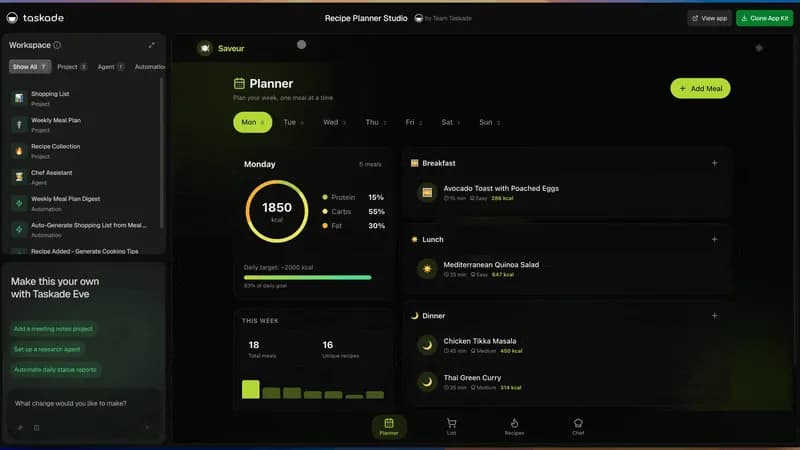
Most businesses do not need one giant system. They need a few apps that work their way: a CRM that knows how they sell, a portal for each client, a tracker for invoices, a form that takes requests, and one dashboard that shows the week. The slow part was never the idea. It was building each app from scratch.
An app factory changes that. You start from something that already works, give it a brain, make it yours in plain words, and then turn one good app into many. This guide shows how to build an app factory in Taskade, step by step, for owners who do not write code.
TL;DR: An app factory is a repeatable way to make the apps your business runs on. In Taskade, clone a working App Kit from Taskade App Factory or describe the app to Taskade EVE. Each app has projects, AI agents and automations, and Taskade hosts 150,000+ apps. Start free with 3 apps. Build your first app →
Build your first app with Taskade Genesis, clone a working app from Taskade App Factory, or compare every plan on Taskade pricing.
| Question | Short answer |
|---|---|
| What is an app factory? | A repeatable way to make many working apps from a few proven ones |
| What do I start from? | A real problem, an App Kit to clone, or a description to Taskade EVE |
| What makes each app smart? | Workspace DNA: projects hold the data, AI agents reason, automations act |
| How do I change an app? | Ask Taskade EVE in plain words, then test and publish |
| How does one app become many? | Duplicate it for each client, or publish it as an App Kit for others to clone |
| What does it cost to start? | Free: 3 apps, 1 AI agent, 2 members, no card. Pro is $10/month billed annually |
🏭 What Is an App Factory?
An app factory is a repeatable way to make the apps a business runs on. You start from a proven app, adapt it, and copy it for the next client, location or team. In Taskade, that is Taskade App Factory, a library of App Kits, plus Taskade Genesis, which builds and runs each app.
The term has four meanings on the web, and each meaning serves a different reader. Large companies use it for a governance program. Developers use it for a code pattern or a software pipeline, and cloud vendors use it for developer platforms. This guide uses the fourth meaning: a small business that makes its own apps. Our Taskade App Factory announcement explains what launched on November 5, 2026.
| Meaning | Who uses it | What comes out | Example |
|---|---|---|---|
| Enterprise app factory | IT teams in large companies | Governance for hundreds of low-code apps | Pega App Factory, the Mendix app factory model |
| Developer "factory" | Software engineers | Code: an app instance or a merged pull request | The Flask application factory pattern, an AI software factory |
| Cloud "app and agent factory" | Developers on a cloud platform | Hosted AI apps and agents | Azure AI Foundry, which Microsoft calls "your AI app and agent factory" |
| Business app factory | Owners, operators and agencies | Live apps with data, AI agents and automations | Taskade App Factory |
A business app factory has a different output from a developer factory. A software factory ends at a code change that someone still has to deploy and host. A business app factory ends at a live web address that a client or a teammate opens the same day. Our guide to software factory tools compares both tracks side by side.
💡 The Idea: A Few Apps That Work Your Way
The idea behind an app factory is simple: you need a few apps that work your way, and you do not build each one from scratch. Most of the work in a small business repeats. Each new client needs the same portal. Each new location needs the same booking page. Each new hire needs the same onboarding checklist.
Off-the-shelf software solves the average version of that work. It does not know that your agency sends a weekly update every Friday, or that your clinic asks for an insurance field on every intake. A custom app knows those things, but a custom app used to mean a developer, a budget and a wait.
An app factory removes the wait in three ways:
- You start from something that works. A cloned app has its data structure, its AI agent and its automations on day one.
- You change it in plain words. "Add a field for contract renewals" is a complete instruction.
- You reuse every improvement. When the portal for client one is right, client two gets the same portal in one step.
Citation capsule: Taskade App Factory at taskade.com/apps lists App Kits for CRMs, portals, invoices and dashboards. A Free kit clones on any plan, and a PRO kit needs a paid plan. According to its FAQ, each kit is a working Taskade Genesis app with its projects, AI agents and automations. The Taskade homepage reports 150,000+ hosted apps.
The rest of this guide follows the six stages of an app factory, from the first app to a published kit that other people clone.
🧭 Start From Something That Works
Every app in the factory starts from one of three places: a real problem you can describe, an App Kit you can clone, or a conversation with Taskade EVE. All three end at the same result, a live app in your workspace. The best starting point depends on how close a kit already is to your process.
| Starting point | Best when | What you get first | Plan notes |
|---|---|---|---|
| A real problem | You can name the job in one sentence, such as "track leads and remind me to follow up" | A clear brief for the next two options | Free |
| An App Kit to clone | A kit in Taskade App Factory already does 70% of the job | A live app with its projects, AI agent and automations | A Free kit clones on Free unless it carries a PRO badge |
| A description to Taskade EVE | No kit fits, or your process is unusual | A new app built from your words in Taskade Genesis | Uses AI credits |
Start with the problem, not the feature list
A good factory brief is one sentence about the job and one sentence about the people. "A CRM for a 3-person design studio that tracks leads, qualifies inquiries and reminds us to follow up" gives Taskade Genesis everything it needs. A list of 20 features gives it a guess. Write the job first, then pick the kit or the prompt.
Clone an App Kit when one is close
Taskade App Factory sorts its App Kits by job: CRMs, client portals, invoices, booking, inventory, dashboards and more. Each kit is a running app, not a mockup. Open a kit, click around in the live preview, and clone it when it fits.
Here is what the Taskade App Factory FAQ says about a clone, word for word: "Taskade copies the whole kit into your workspace: the app, its projects, its AI agents and its automations. The copy is yours." Your changes never touch the original kit. Connected accounts and secrets are not copied, so you connect your own Gmail, Slack or Stripe account after the clone. The App Kits guide shows what to review before you clone.
Three plan facts apply to a clone:
- A Free kit clones on the Free plan, unless it carries a PRO badge. A PRO kit needs a paid Taskade plan.
- Each app you clone counts toward your 3 apps on Free.
- AI agents and AI steps in your copy use the AI credits of your plan.
Describe the app when nothing fits
If no kit is close, describe the app to Taskade EVE, the AI that builds and edits apps in Taskade Genesis. Name the job, the people, the records and the steps. Taskade EVE asks a question when your brief is unclear, then builds the app, its projects, its agent and its automations in one conversation. A prompt build uses AI credits. Free starts with no AI credits: on Free, you earn free AI credits with referrals and invites, and you can upgrade any time.
App template vs App Kit
A template and an App Kit both save time, but they save different time. The Taskade App Factory FAQ puts it this way: "A template gives you a layout or a document to fill in. An app kit gives you a running app with its data, its AI agents and its automations already connected."
| App template | Taskade App Kit | |
|---|---|---|
| What you get | A layout or a document | A running app on a web address |
| Data | Empty fields | Projects with a working structure, often with sample records |
| AI | None | AI agents that already know the app's data |
| Automations | None | Automations that already connect the steps |
| Day one | You fill it in, then build the logic | The app works, and you change it to fit |
| Reuse | Copy the file | Duplicate the app, or publish it as a kit for others |
Our gallery of AI apps you can clone walks through dozens of kits by job.
🧬 Workspace DNA Explained: Give the App a Brain
Workspace DNA is the reason an app in Taskade does more than show data. Every Taskade Genesis app runs on three connected layers: projects hold the data and memory, AI agents reason over that data, and automations execute the steps. Taskade calls this loop Memory, Intelligence and Execution.
A form builder stores a submission. An app with Workspace DNA reads the submission, decides what it means, and acts on it. Each action writes new records back into the projects, so the next decision starts with more context than the last one.
| Layer | What it is in Taskade | In a CRM app |
|---|---|---|
| Memory | Projects that hold records, notes, files and history | The leads table: name, company, source, stage, deal value, next follow-up |
| Intelligence | AI agents with knowledge, tools and a role you write | A sales assistant that reads each inquiry and scores it as hot, warm or cold |
| Execution | Automations with triggers and actions across 100+ integrations | A reminder email when a follow-up date arrives, and a weekly pipeline report |
| Interface (outside the DNA) | The app pages, forms and dashboards that people use on top of the three layers | The pipeline board, the lead form and the "deals closing this month" view |
Example: a CRM that tracks, qualifies and reminds
A CRM is the clearest example of an app with a brain. It tracks leads, qualifies inquiries and reminds you to follow up. Here is one inquiry, from the form to your inbox, inside one Taskade Genesis app:
You can click around a live CRM App Kit below. The pipeline, the contacts and the stages all come from the projects behind it.
Clone this CRM app and you get your own editable copy, with its projects, AI agent and automations. Our guide to building a CRM without code covers the CRM in depth.
What each plan allows for the brain
The brain is on every plan, Free included. The limits change with the plan:
- Free: 1 AI agent and 10 automation runs per billing period. Free runs the built-in steps and the standard connectors.
- Paid plans: premium integrations, such as Gmail, Slack and Google Sheets, need a paid plan. Some integrations need Pro and up.
- Pro: unlimited agents, 1,000 automation runs a month and 50,000 AI credits a month.
For the full picture of the three layers, read the Workspace DNA guide.
✍️ Make It Yours With Taskade EVE
Taskade EVE is how a cloned app becomes your app. Open the app, type the change you want in plain words, and Taskade EVE edits the pages, the projects, the agents and the automations in the same chat. You do not open a code editor, and you do not need to know which layer a change touches.
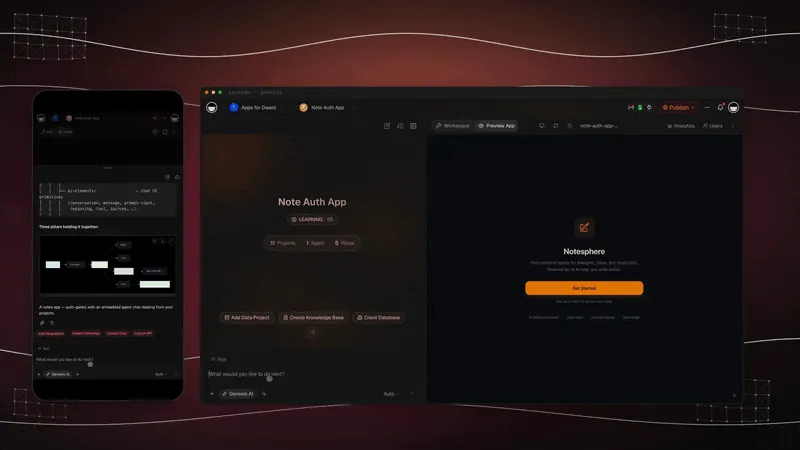
Here are four requests that a CRM owner makes in the first week, and what each one changes:
| You type | What Taskade EVE changes | Layer |
|---|---|---|
| "Add a field for contract renewals" | Adds a renewal date field to the Leads project and shows it on the deal card | Memory |
| "Show deals closing this month" | Adds a filtered view to the pipeline page | Interface |
| "Email me a weekly pipeline report" | Adds a scheduled automation and has the AI agent write the summary | Execution and Intelligence |
| "Use my brand colors and logo" | Changes the app theme, the header and the logo | Interface |
Other owners ask for "Rename Clients to Patients and add an insurance field" or "Email me every Monday with overdue invoices". Each request is a complete instruction. Taskade EVE asks a question when it needs one, such as which email address gets the report.
Build, test, improve, repeat
A factory improves its line one change at a time. Before you edit an app that clients already use, set the app to publish manually. With automatic publishing, a saved change reaches visitors right away. Then use the same loop for every request:
- Build. Ask Taskade EVE for one change.
- Test. Open the app and use the change with a real record.
- Improve. If the result is close but not right, say what to fix: "Move the renewal date above the deal value."
- Publish. When the change works, publish it, so visitors get the tested version.
- Repeat. Take the next request.
Taskade Genesis keeps saved app revisions that you can preview and restore, so a change that goes wrong is one click from undone. Each request to Taskade EVE uses AI credits from your plan.
📋 5 Apps to Build First
The five apps below run most small businesses, and each one has a live App Kit in Taskade App Factory. Start with the app that removes the most manual work this week, then add the next one. Every kit link opens the kit page, where you can preview the app before you clone it.
| App | The job it does | Start from this kit | Then ask Taskade EVE | Go deeper |
|---|---|---|---|---|
| CRM | Tracks leads, qualifies inquiries, reminds you to follow up | Neon CRM Dashboard | "Add a Proposal sent stage" | AI CRM builders |
| Client portal | Gives each client one place for status, files and invoices | Client Portal | "Add a page for signed contracts" | Build a client portal |
| Invoice tracker | Makes invoices, tracks what clients owe, chases late payments | Invoice Generator | "Add our logo and Net 30 payment terms" | Build an invoice app |
| Intake form | Takes requests and quotes, then routes each one | Project Quote Request | "Add a budget field and email me big requests" | Internal tools guide |
| Ops dashboard | Shows every project, status and deadline in one view | Monochrome Project Dashboard | "Add a column for the client and a filter by owner" | AI dashboard builders |
Two patterns show up when owners build these five apps:
- The apps live in one workspace. You manage every app, member and plan limit in one place, and a fix you learn in one app, such as a better agent prompt, carries over to the next.
- The portal is the app that multiplies. A CRM is one app for the whole business. A client portal is one app per client. That is where the factory pays off, as the next sections show.
🛠️ Step-by-Step: Your First App in 30 Minutes
You can build your first factory app in about 30 minutes. The steps below use a client portal as the example, because a portal is the app you will copy most often. The same steps work for the other four apps.
Step 1: Pick one job that repeats
Write one sentence about the job and one about the people. For example: "A portal where each client of my bookkeeping firm sees their open tasks, their invoices and a message thread." Pick the job you do for every client, not a one-off. A repeated job is what makes the factory worth it. Time: about 3 minutes.
Step 2: Clone a kit or describe the app
Open Taskade App Factory, choose the Portals category, and preview two or three kits. Clone the closest one. If none is close, open Taskade Genesis and paste your two sentences instead. The Client Portal kit is a good default. Time: about 5 minutes.
Step 3: Check the projects, the agent and the automations
Open the side panel of the app and read what came with it. Look at each project and its fields, read the instructions of the AI agent, and open each automation to see its trigger. Connect your own accounts where a step needs one, because a clone never copies connected accounts. Time: about 5 minutes.
┌────────────────────────────────────────────────────────────────────┐
│  Client Portal                         [ Preview ]  [ Publish ▾ ]  │
├───────────────────────┬────────────────────────────────────────────┤
│  Workspace            │                                            │
│  All  Project  Agent  │   Welcome back, Jordan                     │
│       Automation      │                                            │
│                       │   ┌───────────┐ ┌───────────┐ ┌──────────┐ │
│  Clients      project │   │ Open tasks│ │ Invoices  │ │ Messages │ │
│  Invoices     project │   │     4     │ │  1 due    │ │  2 new   │ │
│  Messages     project │   └───────────┘ └───────────┘ └──────────┘ │
│  Portal Helper  agent │                                            │
│  Friday update        │   Recent files                             │
│             automation│   - Q3 statements.pdf                      │
├───────────────────────┤   - Signed engagement letter.pdf           │
│  Make this your own   │                                            │
│  with Taskade EVE     │                                            │
│  > Add a page for     │                                            │
│    signed contracts   │                                            │
│                [Send] │                                            │
└───────────────────────┴────────────────────────────────────────────┘
Step 4: Change it with Taskade EVE
Ask for the three changes that make the portal yours. For example: "Use my brand colors and logo", "Add a page for signed contracts", and "Send each client a summary every Friday". Test each change before you ask for the next one. Time: about 8 minutes.
Step 5: Test it with real data and a second account
Add one real client record and one test login. Open the app in a private window and sign in as the test client. Sign-in confirms who the visitor is. It does not hide other people's records by itself. You match each record to the client login, and you test it with the second account until each client sees only the records you matched to them. The App Users guide shows the setup. Time: about 5 minutes.
Step 6: Publish it
Click Publish and choose who can open the app: anyone with the link, each person signs in, or one shared password. For later edits, set the app to publish manually, so each change waits until you test it. Client sign-in works on every plan, Free included. A shared password is Pro and up. A custom domain such as portal.yourfirm.com is also Pro and up: up to 10 per root workspace on Pro, and unlimited on Business and up. Time: about 4 minutes.
| Step | Time | You are done when |
|---|---|---|
| 1. Pick one job | 3 min | You have a two-sentence brief |
| 2. Clone or describe | 5 min | The app opens in your workspace |
| 3. Check the parts | 5 min | You know each project, agent and automation, and your accounts are connected |
| 4. Change with Taskade EVE | 8 min | The app shows your brand and your fields |
| 5. Test | 5 min | The test client sees only the records you matched to that login |
| 6. Publish | 4 min | The client opens the live link |
For a slower first walkthrough, read the App Kits guide on Learn Taskade.
🔁 Turn One App Into Many
An app factory earns its name at this stage: one finished app becomes the base for many. When the portal for your first client is right, the second client should take minutes, not another afternoon. Taskade gives you two ways to multiply an app.
| Way | What it does | Best for | Plan notes |
|---|---|---|---|
| Duplicate app | Makes a copy of your app, its projects, agents and automations in your workspace | One portal per client, one booking page per location | Each copy counts as an app: 3 apps on Free, unlimited on paid plans |
| Publish as an App Kit | Lets other people clone your app into their own workspace | Selling a proven app, or sharing it with partners and franchisees | Every plan, Free included, for the workspace owner |
One portal per client
Open the app menu and choose Duplicate app. Rename the copy for the next client, swap the logo, and invite the client to sign in. Each copy has its own projects, so you add each client's records to that client's portal. If you want one shared app instead, keep one portal and match records to each login, as in Step 5.
From one app to an App Kit
Keep one master app that you never give to a client. Make every improvement there first: a new field, a better agent prompt, a cleaner report. Then duplicate the master for each new client. Over time, the master app becomes your own App Kit: the version of the job that you trust most.
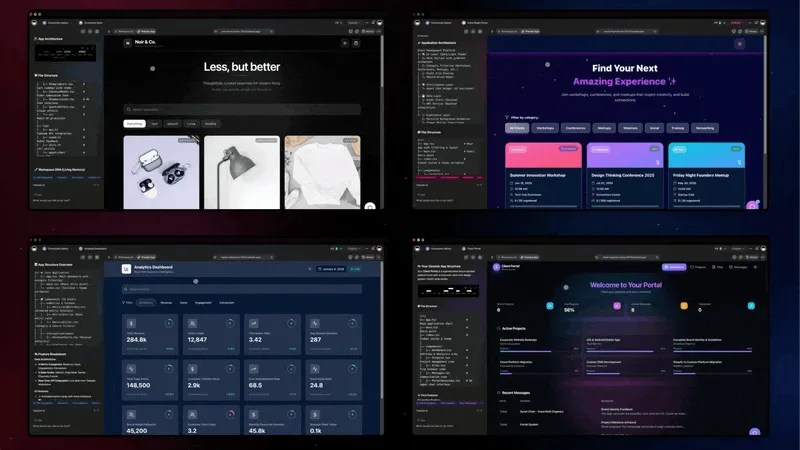
A franchise or a multi-location business uses the same pattern. One booking app becomes one per location. One intake form becomes one per service. The Taskade Genesis wiki covers each building block.
⚖️ App Factory vs SaaS vs No-Code Builders vs Custom Development
An app factory is one of five ways to get the apps a business runs on. Each way fits a different owner. The table compares how each one starts, what you have on day one, and who changes it later.
| Option | How you start | What you have on day one | How you change it | Best fit |
|---|---|---|---|---|
| Taskade App Factory | Clone a live App Kit, or describe the app to Taskade EVE | A live app with its projects, AI agents and automations | Ask Taskade EVE in plain words | Owners who want many apps that act on their data, not just store it |
| Off-the-shelf SaaS | Sign up for a finished product | A tool built for many companies at once | The settings the vendor offers | A standard job that fits the product as it is |
| No-code builders | A template or a data source, as in Softr and Glide | An app over your data that you configure | A visual editor, screen by screen | Teams that want visual control of each screen |
| AI code builders | A prompt, or a remix or fork of a template, as in Lovable and Bolt | Generated source code that the builder hosts | More prompts, or edits to the code | Founders and developers who want to own the code |
| Custom development | A written spec and a developer | Software built to your spec | A developer for each change | A unique product or a deep integration |
Each option has real strengths. SaaS is the fastest path when your process matches the product. Softr describes itself as "the AI app builder for business apps" and is strong on portals over your own data. Lovable's remix gives you "your own independent copy" of a project's code, which suits a founder who wants the code. Custom development is the right call for software that you sell.
An app factory fits the space between them: the apps are custom to your process, they keep working after launch through agents and automations, and one good app becomes many. Our best AI app builders list compares the tools in each group.
If you are comparing free plans before you start, our guide to the free AI app builders tests each one on the same brief.
🌟 Publish and Grow as a Creator
The last stage of an app factory faces outward: you publish your best app as an App Kit in Taskade App Factory, and other businesses clone it. When you publish your App Kit to Taskade App Factory, you build your creator profile on Taskade, a page such as taskade.com/@yourname that shows your apps.
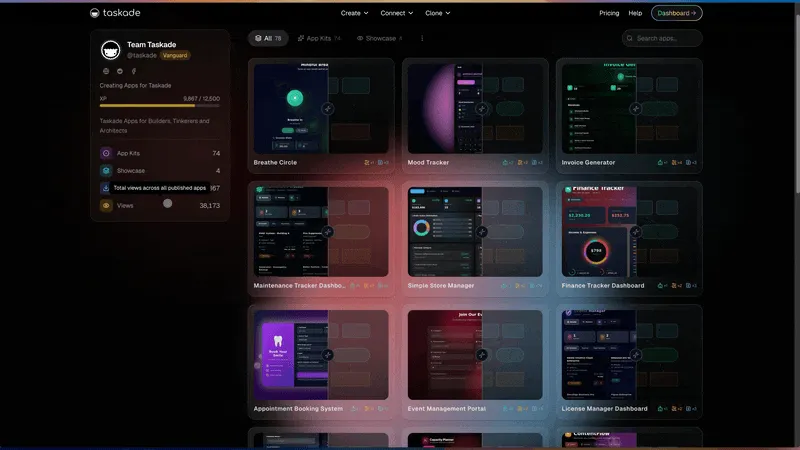
How to publish an App Kit
- Open the app and click Publish.
- Find Let others clone.
- Choose Free, or choose Paid and save a price.
- Make sure that your community profile is on, with a tagline and a short bio.
- Share the kit link.
Cloning is opt-in for each app. Publishing an app to the web does not make it cloneable by itself. Only the workspace owner can share an app as a kit, on any plan, Free included. The steps above cover each control that you need.
Free kit or paid kit
A Free kit spreads your app to the most businesses. A paid kit turns a proven app into a product that you sell. The table follows the Taskade App Factory FAQ.
| Free App Kit | Paid App Kit | |
|---|---|---|
| Price to the person who clones | Free | A one-time price that you set, from $9 to $999 |
| What you get | Your app on your creator profile, and businesses that clone it | The same, and you keep 90% of each sale |
| How you get paid | Not applicable | A Stripe Express account in Settings, under Earnings. Payouts run each week once your balance clears |
| Who can share it | The workspace owner, on any plan | The workspace owner, on any plan |
The guide to sell your app as an App Kit covers paid kits step by step.
What makes a kit get cloned
The kits that get cloned most solve one sharp problem. A focused app, such as an invoice generator or a weekly planner, gets cloned more often than a broad one. Write a strong first line in the description, because visitors read it before they clone. Keep the app current: when you improve the master app, publish the new version so new clones get it.
💳 What Each Plan Covers in an App Factory
Every stage of an app factory works on the Free plan at a small scale. The paid plans raise the limits that matter when one app becomes many. The table uses the limits in Taskade's plan data, checked on November 3, 2026.
| What you need | Free | Pro ($10/mo billed annually) | Business ($25/mo billed annually) |
|---|---|---|---|
| Taskade Genesis apps | 3 apps, clones included | Unlimited | Unlimited |
| AI agents | 1 | Unlimited | Unlimited |
| Workspace members | 2 | Up to 10 | Unlimited |
| AI credits | Starts at 0. Earn with referrals and invites, or upgrade | 50,000 a month | 150,000 a month |
| Automation runs | 10 per billing period, standard connectors | 1,000 a month, premium connectors | 10,000 a month, premium connectors |
| PRO App Kits | Not on Free | Included | Included |
| Client sign-in | Every plan | Every plan | Every plan |
| Shared password on an app | Not on Free | Included | Included |
| Custom domains | Not on Free | Up to 10 per root workspace | Unlimited |
| Share an app as a kit | Every plan | Every plan | Every plan |
Monthly billing is $20 a month for Pro and $50 a month for Business. The pricing page has every plan and the current details.
🚧 Common Mistakes When You Build an App Factory
Most first app factories stall for the same few reasons: too many apps at once, a blank prompt when a kit is already close, and client copies that drift apart. Each reason has a simple fix. The table pairs each common mistake with the habit that replaces it.
| Common mistake | Do this instead |
|---|---|
| Building ten apps in the first week | Build one app that removes real work, use it for two weeks, then copy it |
| Starting from a blank prompt when a kit is close | Preview kits in Taskade App Factory first, and clone the closest one |
| Asking Taskade EVE for ten changes in one message | Ask for one change, test it, then ask for the next |
| Editing each client's copy by hand | Keep one master app, improve it there, and duplicate it for each client |
| Assuming sign-in hides other clients' records | Match records to each login, and test with a second account before you invite clients |
| Skipping the agent instructions | Read and edit the agent's role so that it scores leads or writes updates your way |
| Leaving the automations off | Open each automation after a clone, connect your accounts, and run it once with a test record |
| Publishing a kit before you use it | Use the app with real clients first, then publish the version that survived real work |
The pattern behind every fix is the same one that runs a real factory line: small batches, one change at a time, and a check at each station.
❓ Frequently Asked Questions
What is an app factory?
An app factory is a repeatable way to make the apps your business runs on. You start from one app that already works, adapt it to your process, and copy it for each client, location or team instead of building every app from scratch. In Taskade, the factory is Taskade App Factory plus Taskade Genesis, which builds and runs each app with its data, AI agents and automations.
Is an app factory the same as a software factory?
No. A software factory is a developer pipeline in which coding agents turn requests into merged code changes. An app factory makes running business apps for the people who do the work, and its output is a live app that customers and staff use. Large companies also use "app factory" for a governance program that manages many low-code apps. Our AI software factory guide covers the developer meaning.
Do I need to know how to code to build an app factory?
No. In Taskade Genesis you clone a working App Kit or describe the app in plain words, and Taskade EVE builds and edits it in chat. You check the result by using the app, not by reading code. A developer is still useful for a product that must live in your own code repository.
What is the difference between an app template and an App Kit?
A template gives you a layout or a document to fill in. An App Kit gives you a running app with its data, its AI agents and its automations already connected. After you clone it, the app works on day one, and you change it to fit your work instead of building it from the start.
What happens when I clone an App Kit?
Taskade copies the whole kit into your workspace: the app, its projects, its AI agents and its automations. The copy is yours, and your changes do not touch the original kit. Connected accounts and secrets are not copied, so you connect your own accounts after the clone.
Can I build a CRM, client portal or internal tool without code?
Yes. Taskade App Factory has App Kits for CRMs, client portals, invoices, intake forms and dashboards. Clone the closest kit, then ask Taskade EVE for the changes, for example a field for contract renewals or a view of deals that close this month. The table of 5 apps to build first, above, links a kit for each one.
How much does it cost to run an app factory on Taskade?
Free costs $0 and includes 3 apps, 1 AI agent, 2 workspace members and 10 automation runs per billing period, with no credit card. Each app you clone counts toward the 3 apps. Free starts with no AI credits. On Free, you earn free AI credits with referrals and invites, and you can upgrade any time. Pro is $10 a month billed annually, with unlimited apps and 50,000 AI credits a month. Business is $25 a month billed annually.
Can I put my app on my own domain?
Yes, on Pro and up. Pro allows up to 10 custom domains per root workspace, and Business and up allow unlimited custom domains. Every app on every plan also gets a shareable Taskade web address.
Can my clients sign in to my app?
Yes, on every plan, Free included. Sign-in confirms who each visitor is. It does not hide other people's records by itself. To give each client only their own records, you match the records to the login, and you test it with a second account.
Can I sell an App Kit that I built?
Yes. Build an app with Taskade Genesis, publish it, and turn on Let others clone. Pick Free, or pick Paid and set a price from $9 to $999. You keep 90% of each sale. Connect a Stripe Express account in Settings, under Earnings, to get paid.
Do I get a creator profile when I publish an App Kit?
Yes. When you publish an App Kit to Taskade App Factory, you build your creator profile on Taskade, a page such as taskade.com/@yourname that shows the apps you published. The workspace owner on any plan, Free included, can share an app as a kit, and other businesses can then clone it.
When do I still need a developer?
Hire a developer when the product itself is software that you sell, such as a SaaS product or a mobile app in the app stores, or when you need the source code in your own repository with your own tests. For the tools that run a business, such as a CRM, a client portal or an operations dashboard, an app factory covers the job without code.
🚀 Start Your App Factory
An app factory starts with one app. Pick the job you repeat most, clone the closest App Kit or describe it to Taskade EVE, give it a brain, and make it yours in plain words. When it works for one client, duplicate it for the next. When it works for many, publish it and let other businesses clone it.
▲ ■ ● Memory, Intelligence and Execution, in every app you make.
Clone an App Kit from Taskade App Factory or build your first app with Taskade Genesis.
📚 Related Reading
- Introducing Taskade App Factory: the November 2026 launch and the new Pro Edition kits
- AI software factory: what a software factory is, and how it differs from an app factory
- Software factory tools: 15 tools in two tracks, code factories and app factories
- AI apps you can clone: kits by job, ready to clone
- Build a CRM without code: the CRM app, step by step
- Build a client portal without code: the portal app, step by step
- Free AI app builders: each free plan, tested on one brief
- Workspace DNA: the Memory, Intelligence and Execution loop
- App Kits on Learn Taskade: what a kit includes and how to clone it