
Overview
Capture a task the second it hits you, without stopping what you are doing. The Quick Add widget sits in your menu bar or system tray, so a new to-do lands in the right project in two keystrokes.
TL;DR: The Quick Add widget lives in your macOS Menu Bar or Windows System Tray so you can capture tasks without opening Taskade. Open it with Ctrl + Space, type a task, pick a target Workspace, Project, and even a specific Block, then press the shortcut to send it straight into your project.
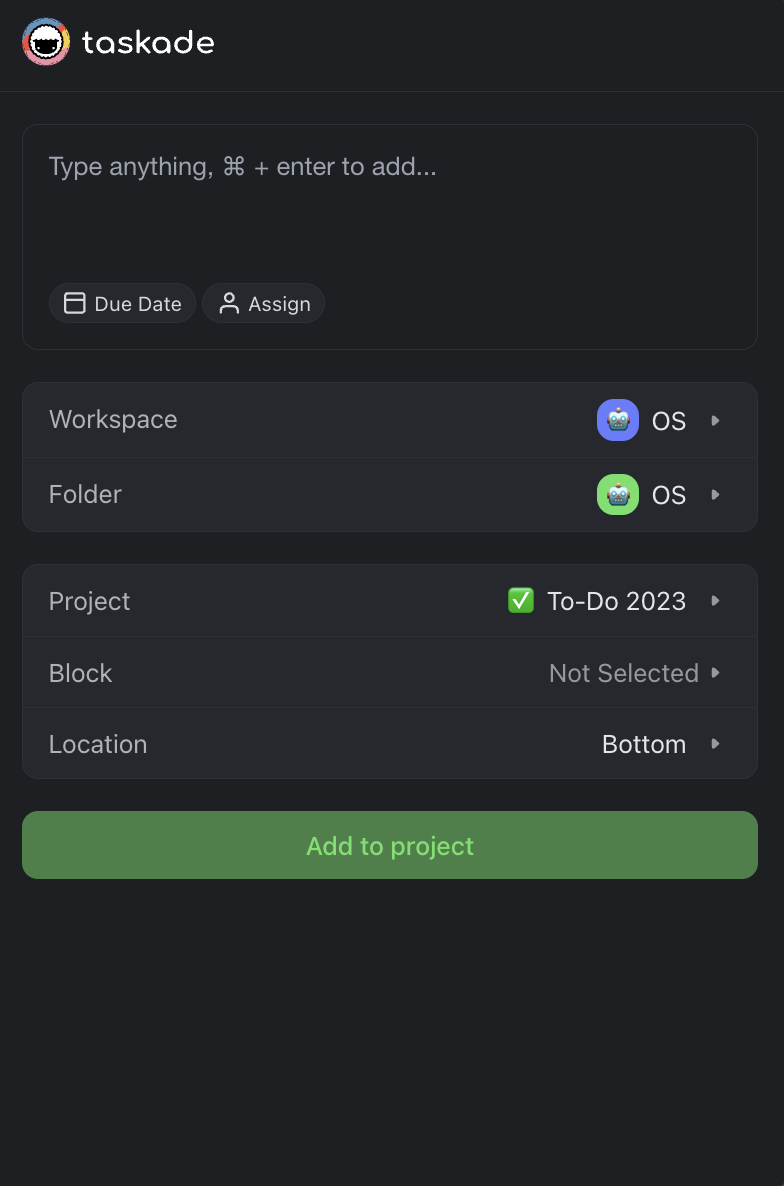
Here is what the popup looks like once it is open:
┌─ Quick Add ──────────────────────────┐
│ ✏️ Follow up with the new client      │
│                                       │
│ Workspace ▸ Acme Ops                  │
│ Project   ▸ Client Pipeline           │
│ Block     ▸ This Week                 │
│                                       │
│          [ Add to Project   ⌘ + ⏎ ]   │
└───────────────────────────────────────┘
Quick Add, Explained
The Quick Add widget is a companion tool that lives in your OS Tray/Menu bar. The widget is part of Taskade desktop apps and lets you quickly add tasks to Projects without opening them in the app. You can even select a target Block for each task.
Use Quick Add
Here is how the add tasks using the Quick Add widget:
- 🔴 (macOS) Click the Taskade icon in the Menu Bar, or
- 🔵 (Windows) Click the Taskade icon in the System Tray.
- Type a text/task ➡ choose target Workspace/Folder and Project.
- (optional) Pick the Block where you want to add the task.
- Click Add to Project or use the ⌨️ ⌘ + Enter / Ctrl + Enter shortcut to confirm.
💡 Note: You can use the ⌨️ Ctrl + Space shortcut to open the Quick Add menu.
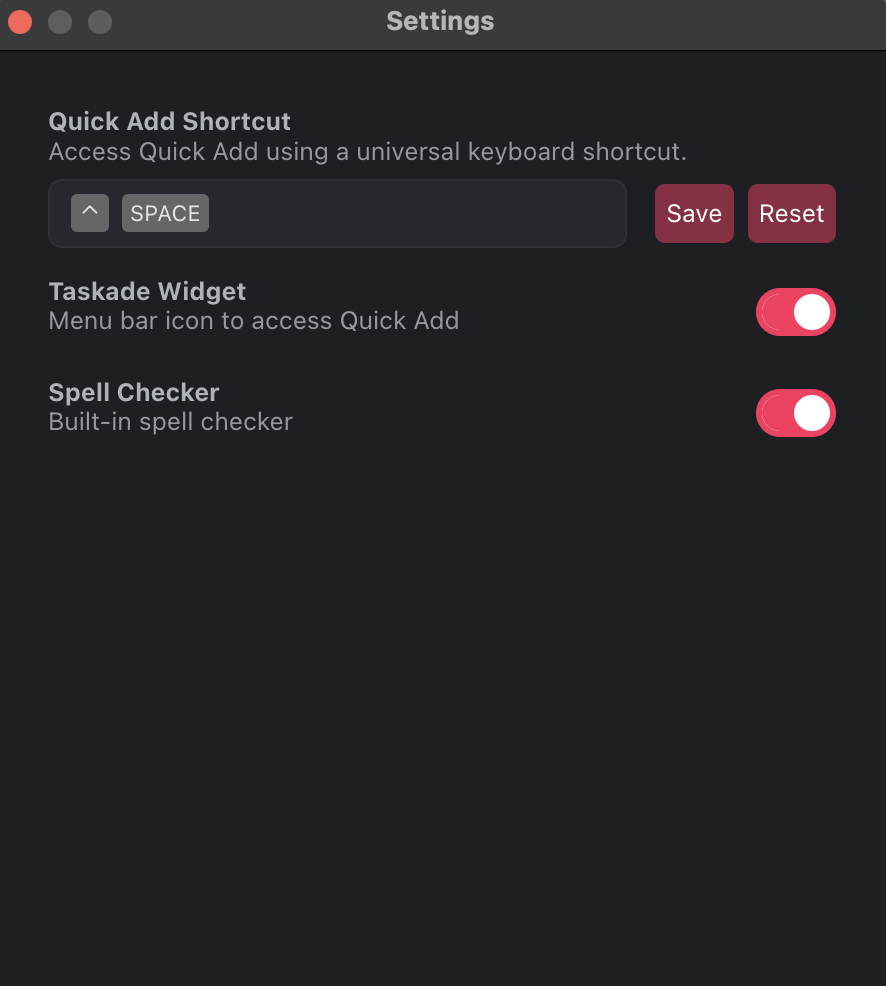
Change Shortcut Settings
🔴 (macOS):
Click Taskade in the menu bar (next to the Apple logo).
Choose Settings from the drop-down list.
Click the gray area and assign a key combination using your keyboard.
Click Save to confirm.
🔵 (Windows):
Click the Taskade logo in the top-left corner.
Choose Taskade ➤ Settings from the drop-down list.
Click the gray area and assign a key combination using your keyboard.
Click Save to confirm.
Tips
- Capture ideas instantly. Quick Add is designed for speed. Open it with Ctrl + Space, type your task, and press ⌘ + Enter (Mac) or Ctrl + Enter (Windows) to add it without leaving your current app.
- Target specific blocks. You can pick a specific Block inside a project instead of the whole project, so tasks land exactly where they belong.
- Use alongside Desktop Widgets. Pair Quick Add with Desktop Widgets. Add tasks from the menu bar and see them appear on your desktop widget instantly.
- Customize the shortcut. If the default Ctrl + Space conflicts with another app, reassign it in Settings to any key combination that works for you.
💡 Tip: Use the browser extension alongside Taskade Genesis to capture ideas and build AI-powered workflows from anywhere.
Related guides
- Desktop Widgets. Companion desktop widgets.
- Mobile Widgets. iOS / Android home-screen widgets.
- Browser Extensions. Capture from any browser tab.
- Quick Add. Feature details inside Taskade.