

TL;DR: Taskade Genesis is an AI workspace that can run a routine with agents, automations, and a custom habit app from one prompt. Habitica is an open-source RPG that rewards finishing habits, with a full free set and Plus around $5/month. Taskade is Free Forever. Pro is $10/mo billed annually for 10 seats. Try Taskade Genesis free →
See the alternative working — clone in 60 seconds
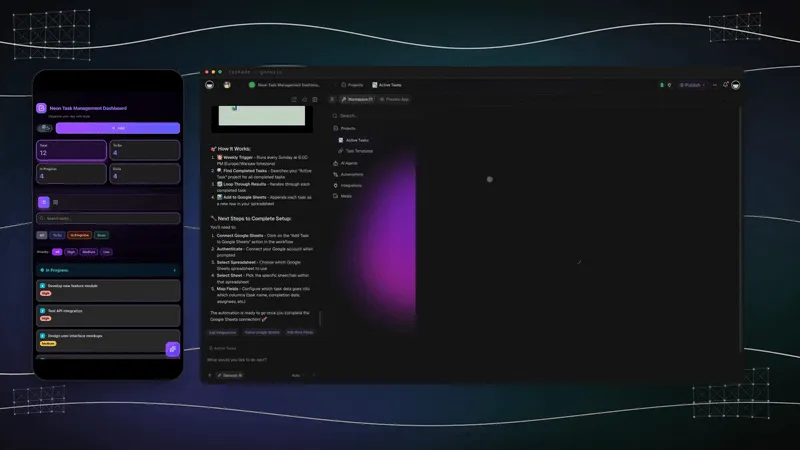
No signup, no credit card. Live neon task manager
| Capability | Habitica | Taskade Genesis |
|---|---|---|
| Pricing (starting) | Free, with Habitica Plus around $5/month or $48/year | $0 Free · $10/mo Pro billed annually (10 seats) |
| Cloneable live demo | ❌ | ✅ |
| Built-in AI agents | None | ✅ built-in tools |
| Automation engine | Reminder rules only | ✅ Durable runtime, 100+ integrations |
| Workspace DNA loop | ❌ | ✅ ▲ Memory · ■ Intelligence · ● Execution |
Overall winner: ✅ Taskade Genesis — for anyone whose goal is to actually get the routine done with help from AI agents and automations. Habitica is still the right pick if RPG mechanics are the thing that gets you out of bed.
Table of Contents
- Quick Comparison Table
- The fundamental difference
- What is Taskade Genesis?
- What is Habitica?
- Feature-by-feature deep dive
- The Workspace DNA advantage
- Pricing and total cost of ownership
- Where Habitica has the edge
- What users say
- When to choose each
- Frequently asked questions
- Without permission
The fundamental difference
Habitica and Taskade Genesis are aimed at the same wall — the friction of getting routine work done — from opposite directions. Habitica says: "Wrap the boring stuff in an RPG. Earn XP for brushing your teeth, lose HP for skipping the gym, party up with friends to fight a dragon." It is gamification as motivational engine, and for the right user it works beautifully.
Genesis takes the inverse stance. The chore is the chore — so let software do as much of it as possible. AI agents check in on you. Automations trigger when something gets completed (or skipped). Projects store the history. Integrations pull in your calendar, your email, your CRM, your fitness data. The goal is fewer manual logs, not more rewarding ones.
Habitica asks: "How do we make the routine fun?" Genesis asks: "How much of the routine can we just automate away?"
What is Taskade Genesis?
Taskade Genesis is the AI app builder inside the Taskade workspace. It is built on Workspace DNA — Memory (Projects), Intelligence (AI Agents), and Execution (Automations) — a self-reinforcing loop where what you and your team do becomes the substrate the agents reason over. Founded by John Xie, Dionis Loire, and Stan Chang in 2017, Taskade is a Y Combinator-backed platform with over a million users and a public Community Gallery of apps anyone can clone.
A single prompt to Genesis can produce a habit tracker, a fitness routine app, a journaling system, a daily standup tool, a personal CRM, or a full team operations dashboard — all with built-in AI agents, automations, custom domains, password protection, and the option to embed publicly with GenesisAuth. No DevOps. No infrastructure. No setup beyond the prompt.
Genesis is for everyone — solo users running their personal life, small teams shipping internal tools, and founders who want to skip plumbing and focus on the idea.
What is Habitica?
Habitica is a free, open-source habit-tracking and productivity app that turns daily routines into a role-playing game. It launched in 2013 as HabitRPG and has been beloved on Reddit, Hacker News, and habit-tracking subreddits ever since.
Habitica at a glance: GPL-3.0 open source. Free with optional Habitica Plus subscription (~$5/month). Native iOS, Android, and web apps. Three core lists — Habits (positive/negative), Dailies (recurring), and To-Dos (one-off). Pixel-art avatar earns XP, gold, and equipment for completing tasks, loses HP for skipping Dailies. Party system lets small groups quest together against bosses, with shared damage when teammates miss tasks.
The headline features Habitica users love are the social-RPG layer: parties of 1–30 people who fight bosses by completing real-world tasks, guilds organized around interests (writers, students, fitness enthusiasts), monthly challenges, and a deeply customizable pixel avatar. A handful of community extensions add Pomodoro support, browser-based webhooks, and minor calendar bridges, though no first-party integrations exist.
Habitica is, for very good reasons, one of the longest-running indie productivity apps on the internet. It is also unapologetically a single-purpose tool: gamified habit tracking, full stop. It does not extend into broader project work, AI assistance, or automation.
Feature-by-feature deep dive
Habit and routine tracking
- Taskade Genesis treats habits as just another shape of project. Build a habit-tracking app in one prompt with streak counts, completion logs, AI nudges, and automations that fire when you complete (or miss) a habit. View the same data as a List, Calendar, Board, or Table.
- Habitica has the most polished pure-habit UX on the market: positive/negative habit buttons, recurring dailies with day-of-week schedules, one-off to-dos, and the RPG reward layer baked in.
AI agents that take action
- Taskade ships AI Agents v2 — first-class digital teammates with persistent memory, built-in tools (web search, file analysis, project management, image generation, code execution, and more), custom tools you define, and the ability to be embedded publicly inside Genesis Apps. An agent can review your week, suggest schedule changes, and trigger automations.
- Habitica has no AI layer. Every habit is logged manually. The "intelligence" is the gamification engine.
Workflow automations and integrations
- Taskade includes production-grade durable Automations with branching, looping, and filtering across 100+ bidirectional integrations. Triggers pull external events in (Google Calendar events, Slack messages, Gmail, Sheets rows, webhooks). Actions push data out (Notion syncs, Salesforce updates, Stripe checkouts, Shopify orders, GitHub PRs).
- Habitica has a small ecosystem of community webhooks and browser extensions but no first-party integration with Google Calendar, Apple Health, Fitbit, Strava, or any productivity tool.
Team and family collaboration
- Taskade is workspace-native: real-time multiplayer editing, comments, chat, video calls, and granular role-based access (Owner to Viewer).
- Habitica has Parties (small co-op groups of up to 30 that quest together) and Guilds (interest-based public groups). Collaboration is social and gamified, not workspace-style.
Project views and visual structure
- Taskade offers multiple project views — List, Board, Table, Mind Map, Docs (Beta), Gantt Chart, Calendar, Actionsheet, and Org Chart — plus visual app editing without writing code.
- Habitica has three tabs: Habits, Dailies, To-Dos. There is no calendar view, no board view, no mind map. The view is the RPG dashboard.
Workspace memory and context
- Taskade's Workspace DNA gives every agent persistent context across projects, files, integrations, and the live state of your work. The longer you use it, the smarter the workspace becomes.
- Habitica stores per-task history and a streak counter. Useful for the gamification loop, but it does not feed any reasoning layer.
The Workspace DNA advantage
Habitica's mental model is "the user logs, the RPG rewards." Genesis's mental model is Workspace DNA: a self-reinforcing loop between three pillars.
- Memory (Projects) — Your tasks, habits, files, notes, and structured data become the substrate every agent reasons over. The longer you work, the smarter the workspace gets.
- Intelligence (Agents) — Custom AI Agents with persistent memory, built-in tools, and custom tools you define, plus a hosted MCP server that Claude Desktop, Cursor, and VS Code connect into, while automations carry the work into the 100+ apps you already use. An agent can run your morning check-in, review missed habits, and propose adjustments.
- Execution (Automations) — Durable workflows triggered by external events (Google Calendar, Slack, Gmail, schedules) that read from Memory and act through Intelligence — then write the results back into Memory. The loop closes.
Habitica is brilliant at one slice of that loop — the manual log and the gamified reward. Genesis runs the entire loop continuously, so the longer you use it, the more your workspace itself becomes the thing that runs your routine.
Pricing and total cost of ownership
| Plan | Taskade Genesis | Habitica |
|---|---|---|
| Free | Free Forever — milestone credits, not monthly; full app builder access (3 Genesis apps) | Fully free — all core features |
| Paid (entry) | Pro $10 / month (annual) — unlimited apps, 10 seats | Habitica Plus ~$5 / month — cosmetic gems, perks |
| Business | $25 / month (annual) — unlimited seats, higher AI capacity | Not applicable |
| Max | $100 / month (annual) — maximum AI generation capacity | Not applicable |
| Enterprise | $250 / month (annual) with custom SLA | Not applicable |
Habitica's pricing is the gentlest in the productivity-app market — almost everything is free, and Habitica Plus is purely cosmetic and quality-of-life. If your only need is gamified habit tracking, you can run on the free tier forever and many users do.
Genesis flips the model: a flat subscription includes AI credits, hosting, deployment, agents, integrations, and automations. There is no separate model bill, no DevOps line item, no infra cost. For users whose goal is "build software that runs my routine," not "log software that rewards my routine," the math reframes itself.
Where Habitica has the edge
In the spirit of an honest comparison, Habitica clearly wins on a few axes:
- The RPG mechanic is unmatched. Pixel-art avatars, equipment drops, mystery items, party quests, boss battles — no other productivity app has built this layer with the same care for over a decade. If gamification is the thing that motivates you, nothing else in this market comes close.
- It is genuinely free, forever. The free tier is the full app, not a teaser. Habitica Plus is cosmetic.
- Open source and self-hostable. GPL-3.0 license. You can run the entire stack on your own server.
- A long-running, kind community. The Habitica subreddit and Discord have a reputation as one of the most welcoming corners of productivity-app fandom.
- Single-purpose simplicity. Three tabs. No agents to configure, no automations to wire up, no workspace to set up. Open the app, log the habit, get XP.
Genesis does not try to compete on any of those. It is a different product with different priorities.
What users say
Habitica's longtime fans on r/habitrpg and r/getdisciplined consistently call out the same things:
- "The party accountability layer is the only thing that has ever kept me consistent."
- "Pixel art and equipment drops sound silly until they actually work on your brain."
- "The free tier is the full app. There is no upsell pressure."
The honest critique that surfaces just as often: "I outgrew the three-tab model when my life got more complex," "no calendar or fitness integration is a 2026 problem," and "I wish an agent could ask me how I'm doing instead of me opening the app every day."
Genesis users tend to show up because they want one workspace that holds their tasks, their projects, their agents, and the automations that connect everything. Browse the Community Gallery to see habit trackers, journaling apps, fitness routines, and personal dashboards built and shipped by other users.
When to choose each
Choose Habitica if:
- Gamification is the thing that gets you to follow through.
- You want one app focused entirely on personal habit tracking.
- You love the idea of a small accountability party that quests with you.
- You want a free, open-source app you can self-host if you want.
- You don't need integrations, AI agents, or broader project work.
Choose Taskade Genesis if:
- You want software that actually runs the routine, not just logs it.
- You want AI agents that check in on you and trigger automations.
- You want to track habits alongside tasks, projects, files, and team work in one place.
- You need integrations with Google Calendar, Slack, Gmail, fitness data via webhooks, and 100+ other tools.
- You want one flat subscription that includes hosting, agents, automations, and team collaboration.
Use both if: Many people keep Habitica for the personal RPG layer that motivates strictly personal habits (workouts, meditation, journaling) and use Taskade for work, projects, agents, and automations across team and family life.
Frequently asked questions
Is Taskade Genesis a good Habitica alternative?
Yes, but they solve different problems. Habitica gamifies tracking. Genesis automates the underlying behavior with AI agents and integrations. The "better" answer depends on whether the RPG layer is the motivator or whether you would rather have software do more of the work.
Is Habitica really free?
Yes — fully free, GPL-3.0 open source, with optional cosmetic Habitica Plus at roughly $5/month. Most users stay on the free tier indefinitely.
Does Habitica have AI agents or automations?
No. Habitica is a manual habit tracker with a gamification engine. Genesis includes AI Agents v2 and durable automations across 100+ integrations.
Can Genesis gamify my habits like Habitica?
Not in the same RPG style. Genesis can build a custom habit app with streaks, points, badges, and team leaderboards, but no pixel avatars, equipment drops, or party quests.
Does Genesis integrate with Google Calendar and other tools?
Yes — 100+ bidirectional integrations including Google Calendar, Slack, Gmail, Notion, Sheets, Stripe, Salesforce, Shopify, GitHub, and more.
What does Taskade Genesis cost?
Free Forever for the entry tier, $10/month on Pro (annual) for unlimited apps and 10 seats, with Business at $25/month (annual) for unlimited seats.
Build without permission
Habitica makes the routine into a game worth playing. Genesis makes the routine into a workspace where AI agents and automations do most of the playing for you.
- Build with Genesis → — One prompt, one deployed app
- Browse the Community Gallery — Clone habit trackers, journals, fitness apps, and personal dashboards shipped by other Genesis builders
- Read the Workspace DNA explainer — How Memory, Intelligence, and Execution work together
Explore Taskade Genesis
- AI App Builder — Build complete apps from one prompt
- Vibe Coding — Natural-language app creation
- AI Agent Platform — Digital teammates that work 24/7
- AI Website Builder — Sites in seconds
- Workflow Automation — AI-powered business automation
Learn the Genesis architecture
Your living workspace includes:
- First-app guide — 5-minute tutorial
- Custom AI Agents — The Intelligence pillar
- Projects & Databases — The Memory pillar
- Automations & Workflows — The Execution pillar
Build without code
- AI App Generator — Full apps from prompts
- AI Dashboard Generator — Business dashboards
- AI Form Generator — Smart intake forms
- Browse Community Apps — Clone and customize
Related reading
- The Build Without Permission article — Our manifesto
- How Workspace DNA Works — The architecture
- Origin of Living Software — The future of apps
- Agentic Workflows That Replace Your Startup's Busywork — Automate the routine
- Stop Worshipping Prompts, Start Building Workflows — Why workflows beat prompts
- AI Tools for Knowledge Management — Organize what you know
- Vibe Coding for Non-Developers — Build apps without code