
Overview
Watch a subreddit and turn what happens there into action you never have to babysit. The Reddit integration plugs into Taskade automations so your community work runs on its own. You are probably already doing a version of this by hand, refreshing a subreddit tab and copy-pasting links into a doc.
TL;DR: Reddit connects to Taskade automations as an action. Create Post publishes to a subreddit, Get Post pulls a post back by its ID. Pair a Reddit action with any trigger, like a new RSS item or a schedule, to post and track community updates automatically. Free to start, across 100+ integrations.
The Reddit Integration at a Glance
Reddit works as an action inside a Taskade automation. An action pushes data out, so a Reddit action either publishes a post to a subreddit (Create Post) or pulls a post back by its ID (Get Post). You start the automation with a trigger, then chain the Reddit action and any follow-up steps after it.
The "watch a feed, then alert" pattern is the one most operators want. Pair an RSS or schedule trigger with an AI step and a Reddit action, and a single setup runs every time the feed changes.
A trigger pulls the event in, the Reddit action pushes the post out, and a notification closes the loop. Build the same shape once and it covers every new item from then on.
Connect & Configure Reddit
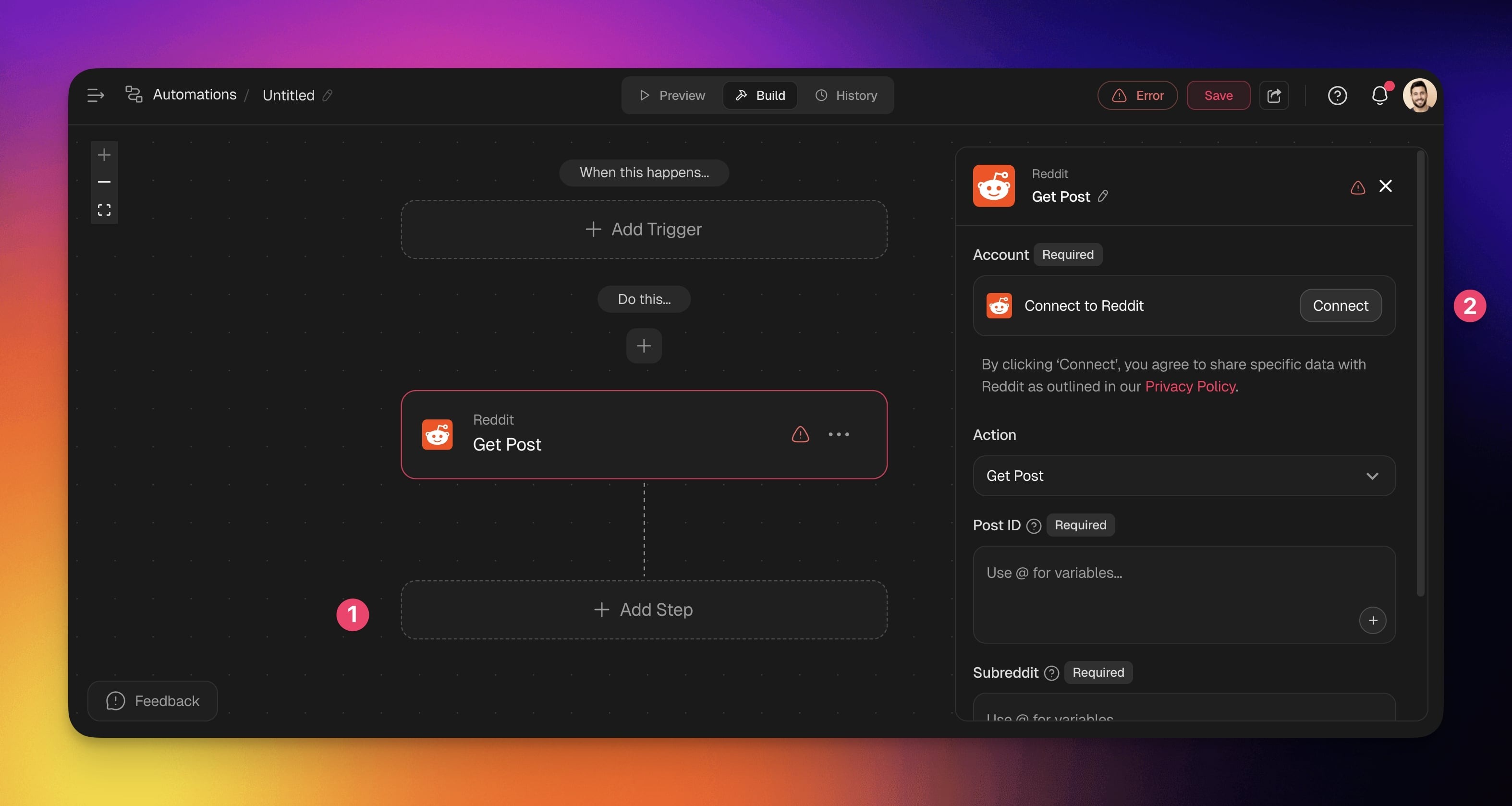
Before you use Reddit in Taskade, configure the integration:
- Add Reddit as an action.
- Click Connect to connect your Reddit account to Taskade.
- Authorize the integration by logging into your Reddit account.
Disconnect Reddit
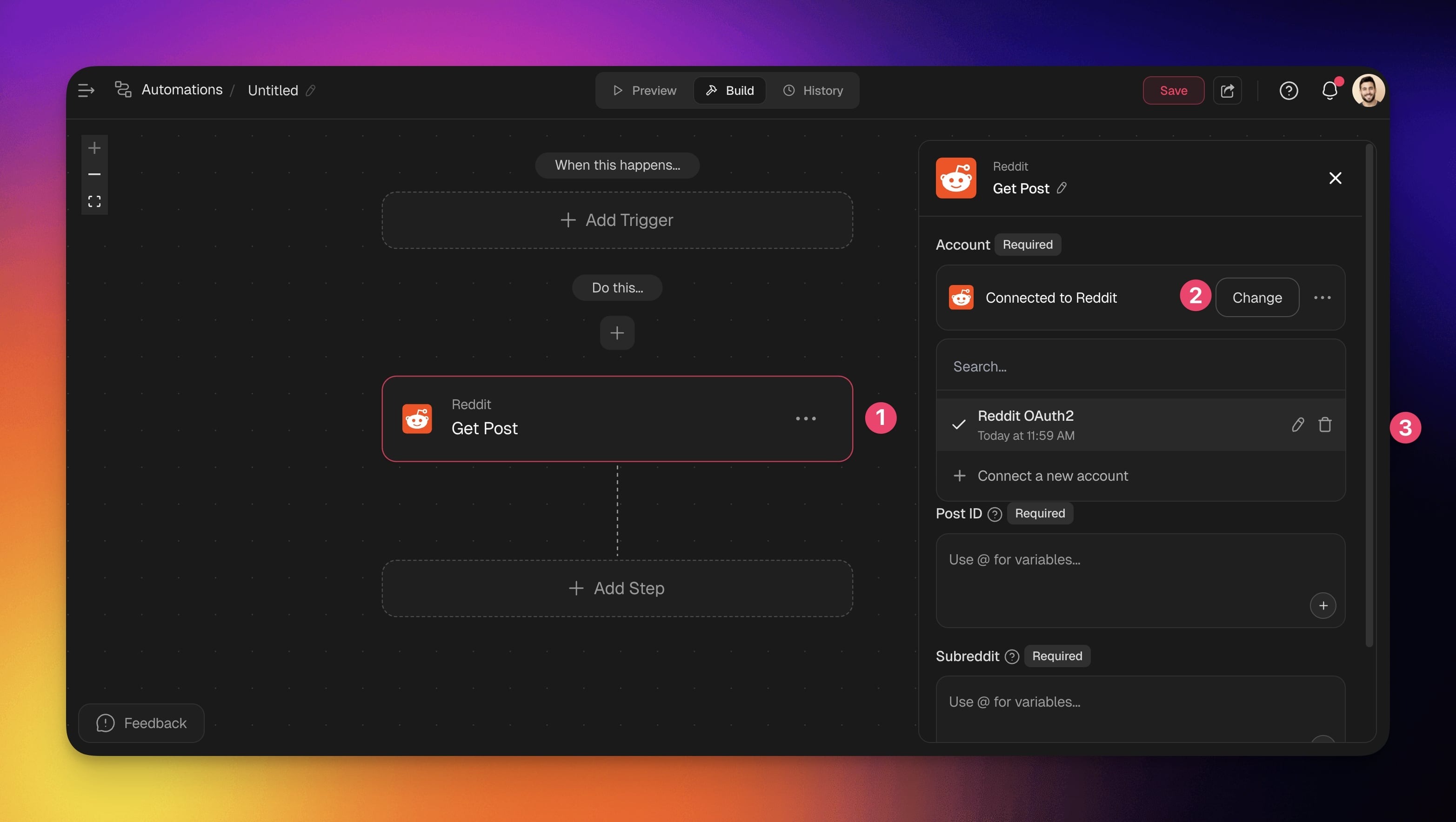
To disconnect the Reddit integration from your Taskade account:
From Automations:
Choose a Reddit action in your automation flow.
Click Change in the configuration sidebar on the right.
Click the trash button 🗑️ next to the active account.
Build Reddit Automations
Set up Taskade once and it creates posts or retrieves content from Reddit on its own, every time your chosen trigger fires. Pick a trigger that starts the flow, then add a Reddit action to publish or pull a post. No code, no manual posting.
💡 Note: Visit our Automation Guide to learn how to build your first automation.
Add Reddit as an Action
- Go to the Automations tab in your workspace or team.
- Click ➕ Create automation.
- Select Start from scratch or use the Workflow Generator.
- Add a trigger to start the flow, then click ➕ Add Step and choose a Reddit action.
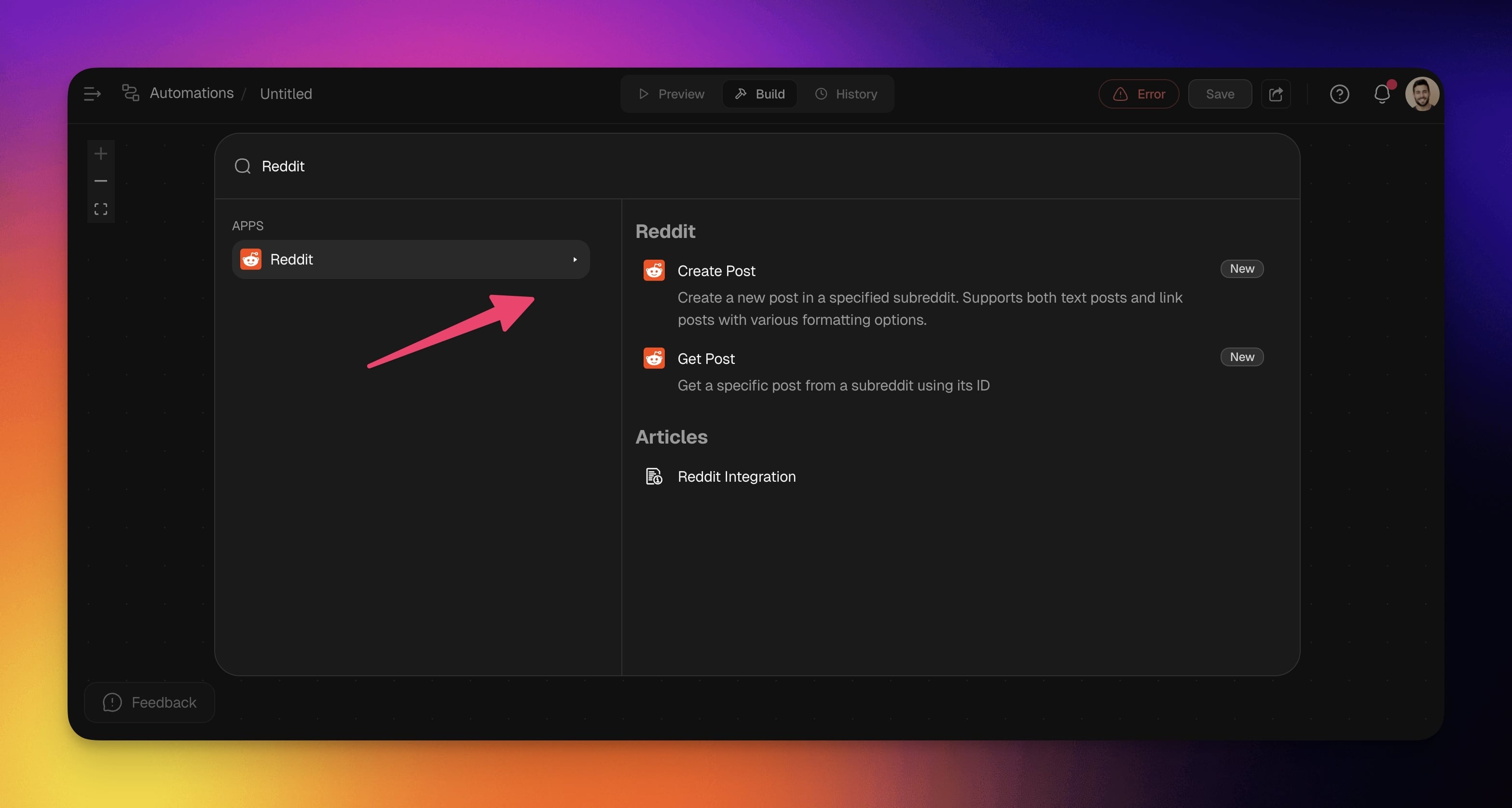
- Connect to configure the Reddit account (see the first section of this guide).
- Configure the action: pick a subreddit, write a post title, and choose a post type.
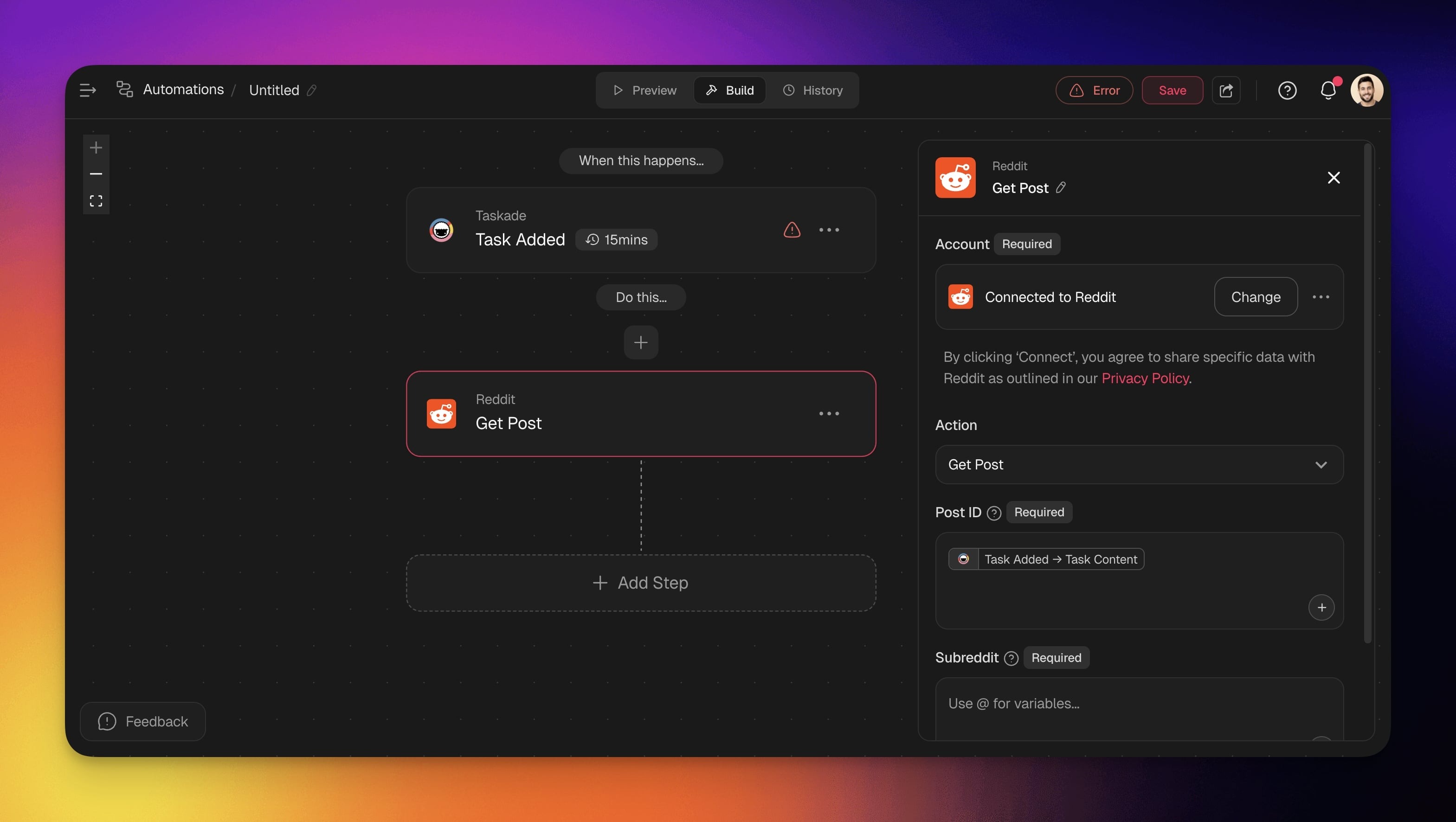
- (optional) Add more steps to the automation.
What can Reddit automations do?
The Reddit integration ships two actions: Create Post publishes a text or link post to any subreddit, and Get Post pulls a specific post back by its ID. Both run inside an automation, so once a trigger fires they handle the posting or fetching for you.
| 🛠️ Action | 📄 Description |
|---|---|
| Create Post | Create a new post in a specified subreddit. Supports both text and link posts with various formatting options. |
| Get Post | Retrieve a specific post from a subreddit using its Post ID. Useful for referencing or tracking published content. |
Automation Settings
Connector options give you full control over your Reddit automations:
| Field | Requirement | Description |
|---|---|---|
| Account | Required | Connect your Reddit account to Taskade. |
| Post Title | Required | Enter the title of your post. You can use variables by clicking + or typing @. |
| Subreddit | Required | Enter the subreddit for the post. |
| Post Type | Required | Choose between a Text Post or Link Post. |
| Mark as NSFW | Optional | Flag the post as Not Safe For Work. |
| Mark as Spoiler | Optional | Mark the post content as a spoiler. |
| Send Inbox Replies | Optional | Enable or disable inbox replies. |
Here is how a Create Post action looks once it is configured inside the automation:
┌─ Create Post (Reddit) ──────────────────────────┐
│ Account     ▸ @your-reddit  (Connected)          │
│ Subreddit   ▸ r/yourcommunity                     │
│ Post Title  ▸ {{ AI summary of the new update }}  │
│ Post Type   ▸ Link Post                           │
│ NSFW  ☐     Spoiler  ☐     Inbox Replies  ☑        │
└──────────────────────────────────────────────────┘
        ▼ runs every time the trigger fires
Curly-brace fields like {{ AI summary }} pull in data from an earlier step, so each post fills itself in.
Common Reddit automation ideas
Pair a Reddit action with the right trigger and you cover a whole job with one setup. Auto-post new blog articles to a subreddit, cross-post a new YouTube video to your community, or share a project update the moment a task completes. Start with these flows:
| Use Case | Automation Flow |
|---|---|
| Auto-post new blog articles to relevant subreddits | ✅ Trigger: New Item Added (RSS) ➡️ Action: Generate with AI Summarize the article ➡️ Action: Create Post (Reddit) to share content ➡️ Action: Add Task to track engagement metrics |
| Share project updates when tasks complete | ✅ Trigger: Task Completed ➡️ Action: Generate with AI to create post content ➡️ Action: Create Post (Reddit) in project subreddit |
| Cross-post YouTube videos to community | ✅ Trigger: New Video (YouTube) ➡️ Action: Create Post (Reddit) with video link ➡️ Action: Send Channel Message (Slack) to notify team |
| Post GitHub releases to developer communities | ✅ Trigger: New Release (GitHub) ➡️ Action: Generate with AI to clean up the changelog ➡️ Action: Create Post (Reddit) with release notes ➡️ Action: Send Email (Gmail) to notify stakeholders |
| Post social content when files are uploaded | ✅ Trigger: New File (Google Drive) ⚙️ Action: Convert File to Text to extract content ⚙️ Action: Create Post (Reddit) with file summary |
Each flow mixes Reddit with other connectors. Common partners are RSS and schedule triggers to start the flow, Gmail or Slack to alert your team, and YouTube or GitHub to pull in fresh content worth sharing.
Use this integration as an AI agent tool, so an agent can post or fetch on its own. See Tools for AI Agents for how Taskade's built-in tools and connectors work together.
Available Capabilities
| Type | Capability | Description |
|---|---|---|
| 🔧 Action | Create Post | Performs the create post operation |
| 🔧 Action | Get Post | Performs the get post operation |
Turn a feed into a working app
You already know what you want here: stop refreshing tabs and let one setup watch the feed for you. In Taskade Genesis, you describe that out loud and get a community portal that your whole team logs into.
Picture a portal where every new mention, blog post, and release lands in one feed, scored by an AI agent, with a one-click "post to Reddit" button next to each item. Your team logs in to approve or skip. The reliable automation you built here runs underneath it, publishing the approved items and alerting the channel, all on its own. Build it free by describing it in plain English.
Related guides
- Other social integrations: X / Twitter · LinkedIn · Facebook · Instagram
- RSS Integration: watch a feed and trigger the flow
- Automation Triggers · Schedule: start a Reddit flow on an event or timer
- AI Categorize: run sentiment analysis on posts
- Marketing Agents: community monitoring agents
- All integrations: browse 100+ bidirectional connectors