
Overview
Turn a finished task into a client report your team edits in Google Docs. The Google Docs integration lets your automations create, find, read, and update docs, so meeting notes, reports, and daily logs write themselves from your projects.
TL;DR: Google Docs works both ways inside Taskade automations. When a document is created, a trigger like New Document pulls the event in, so your workspace reacts. Actions push data back out. Create Document, Append Text, Find Documents, Read Document, and Edit Template File let your workspace write meeting notes, client reports, and daily logs on its own.
Google Docs Automation
When a trigger occurs, such as a project milestone or a completed task, Taskade creates, updates, and searches Google Docs in your drive automatically.
Note: Visit our Automation Guide to learn more.
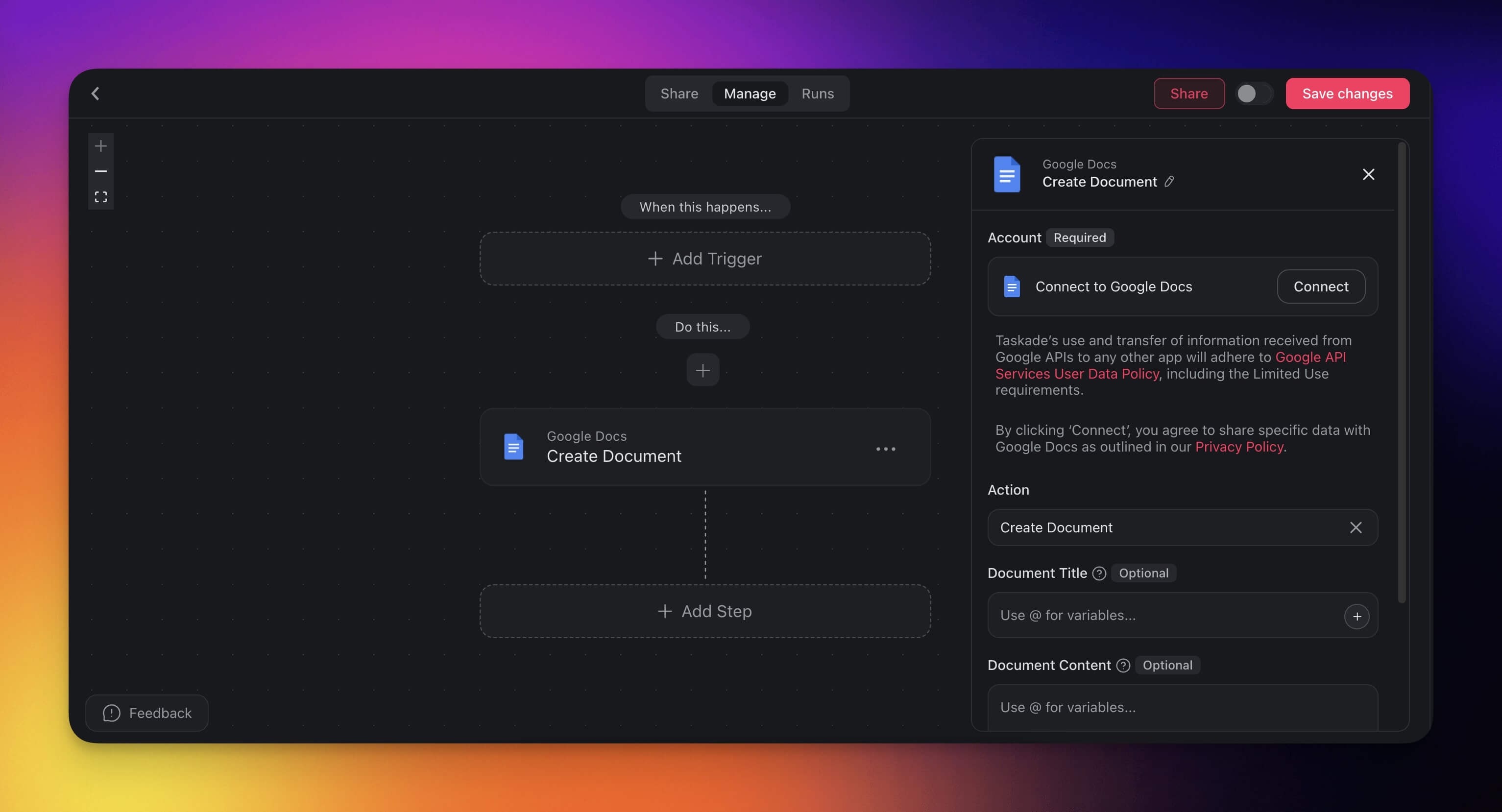
Google Docs Triggers & Actions
Here are the triggers & actions you can use in your workflows:
| Type | Name | Description |
|---|---|---|
| ⚡ Trigger | New Document | Fires when a new document is created in a folder you follow. |
| 🔧 Action | Create Document | Creates a new document on Google Docs. |
| 🔧 Action | Append Text | Appends text to an existing Google Doc. |
| 🔧 Action | Find Documents | Searches for documents by name or parent folder. |
| 🔧 Action | Read Document | Reads the full content of a Google Doc. |
| 🔧 Action | Edit Template File | Replaces placeholder tokens in a Google Doc template. |
Automation Settings
Connector options give you full control over the Google Docs automation:
| Field | Description |
|---|---|
| (optional) Document Title | The title of the new document. |
| (optional) Document Content | The content of the new document. |
| (required) Document | The document to append text to. |
| (required) Text to Append | The text to be appended. |
| (required) Document Name | The name of the document to search for. |
| (required) Document to Return | Return first/all matching document(s). |
| (optional) Behavior When no Documents Found | Decide what to do if no documents are found (Continue or Fail). |
| (optional) Identify Documents | Define the fields that identify the document(s) in Google Docs. |
Use Cases
Here are a few ways to use the Google Docs connector:
| Use Case | Action Flow |
|---|---|
| Update meeting notes | ✅ Trigger: Task Completed (e.g., “tagged #meeting”) ➡️ Action: Find Task(s) (tagged “#meeting”) ➡️ Action: Transform Array to String ➡️ Action: Find Documents (by meeting name) ➡️ Action: Append Text (with task summary) |
| Create client report on completion | ✅ Trigger: Project Completed ➡️ Action: Find Task(s) (from project) ➡️ Action: Transform Array to String ➡️ Action: Create Document titled {ClientName}_Final_Report with summary content |
| Log client communications | ✅ Trigger: Task Added (tagged “#client_call”) ➡️ Action: Find Task(s) (tagged “#client_call”) ➡️ Action: Transform Array to String ➡️ Action: Find Documents (by client name) ➡️ Action: Append Text (add the transcript) |
| Daily team update document | ✅ Trigger: Schedule (daily at 5 PM) ➡️ Action: Find Task(s) (completed today) ➡️ Action: Transform Array to String ➡️ Action: Find Documents (titled Daily_Team_Log_{date}) ➡️ Action: Append Text with daily summary |
| Document brainstorming sessions | ✅ Trigger: Task Added (tagged “#ideas”) ➡️ Action: Find Task(s) (tagged "#ideas") ➡️ Action: Transform Array to String ➡️ Action: Find Documents (e.g., “Brainstorming Log") ➡️ Action: Append Text with task idea or suggestion |
| Create weekly summary document | ✅ Trigger: Schedule (every Friday at 4 PM) ➡️ Action: Find Task(s) (from past 7 days) ➡️ Action: Transform Array to String ➡️ Action: Create Document titled Weekly_Summary_{date} with compiled task summary |
Use this integration as an AI agent tool. See Tools for AI Agents.
Available Capabilities
| Type | Capability | Description |
|---|---|---|
| ⚡ Trigger | New Document | Fires when a new document is created in a folder you follow |
| 🔧 Action | Create Document | Creates a new document on Google Docs |
| 🔧 Action | Append Text | Appends text to an existing Google Doc |
| 🔧 Action | Find Documents | Searches for documents by name or parent folder |
| 🔧 Action | Read Document | Reads the full content of a Google Doc |
| 🔧 Action | Edit Template File | Replaces placeholder tokens in a template |
Related guides
- Google Drive · Google Sheets · Google Forms. Other Google Workspace integrations
- Agent Knowledge. Use Docs as agent knowledge sources
- File Convert Action. Extract text from Docs in automations