# Reddit Integration
> Enhance your content workflows and community engagement by integrating Reddit into your automation flows. Here's everything you need to know to get s...
- Source: https://www.taskade.com/learn/connect/reddit-integration
- Section: Connect
- Updated: 2026-11-09
- Index of all pages: https://www.taskade.com/learn/llms.txt
## Overview
Watch a subreddit and turn what happens there into action you never have to babysit. The Reddit integration plugs into Taskade [automations](https://www.taskade.com/learn/automation/automations-execution) so your community work runs on its own. You are probably already doing a version of this by hand, refreshing a subreddit tab and copy-pasting links into a doc.
> **TL;DR:** Reddit connects to Taskade [automations](https://www.taskade.com/learn/automation/automations-execution) as an action. Create Post publishes to a subreddit, Get Post pulls a post back by its ID. Pair a Reddit action with any [trigger](https://www.taskade.com/learn/automation/triggers), like a new RSS item or a [schedule](https://www.taskade.com/learn/automation/schedule), to post and track community updates automatically. Reddit is a premium integration. An automation that uses it needs a paid plan.
---
## The Reddit Integration at a Glance
Reddit works as an **action** inside a Taskade automation. An action pushes data out, so a Reddit action either publishes a post to a subreddit (Create Post) or pulls a post back by its ID (Get Post). You start the automation with a [trigger](https://www.taskade.com/learn/automation/triggers), then chain the Reddit action and any follow-up steps after it.
The "watch a feed, then alert" pattern is the one most operators want. Pair an RSS or [schedule](https://www.taskade.com/learn/automation/schedule) trigger with an AI step and a Reddit action, and a single setup runs every time the feed changes.
```mermaid
flowchart LR
T["Watch a feed
RSS item or schedule"]
A["Draft with AI
summarize the update"]
R["Reddit action
Create Post to subreddit"]
N["Alert your team
Slack or email"]
T --> A
A --> R
R --> N
style T fill:#0d1b2a,color:#7dd3fc,stroke:#38bdf8,stroke-width:1.5px
style A fill:#1a0d24,color:#ce93d8,stroke:#6a1b9a,stroke-width:1.5px
style R fill:#2a1225,color:#ff8fa3,stroke:#ff2d60,stroke-width:2px
style N fill:#0d1a0e,color:#86efac,stroke:#22c55e,stroke-width:1.5px
```
A trigger pulls the event in, the Reddit action pushes the post out, and a notification closes the loop. Build the same shape once and it covers every new item from then on.
---
### Connect & Configure Reddit
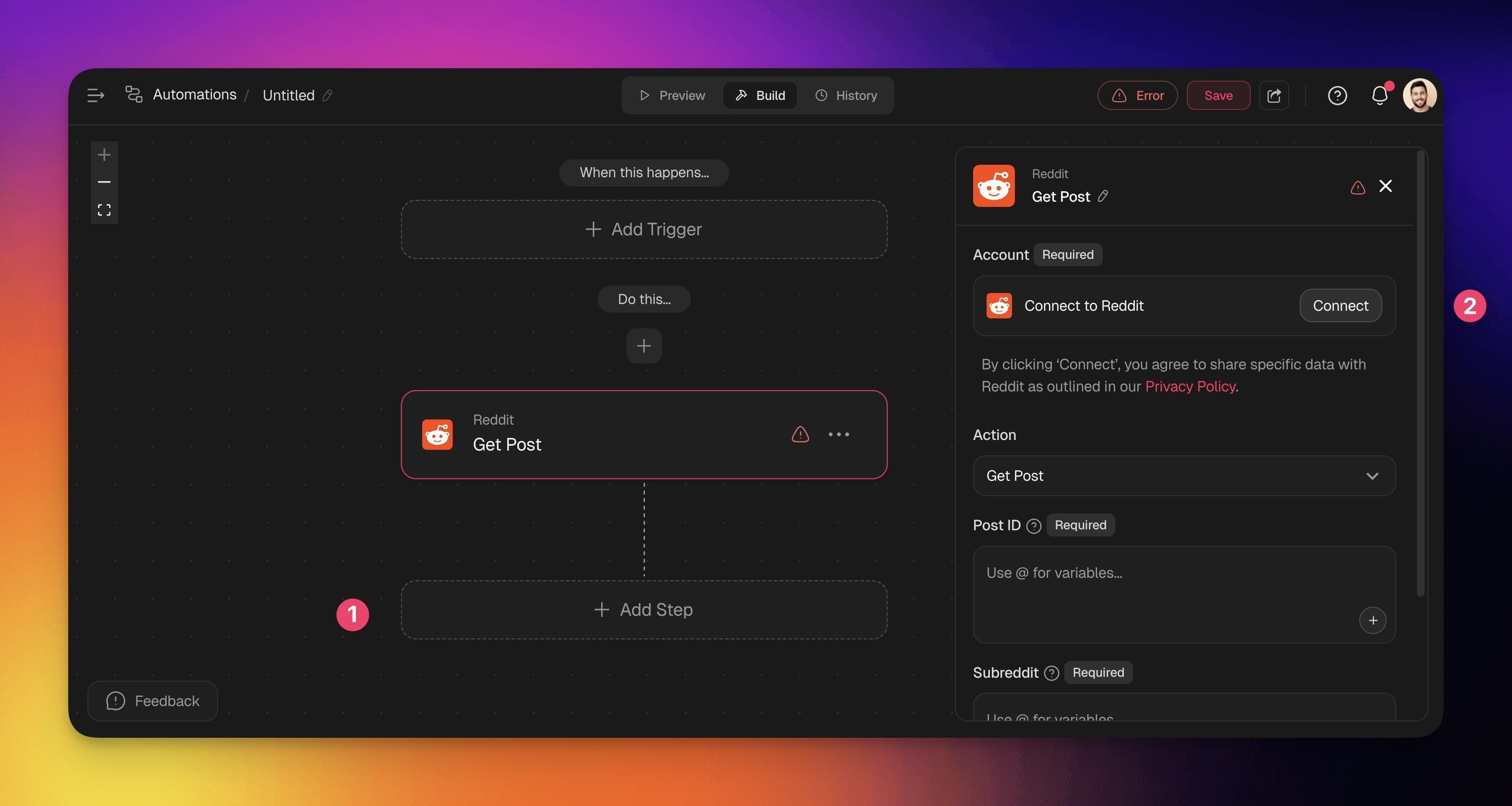
Before you use Reddit in Taskade, configure the integration:
- Add Reddit as an **action**.
- Click **Connect** to connect your Reddit account to Taskade.
- **Authorize** the **integration** by **logging into** your **Reddit account**.
---
### Disconnect Reddit
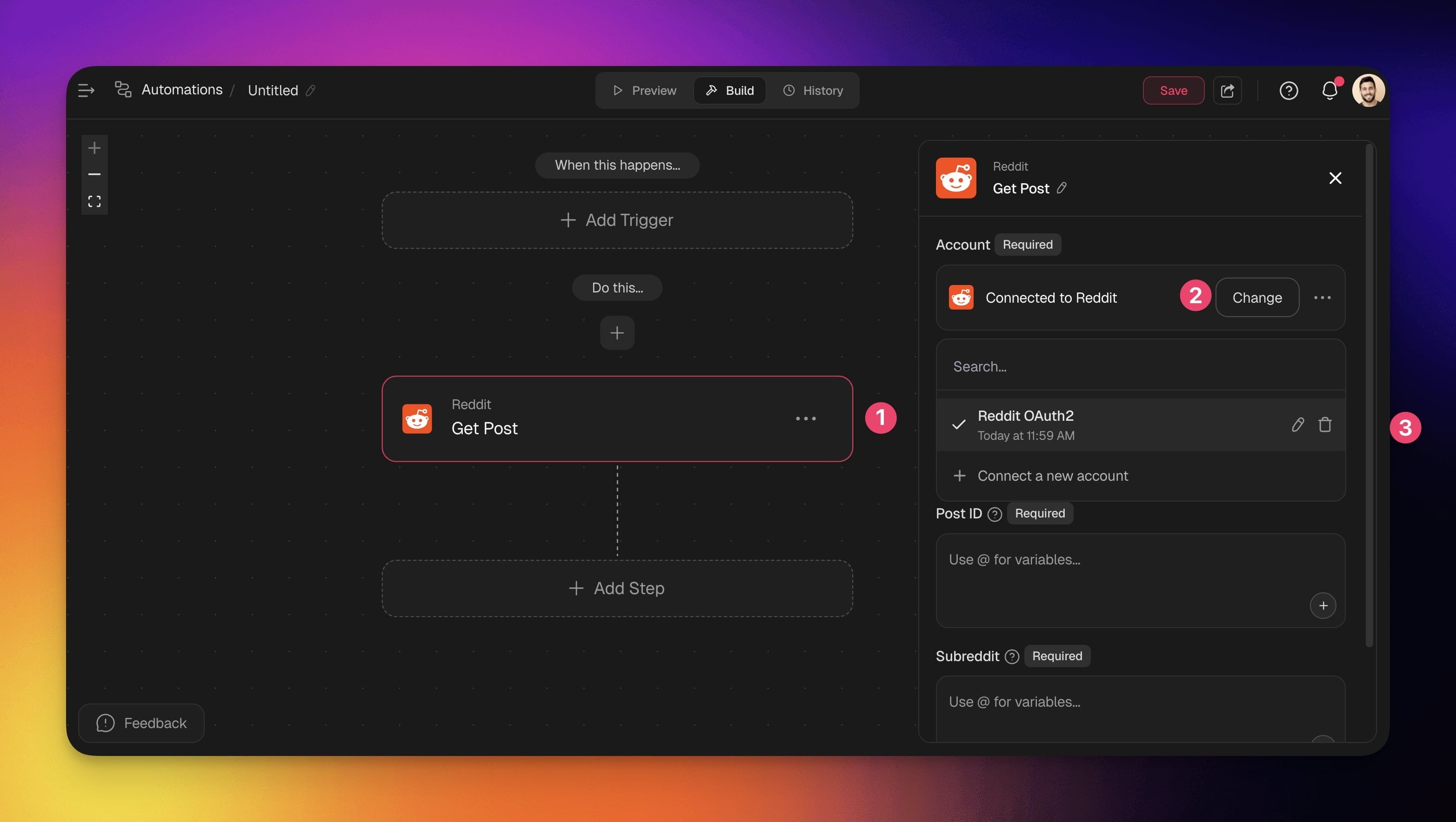
To disconnect the Reddit integration from your Taskade account:
- **From Automations**:
- Choose a Reddit action in your automation flow.
- Click **Change** in the configuration sidebar on the right.
- Click the **trash button** 🗑️ next to the active account.
---
## Build Reddit Automations
Set up Taskade once and it creates posts or retrieves content from Reddit on its own, every time your chosen trigger fires. Pick a trigger that starts the flow, then add a Reddit action to publish or pull a post. No code, no manual posting.
> **💡 Note**: Visit our [Automation Guide](https://www.taskade.com/learn/automation/automations-execution) to learn how to build your first automation.
### Add Reddit as an Action
1. Go to the **Automations** tab in your workspace or team.
2. Click ➕ **Create automation**.
3. Select **Start from scratch** or use the [Workflow Generator](https://www.taskade.com/learn/projects/workflow-generator).
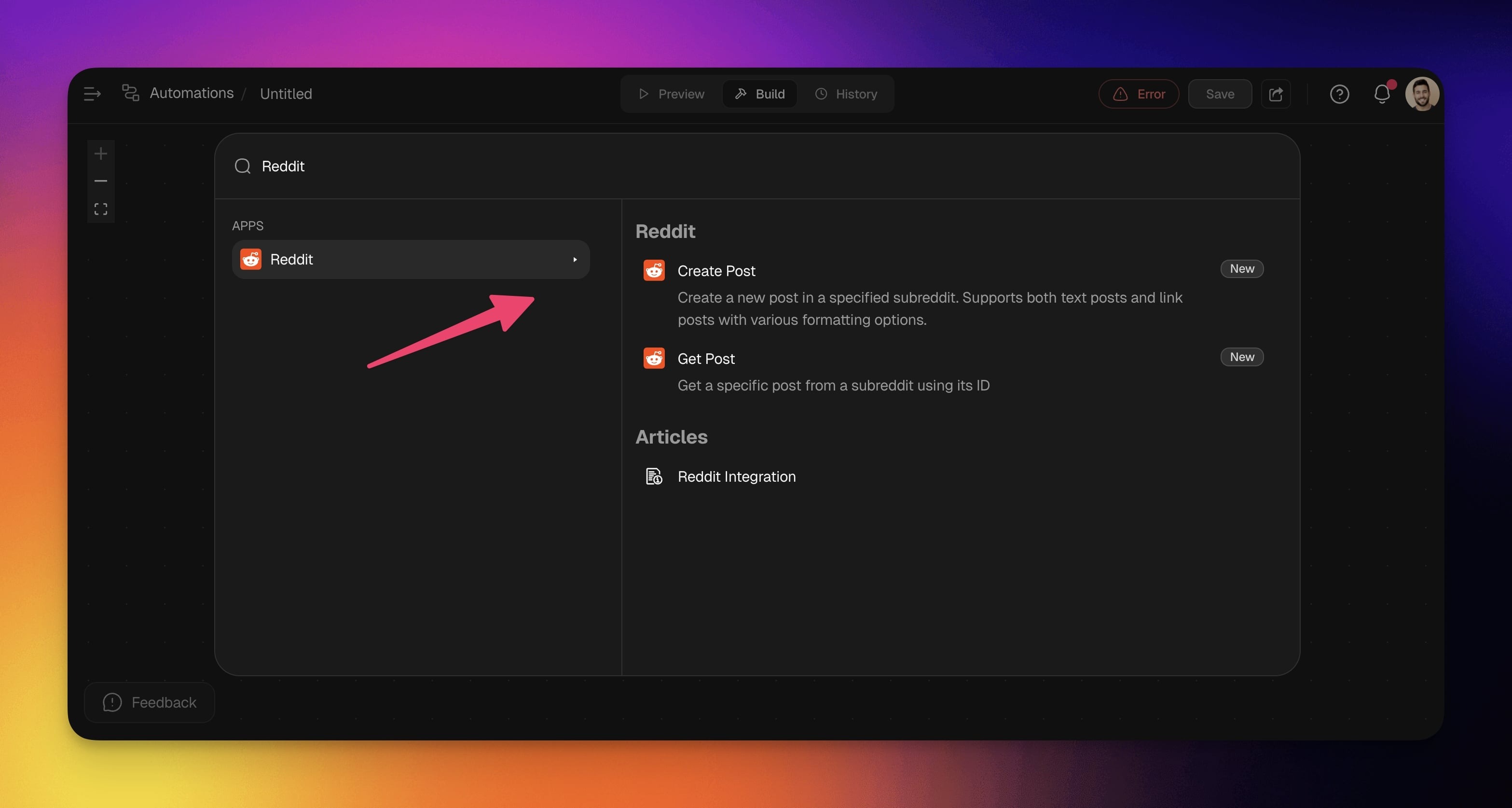
4. Add a [trigger](https://www.taskade.com/learn/automation/triggers) to start the flow, then click ➕ **Add step** and **choose** a **Reddit action**.
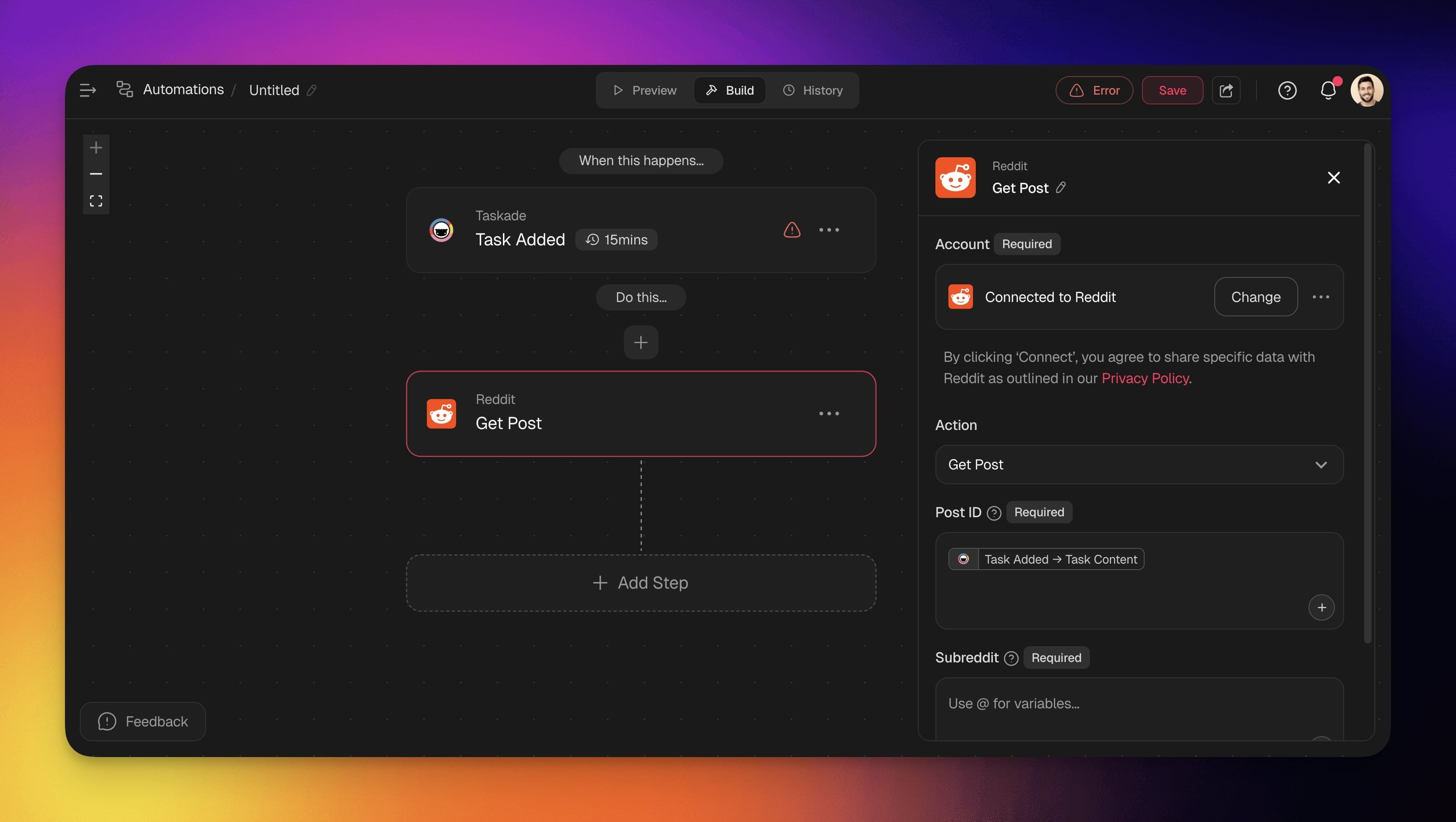
- **Connect** to configure the Reddit account (see the first section of this guide).
- **Configure** the **action**: pick a subreddit, write a post title, and choose a post type.
- (optional) Add more steps to the automation.
---
## What can Reddit automations do?
The Reddit integration ships two actions: **Create Post** publishes a text or link post to any subreddit, and **Get Post** pulls a specific post back by its ID. Both run inside an automation, so once a trigger fires they handle the posting or fetching for you.
| 🛠️ Action | 📄 Description |
| --- | --- |
| Create Post | Create a new post in a specified subreddit. Supports both text and link posts with various formatting options. |
| Get Post | Retrieve a specific post from a subreddit using its Post ID. Useful for referencing or tracking published content. |
---
### Automation Settings
Connector options give you full control over your Reddit automations:
| Field | Requirement | Description |
| --- | --- | --- |
| Account | Required | Connect your Reddit account to Taskade. |
| Post Title | Required | Enter the title of your post. You can use variables by clicking + or typing @. |
| Subreddit | Required | Enter the subreddit for the post. |
| Post Type | Required | Choose between a Text Post or Link Post. |
| Mark as NSFW | Optional | Flag the post as Not Safe For Work. |
| Mark as Spoiler | Optional | Mark the post content as a spoiler. |
| Send Inbox Replies | Optional | Enable or disable inbox replies. |
Here is how a Create Post action looks once it is configured inside the automation:
```text
┌─ Create Post (Reddit) ──────────────────────────┐
│ Account ▸ @your-reddit (Connected) │
│ Subreddit ▸ r/yourcommunity │
│ Post Title ▸ {{ AI summary of the new update }} │
│ Post Type ▸ Link Post │
│ NSFW ☐ Spoiler ☐ Inbox Replies ☑ │
└──────────────────────────────────────────────────┘
▼ runs every time the trigger fires
```
Curly-brace fields like `{{ AI summary }}` pull in data from an earlier step, so each post fills itself in.
---
## Common Reddit automation ideas
Pair a Reddit action with the right trigger and you cover a whole job with one setup. Auto-post new blog articles to a subreddit, cross-post a new YouTube video to your community, or share a project update the moment a task completes. Start with these flows:
| Use Case | Automation Flow |
| --- | --- |
| Auto-post new blog articles to relevant subreddits | ✅ Trigger: New Item Added (RSS)
➡️ Action: Write with AI to summarize the article
➡️ Action: Create Post (Reddit) to share content
➡️ Action: Add Task to track engagement metrics |
| Share project updates when tasks complete | ✅ Trigger: Task Completed
➡️ Action: Write with AI to create post content
➡️ Action: Create Post (Reddit) in project subreddit |
| Cross-post YouTube videos to community | ✅ Trigger: New Video (YouTube)
➡️ Action: Create Post (Reddit) with video link
➡️ Action: Send Channel Message (Slack) to notify team |
| Post GitHub releases to developer communities | ✅ Trigger: New Release (GitHub)
➡️ Action: Write with AI to clean up the changelog
➡️ Action: Create Post (Reddit) with release notes
➡️ Action: Send Email (Gmail) to notify stakeholders |
| Post social content when files are uploaded | ✅ Trigger: New File (Google Drive)
⚙️ Action: Turn a file into text to extract content
⚙️ Action: Create Post (Reddit) with file summary |
Each flow mixes Reddit with other connectors. Common partners are [RSS](https://www.taskade.com/learn/connect/rss-integration) and [schedule](https://www.taskade.com/learn/automation/schedule) triggers to start the flow, [Gmail](https://www.taskade.com/learn/connect/gmail-integration) or [Slack](https://www.taskade.com/learn/connect/slack-integration) to alert your team, and [YouTube](https://www.taskade.com/learn/connect/youtube-integration) or [GitHub](https://www.taskade.com/learn/connect/github-integration) to pull in fresh content worth sharing.
---
Use this integration as an [AI agent](https://www.taskade.com/agents) tool, so an agent can post or fetch on its own. See [Tools for AI Agents](https://www.taskade.com/learn/agents/agent-tools) for how Taskade's built-in tools and connectors work together.
#### Available Capabilities
| Type | Capability | Description |
| --- | --- | --- |
| 🔧 Action | Create Post | Performs the create post operation |
| 🔧 Action | Get Post | Performs the get post operation |
---
## Turn a feed into a working app
You already know what you want here: stop refreshing tabs and let one setup watch the feed for you. In [Taskade Genesis](https://www.taskade.com/create), you describe that out loud and get a **community portal** that your whole team logs into.
Picture a portal where every new mention, blog post, and release lands in one feed, scored by an [AI agent](https://www.taskade.com/agents), with a one-click "post to Reddit" button next to each item. Your team logs in to approve or skip. The [reliable automation](https://www.taskade.com/learn/automation/automations-execution) you built here runs underneath it, publishing the approved items and alerting the channel, all on its own. [Build the portal](https://www.taskade.com/create) by describing it in plain English.
---
### Related guides
- Other social integrations: [X / Twitter](https://www.taskade.com/learn/connect/twitter-x) · [LinkedIn](https://www.taskade.com/learn/connect/linkedin-integration) · [Facebook](https://www.taskade.com/learn/connect/facebook-integration) · [Instagram](https://www.taskade.com/learn/connect/instagram-integration)
- [RSS Integration](https://www.taskade.com/learn/connect/rss-integration): watch a feed and trigger the flow
- [Automation Triggers](https://www.taskade.com/learn/automation/triggers) · [Schedule](https://www.taskade.com/learn/automation/schedule): start a Reddit flow on an event or timer
- [AI Categorize](https://www.taskade.com/learn/automation/ai-categorize): run sentiment analysis on posts
- [Marketing Agents](https://www.taskade.com/learn/genesis/marketing-agents): community monitoring agents
- [All integrations](https://www.taskade.com/integrations): browse 100+ bidirectional connectors