
Overview
Agent Tools let custom AI agents act. An agent can research the web, read files, send messages, or connect to an API. Taskade includes built-in tools and supports custom tools from automations or direct API connections.
TL;DR: Add tools so your custom AI agents can act, not only chat. Taskade ships a large built-in toolkit across research, documents, creation, workspace, and external apps, plus unlimited custom tools built from your automations or any API you use. Toggle each tool on or off and set its approval mode in the agent's Tools tab.
Tool Categories at a Glance
| Category | What's inside | What agents can do |
|---|---|---|
| Research | Web search, YouTube transcription, RSS, Scrape Webpage | Pull live information into responses |
| Documents | PDF OCR, file read, DOCX, EPUB, markdown | Extract data from uploaded files |
| Creation | Image generation, code execution | Produce assets and run scripts |
| Workspace | Create/edit projects, tasks, fields, comments, and ask other agents | Act on your Memory layer directly |
| External apps | Slack, Gmail, Google Sheets/Docs/Drive/Calendar, Mailchimp, WordPress, Twilio, HubSpot, Discord, MS Teams, WhatsApp, X/Twitter, LinkedIn, Telegram, Stripe, Reddit, Apollo | Send messages, post content, log data, process payments |
| Custom | Automation-flow tools, REST API tools | Connect any service you use |
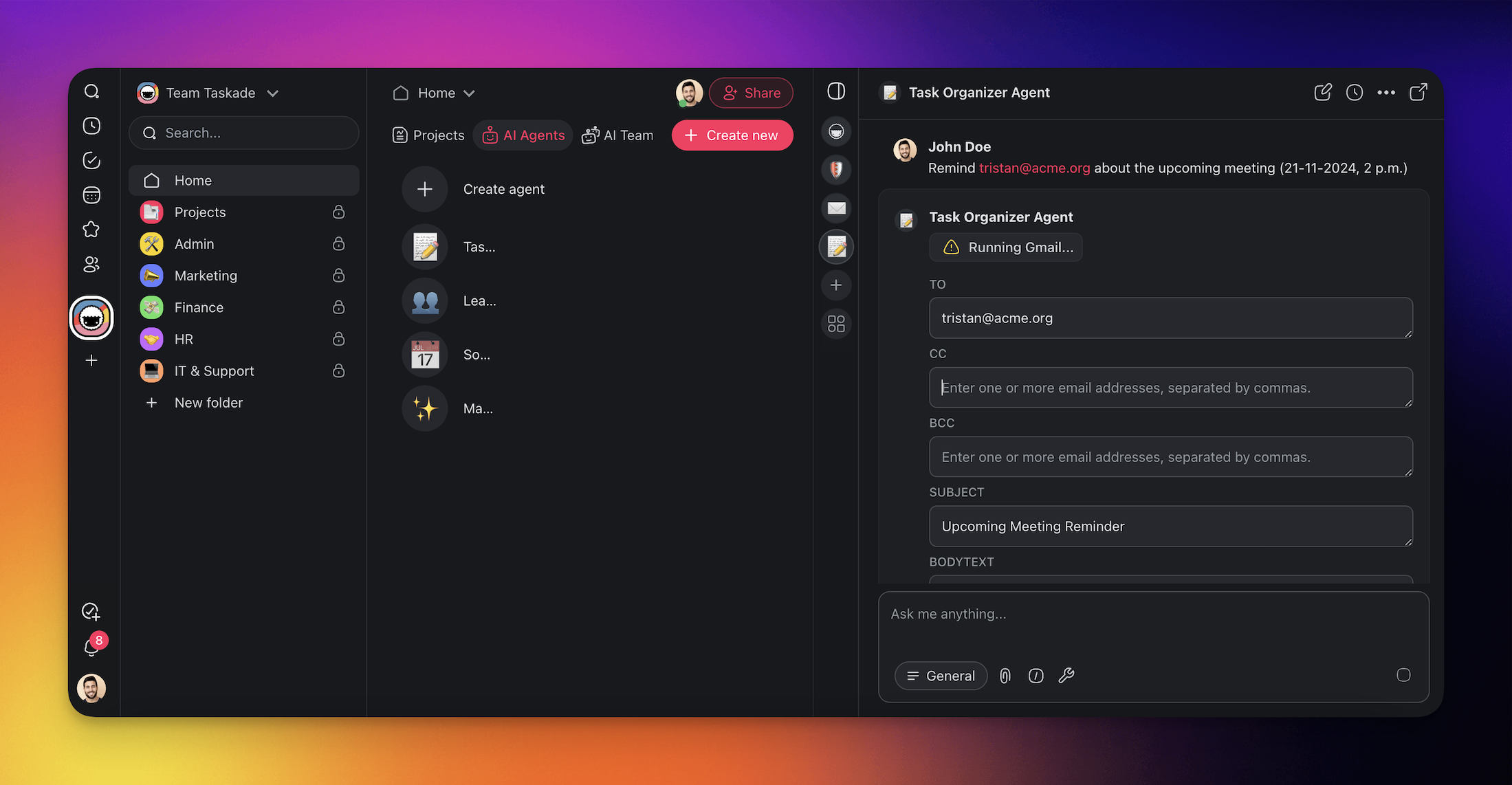
The agent Tools tab: toggle any of the built-in tools on or off, set each tool's approval mode, and connect external apps. On the Free plan the premium external apps carry an upgrade chip. Any paid plan unlocks them:
┌────────────────────────────────────────────────────────────┐
│  Edit AI Agent  ›  Tools                                   │
│  Equip agents with tools to gather data and act.           │
├────────────────────────────────────────────────────────────┤
│  [ All ]  Built-in  Apps  Custom                           │
│  ( Filter tools... )                                       │
├────────────────────────────────────────────────────────────┤
│  Taskade Actions      Manage projects & tasks       ●      │
│  Search Web           Automatic Approval            ●      │
│  Gmail · New email    [Upgrade]  Manual Approval    ○      │
│  Lead Enrichment Flow Manual Approval               ●      │
│                                                            │
│  ● on   ○ off  ·  built-in tools + your automations        │
└────────────────────────────────────────────────────────────┘
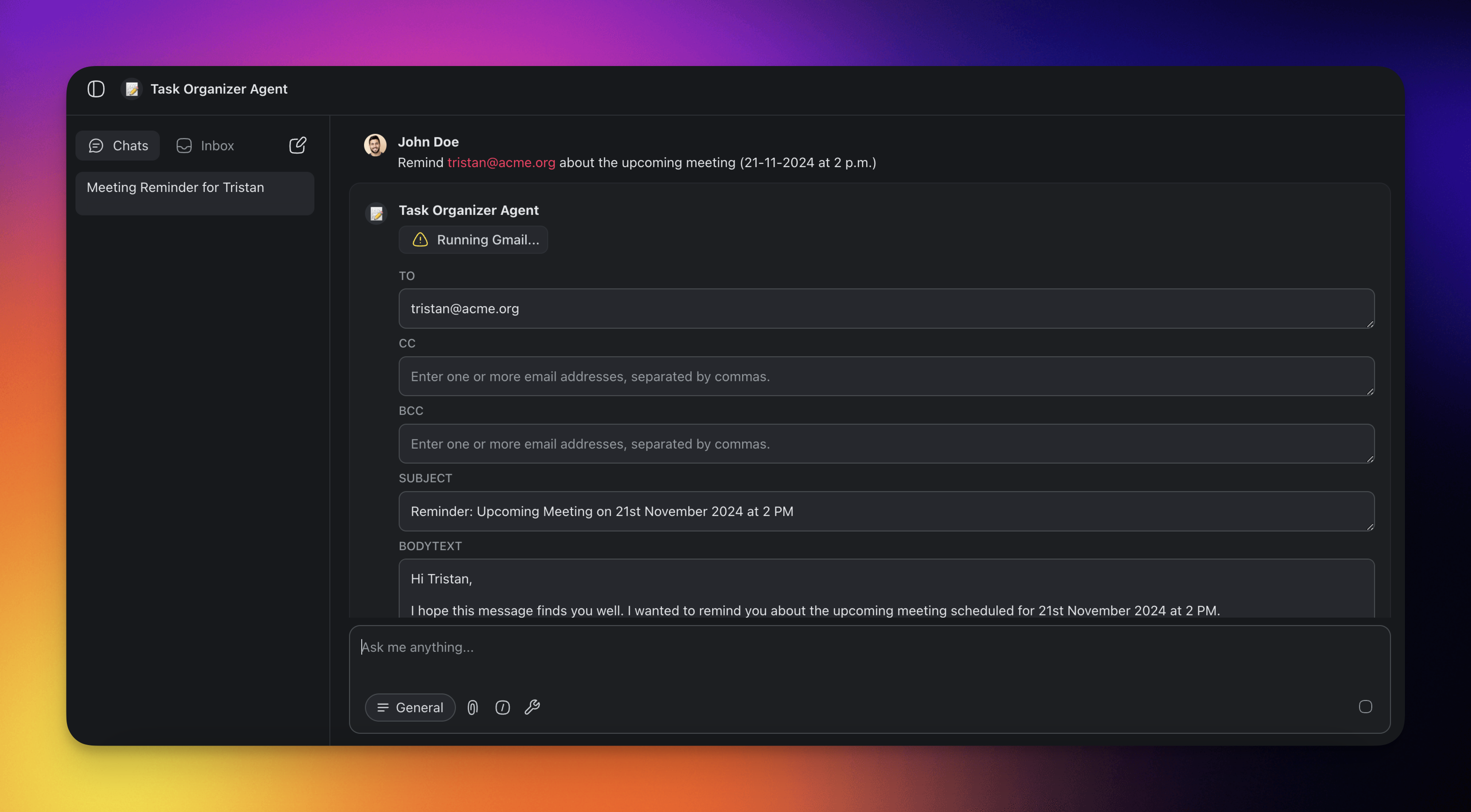
You can also use a tool directly from Agent Chat:
- Open the Agents tab in the left sidebar of your workspace.
- Select your custom AI agent.
- Click ➕ New chat to start a conversation.
- Ask the agent to use the active tool.
- Approve or Reject the agent's output.
📖 Learn more: Share & Embed AI Agents
Taskade EVE vs Custom Agents: Taskade EVE has access to all the built-in tools and can use any tool immediately. Custom AI agents need tools manually enabled. Go to the agent's settings and toggle on the tools you want it to use.
Build Custom Agent Tools
Reuse an automation as a custom AI agent tool.
Note: Visit Agent Automation Trigger to learn more.
- Go to the 🔧 Tools tab on the left.
- Click ➕ New tool.
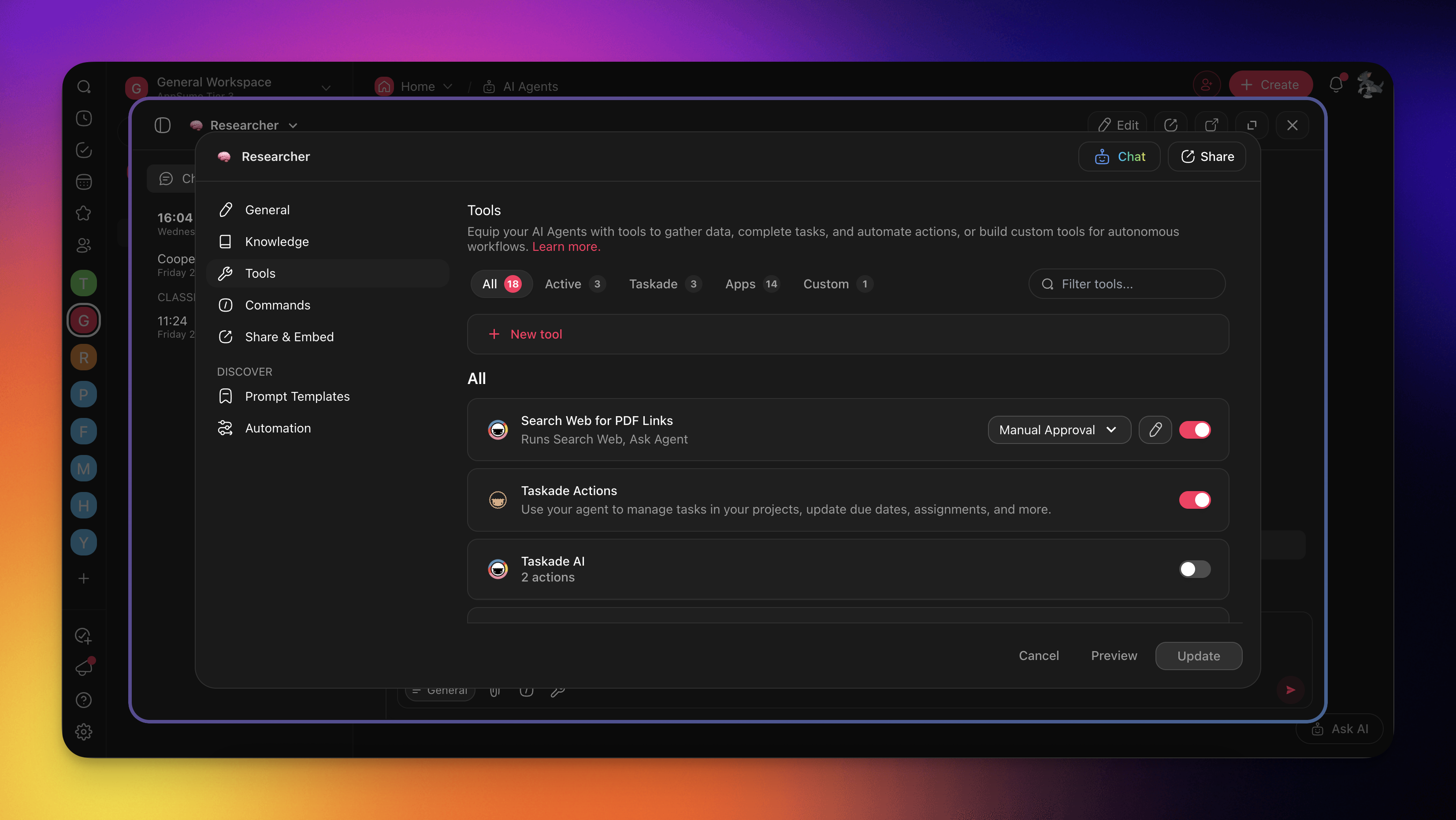
- Define parameters that will be used in the subsequent actions.
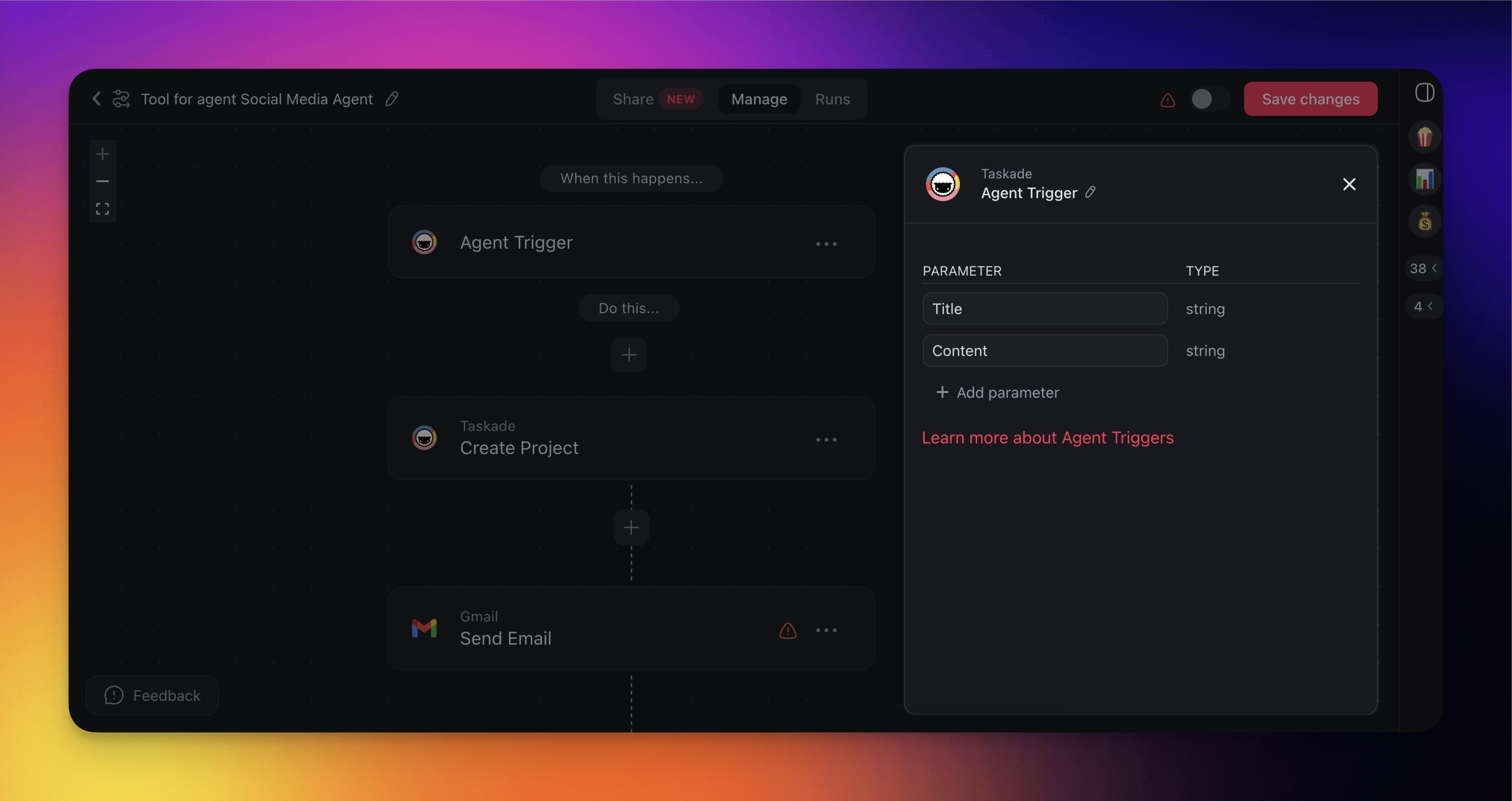
- Add steps to the automation flow.
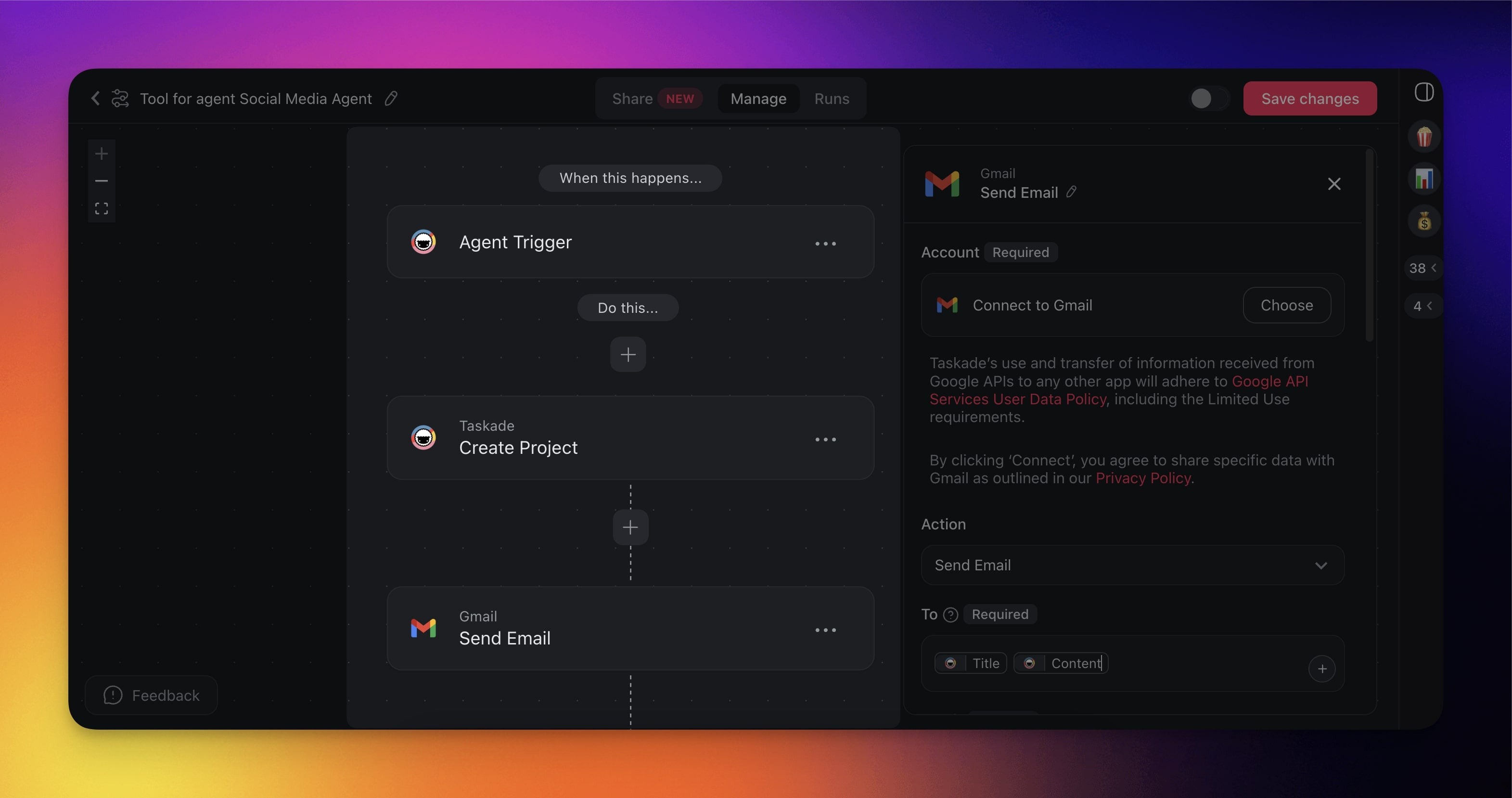
When done, click Save changes (top right) and toggle the automation on.
(optional) Click the pencil ✎ icon(top right) to rename the tool.
The automation flow will be added as a new agent tool.
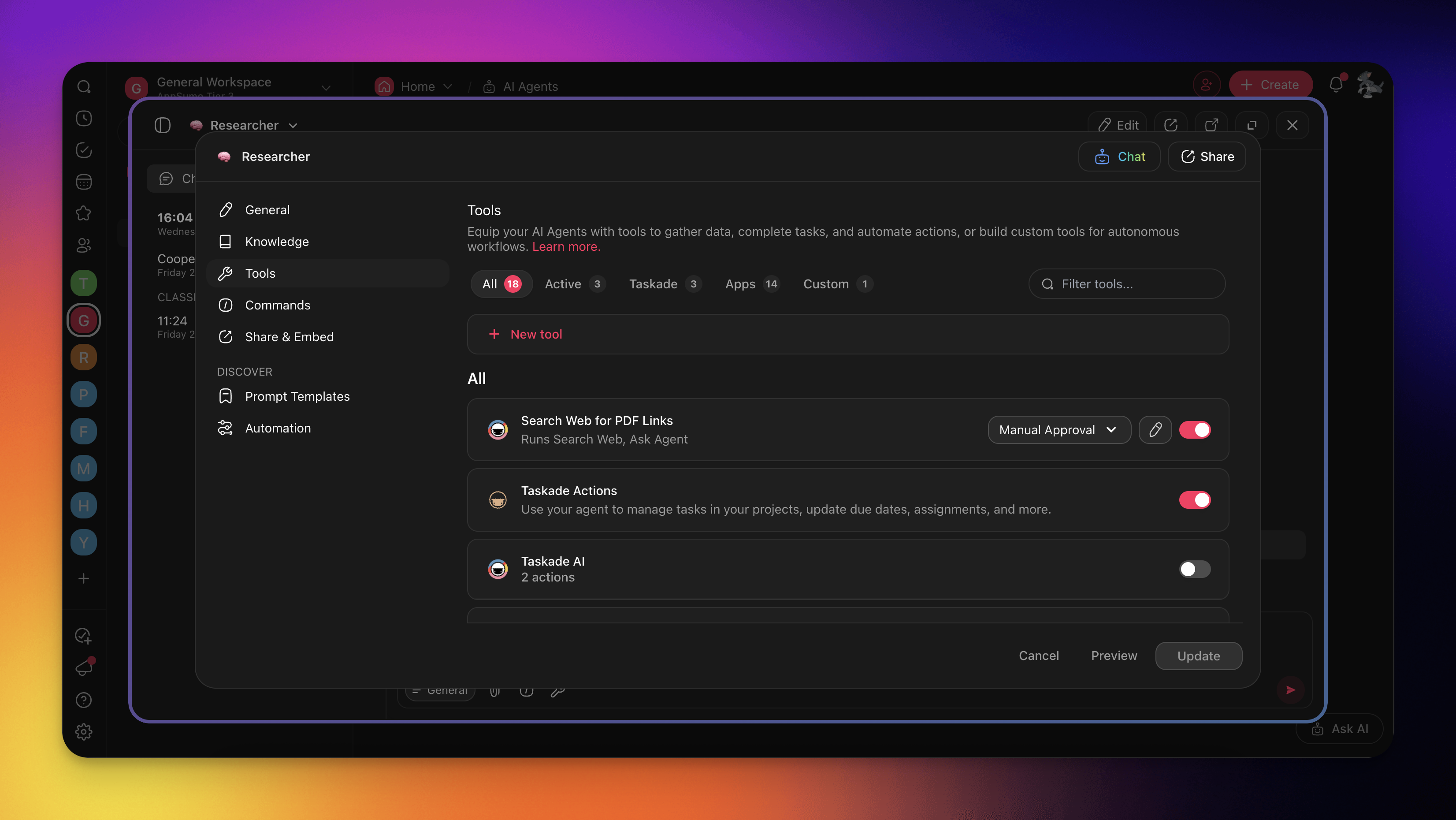
Prompt the agent as usual and ask it to use the new tool.
Enable/Disable Tools
Enable only the tools that the agent needs.
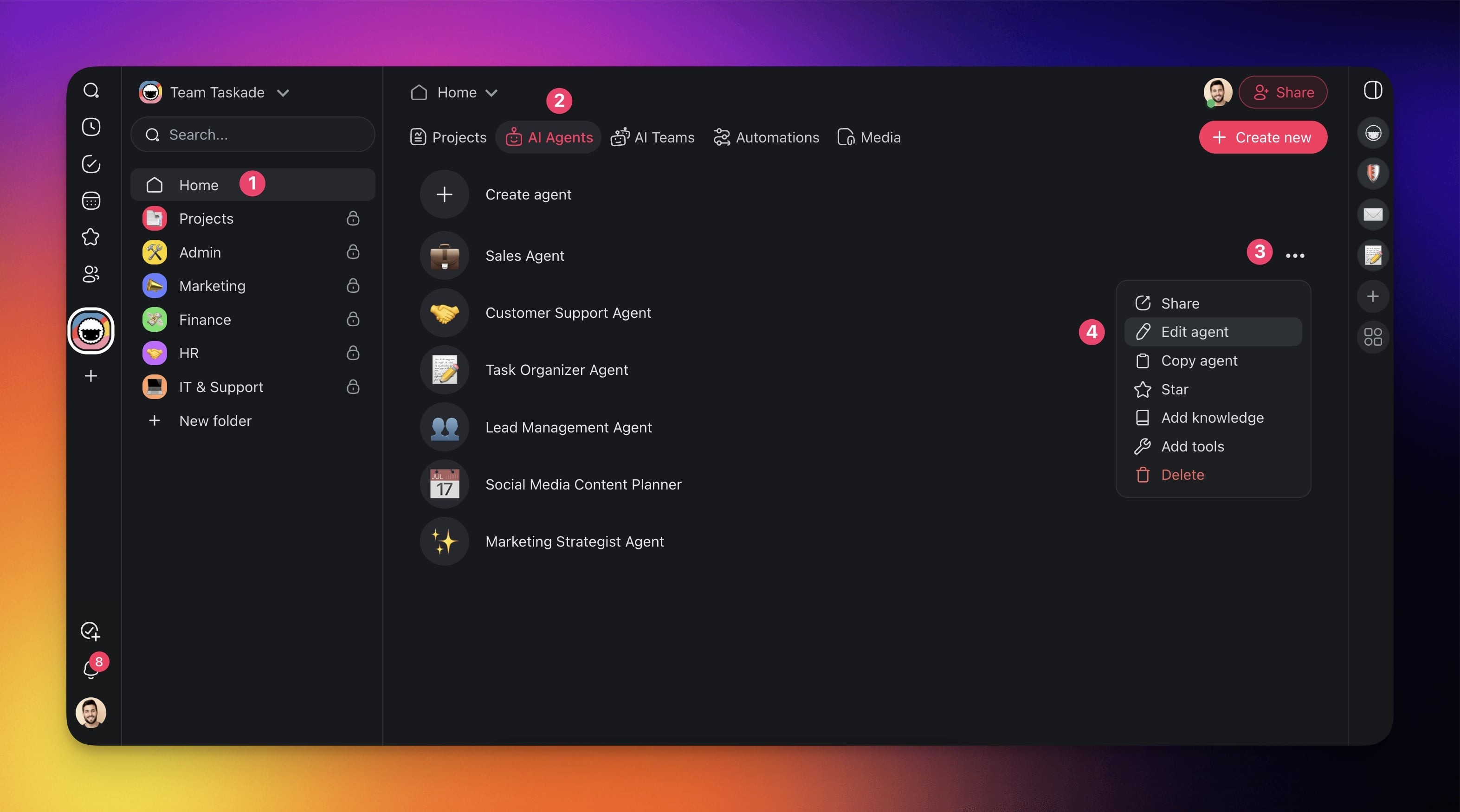
- Go to the Agents tab at the top of your workspace/folder.
- Click the three dots ··· next to the agent you want to edit.
- Choose Edit agent or Add tools from the list.
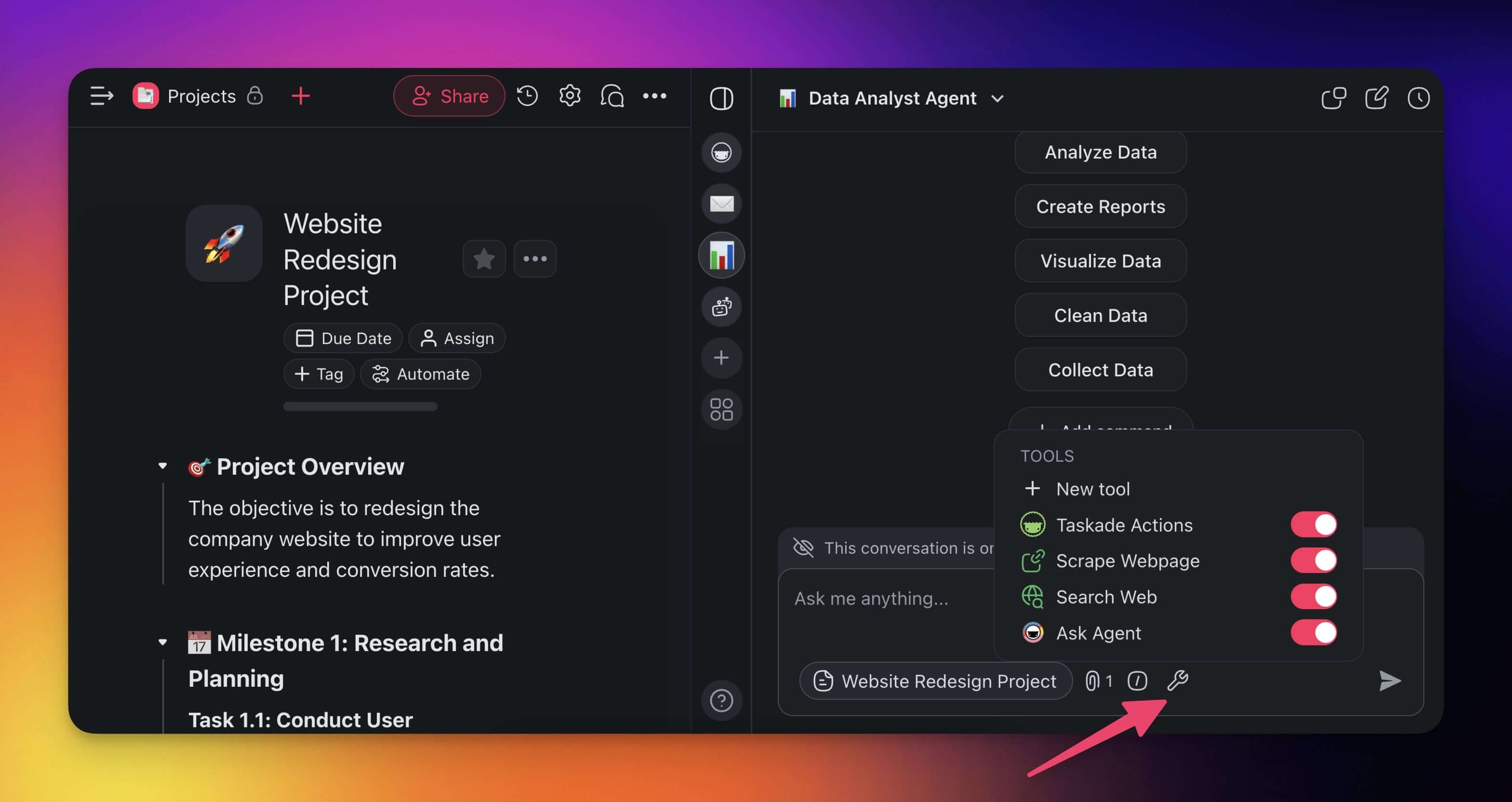
- In the 🔧 Tools tab, use the toggles next to tools to disable/enable them.
- Click Updates to save the changes.
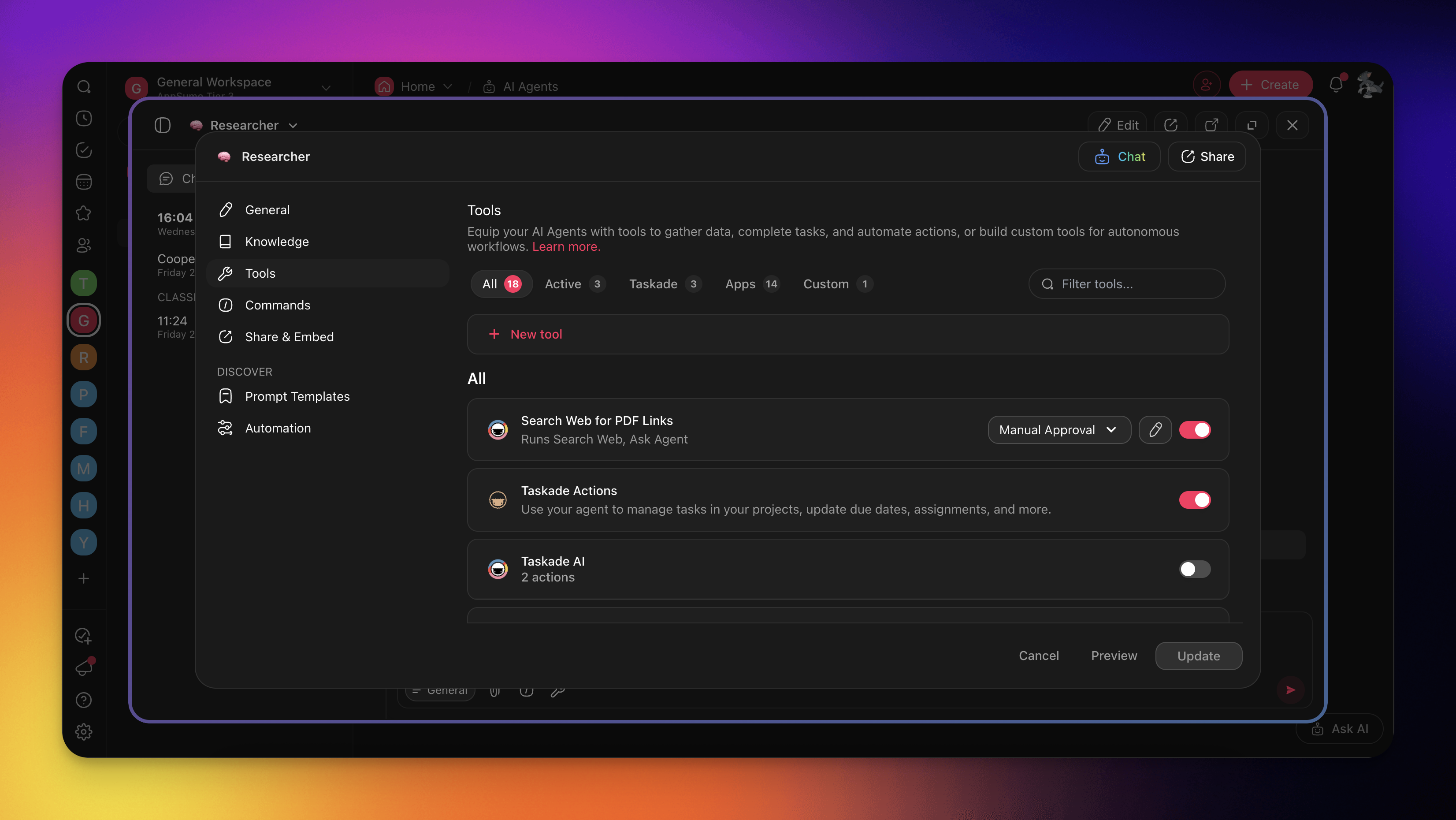
💡 Note: You can also turn tools on or off in the tools dropdown menu.
Human in the Loop
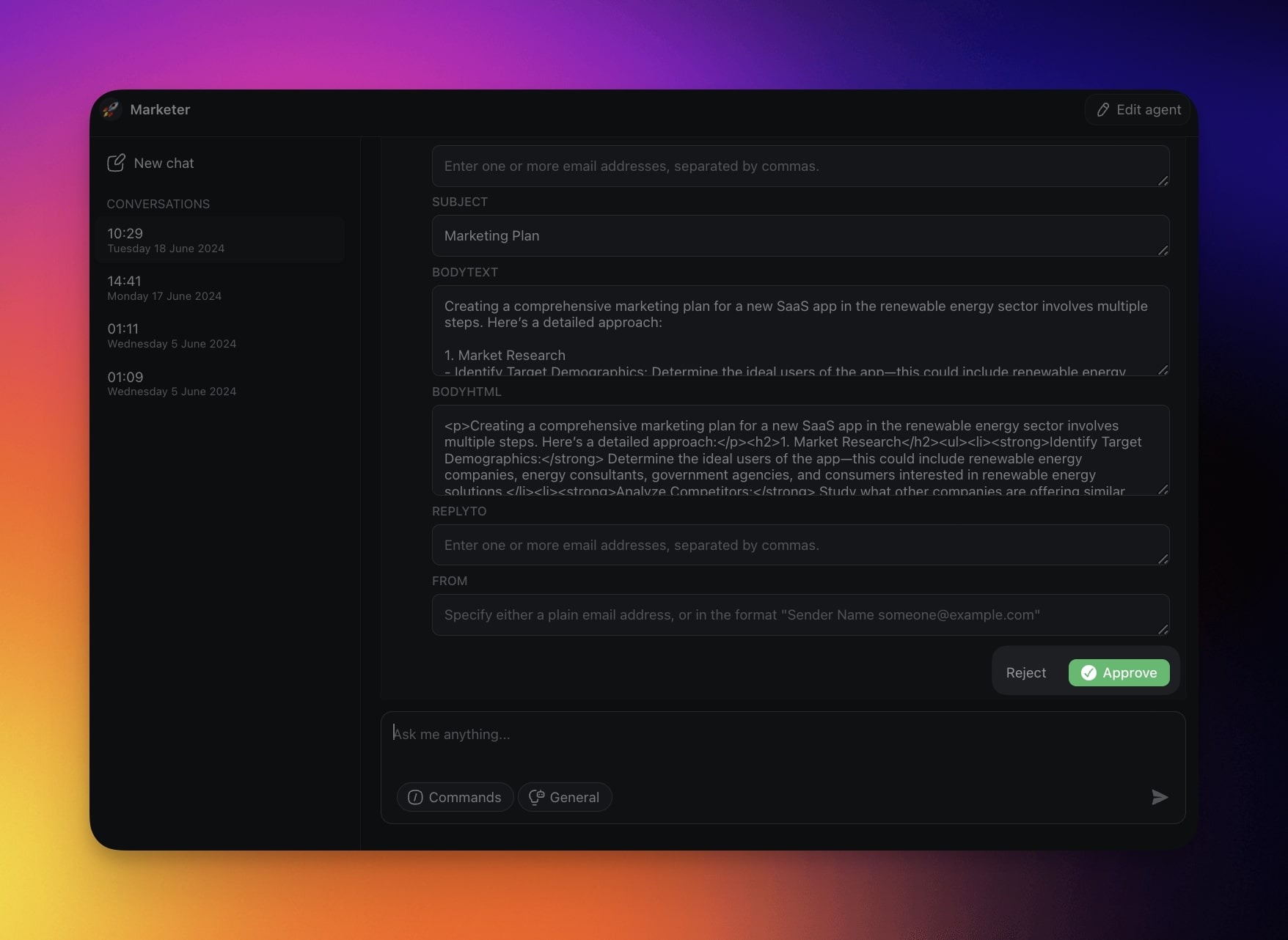
When an agent uses an external platform, approve or reject the action. The agent does not exchange data without your approval.
Here is how it works:
- Enable one of the available agent tools.
- Start a conversation with your agent as usual.
- Prompt the agent to carry out a task. For example: "Please send the document you just generated to jane.doe@example.com via Gmail."
- Wait for the agent to finish and click Approve or Reject.
Taskade Agent Actions
Use the agent to automatically create projects and tasks in your workspace.
Bulk Taskade AI Prompts
| ⚙️ Action | 🔤 Prompt Example |
|---|---|
| Automate Sprint Planning | "Automate sprint planning (next 2 weeks)" |
| Generate Product Roadmap | "Generate a roadmap for a product launch" |
| Restructure Project Phases | "Restructure this project into 3 phases" |
| Build AI Flow | "Create a task list for an AI onboarding flow" |
| Complete All #done Tasks | "Complete all tasks that are marked #done" |
| Push Overdue Tasks | "Push overdue tasks to Monday" |
| Convert to Timeline | "Convert this checklist into a timeline" |
| Tag Design Tasks | "Summarize and tag all design-related tasks" |
| Split Large Task | "Split the task Build Homepage into subtasks" |
| Prioritize Backlog | "Prioritize #backlog tasks by impact" |
| Create Dependency Map | "List task dependencies and show blockers" |
Project and Task Editing
| ⚙️ Action | 🔤 Prompt Example |
|---|---|
| Add Task | "Add a task Schedule kickoff meeting" |
| Add Subtasks | "Add subtasks under Design UI Wireframes" |
| Insert Checklist | "Insert a checklist titled Pre-launch QA" |
| Duplicate Section | "Duplicate the Outreach Plan section" |
| Generate Kanban Board | "Create a Kanban view Ideation Board" |
| Convert Bullets to Tasks | "Turn each bullet in Notes into a task" |
Task Content Updates
| ⚙️ Action | 🔤 Prompt Example |
|---|---|
| Edit Task Title | "Update Email clients task to VIP clients" |
| Make Task Bold | "Make the task Submit report bold" |
| Convert Format | "Convert all checkboxes into bullet points" |
| Rename and Move Task | "Change Draft blog post to Write blog post draft and move it to the top" |
| Summarize Comments | "Summarize all comments on this task" |
| Translate Task | "Translate all tasks tagged #es into English" |
Task Completion
| ⚙️ Action | 🔤 Prompt Example |
|---|---|
| Complete Week Tasks | "Mark all tasks under Week 1 as completed" |
| Complete Specific Task | "Complete the task Submit pitch deck" |
| Check #done Tasks | "Check off any task that has #done" |
| Close Quick Wins | "Complete tasks tagged #quickwin" |
Due Date Management
| ⚙️ Action | 🔤 Prompt Example |
|---|---|
| Add Due Date | "Schedule Launch campaign to next Friday" |
| Update Due Dates | "Set all due dates for Sprint 2 to next week" |
| Remove Due Dates | "Remove due dates from tasks marked complete" |
| Reschedule Urgent Tasks | "Reschedule all #urgent tasks to tomorrow 9am" |
| Shift Weekend Dates | "Move all tasks due Sat-Sun to next Monday" |
Assignments
| ⚙️ Action | 🔤 Prompt Example |
|---|---|
| Assign to Agent Team | "Assign QA tasks to the Bug Bashers AI Team" |
| Assign to Me | "Assign me to any unassigned task" |
| Unassign User | "Unassign John from weekly newsletter" |
| Reassign to User | "Reassign all #marketing tasks to Lian" |
| Balance Workload | "Distribute unassigned tasks across team" |
Labels and Tags
| ⚙️ Action | 🔤 Prompt Example |
|---|---|
| Tag Overdue Tasks | "Add #important to tasks that are overdue" |
| Tag Design Tasks | "Tag Landing Page and Lead Form with #growth" |
| Remove Tag | "Remove #low-priority from completed tasks" |
| Replace Tag | "Change tag #old to #updated across project" |
| Auto-Tag Priority | "Tag tasks with due date < 3 days as #urgent" |
Task Movement
| ⚙️ Action | 🔤 Prompt Example |
|---|---|
| Move Task | "Move Client Call Notes under Follow-Ups" |
| Reorder Tasks | "Reorder all design tasks to be at the top" |
| Indent Task | "Indent Logo Drafts under Design Assets" |
| Move to Bottom | "Move Launch Recap to the bottom" |
| Elevate Priority | "Move #urgent tasks to the top of each section" |
Smart Editing and Restructuring
| ⚙️ Action | 🔤 Prompt Example |
|---|---|
| Split Task | "Split Onboard Team into tasks Intro Session Docs Access Role Setup" |
| Group Tasks | "Group all #backlog tasks under a new section" |
| Categorize Tasks | "Convert this task list into three categories To Do In Progress Done" |
| Collapse Sections | "Collapse all sections except Week 3" |
| Flatten Sections | "Ungroup all subtasks one level up" |
| Merge Duplicates | "Find and merge tasks with identical titles" |
Notes and Comments
| ⚙️ Action | 🔤 Prompt Example |
|---|---|
| Add Note | "Add a note Blocked by legal to Send Agreement" |
| Add Comment | "Add a comment to QA Checklist for review" |
| Convert Notes to Tasks | "Turn each bullet in Notes section into a task" |
| Summarize Notes | "Summarize all notes into a project overview" |
Insights and Reporting
| ⚙️ Action | 🔤 Prompt Example |
|---|---|
| Generate Weekly Summary | "Summarize this project by wins & blockers" |
| Audit Project Health | "List overdue tasks and stalled sections" |
| Compare Progress | "Compare this sprint velocity to last sprint" |
| KPI Snapshot | "Create a KPI snapshot of completed vs planned" |
Governance and Safety
| ⚙️ Action | 🔤 Prompt Example |
|---|---|
| Require Approval | "Add Review checkbox to tasks edited by agents" |
| Detect Sensitive Data | "Highlight tasks containing card numbers" |
| Lock Section | "Prevent edits to Signed Contracts section" |
Custom Field Management
| ⚙️ Action | 🔤 Prompt Example |
|---|---|
| Add Custom Field | "Create select field Status with Open In Progress Closed" |
| Bulk Update Field | "Set Status to Closed for all completed tasks" |
| Remove Field | "Delete custom field Deprecated from project" |
Search and Intelligence
| ⚙️ Action | 🔤 Prompt Example |
|---|---|
| Find Similar Projects | "List projects similar to Q3 OKR" |
| Locate Resources | "Search uploaded PDFs for keyword pricing" |
| Cross Project Insight | "Count tasks tagged #design across workspace" |
Content Generation
| ⚙️ Action | 🔤 Prompt Example |
|---|---|
| Rewrite Section | "Rewrite Overview section for clarity" |
| Generate LinkedIn Post | "Draft LinkedIn update for v2.0 release" |
| Create Slide Outline | "Outline slide deck based on this project" |
Compare and Review
| ⚙️ Action | 🔤 Prompt Example |
|---|---|
| Compare Versions | "Compare project changes to last week" |
| Evaluate Drafts | "Highlight differences between drafts A/B" |
| Benchmark Performance | "Compare completion rate to industry" |
Taskade AI
Allows the agent to ask other agents questions or execute agent commands.
Available agent actions:
🤖 Ask Agent: Ask your agent a question.
🤖 Run Agent Command: Run the command of an agent.
Prompt examples:
"What are Sales Agent and Marketing Agent thoughts about..."
"Run the command 'Generate performance report' on the Reporting Agent."
Media
Prompt the agent to query search engines to find data, articles, and other resources.
Include up to 5 links (URLs) to web resources in your prompt, and the agent will retrieve the content from the pages and present it in the specified format.
Extract information from video content.
Available agent actions:
🌐 Search Web: Search the web to retrieve information on any topic.
🔗 Scrape Webpage: Extract and summarize content from links.
🎞️ Transcribe YouTube Video: Get a transcription from a YouTube video URL.
Prompt examples for Search Web:
"Find recent news articles about renewable energy."
"Find academic articles on climate change mitigation strategies."
Prompt examples for Scrape Webpage:
"Extract and summarize key points from: [URL]."
"Extract the key statistics from the reports at: [URL1] and [URL2]."
Prompt examples for Transcribe Youtube Video:
"Transcribe the interview focusing on speaker names and timestamps."
"Transcribe the video. Include a summary and highlight key points."
"Transcribe the tutorial and organize it with headings."
App Tools
Slack
Communicate updates, reminders, or any other information.
Available agent actions:
| ⚙️ Action | 🔤 Description |
|---|---|
| Send Channel Message | Send a message to a selected Slack channel. |
| Send Direct Message | Send a personal message. |
| Create Channel | Create a new channel. |
| Find User by Email | Find a user by matching against their email address. |
| Find User by Handle | Find a user by matching against their Slack handle. |
Prompt examples:
"Send a message to #general channel: 'Team meeting at 3 PM.'"
"Send a direct message to @mike: 'Can we reschedule for tomorrow?'"
Gmail
Enable agents to craft and send emails on your behalf.
Available agent actions:
✉️ New email: Sends an email through Gmail to a specified recipient.
✉️ Find email(s): Find email(s) in your Gmail account
✉️ Create draft email: Create a new draft email message.
Prompt examples:
"Send an email to jane.doe@example.com with the subject 'Meeting Reminder' and body 'Don't forget about our meeting at 10 AM.'"
"Send an email to support@example.com with the subject 'Technical Issue' and body 'I am experiencing issues with logging in to my account.'"
Google Sheets
Add new data to your Google Sheets documents.
Available agent actions:
🧮 Insert Row: Append a row to an existing spreadsheet.
🧮 Find Row(s): Find row(s) in a Google Sheet.
Prompt examples:
"Append a new row with data ['John Doe', 'Approved', '2023-10-01', '$5000'] to the spreadsheet 'Client Approvals' in the 'October' tab."
"Insert a new row with data ['Jane Smith', 'Pending', 'Project Alpha', 'High Priority'] to the spreadsheet 'Project Status'."
Mailchimp
Add new subscribers to your mailing list.
Available agent actions:
➕ Add contact: Create a new contact in Mailchimp.
Prompt examples:
"Add a new subscriber to the 'Monthly Newsletter' list."
"Include a new contact in the 'Event Invitations' mailing list."
WordPress
Draft and publish content directly to your WordPress site.
Available agent actions:
✏️ Create post: Publish a new post on WordPress.
Prompt examples:
"Draft and publish a new post titled 'Top Productivity Tips.'"
"Publish a new article titled 'How to Optimize Your SEO Strategy.'"
Twilio
Use the agent to send important notifications or updates through SMS.
Available agent actions:
💬 Send SMS: Send out a text message via Twilio.
Prompt examples:
"Send an SMS to +1234567890 with the message 'Your appointment is scheduled for tomorrow at 3 PM.'"
"Send an SMS to +1098765432 with the message 'Your delivery will arrive by noon tomorrow.'"
HubSpot
Add leads and track new sales opportunities in HubSpot.
Available agent actions:
💰 Create new contact: Create a new contact in HubSpot CRM.
💰 Create new deal: Create a new deal in HubSpot CRM.
Prompt examples:
"Create a new deal titled 'Enterprise Software Package' valued at $50,000 and set the deal stage to 'Negotiation' in HubSpot."
"Create a new contact with name 'Alex Johnson' and email 'alex.johnson@example.com'."
Discord
Communicate and manage your Discord server.
Available agent actions:
| ⚙️ Action | 🔤 Description |
|---|---|
| Send Message | Send a message in a channel. |
Prompt examples:
"Post a message in the #announcements channel: 'Game night this Friday!'"
Microsoft Teams
Interact with your team using Microsoft Teams.
Available agent actions:
| ⚙️ Action | 🔤 Description |
|---|---|
| Create Channel | Create a new channel. |
| Send Channel Message | Send a message to a channel. |
| Send Chat Message | Send a message in an existing chat. |
Prompt examples:
"Send the following message to the 'Development Team' channel."
"Create a new channel in Microsoft Teams titled "Collaboration Hub."
Whatsapp Business
Message your clients and employees through Whatsapp Business.
Available agent actions:
| ⚙️ Action | 🔤 Description |
|---|---|
| Send Message | Send a text message through Whatsapp |
Prompt examples:
"Send a Whatsapp message about the development project to the 'Engineering Team' channel."
X/Twitter
Use agents to manage your social media presence.
Available agent actions:
💰 Create a post: Create and publish a post to X.
Prompt examples:
"Draft a post for X about our latest product launch, emphasizing its innovative features and inviting users to sign up with a call to action."
"Create a post for X detailing our upcoming webinar schedule, including dates, times, and the key topics."
Manage your personal and business brand with agents.
Available agent actions:
💰 Create Company Update: Create a new update for the company page.
Prompt examples:
"Compose a company update announcing our recent merger."
"Write a company update about our commitment to sustainability."
Google Docs
Create and edit documents in Google Docs.
Available agent actions:
| ⚙️ Action | 🔤 Description |
|---|---|
| Create Document | Create a new document. |
| Append Text | Append text to a document. |
| Find Document | Search for documents by name. |
Prompt examples:
"Create a new Google Doc titled 'Meeting Notes'."
"Edit the document 'Project Plan' and add the recent updates."
Google Calendar
Manage and update your schedule in Google Calendar.
Available agent actions:
| ⚙️ Action | 🔤 Description |
|---|---|
| Create Quick Event | Add Quick Calendar Event. Event is created with a start time when the action is run, with a duration of 1 hour and a notification 10 minutes before. |
| Create Event | Add a new event. |
| List Events | List events from a calendar within a date range. |
| Get Free/Busy | Check free/busy availability for one or more calendars. |
Prompt examples:
"Create a new calendar event 'Team Meeting' on Friday at 3 PM."
"Create a quick calendar event 'Team Meeting' on Friday at 3 PM."
Google Drive
Manage your files and folders in Google Drive.
Available agent actions:
| ⚙️ Action | 🔤 Description |
|---|---|
| Duplicate File | Duplicate a file from Google Drive. Returns the ID of the new file. |
| Create New Folder | Create a folder in your Google Drive. |
| Create New File | Create a new text file from input text. |
| Search for Folder/File | Search Google Drive for folders/files. |
Prompt examples:
"Create a new file titled 'Monthly Reports' in my Google Drive.
"Create a new folder named 'Project Alpha' in my Google Drive."
Shopify (not yet available)
The Shopify agent tool is not in the tool list yet, because the Shopify App Store listing is on hold. Check the Shopify integration status.
Telegram Bot
Let agents communicate through Telegram: send messages, photos, documents, and manage chats.
| Tool | Prompt Example |
|---|---|
| Send Message | "Send a Telegram message to the support chat" |
| Send Photo / Document / Video | "Send the report PDF to the team Telegram group" |
| Edit / Delete / Pin Message | "Pin the latest update in the announcements channel" |
| Get Chat Info | "Get details about the support chat group" |
Stripe
Handle payments, subscriptions, and invoicing directly from agent conversations. Learn more about the Stripe integration.
| Tool | Prompt Example |
|---|---|
| Create / Update / Retrieve Customer | "Create a new Stripe customer for jane@example.com" |
| Create Payment Intent | "Create a $99 payment for the Pro upgrade" |
| Create / Cancel Subscription | "Set up a monthly subscription for this customer" |
| Create Refund | "Refund the last payment for customer #cus_abc123" |
| Create Invoice | "Generate an invoice for the consulting services" |
| Search Customers / Invoices / Charges | "Find all invoices over $500 from last month" |
Create posts and gather content from Reddit for research, marketing, and community engagement. Learn more about the Reddit integration.
| Tool | Prompt Example |
|---|---|
| Create Post | "Post our product announcement to r/startups" |
| Get Post | "Get the top post from r/productivity today" |
Apollo
Enrich contact data with LinkedIn profiles, company details, and other intelligence. Learn more about the Apollo integration.
| Tool | Prompt Example |
|---|---|
| Enrich User Information | "Look up the LinkedIn profile and company info for john@acme.com" |
Frequently Asked Questions
How many tools can a Taskade AI agent use?
Taskade ships a large built-in toolkit spread across Research, Documents, Creation, Workspace, External apps, and Custom. On top of those, you can wire up unlimited custom tools from your automation flows or from any REST API. Toggle any tool on or off from the agent's Tools tab.
Which tools need a paid plan?
Built-in tools like Search Web, Scrape Webpage, and document reading work on every plan. Premium external apps such as Slack, Gmail, and Google Sheets need a paid plan. On the Free plan they carry an upgrade chip in the Tools tab. Any paid plan unlocks the full external app catalog.
What is the difference between Automatic and Manual approval?
Automatic Approval lets the agent run the tool and act on its own. Manual Approval keeps a human in the loop: the agent waits for you to click Approve or Reject before it sends an email, posts to a channel, or exchanges any data. Set the approval mode per tool in the Tools tab.
Can I build my own tool?
Yes. Open the Tools tab, click New tool, and turn an automation flow into a reusable agent tool by defining its parameters and steps. To reach a service that has no built-in tool, add an HTTP Request action to the flow and call that service's REST API, so your agents can use the tools you already rely on.
Does Taskade EVE need tools enabled like custom agents do?
No. Taskade EVE already has access to all the built-in tools and can use any of them immediately. Custom AI agents are different: you open the agent's settings and toggle on the tools you want it to use before it can call them.
How do I connect an external app like Slack or Gmail?
Open the agent's Tools tab, find the app you want, and turn it on. The first time an agent uses it, you sign in and grant access. From then on, prompt the agent in chat to send a Slack message or a Gmail email, and approve the action before any data is exchanged.
Related guides
- Custom AI Agents: Enable tools on a specific agent
- Agent Automation: Use any automation flow as a reusable tool
- Taskade EVE Assistant: The meta-agent that can call every built-in tool
- MCP Connectors: Connect Claude Desktop, Cursor, or any MCP client into your Taskade workspace
- Taskade Public API: Build custom API tools
- Multi-Agent Teams: Specialists with different tool loadouts