
Overview
Connect Calendly to Taskade so every new booking sets work in motion on its own. The integration links your calendar events to projects, tasks, and notifications. A scheduled meeting turns into a prepped task, a CRM contact, and a heads-up to your team, with no typing. You set the rules once. Bookings run them from then on.
TL;DR: Calendly works both ways inside Taskade automations. A trigger pulls Calendly events in, like Any Event Scheduled or Event Canceled, so your workspace reacts automatically. An action pushes data back out, like Create Project, Add Task, or Send Email via Gmail, so follow-ups happen on their own. One connection covers both directions, across 100+ integrations.
You are already doing a version of this by hand. A booking lands in your inbox, you copy the name into a project, you ping the rep, you set a reminder to follow up. The Calendly integration runs that exact sequence the moment the booking is confirmed.
Inside a Calendly Automation
A new Calendly booking enters Taskade as a trigger event, then fans out into whatever actions you set up. One booking can create a project, add tasks, notify a teammate, and update your CRM in a single pass. Nothing waits for a person to notice the email first.
The shape is always the same: one event in, many actions out. That single fan-out is what turns a calendar into an autopilot.
  CALENDLY                 TASKADE AUTOMATION
  ────────                 ──────────────────
  Booking confirmed  ──▶   [ Trigger ]  Any Event Scheduled
                            │
                            ├─▶  Create Project   "Client - [Name] Call"
                            ├─▶  Add Task         prep notes + agenda
                            ├─▶  Assign Task      to the meeting host
                            ├─▶  Notify           Slack / Gmail
                            └─▶  Update CRM        new contact + status
Build Calendly automations
Calendly automation handles the busywork around every appointment, so your schedule stays organized without manual input once the rules are set. Pick a trigger that watches for bookings. Then chain the actions that run after a booking lands.
Note: Visit our Automation Guide to learn more.
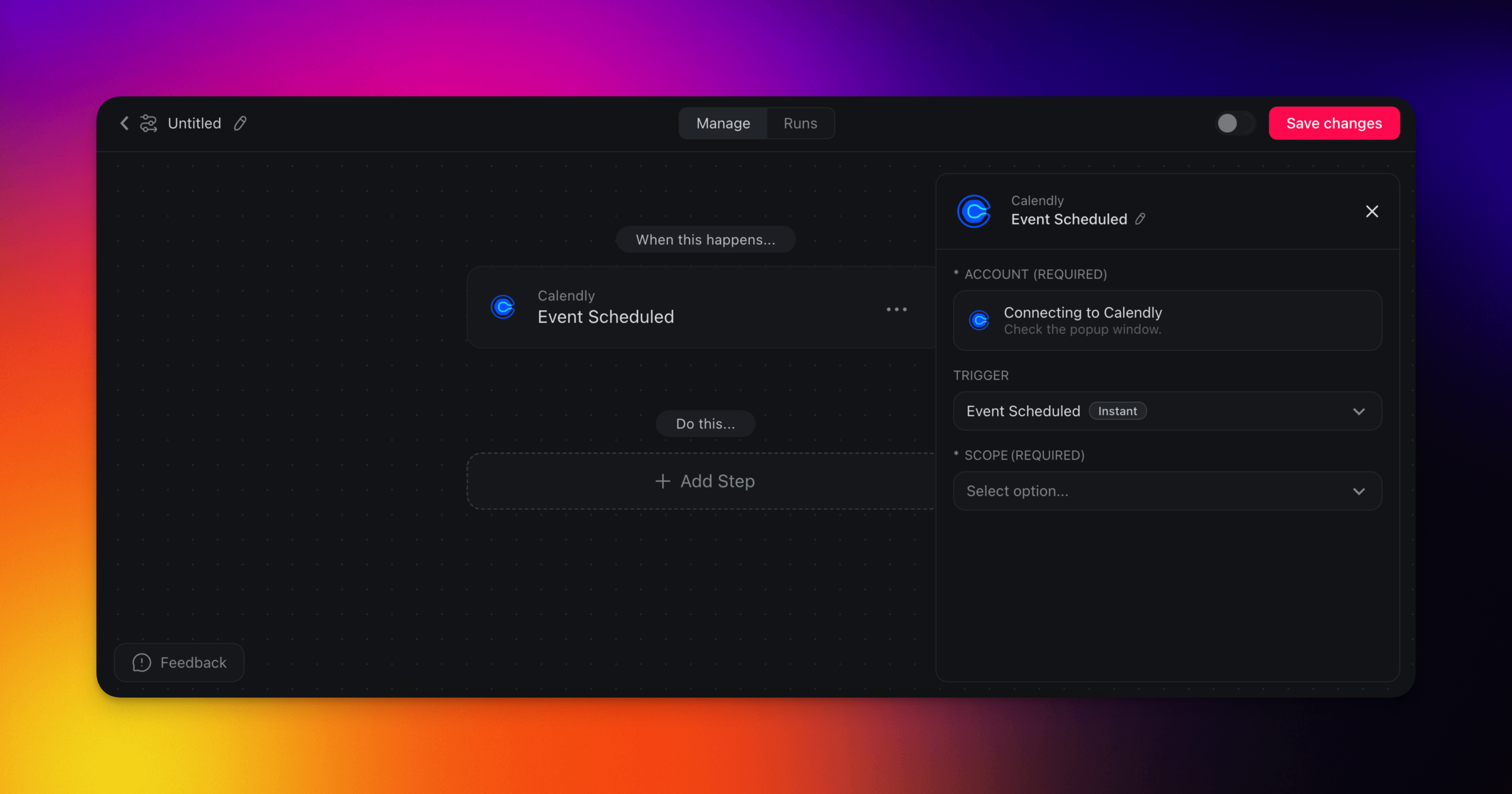
Actions and triggers
Three Calendly triggers start an automation, and any of Taskade's actions can follow. These triggers watch your calendar. Pair them with actions like Create Project, Add Task, Send Email, or update a CRM. Here are the triggers and actions you can use in your workflows:
| Trigger | What it watches for |
|---|---|
| Any Event Scheduled | Fires when a new event is scheduled in Calendly. |
| Event Scheduled for an Event Type | Fires when a specific event type is scheduled. |
| Event Canceled | Fires when an event is canceled in Calendly. |
Automation Settings
Connector options give you full control over the Calendly automation:
Trigger: Event Scheduled for an Event Type
| Field | Description |
|---|---|
| Event Type | Choose the type of event you want the automation to monitor. |
Trigger: Any Event Scheduled
| Field | Description |
|---|---|
| Scope | Select the scope for which the trigger should monitor. This could be organization-wide or limited to an individual user. |
Trigger: Event Canceled
| Field | Description |
|---|---|
| Scope | Select the scope for which the trigger should monitor. This could be organization-wide or limited to an individual user. |
Reference Q&A Data
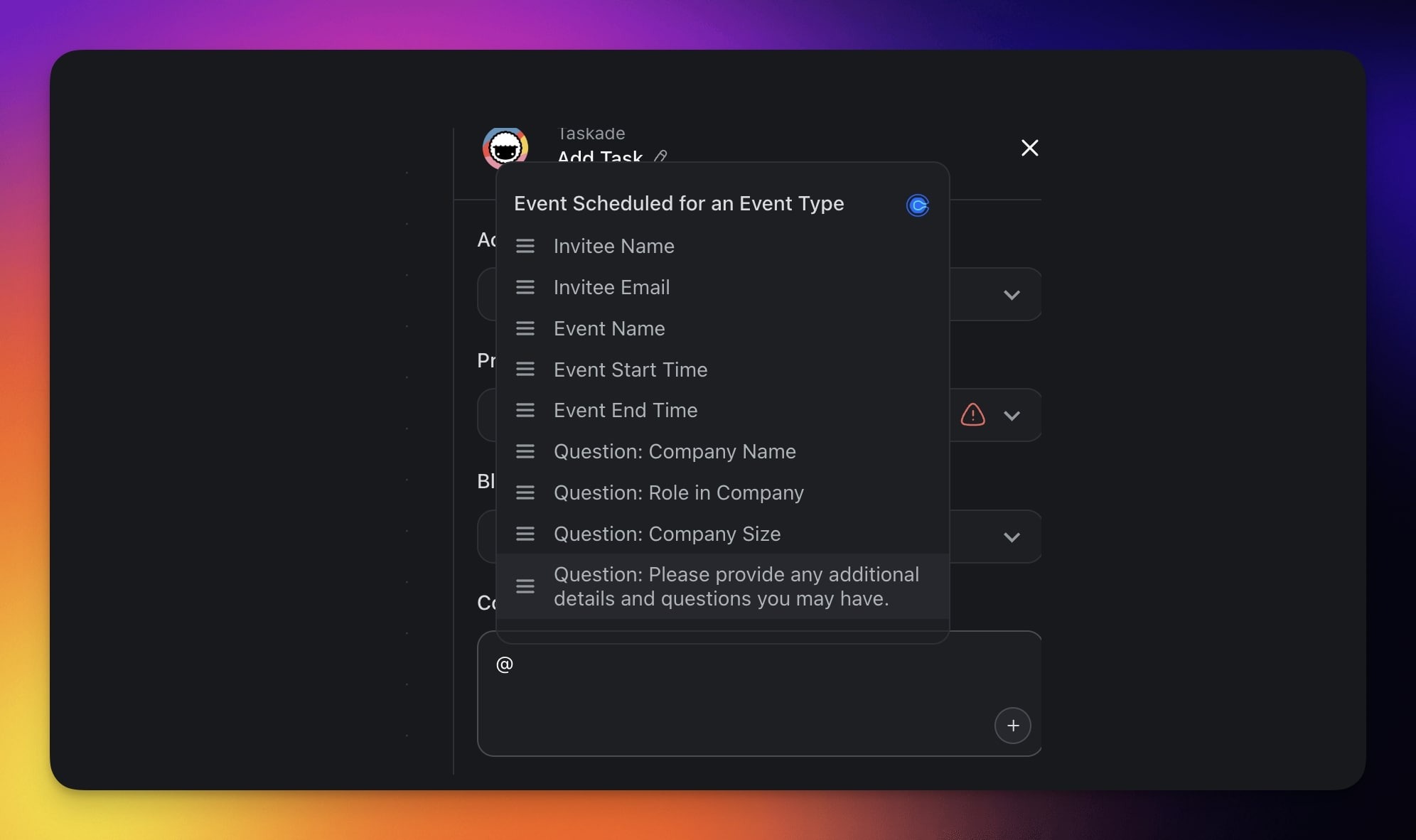
Use the Q&A responses from a Calendly booking to carry invitee details into every step that follows. Invitees give their name, company, and answers to custom questions during scheduling. Taskade passes that information to the next action automatically.
For example, you can:
- ✅ Automatically populate tasks or documents with booking responses.
- ✅ Feed attendee info into your CRM or Google Sheets.
- ✅ Use Q&A fields as variables in AI-generated summaries or structured outputs.
Calendly autopilot journeys
Each Calendly trigger can launch a full journey, not one task only. The table that follows maps common bookings to the action chains operators run most: prep, notify, sync to CRM, and clean up cancellations, all hands-free.
| Use Case | Action Flow |
|---|---|
| Auto-create tasks for new bookings | ✅ Trigger: Any Event Scheduled ➡️ Action: Create Project (e.g. "Client - [Name] Call") ➡️ Action: Add Task with event details ➡️ Action: Assign Task to team lead |
| Slack alert for VIP event types | ✅ Trigger: Event Scheduled (e.g. "Investor Call") ➡️ Action: Send Channel Message in Slack ➡️ Action: Add Task in Taskade to prep for call |
| Prep checklist from Calendly bookings with AI support | ✅ Trigger: Event Scheduled for an Event Type ➡️ Action: Create Project From Template ("Meeting Prep") ➡️ Action: Assign Task to host ➡️ Action: Add Knowledge to Agent (meeting agenda link) |
| Sync bookings to CRM and notify via Gmail | ✅ Trigger: Any Event Scheduled ➡️ Action: Create Contact in HubSpot ➡️ Action: Send Email via Gmail ➡️ Action: Add Task for follow-up |
| Cancel follow-ups if Calendly meeting is canceled | ✅ Trigger: Event Canceled ➡️ Action: Find Task(s) including "follow-up" keyword ➡️ Action: Mark Task as Completed ➡️ Action: Send Direct Message in Slack to notify rep |
| Weekly event summary report | ✅ Trigger: Schedule (Fridays at 3 PM) ➡️ Action: Find Row(s) in Google Sheets with events ➡️ Action: Transform Array to String ➡️ Action: Ask Agent With Structured Output ➡️ Action: Send Email via Gmail |
Hand this integration to an AI agent and it becomes one of the built-in tools your agent can call. The agent can read a fresh booking, draft the meeting brief, and slot prep into the right project on its own. See Tools for AI Agents for how to wire it up.
Available Capabilities
| Type | Capability | Description |
|---|---|---|
| ⚡ Trigger | Invitee Created | Fires when invitee created event occurs |
| ⚡ Trigger | Invitee Canceled | Fires when invitee canceled event occurs |
| ⚡ Trigger | Invitee Created for Event Type | Fires when invitee created for event type event occurs |
Turn bookings into a client CRM
Once Calendly is feeding Taskade, you are one step from a CRM that builds itself from every booking. Describe it in plain English to Taskade Genesis. Taskade EVE, the meta-agent behind Taskade Genesis, assembles a live app. You get a contact list across connected projects, a pipeline view, and the same Calendly automations baked in.
Picture it. A new booking opens a contact card with the invitee's Q&A already filled in. It drops the invitee into the right pipeline stage. It also pings the rep to prep. Your team logs in to see who is coming this week and what to do next. Sales-stage updates, reminders, and follow-up emails run on their own. No spreadsheet to maintain, no booking that slips through.
Build your booking CRM with Taskade Genesis →
Related guides
- Google Calendar · Calendar Sync. Calendar integrations that work today. Zoom is in final testing.
- Gmail. Follow up with attendees by email.
- HubSpot · Salesforce. Push booked meetings into your CRM.
- Slack. Alert your team the moment a meeting is booked.
- Tools for AI Agents · Automations & Execution. Auto-prep meeting briefs, and chain triggers and actions across 100+ integrations.