
Overview
Discord automation strengthens your community management and engagement. Connect Discord to your workflow to send messages and watch for new images in Discord channels, with AI agents and custom automations.
TL;DR: Connect Discord to Taskade and data flows both ways. The New Message trigger pulls a fresh Discord post into Taskade, and actions like Send Message and Create Channel push replies and updates back out to your server. Build it once with automations, no code needed.
Discord Agent Tools
Connecting your Custom AI Agents with the Discord tool empowers them to send messages to selected Discord channels based on agent interactions.
💡 Note: Visit our guide to AI Agent Tools to learn more.
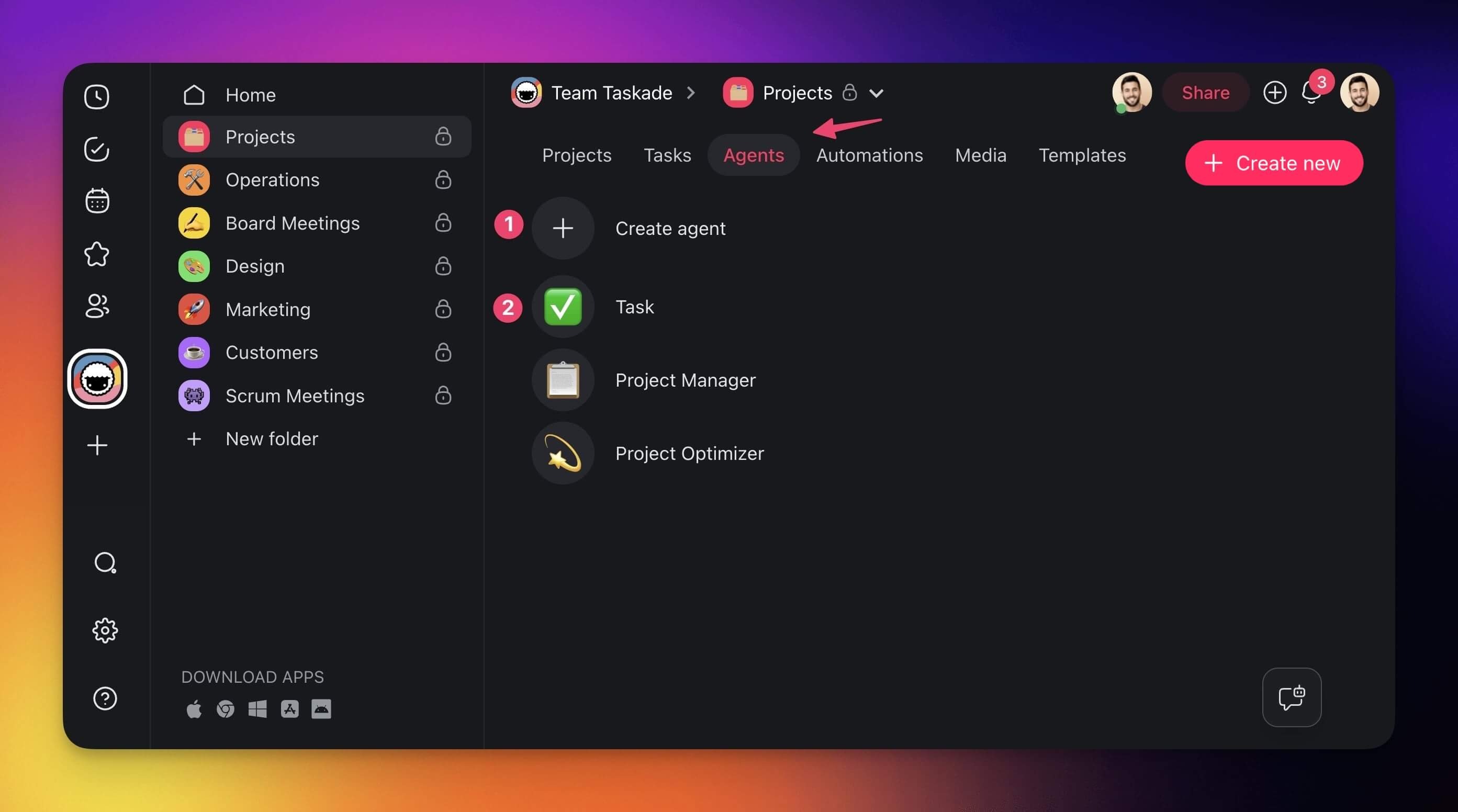
- Go to the Agents tab at the top of your workspace/folder.
- (1) Select an existing agent or (2) create a new one.
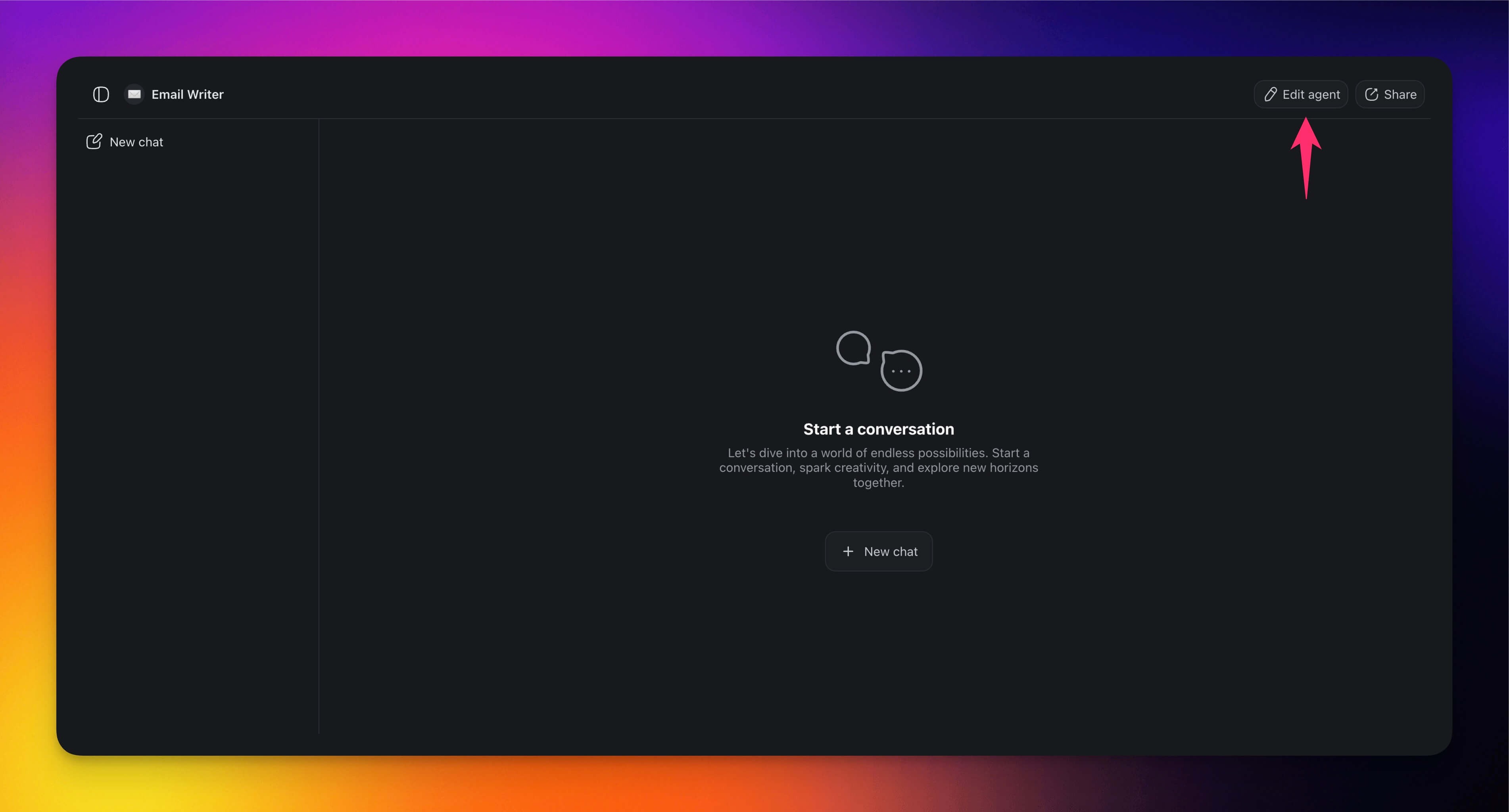
- Click ✏️ Edit agent in the top-right corner.
Go to the 🔧 Tools tab on the left.
Click ➕ Add tool and choose the Discord tool from the list.
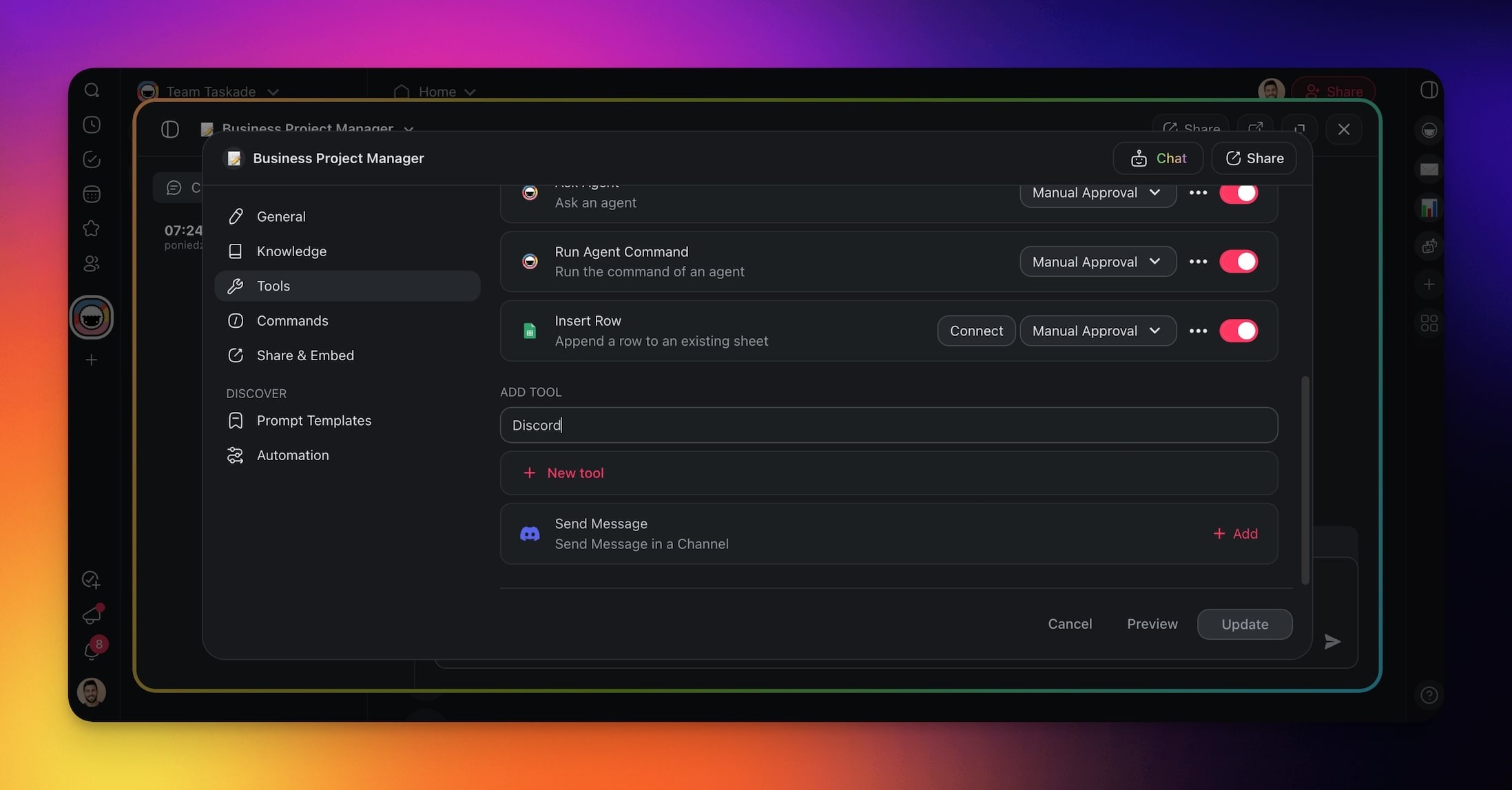
Click Connect to configure the integration.
Click Update to save the changes.
Build Discord Automations
Use the Discord connector in your automation flows to make communication faster, drive engagement, and improve community interactions.
Note: Visit our Automation Guide to learn more.
Add Discord as a Trigger
- Go to the Automations tab in your workspace or folder.
- Click ➕ Create automation.
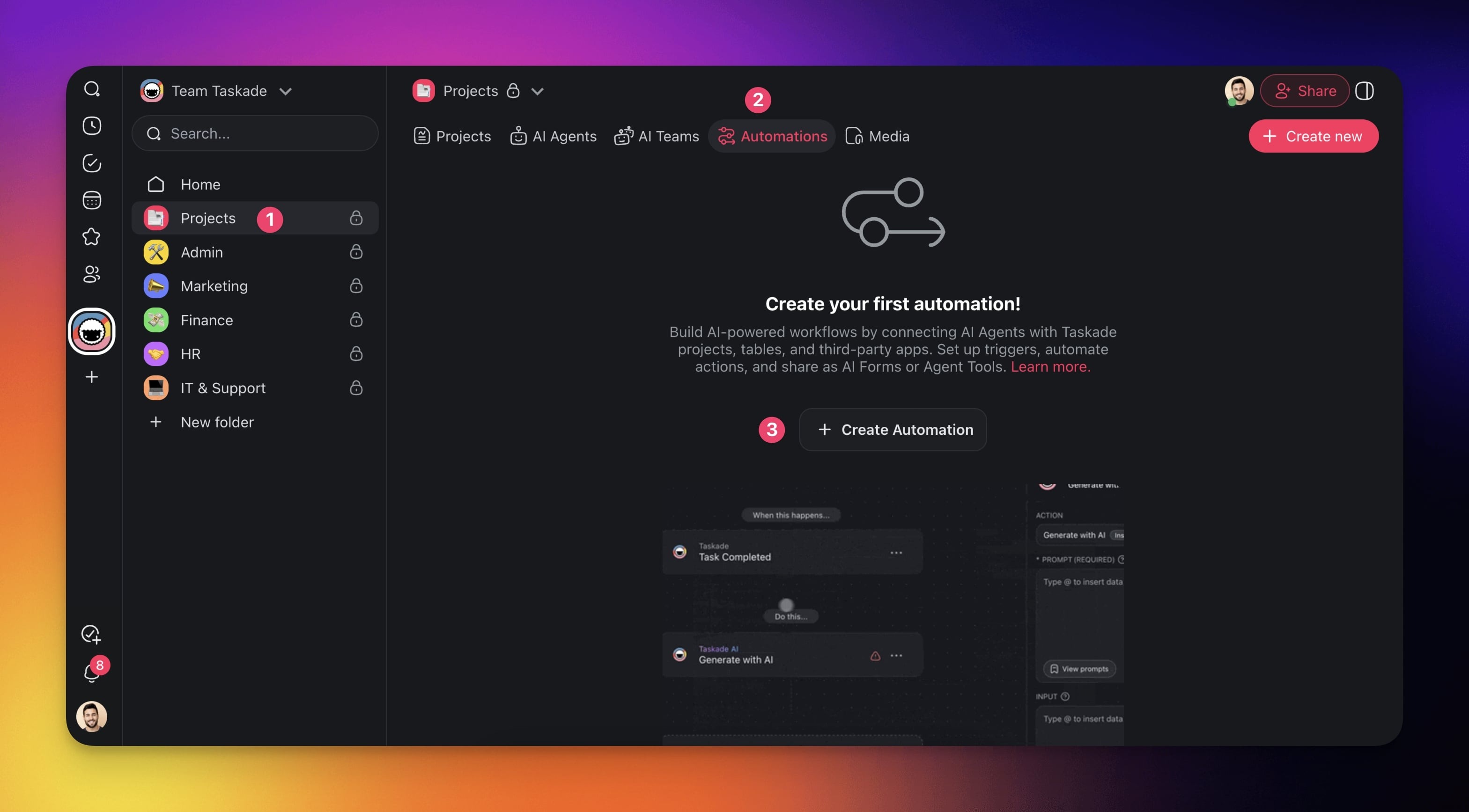
- Select the Add from scratch tile.
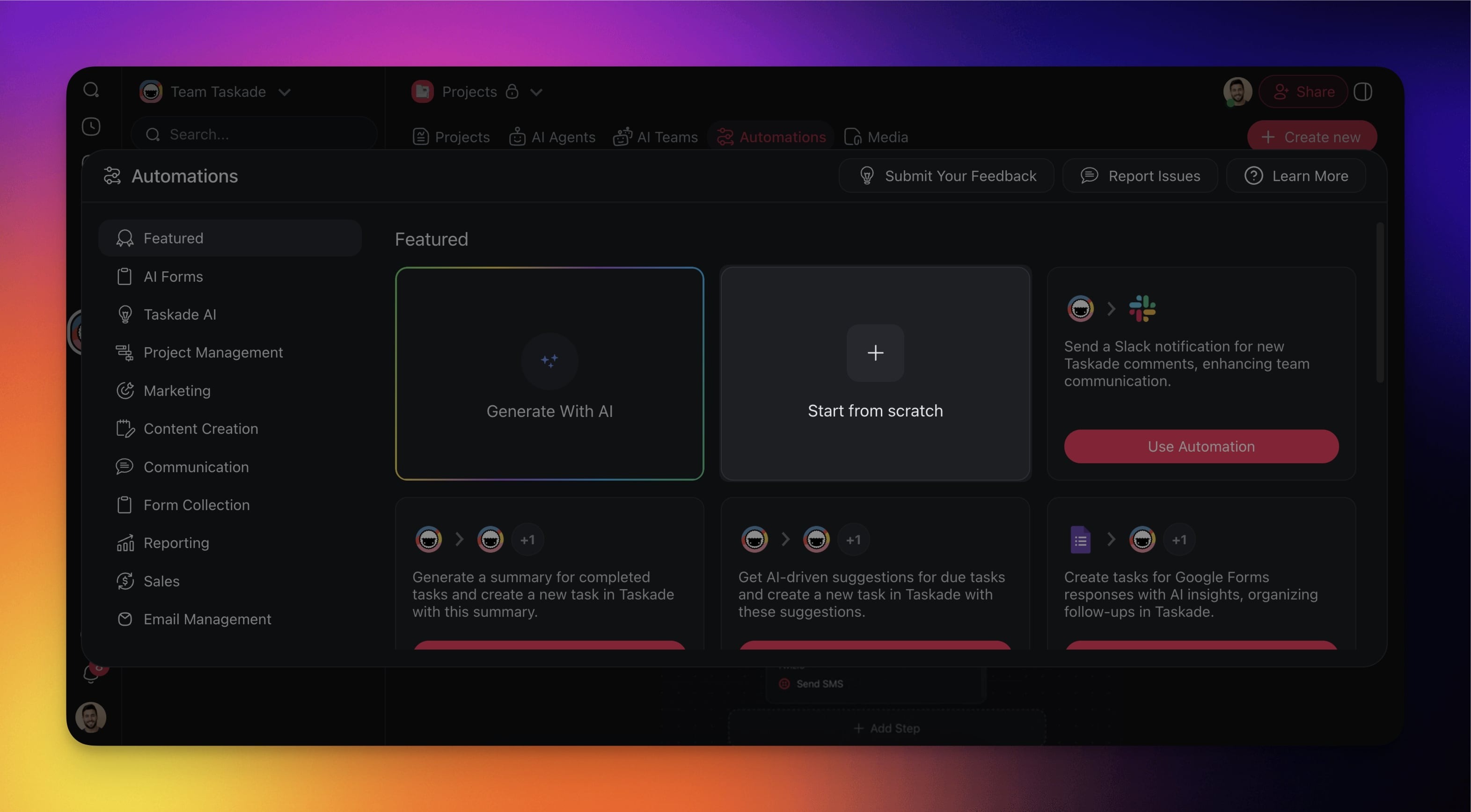
Click ➕ Add Trigger and choose one of the Discord triggers from the list.
Click Connect to configure the trigger (see the first section of this guide).
Specify the conditions for the trigger (if applicable).
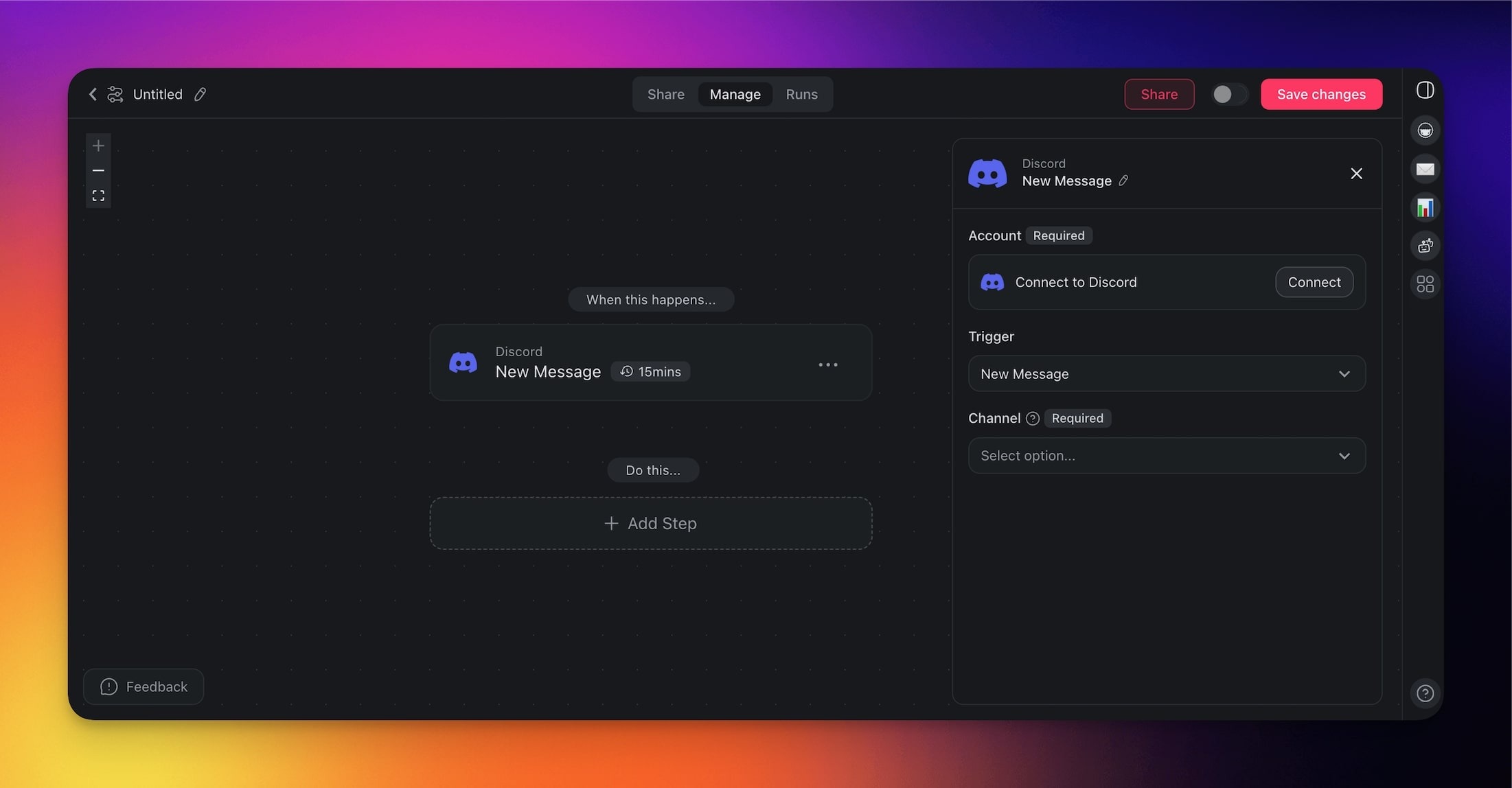
- (optional) Add more steps to the automation.
- Click Save changes in the top-right corner.
- Toggle the automation on in the top-right corner.
Add Discord as an Action
- Go to the Automations tab in your workspace or folder.
- Click ➕ Create automation.
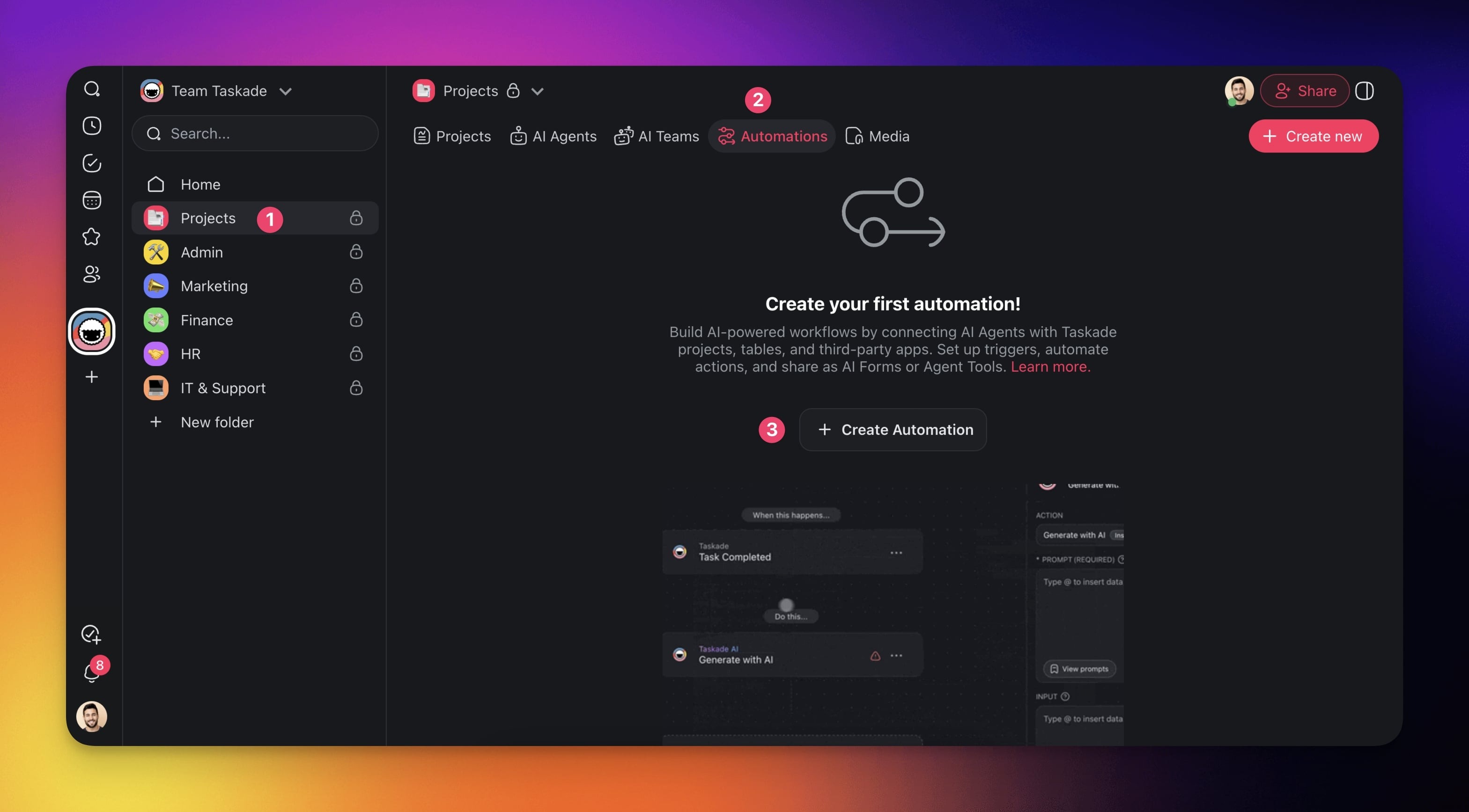
- Select the Add from scratch tile.
- Click ➕ Add Step and choose one of the Discord actions from the list.
- Click Connect to configure the trigger (see the first section of this guide).
- Specify the conditions for the action (if applicable).
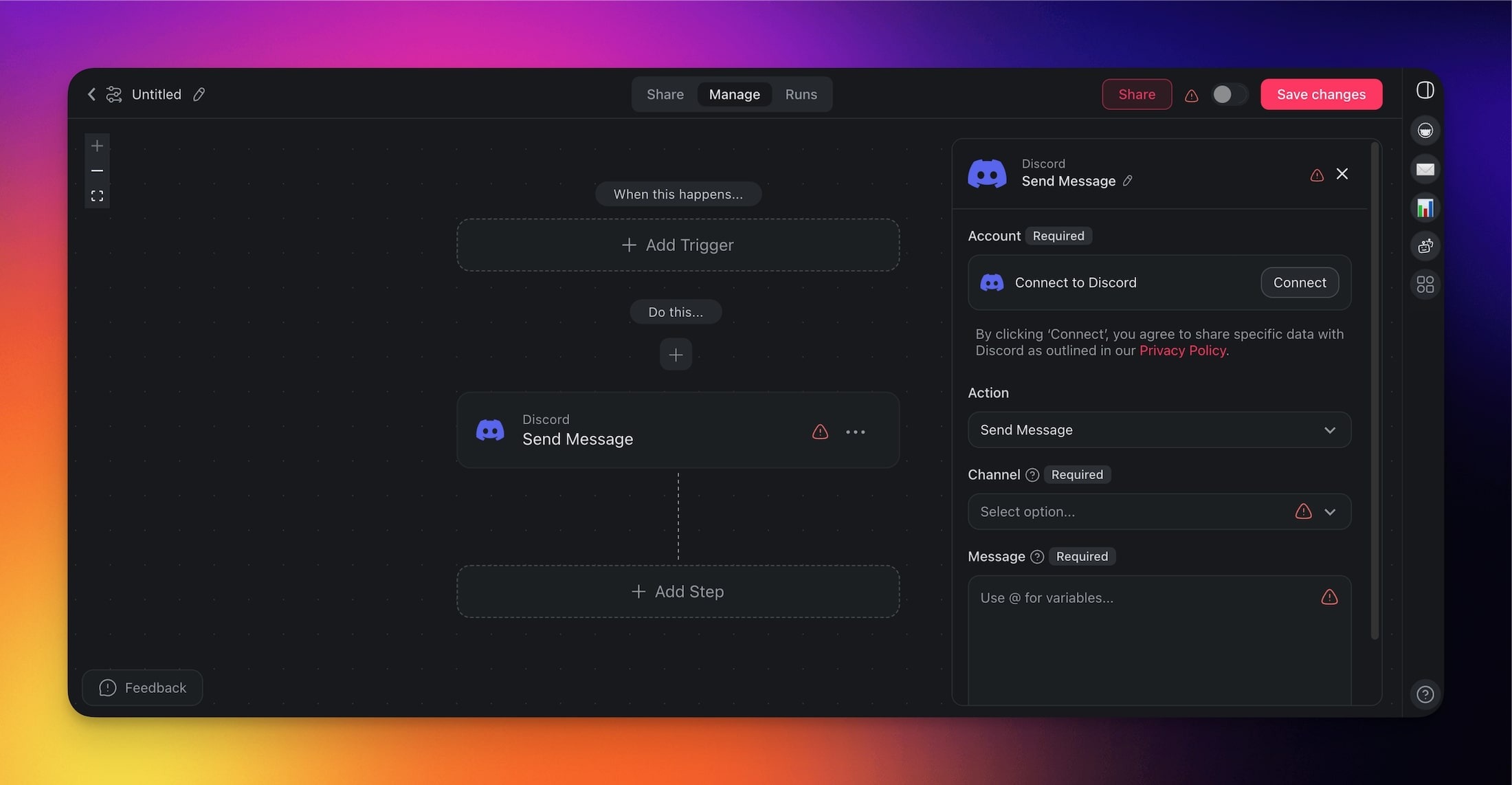
- (optional) Add more steps to the automation.
- Click Save changes in the top-right corner.
- Toggle the automation on in the top-right corner.
Discord Triggers & Actions
Here are the triggers & actions you can use in your workflows:
Discord Triggers
| Trigger | Description |
|---|---|
| New Message | Triggers when a message is posted in a Discord channel |
| New Member Joined | Triggers when a new member joins your Discord server |
New Message: Outputs
Every downstream step can reference the four variables the trigger emits. Use them in Send Message, Add Task, agent prompts, or as inputs to Branch and Filter Data steps.
| Variable | What it holds | Use it for |
|---|---|---|
text |
The full message body as plain text | Feed into Ask Agent, Filter Data, or Add Task |
author |
The Discord username/handle of the sender | Personalize replies, filter by who posted |
channelId |
Discord channel ID where the message was posted | Route differently per channel; pass to Send Message to reply in-place |
messageId |
The Discord message ID | Reference a specific message in follow-up steps or external tooling |
💡 Tip: To reply in the same thread, pass
channelIdstraight into the Send Message action so the response posts back to the originating channel.
Discord Actions
| Action | Description |
|---|---|
| Send Message | Send a message to a specific Discord channel |
| Send Message Webhook | Send a message to a channel through a Discord webhook URL |
| Create Channel | Create a new text or voice channel on your server |
| Delete Channel | Permanently remove a channel from your server |
| Find Channel | Look up a channel by name or ID |
| Rename Channel | Change the name of an existing channel |
| Find Guild Member | Search for members in your Discord server |
| Add Guild Member Role | Assign a role to a member of your server |
| Remove Role from Member | Remove a role from a member of your server |
| Create Guild Role | Create a new role on your Discord server |
| Delete Guild Role | Remove a role from your Discord server |
| Ban Guild Member | Ban a member from your server |
| Remove Ban from User | Lift a ban so a user can rejoin |
| Remove Guild Member | Remove a member from your server |
Use Cases
Here are a few ways to use the Discord integration:
| Monitor Discord messages and create follow-up tasks | ✅ Trigger: New Item Added (Discord) ➡️ Action: Generate with AI ➡️ Action: Add Task |
|---|---|
| Notify Discord channel when a new task is created | ✅ Trigger: New Task ➡️ Action: Send Message (Discord) |
| Announce task completion in Discord | ✅ Trigger: Mark Task as Completed ➡️ Action: Send Message (Discord) |
| Auto-create a new Discord channel for each new project | ✅ Trigger: New Project ➡️ Action: Create Channel (Discord) ➡️ Action: Send Message (Discord) |
| Post a weekly task summary in Discord | ✅ Trigger: Scheduled Time: Weekly ➡️ Action: Find Task(s) ➡️ Action: Transform Array Into String ➡️ Action: Generate with AI ➡️ Action: Send Message (Discord) |
| Send reminder to Discord when task deadline is near | ✅ Trigger: Task Due Date ➡️ Action: Send Message (Discord) |
| Celebrate project milestones in Discord | ✅ Trigger: Mark Project as Completed ➡️ Action: Send Message (Discord) |
Available Capabilities
| Type | Capability | Description |
|---|---|---|
| ⚡ Trigger | New Message | Fires when a message is posted in a channel |
| ⚡ Trigger | New Member Joined | Fires when a new member joins your server |
| 🔧 Action | Send Message | Send a message to a channel |
| 🔧 Action | Send Message Webhook | Send a message via a Discord webhook URL |
| 🔧 Action | Create Channel | Create a new channel on your server |
| 🔧 Action | Delete Channel | Remove a channel from your server |
| 🔧 Action | Find Channel | Look up a channel by name or ID |
| 🔧 Action | Rename Channel | Rename an existing channel |
| 🔧 Action | Find Guild Member | Search for members in your server |
| 🔧 Action | Add Guild Member Role | Assign a role to a member |
| 🔧 Action | Remove Role from Member | Remove a role from a member |
| 🔧 Action | Create Guild Role | Create a new role on your server |
| 🔧 Action | Delete Guild Role | Remove a role from your server |
| 🔧 Action | Ban Guild Member | Ban a member from your server |
| 🔧 Action | Remove Ban from User | Lift a ban so a user can rejoin |
| 🔧 Action | Remove Guild Member | Remove a member from your server |
Related guides
- Slack · Microsoft Teams · Telegram Bot · WhatsApp. Other team-chat integrations.
- Custom AI Agents. Agents that read and post Discord channels.
- Automation Triggers · Automation Actions