
Overview
The Taskade Firefox Extension replaces your New Tab page. Your projects and ideas stay one tab away. Set Taskade to open in a new browser tab. Use the Web Clipper to capture content from the web.
TL;DR: The Taskade Firefox extension puts your projects one tab away. Install it from Firefox Add-Ons, then set what your new tab opens to, like your last project, dashboard, a new project, or the Calendar. Use the built-in Web Clipper to save any highlighted text or page straight into a project.
💡 Note: All browser extensions support Markdown syntax. Visit Markdown Support to learn about all the other ways you can use Markdown in Taskade.
Add the Extension
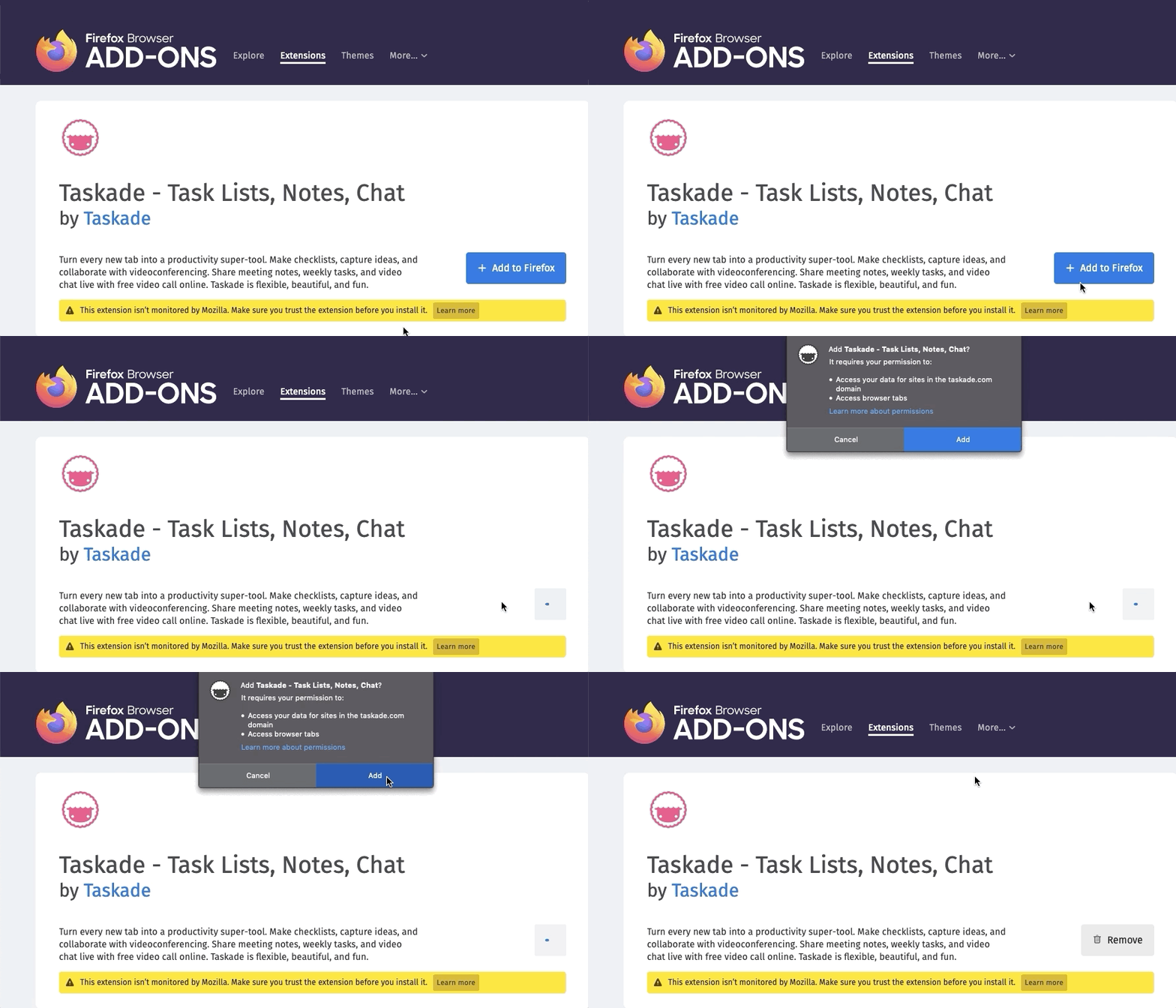
- Go to the Firefox Add-Ons and click ➕ Add to Firefox.
- Confirm the installation in the pop-up prompt.
- Set Firefox to open Taskade in a new tab.
- And that is it! 🥳
Note: If other extensions change tab behavior, reinstall the Taskade extension in a different order to restore compatibility.
Customize Extension Options
Right-click the Taskade logo in the Firefox toolbar.
Click Options to manage the extension.
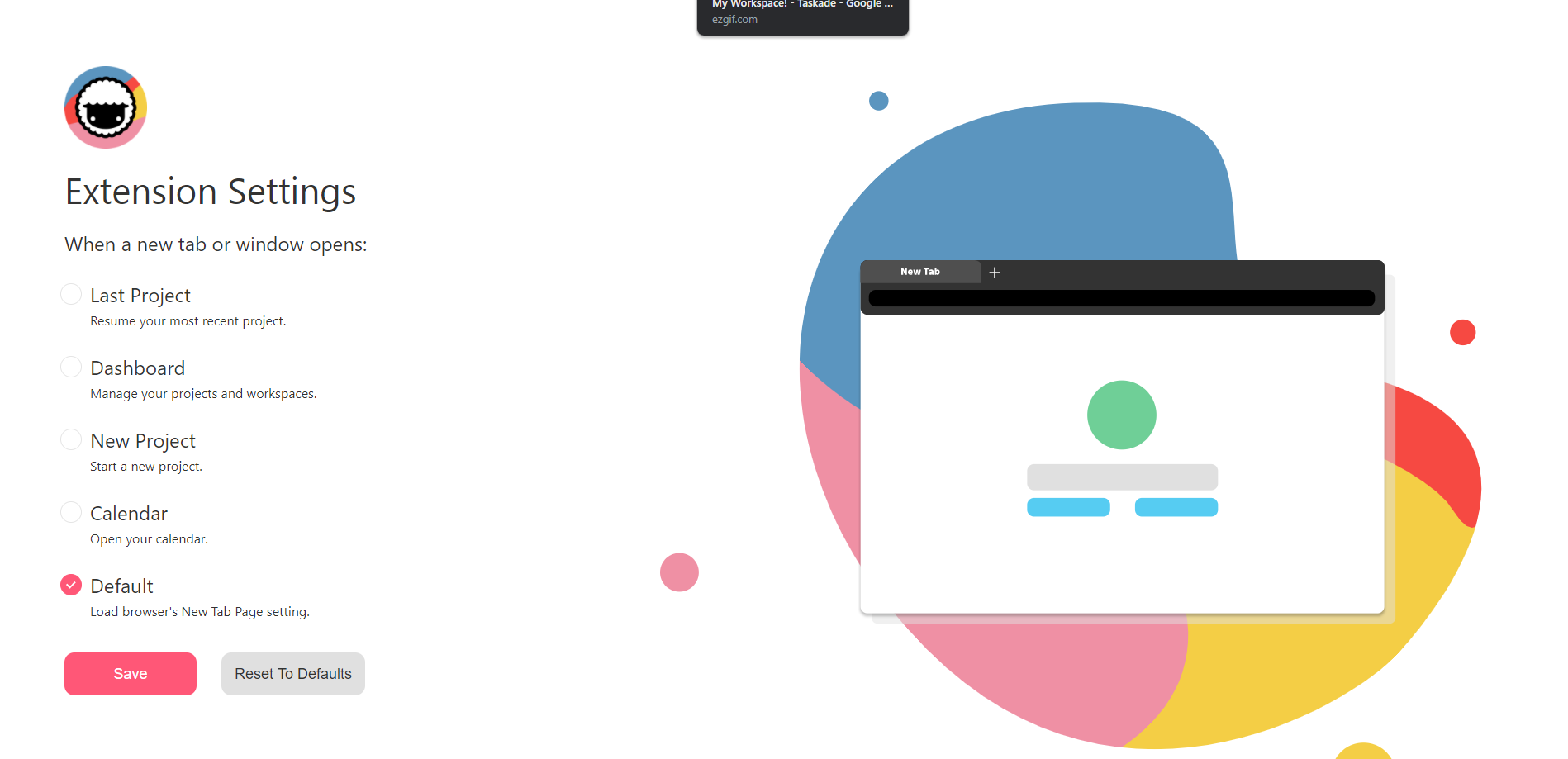
Customize Taskade's behavior when opening a new tab:
- 👈 Last Project (resume your most recent Project)
- 🎛 Dashboard (manage your Projects and Workspaces)
- 🌱 New Project (Start a new Project)
- 🗓 Calendar (Open the Taskade Calendar)
- ⭐️ Default (open a default new tab in your browser)
- Click Save to confirm your choice.
Here is the new-tab picker you will see in Options 👇
┌────────────────────────────────────────────┐
│  Taskade New Tab Options        [ Save ]   │
├────────────────────────────────────────────┤
│  Open every new tab to:                    │
│                                            │
│    (•) Last project                        │
│    ( ) Dashboard                           │
│    ( ) New project                         │
│    ( ) Calendar                            │
│    ( ) Browser default                     │
└────────────────────────────────────────────┘
Your browser now opens Taskade on every new tab.
Tips
- Pin the extension: Click the puzzle-piece icon in Firefox's toolbar. Then click the gear icon next to Taskade and select Pin to Toolbar. The extension stays visible.
- Use the Web Clipper: Right-click any highlighted text or page and select Add to Taskade to clip content directly into a project. Learn more in the Web Clipper guide.
- Extension conflicts: If another extension overrides your new-tab page, disable that extension. You can also reinstall Taskade last, so that Taskade takes priority.
- Keyboard shortcut: Firefox lets you assign custom shortcuts to extensions via
about:addons→ gear icon → Manage Extension Shortcuts.
💡 Tip: Use the browser extension alongside Taskade Genesis to capture ideas and build AI-powered workflows from anywhere.
Related guides
- Chrome Extension · Edge Extension · Brave Extension. Other browsers
- Extension Settings. Configure any Taskade extension
- Web Clipper. Clip web pages to projects