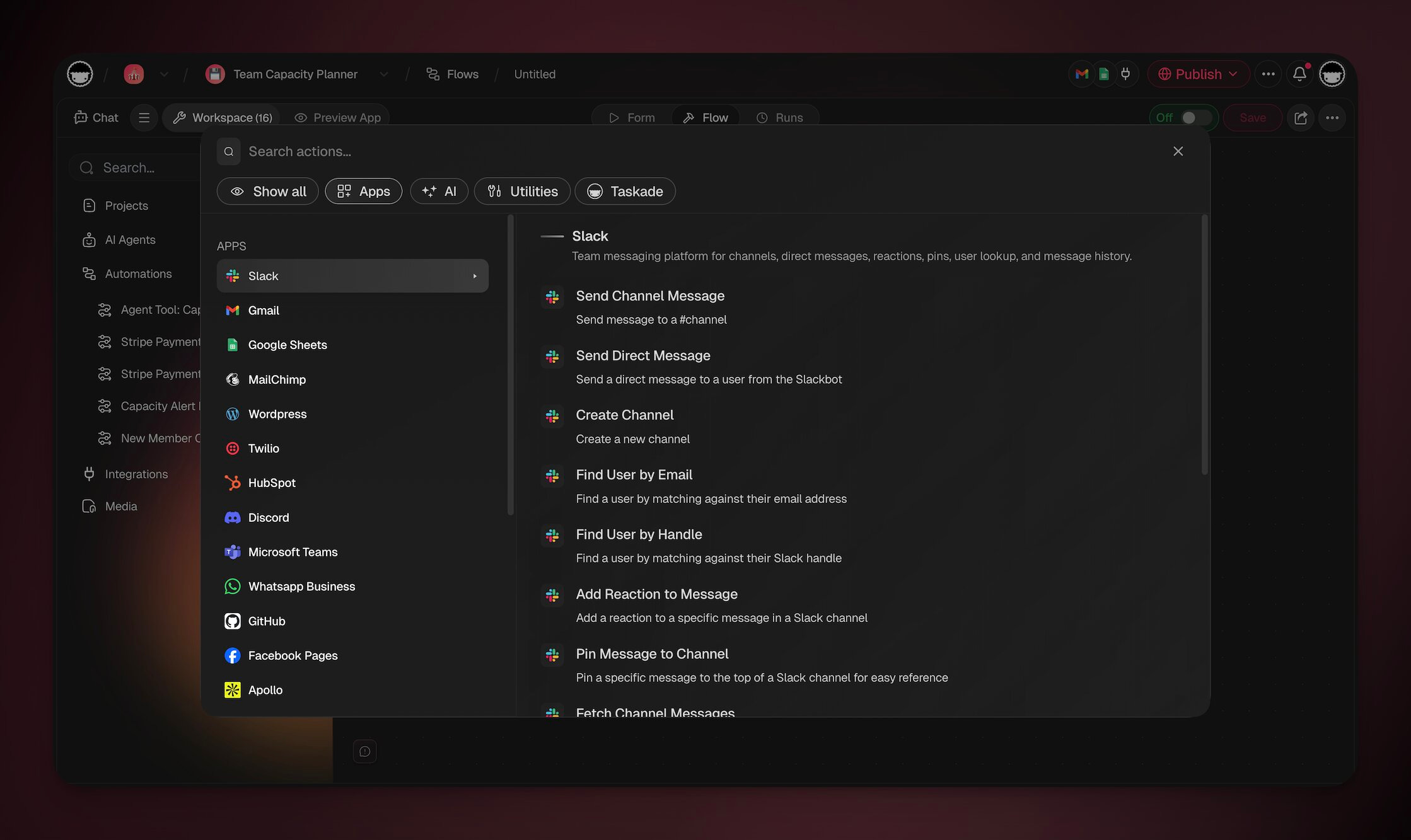
While triggers are the starting point in Taskade's automation, actions are the steps that follow. They are the "then" in the "if this, then that" automation sequence. When a trigger's conditions are met, actions run and do the work automatically.
TL;DR: Actions are the steps that run inside an automation after a trigger fires. They push work out. They create tasks, send messages, call AI, or write to your connected apps. Taskade ships five built-in step groups (Taskade, AI, Media, Schedule, Utilities) plus 100+ connected apps. See the automations overview to build your first one.
💡 Note: New to automations? Check the Getting Started guide first.
Action Categories
Actions fall into five categories. Every workflow step picks from one of these:
How to read this page. Each connector below lists a representative set of its most-used actions, not the full catalog. For every action a service offers, open it in the Integrations Directory, which always shows the current set. Slack, Google Drive, and HubSpot are among the deepest. The built-in Taskade, AI, Media, Schedule, and Utilities actions are always available with no setup.
Taskade Actions
⚙️ Action
🔤 Description
Create Project
Sets up a new project in your workspace/folder.
Add Task
Adds a new task to an existing project.
Mark Task as Completed
Automatically marks a task as done as part of your automation flows.
Create Project From Template
Uses a pre-defined or custom template.
Move Task
Moves a task to a different space.
Assign Task
Assigns a task to someone.
Ask AI
Uses AI to answer questions.
Generate with AI
Uses AI to generate content or responses.
Summarize with AI
Condenses long text into key points with optional custom instructions.
Respond with AI
Automatically provides AI-generated responses.
Ask Agent
Uses a custom AI agent to respond to a query.
Run Agent Command
Uses a custom AI agent command.
Prompt AI
Give the model detailed instructions.
Add Knowledge to Agent
Transcribes knowledge and adds it as knowledge to an agent.
Add Project to Agent Knowledge
Automatically trains your AI agents with project content.
Ask Agent Team
Sends a prompt to an AI Team and returns varied responses from multiple agents.
Ask Agent With Structured Output
Structures the output of agent replies.
Scrape Webpage
Extract the contents of a web page.
Convert File to Text
Convert a source file into text.
Transcribe YouTube Video
Turn a YouTube video into text.
Upload file to Media
Upload file through a URL to save in your workspace or folder's media tab.
Send HTTP Request
Calls another web service at an address you supply.
Loop
Iterates data tasks.
Filter Data
Performs actions only when the data meets a certain condition.
Branch
Creates different paths within your automation, depending on certain conditions.
Delay
Pauses the automation for a set time or until a specific date, then continues. The wait survives restarts.
Update Custom Fields
Updates the custom fields of a task in a project.
Search Web
Searches the web for information to add to a project or for the AI to analyze.
Find Task(s)
Searches for tasks within projects. This action is compatible with loops.
Transform Array to String
Converts the output of the Find Task(s) and Find Row(s) actions into text.
Categorize with AI
Analyzes, classifies, and organizes input data using the power of AI.
The step list also surfaces connector-provided actions once you connect the matching integration. Generate Image, for example, comes from the OpenAI connector and uses your own OpenAI key.
Media Actions
These steps work on the files in your workspace Media Files. Each video and audio step, except Check the file, saves a new file and keeps the original. See Automate Media Files for the triggers, the limits, and the Quick Starts.
⚙️ Action
🔤 Description
Find Files in Media
Lists files by folder, file type, and name.
Make a smaller video
Saves a smaller copy of a video.
Change the file format
Saves a copy of a video or audio file in another format.
Get the audio from a video
Saves the sound of a video as an audio file.
Get a still frame
Saves one frame of a video as a JPEG image.
Cut a clip
Saves part of a video or audio file as a new file.
Check the file
Reads the length, the size in pixels, and the format details of a video or audio file.
Utility Actions (no AI credits)
A toolkit of helpers that reshape data without calling a model. The same input always gives the same result. They run instantly and cost no AI credits. See the full guide.
⚙️ Action
🔤 Description
Calculate, Average, Sum, Min / Max, Count Unique Values
Math over numbers and lists.
Format Date
Reformat any date for the next step or a report.
Get a Field from Data, Get Multiple Values (JSONPath), Lookup Table
Pull values out of the data an earlier step returned, map a code to a label.
Change Capitalization, Find and Replace Text, Match Text with a Pattern (Regex), Split Text into a List, Trim Extra Spaces, Join Text, Find Text, Slugify Text, Strip HTML
Clean and reshape text.
HTML to Markdown, Markdown to HTML
Convert between rich text and Markdown.
CSV to List, List to CSV, Transform Array Into String
Move between spreadsheets, JSON (the data format apps exchange), and plain text.
Generate QR Code
Produce a scannable code for tickets, check-ins, and links.
MCP Client Actions
MCP, the Model Context Protocol, is a shared standard that lets AI tools talk to each other. Point an automation at an outside MCP server and call its tools as a step. Connect the server with its address, plus a secret token when the server asks for one. These are standard (non-premium) actions, so every plan can use them, and each run counts against your plan's automation run allowance. The Free plan includes 10 runs a month.
⚙️ Action
🔤 Description
List Tools
Ask the MCP server which tools it offers, then branch on the result.
Call Tool
Run one of those tools with your inputs and pass the reply to the next step.
Slack Actions
⚙️ Action
🔤 Description
Send Channel Message
Posts a message to a selected channel.
Send Direct Message
Sends a personal message to a user.
Find User by Handle
Find a user by matching against their Slack handle.
Find User by Email
Find a user by matching against their email address.
Create Channel
Create a new Slack channel.
Gmail Actions
⚙️ Action
🔤 Description
Send email
Sends an email through Gmail to a specified recipient.
Find Email(s)
Find email(s) in your Gmail account.
Create Draft Email
Creates a new draft email message.
Google Drive Actions
⚙️ Action
🔤 Description
Trash File
Moves a file to the trash in your drive.
Duplicate File
Duplicates a file from Google Drive. Returns the ID of the new file.
Create New Folder
Creates a folder in your Google Drive.
Create New File
Creates a new text file from input text.
Search for Folder/File
Searches a Google Drive folder for sub-folders/files.
Google Sheets Actions
⚙️ Action
🔤 Description
Insert Row
Adds a new row to a Google Sheets document.
Delete Row
Deletes a row in a Google Sheets document.
Update Row
Updates a row in a Google Sheets document.
Get Row
Retrieves a row in a Google Sheets document.
Find Row(s)
Retrieves specific rows from a Google Sheet based on defined criteria. This action can be used with loops.
Google Docs Actions
⚙️ Action
🔤 Description
Create Document
Creates a new document.
Append Text
Appends text to a document.
Find Document
Searches for a document.
Google Calendar Actions
⚙️ Action
🔤 Description
Delete Event
Deletes an event from Google Calendar.
Create Quick Event
Creates an event with a start time when the action is run, with a duration of 1 hour and a notification 10 minutes before.
Create Event
Creates a new Google Calendar event.
List Events
Lists events from a Google Calendar within a date range.
Get Free/Busy
Checks free/busy availability for one or more calendars.
Mailchimp Actions
⚙️ Action
🔤 Description
Add contact
Creates a new contact in Mailchimp.
WordPress Actions
⚙️ Action
🔤 Description
Create post
Publishes a new post on WordPress.
Webflow Actions
Connect Webflow with Webflow sign-in. The same connection covers the CMS actions and the New Form Submission trigger.
⚙️ Action
🔤 Description
List Sites
Lists the Webflow sites available to the connection.
List Collections
Lists CMS collections for a selected site.
Create CMS Item
Creates a staged collection item.
Get CMS Item
Retrieves an item and its fields.
Update CMS Item
Changes fields on an existing item.
Publish CMS Item
Publishes a staged item to the live site.
Twilio Actions
⚙️ Action
🔤 Description
Send SMS
Sends out a text message via Twilio.
HubSpot Actions
⚙️ Action
🔤 Description
Create New Contact
Creates a new contact in HubSpot CRM.
Create New Deal
Creates a new deal in HubSpot CRM.
X/Twitter Actions
⚙️ Action
🔤 Description
Create Reply
Creates a reply to a post on X/Twitter.
Create Post
Creates a new post on X/Twitter.
LinkedIn Actions
⚙️ Action
🔤 Description
Create Share Update
Publishes a post to your LinkedIn profile.
Create Company Update
Publishes a post to your business/company LinkedIn page.
Microsoft Teams Actions
⚙️ Action
🔤 Description
Create Channel
Creates a new channel.
Send Channel Message
Sends a message to a channel.
Send Chat Message
Sends a message in an existing chat.
Discord Actions
⚙️ Action
🔤 Description
Send Message
Sends a message to a Discord channel.
Facebook Actions
⚙️ Action
🔤 Description
Create Page Post
Creates a standard post on a Facebook page you manage.
Create Post with Image
Creates a post with an image on a Facebook page you manage.
WhatsApp Business Actions
⚙️ Action
🔤 Description
Send Message
Sends a text message to a specified contact or group on WhatsApp.
Send Template Message
Sends a pre-designed template message for consistent communication.
GitHub Actions
⚙️ Action
🔤 Description
Create Comment
Adds a comment to an issue/pull request.
Create Issue
Opens a new issue in a repository.
Get Issue Information
Retrieves details about an issue.
Lock Issue
Locks an issue to stop comments.
Unlock Issue
Unlocks a previously locked issue.
Apollo Actions
⚙️ Action
🔤 Description
Enrich User Information
Retrieves lead information from Apollo using an email/LinkedIn profile URL.
Reddit Actions
⚙️ Action
🔤 Description
Create Post
Create a new post in a specified subreddit. Supports both text and link posts with various formatting options.
Get Post
Retrieve a specific post from a subreddit using its Post ID. Useful for referencing or tracking published content.
Notion Actions
⚙️ Action
🔤 Description
Create Page
Creates a new page in a Notion database.
Get Page
Retrieves a page from Notion by ID.
Update Page
Updates properties of an existing Notion page.
Query Database
Queries a Notion database with optional filters and sorting.
Append Block Children
Appends content blocks to a Notion page.
Salesforce Actions
⚙️ Action
🔤 Description
Create Record
Creates a new record (Lead, Contact, Account, and more) in Salesforce.
Update Record
Updates an existing Salesforce record.
Find Records by Query
Searches for Salesforce records using a SOQL query.
Jira Actions
⚙️ Action
🔤 Description
Create Issue
Creates a new Jira issue.
Get Issue
Retrieves details of a Jira issue.
Search Issues
Searches for Jira issues using JQL.
Linear Actions
⚙️ Action
🔤 Description
Create Issue
Creates a new Linear issue.
Get Issue
Retrieves details of a Linear issue.
Search Issues
Searches for Linear issues with filters.
Airtable Actions
⚙️ Action
🔤 Description
Create Record
Creates a new record in an Airtable base.
List Records
Lists records from an Airtable base with optional filters.
Update Record
Updates an existing Airtable record.
Monday Actions
⚙️ Action
🔤 Description
Create Item
Creates a new item on a Monday.com board.
Get Item
Retrieves details of a Monday.com item.
Update Item
Updates an existing Monday.com item.
Trello Actions
⚙️ Action
🔤 Description
Create Card
Creates a new Trello card on a board.
Get Card
Retrieves details of a Trello card.
Update Card
Updates an existing Trello card.
Zoom Actions
Rolling out: Zoom actions are not available in the automation editor yet. Check the Integrations Directory for the current list.
⚙️ Action
🔤 Description
Schedule Meeting
Creates a scheduled Zoom meeting.
Create Webinar
Creates a new Zoom webinar.
Stripe Actions
⚙️ Action
🔤 Description
Create Customer
Create a new customer in Stripe
Update Customer
Update an existing customer in Stripe
Retrieve Customer
Retrieve a customer by ID from Stripe
Search for Customers
Search for customers in Stripe
Create Payment Intent
Create a payment intent to start a payment flow
Retrieve Payment Intent
Retrieve a payment intent by ID from Stripe
Search for Charges
Search for charges in Stripe
Create Product
Create a new product in Stripe
Create Price
Create a new price for a product in Stripe
Create Refund
Create a refund in Stripe
Create Subscription
Start a subscription for a customer with specified items/prices
Cancel Subscription
Cancel an existing subscription, immediately or at period end
List Subscriptions
List subscriptions from Stripe with optional filters
Create Invoice
Create an invoice in Stripe
Search for Invoices
Search for invoices in Stripe
Shopify Actions
Rolling out: Shopify actions are not available in the automation editor yet. Check the Integrations Directory for the current list.
⚙️ Action
🔤 Description
Get Customer
Look up a Shopify customer by email or ID
Get Customer Orders
Retrieve order history for a customer
Create Order
Create a new order with line items and customer
Create Draft Order
Create a draft order for review before finalizing
Update Order
Modify an existing order (notes, tags, shipping)
Cancel Order
Cancel an open order with optional refund
Close Order
Mark a fulfilled order as closed
Create Product
Add a new product to your Shopify store
Update Product
Modify an existing product's details or pricing
Get Products
List products with optional filters (collection, type)
Here is how a non-technical operator chains these actions into a working business workflow. A customer submits a quote request on the website:
Categorize with AI sorts the job by trade (plumbing, electrical, roofing).
Branch routes it to the right crew.
Add Task drops the job into the Jobs project, and Assign Task hands it to the crew lead.
Send Channel Message (Slack) alerts the team.
Create Customer and Create Invoice (Stripe) bill the work.
No router, no spreadsheet, no copy and paste. The same shape powers a clinic intake queue, an e-commerce fulfillment line, or a real-estate deal pipeline. Browse live versions in the Community Gallery.