
Overview
Agent knowledge gives your AI agent your own facts to answer from. Upload your price sheet and the agent quotes the right number. Connect your job-tracker project and it tells a customer where their order stands. It is the Memory pillar of Workspace DNA: your projects, files, and databases become the agent's memory, and a custom AI agent (the Intelligence pillar) answers from it instead of guessing from the open internet.
TL;DR: Ground an AI agent in your own knowledge. Upload files, add links, or connect live projects. The agent uses these sources for relevant answers. Connected projects stay current as your work changes. Learn how projects and databases become shared memory, then build a custom agent.
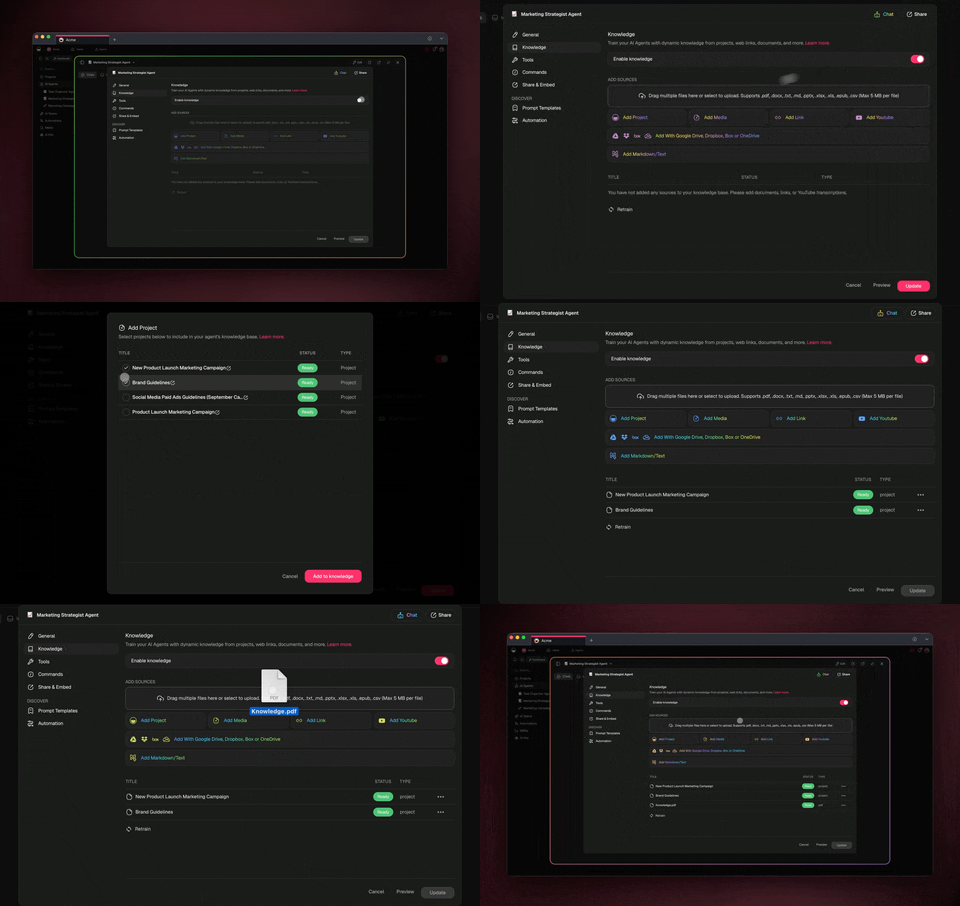
How Memory Feeds Intelligence
Knowledge is the bridge between two Workspace DNA pillars. Your projects and files are Memory. Your agent is Intelligence. Knowledge connects them, so the agent reasons over what you know.
Here is the full path, from your raw content to a grounded answer:
┌──────────────────────────────────────────────────────────────────┐
│                                                                    │
│   YOUR CONTENT              AGENT MEMORY            GROUNDED REPLY  │
│   (Memory pillar)         (searchable index)     (Intelligence)    │
│                                                                    │
│   ┌─────────────┐                                                  │
│   │  Projects   │──┐                                               │
│   ├─────────────┤  │      ┌──────────────┐      ┌──────────────┐   │
│   │   Files     │──┼─────▶│  Knowledge   │─────▶│  Custom AI   │   │
│   ├─────────────┤  │      │     Tab      │ read │    Agent     │   │
│   │  Web pages  │──┤      │ (your index) │ every│ reasons over │   │
│   ├─────────────┤  │      └──────────────┘ reply│  your data   │   │
│   │  YouTube    │──┘             ▲              └──────┬───────┘   │
│   └─────────────┘               │                     │           │
│                                  │  carries facts      ▼           │
│                          ┌───────┴───────┐      ┌──────────────┐   │
│                          │    Memory     │◀─────│   Answer      │   │
│                          │ (per user,    │writes│  cites the    │   │
│                          │  per session) │ facts│  sources used │   │
│                          └───────────────┘      └──────────────┘   │
│                                                                    │
└──────────────────────────────────────────────────────────────────┘
You add the knowledge. The agent reads it on every message, remembers facts about you across sessions, and shows you which sources it used. No retraining loop to manage.
Knowledge vs. Memory
These are two separate things in Taskade, and the difference is the key to building a great agent. Knowledge is what the agent reads. Memory is what the agent remembers. Both feed every response.
| Knowledge Sources | Memory | |
|---|---|---|
| What it is | Documents and projects the agent reads | Running conversation plus learned facts |
| Who writes it | You (upload, connect) | The agent (automatically) |
| When it updates | When you change the source | Every message |
| Persistence | Until you remove it | Across sessions |
| Example | Your brand guidelines PDF | "This user prefers British English" |
What Each Source Unlocks
Pick the source that matches the job. Each one teaches your agent something different.
| Knowledge source | What the agent can do with it |
|---|---|
| A connected project | Answer from live workspace data and update itself when the project changes |
| An uploaded file (PDF, DOCX, spreadsheet) | Quote specific, structured facts like a pricing sheet or a contract |
| An image | Read text inside the picture and use it (built-in OCR) |
| A web page or whole site | Answer from up-to-date public information you link |
| A YouTube video | Use the auto-generated transcript as searchable text |
| A Markdown or text note | Hold quick rules and policies you type in directly |
Open the Knowledge Tab
Every agent has a Knowledge tab where you add, review, and edit its sources in one place. Start here.
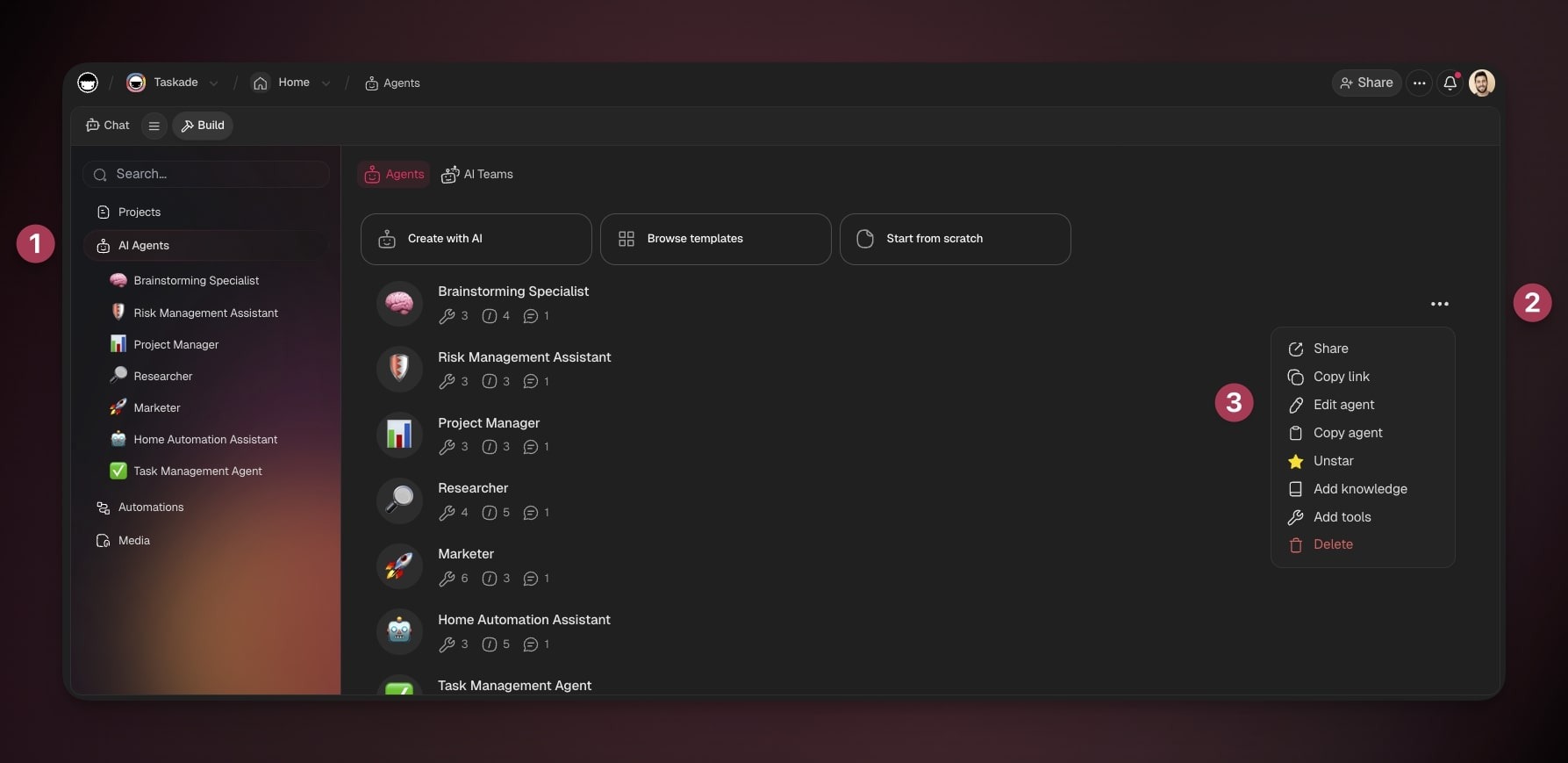
- Go to the Agents tab in your workspace or folder.
- Click the three dots ··· next to an agent and select ✏️ Edit agent.
- Choose the Knowledge tab in the sidebar on the left.
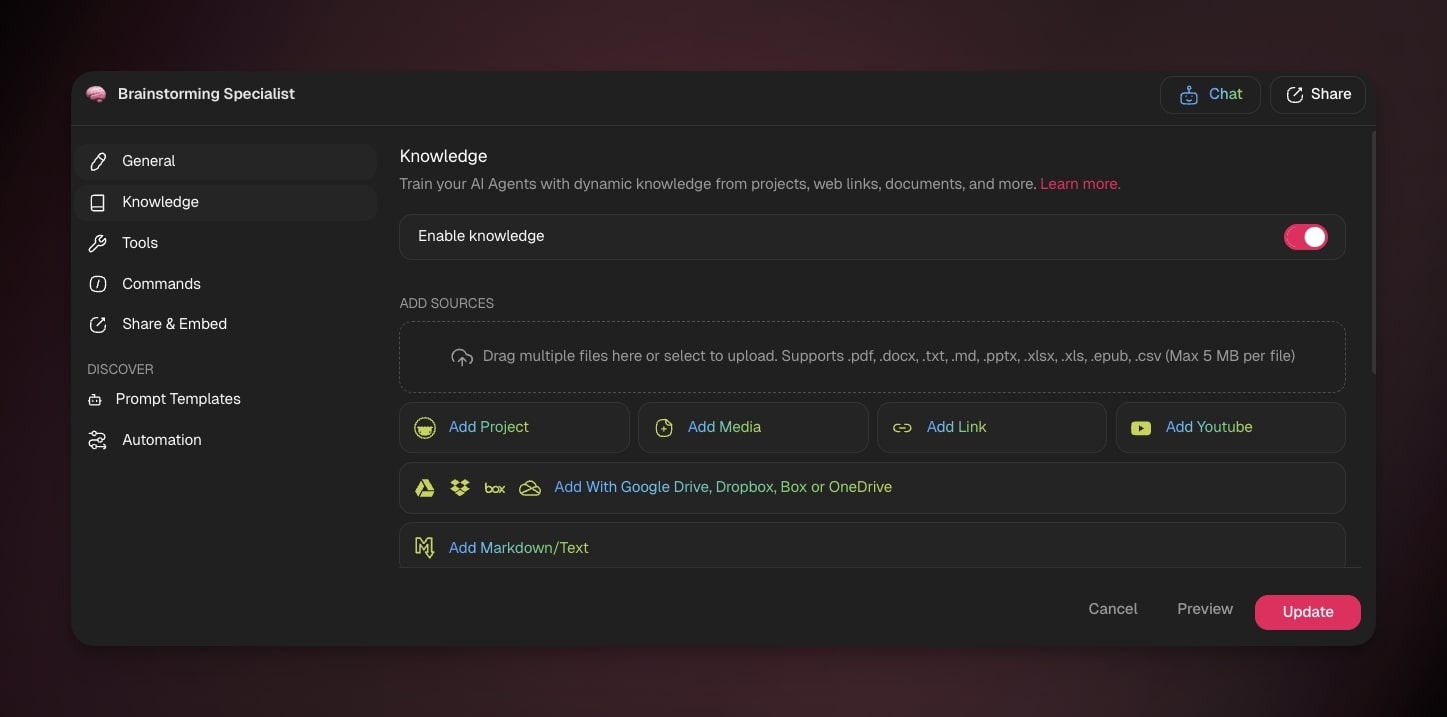
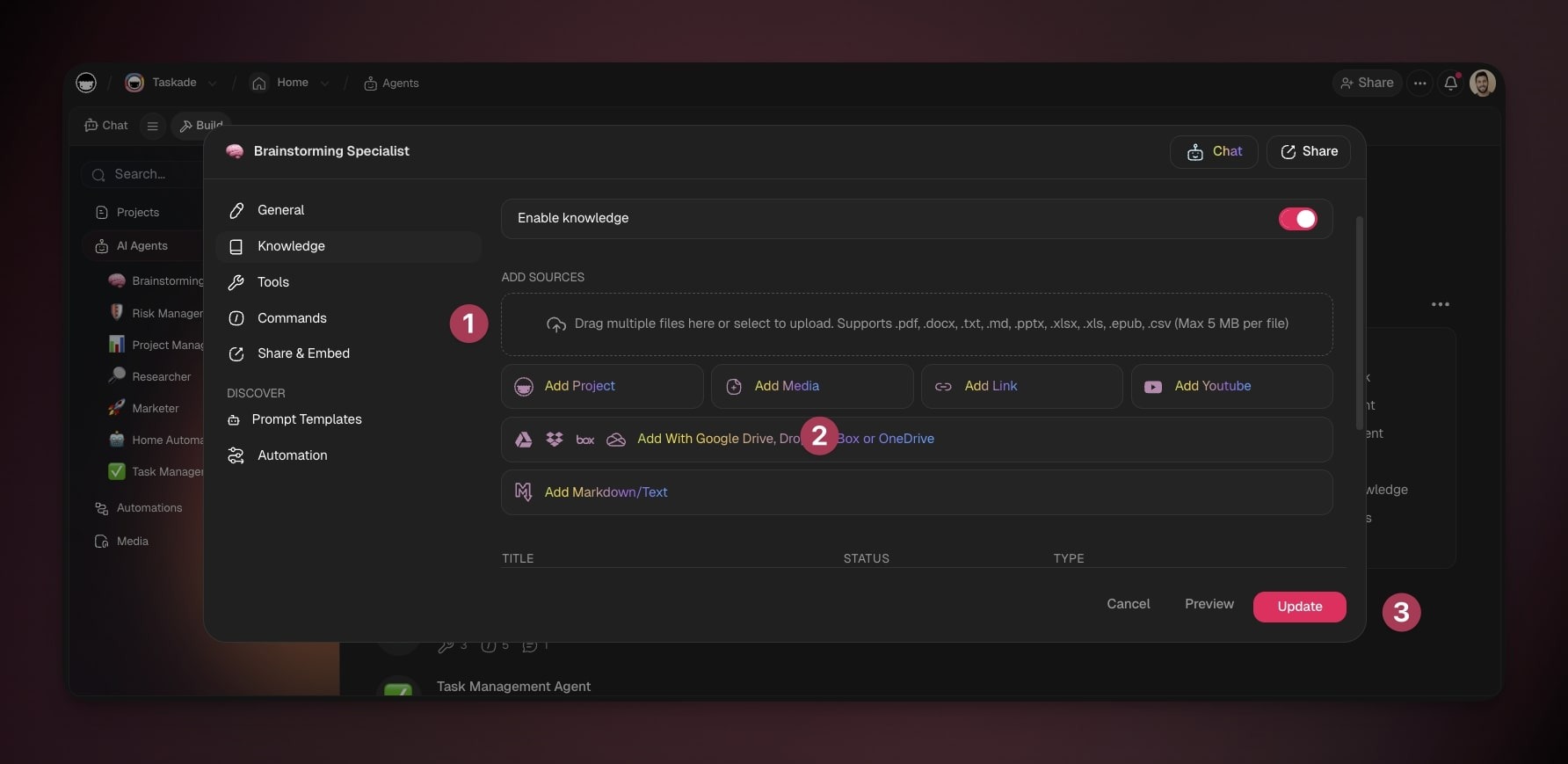
When you are done adding sources, click Update to save. The agent reads the new knowledge on its next reply.
Upload Documents
Uploading documents is the simplest way to hand your agent specific, structured information. Use it for anything you attach to an email: a price sheet, a contract, a deck, a spreadsheet.
- Open your agent's Knowledge tab.
- Click the ADD SOURCES box to choose files from your device, or drag and drop them in.
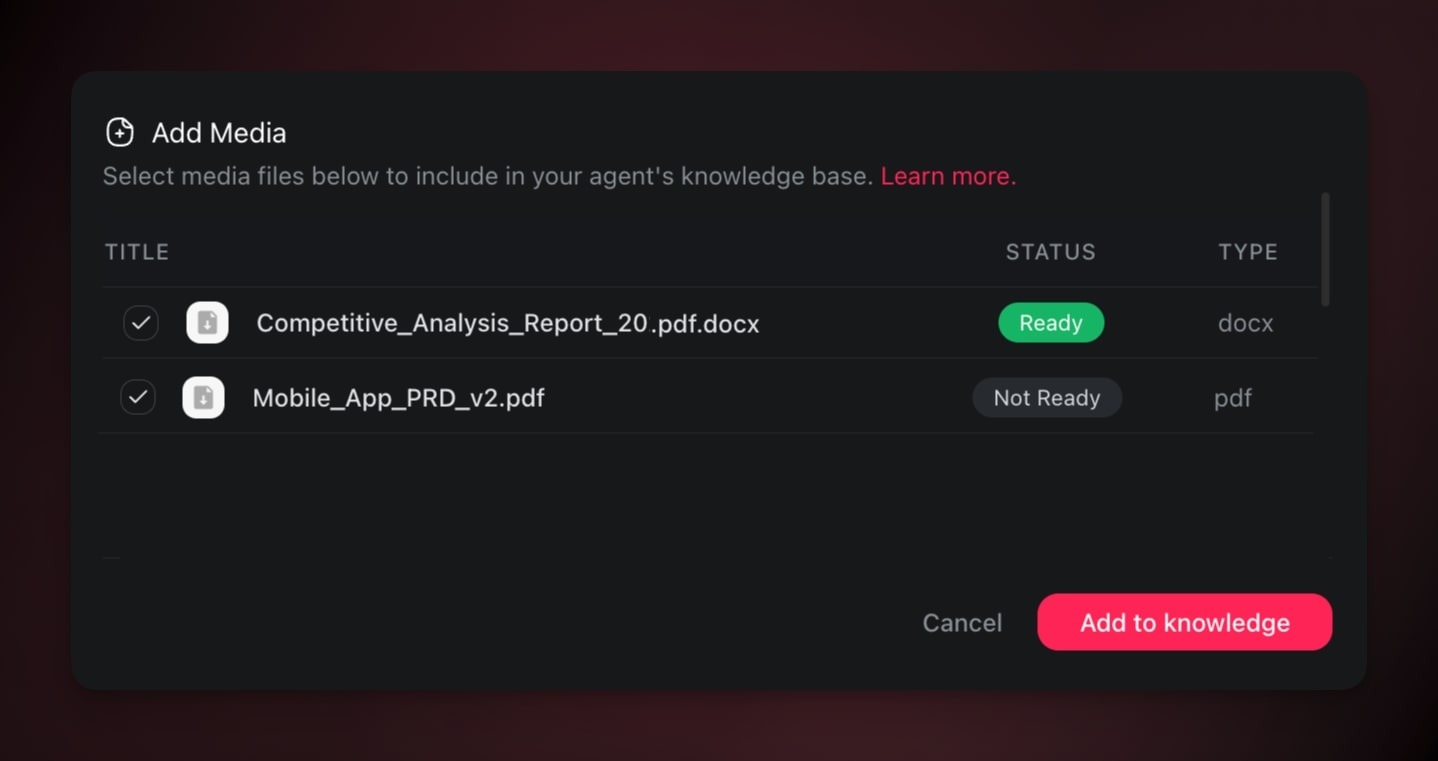
- Or click 📄 Add Media to pick a file already uploaded to your projects. See Media Files.
- Click Update to save.
Supported Knowledge Formats
| 📎 Files & Documents | 🌐 Web Resources |
|---|---|
| YouTube videos | |
| .csv | Blog articles |
| .txt | Tweets |
| .docx | Reddit threads |
| .md | News websites |
| .pptx | |
| .xlsx | |
| .epub |
Images upload too, and Taskade reads the text inside them with built-in OCR.
If you drop a file Taskade cannot read, it is skipped and a notice names it. The notice lists the file it skipped and the formats the Knowledge tab accepts, so you can convert the file and drop it again. The rest of the batch still uploads.
Add Many Sources at Once
You can build a knowledge base fast by adding several projects, links, and files in one go.
- Open your agent's Knowledge tab.
- Choose any upload method.
- Use the checkboxes or click ➕ Add another to select multiple sources.
- Click Update to save them all.
Use Web Resources
Web resources let your agent answer from up-to-date information you point it at. Use them when a fact lives on a public page instead of in a file.
- Open your agent's Knowledge tab.
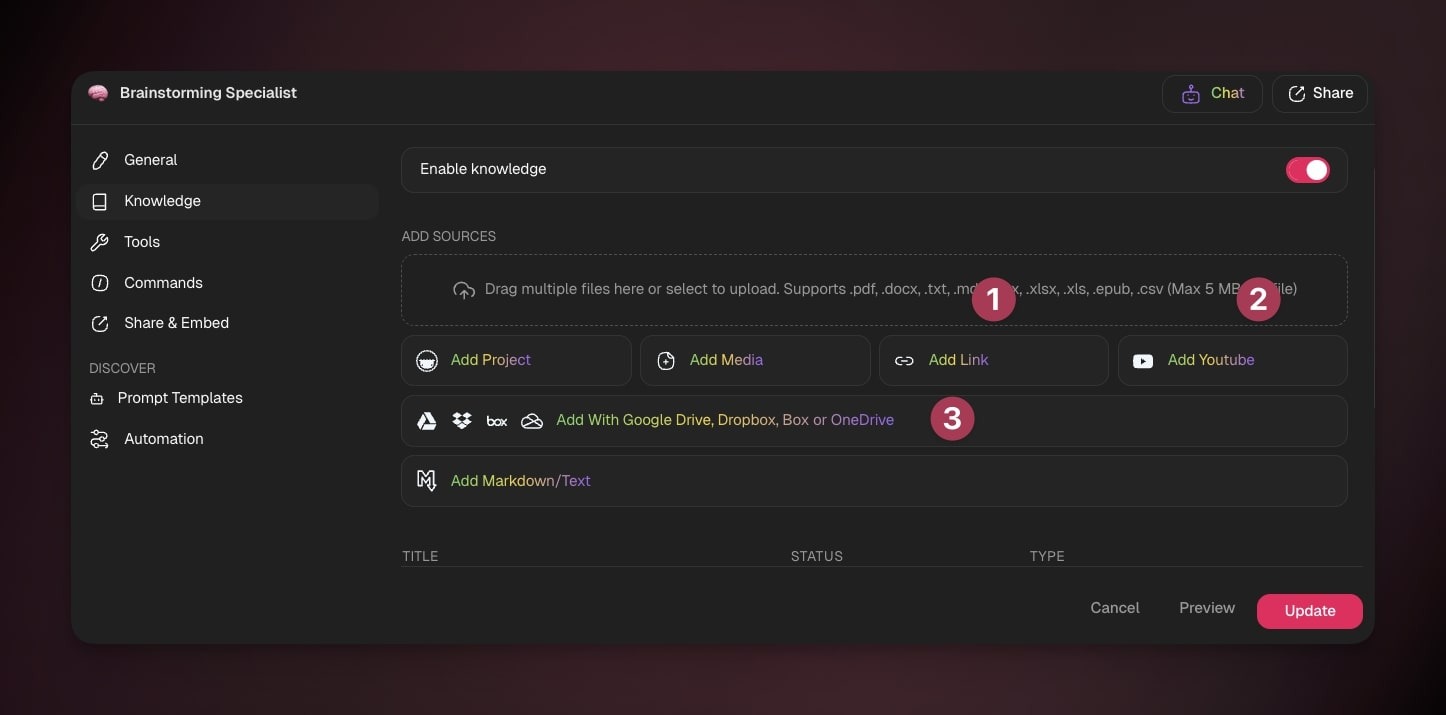
- Pick a source:
- 🌐 Add link for a website or blog.
- 🎞️ Add YouTube for one or more videos to transcribe.
- 📦 Add from Google Drive, Dropbox, Box, or OneDrive.
- Click Update to save.
💡 Note: A link or sitemap you add is read as one page. Taskade does not crawl the internal links inside it.
Create a Note From Scratch
Type rules, policies, or quick facts straight into the Knowledge tab. No file needed.
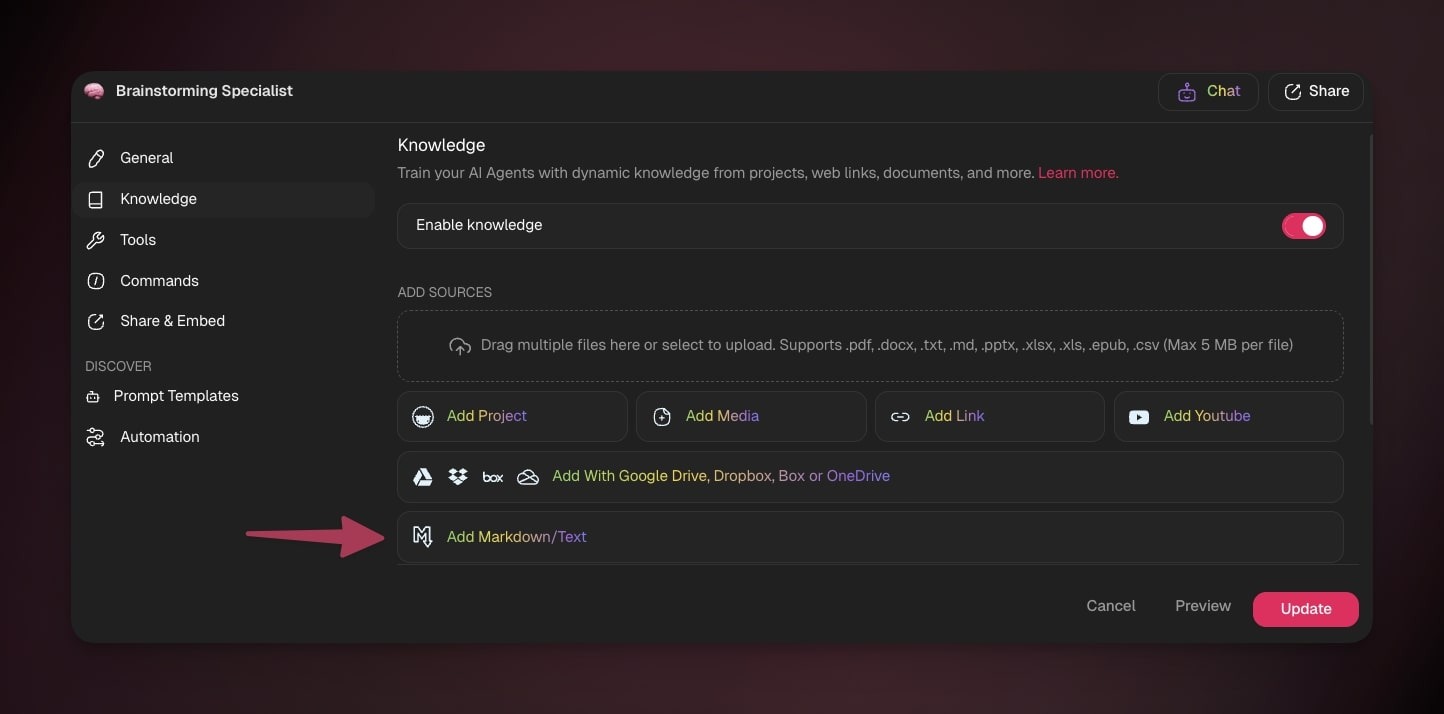
- In the Knowledge tab, choose Add Markdown/Text.
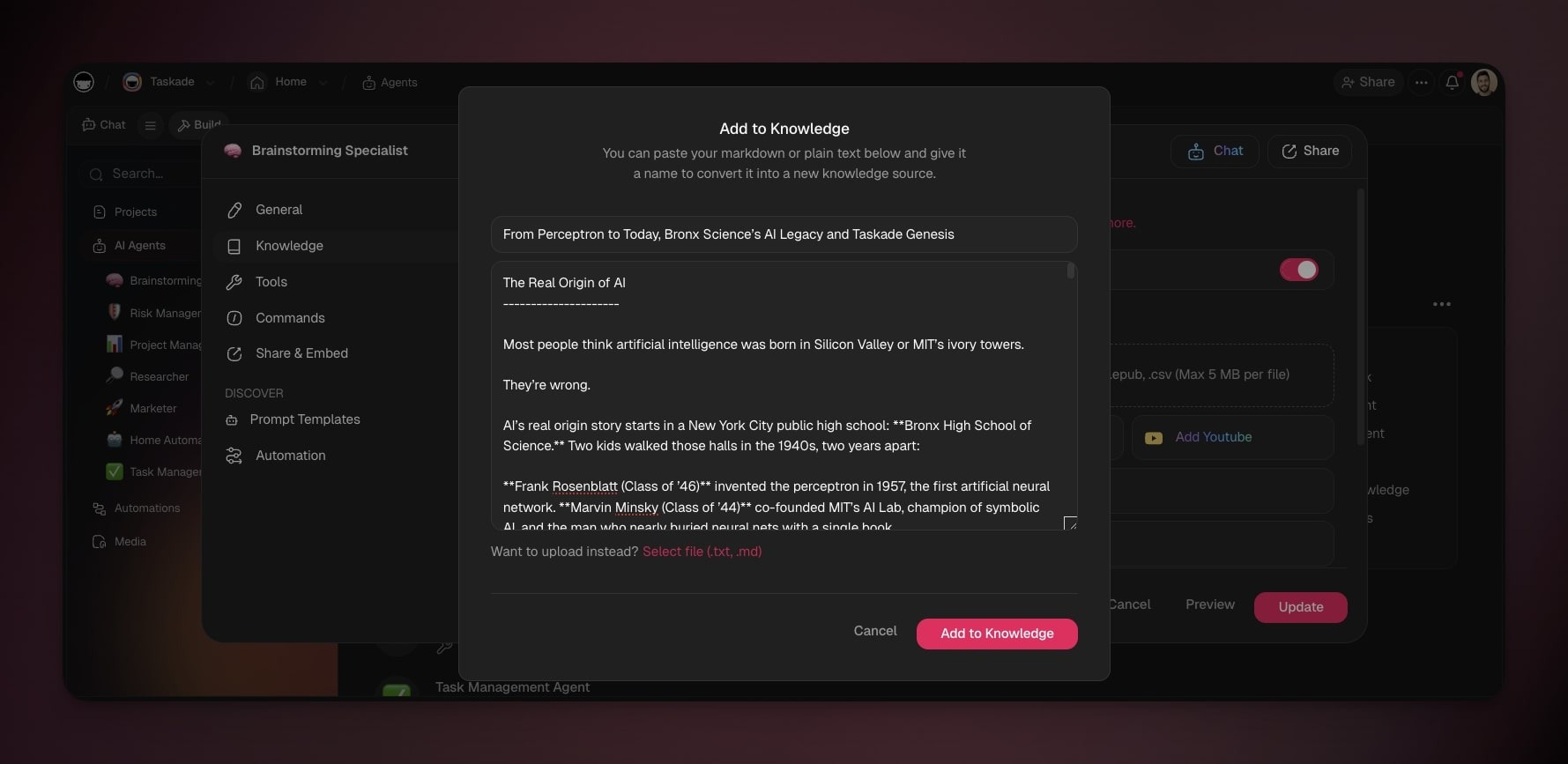
- Paste Markdown or plain text into the pop-up. See Markdown Support for formatting.
- Click Add to Knowledge.
- Click Update to save.
Connect Live Projects
Connecting a project gives your agent live memory. Uploaded files are static. A connected project is dynamic: when the project changes, the agent inherits the update on its next reply, with no re-upload. This is the Memory pillar feeding the Intelligence pillar in real time.
For example, a solo realtor connects a live Listings project. When a property goes under contract and the status changes, the inbound CRM agent reflects that on its very next reply. No re-upload, no stale answers.
- Select your agent in the Agents tab.
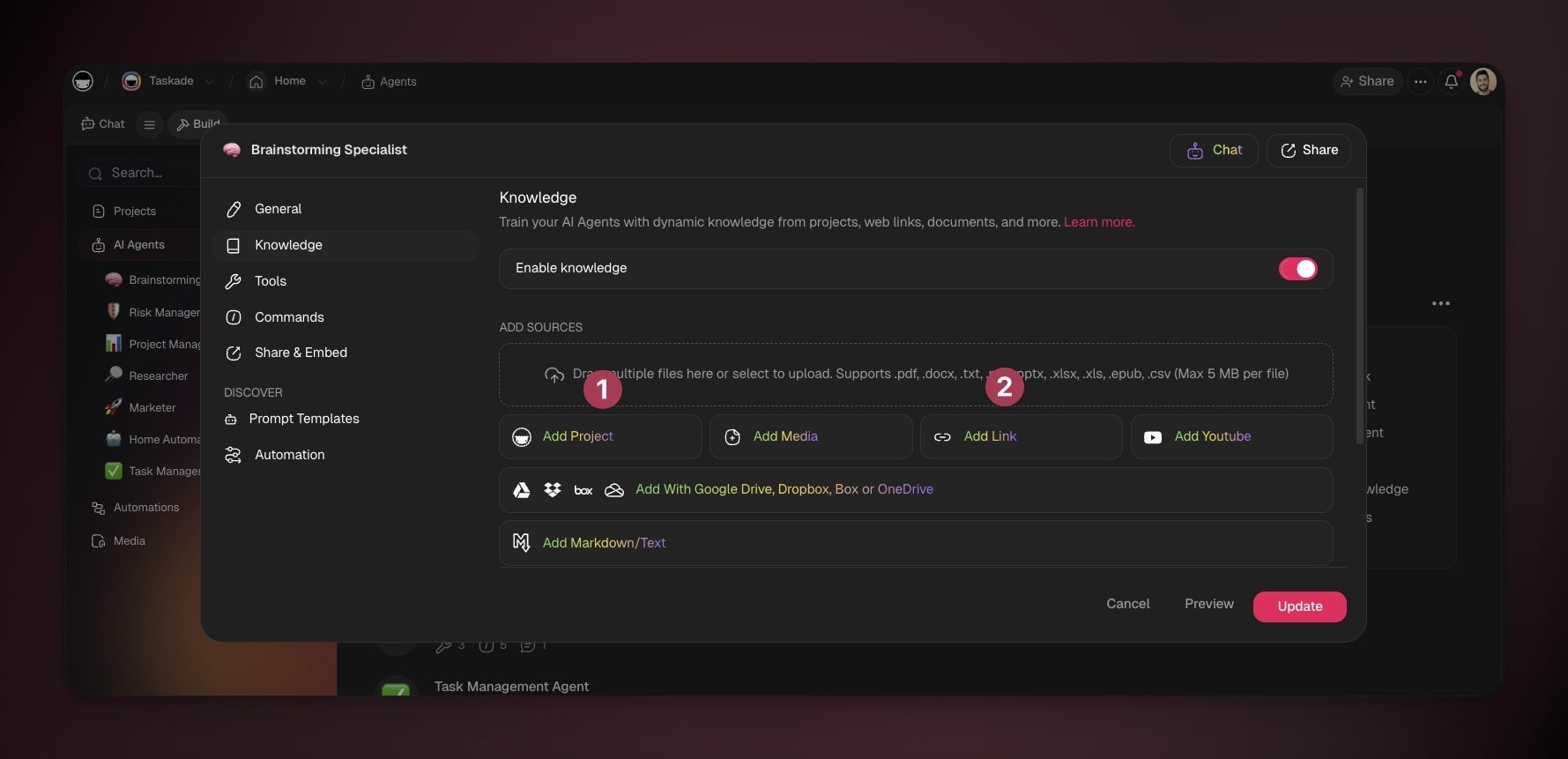
- Choose the Knowledge tab in the sidebar.
- Turn on the Knowledge toggle on the right.
- Add a live source:
- 📄 Add Project to pick projects from the current workspace or folder.
- 🌐 Add link to pick a website or blog.
A connected project shares this content with your agent:
| ✅ Included | ❌ Not Included |
|---|---|
| Text, blocks, paragraphs | Uploaded files |
| Due dates | Comments |
| Assignees | Embedded links or files |
| Custom fields | Timers |
| Reactions | |
| Chat messages |
See Which Sources It Used
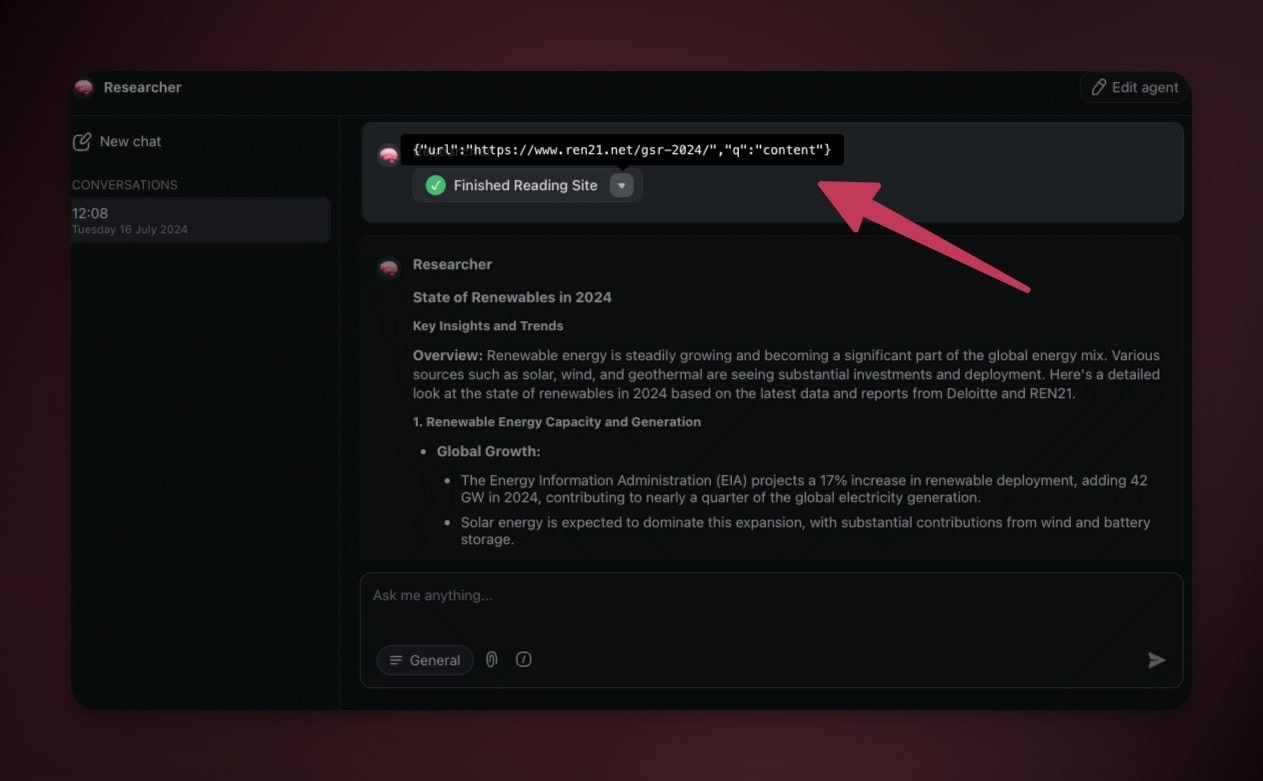
Every answer shows its receipts. When you chat with an agent, it tells you which knowledge it read, so you can trust the reply and trace it back to the source.
- Start a conversation with your agent.
- Look for the box that shows it accessed your sources.
- Click the drop-down arrow to preview the exact sources used.
If the agent cannot retrieve one of your sources, it says so instead of answering around the gap. The reply names the sources it failed to read, so a stale link or a file still processing never reads as a confident answer built on nothing. Re-add or replace the source and ask again.
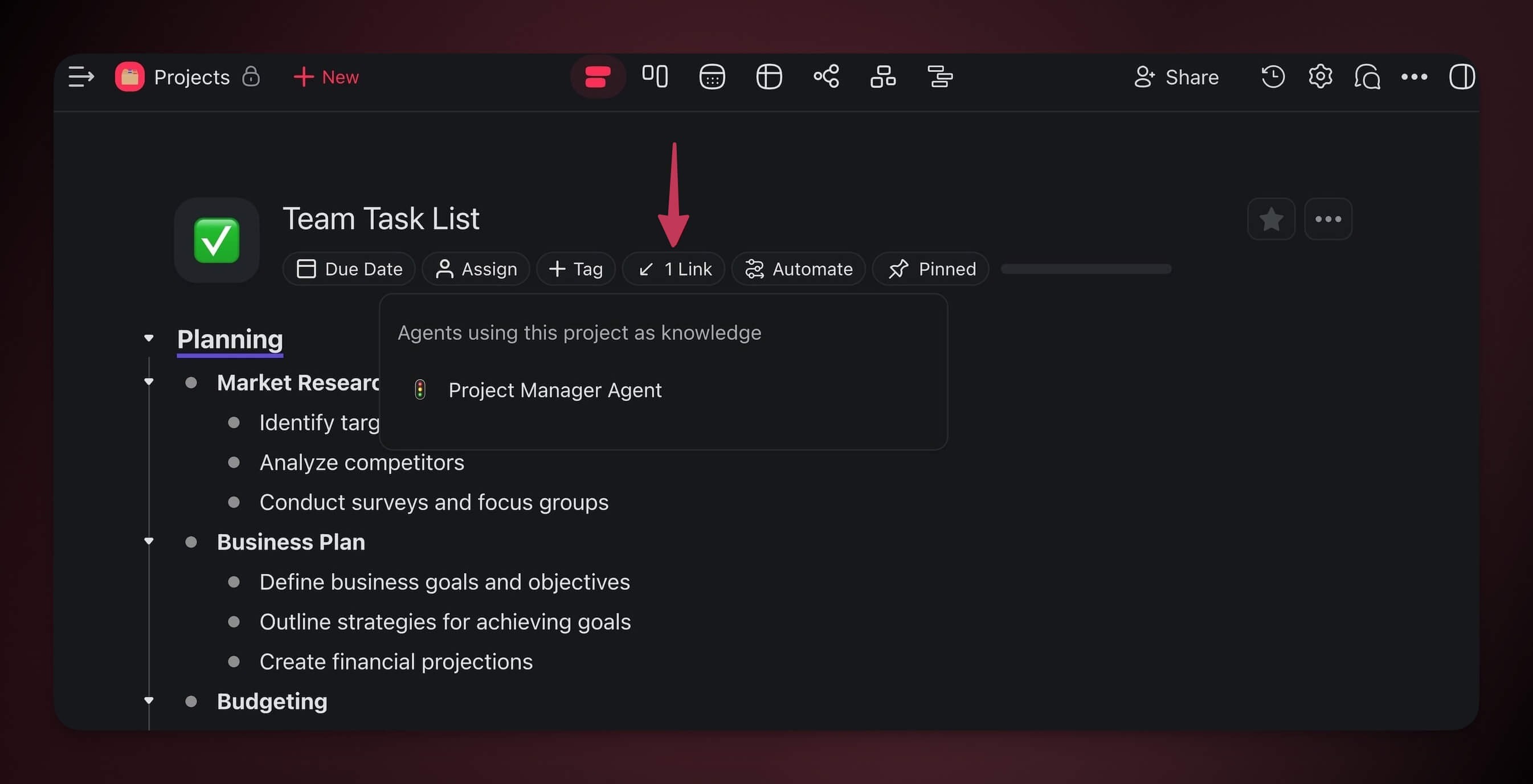
When an agent uses a project as knowledge, Taskade adds a backlink inside that project. Open the project and you can see which agents rely on it.
Keep Your Agent Sharp
A clean knowledge base is a reliable agent. Two small habits do most of the work.
Describe each file as you add it. Every uploaded file carries a short description. The agent reads that description when it searches its library, so a clear label surfaces the right file at the right moment.
- Add a one-line description right after you upload.
- Treat it like a cue that a teammate scans first ("Q2 pricing one-pager", "Sales call with Acme").
- Edit the description later if the agent keeps reaching for the wrong file.
Sweep out stale sources. Old contracts and last quarter's deck pull the agent off course. Trim them and it stays focused.
- Open the Knowledge tab on the agent.
- Tick the checkbox next to each item you no longer need, or use Select all.
- Click Delete in the action bar at the bottom. Counts refresh as the sweep finishes.
- For one-off cleanup, click a single row's delete control. The agent gets sharper on the next reply.
Community Agent Templates
Explore AI agents built by the Taskade community. Clone one and study how it uses knowledge.
- AI Prompt Evaluator. Evaluate and improve AI prompts
- Bluey Episode Chatbot. Knowledge-grounded conversational agent
- Cover Letter Generator. Context-aware document generation
- AI Study Buddy. Educational Q&A assistant
Build your own → taskade.com/create
Frequently Asked Questions
What is the difference between knowledge and memory?
Knowledge is what the agent reads, and memory is what the agent remembers. You write knowledge by uploading files or connecting projects. The agent writes memory on its own, keeping your conversation history and learned facts across sessions. Both feed every reply. Knowledge grounds the answer in your data. Memory keeps the agent personal to you over time.
How is agent knowledge the Memory pillar of Workspace DNA?
Workspace DNA has three pillars: Memory (your projects and files), Intelligence (your agents), and Execution (your automations). Knowledge is how the Memory pillar feeds the Intelligence pillar. Your projects and databases become a searchable memory, and a custom agent reasons over it. The more your workspace grows, the smarter your agents get.
What file types can I upload as knowledge?
You can upload PDF, CSV, TXT, DOCX, MD, PPTX, XLSX, and EPUB files. Images upload too, and Taskade reads the text inside them with built-in OCR. For web content, you can add website links, blog articles, news pages, and YouTube videos (using the auto-generated transcript). You can also pull files from Google Drive, Dropbox, Box, or OneDrive.
How many knowledge sources can one agent hold?
A Free workspace gives each agent one knowledge source, which is enough to try the feature on a single file or project. Every paid plan raises the ceiling to 50 sources per agent, so you can ground one agent in a whole document set. See pricing for the full plan matrix.
What is the difference between uploading a file and connecting a project?
An uploaded file is static. It holds whatever it said the day you added it. A connected project is dynamic, so when the project changes, the agent inherits the update on its next reply with no re-upload. Use files for fixed reference material like a contract. Use connected projects for live data that keeps changing.
Does the agent show which sources it used?
Yes. When you chat with an agent, it shows a box indicating it accessed your sources. Click the drop-down arrow to preview the exact sources behind the answer. Taskade also adds a backlink inside any project an agent uses as knowledge, so you can open the project and see which agents rely on it.
What does a connected project share with the agent?
A connected project shares its text, blocks, paragraphs, due dates, assignees, and custom fields. It does not share uploaded files, comments, embedded links or files, timers, reactions, or chat messages. If you need the agent to read a file attached to a project, upload that file directly to the Knowledge tab instead.
Related guides
- Custom AI Agents: The Intelligence Pillar. Build and train the agent that reasons over your knowledge.
- Projects & Databases: The Memory Pillar. How project data becomes searchable agent memory.
- How Taskade Genesis Works: Workspace DNA. The three-pillar loop of Memory, Intelligence, and Execution.
- Multi-Agents. Build teams where agents share knowledge.
- Tools for AI Agents. The built-in tools an agent carries, plus custom tools you define.
- MCP Connectors. Let external AI clients read your workspace over the hosted MCP server.
- Media Files. Reuse files you already uploaded to your projects.
- Keep Your Agent's Knowledge Up to Date. Refresh knowledge automatically from a web page, sheet, inbox, or form.
- Build a Chatbot with Knowledge Base. Turn this knowledge into a published website chatbot.