
Add AI to Any Automation Step
Turn any automation step into an AI worker. It answers questions, writes and rewrites text, creates tasks, and brainstorms ideas from the data in your workflow. The Taskade AI action drops generative AI into an automation without setting up a custom agent.
TL;DR: Taskade AI actions run as steps inside an automation. Use them to answer questions, generate text, summarize long content, translate, or classify data, then pass the result to the next step. Leave the model on TSK-Auto, or pick a TSK tier from the Model (optional) menu. See AI Models for guidance.
The Taskade AI action is the lightweight cousin of the full Ask Agent step. It gives you generative AI inside any automation without configuring a custom agent. It uses 15+ frontier models from OpenAI, Anthropic, and open-weight providers. For richer reasoning and tool use, graduate to a Custom Agent.
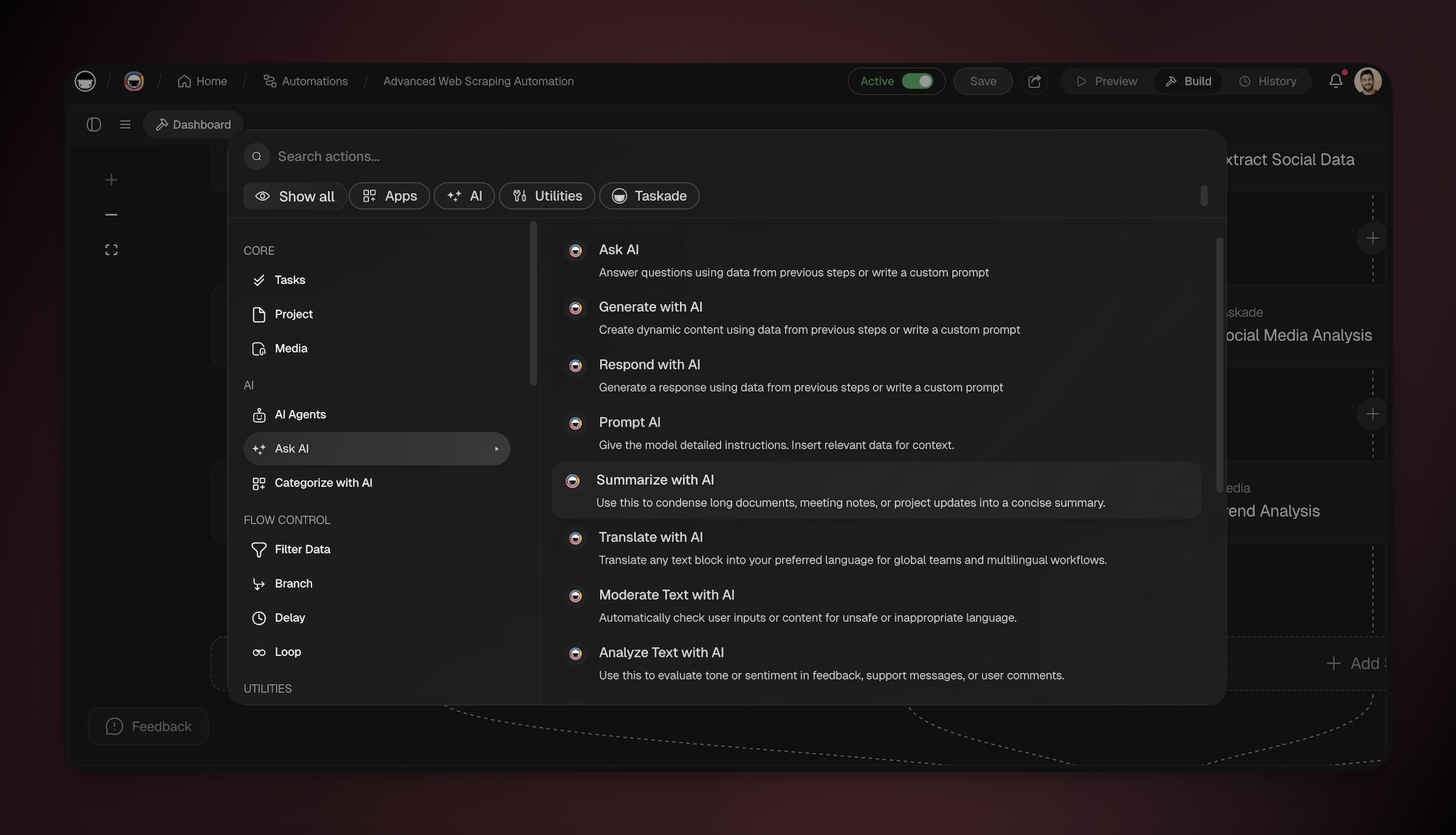
Taskade AI Triggers and Actions
Here are the triggers & actions you can use in your automations:
| Action | Description |
|---|---|
| Ask AI | Answer questions using data from previous steps or a custom prompt. |
| Generate with AI | Create dynamic content (text, code, outlines, drafts) from context or a prompt. |
| Summarize with AI | Condense meeting notes, emails, project updates, or other long text into key points. |
| Respond with AI | Craft a reply or decision based on messages or data in the automation. |
| Prompt AI | Send detailed instructions to the model; insert step data for rich context. |
| Categorize with AI | Sort text into preset or custom labels for classification and routing. |
If the input is long text and the output must keep only the key points, use Summarize with AI. Add optional instructions when you need a specific format, tone, or emphasis. Leave the instructions empty for a concise general summary. Use Generate with AI or Prompt AI for translation, moderation, sentiment analysis, and other custom instructions. For repeatable sorting into fixed labels, use Categorize with AI and branch on the result.
Need an agent's memory, custom tools, or a whole team in the automation? Use Ask Agent, Run Agent Command, or Ask Agent Team on the Agent Action page.
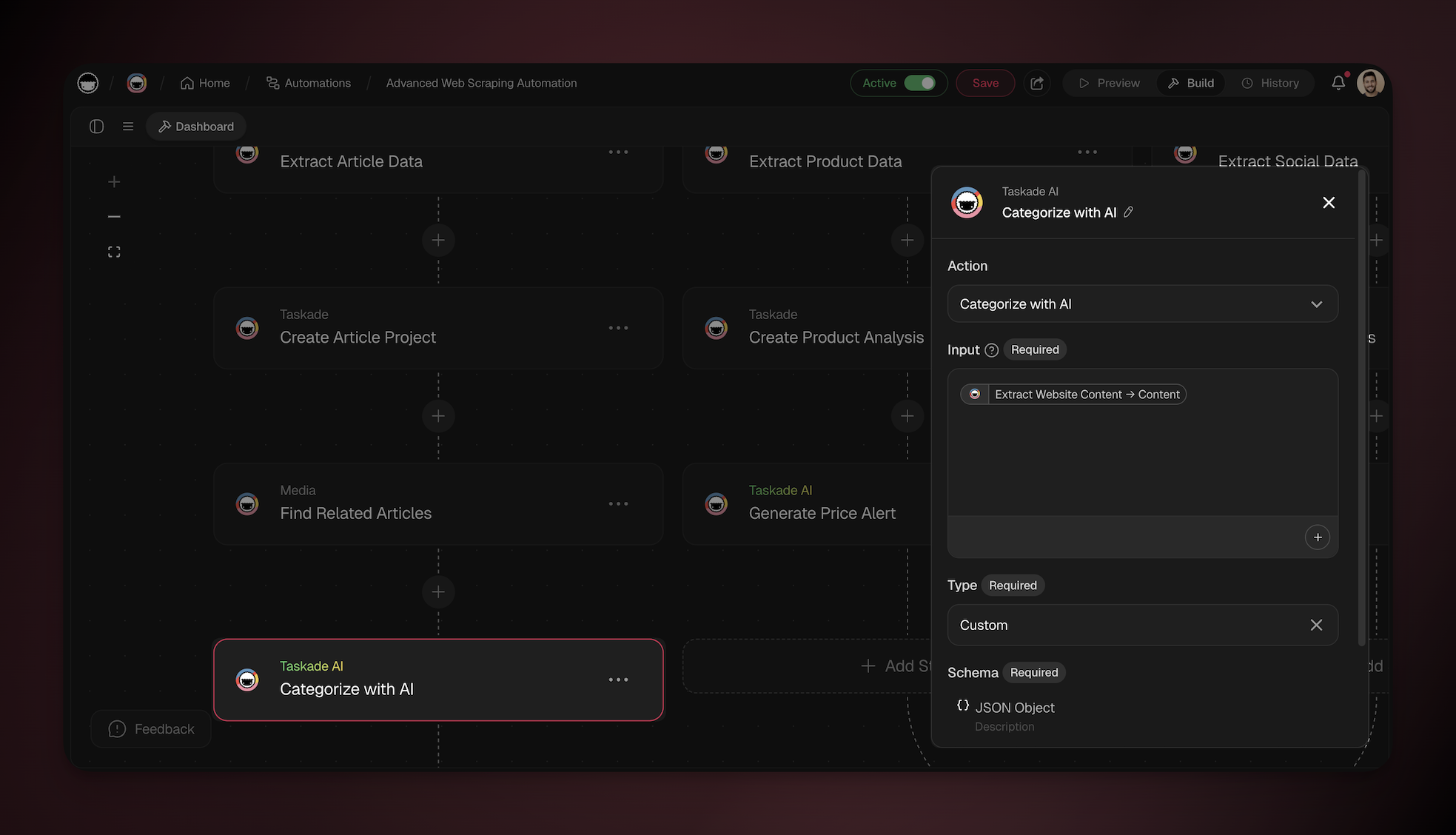
Taskade AI Automation Settings
Connector options give you full control over Taskade AI automations.
| Field | Description |
|---|---|
| Action | Choose one of the available Taskade AI actions to match your use case. |
| Prompt | Input the specific prompt to determine the behavior of Taskade AI. You can type "@" or click ➕ to insert relevant data from the previous automation steps. |
| Input | Provide additional data or context for the AI to use when it generates a response. You can type "@" or click ➕ to insert relevant data dynamically. |
Pick a Model on Every Step
Every Taskade AI action has a Model (optional) menu in its step settings, from Ask AI to Categorize with AI. The Summarize Website step has the same menu. The menu lists TSK-Auto and the TSK tiers under a Taskade credits heading, so you pick a depth, not a model name.
- Open the Taskade AI step in the flow editor.
- Click the Model (optional) menu.
- Hover a tier to see its credit cost.
- Pick the tier that fits the job, or keep TSK-Auto to let Taskade choose.
| Option | Best for | Plan |
|---|---|---|
| TSK-Auto (default) | Most steps. Taskade picks the model for each run. | Every plan |
| TSK-Instant | Fast, high-volume steps such as routing | Every plan |
| TSK-Standard | Everyday writing and answers | Paid plans |
| TSK-Thinking | Planning and deeper analysis | Paid plans |
| TSK-Reasoning | Multi-step logic, workflows, and systems | Business and above |
If your plan cannot use a tier, the tier shows an upgrade chip. A click on that tier opens the upgrade panel and leaves the step unchanged.
A step that already names a specific model keeps that model and its label, because the menu change affects only new picks. Taskade retired the GPT-4o models. A step that still names one now runs on TSK-Auto, unless the step runs on your own OpenAI key.
Mix tiers inside one automation. Use TSK-Instant for a routing step, then hand off to TSK-Reasoning for the final answer. See AI Models & Credit Costs for how credits work.
Example from the field. A logistics operator reads incoming shipping emails with TSK-Instant, then branches. Routine shipments clear on their own. Only the exceptions go to a deeper tier for judgment. Most of the volume costs almost nothing, and the hard calls still get the best reasoning.
Every Taskade AI action draws from your workspace AI credit pool. A space that stores its own AI provider keys is the one exception. If the space holds an OpenAI key, a step set to TSK-Standard or TSK-Reasoning runs on that key and spends no credits. Some steps only reshape data, like formatting a date, pulling a field out of JSON data, or converting a CSV spreadsheet file. Use a utility action for those. Utilities run instantly and cost no AI credits.
Related guides
- Agent Action. Full custom-agent version
- AI Categorize. AI-powered classification
- Structured Output. AI replies that come back as labeled fields
- AI Models. Choose from 15+ frontier models
- Automations: Overview. Where AI actions fit in the Execution layer