
Overview
The New Comment trigger allows automation to detect when a comment is added to a task to initiate follow-up actions. Combine with Categorize with AI to detect sentiment or urgency, then Branch to escalate, assign, or notify.
TL;DR: The New Comment trigger fires the moment someone comments on a task, pulling that event into Taskade so your automation can react automatically. Use it to alert your team, log feedback, or kick off follow-up steps without manual checking. Watch one project, a specific block, or every project, then pair it with Categorize with AI to detect urgency.
How to Use It
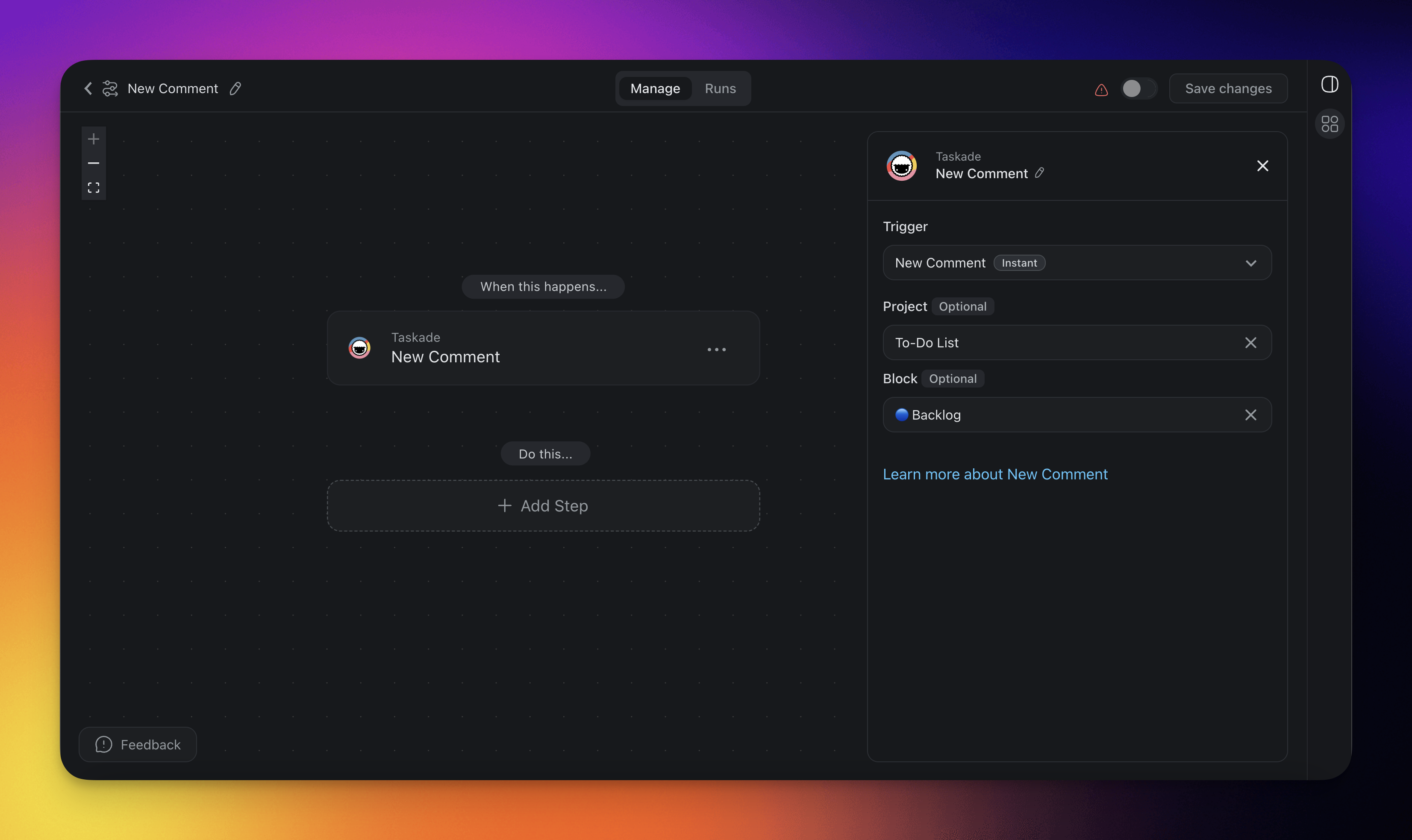
- Click ➕ Add Trigger and choose the New Comment trigger.
- Select a Project for the automation to monitor. If you select no project, the automation monitors all projects.
- Optionally, select a specific Block within the Project to monitor for changes.
- Add more steps for further processing.
Trigger Settings
Connector options give you full control over the New Comment trigger:
| 🏷️ Field | 🔤 Description |
|---|---|
| Project (Optional) | Select the Project you want this trigger to watch. If you leave the project field blank, all projects are selected by default. |
| Block (Optional) | Select the Block you want this trigger to watch. If you leave the block field blank, all tasks in the project are monitored. Only Blocks inside the selected Project are available to pick. |
Reference Comment Content
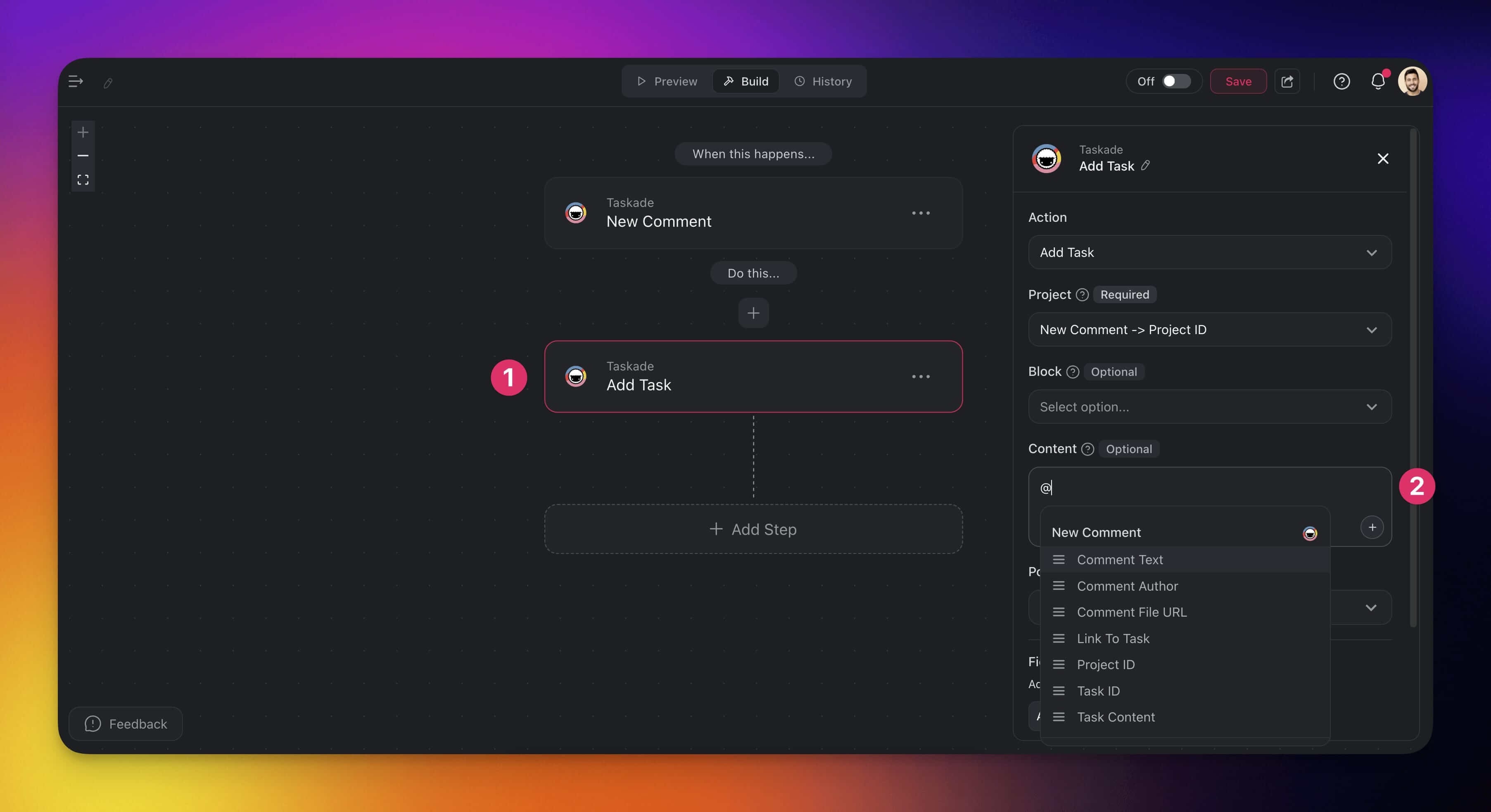
You can pass the trigger output to subsequent automation steps.
- Follow the trigger with an automation step.
- Reference the trigger content in the Content field (type @ or click ➕).
Use Cases
Not sure how to use the New Comment trigger? Here are a few ideas:
| 🚀 Use Case | ⏩ Action Flow |
|---|---|
| Team alert on new feedback | ✅ Trigger: New Comment in "Feedback" project ➡️ Action: Send Channel Message in Slack ➡️ Action: Add Task to "Follow-Up" Project |
| Automatic documentation updates | ✅ Trigger: New Comment in "Documentation" project ➡️ Action: Append Text to Google Doc with comment |
| Bug tracking & triage | ✅ Trigger: New Comment in "Bug Tracker" project ➡️ Action: Create Issue in GitHub repository ➡️ Action: Assign Task to a team member |
| Schedule follow-up meeting | ✅ Trigger: New Comment in "Client A" project ➡️ Action: Create Quick Event in Google Calendar ➡️ Action: Send email (via Gmail) confirming meeting |
| Agent knowledge enrichment | ✅ Trigger: New Comment in "Knowledge Base" project ➡️ Action: Add Knowledge to Agent |
Related guides
- Project Comments: How comments work in projects
- Task Added, Task Completed: Other task triggers
- AI Categorize: Classify comment sentiment
- Agent Knowledge: Feed comments into agent memory