
Connect Taskade to Any App
Webhooks let you plug Taskade into any tool that does not have a native integration. When an event happens in another app, that app sends Taskade a small message, and your automation runs. Use webhooks to update tasks, post instant notifications, or start an automation using HTTP requests.
TL;DR: A webhook is a URL Taskade gives you so any external service that can POST JSON can fire a Taskade automation. Pair the Webhook trigger with actions like Slack messages, project updates, or utility helpers to plug Taskade into anything. The HTTP-Webhook trigger is available on Pro and higher plans. The universal pattern works on every paid tier.
Webhooks are Taskade's universal escape hatch. When none of the 100+ native integrations fit, any service that can POST JSON can fire a Taskade automation.
Set up Webhooks
With the Webhook trigger you can configure the parameters of the incoming data. You can reference these parameters in the later actions of the automation. There is no limit to the number of parameters within a single trigger.
- Navigate to the Automations tab at the top of your workspace.
- Click ➕ Add automation ➡ Start from scratch.
- Add a Webhook Trigger.
- Configure the structure of the incoming data.
- Add an Action to reference the configured parameters.
- Take note of the unique Webhook URL shown in the trigger.
- Activate the automation with the toggle in the top-right corner.
Here is an example of the structure of the received data and how it can be referenced:
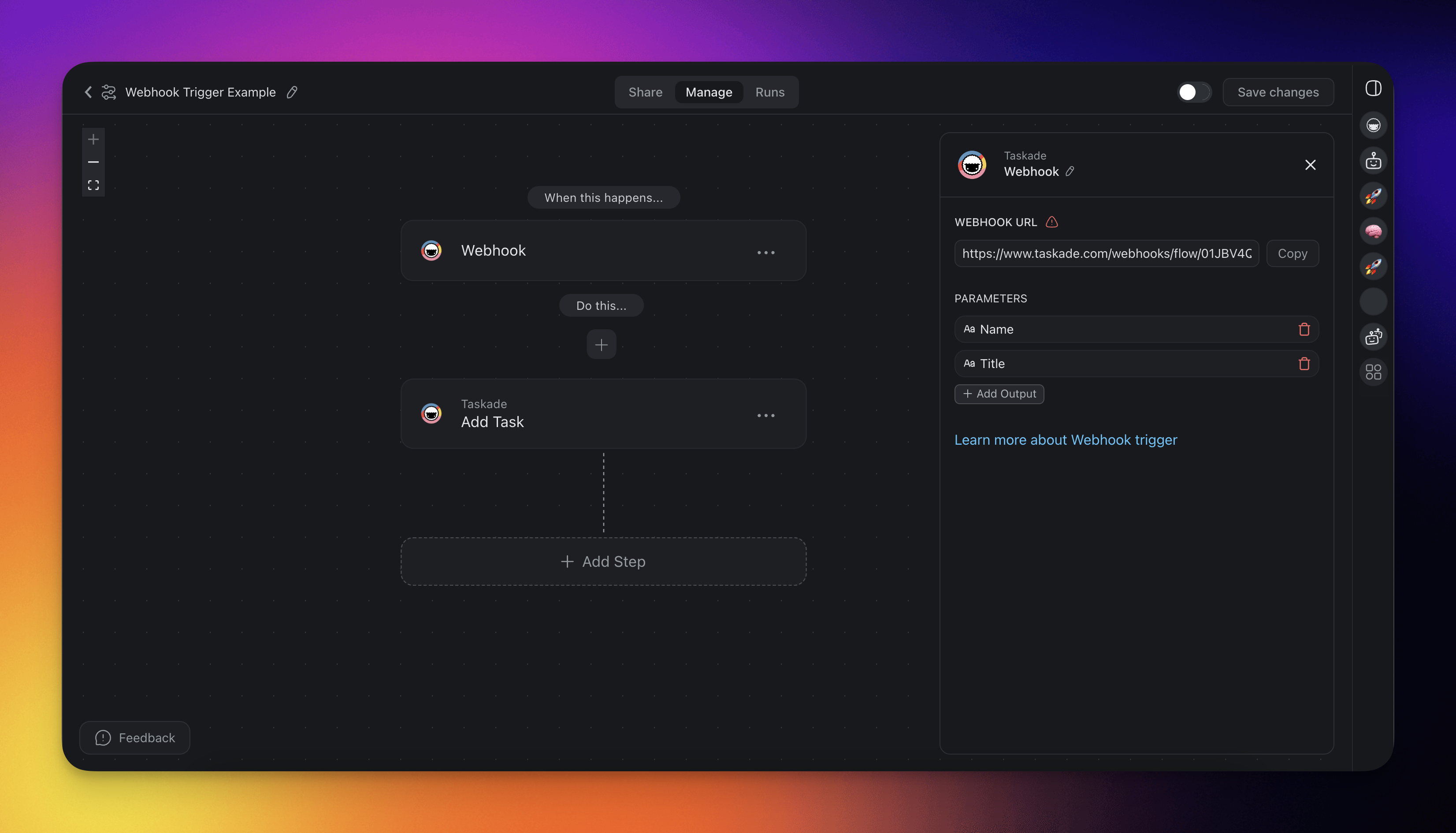
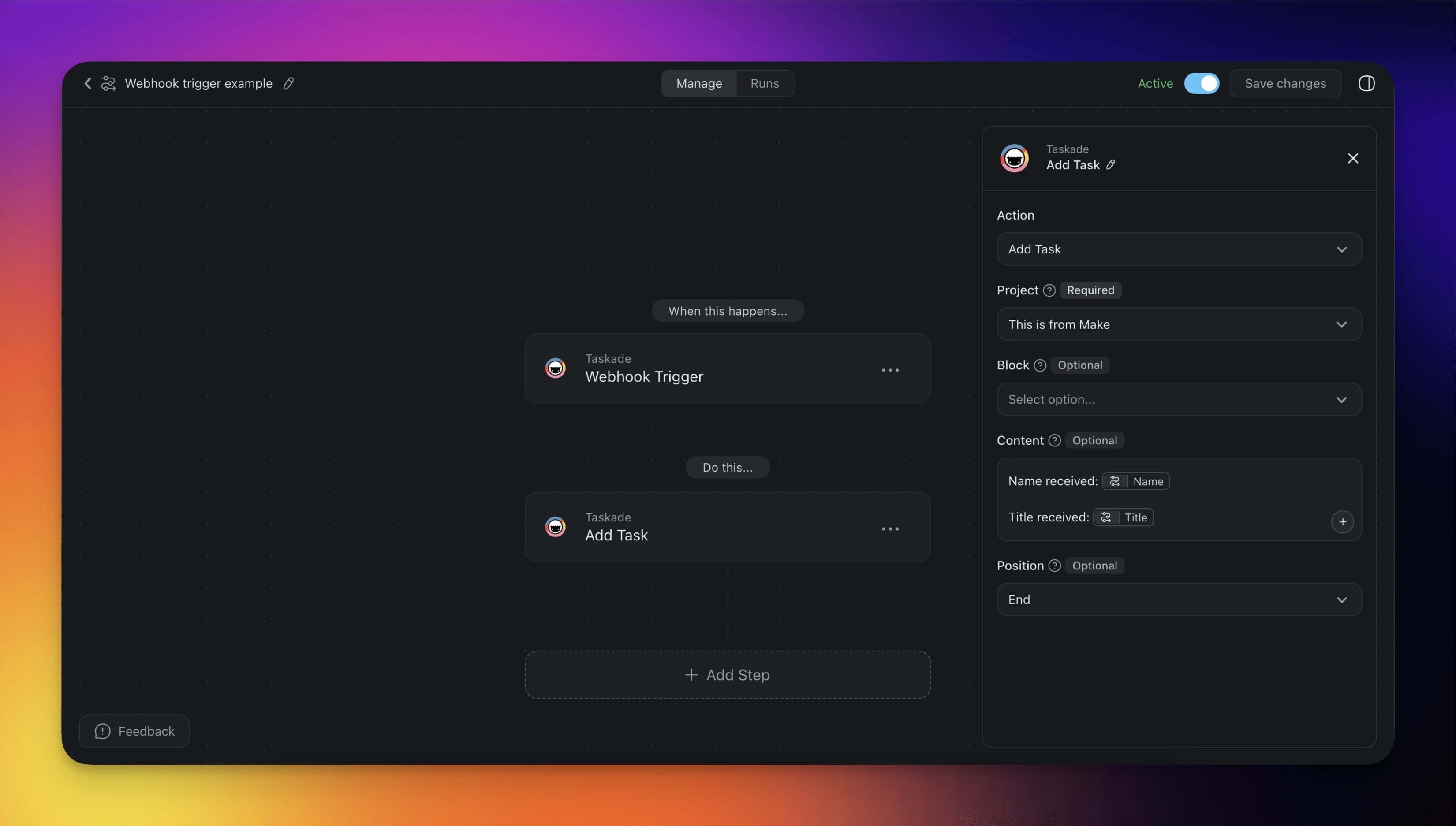
And here is a data sample the Webhook trigger above can receive:
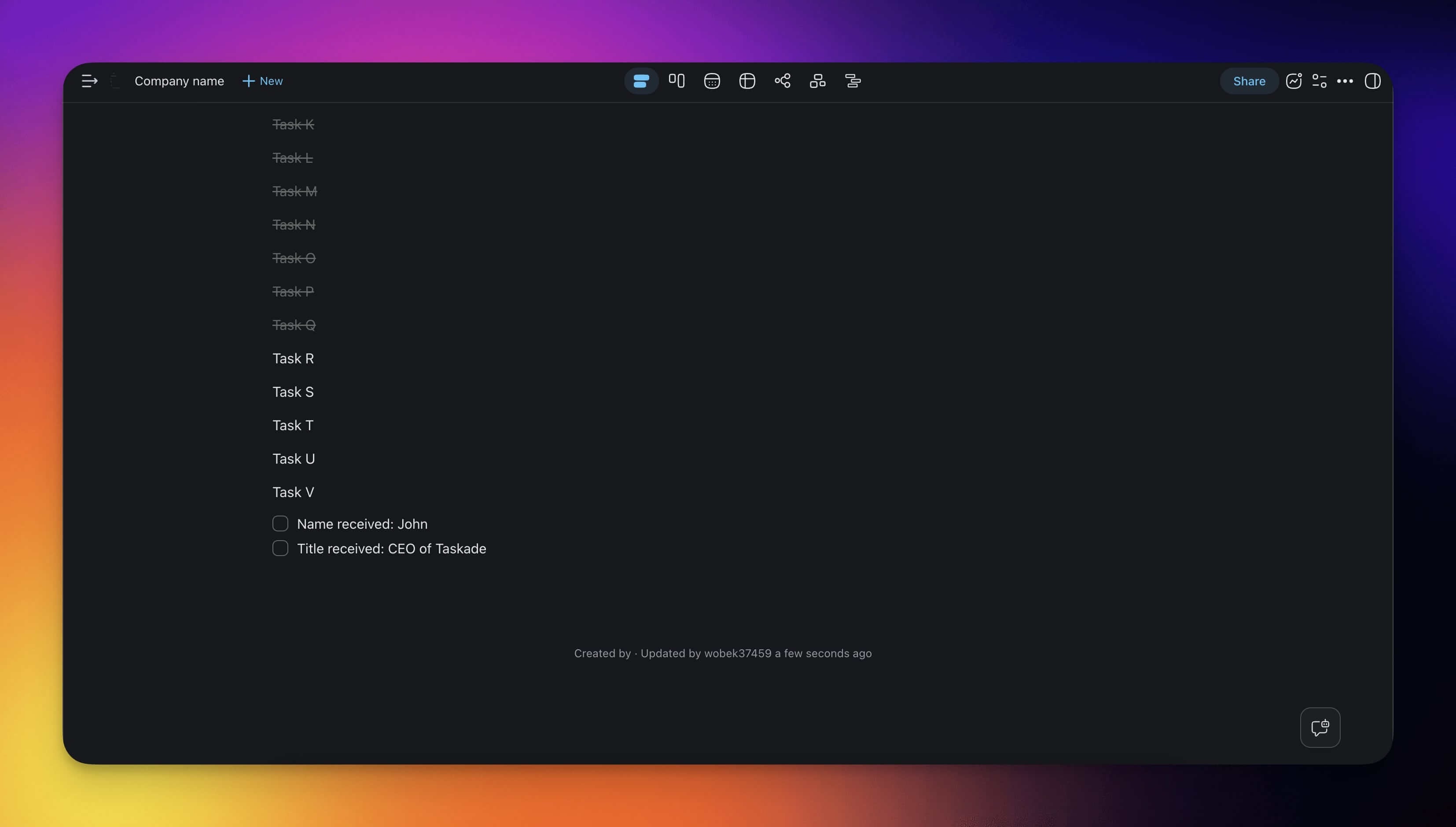
{ "Name": "John", "Title": "CEO of Taskade"}
Payload Parameters
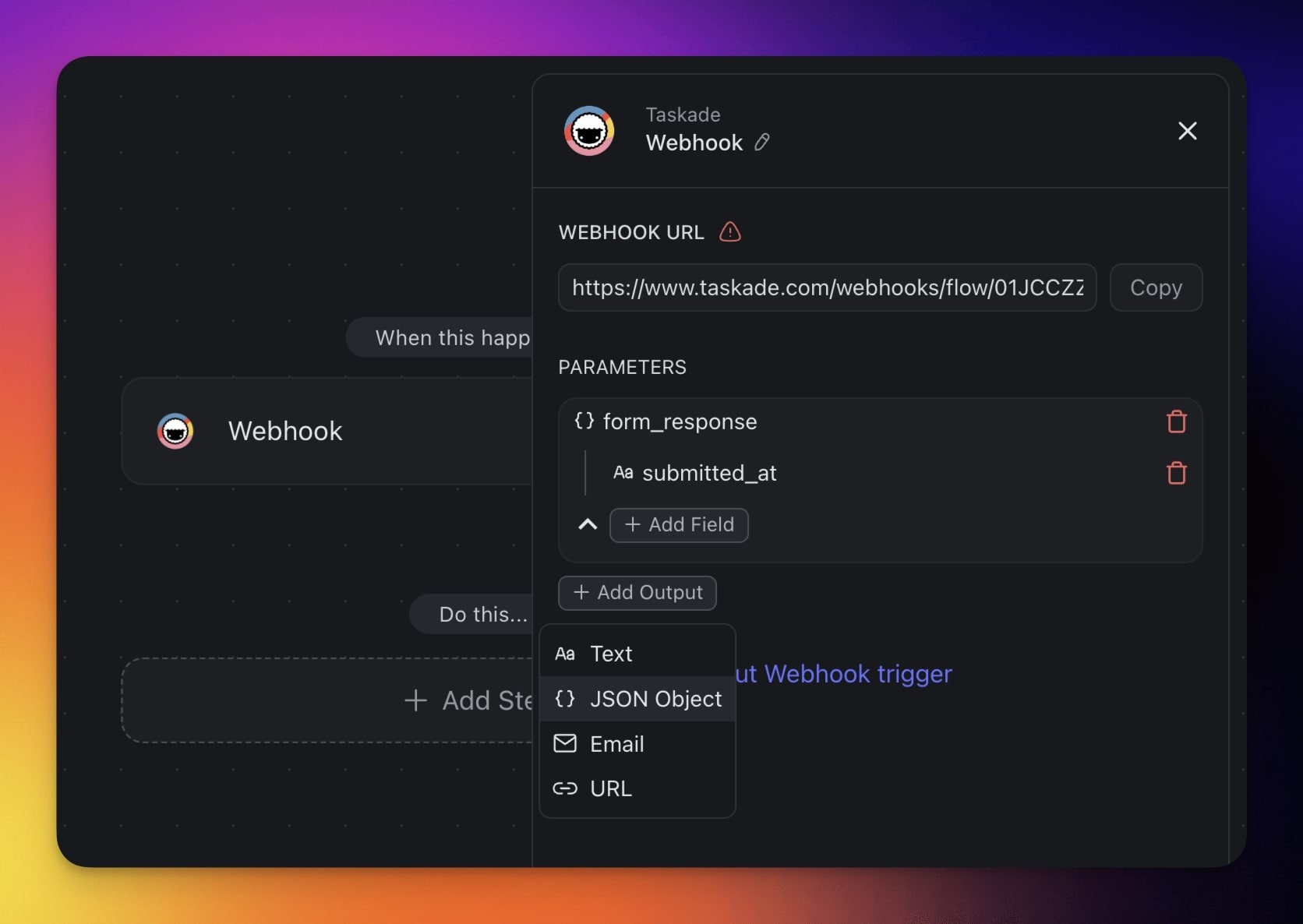
To access nested values in your payload:
- Select the JSON Object parameter in your webhook trigger.
- Use the Add Field option select nested JSON properties.
Using Parameters
When setting up parameters in your webhook trigger (for example, text, JSON object, email, or URL), you can reference them directly in your actions.
For instance, if your webhook receives a parameter named query with the value "my query", you can pass this value to an action by typing @ and selecting query. The action then receives the exact value "my query".
JSON Object Parameters
If your webhook includes a JSON object parameter, you can reference the full response by typing @ and selecting Webhook Body (Raw). You can then access the complete payload without defining individual parameters by hand.
Note: Passing the raw webhook body to an AI Agent action is particularly useful for extracting specific values or parsing structured outputs.
Trigger the Webhook with HTTP
HTTP stands for HyperText Transfer Protocol. It is a way for computers to communicate over the Internet. Think of an HTTP request like sending a letter to another app, and a Webhook is one way an application can receive this letter.
Using Make
- Sign in to your Make account.
- Click the Create a new scenario button on the top left corner of the screen.
- Click the plus icon and choose HTTP from the available modules.
- Select Make a request.
- Fill in the URL field with the Webhook URL shown in the Taskade Trigger.
- Select the Method as POST.
- Select the Content type as JSON.
- Input the data you want to send to Taskade in the Request Content input box.
- Click on the Run Once button
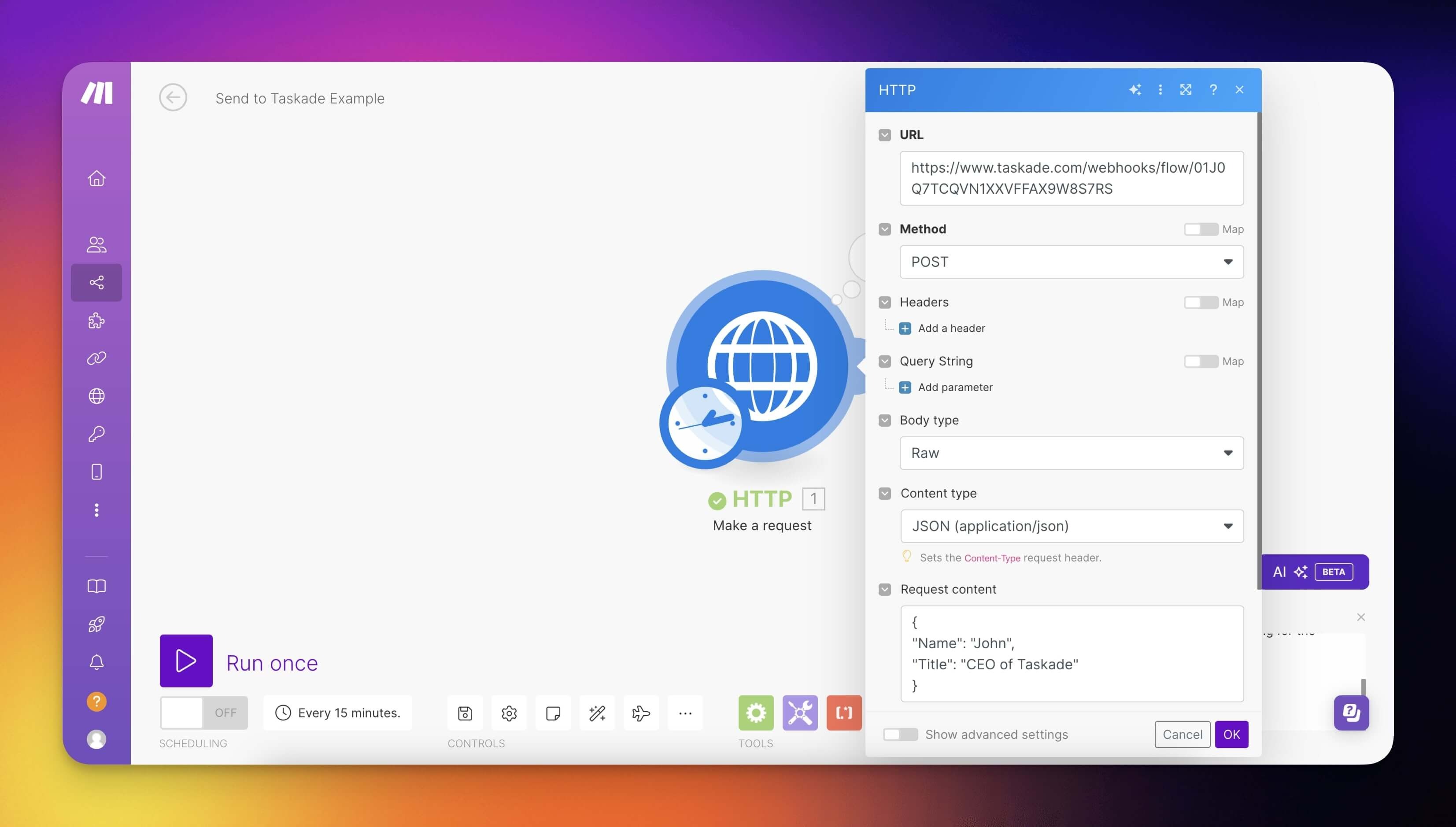
💡 Note: The parameter name sent as the request content from Make must be exactly the same as the parameter name entered in Taskade's WebHook Trigger.
In this example, the received data will be added as a task to a project:
Test Your Webhook
After setting up your webhook, test it by sending a request from your terminal. Here is how:
Basic test with cURL:
curl -X POST "YOUR_WEBHOOK_URL" \ -H "Content-Type: application/json" \ -d '{"name": "Test User", "email": "test@example.com", "message": "Hello from webhook!"}'
Replace YOUR_WEBHOOK_URL with the URL from your webhook trigger settings.
What to expect:
- Success: HTTP 200 response. Your automation runs.
- Invalid payload: HTTP 400. Check that your JSON matches the parameter names you defined.
- Webhook not found: HTTP 404. Make sure that the URL is correct and the automation is active.
Common Integrations
Webhooks connect Taskade to virtually any tool that supports HTTP requests:
| Tool | Use Case | How |
|---|---|---|
| Zapier | Connect 5,000+ apps to Taskade | Use "Webhooks by Zapier" action → paste your Taskade webhook URL |
| Make (Integromat) | Complex multi-step integrations | Use the HTTP module → POST to your webhook URL |
| n8n | Self-hosted automation | Use the HTTP Request node → POST to your webhook URL |
| GitHub | Trigger on push, PR, or issue events | Add webhook in repo Settings → Webhooks → paste URL |
| Stripe | Payment and subscription events | Add endpoint in Stripe Dashboard → Webhooks → paste URL |
Plan availability
Taskade ships two webhook triggers, and they have different plan rules. The webhook trigger that fires from in-product events (Forms, internal automations, and similar Taskade-side payloads) is available on every plan. The generic HTTP webhook trigger described above, the one you POST to from cURL, Zapier, Make, n8n, GitHub, or Stripe, needs Pro or higher.
| Trigger | Plan | What it covers |
|---|---|---|
| Webhook Trigger (in-product events) | All plans | Fired by Taskade-side events such as Forms submissions and internal flows |
| HTTP Webhook Trigger (inbound from external services) | Pro and above | Inbound POSTs from cURL, Zapier, Make, n8n, GitHub, Stripe, and any HTTP client |
See the pricing page for the latest plan matrix.
Troubleshooting
If your webhook is not working, check these common issues:
| Problem | Cause | Fix |
|---|---|---|
| Automation does not run | Automation is paused or disabled | Toggle the automation On in the Automations tab |
| Data does not appear in actions | Parameter names do not match | Make sure that JSON keys exactly match the parameter names you defined |
| Nested JSON not parsed | Parameter type set to "text" instead of "JSON object" | Change the parameter type to JSON Object and add sub-fields |
| 400 error response | Malformed JSON in request body | Validate your JSON at jsonlint.com before sending |
| Webhook URL changed | Automation was deleted and recreated | Copy the new URL and update it in the sending tool |
Related guides
- HTTP Webhook Trigger (Pro+). Inbound trigger walkthrough with reliability, retries, and security tips.
- HTTP Request Action. Outbound counterpart that sends from Taskade to an external tool.
- Mailhook Trigger. Same idea but via email.
- Utility Helpers (utils.jsonExtract, taskade.setProjectTitle, utils.formatDate/textReplace/textRegexMatch). Shape webhook payloads before downstream actions.
- Two-Way GitHub Sync. Push apps to repos and import private repos.
- Taskade Public API. Full programmatic API beyond webhooks.