# Automation Actions
> While triggers are the starting point in Taskade's automation, actions are the steps that follow. They are the "then" in the "if this, then that" aut...
- Source: https://www.taskade.com/learn/automation/actions
- Section: Automation
- Updated: 2026-11-09
- Index of all pages: https://www.taskade.com/learn/llms.txt

## Overview
While [triggers](https://www.taskade.com/learn/automation/triggers) are the starting point in Taskade's automation, actions are the steps that follow. They are the "then" in the "if this, then that" automation sequence. When a trigger's conditions are met, actions run and do the work automatically.
> **TL;DR:** Actions are the steps that run inside an automation after a trigger fires. They push work out. They create tasks, send messages, call AI, or write to your connected apps. Taskade ships five built-in step groups (Taskade, AI, Media, Schedule, Utilities) plus **100+ connected apps**. See the [automations overview](https://www.taskade.com/learn/automation/automations-execution) to build your first one.
> **💡 Note**: New to automations? Check the [Getting Started](https://www.taskade.com/learn/automation/automations-execution) guide first.
### Action Categories
Actions fall into five categories. Every workflow step picks from one of these:
```mermaid
flowchart TD
T[Trigger fires] --> CATS{{Action category}}:::q
CATS --> T1[Workspace
Add Task · Create Project · Assign · Move · Custom Fields]:::tk
CATS --> T2[AI
Ask AI · Generate · Summarize · Ask an agent · Categorize]:::ai
CATS --> T3[Web & Files
Scrape · HTTP · Search · Transcribe · Convert File]:::web
CATS --> T4[Control Flow
Branch · Loop · Filter · Delay · Array Transform]:::ctl
CATS --> T5[100+ Integrations
Slack · Gmail · Sheets · Stripe · Notion · GitHub · ...]:::int
classDef q fill:#1a140a,color:#ffb74d,stroke:#e65100,stroke-width:2px
classDef tk fill:#2a1225,color:#ff8fa3,stroke:#ff2d60,stroke-width:1.5px
classDef ai fill:#1a0d24,color:#ce93d8,stroke:#6a1b9a,stroke-width:1.5px
classDef web fill:#11111b,color:#cdd6f4,stroke:#00d4aa,stroke-width:1.5px
classDef ctl fill:#0d1a0e,color:#86efac,stroke:#22c55e,stroke-width:1.5px
classDef int fill:#0d1b2a,color:#7dd3fc,stroke:#38bdf8,stroke-width:1.5px
```
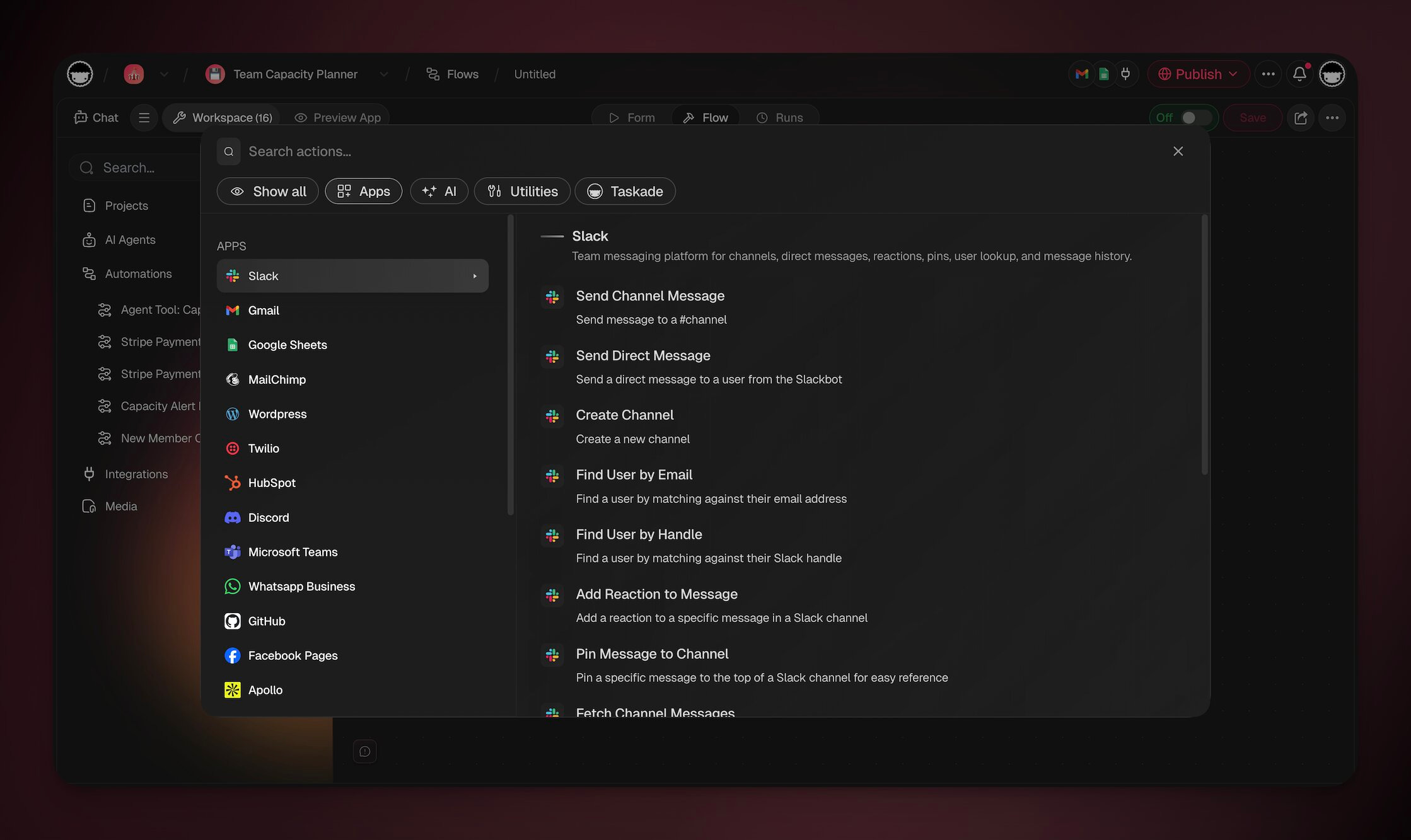
> **How to read this page.** Each connector below lists a representative set of its most-used actions, not the full catalog. For every action a service offers, open it in the [Integrations Directory](https://www.taskade.com/integrations), which always shows the current set. [Slack](https://www.taskade.com/integrations/slack), [Google Drive](https://www.taskade.com/integrations/google-drive), and [HubSpot](https://www.taskade.com/integrations/hubspot) are among the deepest. The built-in Taskade, AI, Media, Schedule, and Utilities actions are always available with no setup.
---
### Taskade Actions
| ⚙️ Action | 🔤 Description |
| --- | --- |
| Create Project | Sets up a new project in your workspace/folder. |
| Add Task | Adds a new task to an existing project. Set **Match by** to update the matching task instead of adding a duplicate. See [Add Task](https://www.taskade.com/learn/automation/add-task). |
| Mark Task as Completed | Automatically marks a task as done as part of your automation flows. |
| Create Project From Template | Uses a pre-defined or custom template. |
| Move Task | Moves a task to another block in the same project. To move a task to a different project, use [Copy and Move](https://www.taskade.com/learn/projects/copy-move) in the project. |
| Assign Task | Assigns a task to someone. |
| Unassign a task | Removes an assignee from a task. |
| Add a subtask | Adds a new task under another task. |
| Update a task | Changes the title or the note of a task. |
| Reopen a task | Marks a done task as not done. |
| Delete a task | Removes a task from its project. This cannot be undone. |
| Set a due date | Sets the due date on a task. |
| Clear a due date | Removes the due date from a task. |
| Add a comment | Adds a comment on a task. |
| Attach a file | Attaches a file from your Media tab to a task. |
| Get a task | Reads one task, with its note, completion state, due date, assignees, and custom fields. |
| Rename a project | Changes the title of a project. |
| Set project dates | Sets the start date and the end date of a project. |
| Archive a project | Hides a project from the active list. You can bring it back later. |
| Unarchive a project | Brings an archived project back to the active list. |
| Pin a project | Keeps a project at the top of the list. |
| Unpin a project | Removes a project from the top of the list. |
| Tag a project | Adds a workspace tag to a project. |
| Untag a project | Removes a workspace tag from a project. |
| Get project info | Reads the name, members, and tags of a project. |
| Find projects | Finds the projects in your workspace that match a title. |
| Export a project | Exports a project as Markdown or plain text. |
| Turn a file into a project | Creates a project from a PDF, a web page, a video, or an audio file. |
| Turn a recording into a project | Transcribes an audio recording into a new project. |
| Ask AI | Uses AI to answer questions. |
| Write with AI | Uses AI to generate content or responses. |
| Summarize with AI | Condenses long text into key points with optional custom instructions. |
| Reply with AI | Automatically provides AI-generated responses. |
| Ask an agent | Uses a custom AI agent to respond to a query. |
| Run an agent command | Uses a custom AI agent command. |
| Prompt AI | Give the model detailed instructions. |
| Add knowledge to an agent | Gives an agent a file, a website, a YouTube video, or text to learn from. |
| Add a project to an agent | Lets an agent read a project as knowledge. |
| Ask an agent team | Sends a prompt to an AI Team and returns varied responses from multiple agents. |
| Structured output | Set **Output Type** to **Structured Output** on an **Ask an agent** or **Run an agent command** step. The step returns typed fields instead of free text. |
| Create an agent | Creates a new AI agent in this workspace, with a name and instructions. |
| Update an agent | Changes the name, the greeting, or the instructions of an agent. |
| Send a chat message | Posts a message in an agent chat. The agent does not reply to it. |
| Read a web page | Extract the contents of a web page. |
| Turn a file into text | Convert a source file into text. |
| Transcribe a YouTube video | Turn a YouTube video into text. |
| Save a file to Media | Downloads a file from a link into Media. |
| Save text to Media | Saves text as a file in your Media tab. |
| Summarize a web page | Reads a web page and returns a short AI summary in one step. |
| Send HTTP Request | Calls another web service at an address you supply. |
| Send an email | Sends an email from Taskade's verified address to you or a verified member of this workspace. To email anyone else, use the Gmail or Outlook send email action. If the step does not send to a recipient, the run history shows the step as **Skipped** with the reason, and the automation keeps running. |
| Loop | Iterates data tasks. |
| Filter Data | Performs actions only when the data meets a certain condition. |
| Branch | Creates different paths within your automation, depending on certain conditions. |
| Delay | Pauses the automation for a set time or until a specific date, then continues. The wait survives restarts. |
| Run Automation | Starts another automation from this one. |
| Update Custom Fields | Updates the custom fields of a task in a project. |
| Search the web | Searches the web for information to add to a project or for the AI to analyze. |
| Find Task(s) | Searches for tasks within projects. This action is compatible with loops. |
| Transform Array to String | Converts the output of the Find Task(s) and Find Row(s) actions into text. |
| Categorize with AI | Analyzes, classifies, and organizes input data using the power of AI. |
The step list also surfaces connector-provided actions once you connect the matching integration. **Generate Image**, for example, comes from the OpenAI connector and uses your own OpenAI key.
### Media Actions
These steps work on the files in your workspace Media Files. Each video and audio step, except **Check the file**, saves a new file and keeps the original. See [Automate Media Files](https://www.taskade.com/learn/automation/media-automations) for the triggers, the limits, and the Quick Starts.
| ⚙️ Action | 🔤 Description |
| --- | --- |
| Find Files in Media | Lists files by folder, file type, and name. |
| Convert an image | Saves a copy of an image in another format: JPEG, PNG, WebP, or AVIF. |
| Make a smaller video | Saves a smaller copy of a video. |
| Change the file format | Saves a copy of a video or audio file in another format. |
| Get the audio from a video | Saves the sound of a video as an audio file. |
| Get a still frame | Saves one frame of a video as a JPEG image. |
| Cut a clip | Saves part of a video or audio file as a new file. |
| Convert video to GIF | Saves a short part of a video as an animated GIF, up to 5 seconds long and 480 pixels wide. |
| Check the file | Reads the length, the size in pixels, and the format details of a video or audio file. |
---
### Utility Actions (no AI credits)
A toolkit of helpers that reshape data without calling a model. The same input always gives the same result. They run instantly and cost no AI credits. See the [full guide](https://www.taskade.com/learn/automation/utility-actions).
| ⚙️ Action | 🔤 Description |
| --- | --- |
| Calculate, Average, Sum, Min / Max, Count Unique Values | Math over numbers and lists. |
| Format Date | Reformat any date for the next step or a report. |
| Add or Subtract Time, Time Between Dates, Start or End of Period | Date math: move a date, count the time between two dates, or find the start or end of a day, week, month, or year. |
| Base64 Encode, Base64 Decode, Hash Text, Create HMAC Signature | Encode or decode base64, fingerprint text, or sign text with a secret key. |
| Get a Field from Data, Get Multiple Values (JSONPath), Lookup Table | Pull values out of the data an earlier step returned, map a code to a label. |
| Merge Two Sets of Data | Combine two sets of data, and choose which one wins when both have the same field. |
| Stop and mark as failed, Get run info | Stop a run on purpose and mark it as failed, or read the ID and the start time of the current run. |
| Change Capitalization, Find and Replace Text, Match Text with a Pattern (Regex), Split Text into a List, Trim Extra Spaces, Join Text, Find Text, Slugify Text, Strip HTML | Clean and reshape text. |
| HTML to Markdown, Markdown to HTML | Convert between rich text and Markdown. |
| CSV to List, List to CSV, Transform Array Into String | Move between spreadsheets, JSON (the data format apps exchange), and plain text. |
| Generate QR Code | Produce a scannable code for tickets, check-ins, and links. |
---
### MCP Client Actions
MCP, the Model Context Protocol, is a shared standard that lets AI tools talk to each other. Point an automation at an outside MCP server and call its tools as a step. Connect the server with its address, plus a secret token when the server asks for one. These are standard (non-premium) actions, so every plan can use them, and each run counts against your plan's automation run allowance. The Free plan includes 10 runs a billing period.
| ⚙️ Action | 🔤 Description |
| --- | --- |
| List Tools | Ask the MCP server which tools it offers, then branch on the result. |
| Call Tool | Run one of those tools with your inputs and pass the reply to the next step. |
---
### Slack Actions
| ⚙️ Action | 🔤 Description |
| --- | --- |
| Send Channel Message | Posts a message to a selected channel. |
| Send Direct Message | Sends a personal message to a user. |
| Find User by Handle | Find a user by matching against their Slack handle. |
| Find User by Email | Find a user by matching against their email address. |
| Create Channel | Create a new Slack channel. |
| Schedule Channel Message | Schedule a message to post to a channel later, up to 120 days ahead. |
| List Thread Replies | Read the parent message of a thread and its replies. |
---
### Gmail Actions
| ⚙️ Action | 🔤 Description |
| --- | --- |
| Send email | Sends an email through Gmail to a specified recipient. |
| Find Email(s) | Find email(s) in your Gmail account. |
| Create Draft Email | Creates a new draft email message. |
| Get Thread | Gets every message of an email thread, oldest first. |
| Create Draft Reply | Saves a reply in an existing thread as a draft, for a person to review. |
---
### Google Drive Actions
| ⚙️ Action | 🔤 Description |
| --- | --- |
| Trash File | Moves a file to the trash in your drive. |
| Duplicate File | Duplicates a file from Google Drive. Returns the ID of the new file. |
| Create New Folder | Creates a folder in your Google Drive. |
| Create New File | Creates a new text file from input text. |
| Search for Folder/File | Searches a Google Drive folder for sub-folders/files. |
---
### Google Sheets Actions
| ⚙️ Action | 🔤 Description |
| --- | --- |
| Insert Row | Adds a new row to a Google Sheets document. |
| Delete Row | Deletes a row in a Google Sheets document. |
| Update Row | Updates a row in a Google Sheets document. |
| Get Row | Retrieves a row in a Google Sheets document. |
| Find Row(s) | Retrieves specific rows from a Google Sheet based on defined criteria. This action can be used with loops. |
| Get Rows | Gets the rows of a sheet, all of them or the rows where one column equals a value. |
| Read Range | Reads the cell values of a range in A1 notation, for example `A1:D20`. |
---
### Google Docs Actions
| ⚙️ Action | 🔤 Description |
| --- | --- |
| Create Document | Creates a new document. |
| Append Text | Appends text to a document. |
| Find Document | Searches for a document. |
---
### Google Calendar Actions
| ⚙️ Action | 🔤 Description |
| --- | --- |
| Delete Event | Deletes an event from Google Calendar. |
| Create Quick Event | Creates an event with a start time when the action is run, with a duration of 1 hour and a notification 10 minutes before. |
| Create Event | Creates a new Google Calendar event. |
| List Events | Lists events from a Google Calendar within a date range. |
| Get Free/Busy | Checks free/busy availability for one or more calendars. |
| List Calendars | Lists the calendars of the connected account, with the ID of each one. |
---
### Mailchimp Actions
| ⚙️ Action | 🔤 Description |
| --- | --- |
| Add contact | Creates a new contact in Mailchimp. |
---
### WordPress Actions
| ⚙️ Action | 🔤 Description |
| --- | --- |
| Create post | Publishes a new post on WordPress, or saves it as a draft. Add a Featured Image URL to set the featured image of the post. |
---
### Webflow Actions
Connect Webflow with Webflow sign-in. The same connection covers the CMS actions and the **New Form Submission** trigger.
| ⚙️ Action | 🔤 Description |
| --- | --- |
| List Sites | Lists the Webflow sites available to the connection. |
| List Collections | Lists CMS collections for a selected site. |
| Create CMS Item | Creates a staged collection item. |
| Get CMS Item | Retrieves an item and its fields. |
| Update CMS Item | Changes fields on an existing item. |
| Publish CMS Item | Publishes a staged item to the live site. |
---
### Twilio Actions
| ⚙️ Action | 🔤 Description |
| --- | --- |
| Send SMS | Sends out a text message via Twilio. |
---
### HubSpot Actions
| ⚙️ Action | 🔤 Description |
| --- | --- |
| Create New Contact | Creates a new contact in HubSpot CRM. |
| Create New Deal | Creates a new deal in HubSpot CRM. |
---
### X/Twitter Actions
| ⚙️ Action | 🔤 Description |
| --- | --- |
| Create Reply | Creates a reply to a post on X/Twitter. |
| Create Post | Creates a new post on X/Twitter. |
---
### LinkedIn Actions
| ⚙️ Action | 🔤 Description |
| --- | --- |
| Create Share Update | Publishes a post to your LinkedIn profile. |
| Create Company Update | Publishes a post to your business/company LinkedIn page. |
---
### Microsoft Teams Actions
| ⚙️ Action | 🔤 Description |
| --- | --- |
| Create Channel | Creates a new channel. |
| Send Channel Message | Sends a message to a channel. |
| Send Chat Message | Sends a message in an existing chat. |
---
### Discord Actions
| ⚙️ Action | 🔤 Description |
| --- | --- |
| Send Message | Sends a message to a Discord channel. |
---
### Facebook Actions
| ⚙️ Action | 🔤 Description |
| --- | --- |
| Create Page Post | Creates a standard post on a Facebook page you manage. |
| Create Post with Image | Creates a post with an image on a Facebook page you manage. |
---
### WhatsApp Business Actions
| ⚙️ Action | 🔤 Description |
| --- | --- |
| Send Message | Sends a text message to a specified contact or group on WhatsApp. |
| Send Template Message | Sends a pre-designed template message for consistent communication. |
---
### GitHub Actions
| ⚙️ Action | 🔤 Description |
| --- | --- |
| Create Comment | Adds a comment to an issue/pull request. |
| Create Issue | Opens a new issue in a repository. |
| Get Issue Information | Retrieves details about an issue. |
| Lock Issue | Locks an issue to stop comments. |
| Unlock Issue | Unlocks a previously locked issue. |
---
### Apollo Actions
| ⚙️ Action | 🔤 Description |
| --- | --- |
| Enrich User Information | Retrieves lead information from Apollo using an email/LinkedIn profile URL. |
---
### Reddit Actions
| ⚙️ Action | 🔤 Description |
| --- | --- |
| Create Post | Create a new post in a specified subreddit. Supports both text and link posts with various formatting options. |
| Get Post | Retrieve a specific post from a subreddit using its Post ID. Useful for referencing or tracking published content. |
---
### Notion Actions
| ⚙️ Action | 🔤 Description |
| --- | --- |
| Create Page | Creates a new page in a Notion database. |
| Get Page | Retrieves a page from Notion by ID. |
| Update Page | Updates properties of an existing Notion page. |
| Query Database | Queries a Notion database with optional filters and sorting. |
| Append Block Children | Appends content blocks to a Notion page. |
| Search Pages and Databases | Finds the ID of a page or a database from its title. |
| Create Page Under a Page | Creates a sub-page under an existing Notion page. |
---
### Salesforce Actions
| ⚙️ Action | 🔤 Description |
| --- | --- |
| Create Record | Creates a new record (Lead, Contact, Account, and more) in Salesforce. |
| Update Record | Updates an existing Salesforce record. |
| Find Records by Query | Searches for Salesforce records using a SOQL query. |
---
### Jira Actions
| ⚙️ Action | 🔤 Description |
| --- | --- |
| Create Issue | Creates a new Jira issue. |
| Get Issue | Retrieves details of a Jira issue. |
| Search Issues | Searches for Jira issues using JQL. |
---
### Linear Actions
| ⚙️ Action | 🔤 Description |
| --- | --- |
| Create Issue | Creates a new Linear issue. |
| Get Issue | Retrieves details of a Linear issue. |
| Search Issues | Searches for Linear issues with filters. |
---
### Airtable Actions
| ⚙️ Action | 🔤 Description |
| --- | --- |
| Create Record | Creates a new record in an Airtable base. |
| List Records | Lists records from an Airtable base with optional filters. |
| Update Record | Updates an existing Airtable record. |
---
### Monday Actions
| ⚙️ Action | 🔤 Description |
| --- | --- |
| Create Item | Creates a new item on a Monday.com board. |
| Get Item | Retrieves details of a Monday.com item. |
| Update Item | Updates an existing Monday.com item. |
---
### Trello Actions
| ⚙️ Action | 🔤 Description |
| --- | --- |
| Create Card | Creates a new Trello card on a board. |
| Get Card | Retrieves details of a Trello card. |
| Update Card | Updates an existing Trello card. |
---
### Zoom Actions
> **Rolling out:** Zoom actions are not available in the automation editor yet. Check the [Integrations Directory](https://www.taskade.com/integrations) for the current list.
| ⚙️ Action | 🔤 Description |
| --- | --- |
| Schedule Meeting | Creates a scheduled Zoom meeting. |
| Create Webinar | Creates a new Zoom webinar. |
---
### Stripe Actions
| ⚙️ Action | 🔤 Description |
| --- | --- |
| Create Customer | Create a new customer in Stripe |
| Update Customer | Update an existing customer in Stripe |
| Retrieve Customer | Retrieve a customer by ID from Stripe |
| Search for Customers | Search for customers in Stripe |
| Create Payment Intent | Create a payment intent to start a payment flow |
| Retrieve Payment Intent | Retrieve a payment intent by ID from Stripe |
| Search for Charges | Search for charges in Stripe |
| Create Product | Create a new product in Stripe |
| Create Price | Create a new price for a product in Stripe |
| Create Refund | Create a refund in Stripe |
| Create Subscription | Start a subscription for a customer with specified items/prices |
| Cancel Subscription | Cancel an existing subscription, immediately or at period end |
| List Subscriptions | List subscriptions from Stripe with optional filters |
| Create Invoice | Create an invoice in Stripe |
| Search for Invoices | Search for invoices in Stripe |
---
### Shopify Actions
> **Rolling out:** Shopify actions are not available in the automation editor yet. Check the [Integrations Directory](https://www.taskade.com/integrations) for the current list.
| ⚙️ Action | 🔤 Description |
| --- | --- |
| Get Customer | Look up a Shopify customer by email or ID |
| Get Customer Orders | Retrieve order history for a customer |
| Create Order | Create a new order with line items and customer |
| Create Draft Order | Create a draft order for review before finalizing |
| Update Order | Modify an existing order (notes, tags, shipping) |
| Cancel Order | Cancel an open order with optional refund |
| Close Order | Mark a fulfilled order as closed |
| Create Product | Add a new product to your Shopify store |
| Update Product | Modify an existing product's details or pricing |
| Get Products | List products with optional filters (collection, type) |
| Get Product Variant | Retrieve variant details (size, color, price) |
| Upload Product Image | Upload an image to a product listing |
| Get Order Details | Fetch full details of a specific order |
---
### Telegram Bot Actions
Connect your Telegram bot to send messages, media, and manage chats directly from Taskade automations. [Learn more about Taskade automations.](https://www.taskade.com/learn/automation/automations-execution)
| ⚙️ Action | 🔤 Description |
| --- | --- |
| Send Message | Send a text message to a chat, group, or channel |
| Send Photo | Send an image with an optional caption |
| Send Document | Send a file (PDF, DOCX, and more) to a chat |
| Send Video | Send a video with an optional caption |
| Edit Message | Edit a previously sent bot message |
| Delete Message | Remove a message from a chat |
| Pin Message | Pin a message to the top of a chat or group |
| Get Chat | Retrieve chat details (name, member count, description) |
> **💡 Tip**: Combine Telegram Bot actions with [AI agents](https://www.taskade.com/learn/agents/custom-agents) to build smart support bots that auto-respond to customer messages.
---
### More connectors
These apps also offer actions in the automation editor. Open each one for its full list.
| Connector | Actions | Common actions |
| --- | --- | --- |
| [Microsoft Outlook](https://www.taskade.com/integrations/microsoft-outlook) | 7 | Send Email, Reply, Forward, Find Email, Move to Folder |
| [Google Tasks](https://www.taskade.com/integrations/google-tasks) | 8 | Create Task, Complete Task, Update Task, List Tasks |
| [ClickUp](https://www.taskade.com/integrations/clickup) | 8 | Create Task, Update Task, Create Comment, List Tasks |
| [Asana](https://www.taskade.com/integrations/asana-automation) | 6 | Create Task, Update Task, Add Comment, Search Tasks |
| [Todoist](https://www.taskade.com/integrations/todoist-automation) | 5 | Create Task, Complete Task, Update Task, Find Task |
These newer connectors have their own guides, and they need Pro and up: [Pipedrive](https://www.taskade.com/learn/connect/pipedrive-integration), [Attio](https://www.taskade.com/learn/connect/attio-integration), [HighLevel](https://www.taskade.com/learn/connect/highlevel-integration), [Brevo](https://www.taskade.com/learn/connect/brevo-integration), [Resend](https://www.taskade.com/learn/connect/resend-integration), [Tally](https://www.taskade.com/learn/connect/tally-integration), [Jotform](https://www.taskade.com/learn/connect/jotform-integration), [Cal.com](https://www.taskade.com/learn/connect/cal-com-integration), [Microsoft To Do](https://www.taskade.com/learn/connect/microsoft-todo-integration), [Microsoft Outlook Calendar](https://www.taskade.com/learn/connect/microsoft-outlook-calendar-integration), [Confluence](https://www.taskade.com/learn/connect/confluence-integration), [Supabase](https://www.taskade.com/learn/connect/supabase-integration), [Figma](https://www.taskade.com/learn/connect/figma-integration), and [SendGrid](https://www.taskade.com/learn/connect/sendgrid-integration). The [SMTP](https://www.taskade.com/learn/connect/smtp-integration) connector needs a paid plan.
---
### Put it together: a service firm
Here is how a non-technical operator chains these actions into a working business workflow. A customer submits a quote request on the website:
1. **Categorize with AI** sorts the job by trade (plumbing, electrical, roofing).
2. **Branch** routes it to the right crew.
3. **Add Task** drops the job into the Jobs project, and **Assign Task** hands it to the crew lead.
4. **Send Channel Message** (Slack) alerts the team.
5. **Create Customer** and **Create Invoice** (Stripe) bill the work.
No router, no spreadsheet, no copy and paste. The same shape powers a clinic intake queue, an e-commerce fulfillment line, or a real-estate deal pipeline. Browse live versions in the [Taskade App Factory](https://www.taskade.com/apps).
---
### Related guides
- [Automation Triggers](https://www.taskade.com/learn/automation/triggers). The "if" half of if-this-then-that.
- [Automations: Overview](https://www.taskade.com/learn/automation/automations-execution). Full anatomy of an automation.
- [Branch Action](https://www.taskade.com/learn/automation/branch-action). If/else routing.
- [Loop Action](https://www.taskade.com/learn/automation/loop-action). For-each iteration.
- [Filter Data](https://www.taskade.com/learn/automation/filter-data). Gate-keeping.
- [Agent Action](https://www.taskade.com/learn/automation/agent-action). Use a custom agent as an action.
- [HTTP Request](https://www.taskade.com/learn/automation/http-request). Call any outside web service.
- [Integrations Directory](https://www.taskade.com/integrations). All 100+ action providers.