
Overview
You will build a library for your standard operating procedures (SOPs). Each procedure has an owner and a review date. Staff read a procedure and click a button to confirm it, and the app records who confirmed what. An assistant answers staff questions from your SOPs.
TL;DR: Build an SOP library in Taskade Genesis in about 40 minutes. Import your procedures, give each one an owner and a review date, and add an "I read this" button that writes a row to a Confirmations project. A Task Due automation reminds owners to review, and an agent answers from your SOPs.
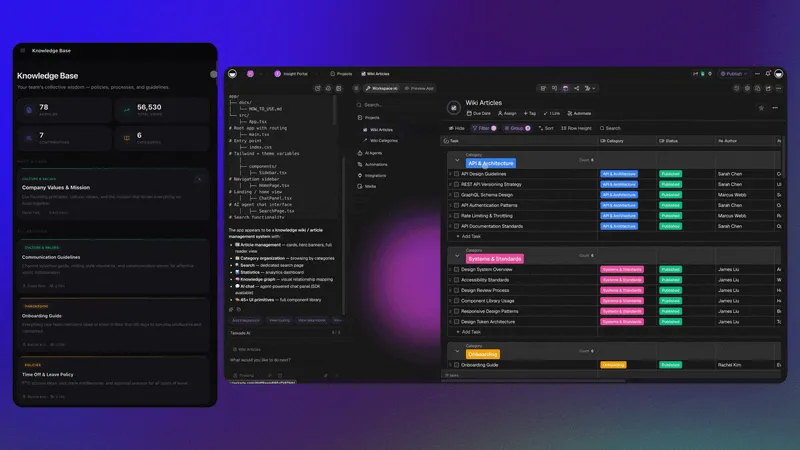
Use case: An operations or training lead uses this setup to keep every procedure in one place. Staff confirm what they read, and the assistant answers routine questions from your SOPs, so the lead answers the same question less often.
Before You Start
- What you need: A Taskade account and your current procedures, in Google Docs, PDF files or plain text.
- Time: About 40 minutes.
- Files: Uploading a PDF needs a paid plan. On Free, paste the text of each procedure.
The Parts of an SOP Library
Five parts make an SOP library something staff use.
| Part | Example | How Taskade does it |
|---|---|---|
| One home | Every procedure in one place, by team | One project for each team, one task for each SOP |
| Owner and review date | Opening checklist, owner Kim, review 2027-01-15 | An Owner field and a due date on each SOP |
| Confirmation record | Who read version 3, and when | An "I read this" button that adds a row to a Confirmations project |
| Review reminder | The owner hears when the SOP is due for review | The Task Due trigger, then Send an email |
| Answers | "How do I close the till?" | An agent with the SOP projects as agent knowledge |
Step 1: Create the SOP Library App
Start from a live app, or describe the app to Taskade EVE.
- Open Team Wiki Portal. It is a published Taskade Genesis app with a Knowledge Assistant agent.
- Click Clone app and pick your workspace.
- Rename the app and replace the sample pages with your procedures.
A clone counts as 1 of the 3 apps on the Free plan. On Free, you can clone an app that has no automations. To clone an app that includes automations, you need a paid plan.
To start from a prompt instead, open Taskade Genesis and paste this prompt:
Build an SOP library. Keep one project for each team, and one task for each procedure,
with the fields Owner, Version and Review date. Show staff a searchable list of SOPs.
On each SOP, add an "I read this" button that adds a row to a Confirmations project
with the person, the SOP, the version and the date. Show managers who confirmed each SOP.
Do not add sign-in or quizzes yet.
Why this works: The prompt stores each confirmation as its own row, so the record stays after an SOP changes.
Step 2: Add Your Procedures
- If a procedure is a Google Doc, convert it to Markdown and paste it into the SOP project. See Import Google Docs.
- If a procedure is a PDF, import it on a paid plan. See Import a PDF.
- If a procedure is plain text, paste it into a new task in the SOP project.
- Give each SOP an owner, a version and a review date. Set the due date of the SOP task to the same review date. The reminder in Step 4 reads the due date, not the Review date field.
Step 3: Train the Assistant on Your SOPs
- Open the agent in your workspace and choose the Knowledge tab.
- Connect your SOP projects. See Agent Knowledge.
- Ask the agent one question that a new hire asks, and make sure that the answer matches the SOP.
A connected project stays current. When you edit an SOP, the agent reads the new text on its next reply, with no new upload. On Free, the plan includes 1 agent, and each agent holds 1 knowledge item. Keep every SOP in one project on Free, and connect that project. Paid plans hold more knowledge items for each agent.
Step 4: Record Confirmations and Review Dates
- Open the published app as a test user and click I read this on one SOP.
- Make sure that a new row shows in the Confirmations project.
- Open Automations and create a new automation with the When a task is due trigger. Pick one SOP project. If you keep one project for each team, repeat this automation for each SOP project.
- Add the Send an email step. Remind the owner to review the SOP.
- Turn the automation on.
If staff must sign in to the app, turn on App Users. Sign-in works on every plan, including Free. Sign-in confirms who a person is, so the Confirmations project can record the right name. It does not hide other rows by itself. Match each record to the email of the person, and test it with a second account.
You Are Done When
Every SOP has an owner and a review date, a test click on I read this adds one row to the Confirmations project, and the agent answers a test question with the words of your SOP.
Plans and Limits
| Plan | What you get for an SOP library |
|---|---|
| Free | 2 workspace members, 3 Taskade Genesis apps, 1 agent and 10 automation runs a month. Paste procedures as text. |
| Paid plans | More members and automation runs, PDF and document uploads, and more knowledge sources for each agent. |
The agent uses AI credits when it answers. Free starts with no AI credits. You earn credits with referrals and invites, or buy a credit pack on any plan. App sign-in works on every plan. A custom domain is Pro and above. See pricing for current details.
Next Steps
- Read the step-by-step guide on the blog: See how to build an SOP library without code.
- Add data: Turn a document into a project with Knowledge Kit.
- Add an agent: Build a knowledge chatbot for one team.
- Add an automation: Email a weekly list of new confirmations with the Schedule trigger and Find tasks.
- Publish: Share the app with your team. See Publish Your App.
Frequently Asked Questions
How do I know who read each SOP?
Add an "I read this" button that writes a row to a Confirmations project. Each row records the person, the SOP, the version and the date. Turn on sign-in, so each row carries the right name.
Can I import my SOPs from Google Docs?
Yes. Convert each Google Doc to Markdown and paste it into the SOP project. The headings, lists and links stay. See Import Google Docs.
Does the assistant stay current when I change an SOP?
Yes, when you connect the SOP project as agent knowledge. A connected project updates with each edit. An uploaded file stays as it was until you upload it again.
Can staff confirm an SOP without a Taskade workspace?
Yes. Turn on App Users and staff sign in to the published app with their email. Sign-in works on every plan, including Free.