
Overview
Give your customers their own login. Your published Taskade Genesis app has its own users, separate from your workspace teammates. The App Users screen lists people after they sign up or after you add them. Use it to add a person by email, choose who can sign up, ask for an emailed sign-in code, and search, disable, re-enable, or remove access. Use the signed-in identity when you build filters for a portal or member area.
TL;DR: App Users (beta) gives every published Taskade Genesis app a built-in admin surface for end users. Customers sign in with their email, or you add them by email. Make sign-up invite-only, ask for an emailed sign-in code, and disable or remove accounts. Pair with GenesisAuth and test identity-based filters before publishing private data.
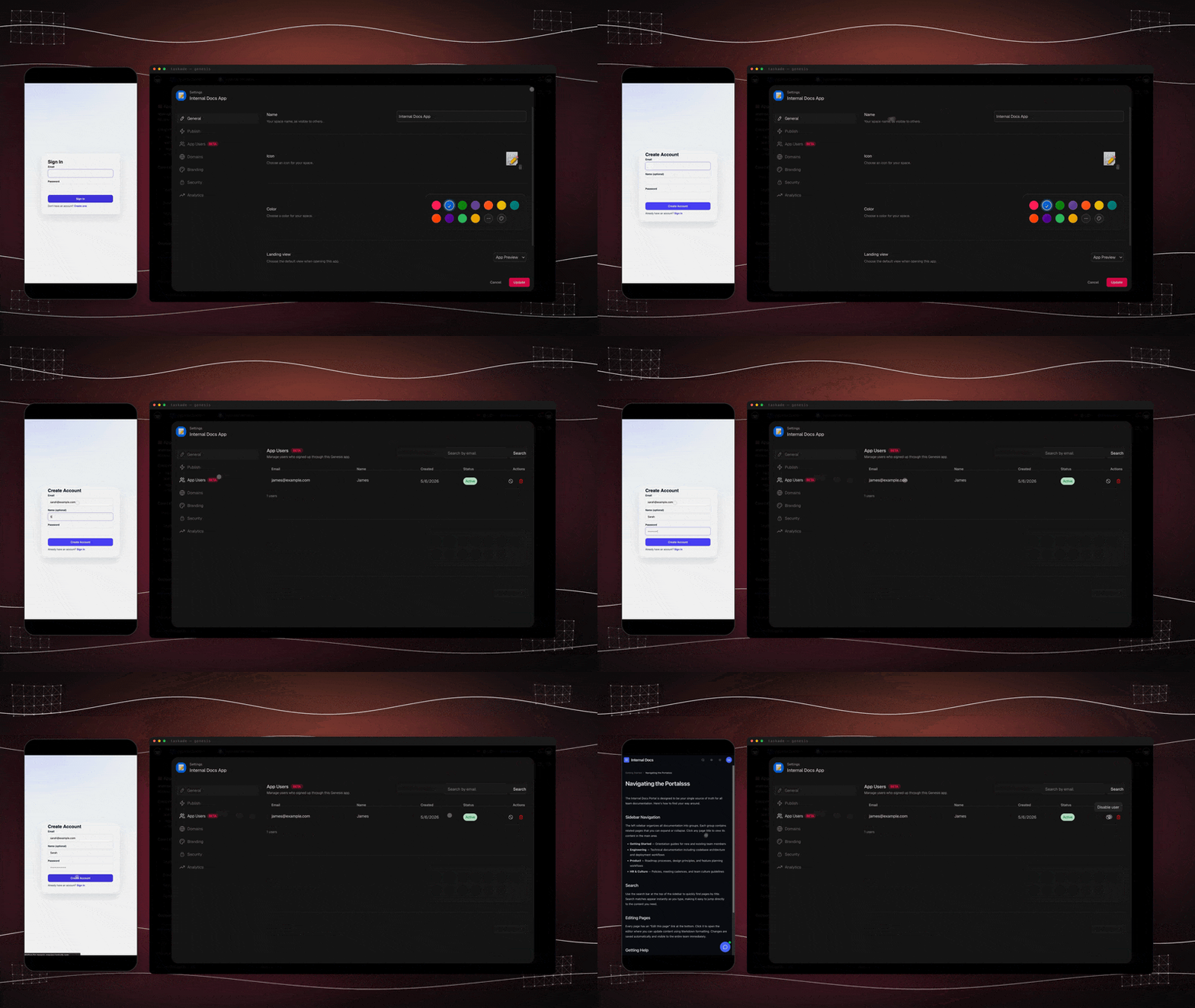
Add App Users
Step 1: Add sign-in to the app
Add GenesisAuth to the published Taskade Genesis app. App Users and sign-in work on every plan, including Free.
Step 2: Share the sign-in URL or add the person
Share the app's sign-in URL with the customer or member, and they create an app account. Or type their email in Add person on the App Users tab. Taskade then emails them a link to set a password.
Step 3: Confirm the account
Open App Settings → People & Access → App Users. Search for the email. The account must show an active status.
Which plan do I need for App Users?
App Users and client sign-in work on every plan, including Free. A custom domain is a separate control and is Business and above. Browse live apps at /apps.
How do I match records to a signed-in user?
Sign-in confirms identity. You match records to the login. You test with a second account. Row matching is opt-in, defaults off, and needs a validated ownerFieldPath.
Two layers, one workspace
Most builders trip on this once. Get it right early and the rest is easy.
| Workspace members | App Users | |
|---|---|---|
| Who | You + your team | The customers of your published app |
| What they touch | Projects, agents, automations, settings | Only the screens you published |
| Where they sign in | www.taskade.com |
Your app's URL (or custom domain) |
| Billing seat? | Yes, against your plan | No, separate count |
| How they join | Workspace invitation | Self sign-up, or Add person on the App Users tab |
| Managed from | Workspace Settings | App Users dashboard in each app |
Think of it like a website. The workspace is your control panel where you build the app from your projects, agents, and automations. See Workspace DNA for how those three pieces fit together. The app is the public site itself. App Users are the people who visit and sign in.
What you can do with App Users
- See people who signed in to the published app.
- Add a person by email. Taskade emails them a link to set a password.
- Choose who can sign up: Anyone or Invite only.
- Ask for an emailed 6-digit sign-in code, once from an account whose email is not yet confirmed, or at every sign-in.
- Search the list by email.
- Disable or re-enable an account.
- Delete an App User when you no longer need the account.
- Build identity-aware screens by explicitly matching the signed-in user to the correct Project records.
This is the answer to "how do strangers safely use my app." Workspace members run the workspace. App Users use the app.
Add your first App Users
- Add GenesisAuth to the published app.
- Share the app's sign-in URL with the customer or member.
- Let the person create an app-specific account and sign in.
- Open App Settings → People & Access → App Users.
- Search for the email. The account must show an active status.
If the app shows Set up sign-in with Taskade EVE instead of a list, the app has no sign-in yet. Click it, and Taskade EVE opens with a prompt that adds sign-in.
Add a person by email
Add a person yourself when you do not want to wait for them to sign up. Only the owner of the workspace can add people.
- Publish the app. The email links to the app's own sign-in page.
- Open App Settings → People & Access → App Users.
- Type the email address in Add person, then click Add person.
Taskade creates the account and emails the person a link to set a password. No password is sent. You are done when Taskade confirms that the account was created and the email shows in the list.
The email names your app after its site name or page title. If the app has neither, the email uses the name of your workspace.
Choose who can sign up
The Who can sign up setting decides who can create an account from the sign-in page.
| Option | What it does |
|---|---|
| Anyone | Anyone who reaches the sign-in page can create an account. This is the default. |
| Invite only | Only the people you add can have an account. The sign-up page reads "This app is invite-only. Ask the app owner for an account." |
Existing accounts keep working when you switch to Invite only.
Ask for an emailed sign-in code
The Sign-in code setting adds a 6-digit code that Taskade emails to the person. The code expires in 10 minutes and works once.
| Option | What it does |
|---|---|
| Off | Email and password only. Taskade does not check the email address. This is the default. |
| New accounts | An account with an unconfirmed email enters one code at its next sign-in. After that, the password is enough |
| Every sign-in | Every sign-in with a password also needs a fresh code |
People who are already signed in stay signed in when you change the setting. See GenesisAuth for what the visitor sees.
The App Users table
The table shows every App User, including people you added who have not signed in yet:
Here is the App Users tab inside your published app's settings:
┌──────────────────────────────────────────────────────────┐
│  App Settings › People & Access › App Users   [BETA]     │
│  Manage the users of your Taskade Genesis app            │
├──────────────────────────────────────────────────────────┤
│  Search by email .................   [ Search ]          │
├──────────────────────────────────────────────────────────┤
│  EMAIL               NAME         CREATED   STATUS       │
│  ─────────────────   ──────────   ───────   ──────────   │
│  maria@acme.io       Maria Cole   Apr 14    ● Active     │
│  ops@northwind.co    J. Okafor    Apr 18    ● Active     │
│  trial@hexlabs.dev   -            Apr 22    ○ Disabled   │
│                                                          │
│  128 users                            [ Load more ]      │
└──────────────────────────────────────────────────────────┘
● Active · ○ Disabled. Toggle any seat off in one click.
| Column | What it means |
|---|---|
| The email of the account. A check mark shows when the email is verified | |
| Name | Their display name; blank names show as a dash |
| Created | When the account was created |
| Status | Active or Disabled, toggle a seat off in one click |
| Actions | Disable or Enable a seat, or Delete it |
Search by email when the list grows, and load more as you scroll.
Gate content per user
Once you have App Users, ask Taskade EVE to build explicit checks that match the signed-in identity to fields in your Project data. Sign-in confirms who the visitor is. It does not automatically hide unrelated Project rows.
Examples that work today:
- "Match the signed-in email to the customer_email field before reading a row."
- "Hide the internal database unless the signed-in person's email ends in
@mycompany.com." - "Return only Customers rows whose customer_email equals the signed-in email."
- "Test an unmatched account and show an empty state instead of the full Project."
Uploads from signed-in app users become part of the app's files, so an automation can read them and write the result back to that person's row. See Files from Your App's Users.
Say a clinic publishes a client portal. The clinic stores each customer's email on the relevant appointment rows and asks Taskade EVE to filter by the signed-in email. Before publishing, the builder tests two customer accounts plus an unmatched account. That configured match is what scopes the records. App Users alone is not a row-level permission system.
Common patterns
| Pattern | Identity rule | What App Users unlocks |
|---|---|---|
| Client portal | Signed-in email equals customer_email |
Personal dashboards after you configure and test the filter |
| Internal tool | Email domain allowlist | Company-only access to selected screens |
| Beta program | Email allowlist stored in a Project | Limit a feature to approved testers |
| Paid app | Customer email matches a paid order record | Gate premium screens after your Stripe automation updates the record |
| Education / cohort | Email matches an enrollment row | Different course content from one app |
Disable or remove a user
Use the row action to Disable an App User. To return access later, re-enable the account. To remove the App User record, choose Delete. Deletion removes access at once and cannot be undone. If sign-up is open to Anyone, the person can sign up again. To stop that, set Who can sign up to Invite only.
Disabling an App User does not delete separate Project rows, automation history, or uploaded files. Manage that data in its owning surface.
Tips that pay back
- Store the user email on every Project row that needs per-user filtering.
- Test two real identities and one unmatched identity before publishing private data.
- Pair signed-in email checks with a domain allowlist for company-only screens.
- Combine App Users with App Analytics to see which roles actually use the app.
Frequently Asked Questions
What are App Users?
App Users are the end users of your published Taskade Genesis app, kept separate from workspace teammates. Each person gets an app-specific login and appears in the App Users dashboard, where you can search, disable, re-enable, or delete the account.
Which plan do I need for client logins?
You do not need a specific plan. App Users and client sign-in work on every published Taskade Genesis app, on every plan including Free. What does need Business or above is putting that app on your own custom domain. See pricing for current details.
How do my customers sign in?
Customers create an account or sign in on your app's URL with their email. Share that URL directly, or add the customer by email from Add person so Taskade sends them a link to set a password. If you turn on a sign-in code, they also enter a 6-digit code from their email.
How do I show each visitor the records that match their login?
Sign-in confirms identity. You match records to the login. You test with a second account. Ask Taskade EVE to match the signed-in email to a field such as customer_email. Row matching is opt-in, defaults off, and needs a validated ownerFieldPath.
How is this different from sharing a public link?
A public link can show the same screen to every visitor. App Users gives each person an identity that your app can use in explicit email, domain, or record-matching checks. Configure those checks before treating a screen as a private client portal.
Can I manage or remove users?
Yes. The App Users dashboard lists every App User. Add a person by email, search by email, disable or re-enable an account, or delete the App User record.
Related guides
- GenesisAuth. Email sign-in for the people who use your app.
- Files from Your App's Users. What happens to a file after someone uploads it.
- Publishing apps. How to ship the app your users will sign into.
- App Analytics. Track per-user activity over time.
- Collaboration. Workspace-side roles for your team.
- Custom Domains. Brand the sign-in URL your users see.
- Build an app. Start a Taskade Genesis app your customers can sign into.
- Browse live apps. See published Taskade Genesis apps in the Community Gallery.