
TL;DR: A worked example of Workspace DNA in one bundle: a Knowledge Hub project (Memory) + an RSS-powered automation (Execution) + a custom agent trained on the Hub (Intelligence). Install the kit, point it at your feeds, and your AI assistant gets smarter every day with zero retraining. Add to workspace →
Add to Workspace
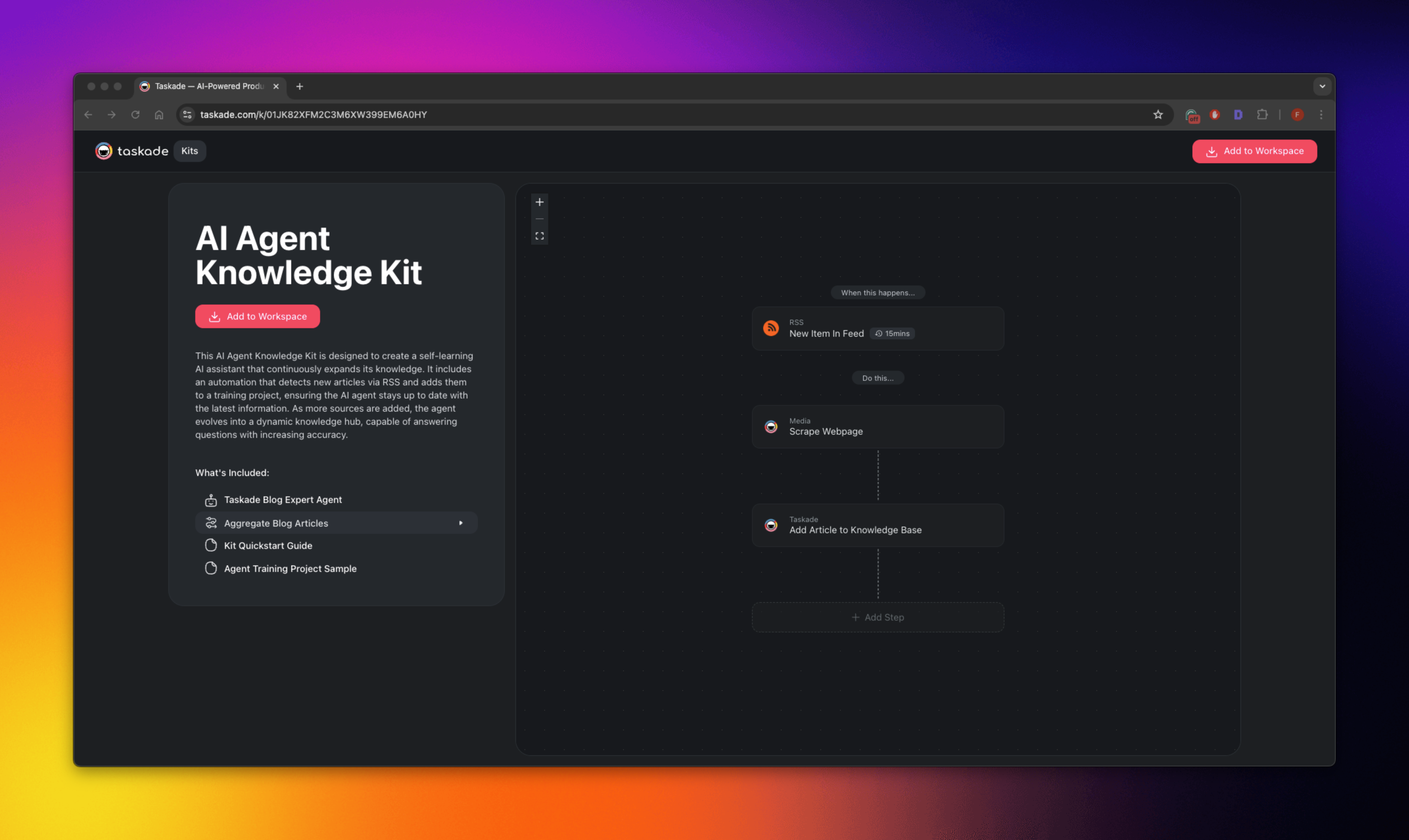
Overview
What Is This Kit?
This kit is a shareable workspace bundle, one file that contains a ready-made Project, an Automation, and an AI Agent wired together. Add it to your workspace and you instantly have a self-updating knowledge base where:
- A Knowledge Hub project stores every article, URL, or resource
- An RSS-powered automation watches your chosen sources and appends new content
- A custom agent is trained on the Knowledge Hub and answers questions with the freshest info
The loop runs on its own. Every new article your RSS feeds surface is added to the hub, and every question you ask the agent pulls from the current state of the hub. No manual retraining.
💡 Key insight: Your agent gets smarter every time a new article hits the hub. You never have to manually re-upload anything. This is the Workspace DNA Memory→Intelligence loop in its simplest form.
Who Is This Kit For?
- Teams & Individuals
- Create highly knowledgeable AI agents that continually learn.
Researchers, Support Teams & Content Curators
- Access up-to-date insights by automatically collecting new articles or resources.
Anyone Wanting a Self-Learning AI Assistant
- Automate knowledge gathering for improved responses and accuracy over time.
What's Included?
The kit ships as a single bundle: three components pre-wired to work together:
| Component | What it is | What it does |
|---|---|---|
| 🗂 Knowledge Hub (project) | A structured Taskade project with fields for title, URL, source, summary, date | Repository for every article the agent can learn from |
| 🔁 RSS-powered automation | A ready-to-run automation flow with an RSS trigger and an "Add task" action | Watches feeds, captures new items, appends to the Hub |
| 🤖 Custom AI Agent | An agent pre-configured with knowledge sources pointed at the Hub | Answers your questions using current Hub content |
All three come bundled, so the kit installs the wiring with them. You do not create the project, write the automation, train the agent, and then link them. That work is already done.
Getting Started
Install the Kit
- Follow the kit link at the top of this guide.
- Click Add to Workspace and choose a folder or workspace.
Customize Automations
- Configure the RSS feeds to pull relevant knowledge sources into your Knowledge Hub project.
- Schedule the automation to run at desired intervals so the AI's knowledge expands regularly.
- Add a notification action via Slack or Gmail to stay up to date when the automation updates your agent's knowledge.
Good sources to start with:
| Purpose | Example RSS URLs |
|---|---|
| Industry news | HackerNews, TechCrunch, your competitor's blog, trade publications |
| Research papers | arXiv category feeds, Papers with Code, Google Scholar alerts |
| Customer support | Your help center changelog, Reddit subreddit feeds, YouTube channel feeds |
| Market intelligence | Product Hunt, a16z blog, Y Combinator blog, industry analyst feeds |
Customize Agents
- Adjust the AI agent's settings for specific goals or domains. See Custom AI Agents
- Refine its training data or add additional commands to enhance specialized knowledge
- Choose from 15+ frontier models depending on how much reasoning your answers need
Customize Projects
- Expand your Knowledge Hub by manually adding curated resources or structured insights
- Organize the project with tags, fields, or sections for easy navigation and reference
- Use the Table or Board view to track source quality, recency, and usage
Build Your Own Kit
After you understand the wiring of this kit, package your own. Export any combination of projects, automations, agents, and apps in your workspace as a shareable kit. Use it to onboard new teams, to share templates with clients, or to publish to the Community Gallery.
Related guides
- Community Kits: Browse kits built by other Taskade users.
- Agent Knowledge & Memory: Deep dive on how agents read their knowledge sources.
- Custom AI Agents: Build the agent from scratch without a kit.
- RSS Integration: Configure the RSS feeds the automation watches.
- Schedule & Delay Actions: Control how often the automation runs.
- Second Brain: A similar pattern for personal knowledge management.
- Build your own →: Start a custom Taskade Genesis app with a built-in knowledge loop.