







Every SaaS founder should spend a day watching their customers work.
Watch the sales manager export leads to a spreadsheet because the CRM doesn't quite fit. Watch the account manager copy customer information between tools. Watch the operations team maintain a dashboard nobody has time to update.
These aren't edge cases. They're the little workarounds that accumulate when software doesn't match how a business actually runs.
For years, customers accepted them. Changing software was expensive. Custom development was even more expensive. And the people who understood the problem rarely had the technical skills to solve it.
AI is changing that equation. The next competitor to a SaaS company might be the customer who knows exactly what the product is missing.
TL;DR: Build vs buy software now has a new answer: describe it. The people closest to the work can build the CRM, portal, or dashboard they need. In a census of 471 top-traffic paid Taskade Genesis apps, dashboards led at 28.2% of traffic. Rent the systems of record. Build the rest. Build your first app →
The CRM below is a real Taskade Genesis app kit, not a mockup. Click around in it. It runs on a workspace with 2 projects, 1 AI agent and 2 automations, and you can clone the Neon CRM Dashboard kit into your own workspace and change it. Cloning it needs a paid plan, because the kit includes automations.
▲ ■ ● This is live. Lead pipelines, deal tracking and sales analytics, with an AI agent and two automations behind the screen.
🧭 Build vs Buy Software in 2026: The Short Answer
The short answer to build vs buy software in 2026: buy the systems of record, build the operational tools that make your business different. AI app builders now let the person who runs a workflow describe the tool and get a working app, so "build" no longer means "hire developers".
Most build vs buy guides are written for an enterprise IT buyer with a budget and a development team. This one is written for two other people: the business owner who can now build a CRM or a client portal without code, and the SaaS founder whose customer just did.
| Question | Short answer |
|---|---|
| What should I still buy? | Payroll, the accounting ledger, payments, email delivery at scale, and anything a regulator or auditor checks |
| What can I build now? | CRMs, client portals, operations dashboards, intake systems, invoice trackers and other tools shaped like your process |
| Who builds it? | The person who runs the workflow, by describing it in plain English |
| What does building cost? | A plan, your time, and the upkeep: testing, permissions, data quality and support |
| What is the common middle path? | Keep the system of record and build the missing piece next to it |
| What should a SaaS founder do? | Make the product easy to build on, so customer-built tools connect to it instead of replacing it |
Four questions decide most cases. Is the workflow your edge? Does a regulator check it? How many seats would you pay for to use a small part of the product? Who changes the tool when the process changes?
The rest of this post explains why the answer changed, what people actually build, and how to make the call for your own business.
👀 The People Closest to the Work
The people who understand a business process best are the people who run it every day, not the people who write its software. That gap between knowing a problem and building its fix is what AI app builders are starting to close.
Think about who actually understands a business process. The sales manager knows why a deal keeps getting stuck. The account manager knows what every client asks for. The operations manager knows which spreadsheet absolutely cannot break.
That knowledge usually lives outside the software. It lives in people's heads, spreadsheets, emails, documents, and years of experience.
| Who knows the work | What they know that the software does not | Where that knowledge lives today | The workaround you will find |
|---|---|---|---|
| Sales manager | Why a deal stalls, and which signals mean a lead is real | Notes, call memory, a private spreadsheet | Leads exported weekly to a sheet with extra columns |
| Account manager | What each client asks for, and when | Email threads and a shared doc | Client details copied between three tools |
| Operations manager | Which numbers matter on Monday morning | A dashboard spreadsheet with manual updates | A report rebuilt by hand every week |
| Office manager | How a request moves from intake to done | Inbox folders and sticky notes | A form, a sheet and a reminder email, glued together |
| Founder | Which exceptions the business cannot afford | Their own head | "Ask me first" as the approval process |
Traditional software development starts with requirements. Someone explains the business to a product manager. The product manager writes specifications. Designers turn those into interfaces. Developers build the application. Everyone hopes the original problem survived the translation.
Sometimes it does. Often, something gets lost.
Now imagine the person doing the work can describe what they need and get a working application. The distance between understanding a problem and building its solution gets much shorter.
That's a bigger change than faster coding. It's a change in who gets to build.
🧾 Why Businesses Have Lived With Software That Almost Works
Businesses live with software that almost works because packaged SaaS must serve thousands of customers at once, and the alternative, custom development, cost far more. The result is a stack of subscriptions plus a layer of spreadsheets that fill the gaps.
SaaS made sophisticated software accessible without having to build it yourself. That was an enormous improvement over buying servers, installing applications, and maintaining custom systems.
But packaged software comes with a tradeoff: it has to work for many customers.
Your CRM has someone else's pipeline assumptions. Your client portal has someone else's account structure. Your dashboard measures what the vendor decided to include.
Businesses adapt. They add spreadsheets. They subscribe to another tool. They hire contractors to connect the systems. They train employees to work around missing features.
Eventually, the workarounds become part of the business. Here is what that looks like in practice, next to the same process as a built app:
BEFORE: the spreadsheet workaround          AFTER: one built app on one workspace
───────────────────────────────────         ─────────────────────────────────────
 CRM (rented)                                Pipeline app (built)
   │  export leads every Friday                │  leads arrive from the intake form
   ▼                                           ▼
 leads.xlsx  + 6 extra columns               Projects: one record per lead,
   │  "Status (REAL)", "Owner?",               │  with the fields your team uses
   │  "Last call", "Notes v2"                  ▼
   ▼                                         AI agent: drafts a qualification
 Email to the team: "use v3"                   │  note on each new lead
   │                                           ▼
   ▼                                         Automation: when a deal moves
 Manager rebuilds the report                   │  stage, assign it and send
   │  by hand on Monday                        │  the follow-up email
   ▼                                           ▼
 Two versions of the truth                   One version of the truth,
 by Wednesday                                  visible to the whole team
Consider two hypothetical companies. One pays $500 a month for software that primarily manages records and user access. Another spends $20,000 developing a tailored application.
Those numbers aren't universal market averages. They illustrate the economic decision businesses face. For a long time, the choice was to buy something close enough or pay substantially more to build something tailored.
Now there's a third option. Describe the system you need and build it yourself.
The honest comparison is total cost of ownership, not the sticker price. A subscription bundles hosting, security, support and updates into one line item. A built tool moves part of that work to you: maintenance, security, data quality and support for the people who use it.
| Cost line (illustrative) | Rent generic SaaS | Commission custom software | Build it yourself on an AI workspace |
|---|---|---|---|
| Upfront cost | Low: a subscription starts today | High: the illustrative $20,000 build | Low: a plan plus your own time |
| Ongoing cost | The illustrative $500 a month, rising with seats | Hosting, fixes and developer hours | The plan, plus the hours you spend on upkeep |
| Fit to your process | Close enough | Tailored | Tailored, and you can change it |
| Who maintains it | The vendor | Your developer or agency | You and your team |
| Security and support | The vendor carries most of it | You contract for it | Shared: the platform runs the infrastructure, you own permissions and data quality |
| Speed to change | The vendor roadmap | The next development cycle | The same day |
The figures in this table are illustrative, not market averages. Replace them with your own numbers before you decide.
What it costs to keep paying
The cost of renting is easy to miss because it arrives one subscription at a time. Zylo, a SaaS management vendor, measures it across its customers' spend data, and its 2026 numbers show how much of that spend goes unused.
| Measure | Figure | Source |
|---|---|---|
| Median SaaS spend per employee | $9,455 a year | Zylo 2026 SaaS Management Index, Jan 29, 2026 |
| Licenses that go unused | 36% on average | Zylo, Jan 29, 2026 |
| Share of SaaS spend that business units control | 81% (IT manages 15%) | Zylo, Jan 29, 2026 |
| Average SaaS apps per company | 305 | Zylo SaaS statistics, 2026 Index |
Zylo's sample skews toward larger companies, so read these as a direction, not as a small-business average. The second number matters most for an owner: if a third of licenses go unused, part of every seat you rent pays for a product nobody opens.
The 81% figure matters for the SaaS founder. The people who choose and pay for most software are no longer only in IT. They are the same business teams who can now build.
📜 Your Spreadsheet Is Already Custom Software
Every business that runs on a spreadsheet next to its SaaS already builds its own software. The spreadsheet is the custom tool. It is only a fragile one, with no permissions, no automation and no single version of the truth.
Retool, which sells a platform for internal tools, found in its 2020 State of Internal Tools survey that more than 40% of 310 respondents used Google Sheets to build internal tools (Retool, 2020). In its 2022 survey, technical teams spent 33% of their time on internal tools (Retool, 2022).
Research on spreadsheet accuracy explains why that matters. Ray Panko collected nine development experiments in which people built spreadsheets alone, and their average cell error rates ran from 1.1% to 5.6% (Panko, Spreadsheet Development Experiments). Real companies fare no better. Nine field audits with known methods examined 163 operational spreadsheets and found errors in 84% of them (Panko, Audits of Operational Spreadsheets). Even a small error rate per cell adds up to a likely mistake in a large sheet, which anyone who has found a broken formula in a report already knows.
Business teams also build outside IT more each year:
| Signal | Figure | Source |
|---|---|---|
| Employees who acquire, modify or create technology outside IT's visibility | 41% in 2022, forecast 75% by 2027 | Gartner, Mar 28, 2023 |
| Technology solutions developed outside centralized IT | 15.3% | Gartner, CIO Planning for 2027, 2026 |
| Tech executives who expect AI to expand business-developed solutions by 2030 | 80% | Gartner, CIO Planning for 2027, 2026 |
So the question for most owners is not whether to build custom software. You already do. The question is whether your custom software stays a spreadsheet or becomes an app with records, permissions and automation behind it.
🛠️ The Customer Becomes the Builder
The customer becomes the builder when the person who owns a workflow can turn it into software directly. AI app builders let a business operator describe a process in plain English, get a working application, and keep adjusting it without a development team.
Your next CRM could be built by your sales manager. Your next client portal by your account manager. Your next operations dashboard by the person running operations.
These people already understand the requirements. They know the exceptions, the approval steps, the records that matter, and the things that go wrong on a Friday afternoon.
What they haven't had is a practical way to turn that knowledge into software.
AI app builders are starting to close that gap. A business operator can describe a workflow in plain English and generate an application to support it. They can inspect the result, adjust it, and connect the relevant data and processes. If you have never written code, the comparison of free AI app builders helps you pick a tool.
The result doesn't have to replace a company's entire software stack. It might replace one spreadsheet. One manual process. One expensive add-on. One internal tool that never made it onto the engineering roadmap. These small, single-purpose tools have a name, micro apps, and they are where most customer-built software starts.
That's where the change begins. A 2026 survey from Retool, of 817 of its customers and builders, puts numbers on it (Retool 2026 Build vs. Buy report, Feb 17, 2026):
| Finding from Retool's 2026 survey | Figure |
|---|---|
| Teams that replaced at least one SaaS tool with a custom build | 35% |
| Builders who plan to build more custom tools in 2026 | 78% |
| Builders whose team uses production software built with AI | 51%, and 49% of those save 6+ hours a week |
| Builders who built something outside IT oversight in the past year | 60% |
| Their top reasons | Speed 31%, unmet needs 25%, slow IT process 18% |
Retool's respondents are its own users, so the sample leans toward people who already build. The direction still matches what Gartner reports from the IT side. Retool also names the risk in the same report: "Time saved on one task can be offset by time lost to maintenance, wrangling ungoverned tool sprawl, or triaging security vulnerabilities." Keep that sentence in mind for the scorecard below.
📅 What Changed: A Short History of Build vs Buy, 1969 to 2026
Build vs buy has changed shape about once a decade since 1969, and each change moved the decision closer to the people who use the software. In 2023 AI generated the workflow. In 2025 it generated the application. In 2026 the application connects to memory, agents and automations.
From 1969 to 2014: who builds moves outward
| Date | What happened | Who built the software | Source |
|---|---|---|---|
| Jun 23, 1969 | IBM announces separately priced software, widely credited as the start of the independent software industry | A vendor, sold apart from the hardware | ETHW |
| Jul 6, 1992 | SAP R/3 launches for client-server computers | A vendor, then consultants who configure it | Wikipedia, SAP R/3 |
| Mar 8, 1999 | Salesforce starts with the idea of "no software" to install | A vendor that hosts it for you | TechCrunch |
| Jun 9, 2014 | Forrester first uses the term "low-code" | Developers and power users on a visual platform | Wikipedia, Low-code |
From 2023 to 2026: from AI workflows to AI applications
In May 2023, Taskade launched its AI Workflow Generator, which generated case-specific workflows, from team agendas to design sprints, from a short prompt. On May 16, 2023, Y Combinator CEO Garry Tan quoted the launch post on X and called it "a novel and clever approach to 'AI meets task management'." He added that "a lot of old categories that might seem lost to infinite competition might become winnable again."
In December 2025, Garry Tan made the argument about software itself. In a post on X that passed 1.7 million views, he named Replit, Emergent and Taskade as tools people would use to build their own custom software. He asked: "Why pay $30/seat/month for over bundled SaaS when soon even nontech ops ppl can vibe-code a custom solution in a weekend?"
That second post started a public debate with Zoho co-founder and chief scientist Sridhar Vembu about whether customer-built software can compete with established SaaS. The full story, with both sides, is in Will Vibe Coding Kill SaaS? The Garry Tan vs Zoho Debate, and the Garry Tan prediction scorecard tracks how his calls held up. This post answers a narrower, practical question: which tools should you build?
| Date | What happened | What AI generated |
|---|---|---|
| May 2023 | Taskade launches the AI Workflow Generator | A workflow: the tasks for a goal |
| May 16, 2023 | Garry Tan calls it "a novel and clever approach" on X | A signal that old categories can open again |
| Feb 2025 | Andrej Karpathy names "vibe coding" | Code from a prompt |
| Mar 6, 2025 | A quarter of the YC W25 batch has codebases that are 95% AI-generated (TechCrunch) | Most of a startup's code |
| Jul 29, 2025 | 84% of developers use or plan to use AI tools (Stack Overflow 2025) | Code inside the developer's daily work |
| Oct 2025 | Taskade Genesis launches | A live app on a workspace |
| Dec 2025 | Garry Tan asks why ops teams pay $30 a seat for over-bundled SaaS | The argument: customers build their own tools |
| Feb 17, 2026 | Retool reports that 35% of surveyed teams replaced a SaaS tool with a custom build | Evidence that the switch is happening |
| Jun 2026 | Taskade publishes a census of 471 paid apps | Evidence of what people build |
| Oct 2026 | Teams clone working app kits from the gallery and change them | A system that keeps running |
The arc is short. 2023: generate the workflow. 2025: generate the application. Now: connect the application to the memory, agents and automations that run the business behind it.
🔀 Build, Buy, Extend or Describe: The Four Options
Most build vs buy guides list three options: build custom software, buy a product, or buy a product and extend it. AI adds a fourth: describe the tool and run it on a workspace. Each option differs in who changes the software, how the cost grows and who owns the upkeep.
| Build (custom code) | Buy (SaaS) | Buy and extend | Describe (AI workspace) | |
|---|---|---|---|---|
| Time to first version | Weeks to months | Days | Days, then weeks for the extension | Minutes to hours |
| Who changes it | Developers | The vendor | The vendor, plus your developer or a consultant | The person who runs the workflow |
| Cost shape | Large upfront, then hosting and developer hours | Per seat, every month | Per seat, plus integration work | A plan, plus your upkeep time |
| Data ownership | Yours, in your database | In the vendor's product, with export | Split across the product and the extension | In your workspace, with export |
| Maintenance owner | Your developer or agency | The vendor | Both, which is where gaps appear | You and your team, on hosted infrastructure |
The describe option is not free of work. It moves the build work to minutes and leaves the ownership work with you. That trade suits the tools that change often and that only your team uses. It suits less well the tools where a mistake costs money or a compliance finding.
📊 What Are People Actually Building?
People who build their own software mostly build operational tools, not landing pages. In a first-party analysis of 471 top-traffic paid Taskade Genesis apps, the largest category was dashboards and analytics, at 28.2% of traffic, across 151 apps.
At Taskade, we've seen this behavior in our own product. Across those 471 applications were 2,778 connected projects and 1,078 AI agents.
| Census measure | Value |
|---|---|
| Paid apps studied | 471 top-traffic paid Taskade Genesis apps |
| Largest category | Dashboards and analytics, 28.2% of traffic (151 apps) |
| Next categories | Calculators and tools 12.9%, booking and scheduling 10.0%, education 7.7% |
| Connected projects | 2,778 |
| AI agents | 1,078 |
| Average per app | 5.9 projects and 2.3 agents |
These aren't simply landing pages. People are building operational tools: dashboards, trackers, client portals, CRMs, booking systems, and applications that help manage everyday work.
The data is limited to this specific cohort, not the software market as a whole. But it tells us something useful about what people want when building becomes easier. They often start with the work they're already doing.
Retool's survey points the same way from a different sample. Workflow automations led the categories its respondents replaced or considered replacing, at 35%. Internal admin software followed at 33%, BI software at 29%, CRMs and form builders at 25%, and project management software at 23%.
Read the full 471-app analysis.
🧬 An App Is Only the Beginning
An app is only the beginning because a business tool must remember records, act on them and keep running after the first build. Taskade Genesis connects each app to a Taskade workspace, so the screen sits on top of projects, AI agents and automations that do the work.
Generating a screen is becoming easier. Running a business on that screen is a different challenge.
A CRM needs customer records, pipeline state, permissions, and follow-ups. A client portal needs the right information for the right customer. An operations dashboard needs data that changes as work gets done.
Software has to remember what happened yesterday, execute what needs to happen today, and make tomorrow's work easier.
That's the idea behind Taskade Genesis. Instead of generating an isolated interface, Taskade Genesis connects an app to the surrounding Taskade workspace.
- Projects hold structured business information and shared context.
- AI agents help process information, reason, and carry out supported tasks.
- Automations connect triggers and actions across recurring workflows.
- Apps give people an interface for working with the system.
Projects remember. Agents reason. Automations run. Apps serve.
The app is the surface. The workspace is the runtime. The architecture post, Software That Runs Itself, explains how the four layers share one runtime.
| Layer | Job | In a CRM | In a client portal |
|---|---|---|---|
| Projects (memory) | Store records and context | Leads, deals, contacts and call notes | Client accounts, deliverables and requests |
| AI agents (intelligence) | Read the records and reason over them | Draft a qualification note for each new lead | Summarize a request and suggest a priority |
| Automations (execution) | Run steps when something happens | Assign a deal and send a follow-up when it moves stage | Send a confirmation when a client submits a form |
| App (interface) | Give people a screen to work in | Pipeline board and sales analytics | Sign-in, dashboard and request form |
Here is one request moving through that loop. A client submits it once. The workspace does the rest:
A sales manager can build a pipeline app, connect customer records, configure an agent to help qualify leads, and automate follow-up steps.
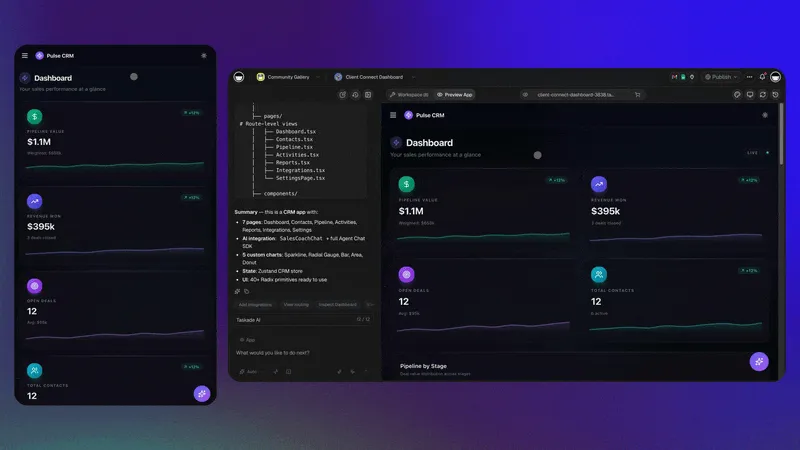
The point isn't simply to create a CRM. It's to turn an existing business process into software that can help run it. Once the first version runs, the work changes again: feedback from the people who use the tool turns into fixes in hours, not quarters. That operational side, after the first build, is the subject of The End of the Software Backlog.
🧰 Five Tools Worth Building First
The five tools most worth building first are a CRM, a client portal, an operations dashboard, an intake system and an invoice tracker. Each one replaces a common spreadsheet workaround, and each one has a live Taskade Genesis app kit you can clone and change today. Every kit in this table includes automations, and cloning a kit with automations needs a paid plan. On Free, describe the same app in Taskade Genesis instead: the automations you build yourself get 10 runs a month.
| Tool | The workaround it replaces | Live kit to start from | What the kit includes |
|---|---|---|---|
| CRM | A leads spreadsheet next to a CRM that does not fit | Neon CRM Dashboard | 2 projects, 1 AI agent, 2 automations |
| Client portal | Status updates sent by email, one client at a time | Client Portal | 3 projects, 1 AI agent, 4 automations |
| Operations dashboard | A weekly report rebuilt by hand | Neon Task Management Dashboard | 2 projects, 1 AI agent, 4 automations |
| Intake system | A form, an inbox and a reminder email | Consultancy Booking Form | 4 projects, 1 AI agent, 2 automations |
| Invoice tracker | Invoices in a document, payments in a sheet | Invoice Generator | 3 projects, 1 AI agent, 4 automations |
What renting these five costs a small team
The per-seat math is where building starts to win. The table below uses one formula, seats x monthly price x 36 months, with illustrative prices. They are not quotes from any vendor. Put in the prices from your own invoices.
| Tool (6-person team) | Illustrative rental formula | 3-year rental cost | What the built version adds | Main risk of building |
|---|---|---|---|---|
| CRM | 6 seats x $50 x 36 | $10,800 | Your stages, your fields, your qualification rules | Data quality if nobody owns the pipeline |
| BI dashboard | 6 seats x $30 x 36 | $6,480 | Reads the same projects the team works in | Metrics drift if definitions are not written down |
| Client portal | $100 a month x 36 | $3,600 | Your account structure and your request form | Each client must see only their records: test with a second account |
| Intake forms | $50 a month x 36 | $1,800 | Routing, a summary from an agent, a next step | A missed edge case in the routing rules |
| Invoice tracker | $30 a month x 36 | $1,080 | Ties each invoice to the work delivered | It must not replace your accounting ledger |
The same numbers as a bar chart, so the gap is easy to see:
Illustrative 3-year rental cost for a 6-person team (seats x price x 36 months)CRM              $10,800  ██████████████████████████████████████████
BI dashboard      $6,480  █████████████████████████
Client portal     $3,600  ██████████████
Intake forms      $1,800  ███████
Invoice tracker   $1,080  ████
───────
Total            $23,760  across five subscriptions
One Taskade Pro workspace, up to 10 users, $10/mo billed annually:
$360  █  over 36 months, plus your upkeep hours
The Pro line is a real plan price. The five rental lines are illustrative. The fair comparison adds the hours you spend on upkeep to the built side, and Pro already includes up to 10 custom domains, so putting the client portal on your own domain adds no plan cost.
1. A CRM shaped like your sales process
A CRM is the most common first build because every sales team has a pipeline with its own stages, fields and rules. The Neon CRM Dashboard kit has lead pipelines, deal tracking and sales analytics. Rename the stages to match yours, add the fields your team keeps in its private spreadsheet, and point the agent at your qualification criteria. For the full build, see how to build a CRM.
2. A client portal your clients can sign in to
A client portal replaces the status email. The Client Portal kit is a multi-page service portal with intake, profile and dashboard sections. Client sign-in works on every Taskade plan, Free included. Sign-in confirms who the visitor is. It does not hide other clients' records by itself, so you match records to each login and test the result with a second account before you share the link. To publish the portal on your own domain, you need Pro (up to 10 custom domains) or Business and up (no limit). The App Users guide and the client portal builders compared cover the setup and the options.
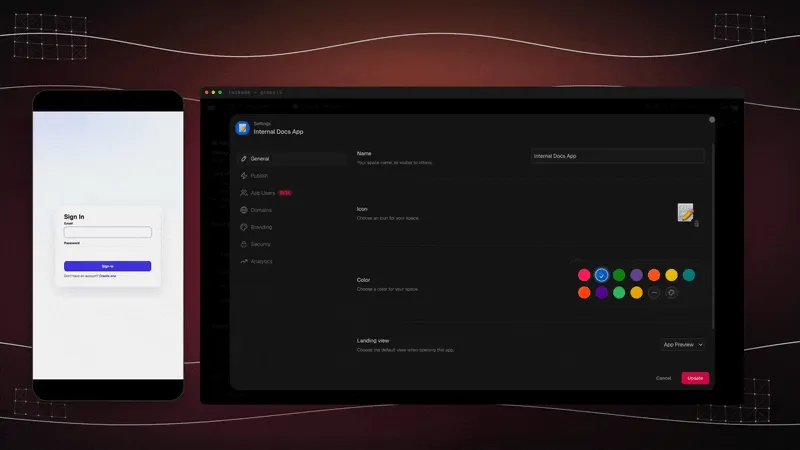
3. An operations dashboard that updates itself
An operations dashboard is the largest category in the census for a reason: every business has numbers it checks every morning. The Neon Task Management Dashboard kit tracks team tasks and projects on one screen, with four automations behind it. Because the dashboard reads the same projects your team works in, nobody rebuilds the report by hand. For more examples, see the AI dashboard builders compared.
4. An intake system that routes every request
An intake system turns "send me an email" into a form, a record and a next step. The Consultancy Booking Form kit combines intake forms, scheduling and automated client communications. A Form Trigger can start an automation each time someone submits the form, and an agent action can summarize the request before a person reads it. The booking system how-to walks through a similar build.
5. An invoice tracker tied to the work
An invoice tracker connects what you billed to what you delivered. The Invoice Generator kit generates invoices, tracks payments and automates billing steps. Keep your accounting software for the books. Use the tracker for the daily view your team needs. The invoice app how-to shows the build step by step.
Browse more kits in the Taskade app gallery, or start from a blank prompt at /create.
🧮 The Owner's Scorecard
The owner's scorecard turns the build vs buy decision into one number. Score a tool from 1 to 5 on seven criteria, multiply each score by its weight, and add the results. A high total favors building, a low total favors buying, and the middle favors keeping the product and building next to it.
Score each criterion for how strongly it favors building. A 5 means "this points hard toward building". A 1 means "this points hard toward buying".
| Criterion | Weight | Scores 5 (build) when | Scores 1 (buy) when |
|---|---|---|---|
| Fit to your process | 20% | No product matches how you work | A product matches it out of the box |
| Workaround hours each week | 20% | The team loses hours to copy-paste and spreadsheets | There is no workaround today |
| Rental cost over 3 years | 15% | Many seats pay for a small part of a product | The subscription is small and fully used |
| Cost of a failure | 15% | A mistake is cheap and quick to fix | A mistake costs money, safety or a compliance finding |
| Data sensitivity | 10% | Internal, non-regulated data | Regulated, financial or health data |
| How often the process changes | 10% | Every month or quarter | Rarely |
| Who can own upkeep | 10% | A named person has time for it | Nobody does |
Read the weighted total like this: above 3.5, build it. Between 2.5 and 3.5, keep the product and build the missing piece next to it. Below 2.5, keep buying.
Here is a worked example for an illustrative 6-person agency that wants a client portal. The scores are an example, not a benchmark:
| Criterion | Weight | Score | Weighted |
|---|---|---|---|
| Fit to your process | 20% | 5 | 1.00 |
| Workaround hours each week | 20% | 4 | 0.80 |
| Rental cost over 3 years | 15% | 4 | 0.60 |
| Cost of a failure | 15% | 4 | 0.60 |
| Data sensitivity | 10% | 3 | 0.30 |
| How often the process changes | 10% | 5 | 0.50 |
| Who can own upkeep | 10% | 3 | 0.30 |
| Total | 100% | 4.10 |
At 4.10, the agency builds the portal. The same agency would score its payroll system well below 2.5, because the cost of a failure and the data sensitivity both point hard toward buying.
⚖️ Should Every Company Build Its Own Software?
No company should build all of its own software. Buying still wins for accounting, regulated workflows and security-sensitive systems. Building wins for smaller operational tools where your process is unique, the workaround costs hours every week, and you only use a fraction of a paid product.
Of course not. Buying established software still makes sense for complex accounting, regulated workflows, security-sensitive systems, and applications where mature integrations, ongoing support, and proven reliability outweigh customization.
Software doesn't become free to operate just because it becomes cheaper to generate. Someone still has to consider security, permissions, data quality, reliability, maintenance, and what happens when things go wrong.
But the calculation is changing for smaller operational tools. If your company has a unique workflow, if existing software requires constant workarounds, or if a relatively simple internal application would save hours every week, building something tailored deserves serious consideration.
The decision becomes less about whether you can afford a development team and more about whether the software delivers enough value to justify building and maintaining it.
What you should still buy
Some software is worth renting for as long as your business exists, because the vendor carries legal, financial or deliverability risk that a small team cannot.
| Keep buying | Why | What you can build next to it |
|---|---|---|
| Payroll | Tax tables, filings and penalties change every year | A time-off request app that feeds the payroll system |
| Accounting ledger | Your accountant and auditors work in it | An invoice tracker tied to the work delivered |
| Payments processing | Card security and fraud rules | A client portal that links to the payment page |
| Email delivery at scale | Sender reputation and spam rules | An intake system that sends through your email provider |
| Systems that hold regulated data | Audits, certifications and breach rules | A non-sensitive scheduling or status app |
Notice the third column. The most common answer is not "replace the product". It is "build the missing piece next to it". A business keeps its accounting system and builds the invoice tracker. It keeps its email platform and builds the intake system that feeds it. With 100+ integrations, a built tool can read from and write to the systems you keep renting.
Before you build, write down who owns the tool. A built app needs the same care as any system the business depends on: permissions set with role-based access from Owner to Viewer, a test with real data, and a person who answers when something looks wrong.
Build vs buy by business type
The right split depends on the business. These rows are starting points, not rules:
| Business | Keep buying | Build first |
|---|---|---|
| Agency | Accounting, payroll, the design and ad platforms | Client portal, project dashboard, intake form for new briefs |
| Clinic | The patient record system and medical billing | Non-clinical tools such as a staff schedule board. Check the rules for patient data before you store any |
| Contractor | Accounting and payments | Job intake, quote and invoice tracker, a work order board for the crew |
| Coach or consultant | Payments and the calendar | Booking and intake app, a client portal with session notes and next steps |
| Ecommerce store | The store platform and payments | Inventory and reorder dashboard, a returns and support request tracker |
🏢 What Happens to SaaS?
SaaS is not disappearing, but its advantages are shifting. A long feature list and a generic interface defend a product less when customers can build what they need. Reliability, proprietary data, distribution and deep expertise defend it more.
SaaS isn't disappearing. Great software companies do far more than produce code. They maintain infrastructure, protect customer data, integrate complex systems, support users, and continually improve their products. Those responsibilities remain valuable.
But some familiar advantages are getting weaker. A long feature list is less convincing when customers can create tailored functionality. A generic interface is less defensible when alternatives become easier to build. A high subscription price is harder to justify when customers only need a fraction of the product.
Meanwhile, the things that are difficult to reproduce become more important: reliability, distribution, customer relationships, proprietary data, deep expertise, and the ability to deliver results consistently.
| Advantage | Weaker when customers can build | Stronger when customers can build |
|---|---|---|
| Long feature list | Yes: customers build the features they need | |
| Generic, one-size interface | Yes: a tailored screen is a prompt away | |
| Per-seat price for a fraction of the product | Yes: the math invites a build | |
| Reliability and uptime record | Yes: hard to reproduce in a weekend | |
| Proprietary data and network effects | Yes: a built tool cannot copy them | |
| Compliance, security and audits | Yes: the vendor carries the risk | |
| Distribution and customer relationships | Yes: trust compounds over years | |
| Deep domain expertise | Yes: it shapes defaults customers keep |
The opportunity for SaaS companies is to understand their customers better and make products worth continuing to pay for. The opportunity for customers is to stop waiting for every feature request.
🧑💼 For SaaS Founders: When Your Customer Becomes Your Competitor
A SaaS founder loses a customer to a custom build one workaround at a time. The customer adds a spreadsheet, then builds one missing piece, then moves the workflow into it, and the seat count falls. The defense is to make your product the platform those tools build on.
Customers rarely cancel in one step. The path usually looks like this:
For a SaaS founder, the practical response starts with the day spent watching customers work. Every spreadsheet next to your product is a feature request your customer is building without you. You can treat it as a threat, or you can make your product the system of record those custom tools connect to.
| Defense | What it means in practice | Why it keeps the customer |
|---|---|---|
| A public API | Customers can read and write their data from their own tools | A built tool connects to you instead of replacing you |
| Webhooks | Your product tells other tools when something changes | Customer automations start from your events |
| Data portability | Clean export of every record | Trust: customers stay because they can leave |
| Extensibility | Custom fields, custom views, room for customer-built screens | The workaround lives inside your product |
| Be the platform | Your data and reliability are the base other tools build on | Proprietary data and uptime are hard to rebuild |
| Watch the workarounds | Ask customers which spreadsheets they keep next to you | Each one is a roadmap item with proof of demand |
The categories customers rebuild first are the ones closest to their own process. In Retool's 2026 survey, those were workflow automations, internal admin tools, BI tools, and CRMs and form builders. If your product sits in one of those categories, the defense table above is your roadmap.
🚀 Build Your First Business App
You can build your first business app in five steps: describe the workflow, review the app and its data, add an agent, add an automation, and share the result. Start from a blank prompt on any plan, or clone a kit from the gallery and change it (a kit with automations needs a paid plan).
Before you start: a Taskade account. You can start on the Free plan, which holds up to 3 Taskade Genesis apps, 1 AI agent and 2 workspace members. Free starts with no AI credits: you earn credits with referrals and invites, or buy a credit pack. Pro costs $10 per month billed annually and adds monthly AI credits, unlimited apps and unlimited agents. See pricing for every plan.
| Plan | What it gives a first-time builder |
|---|---|
| Free | Up to 3 Taskade Genesis apps, 1 AI agent, 2 workspace members, no AI credits to start |
| Pro, $10/mo billed annually | Monthly AI credits, unlimited apps, unlimited agents, up to 10 users, up to 10 custom domains |
| Business, $25/mo billed annually | Unlimited custom domains for client-facing apps, unlimited members |
Step 1: Describe the workflow at /create
Open /create and describe the process, not the screens. Name the records, the stages, the people and the exceptions. For example: "A CRM for a three-person sales team. Leads come from a web form. Stages are New, Qualified, Proposal, Won and Lost. Each lead has a source, a deal size and a next step."
Step 2: Review the app and its data
Open the app and the projects behind it. Make sure that each field you named exists and that the sample records look like your real ones. Ask for changes in plain English until the pipeline matches how your team works.
Step 3: Add an AI agent
Add an AI agent that reads the project and does one job well, for example a first qualification note on each new lead. Give it your criteria in its instructions. The custom agents guide covers the settings.
Step 4: Add an automation
Add an automation for the step your team forgets. For example, when a deal moves stage, assign it and send the follow-up email. The triggers guide lists every event that can start one.
Step 5: Share it, or clone a kit to go faster
Invite your team, or publish the app and let clients sign in. Test what each person sees with a second account before you share the link. To skip the blank page, clone a kit from /apps and change it. Cloning a kit that includes automations needs a paid plan, and on Free your own automations get 10 runs a month.
🌱 Build the Software You Wish Existed
The next generation of business software can come from the people who use it every day. AI makes software easier to build, and Taskade Genesis connects what you build to projects, agents and automations that keep it running.
We've spent decades making software easier to buy, install, and use. Now we're making it easier to build.
That means the person with the best understanding of a business problem doesn't necessarily need to wait for the vendor's roadmap, hire an agency, or become a programmer. They can start building the tool themselves.
At Taskade, that's what we're working toward with Taskade Genesis: helping people turn ideas, knowledge, and everyday business workflows into apps, agents, and automations that actually run.
One prompt. One live app. One connected workspace.
▲ ■ ● Memory. Intelligence. Execution.
Build your first app with Taskade Genesis. Or explore apps you can clone and customize.
The next generation of business software may come from the people who have been using it all along.
🔗 Related Reading
- Will Vibe Coding Kill SaaS? The Garry Tan vs Zoho Debate: the full debate, with both sides
- What People Actually Build With AI: the census of 471 paid apps
- Software That Runs Itself: the architecture behind Taskade Genesis
- How to Build a Client Portal: a client portal, step by step
Frequently Asked Questions
Should I build or buy software in 2026?
Buy software for systems of record such as accounting, payroll, and regulated data, where a vendor carries the risk and the workflow is the same in every company. Build the operational tools that are specific to your business, such as a CRM shaped like your pipeline, a client portal, or an operations dashboard. In 2026 you can build those by describing them to an AI app builder, without a development team.
How do I decide between build vs buy software for a small business?
Ask four questions. Is the workflow your edge or the same everywhere? Does a regulator or auditor check it? How many seats would you pay for to use a small part of a product? Who will change the tool when the process changes? If the workflow is yours, unregulated, and changes often, build it. If it is standard, regulated, or costly to get wrong, buy it. Many businesses do both: they keep the system of record and build the missing piece next to it.
Can you build your own CRM with AI?
Yes. An AI app builder such as Taskade Genesis can generate a CRM from a plain-English description of your sales process. The result includes customer records, pipeline views, an AI agent that can help qualify leads, and automations for follow-ups. Before you run a team on it, test it with real data, configure permissions, and check each automation step.
What is the total cost of owning a custom-built business app?
The total cost is more than the price of the builder. Add the hours to describe, test, and adjust the app, the time to keep its data clean and its permissions correct, the integrations it depends on, and the time to fix it when a process or a connected tool changes. Count who owns that work after launch. If nobody does, the app turns back into a spreadsheet workaround. Compare that total with the seats you would pay for, not with the subscription price alone.
Is it cheaper to build software than buy SaaS?
It depends on the tool. A subscription price is easy to compare, but the real cost of a built tool also includes the time to test it, keep data clean, manage permissions, connect integrations, and fix it when something breaks. Building usually wins for a small operational tool that replaces several seats or a daily spreadsheet workaround. Buying usually wins for accounting, regulated workflows, and security-sensitive systems.
What software can non-developers build with AI?
Non-developers commonly build CRMs, client portals, operations dashboards, intake and booking systems, invoice trackers, inventory tools, internal directories, and approval workflow apps. In a first-party census of 471 top-traffic paid Taskade Genesis apps, dashboards and analytics were the largest category at 28.2% of traffic, followed by calculators and tools and by booking and scheduling apps.
What should a business still buy instead of build?
Keep buying payroll, the accounting ledger, tax filing, email delivery at scale, payments processing, and any system that holds regulated data or must pass an audit. These products carry legal and security risk that a vendor is set up to manage. A built tool can still sit next to them, for example an invoice tracker that reads from the accounting system your accountant uses.
What makes Taskade Genesis different from a basic AI app generator?
A basic AI app generator gives you a screen or a code file. Taskade Genesis connects each app to a Taskade workspace of projects, AI agents, and automations. Projects hold the records and context, agents reason over them, automations run recurring steps, and the app is the interface. The app keeps working with live data after the first build.
What should a SaaS founder do when customers build their own tools?
Watch which workarounds your customers keep next to your product, because each one is a feature they are building without you. Then make your product easy to build on: a public API, webhooks, data export, and room for customer-built tools to connect to your data. A customer who builds on top of your product stays. A customer who builds around it leaves.
Can clients sign in to an app I build in Taskade Genesis?
Yes. App sign-in works on every Taskade plan, including Free. Sign-in confirms who the visitor is. It does not hide other people's records by itself. You match records to the login and then test the result with a second account before you share the app with clients. Publishing the app on your own custom domain starts on Pro, with up to 10 domains, and Business and up have no limit.
How much does it cost to start building business apps in Taskade?
You can start on the Free plan, which holds up to 3 Taskade Genesis apps, 1 AI agent, and 2 workspace members. Free starts with no AI credits, so you earn credits with referrals and invites or buy a credit pack. Pro costs $10 per month billed annually and adds monthly AI credits, unlimited apps, and unlimited agents. Pro also includes up to 10 custom domains, and Business ($25 per month billed annually) has no limit.