






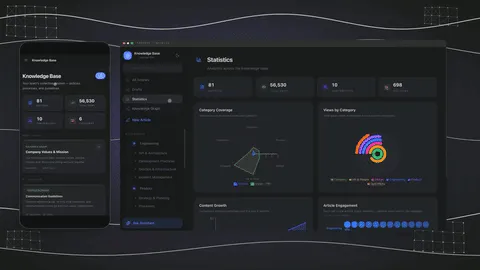
import IFrame from '@/components/ui/IFrame';
TL;DR: Build an AI-native team knowledge base in 7 minutes with Taskade Genesis. Persistent agents read every page; automations fire on knowledge changes; multi-layer search (full-text + semantic + OCR) retrieves answers with citations. The live demo below is cloneable into your free workspace. Build your team knowledge base free →
▲ ■ ● This is live. Click "Use this app" inside the iframe to clone this AI knowledge base into your free workspace.
Why Teams Outgrow Static Wikis
Most teams hit the same knowledge-base ceiling. They start with Google Docs scattered across folders. They migrate to Notion or Confluence for structure. They add a Slack channel for "where do I find X?" questions. They never actually solve the underlying problem: the knowledge exists but no one reads it, the wiki goes stale because nobody updates it, and the search results return either nothing or twelve out-of-date pages.
The fix in 2026 is not "buy a wiki and discipline yourselves into using it". The fix is to make the knowledge base agentic, let AI agents read every page, answer questions with citations, draft updates when knowledge changes, and route digests to the people who need to know. The wiki becomes a working knowledge layer, not a static archive.
This guide walks through building exactly that with Taskade Genesis in 7 minutes. The same loop powers customer-facing help centers, internal team wikis, onboarding portals, and engineering runbooks. The architecture is the same; only the prompt changes.
The Workspace DNA Loop Applied to Knowledge
Memory holds the knowledge as structured Projects. Intelligence reads, drafts, and reviews via AI agents. Execution acts on knowledge changes via 100+ bidirectional integrations. The loop is what makes the knowledge base agentic, each layer feeds the next, and the system gets smarter as it runs.
Step 1: Generate the Knowledge Base in 7 Minutes
Open Taskade Genesis. The prompt to use:
Build a team knowledge base with categories for Engineering, Sales, Customer Success, and Operations. Each category has a folder structure for SOPs, runbooks, FAQs, and onboarding. Include an AI assistant agent that can answer questions from any document, citing sources. Automations: post a Slack digest to #knowledge when a new article is published; send a Gmail summary to affected teams when an existing article is updated; sync the public-facing FAQs to Notion as a backup.
Genesis runs for 3-7 minutes. EVE (the meta-agent) decomposes the prompt, generates the Projects layer with the category structure, configures the AI Q&A agent with workspace-wide memory access, sets up the three automations, and ships the App UI. The output is a live URL.
┌─────────────────────────────────────────────────────────────────┐
│  7-Minute Knowledge Base Build Timeline                         │
├─────────────────────────────────────────────────────────────────┤
│                                                                 │
│  0:00  Type prompt in Genesis                                   │
│  0:15  EVE acknowledges, asks 1 clarifying question             │
│  0:45  Genesis starts generating Projects layer                 │
│  2:00  Category folders created (Eng, Sales, CS, Ops)           │
│  3:30  Q&A agent configured with workspace memory               │
│  4:30  Three automations wired (Slack, Gmail, Notion)           │
│  6:00  App UI rendered, custom domain placeholder set           │
│  7:00  Live URL ready — workspace.taskade.com/share/apps/abc    │
│                                                                 │
└─────────────────────────────────────────────────────────────────┘
You now have a working knowledge base. The next steps customize it.
Step 2: Import Existing Content
If you already have content in Notion, Confluence, Google Docs, or as Markdown files, the Taskade import tools handle the migration:
- Notion: Export as Markdown bundle, import to Taskade. Pages become Projects; database rows become structured Projects with custom fields.
- Confluence: Export as HTML or PDF; Taskade imports both. Permissions reset on import (you re-establish them on the role system).
- Google Docs: Connect Google Drive integration, select docs, import as Projects. Comments preserved.
- Markdown files: Bulk upload from local folder. Headings become Project structure.
Once imported, the content immediately becomes readable by the Q&A agent. The first time you ask the agent a question post-import, the response will cite the freshly migrated content as if it had always been there.
Step 3: Configure the AI Q&A Agent
The Q&A agent comes pre-configured from the Genesis generation, but customize it for your team's voice and citation preferences:
Agent instructions: Tell the agent how to behave. Example: "You are the engineering knowledge base assistant. Answer questions citing specific Project names. When information is missing, suggest creating a new Project rather than guessing. Use markdown formatting in responses."
Tool access: Decide which of the built-in tools the agent can call. For a Q&A agent, web search (for context that's not in the workspace), code execution (for evaluating snippets), and image generation (for diagrams) are useful additions.
Memory scope: Persistent memory across sessions. The agent remembers what questions you've asked before and learns patterns over time.
Integration access: If the agent should be able to take actions (post to Slack, send Gmail), enable the relevant integration permissions. Most teams start with read-only and add actions later.
Step 4: Set Up Knowledge-Triggered Automations
The three Genesis-generated automations are the starter set. Add more as your team's workflow demands:
| Trigger | Action | Why |
|---|---|---|
| New article published in Engineering | Post to #engineering-knowledge Slack | Eng team sees new SOPs without polling |
| New article published in Customer Success | Send Gmail to support team | Support team stays current on FAQs |
| Article updated in Sales | Notify deal owners on related Salesforce records | Sales sees updated playbooks in their workflow |
| New FAQ added | Sync to public help center via Notion integration | Customer-facing docs stay current |
| Article archived | Move to "Archive" folder + post to Slack | Visibility on deprecated content |
| Article unviewed for 90 days | Send to the project Owner for review | Stale-content prevention |
All automations run as reliable workflows with automatic retry. No glue code, no Zapier bills, no silent failures.
Step 5: Configure Permissions
Taskade's role-based access runs from Owner to Viewer. The right configuration for a team knowledge base typically looks like:
- Owner: Workspace admin, can change billing, approve agent drafts, and edit any Project
- Editor: Team lead, can edit Projects in their category
- Checker: All team members, can comment on Projects and suggest edits
- Viewer: Read-only access for the broader org and for contractors
Public agents have additional controls, internal-integration filtering prevents external users from accessing internal knowledge even if the underlying Project is referenced. Public-agent opt-out tool controls let you scope which tools the agent can call when answering external users.
Step 6: Publish Customer-Facing Knowledge
Once the internal knowledge base works, the customer-facing variant is a permission flip. Mark public-facing FAQ Projects as "public" and the agent serving them becomes the public help center.
Genesis Apps support custom domains with Genesis Auth (OIDC/SSO). Publish at help.yourcompany.com, gate behind auth if needed, or allow public anonymous access. The same multi-layer search and Q&A agent answers customer questions on the public site that answer team questions on the internal site, different scope, same architecture.
What the GIFs Show
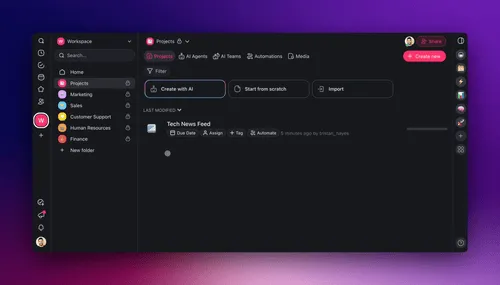
The "train agents on unlimited links" feature above lets your knowledge agent absorb external pages (vendor docs, regulatory texts, industry references) alongside internal Projects. The multi-layer search treats everything as unified retrievable context.
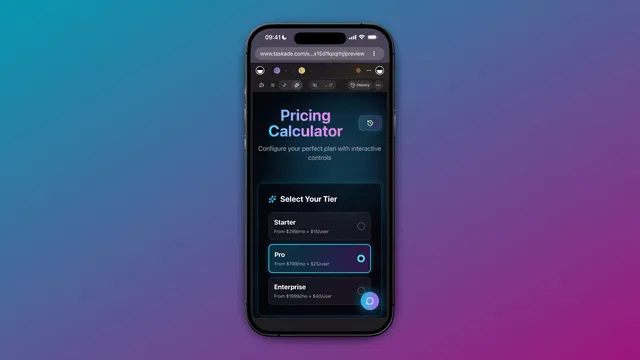
The "agents anywhere" view shows the same knowledge agent accessible from chat, from any Project page, from automations, and from public embedded surfaces. The knowledge moves with the user, not the other way around.
Pricing: What It Actually Costs
For a 10-person team, the all-in monthly cost of an AI-native knowledge base:
| Component | Notion + AI | Confluence Premium | Taskade Pro |
|---|---|---|---|
| Base license | $120/mo | $115.50/mo | $10/mo flat |
| AI add-on | $100/mo | Included | Included |
| Native automation | $20/mo (Zapier) | $20/mo (Zapier) | Included |
| Total / month | $240/mo | $135.50/mo | $10/mo |
| Total / year | $2,880 | $1,626 | $120 |
Taskade Pro is ~93% cheaper than Confluence Premium and ~96% cheaper than Notion + AI at this team size. The pricing wedge widens with team growth, Taskade Business at $25/month covers unlimited seats, while Notion + AI at 100 users runs $26,400/year.
Why Multi-Layer Search Beats Keyword Search
The example shows why multi-layer search beats keyword search in a real team scenario. A keyword search for "enterprise" returns dozens of stale partial matches. The semantic layer routes to the canonical pricing Project. The OCR layer surfaces the actual signed contracts that contain volume discount terms. The agent integrates all three and answers with citations.
Notion AI and Confluence AI are keyword + summarize. The reason they feel less useful than Taskade agents on the same content is the missing semantic and OCR layers, not the LLM choice, but the retrieval architecture upstream of the LLM.
FAQ
How long does it take to build a team knowledge base?
With Taskade Genesis, 7 minutes for the initial generation. Add content (import existing docs or write new ones) over the following days. The agent and automations work immediately once the first content is in.
Can the AI write articles automatically?
Yes. Multi-agent collaboration lets a researcher agent gather context, a writer agent draft, and a reviewer agent fact-check. The output routes through a publish-approval automation before going live.
What happens when knowledge gets stale?
Taskade can fire an automation when a Project hasn't been viewed in 90 days, routing it to the project Owner for review. The agent flags inconsistencies between Projects as part of its workspace memory updates.
Can I host the knowledge base on my own domain?
Yes. Genesis Apps support custom domains with Genesis Auth (OIDC/SSO). Publish at wiki.yourcompany.com with single sign-on through your identity provider.
Does the AI cite sources?
Yes. Answers include links to the specific Projects that informed the answer. For OCR-derived content, citations link to the uploaded file. This is critical for trust in regulated environments.
How does it handle attachments and PDFs?
Uploaded PDFs and images are OCR-indexed automatically. The content is searchable alongside native Projects. Attachments do not need to be transcribed manually.
Can multiple teams use one knowledge base?
Yes. Permissions are role-based (Owner to Viewer) and can be set per folder or per Project. A single workspace can host Engineering, Sales, CS, and Ops with appropriate cross-team visibility.
What about regulatory compliance?
Enterprise tier offers SOC 2 Type 2, GDPR alignment, and HIPAA configurations for regulated industries. Data residency options and BYOK (bring your own keys) for OpenAI/Anthropic are available on Enterprise.
Can the knowledge base trigger Slack/Gmail/Salesforce actions?
Yes. That's the Execution layer of Workspace DNA. 100+ bidirectional integrations let the knowledge base post, send, and update across your existing tools.
How does AI handle conflicting information?
The agent flags conflicts in its response and routes ambiguity to the project Owner. The Ask-Questions tool (v6.150) lets the agent ask clarifying questions before drafting updates.
Can I export the knowledge base?
Yes. Genesis project export to Markdown (v6.150) covers content portability. The runtime stays on Taskade; the content can be exported in standard formats.
Does Taskade work offline?
The web app needs connectivity. The mobile apps cache recent Projects for offline read access. Edits sync when connectivity returns via CRDT-backed merge.
Can the AI search uploaded files?
Yes. File content OCR indexes PDFs, images, and documents. A contract uploaded as PDF is searchable like a native Project.
Are there knowledge base templates?
Yes. The Community Gallery has cloneable knowledge base apps. The Templates curation lists specific category templates (engineering wikis, sales playbooks, customer FAQs).
How does the knowledge base scale?
Taskade Genesis runs on production infrastructure built to stay fast and available as your workspace grows. Knowledge bases with thousands of Projects and tens of thousands of monthly searches operate without performance concerns.
Build your team knowledge base in 7 minutes. Try Taskade free →, 11,000 credits, persistent agents, multi-layer search, 100+ integrations. No credit card required.
▲ ■ ● Memory · Intelligence · Execution.