






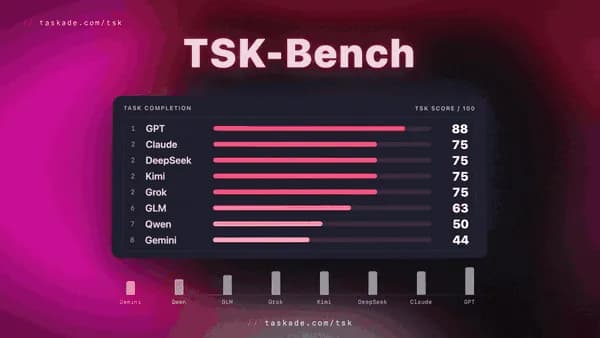
Which AI builds the best apps for real work? We gave the top AI models the same real tasks, used every app like a customer would, and published who finished. Meet TSK-Bench, the AI task leaderboard. Compare the models, build your next app, or clone a live one.
TL;DR: TSK-Bench scores AI models on real app work in Taskade Genesis: the same request, the same starting point, and a working app as the only pass. What we learn helps TSK-1 Auto pick the right model for each task, so you do not have to. Bring Your Own Key is coming soon: reply BYOK on our launch posts for early access. Start building.
What Is TSK-Bench?
TSK-Bench is the Taskade AI task leaderboard. Every model gets the same request, word for word, from the same starting point. Some finish a working app. Some do not. The leaderboard shows both.
Real Tasks. One Leaderboard. Most AI benchmarks ask quiz questions. TSK-Bench asks for the job you would give it:
- Real apps, not quiz questions. We test what each AI builds and runs, the way a customer uses it.
- One pass rule: the app works. We open each app, enter data, and check that the app keeps it.
- One follow-up change. We then ask for a change in the same chat, and check that nothing else broke.
The leaderboard has two arenas today:
| Arena | What it tests | See the results |
|---|---|---|
| Build | One request goes in. The model must turn it into an app that opens, saves data, and does what was asked. | Build arena |
| Code | After the first build, one follow-up coding request. The change must land without breaking what already worked. | Code arena |
Want the method in full? Read how we test AI models on real tasks, the first TSK-1 benchmark, and why every model claims to be the best. For the story of how tasks became execution, read from tasks to execution.
How Does TSK-1 Auto Pick a Model for You?
One Model. On Autopilot. TSK means Taskade System Kernel. Leave your model on TSK-Auto, and TSK-1 Auto picks the right AI for each task. A quick edit gets a fast answer. A bigger app gets more care. What we learn from TSK-Bench helps it make that choice.
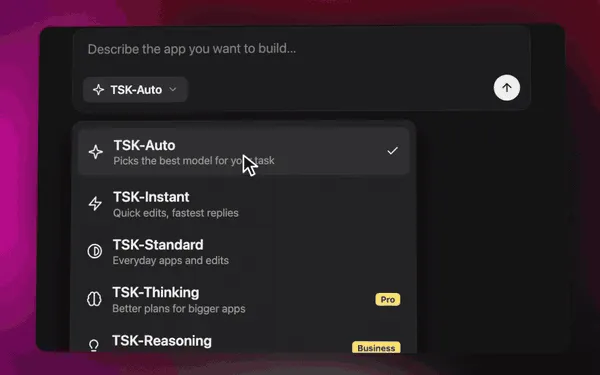
Want to set the depth yourself? Pick a TSK speed from the same menu:
| Option | Best for | Plans |
|---|---|---|
| TSK-Auto | Almost everything. It picks for you. | Every plan, including Free |
| TSK-Instant | Fast edits and quick replies | Every plan, including Free |
| TSK-Standard | Everyday apps and tasks | Every paid plan |
| TSK-Thinking | Bigger apps that need more care | Every paid plan |
| TSK-Reasoning | Complex apps, workflows, and systems | Business and up |
Deeper options use more credits for each turn. See Thinking Modes to compare them, TSK-1: The Taskade System Kernel for the big picture, and Model Credits for credit use. To see every model in Taskade, old and new, by lab, browse the AI model directory.
Can I Use My Own AI Key in Taskade?
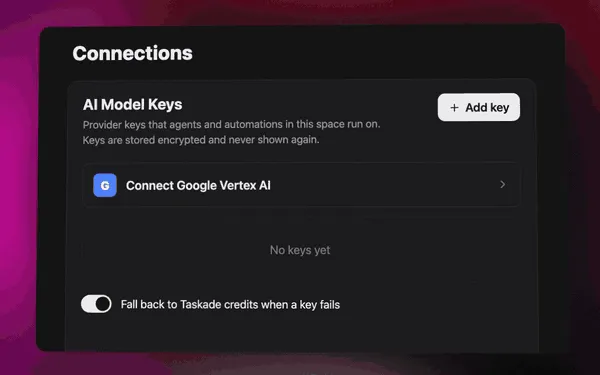
Your Model. Your Key. Yes, and more is on the way. Today, a custom agent on Pro and up can run Claude on your own Anthropic API key (BYOK). An automation step can also run on your own provider account.
Coming soon: Bring Your Own Key across Taskade. Use the AI account you already pay for:
- Build without a credit limit. Your own key pays for your AI use, so your plan credits are not the limit.
- A backup when you need it. If your key fails, Taskade credits can take over, so the build keeps going.
- The AI you already pay for. Bring keys for OpenAI GPT and for open models such as DeepSeek, Qwen, and Kimi.
Get early access. Reply BYOK and your favorite model on our launch post on X, LinkedIn, or Reddit.
Which App Kits Can I Clone Today?
Real Apps. Yours Today. Every kit below is a live Taskade Genesis app with its projects, AI agents, and automations already wired together. Clone one into your workspace, then ask Taskade EVE to make it yours.
| App kit | What it does | Clone it |
|---|---|---|
| Invoice Generator | Bill it. Send it. Get paid. | Clone the kit |
| Client Connect Dashboard | Track leads and clients. | Clone the kit |
| Simple Store Manager | Manage your orders. | Clone the kit |
| Neon Task Management Dashboard | Plan, track, get work done. | Clone the kit |
Browse all app kits, or read Builder Community & App Kits to see what a kit carries.
How Do I Start?
Start a workspace and build in minutes:
- Open Taskade Genesis and describe the app you want.
- Leave the model on TSK-Auto. It picks the right AI for each step.
- Open the app, add your data, and publish it with one click.
New to building? Follow Build Your First App. Want a head start? Clone and remix a live app kit. Your app runs on Workspace DNA: projects remember, agents think, and automations execute. Compare plans on the pricing page, and see what else shipped in the changelog.
Related reading: Introducing Taskade TSK-1 · Multi-Model AI Access · How we test AI models on real tasks
Frequently Asked Questions
What is TSK-Bench?
TSK-Bench is the Taskade AI task leaderboard. We give the top AI models the same real request in Taskade Genesis, from the same starting point, and publish which ones finish a working app. The full results live at taskade.com/tsk, with a Build arena for new apps and a Code arena for follow-up changes.
How does TSK-Bench test AI models?
Every model builds an app from the same request, word for word. We open each app, enter data the way a customer would, check that the app keeps the data, and then ask for a follow-up change in the same chat. A model scores only when the app works, not when the answer reads well.
What is TSK-1 Auto?
TSK-1 Auto is the default model setting in Taskade, shown as TSK-Auto in the model menu. It picks a model for each task, so you do not have to. TSK-Auto and TSK-Instant work on every plan, including Free. TSK-Standard and TSK-Thinking need a paid plan, and TSK-Reasoning needs Business or a higher plan.
Can I use my own AI key in Taskade?
Yes, in part, today. A custom agent on Pro and up can run Claude on your own Anthropic API key (BYOK). An automation step can also run on your own provider account. Bring Your Own Key for more of Taskade is coming soon. Reply BYOK with your favorite model on our launch posts for early access.
Do I need to pick an AI model to build an app?
No. Describe the app to Taskade EVE and leave the model on TSK-Auto. It chooses a model for each step of the build. Pick a TSK speed only when you know the job needs a quick edit or a deeper plan.