
Overview
Google Docs is a widely used online document editor. Taskade has no direct Google Docs import, so convert your documents to Markdown with a free plugin first. Then paste or upload them into Taskade. Your headings, lists, bold text, links, and other formatting stay intact.
TL;DR: Convert a Google Doc to Markdown with the free Docs to Markdown plugin, then paste it into a new Taskade project to keep your headings, lists, and links intact. For PDFs or batches, download as PDF and use Summarize with AI. Once imported, switch across any of Taskade's project views.
Export a Google Doc
To import Google Docs into Taskade, first convert them into .md (Markdown) files. A free, open-source plugin does the conversion for you.
- Install the Docs to Markdown plugin from the Google Marketplace.
- Open the document you want to import.
- Select "Extensions" ➡ "Docs to Markdown" from the Menu Toolbar at the top.
- Click "Convert" and select Markdown to copy the .md file to the clipboard.
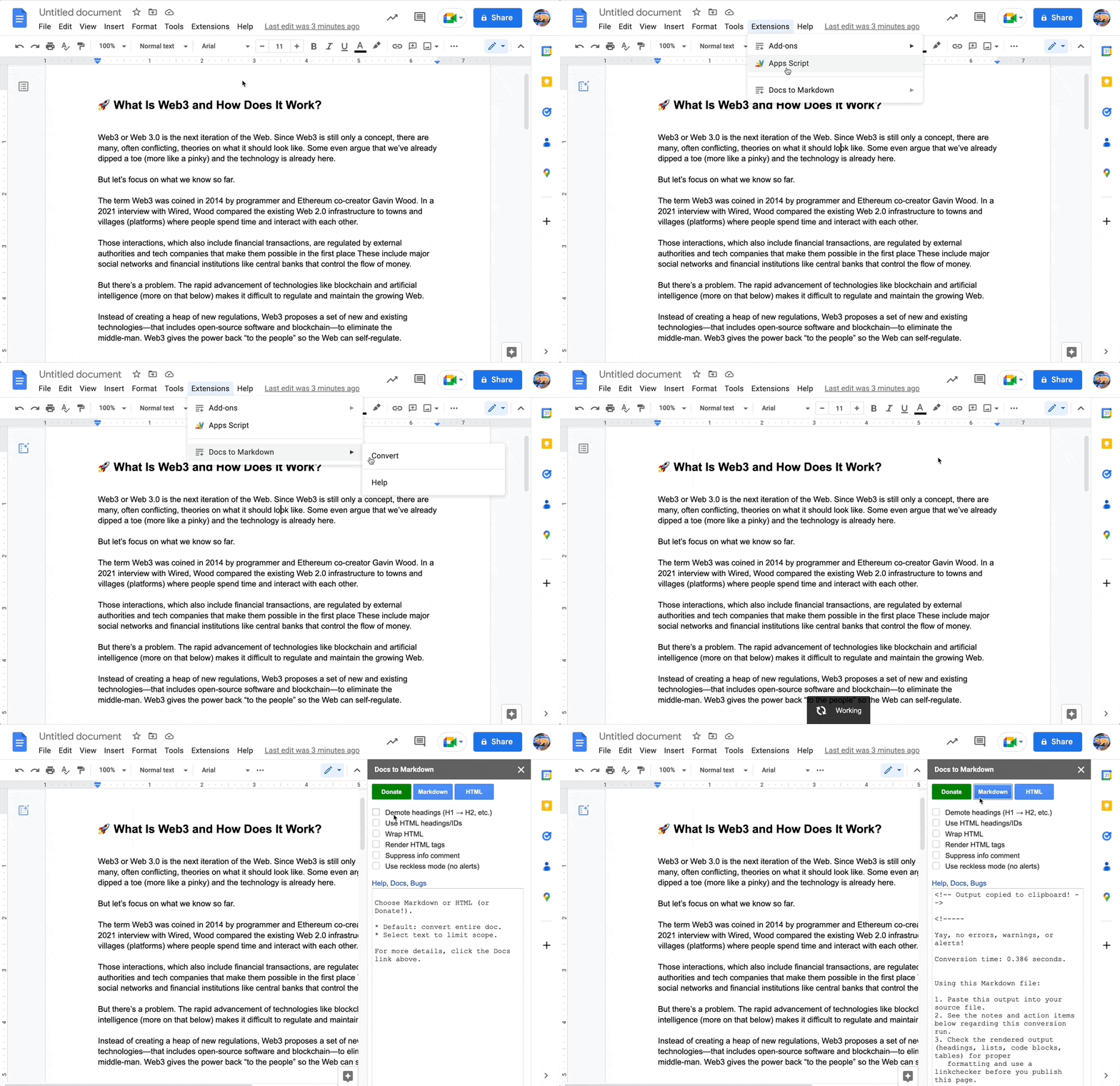
You can also download your Google Doc as a PDF (File ➡ Download ➡ PDF Document). Then import that file with Summarize with AI.
Import to Taskade
- Go to your workspace or folder.
- Click the arrow next to the ➕ New Project button.
- Select Import and click Paste Text & Markdown in the Import with AI tab.
- Paste the contents of the .md file.
- Click Create Project to finish.
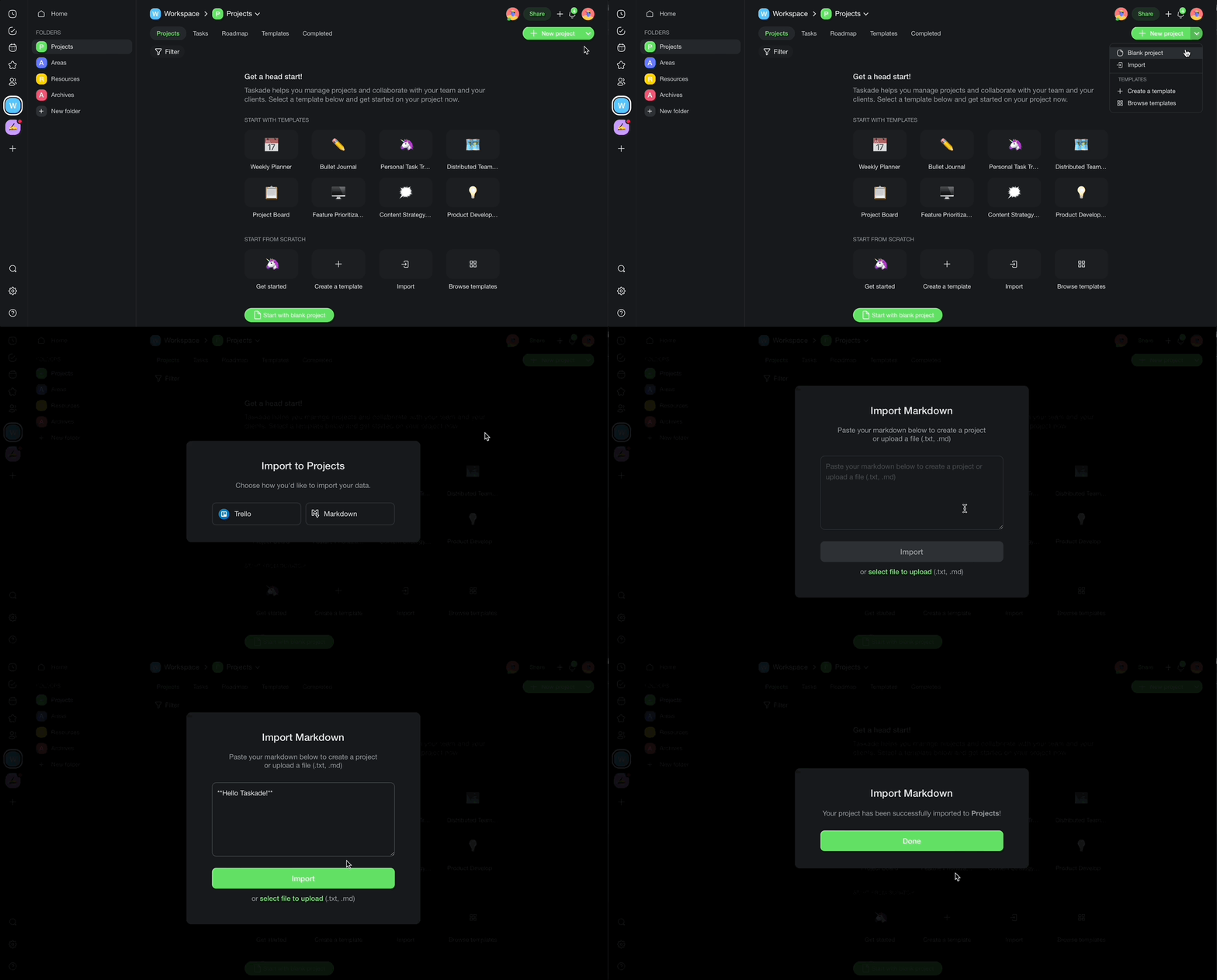
Your Google Doc content is now a Taskade project with formatting intact.
After Import
After your Google Docs content lands in Taskade, you can expand on it:
- Switch views: See your document in List, Mind Map, Board, or any of Taskade's project views.
- Collaborate in real time: Invite teammates to edit the imported content with real-time collaboration, similar to Google Docs but with AI-powered features.
- Enhance with AI: Use Taskade AI to summarize long documents, extract action items, generate follow-up tasks, or rewrite sections.
- Add to agent knowledge: Upload your documents as agent knowledge so custom AI agents can answer questions based on your content.
Tips
- The Docs to Markdown plugin handles most formatting well. Complex tables and embedded images can need a manual fix after import.
- For a handful of documents, convert and import them one at a time. For a large batch, download each as a PDF and use Summarize with AI.
- Use folders in Taskade to organize imported documents by topic or team.
For more on turning docs into automations, see Custom AI Agents/GPTs.
Google Docs Field Mapping
| Google Docs | Taskade Equivalent |
|---|---|
| Document | Project |
| Heading 1/2/3 | Project headings |
| Bullet list | Task list |
| Checkbox | Task |
| Comment | Comment (role-based access from Owner to Viewer) |
| Inline link | Link |
Carries over vs needs cleanup
- Imports cleanly: Headings, lists, bold/italic, links, checklists, paragraph text.
- Needs cleanup: Inline tables (recreate in Table view), embedded drawings, suggesting-mode revisions.
How the Import Works
Bring It Into Taskade Genesis
Your imported document is now part of your Workspace DNA. Open the project's ... menu and choose Add to Agent Knowledge so a custom agent answers questions from the document. Start an automation from the project to act on the action items it holds. Then open Taskade Genesis and describe the app you want on top of it, such as a client portal, a CRM, or a proposal tracker. For a web page or YouTube video, save the link in Media Files instead.