
Overview
Open the classes Project and stay in Table view. Add one row per class or session type, with capacity, duration, and price. Open Automations to connect Google Calendar and Stripe. Both connectors are available on paid plans. Click Publish when the booking page is ready to share.
A wellness coach hands out one link and clients book their own sessions. A consultant publishes a booking form, and every request lands in a live dashboard that tracks revenue and attendance.
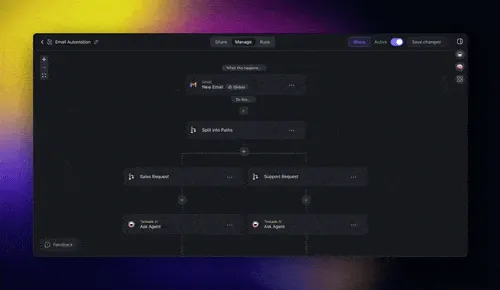
Here is how the pieces fit. Projects store classes, clients, and sessions. Taskade EVE drafts confirmation copy, reminder emails, and session notes in your voice. Automations sync to Google Calendar, collect payments, and ping everyone who needs to show up. The published app is a booking page your clients visit directly.
TL;DR: Turn a prompt into a full booking system in Taskade Genesis. Clients book themselves, pay through Stripe, and get reminders. You see every session, payment, and no-show in one dashboard. Branded client portal at a custom domain. Works for coaches, studios, tutors, and consultants. Calendar sync and Stripe payments are available on paid plans. Build the app.
Clone These Live Apps
Skip the blank page. Open one of these working booking apps, see exactly how it behaves, then clone it into your own workspace and rename it. Each one is a real, published Taskade Genesis app you can use today.
| Live app | What it does | Try it |
|---|---|---|
| Appointment Booking System | A full booking page with classes, slots, and confirmations. Best fit for a wellness coach taking client sessions. | Open demo → |
| Consultancy Booking Form | A public booking form that feeds a live dashboard of requests. Best fit for a consultant who wants every lead in one place. | Open demo → |
To clone, open a demo, click Use this app, and pick your workspace. The app, its fields, and its automations copy over. Edit the class names, prices, and reminder text, and you are live.
What You Will Build
- A Classes and Sessions table in Table view, with capacity, duration, price, and recurring schedule.
- A Public booking page clients use to reserve a spot, sorted by date and availability.
- A Confirmation and reminder automation chain that fires on every new booking.
- A Revenue and attendance dashboard powered by the same workspace data.
Here is the booking page your clients see. Clean, branded, and bookable from any phone.
+----------------------------------------------+
|  book.yourstudio.com                         |
+----------------------------------------------+
|                                              |
|   Morning Flow Yoga          [ Book Now ]    |
|   Mon 7:00am  .  60 min  .  $18  .  4 left   |
|                                              |
|   1:1 Coaching Session       [ Book Now ]    |
|   Pick a slot  .  45 min  .  $90  .  open    |
|                                              |
|   Strategy Consult Call      [ Book Now ]    |
|   Pick a slot  .  30 min  .  Free            |
|                                              |
+----------------------------------------------+
Every booking on this page writes straight back into your workspace. That is the Workspace DNA loop at work: each piece feeds the next, so the system gets smarter every time a client books.
| Workspace DNA | In a booking system | Outcome for you |
|---|---|---|
| Memory | Projects hold classes, clients, and session history. | Every client and booking lives in one place. |
| Intelligence | Taskade EVE writes confirmations, reminders, and notes. | Warm, on-brand messages without you typing them. |
| Execution | Automations book the slot, charge the card, and remind. | The whole flow runs itself, day and night. |
See Workspace DNA Explained for how Memory, Intelligence, and Execution feed each other in every app you build.
Do this in Taskade
Step 1: Generate the base app
Open Taskade Genesis and paste this prompt.
Build a booking and class scheduling app.
Fields for classes: title, instructor, capacity, duration, price, schedule.
Fields for bookings: client name, email, phone, class, status, paid.
Include a public booking page, Stripe payment checkout, Google Calendar
sync, email and SMS reminders 24 hours and 1 hour before each session,
and a dashboard showing attendance and revenue by week.
Taskade Genesis generates a Projects table, a published app, three automations, and Taskade EVE pre-wired to handle client questions in the booking page.
Step 2: Define your classes
Open the classes Project in Table view.
- Add a row for each class or session type.
- Fill in duration, capacity, price, and recurring schedule (weekly, monthly, one-off).
- Drop a cover image into the
imagecolumn. Taskade EVE uses it on the public booking page.
Save. Every class becomes a bookable slot on the published app.
Step 3: Connect calendar and payments
Open Automations and find the Sync Booking to Calendar step. The Google Calendar and Stripe connectors are available on paid plans.
- Pick Google Calendar from the integrations catalog.
- Sign in and pick the calendar you want bookings to write to.
- Open the
Collect Paymentautomation. Pick Stripe and paste your publishable key.
The automation fires the moment a client clicks Book Now. Payment runs first. Calendar event posts second. Confirmation email sends third. All durable, all retryable, all visible in the Runs tab.
Step 4: Write the reminder copy
Taskade EVE drafted reminder text on first run. Review and tune it.
- Open the
reminder_templatesProject. - Edit the 24-hour and 1-hour reminder text. Keep it under 60 words. Add the session time, instructor name, and a link to reschedule.
- For a different tone, ask Taskade EVE to "rewrite these in a warm, confident studio voice".
Updated templates apply to every future reminder automatically.
Common Booking Patterns
| Pattern | How Taskade Genesis handles it |
|---|---|
| Group classes with capacity limits | Capacity field on each class row. Booking page disables full classes automatically. |
| 1:1 client sessions | Use Calendar view and block 30 or 60-minute slots. Clients pick an open slot. |
| Recurring memberships | Stripe subscription integration. A subscribed client sees all classes free on the booking page. |
| Cancellations and refunds | Add a cancelled status. The automation refunds through Stripe and frees the slot. |
| Waitlist | When capacity fills, clients join a waitlist. Auto-promote if someone cancels. |
| Instructor pay-outs | Monthly automation totals completed sessions by instructor and issues an invoice. |
Who This Works For
| Role | Typical setup |
|---|---|
| Yoga or fitness studio | 10 to 30 recurring classes, multiple instructors, waitlist enabled. |
| Private tutor | 1:1 session booking, Calendly-style open slots, reminder emails. |
| Coach or consultant | Retainer-based bookings, post-session notes drafted by Taskade EVE. |
| Music or art teacher | Class catalog, student portal with shared notes. |
| Language school | Group classes with capacity, teacher rotation, multilingual reminders. |
Publish the Booking Page
When the app feels right, click Publish.
- Pick a custom domain like
book.yourstudio.com. - If clients need sign-in and booking history, turn on App Users.
- Drop the link in your Instagram bio, email signature, or website.
Every booking feeds the same workspace. Client history, attendance, and revenue all update without a spreadsheet in sight.
Frequently Asked Questions
Can clients book without creating a new account?
Yes. The booking page is open by default. A client picks a slot and pays without a Taskade login. If you want clients to sign in and see booking history, turn on App Users. That sign-in works on every plan, including Free.
How do I run a booking page on a Free plan?
You can generate the app, fill the classes Project, and publish the booking page on Free. Clients can book without a Taskade login on Free. The Google Calendar and Stripe connectors in Automations are available on paid plans. A custom domain is Pro and above, and is separate from sign-in. See pricing.
How long does it take to build a booking system?
A few minutes. Paste the prompt in Taskade Genesis, and your booking page, classes table, and reminder automations generate together. Most of your time goes into naming your classes and setting prices, not building from scratch.
Can clients book without creating an account?
Yes. By default your booking page is open, so a client picks a slot and pays in a few taps. If you want clients to sign in and see their booking history, turn on App Users.
Do I need to know how to code?
No. You describe the booking system in plain English, and Taskade Genesis builds it. A wellness coach or a consultant with no engineering background can ship a working booking page the same day.
How do payments and reminders work?
Automations handle both. Connect Stripe once, and every booking charges the card automatically. The Stripe connector is available on paid plans. Taskade EVE drafts the reminder text, and automations send it 24 hours and 1 hour before each session. See Automation Triggers for the full list of events you can act on.
How much does it cost?
You can build and publish the booking page free. Paid plans add the Google Calendar and Stripe connectors, capacity, and users. A custom domain like book.yourstudio.com is included on Pro and above. See pricing for current details. This replaces scheduling apps that charge $25 to $80 per month.
Can I see every booking and payment in one place?
Yes. Each booking writes back to your workspace, so the dashboard updates live. A consultant watches new requests land in real time, and a coach sees attendance and revenue by week. Pair it with Taskade as a CRM to track each client over time.