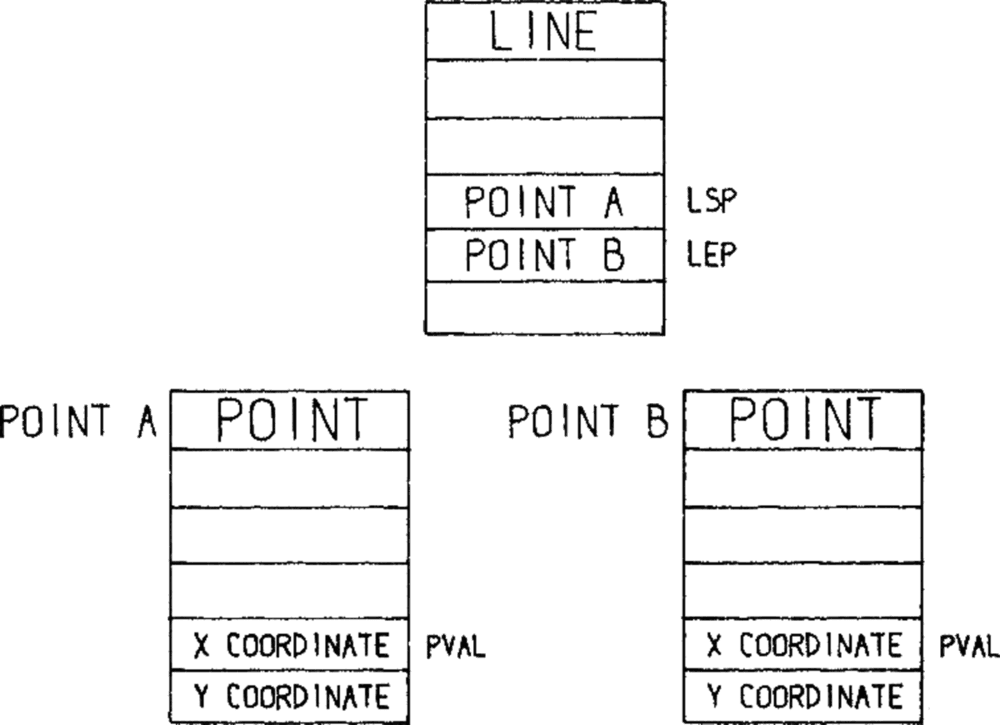
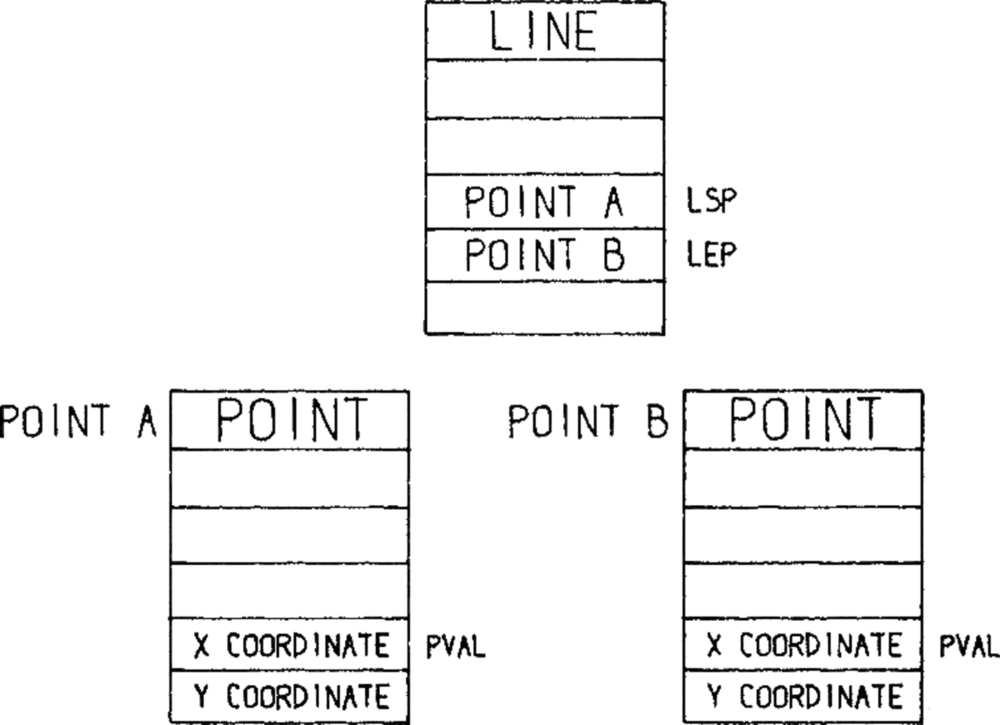
In 1963, Ivan Sutherland's Sketchpad let a person draw a shape on a screen and then tell the computer what had to stay true about it — this line stays parallel, these corners stay square. It was the first design tool, and it already contained the idea the whole category is rediscovering in 2026: the drawing is not the valuable part. The constraints are.
Sixty-three years later, you can describe an interface in a sentence and get a polished screen back in ninety seconds. The screens are good. The problem is that everyone's screens look the same — and the reason is that almost nobody gives the model constraints to work from.
TL;DR: We compared 14 AI design tools on price, output format, code export, and the column no other comparison publishes: whether the tool actually reads a
DESIGN.md. Google open-sourced that format on April 21, 2026. Support is uneven. The finding that matters most: attaching a design system beats writing a better prompt. Build a live app from a brief →
DESIGN.md. Image: Wikimedia Commons / CC0.What Are the Best AI Design Tools in 2026?
There is no single best AI design tool, because the category has split into three jobs that different tools do well. Canvas-native tools turn a brief into a polished artifact. Prompt-to-code tools emit real HTML and React you can host. Design-file tools extend a component library your team already maintains. Picking the wrong group for your job costs more than picking the wrong tool inside the right one.
Here is the whole field in one table. Output format is the column that decides whether your work survives past the demo.
| Tool | Group | Output | Code export | Reads DESIGN.md? |
|---|---|---|---|---|
| Claude Design | Canvas-native | Prototypes, decks, landing pages | Via hand-off to Claude Code | Own import + /design-sync |
| Figma Make | Design-file | Figma file → working prototype | Yes | Own design-system path |
| Google Stitch | Canvas-native | UI screens | Yes | Yes — it authored the spec |
| v0 (Vercel) | Prompt-to-code | React + Tailwind | Yes | Repo convention |
| Lovable | Prompt-to-code | Full app + backend | Yes | Repo convention |
| Paper | Canvas-native | Real HTML + CSS canvas | Yes | Via MCP |
| pen.dev | Canvas-native | HTML + CSS/Tailwind | Yes | Via MCP + CLI |
| OpenPencil | Canvas-native | Open-source canvas | Yes | Via bring-your-own model |
| Visily | Design-file | Wireframes, mockups | Limited | No |
| Uizard | Design-file | Wireframes, mockups | Limited | No |
| Banani | Canvas-native | UI screens | Limited | No |
| Magic Patterns | Prompt-to-code | React components | Yes | Repo convention |
| Superdesign | Prompt-to-code | Components | Yes | Repo convention |
| Creatie | Design-file | Design file | Limited | No |
Two honest caveats before you use that table. The DESIGN.md column is the least-documented fact in this category — most vendors do not state support either way, so "repo convention" means the tool reads Markdown in your project because coding agents read Markdown in your project, not because anyone shipped a feature for it. And the groups leak: Claude Design hands off to Claude Code, which turns a canvas-native tool into a prompt-to-code tool at the last step.
The Three Things That Changed in 2026
Three events in six months turned AI design from a novelty into a category with a standard, a price war, and an incumbent under pressure.
A model company shipped a design product
Anthropic launched Claude Design on April 17, 2026 as an Anthropic Labs research preview, turning prompts, images, documents, and entire codebases into prototypes, slide decks, mockups, one-pagers, and landing pages. It is available on Pro, Max, Team, and Enterprise plans — not Free.
The market read it as an attack on the design-tool incumbents. On launch day Figma fell about 6%, Adobe 2.7%, Wix 4.7%, and GoDaddy 3%.
A design system became a text file
On April 21, 2026, Google open-sourced the draft specification for DESIGN.md, the format behind its Stitch tool. The announcement's own framing: the spec was released "so it can be used across any single tool or platform." The stated benefit is the one that matters: "Instead of guessing intent, AI agents can know exactly what a color is for, and can validate their choices against WCAG accessibility rules."
Read the verb. Guessing intent is what every AI design tool does when you hand it a prompt and nothing else.
The frontier got cheaper instead of more expensive
For three years each new frontier model tier cost more than the last. That reversed on September 22, 2026, when Claude Opus 5.5 shipped at $4 per million input tokens and $20 per million output, matching the far pricier Fable 5.1 tier on most work. Design tools sit downstream of model pricing, so the cost of a generation is falling under the whole category at once.
Does Your AI Design Tool Actually Read a DESIGN.md?
This is the question no comparison page answers, and it is the one that decides output quality. Google's own announcement hedges on it — the spec was published so it can be used across tools, which is a statement about possibility, not adoption.
Here is what support actually looks like in practice, split by mechanism:
| Mechanism | What it means | Tools |
|---|---|---|
| Native | Reads the published DESIGN.md format directly |
Google Stitch |
| Repo convention | Reads any Markdown in your project, so a DESIGN.md works by habit, not by feature |
Claude Code, Cursor, v0, Lovable, Magic Patterns |
| Own import path | Ingests a design system, but through a proprietary mechanism | Claude Design (/design-sync), Figma Make |
| Via MCP | Reads project context through a Model Context Protocol server | Paper, pen.dev |
| None found | No documented design-system input | Visily, Uizard, Banani, Creatie |
The practical takeaway is that "repo convention" is the most widely available path, and it is also the cheapest. If your tool is a coding agent, you already have DESIGN.md support — put the file in the repository root and reference it. You do not need a vendor feature. What you do need is to verify it, because an agent reading a file is not the same as an agent obeying it.
Test it in five minutes. Put a
DESIGN.mdin your project with one deliberately unusual, unmistakable rule — a specific accent hex that is not a default, or a border radius of exactly 3px. Ask the tool to build one screen. If the unusual rule does not appear in the output, the file is being read and ignored, or not read at all. Either way you have your answer, and it took one prompt.
What Is a DESIGN.md File?
A DESIGN.md is a plain-text Markdown file that describes a design system in a form an AI agent can read — color roles, type scale, spacing, component rules, and accessibility constraints. It sits in your project next to the code, so it travels with the work and gets versioned with it.
The critical design decision in the format is that it describes roles, not values. A hex code tells a model what color something is. A role tells it what the color is for — which is the information the model needs to make a decision you have not anticipated.
Markdown
# DESIGN.mdVoice
Quiet interface. Content carries the color; chrome stays neutral.
Color roles
- primary #ff2d60 Action color. Buttons, active states, links.
- accent #2a1225 Hover and selection tint. Never the action itself.
- surface #11111b Page and card background.
- text-primary #cdd6f4 Body copy. Must hit WCAG AA on surface.
Type scale
Display 48/1.1 · H1 32/1.2 · H2 24/1.3 · Body 16/1.6 · Caption 13/1.4
Spacing
4px base. Use 4, 8, 12, 16, 24, 32, 48. Never an off-scale value.
Components
- Buttons: 8px radius, 12px/20px padding, one primary per view.
- Cards: 12px radius, 1px border, no drop shadow.
Constraints
- Contrast: WCAG AA minimum on all text.
- Motion: respect prefers-reduced-motion on every transition.
Note the line that does the most work: accent — hover and selection tint. Never the action itself. That is a rule a model cannot infer from a palette, and it is exactly the kind of mistake that makes generated interfaces feel subtly wrong.
An ecosystem has grown around the format faster than tool support has — generators that derive a DESIGN.md from an existing website, catalogs of ready-made files, and community collections. Useful, with one caveat worth stating plainly: a design system borrowed from another product is not a constraint, it is a costume. More on why that fails below.
The Idea Is Sixty Years Old
This is not a new invention, and knowing that helps you use it well. Sutherland's Sketchpad stored relationships between shapes rather than the shapes themselves — say two lines must stay parallel, and they stayed parallel when you dragged either one. A decade later at Xerox PARC, the Alto turned those ideas into the first personal computer with a graphical interface, and the industry spent fifty years building tools that let humans draw pixels directly.
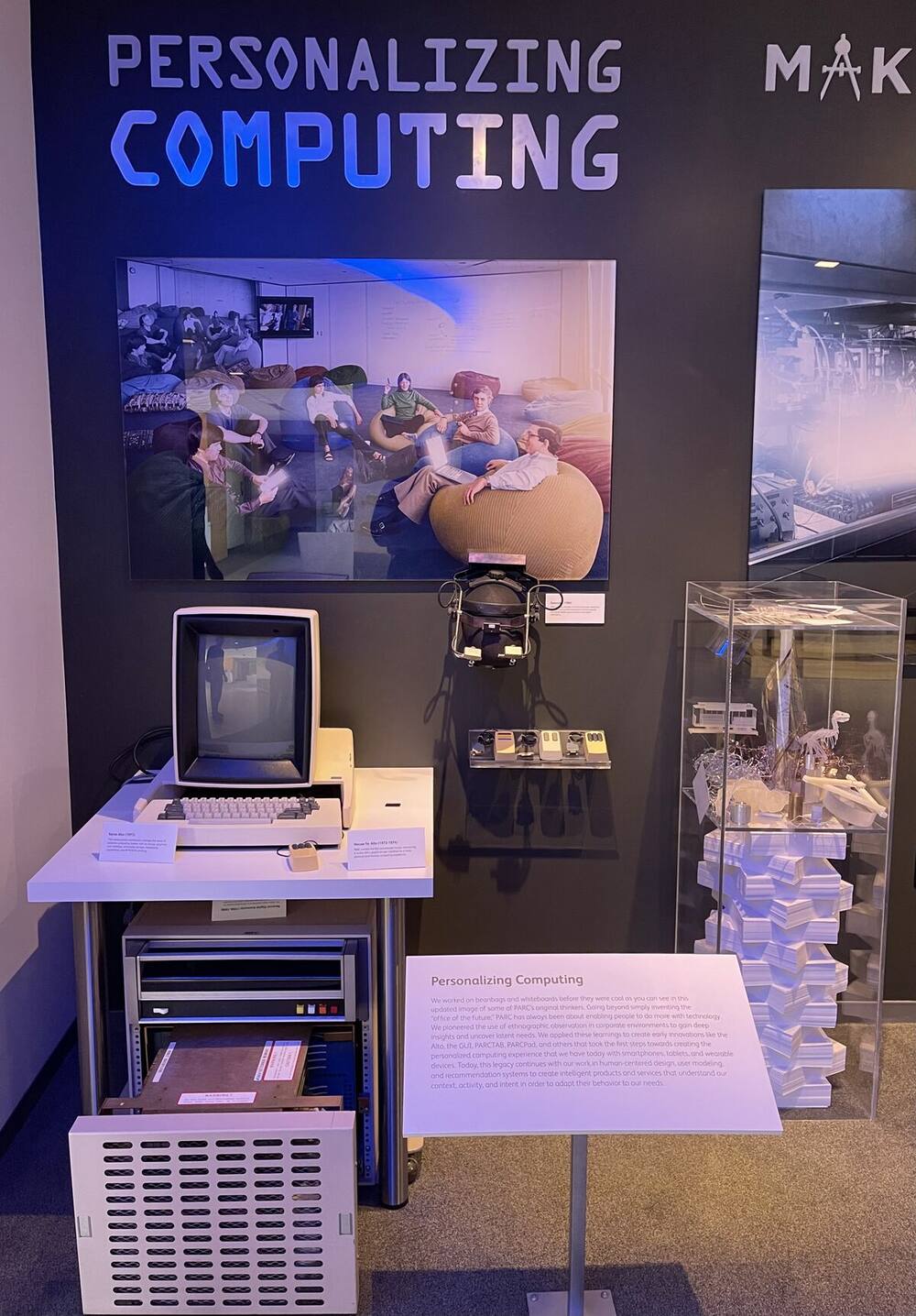
DESIGN.md asks them to write down the rules instead. Photo: Wikimedia Commons / CC BY 2.0.DESIGN.md inverts that back. The file is not a picture of the interface — it is the set of things that must stay true about every interface you generate. That is Sketchpad's constraint model, written in Markdown, addressed to a machine that can finally read prose. The same idea drives diagrams as code: put the source of truth in text, keep it in version control, and let the rendering be the derived artifact.
The Six-Step Process That Beats Better Prompting
The single highest-leverage change in AI design is not the tool. It is doing the thinking before the generator runs. Practitioners who ship real products with these tools converge on roughly the same sequence, and it inverts the traditional order in one specific, deliberate way.
Steps 3 and 4 are in that order on purpose. The traditional path is spec → design → build. With AI it works better to generate two real screens first, because a few concrete visuals make a product legible in a way a document cannot, and the document then has something specific to iron out. You write the spec knowing what the thing looks like.
| Step | What you produce | Why it cannot be skipped |
|---|---|---|
| 1. Problem | Two paragraphs: who, what, evidence | Everything downstream inherits this framing |
| 2. Design brief | DESIGN.md or equivalent |
The one input that stops generic output |
| 3. Key screens | 2 screens × 2 variations | Diverge before you converge |
| 4. Spec | Product + design + tech, one file | Edge cases and empty states live here |
| 5. All screens | Onboarding, empty, error, full-list | Where AI-built products usually fall apart |
| 6. Build | Working app | The cheapest step, and now the last one |
Two details from step 4 are worth stealing outright. First, include a component library in the spec. Without one, generators invent a new visual vocabulary on each pass and the interface drifts into a mess by screen six. Second, decide the data schema before the build, because a database is the hardest thing to change once real records exist.
And one rule for step 6, which is the one most people skip: when the agent changes code, tell it to update the spec and design files in the same pass. Three artifacts that start in sync will drift apart within a week otherwise, and a stale spec is worse than no spec.
What Does an AI Design Stack Actually Cost?
Budget for the meter, not the sticker price. Nearly every tool in this category bills in credits, prompts, or tokens rather than seats, which means the advertised monthly price tells you almost nothing about what you will actually pay.
ADVERTISED                          WHAT DECIDES YOUR BILL
──────────────                      ──────────────────────
"$20/month"            ───────►     How many credits per generation?
"Free tier available"  ───────►     Does the free tier publish or only build?
"Unlimited projects"   ───────►     Unlimited projects, metered generations
"Export your code"     ───────►     Export to where? You now own hosting.
Three cost mechanics are worth knowing before you commit:
- A high-fidelity generation can consume many credits at once. A tier that looks generous in credits can be a handful of real iterations, and design is an iterative activity by definition.
- Failed generations are still billed on several platforms. The run that produced nothing usable still counted.
- Free tiers often let you build but not publish. This is the most common gap between "free plan" and "free to ship," and it appears across the adjacent free AI app builder category too.
The Real Numbers, Side by Side
Here is what each tier actually buys, verified against vendor pricing pages and documentation on September 22, 2026. The free-tier column is stated in each vendor's own unit, because the units are not comparable and pretending otherwise is how these comparisons mislead.
| Tool | Free tier (vendor's own unit) | Publish on free? | Entry paid tier |
|---|---|---|---|
| Claude Design | Not available on Free at all | — | Pro $17/mo annual ($20 monthly) |
| Figma Make | 150 AI credits/day, up to 500/month | Via Figma Community | Professional $16/mo annual ($20 monthly), 3,000 credits/month |
| Google Stitch | Full product, daily design credits | Yes | No paid tier exists |
| v0 | $5/month in credits + 7 messages/day | Yes, deploy to Vercel | Plus $30/user/month |
| Lovable | 5 credits/day, capped at 30/month | Yes, hosting included | Pro $21/mo annual ($25 monthly), 100 credits/month |
| Paper | 100 MCP calls/week, 25 MB image cap | Canvas is live and shareable | Pro $16/mo annual ($20 monthly) |
| pen.dev | The entire product — no credit system | Yes, share by link | No paid tier exists |
| Visily | 300 AI credits/month, 2 editable boards | Yes, public share links | Pro $11/editor/month annual |
Four things in that table are worth more than the prices:
- Claude Design has no free tier and no separate usage limit. It is not on the Free plan at all, and on paid plans it draws from the same shared Claude usage pool as everything else, on a rolling five-hour window. There is no design-specific allowance to budget against. On Enterprise it is off by default until an owner enables it in organization settings.
- Google Stitch and pen.dev have no paid tier at all. Both are currently free in full. That makes them the cheapest serious way to test whether this category helps you — with one catch noted below.
- v0's free tier is 7 messages per day. That is the most concrete free-tier constraint any vendor in this table publishes, and it is a useful reality check on what "free" buys in an iterative activity.
- Visily gates code export behind the paid tier. The free plan designs; it does not hand you the code.
The honest way to compare is still not price per seat, but cost per usable iteration — and since almost no vendor publishes that, the only reliable method is to run the same brief through two tools and count how many prompts each needed to reach something you would show a customer.
The Failure Modes Nobody Puts in the Comparison Table
Every ranking page lists features. Almost none list the ways these tools fail. Here are the three that cost the most, in ascending order of damage.
The manual-edit trap
On several canvas tools, making a manual edit can break prompt-based refinement afterward. The tool becomes a starting point rather than an iterative partner: you can hand-edit, or you can keep prompting, but the two stop composing. The practical defense is to get the structure right by prompt first and treat manual edits as the final pass, not a mid-flight correction.
The taste gap
The tools check their own work for breakage, not for taste. Claude Design screenshots its own output, inspects it, and fixes visible defects unprompted — which is genuinely impressive and genuinely narrow. Overlapping text gets caught. A layout that is merely crowded does not, because crowding is a judgment call and a checker that fires on judgment calls would cry wolf on every build.
This is the honest ceiling of the category right now. Automated review covers breakage. The last 10% — density, rhythm, hierarchy, whether it feels like anything — has no machine reader. That work is still yours, and it is the work that separates a generated screen from a designed one.
The security gap, with a number
This is the one to take seriously. Researchers scanning 1,645 applications built on one popular AI builder found 170 of them — about 10% — had exposed databases, across 303 vulnerable API endpoints. Roughly 70% had row-level security disabled entirely. The flaw was assigned CVE-2025-48757, discovered in March 2025 by Matt Palmer and Kody Low after a generated app let them read its entire user database by removing an authorization header.
The root cause was not a bad model. It was the generator creating database tables without configuring access policies — so anything holding the public key could read the data. To its credit, the vendor updated its generation pipeline to include those policies in new schemas. Existing apps stayed exposed unless their owners fixed them by hand.
The category lesson generalizes well past any one vendor:
Sign-in supplies identity. It does not supply isolation. A login proves who someone is. A separate row-scoping rule decides which records that person can see. These are two mechanisms, they are configured separately, and on most platforms the second one defaults to off. Configure it explicitly, then test it with a second account before anyone real signs up.
We state that plainly about our own product too — row scoping in Taskade Genesis is opt-in and off by default, and we would rather say so than let someone assume a login is a wall. If a page tells you AI-generated apps are secure by default, it is selling something. A generated interface can look completely finished and still be wide open, which is the same lesson why AI-generated apps break reaches from the reliability side.
The 2026 Corporate Facts Most Comparisons Still Get Wrong
This category changed owners faster than the articles describing it changed dates. If you are reading a comparison written before September 2026, check these six facts before you trust its recommendations — several widely-cited guides still describe companies that no longer exist in the form they describe.
| Tool / company | What actually happened | When |
|---|---|---|
| Cursor (Anysphere) | Acquired by SpaceX in an all-stock deal valuing it at $60B; now sits inside SpaceXAI | Closed Aug 14, 2026 |
| Base44 | Acquired by Wix; total consideration passed $150M including earn-out | 2025, earn-out through 2026 |
| Lovable | Raised $400M Series C at $13.3B — roughly double its valuation eight months earlier | Aug 12, 2026 |
| Replit | Shipped Agent 4 and closed a $400M Series D at $9B, 3× its valuation six months prior | Mar 11, 2026 |
| OpenAI Agent Builder | Announced winding down; Agent Builder and Evals shut down | Shutdown Nov 30, 2026 |
| Windsurf | Google paid $2.4B to license tech and hire the CEO; Cognition acquired the remaining IP and brand | 2025, still shapes 2026 coverage |
Two of those matter directly to a tool decision rather than as trivia. Any guide recommending OpenAI's Agent Builder as a current pick is recommending a product with a published end date. And a tool whose parent company changed hands twice in eighteen months is a different risk profile from an independent vendor, regardless of how good the output is — which is the honest argument for preferring tools that let you export what you build.
How We Compared These Tools
Transparency about method matters more in this category than in most, because nearly every comparison page in the top results is published by a vendor that ranks itself first. We are a vendor too. Here is how to read this piece:
- Capabilities and dates come from vendor announcements, official documentation, and primary sources, each linked inline. Where a fact could not be confirmed from a primary source, it is not stated.
- The
DESIGN.mdcolumn is mechanism-based, not marketing-based. "Repo convention" means the tool reads Markdown in your project because coding agents read Markdown in your project — not because a vendor shipped a feature. We say so rather than scoring it as support. - Pricing moves constantly in this category and several tools repriced more than once in 2026. Verify against the vendor before committing budget.
- Taskade appears in one section, at the end, about the step after the mockup — because that is the step we work on, not because it competes with a canvas tool.
- We name genuine strengths of tools we compete with, including the ones where they beat us, because a comparison that finds no competitor strengths is an advertisement.
The Tools, One by One
Grouped by the job they actually do. Prices and capabilities move fast in this category — verify against the vendor before committing.
Canvas-native: brief in, artifact out
Claude Design is the strongest option when you are starting from nothing. Its distinguishing behavior is that it interviews you before it builds — tone, visual direction, motion style, audience, how it ends — with a "decide for me" escape on every question, which matters enormously if you are not a designer and do not know what to ask for. It screenshots and fixes its own output. It exports to Canva, PPTX, and PDF, and hands off to Claude Code for anything else. Since August 17, 2026 you can invoke the same canvas from inside Claude Code with /design. Its weakness is well documented by its own users: ask for open-ended variations with no design system attached and you get crowded, interchangeable output.
Google Stitch is the only tool that natively reads the DESIGN.md format, for the straightforward reason that Google wrote the spec. It outputs live HTML and CSS with Tailwind classes and includes a "Paste to Figma" path. It has no paid tier — the full product is free, metered by daily design and redesign credits. If you intend to build your workflow around a portable design-system file, this is where support is least ambiguous and the cheapest place to test the idea.
Paper is built on real HTML and CSS rather than a proprietary canvas format — real flexbox layout, real font rendering — which is a structural advantage for agent workflows, because an agent can read and write the canvas directly. Its MCP server ships 24 bidirectional tools against Figma's 3 read-only beta tools, and it added a Tailwind export alongside "Copy as React." Free gives you 100 MCP calls per week; Pro is $16/month billed annually. It opened in alpha in September 2025 and now runs a full three-tier commercial structure, so confirm current status with the vendor if production reliance matters.
pen.dev (formerly Pencil) is an agentic canvas where several agents work simultaneously, each with its own cursor. It ships a CLI and MCP support, keeps Figma and Sketch keyboard shortcuts, exports frames as HTML and CSS or Tailwind in one click, and uses an open .pen JSON format. The whole product is currently free with no credit system — but read the catch: pen.dev is the canvas, not the generator. Real AI generation requires connecting a separately paid coding agent such as Claude Code, so "free" describes the surface, not the stack.
OpenPencil is the open-source entry, which makes it the cheapest per prompt if you bring your own model keys — and the right pick if you need the tool itself to be inspectable.
Prompt-to-code: design that arrives as files
v0 by Vercel generates React and Tailwind and has moved well past component generation into a full development environment with Git integration and database connectivity. Its pricing has changed more than once in 2026, so check current tiers directly.
Lovable produces a full application with a backend, which is why it appears in app-builder comparisons as often as design ones. It raised a $400M Series C at a $13.3B valuation in August 2026, with more than 60 million projects created since launch — genuine scale, and the reason its security history is worth learning from rather than dismissing.
Magic Patterns and Superdesign both generate React components from prompts and fit teams that want AI output to land directly in an existing component-driven codebase.
Design-file: extend what your team already has
Figma Make has the shortest path from an existing component library to a working prototype. If your team already lives in Figma with a maintained design system, the continuity is worth more than any single generation-quality comparison — that library is your constraint file, already written.
Visily and Uizard are the most approachable wireframing tools in the group and the best fit for early, low-fidelity exploration — turning a screenshot or a sketch into an editable wireframe quickly. Visily's free Starter plan gives 300 AI credits a month and two editable boards, with Pro at $11 per editor per month billed annually — the cheapest paid tier in this comparison. Note that code export is Pro-only on Visily: the free plan designs, it does not hand you the code. Neither tool documents design-system-file input, so expect to carry brand consistency yourself.
Banani and Creatie round out the group with prompt-to-UI generation aimed at product teams.
What Is the Best AI Wireframe Generator?
For wireframes specifically — low-fidelity layout exploration before any visual design — Visily and Uizard are the most direct tools, because both accept a screenshot or a hand sketch and return an editable wireframe. That is a different job from the prompt-to-interface tools above, and using a high-fidelity generator for it wastes the step.
A wireframe answers "what goes where." A mockup answers "what does it look like." A prototype answers "what happens when I click." Tools that are excellent at one are often mediocre at the others:
| You want | Fidelity | Best fit | Why |
|---|---|---|---|
| Wireframe | Low — boxes and labels | Visily, Uizard | Sketch or screenshot in, editable structure out |
| Mockup | High — real visual design | Claude Design, Stitch, Figma Make | Brief in, polished screen out |
| Prototype | Interactive — clickable flows | Figma Make, Claude Design | Multi-screen with state and navigation |
| Production UI | Real code | v0, pen.dev, Paper | HTML, CSS, React you can host |
Do not skip the wireframe stage because the generator can jump straight to high fidelity. A polished screen is much harder to argue with than a box diagram, which means a wrong structure survives longer when it arrives beautiful. The cheapest place to discover that a page is doing two jobs at once is in grey boxes.
Can AI Generate a Wireframe From a Screenshot?
Yes, and this is the most reliable single trick in the category. Feed a wireframing tool a screenshot of an interface whose structure works — yours, a competitor's, or a reference you admire — and ask it to extract the layout rather than the visuals. You get the skeleton without the styling, which is exactly what you want at this stage, and it sidesteps the blank-page problem that makes wireframing feel slow.
The same move works one level up: reference screenshots are the fastest way to give a high-fidelity tool a visual direction when you do not yet have a DESIGN.md written.
Which AI Design Tool Fits Your Job?
| If you are… | Start with | Because |
|---|---|---|
| A founder with no design background | Claude Design | It asks the questions you do not know to ask |
| A design team on Figma | Figma Make | Your component library is already the constraint |
| A developer who wants the files | v0 or pen.dev | Real HTML, CSS, React out the other end |
| Standardizing across many tools | Google Stitch + DESIGN.md |
The only native support for a portable spec |
| Cost-sensitive or privacy-sensitive | OpenPencil | Open source, bring your own model keys |
| Shipping an app, not a mockup | A workspace builder | The mockup is 20% of the work |
What Happens After the Mockup?
A mockup is not an application, and the distance between them is where most AI design projects quietly stop. A design tool hands you a beautiful screen. A shipped product also needs a database, authentication, a domain, hosting, and somewhere the data can be read and edited after launch — plus someone to keep all of it running.
There are two honest answers to that gap, and the right one depends on what you are building.
Own the gap yourself. Prompt-to-code tools give you the files, and you point your own hosting, database, and domain at them. You keep complete control and complete responsibility. For a developer, or anything with unusual infrastructure needs, this is the correct choice.
Or skip the handoff. Taskade Genesis generates a live application on a shareable URL with the database, AI agents, and automations already attached — no deployment step, because there was never a handoff. It commits to a theme decision, a page plan, and the exact data fields before it writes interface code, which is the same discipline the six-step process above describes, applied automatically. The free plan includes 3 apps, 1 agent, and 6,000 credits to start with no credit card; custom domains unlock on Business at $25/month billed annually. Browse what people have built or start from a brief.
Neither answer is universally right. What is universally wrong is picking a tool without knowing which half of that gap you just signed up for.
Frequently Asked Questions
Does a DESIGN.md actually improve output quality?
Yes, and the effect is larger than prompt engineering. A design brief gives the model information it cannot infer — which color is the action color, which is the hover tint, what the spacing scale is, what must never happen. Without it the model picks the statistical average of everything it has seen, which is exactly why unguided AI design looks interchangeable. The mechanism is the same one behind AI slop generally: with no constraint, a model regresses to the mean.
Can I use a design system from another product?
You can, and it usually disappoints. A design system lifted from a third-party UI kit is tuned for that product's content, density, and audience, so applying it wholesale often produces something worse than no system at all. Borrow the reasoning — why this spacing, why this color role — and write your own file. The value is in the constraints being true for your product, not in where they came from.
Do I still need a designer?
For anything customers pay for, yes — and the job changed rather than shrank. Generation handles the first 90%; taste, hierarchy, and judgment handle the last 10%, and the last 10% is what these tools measurably cannot check. The skill that appreciates is knowing what to ask for and recognizing when the output is subtly wrong.
What is the difference between AI design tools and AI app builders?
Design tools produce an interface. App builders produce a running application with data, users, and a URL. The categories overlap where a design tool exports code, but the distinction matters for what you have at the end of an afternoon. Compare the builder side in best AI app builders and free AI app builders.
How do I keep AI-generated screens consistent with each other?
Generate a component library early and make every later screen reuse it. This is the single most effective consistency mechanism, and it is why the six-step process puts a component library inside the spec. Without one, each generation invents fresh components and the product drifts into visual noise by the sixth screen.
Are these tools good enough for production interfaces?
For internal tools, prototypes, landing pages, and MVPs, comfortably. For a customer-facing product, treat the output as a strong first draft that needs a design review and a security review. The CVE-2025-48757 findings above are the clearest evidence that "looks finished" and "is finished" are different states.
Which AI design tool has the best free tier?
The open-source options are the cheapest by a wide margin if you bring your own model keys, since you pay inference cost rather than a subscription. Among hosted tools, free tiers usually let you build but restrict publishing, export, or both — the same pattern documented across free AI app builders. Check the publish path, not the credit count.
Will AI design tools replace Figma?
Not on current evidence. Figma's advantage is not generation quality, it is that a real design system, a component library, and a team's history already live there — and that is precisely the constraint input these tools are hungry for. The likelier shape is the one already visible: generation tools that read a design system and write back to it, with the system remaining the durable asset.
Further Reading
- Best AI App Builders 2026 — the builder side of the same workflow
- Best Free AI App Builders — 15 tested, every free-plan limit verified
- Best Vibe Coding Tools — 17 code-generation tools ranked
- Why AI-Generated Apps Break — the reliability half of this story
- AI Slop Explained — why unconstrained generation regresses to the mean
- Anthropic & Claude History — Claude Design in the wider product lineup
- What Are AI Agents — the agents that read your design file
- Agent Builders Explained — how agent tooling composes
- History of Mermaid — diagrams as code, the same text-as-source-of-truth idea
- AI Design and Branding Tools — build your own palette and brand tools
- Best AI Tools for Designers — the generative-art side of a designer's stack
- State of Vibe Coding — market data behind the category
- Origin of Living Software — why apps that hold their own data behave differently
Sources
- Introducing Claude Design by Anthropic Labs — Anthropic, April 17, 2026
- Stitch's DESIGN.md format is now open-source — Google, April 21, 2026
- CVE-2025-48757 — National Vulnerability Database
- Sketchpad — Ivan Sutherland, 1963
▲ ■ ● The drawing was never the valuable part — the constraints were, and Sutherland knew it in 1963. Write the brief, then let the machine draw. Memory feeds Intelligence, Intelligence triggers Execution. Turn a brief into a live app →