
TL;DR: Build a contract lifecycle in Taskade Genesis: case project (Memory) + drafting agent + review agent (Intelligence) + e-sign automation (Execution). Every matter has a complete audit trail, every draft, review annotation, and signature in one place. Replace 5 tools and a lot of version sprawl with one workspace. Build a legal app →
What You Can Build
Contract work usually spans five disconnected tools: a Word doc, an email thread, track changes, an e-sign portal, and a file cabinet. Replace all five with one workspace, where every matter keeps a complete audit trail. Your Custom AI Agents can:
- 🔶 Assist with legal writing and case summarization.
- 🔶 Provide expertise on specific subject matters.
- 🔶 Suggest recommended document formatting.
- 🔶 Improve your reasoning and argumentation.
What Are AI Agents?
AI Agents are smart tools that automate tasks such as research and content creation. They save you time by handling routine activities inside projects.
Check this video guide for a quick introduction. 👇
Create a Legal Advisor Agent
There are two ways to build AI agents in Taskade. You can start from scratch (advanced method), or choose from dozens of AI agent templates.
This guide uses the 👩 Legal Advisor agent template.
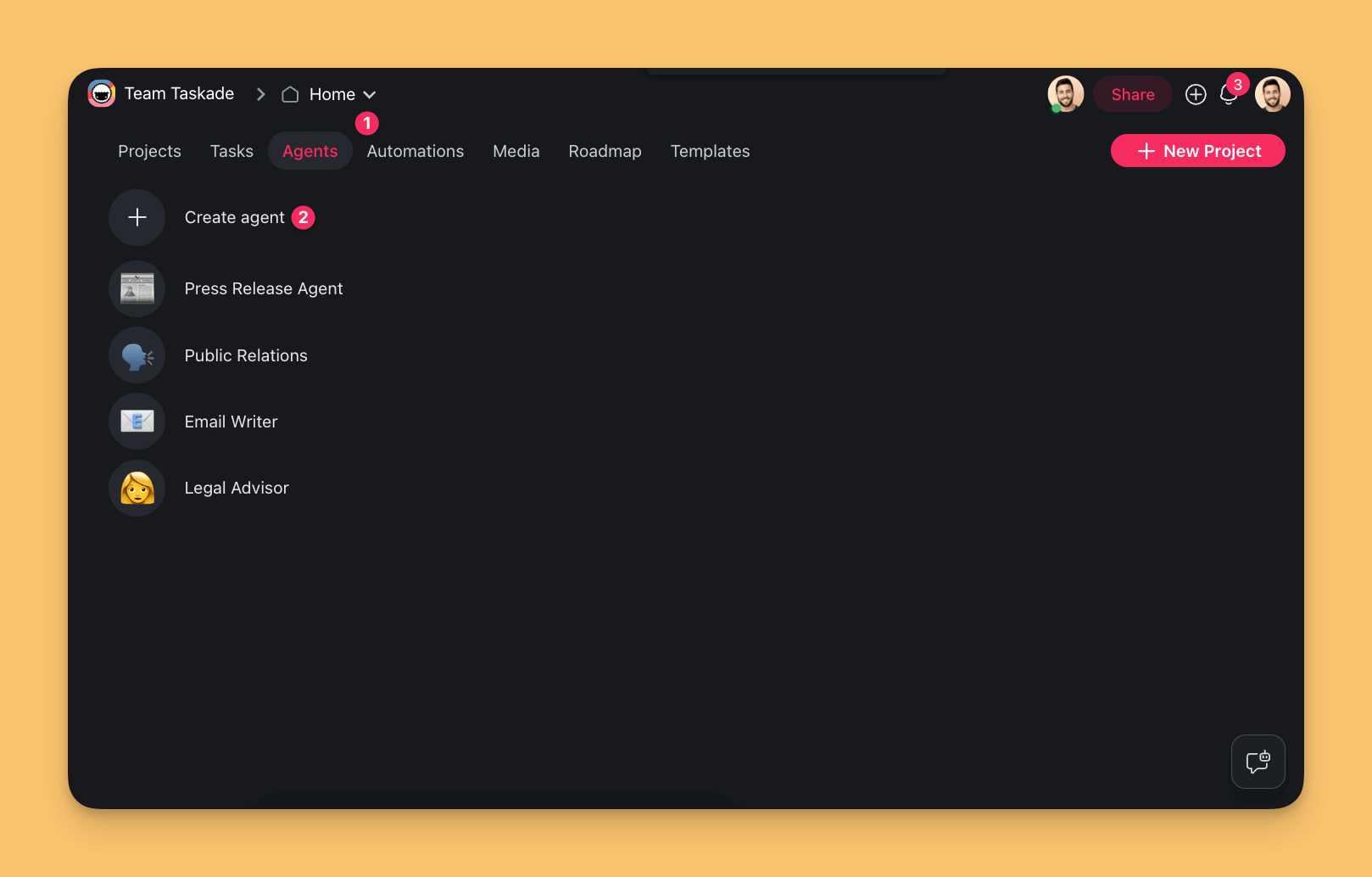
Go to the Agents tab in the workspace/folder.
Click ➕ Create agent.
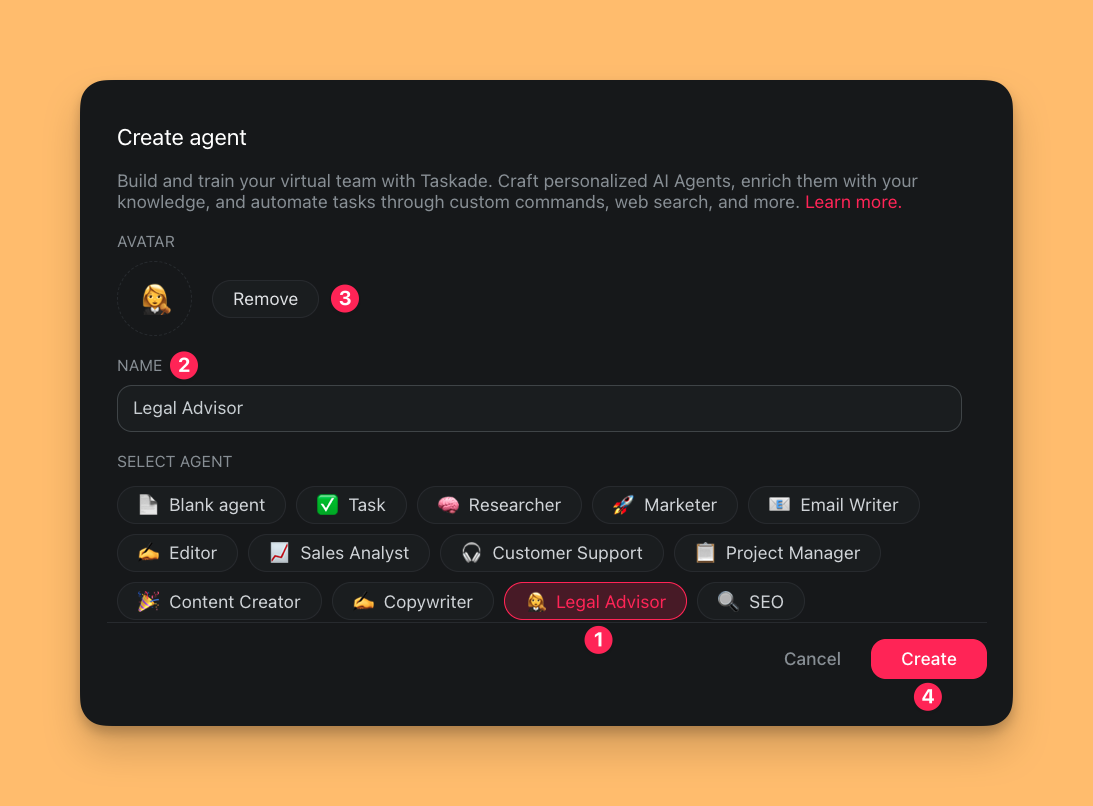
You are now in the Agent Creator:
- Choose the 👩 Legal Advisor agent template from the list.
- Create a unique name for your custom agent.
- Select an avatar or upload your own.
- Click Create to save the new agent.
Train the New Agent
Our 👩 Legal Advisor agent starts with some basic knowledge, but it needs context to be more effective. You can train the agent on using anything from court filings to legal memos and briefs. The more varied the documents, the better equipped the agents will be to provide tailored assistance across a range of legal scenarios.
Here are a few document types you can use:
| Legal case documents | Legal research materials |
|---|---|
| Annotations or commentary on cases | Statutes, regulations, legislative history |
| Citation guidelines | Articles from legal journals |
| Argumentation and negotiation materials | Precedent-setting case laws |
| Historical legal documents | Legal textbooks and treatises |
| Subject-matter specific resources | Specialized legal databases |
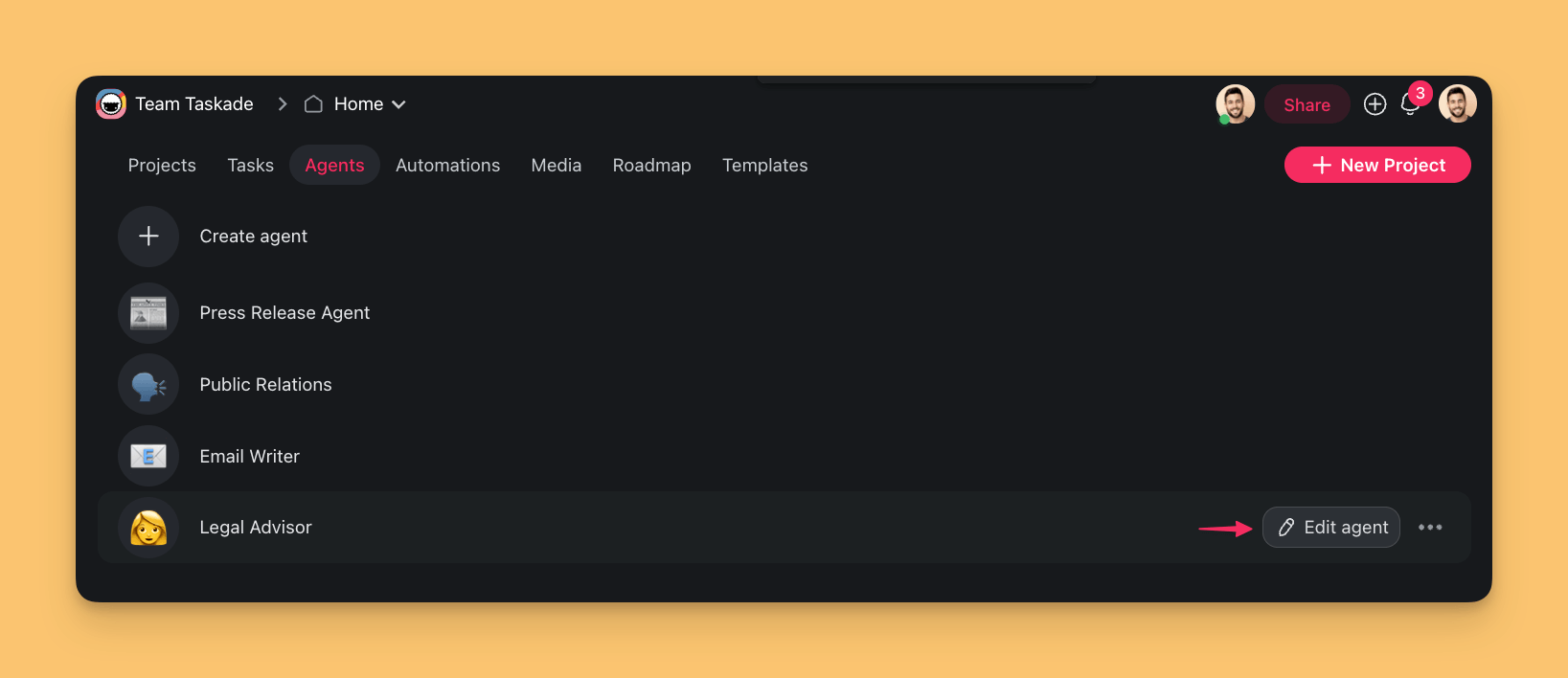
Go to the Agents tab in your workspace.
Hover the mouse cursor over the 👩 Legal Advisor agent.
Click the ✏️ Edit agent button on the right.
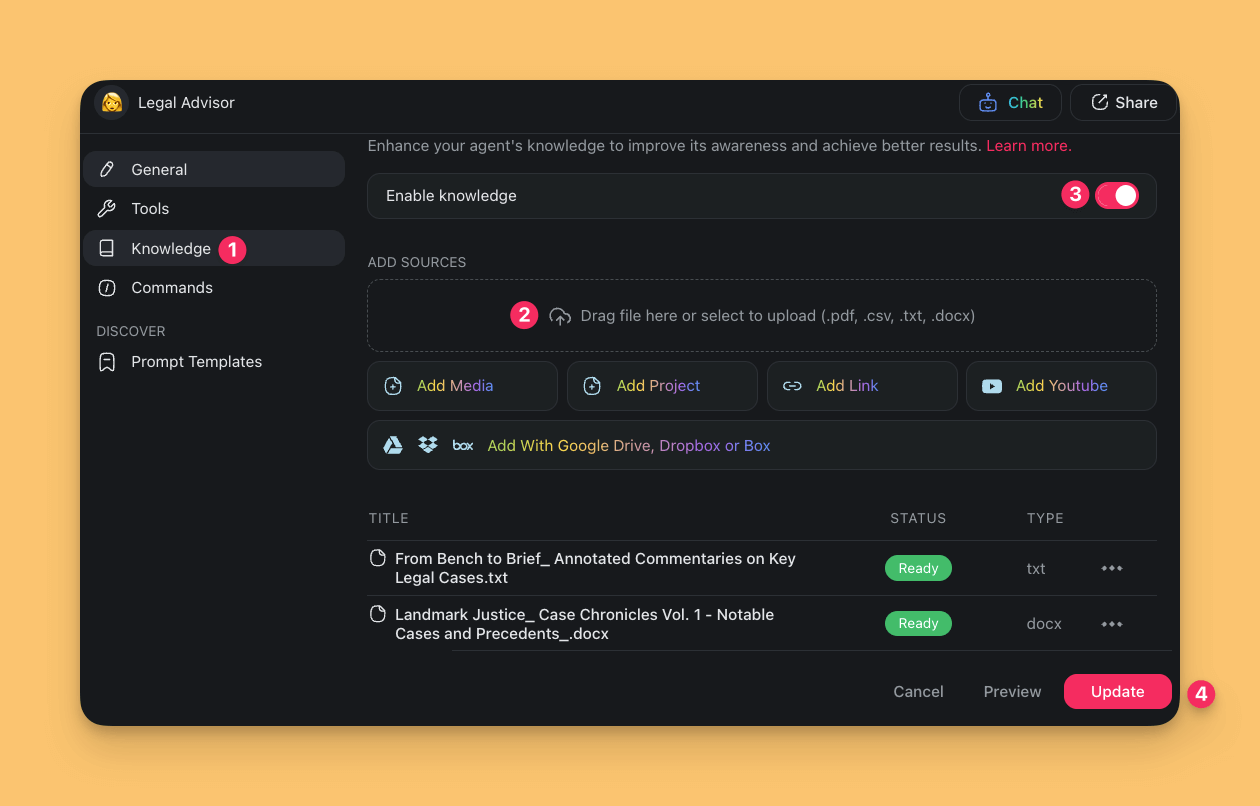
- Choose the Knowledge tab on the left.
- (method #1) Click the box under ADD SOURCES and select the file.
- (method #2) Drag & drop the file from your device.
- Enable the Knowledge toggle in the top-right corner.
- Click Update to save changes.
Note: The 👩 Legal Advisor agent works best with .txt, .pdf, or .docx files.
Use the Agent in Your Practice
There are several ways you can interact with your agent:
Go back to the Agents tab.
Select the 👩 Legal Advisor agent.
Start a conversation and ask your agent questions.
🧩 Example: Enhance your courtroom strategy by engaging with in an interactive rehearsal with the 👩 Legal Advisor agent. Upload your case files and notes as agent knowledge or describe the details, and ask the agent will adopt the role of opposing counsel. This exercise will help you to refine your arguments and uncover any potential weaknesses in your case.
Open a project in the workspace/folder.
Select the text and type /name of a custom command.
- A partial command name is enough.
- Press ⌨️ Enter to execute the command.
🧩 Example: Type or paste your contracts or memos into the project editor and use an agent command to apply Bluebook standards to your citations. Read Add Custom Commands to learn how to create your own commands.
- Open a project and click the chat balloon icon 💬 (bottom-right).
Click the button at the top of the chat window.
Choose the 👩 Legal Advisor agent from the list.
Type your prompts to interact with the agent.
- Type "/" to show the list of custom agent commands.
- Click Copy to save the output, or Add to Project to paste it into the editor.
🧩 Example: Describe a case in a project and ask the 👩 Legal Advisor agent to summarize the legal rules and reasoning used by the court.
A Contract Flow with Agents
Traditional contract lifecycle = Word doc → email thread → track changes → e-sign portal → file cabinet. That is 5 tools, repeated re-keying, and heavy version sprawl. In Taskade, the same flow is a single project + agent + automation chain:
Every matter has a complete audit trail: every draft, every review annotation, every signature, all in one Taskade project with the agents and automations that produced them.
Related guides
- Custom AI Agents. Train drafting and review agents on your firm's playbook.
- Agent Knowledge & Memory. Upload precedent contracts as knowledge sources.
- Multi-Agent Teams. Drafting agent plus review agent working together.
- Automation Actions. E-sign integration via automation.
- Version History. Complete audit trail of every edit.
- Workflow Generator. Describe your contract lifecycle in plain English.