
Overview
A multi-agent system assigns one goal to a team of specialized AI agents. Each agent has a role, knowledge, and tools. In Taskade Genesis, you describe this team in plain English. The agents share workspace memory and pass results between specialists. Run them in sequence, in parallel, or with a supervisor.
Use Multi-Agents to divide work among personalized AI assistants. The agents can complete several background tasks at the same time.
Instead of one agent doing everything, you compose specialized agents that pass work to each other. A researcher gathers sources, a writer drafts, and a reviewer catches errors. Each agent has its own prompt, tools, and knowledge. Together they behave like a real team.
TL;DR: Build a team of specialized AI agents that share one workspace memory. Assign each agent a clear role. Run the team in sequence, in parallel, or with a supervisor. Each output moves to the next specialist without manual copying. Build an agent team →
Answer first (40-second version): A multi-agent system divides a job among AI agents that each own one skill, then coordinate the handoffs toward a shared outcome. Frameworks like CrewAI, AutoGen, LangGraph, and OpenAI's Agents SDK do this with Python code. Taskade Genesis does it without code, inside one workspace, with persistent memory the whole team shares. That last part is the difference: most tools wire agents together, then make you wire up the data plumbing too. Taskade hands every agent the same living memory for free. Try it free →
This is the same pattern the whole industry calls a multi-agent system (sometimes "multi agent AI" or "agent orchestration"). The 2026 playbook names three topologies that keep coming up: a supervisor that dispatches workers, an orchestrator-worker loop (the most common in production), and a swarm of peer agents with no central boss. Taskade Genesis supports all three through one tab and one Taskade EVE prompt, which is covered in detail below.
The solid arrows are the forward pass. The dashed arrows are feedback loops: reviewers can bounce work back to earlier agents, which is how real teams work. This same pattern powers Taskade Genesis: multiple specialized agents collaborate internally to build an app from a single prompt.
How Taskade EVE Delegates
The fastest way to spin up a team is to ask Taskade EVE, the meta-agent that orchestrates Memory, Intelligence, and Execution. You describe the outcome in one sentence, and Taskade EVE creates the specialists, wires their handoffs, and hands the team back to you running. Taskade EVE is the supervisor in the diagram below: it reads the request, picks who acts, and routes the result.
The dashed arrow is the part competitors charge you to build. Every agent reads and writes the same workspace memory, so Taskade EVE never has to copy a result from one agent's output into another agent's input. The memory is the connective tissue. See Workspace DNA for how Memory, Intelligence, and Execution reinforce each other.
Round-Robin vs Hierarchical
Two teams can hold the same agents and behave completely differently depending on how the work moves. A round-robin (peer / swarm) team passes the baton agent to agent with no boss. A hierarchical (supervisor) team puts one agent in charge of routing. Pick by the shape of the job.
Use round-robin when every stage adds value in a fixed order, like a content pipeline. Use hierarchical when the next step depends on context, like a support ticket that can be billing, technical, or sales. Taskade Genesis runs both, plus a parallel mode, from the orchestration setting shown later in this guide.
A Hand-Off, Step by Step
A handoff is the moment one agent finishes and the next one picks up with full context. In code-first frameworks this is a function that returns another agent. In Taskade Genesis it is automatic: the shared memory carries the context, so the next agent already knows what happened. Here is one support ticket moving through a supervisor team.
No copy-paste between agents. The triage agent's finding ("two charges found") is already in memory when the billing agent starts, because they share one brain. That is the hand-off Taskade gives you without any wiring.
Single Agent or a Team?
Use one agent for one job. Reach for a team when the work needs different specialists in sequence, or when training one agent on too many unrelated topics is impractical.
| Use one agent when... | Use a multi-agent team when... |
|---|---|
| The job is a single skill (answer, summarize, draft) | The job has distinct stages (research, then write, then review) |
| One knowledge set covers it | Each stage needs different knowledge or tools |
| You want the simplest setup and lowest credit use | Quality improves when a second agent checks the first |
| A person prompts it directly each time | The handoffs run automatically end to end |
Taskade's advantage over standalone agent tools is workspace memory. Your agents share it, so the researcher's findings flow straight to the writer with no copy and paste. See Custom AI Agents to build the individual specialists first.
Taskade Genesis vs Code Tools
The developer world has strong multi-agent frameworks: CrewAI, AutoGen, LangGraph, and OpenAI's Agents SDK. They are excellent if you write Python and want to assemble the plumbing yourself. Taskade Genesis aims at a different person: the operator who wants a working agent team today, in a workspace, without code. Here is an honest side-by-side.
| Taskade Genesis | CrewAI | AutoGen | LangGraph | OpenAI Agents SDK | |
|---|---|---|---|---|---|
| Setup | Describe it in plain English | Python, role-based | Python, conversational | Python, graph of nodes | Python / TypeScript |
| Code required | None | Yes | Yes | Yes | Yes |
| Orchestration | Sequential · parallel · supervisor | Role / sequential | Group chat | Graph + branching | Handoffs + routines |
| Shared memory | Built-in, every agent reads the same workspace | RAG you configure | Conversation history | State you checkpoint | Sessions you wire |
| Tools per agent | Built-in toolkit + 100+ integrations | Bring your own | Bring your own | Bring your own | Bring your own |
| Where it runs | Hosted, shareable, publishable as an app | Your infrastructure | Your infrastructure | Your infrastructure | Your infrastructure |
| Best for | Operators, teams, non-coders | Python devs, role workflows | Research, human-in-the-loop | Complex state machines | OpenAI-stack production |
A few honest notes so you choose well. CrewAI has the gentlest learning curve of the code frameworks and a clean role model, great when you already write Python. LangGraph gives the most control for complex branching and is the most production-mature of the four. AutoGen is strong for conversational, human-supervised research, though Microsoft folded its future into a broader agent framework. OpenAI's Agents SDK is the supported successor to the Swarm reference project, built around handoffs and guardrails on the OpenAI stack. If your team writes code and wants maximum control, those are real options.
The reason to pick Taskade Genesis is the row that the others all answer with "you configure it": shared memory. In a code framework you connect the agents, then separately stand up the database, the retrieval, and the state passing. In Taskade, the workspace memory already exists, every agent already reads it, and the whole team is one prompt away. That is the "multi-agent without code, in one workspace, with memory" promise made concrete. For a ranked tour of the category, see Best Multi-Agent Platforms.
Multi-Agent vs One Big Model
People sometimes ask why not use one very capable model instead. Production teams answer this way in 2026: a multi-agent system wins when the work splits into specialties, runs in parallel, or benefits from one agent critiquing another. It costs more tokens, so reach for it when the job earns it.
| Reach for a team when... | Stay with one agent when... |
|---|---|
| The job has distinct stages (research → write → review) | The job is a single skill |
| Parallel work finishes faster (multi-source analysis) | The task is quick and linear |
| A second agent checking the first raises quality | Speed and low credit use matter most |
| Different stages need different tools or knowledge | One knowledge set covers everything |
Important: Taskade introduced a new way to chat and interact with multiple agents. See the guide to AI Teams to learn more.
See a Multi-Agent Team Run
The fastest way to understand a multi-agent system is to clone one and watch the agents coordinate. These are real, live Taskade Genesis apps from the Community Gallery. Click either screenshot to open the app, then clone it in about a minute and look at how the team is wired.

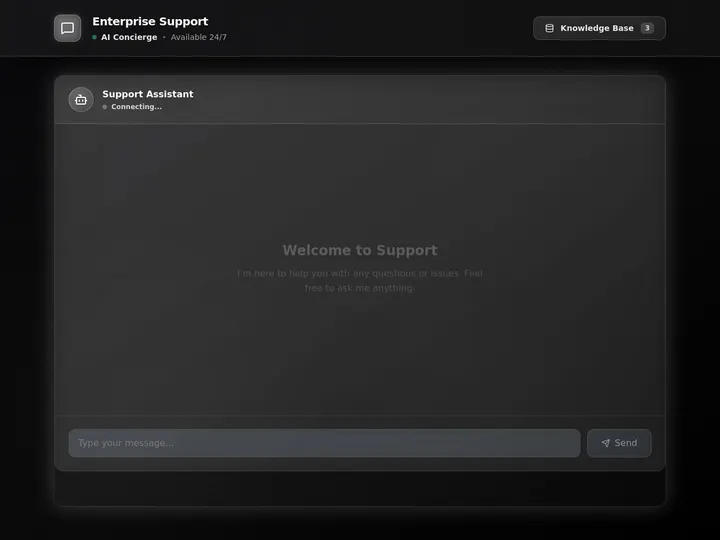
The Sales Agent Studio runs a lead-qualifier, a follow-up writer, and a CRM-updater as one coordinated team. The Support Agent triages incoming messages, drafts answers from your docs, and routes anything it cannot resolve. This is the multi-agent pattern no open-source framework ships ready to run, because each agent already shares the same workspace memory. Clone either, open the Agents tab, and you can see exactly how the handoffs are set up.
One of our first Enterprise customers described this difference after building a production field-service dashboard on Taskade Genesis: "what I did in weeks would have taken 40 people 18 months." A multi-agent team lets a single operator run work that used to need a department.
Watch Agents Hand Off Work
Each agent in a team brings its own tools to the job. The agent-workflows view below shows agents picking up tasks, calling tools, and passing results along, all inside one workspace.

Every Taskade agent ships with a large built-in toolkit plus the full 100+ bidirectional integration catalog: triggers pull events in, actions push data out. One agent can search the web while another updates your CRM and a third posts to Slack, all in the same run. See Tools for AI Agents for the full catalog.
Set Up Your AI Agents
You can build and deploy a team of multi-agents using your existing Custom AI Agents, or you can create new agents for this purpose.
🤔 When to create AI agents: If a task comes up regularly or takes over 15 minutes of your focus, or if you are frequently troubleshooting the same problem, setting up an AI agent can save you hours every week.
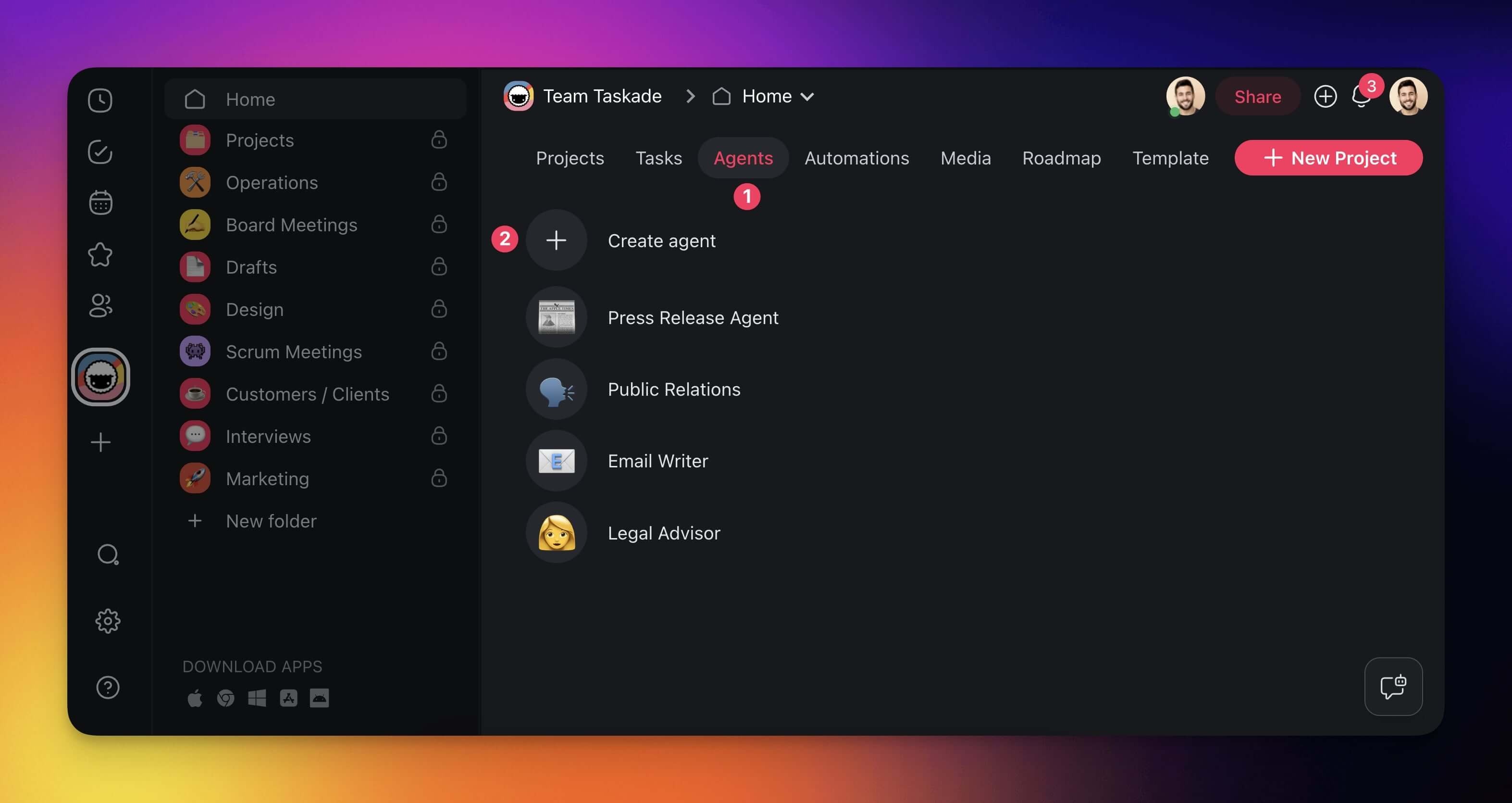
- Go to the Agents tab at the top of your workspace/folder.
- Click ➕ Create agent to open the agent creator.
Method #1: Start from scratch
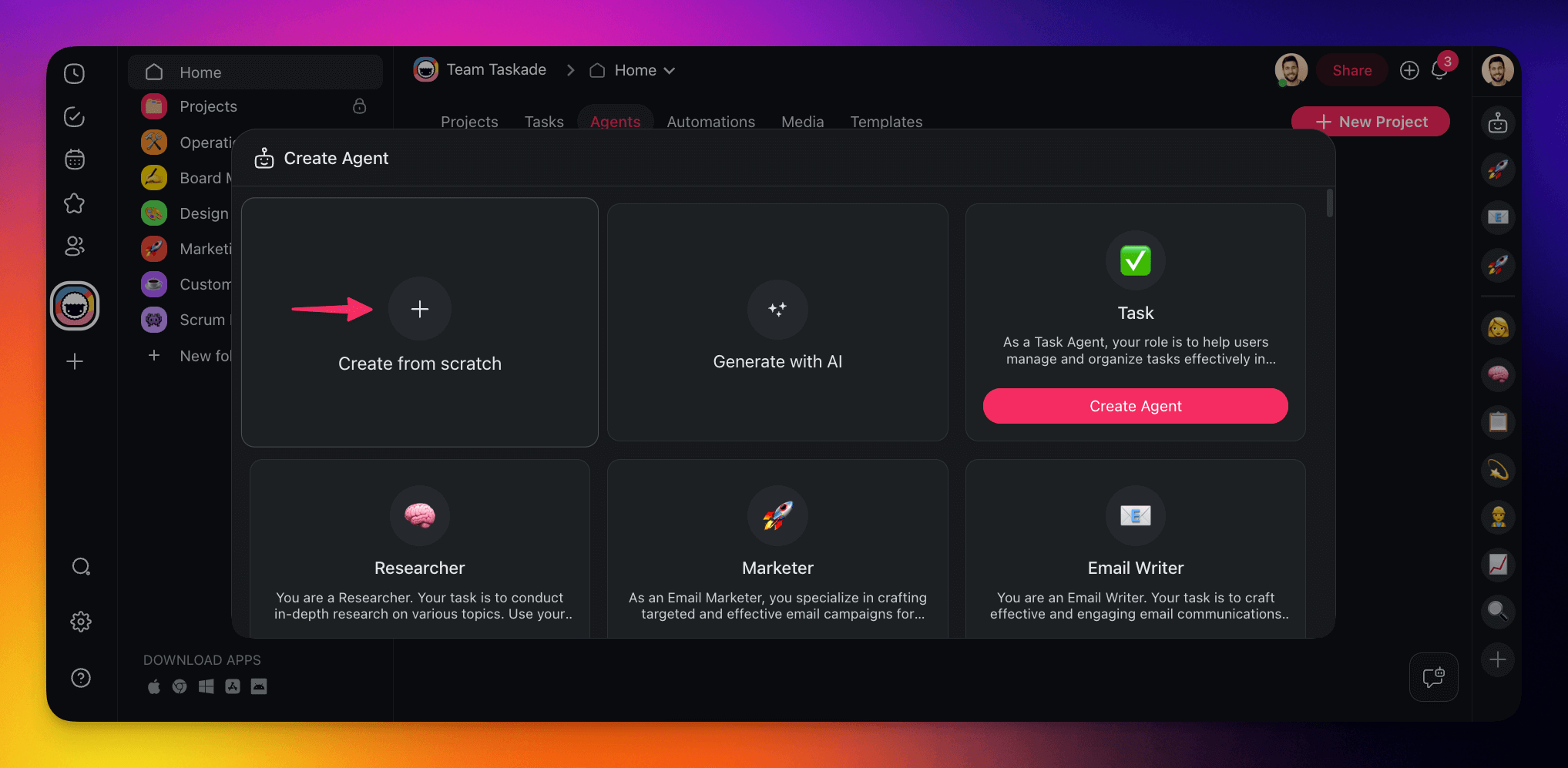
- In the agent creator, click ➕ Start from scratch.
- Create a unique name for your custom agent.
- Select an avatar or upload your own.
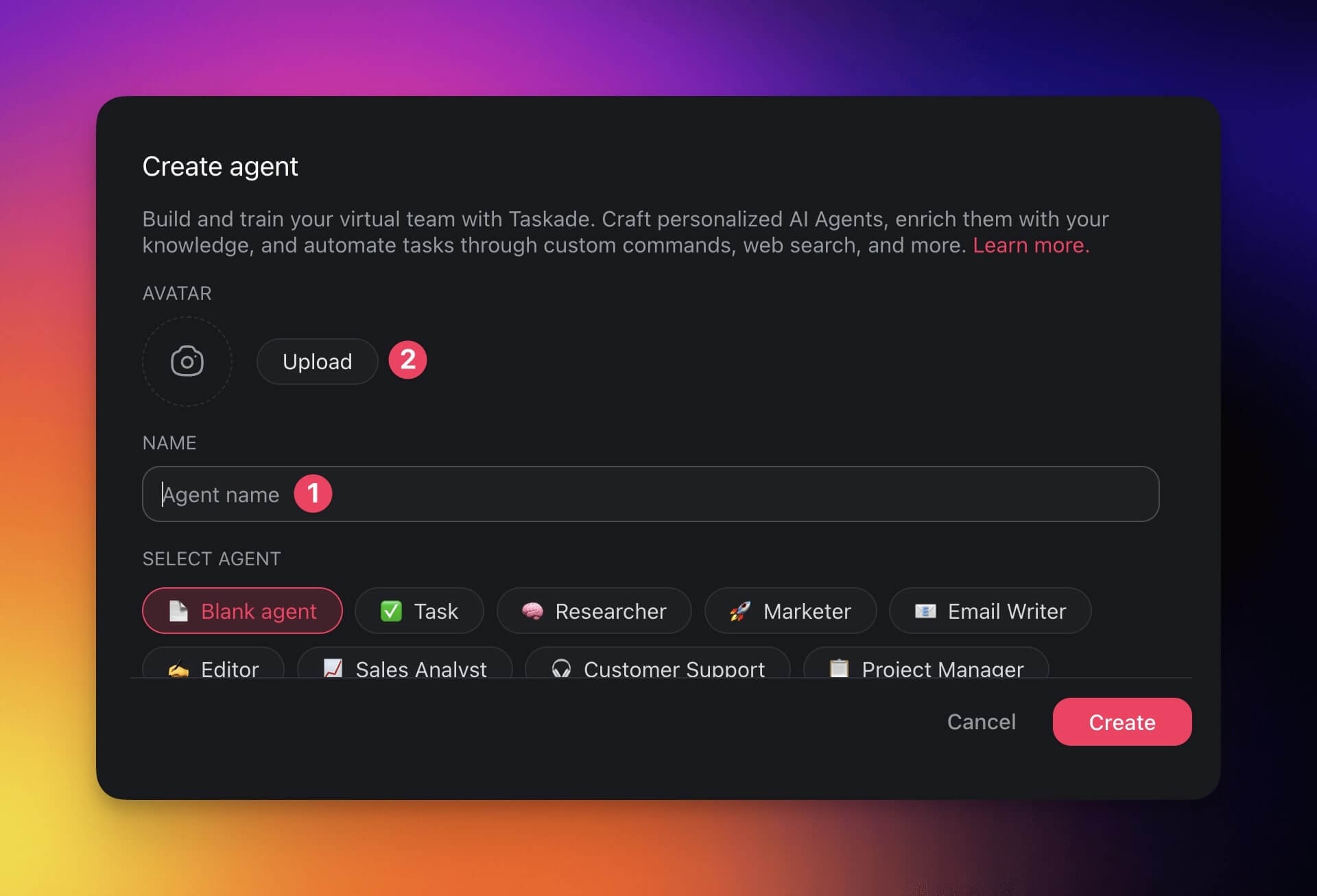
Method #2: Use one of the available agent templates.
- Pick an agent template from the list at the bottom.
- Create a unique name for your custom agent.
- Select an avatar or upload your own.
- Click Create to save the new agent.
💡 Note: Visit our Custom AI Agents guide for detailed instructions.
Team Up with AI Agents
There are two ways you can use collaborate with Multi-Agents inside projects:
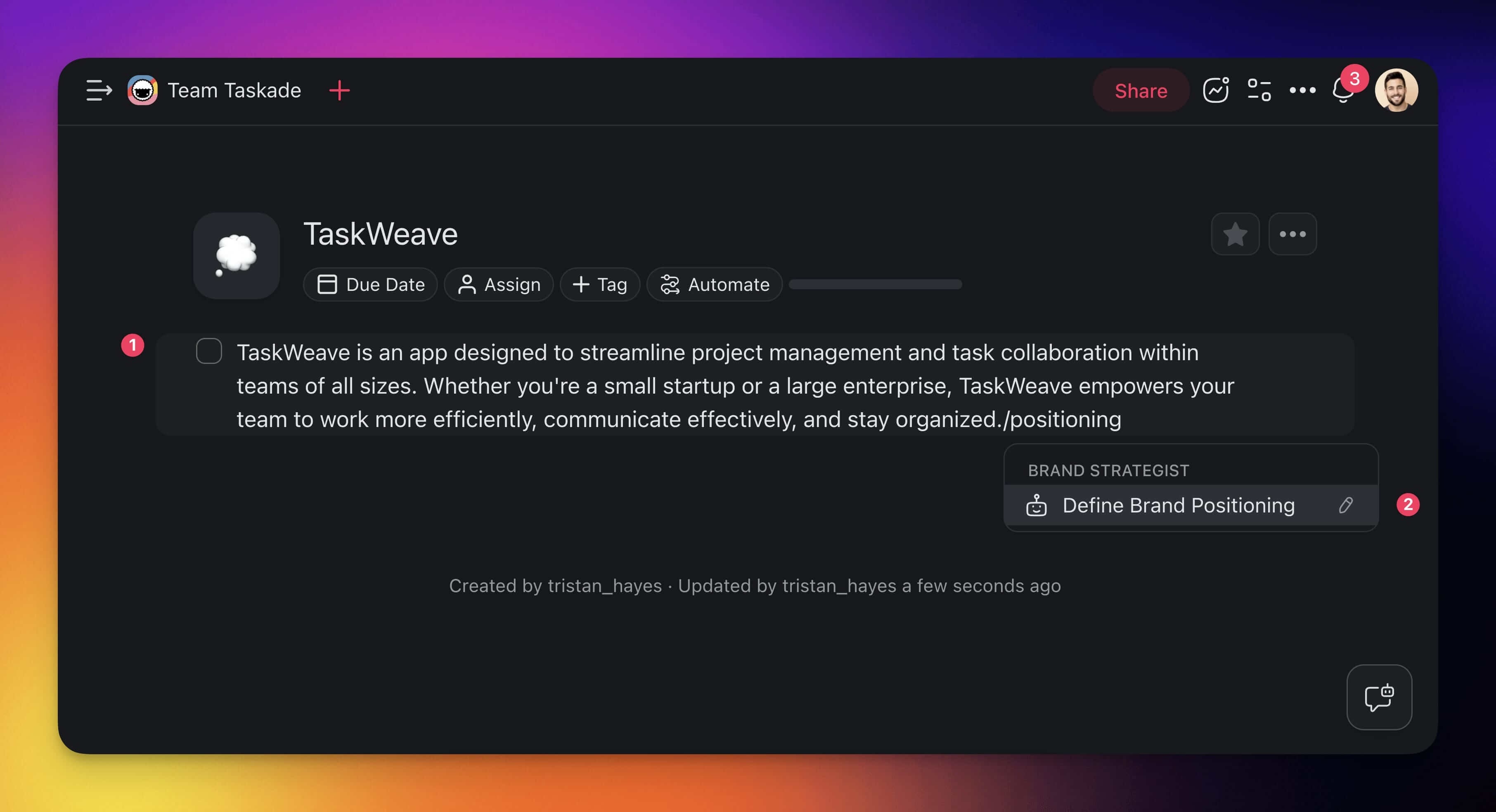
- Assign a single agent to several tasks:
- Select the first task you want your agent to work on.
- Type / + custom command associated with your agent.
- You do not need to type the entire command.
- Press ⌨️ Enter to execute the command.
- Click anywhere in the project to minimize the agent window.
- Repeat steps 1-3 to assign the agent to additional tasks.
💡 Note: Agent names are visible under the tasks they are working on, with a spinning circle indicating tasks in progress. Click the names to show a conversation history of each of the agents assigned to a task.
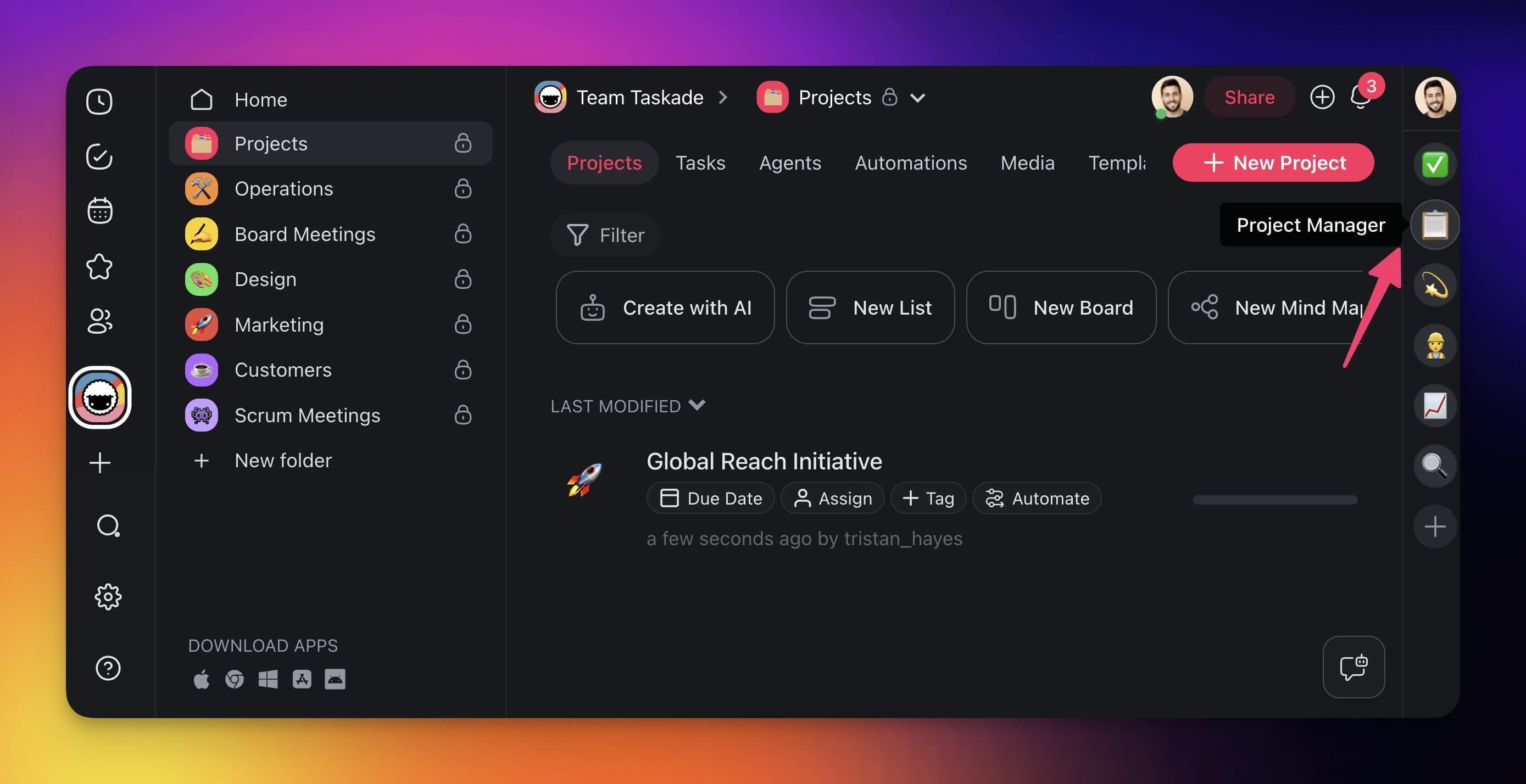
- Assign multiple agents concurrently:
- Select the first task you want an agent to work on.
- Type / + custom command associated with an agent.
- Press ⌨️ Enter to execute the command.
- Click anywhere in the project to minimize the agent window.
- Use a different command on a task to deploy another agent.
- Repeat the process to deploy additional agents.
💡 Note: You can deploy multiple agents to work on the same task.
Iterate on the Output
Every agent comes equipped with both short and long-term memory, which allows you to browse its conversation history and iterate on the output.
- Reprompt the agent:
- Click the agent name under a task.
- Type a follow-up prompt in the chat interface.
- Browse previous interactions using the arrows in the top-right corner.
💡 Note: Not sure where to start? Visit our guide to Writing Agent Prompts.
Chat with Agents & Your Team
Use shared agent chats to work with teammates and custom AI agents. Everyone can contribute ideas and read the same AI responses.
- Open the chat box (see the previous sections).
- Choose an agent from the drop-down at the top.
- (optional) Click the ⁺ 👤 button to invite people to the conversation.
- Type a prompt to start a conversation.
Note: When you start a shared AI chat, a tooltip at the bottom of the chat box will let you know if the chat is public or private, so you can see who has access.
Copy / Duplicate Multi-Agents
- Create a custom agent following the steps in the previous sections.
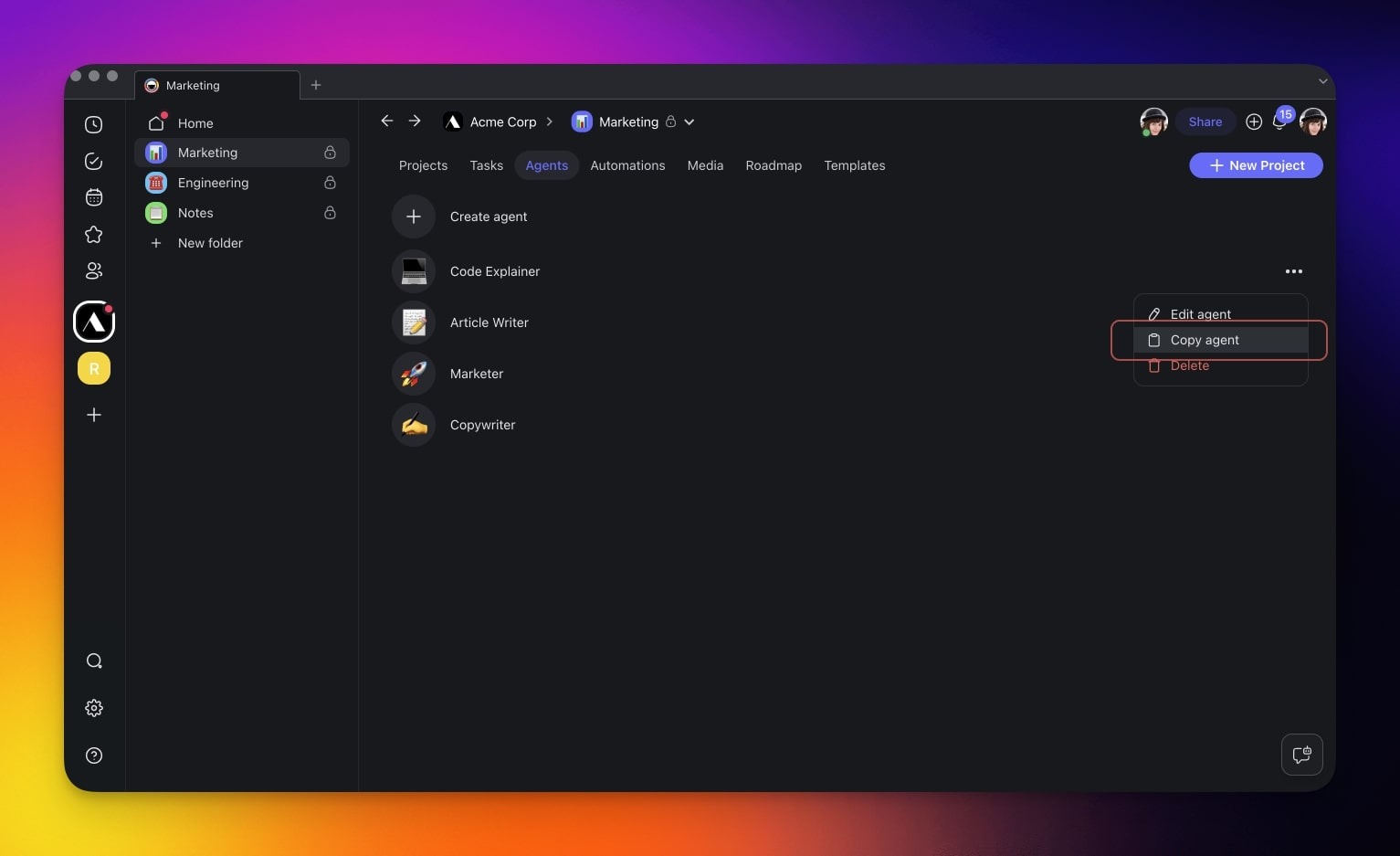
- Navigate to the 🤖 Agents tab and choose your custom AI agent.
- Click the three dots ··· next to an agent.
- Click Copy and select the target workspace/folder.
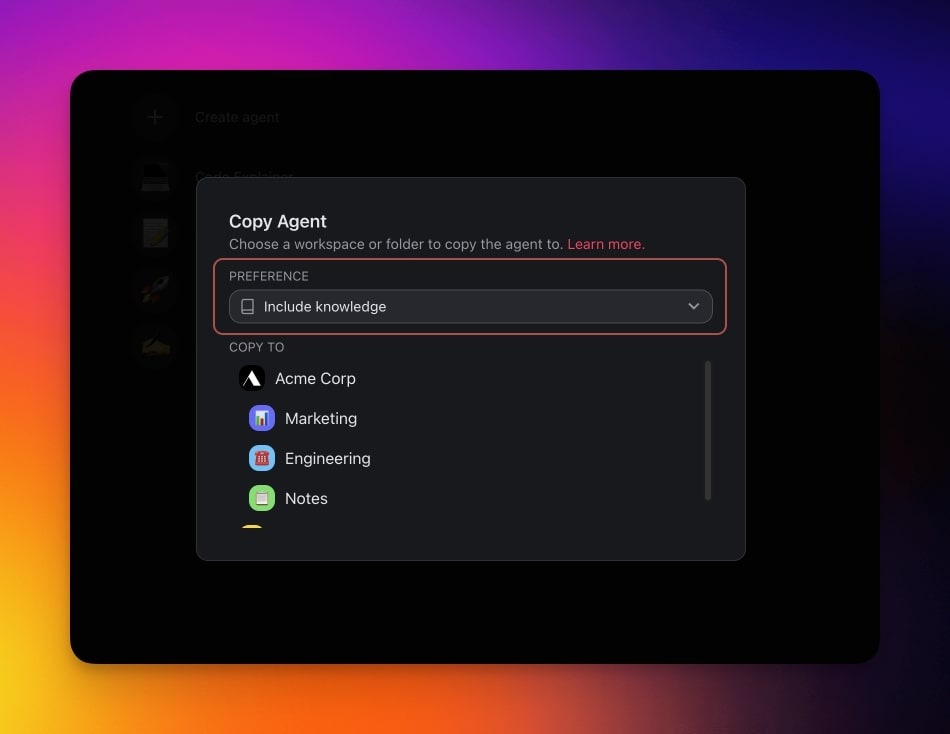
- Choose the target workspace/folder.
- Decide if you want the agent to retain its knowledge.
Share Agents
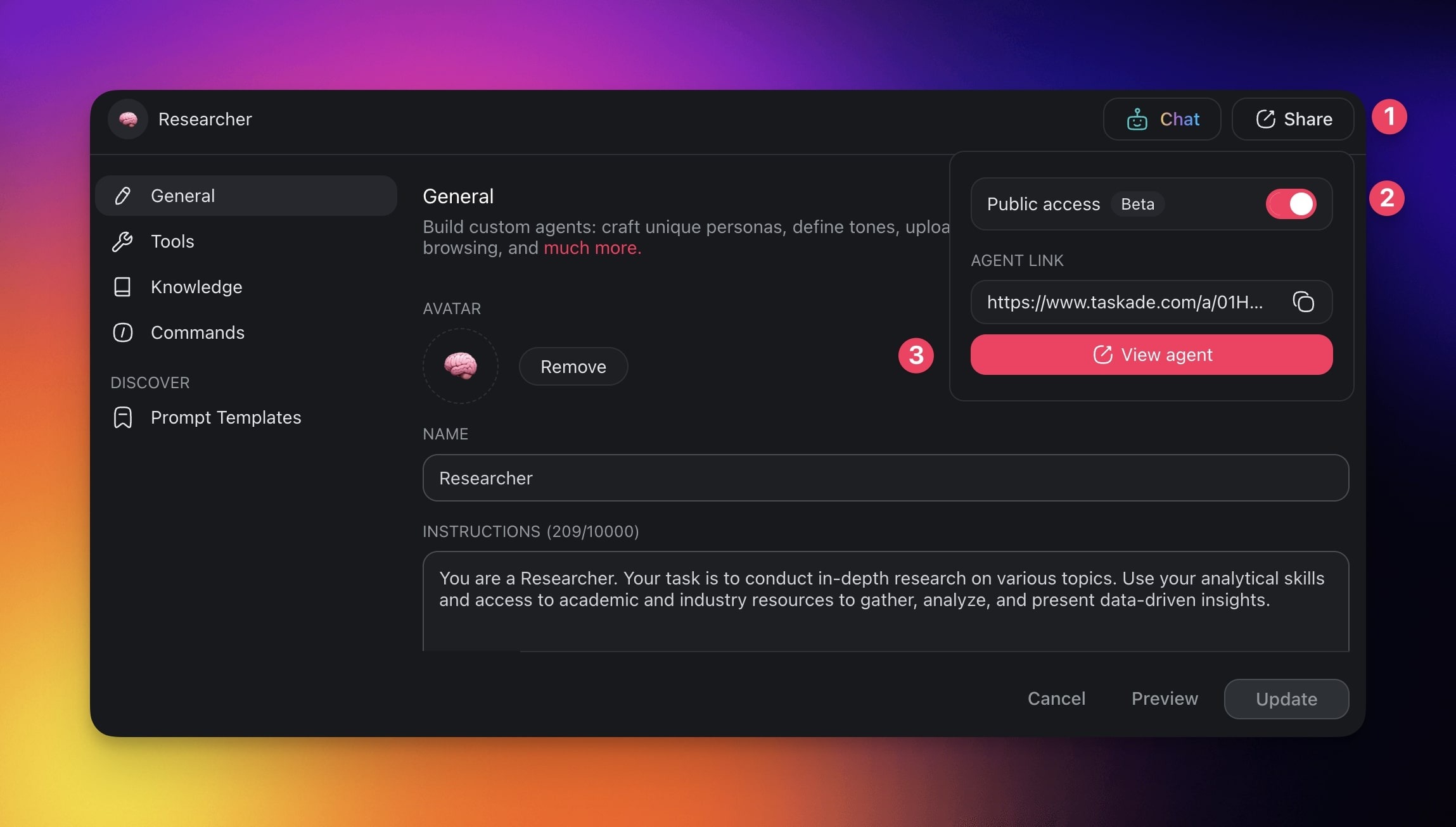
- Navigate to the 🤖 Agents tab and choose your AI agent.
- Click the ✎ Edit agent button in the top-right corner.
- Click Share button in the top-right corner.
- Enable Public access in the top-right.
- Copy the agent link using the ⧉ button.
- Share the agent link with others.
Workspace DNA
🌎
Browse templates, agents, and apps built by the Taskade community at taskade.com/apps.
Different tool sets per agent: Each agent in a team can specialize with its own loadout from the built-in toolkit plus the custom tools you define, so one agent searches the web while another manages your CRM through an automation it can trigger, and that automation carries the work into the 100+ integration catalog.
MCP Connectors: Taskade also runs a hosted MCP (Model Context Protocol) server, so Claude, Cursor, and other MCP clients can connect into the same workspace your team of agents works in and read or update it from there.
Multi-Agent Team Templates
Explore multi-agent orchestration apps from the community:
- Team Capacity Planner: Multi-agent resource allocation
- Client Portal: Agent-powered customer management
- Event Management Portal: Multi-agent event coordination
Build your own → taskade.com/create
Orchestration Patterns
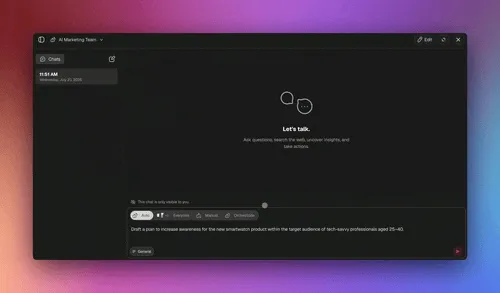
Multi-agent teams support three orchestration modes:
Taskade EVE can create and manage multi-agent teams for you. Describe what you need, like "Create a content team with a writer, editor, and SEO specialist", and Taskade EVE sets it up automatically.
Sequential Mode
Agents work one after another in a defined order. Output from Agent A becomes input for Agent B. Best for: content pipelines (research → write → edit → publish).
Parallel Mode
Multiple agents work simultaneously on different parts of a task. Results are combined at the end. Best for: data analysis from multiple sources, multi-language translations.
Supervisor-Delegated Mode
A supervisor agent routes tasks to specialist agents based on context. The supervisor decides which agent handles each sub-task. Best for: customer support (route to billing, technical, or sales agents).
Build a Multi-Agent Team
You can stand up a working team in about ten minutes, no code. Follow these five parts, then use the Verify table at the end to confirm the team is wired correctly.
| Part | What you do |
|---|---|
| 1. Name the outcome | Write the goal in one sentence: "Turn a topic into a published, fact-checked blog post." The outcome decides which specialists you need. |
| 2. Create the specialists | In the Agents tab, create each agent (or ask Taskade EVE to make them). Give each one role, instructions, and the knowledge it needs. |
| 3. Give each agent tools | Turn on only the tools that role needs: web search for the researcher, your CRM for the sales agent, Slack for the notifier. |
| 4. Add them to a team and pick a mode | Add the specialists to an AI Team, then choose sequential, parallel, or supervisor orchestration. |
| 5. Run it on a real example | Give the team one real task from the job it was built for and watch the handoffs. Iterate the prompts where the output is off. |
Here is the same team as an at-a-glance map. Read it top to bottom: the goal flows into a supervisor, the supervisor routes to specialists, and every specialist reads and writes the same shared memory.
              ┌─────────────────────────────────────┐
   GOAL  ───▶ │  Taskade EVE  (supervisor / router) │
              └───────┬───────────┬───────────┬──────┘
                      ▼           ▼           ▼
                ┌──────────┐ ┌──────────┐ ┌──────────┐
                │ Research │ │  Writer  │ │ Reviewer │   ◀── each: own role,
                │  Agent   │ │  Agent   │ │  Agent   │       knowledge, tools
                └────┬─────┘ └────┬─────┘ └────┬─────┘
                     │            │            │
                     ▼            ▼            ▼
              ╔══════════════════════════════════════╗
              ║   SHARED WORKSPACE MEMORY            ║  ◀── ▲ Memory
              ║   projects · knowledge · live state  ║      every agent
              ╚══════════════════════════════════════╝      reads + writes
Ask Taskade EVE to skip the manual setup entirely: "Create a content team with a researcher, a writer, an editor, and an SEO specialist, run them in sequence." Taskade EVE creates all four, wires the handoffs, and hands the team back ready to run.
Test Your Team
Run the team on three real examples, then read the result against this table. Each row tells you exactly which dial to turn.
| What you see | What it means | What to fix |
|---|---|---|
| One agent answers for the whole task | The team is not handing off | Pick a different execution mode (Orchestrate or Everyone) at the top of the team chat |
| The writer ignores the researcher's findings | The agents are not sharing memory | Point both agents at the same workspace project |
| The supervisor routes everything to one agent | Routing instructions are too vague | Sharpen each specialist's role description so the supervisor can tell them apart |
| Output is generic | Knowledge is thin | Add the right files, links, and projects to each agent |
| Credits drain fast | Heavy models on every step | Use TSK-Instant for intermediate steps. Reserve a deeper thinking mode for the final output |
| The team works every time | The handoffs are correct | Publish it as a Taskade Genesis app so others can clone it |
When all three examples pass, the team is ready. The last row is the payoff: a proven team becomes a Taskade Genesis app with its own link, custom domain, and one-click clone.
Credit Considerations
Each agent in a multi-agent team consumes credits independently. A 3-agent sequential pipeline uses ~3x the credits of a single agent. Use efficient Standard-tier models for intermediate processing steps and reserve Thinking or Reasoning-tier models for final output.
Error Handling
If an agent in a sequence fails, the pipeline pauses and surfaces the error. You can configure retry logic via automations or set fallback agents for critical workflows.
One Workspace, Living Software
A multi-agent team is one part of a larger idea. In Taskade Genesis you do not build software, you describe it, and the workspace runs it. Your agents are the team, your projects are the memory, and your automations are the execution. Put together, they become living, cloneable software that an operator runs instead of a department.
| Pillar | What it is | How multi-agents use it |
|---|---|---|
| ▲ Memory | Projects and databases across multiple views (List, Board, Table, Mind Map, Docs, Gantt Chart, Calendar, Actionsheet, Org Chart) | The shared brain every agent reads and writes |
| ■ Intelligence | AI Agents v2: a large toolkit, persistent memory, multi-model, public embed, Taskade EVE meta-agent | The specialists that reason, decide, and act |
| ● Execution | Automations: reliable durable workflows, branching and looping, 100+ bidirectional integrations | Triggers that fire the team and actions that push results out |
This loop is Workspace DNA: Memory feeds Intelligence, Intelligence triggers Execution, and Execution writes new Memory. A multi-agent team sits right in the middle, drawing on all three. The agents read live data, run frontier models (15+ from OpenAI, Anthropic, plus open-weight providers), and trigger automations that update your projects, which makes the next decision smarter.
The vision is simple. AI Apps mean you describe an app and get a running one you can publish, give a custom domain, and let anyone clone. AI Agents v2 are the intelligence inside that app, a team rather than a single bot. Automation runs the work on a schedule or a trigger without you watching. And the Community Gallery plus buy-once-clone App Kits mean a team built once can be cloned by thousands. Software you describe instead of build, run by every operator as living, cloneable apps. Start free at taskade.com/create.
Common Questions
What is a multi-agent system?
It is a team of AI agents that work together, each with its own job. One researches, one writes, one reviews. They pass work between each other and share the same workspace memory, so the team produces a better result than a single agent doing everything.
Multi-agent AI vs one agent?
Multi-agent AI splits a job across several specialized agents that coordinate handoffs, instead of one agent trying to do everything. You reach for it when the work has distinct stages, runs faster in parallel, or improves when one agent checks another. A single agent is better for quick, linear, single-skill tasks. The 2026 industry consensus is the same: a team wins when the work genuinely benefits from specialization or critique.
How do agents collaborate?
Agents share your workspace memory, so one agent's output becomes the next agent's input automatically. You can run a team in sequence, in parallel, or with a supervisor agent that routes each task to the right specialist. Set this up in the AI Teams tab.
Do I need code for a team?
No. You build each agent by describing its role in plain English, then add them to a team in the AI Teams tab. You can also ask Taskade EVE to create the whole team for you: "Create a content team with a writer, an editor, and an SEO specialist." Code-first frameworks like CrewAI, AutoGen, and LangGraph require Python. Taskade Genesis does not.
Taskade vs CrewAI or AutoGen?
CrewAI, AutoGen, and LangGraph are Python frameworks for developers who want to assemble multi-agent systems in code. Taskade Genesis builds the same kind of team without code, inside one workspace, with shared memory that every agent reads for free. In a code framework you wire the agents and then separately stand up the database and state passing. In Taskade the workspace memory already exists. See the comparison table above and Best Multi-Agent Platforms.
What agent patterns exist?
Three patterns dominate in 2026. Sequential (round-robin) passes work agent to agent in a fixed order, best for pipelines. Parallel runs agents at the same time and combines results, best for multi-source analysis. Supervisor (hierarchical) puts one agent in charge of routing each task, best for support and triage. Taskade Genesis runs all three from one orchestration setting.
How many agents can join?
You can add multiple specialists to a team and even assign several agents to the same task. Each agent consumes credits independently, so a three-agent pipeline uses roughly three times the credits of one agent. Use efficient models for intermediate steps. See AI Usage & Credits.
Do agents share memory?
Yes. Every agent in a Taskade team reads and writes the same workspace memory: projects, knowledge, and live state. The researcher's findings are already in memory when the writer starts, so there is no copy-paste between agents. This is the connective tissue that code frameworks make you build yourself. See Agent Knowledge & Memory.
When do I need a team?
Use a team when the work has distinct stages that need different knowledge or tools, or when a second agent checking the first improves quality. Use one agent when a single skill and knowledge set covers the job. See the decision table above.
Can I share a team?
Yes. Once a team works reliably, publish it as a Taskade Genesis app with its own link, optional custom domain, and one-click clone. Browse live examples like the Sales Agent Studio and Support Agent in the Community Gallery, then clone one to see how the team is wired.
Which plan do I need for a team?
Multi-agent teams are available on Pro and above. That covers every route to a team: generating one from a prompt, building one by hand, and asking Taskade EVE to assemble one. Free and Starter workspaces can still run single custom agents. AI usage is metered in credits, not seats. See pricing or AI Usage & Credits.
Related guides
- AI Teams: The new way to chat with and orchestrate multiple agents
- Custom AI Agents: Build the individual specialists first
- Build an AI Agent: The Complete Playbook: Create, train, tool, and deploy one agent first
- Taskade EVE: Ask the meta-agent to create a whole team for you
- How Taskade Genesis Works: Workspace DNA: The architecture behind multi-agent apps
- Projects & Databases: The Memory Pillar: Data that agents share and learn from
- Automations: The Execution Pillar: Trigger agent teams from automation workflows
- Agent Knowledge & Memory: Train agents with shared knowledge
- Tools for AI Agents: The full built-in tool catalog each agent can use
- MCP Connectors: Connect Claude Desktop, Cursor, or any MCP client into your Taskade workspace
Related reading
- Best Multi-Agent Platforms: A ranked tour of the multi-agent category
- What Are AI Agents?: The plain-English explainer behind agent teams
- Multi-Agent Systems (Wiki): The concept, defined
- AI Agents · AI Apps · Automations: The three pillars, on one page each
Try It: Build Your First Team
You do not need code, a deployment pipeline, or a team of engineers. Describe the outcome, let Taskade EVE assemble the specialists, and watch them coordinate inside one workspace with shared memory. That is the whole promise: multi-agent without code, in one workspace, with memory.
Start building at taskade.com/create →
▲ ■ ● Memory feeds Intelligence, Intelligence triggers Execution, Execution writes new Memory. That is how one operator runs the work of a team.