
Overview
Hand a client a clean copy of their project, back up your work before a big edit, or move data into another tool. Taskade exports any project as an image, plain text, Markdown, CSV, or PDF. You can also print straight from the app. All export options live in the project menu.
TL;DR: Export any Taskade project as Image, Text, Markdown, CSV, or PDF from the three-dots menu, or print it straight from the app. Markdown and CSV export on every plan, including Free, and both re-import cleanly. Image, Text, and PDF export need a paid plan. See Import Markdown to bring exports back in.
Export a Project
- Click the three dots ··· at the top right-hand corner of your project.
- Select 📤 Export and choose one of the available formats:
- 🏞 Image (perfect for mind maps, org charts, and flowcharts)
- 🔡 Text
- ⌨️ Markdown
- 📊 CSV (spreadsheet rows, one row per task, from any project view)
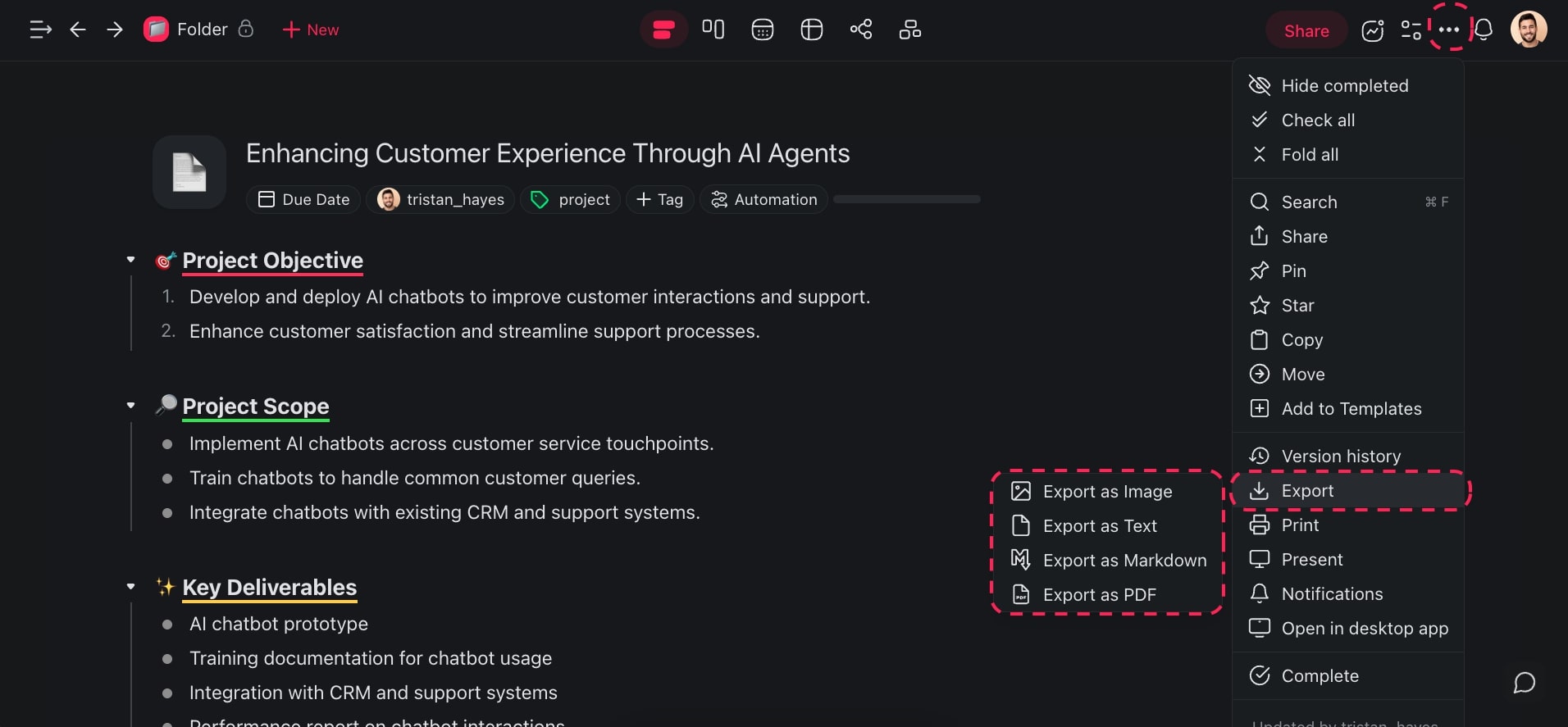
Each format serves a different purpose:
- Image is best for visual project views like mind maps, org charts, and flowcharts. The export captures the full layout as a high-resolution image.
- Text exports the raw content without formatting. This format suits emails and plain-text editors.
- Markdown preserves headings, bold text, links, and list structure. Pick it for a later re-import into Taskade, or for another Markdown-compatible tool.
- CSV exports your tasks as spreadsheet rows, one row per task. Open the file in Excel, Google Sheets, or any other tool. The export reads the project itself, not the view you are looking at, so it works from every project view. Custom field columns are not included.
- PDF creates a printable document with formatting intact. This format suits reports and presentations.
Export Formats by Plan
Markdown and CSV are lossless copies of your project tree, so they export on every plan.
| Format | Plan needed |
|---|---|
| Markdown | Every plan, including Free |
| CSV | Every plan, including Free |
| Image | Paid plan |
| Text | Paid plan |
| Paid plan |
If you are on the Free plan, use Markdown or CSV for backups and cross-tool moves. Both bring your structure back into Taskade later.
Print a Project
To print a Taskade project:
- Click the three dots ··· in the top right-hand corner.
- Select 🖨️ Print from the drop-down list.
- Adjust your settings in the pop-up menu. Then print the project.
Your browser's print dialog opens. There you choose a printer, set the page range, and adjust the orientation and margins.
Tips
- To re-import the project into Taskade or another tool later, use Markdown export.
- For spreadsheet rows in Excel or Google Sheets, export a project as CSV. You can bring a CSV back in later with Import CSV Spreadsheets.
- Image export works best for a project in Mind Map or Org Chart view.
- For regular backups, export important projects as Markdown files and store them in a cloud drive.
- To move content between two Taskade workspaces, export it as Markdown and import it again.
Format Comparison
| Format | Best For | Re-importable | Plan needed |
|---|---|---|---|
| Image | Mind Maps, Org Charts, flowcharts | No | Paid plan |
| Text | Plain copy/paste | Partial | Paid plan |
| Markdown | Backups, cross-tool moves | Yes | Every plan |
| CSV | Spreadsheets, task rows | Yes | Every plan |
| Reports, sharing | No | Paid plan |
See Import Markdown, Sort & Add Notes.