
Overview
Obsidian is a Markdown-based knowledge management app that stores all your notes as local .md files in a Vault folder on your computer. Because Obsidian uses standard Markdown, the move to Taskade is short. Open your Vault folder, then upload the .md files into Taskade.
TL;DR: To import from Obsidian to Taskade, open your Vault folder, then drag your
.mdfiles into the Import with AI tab on a new project. Each note becomes its own Taskade project with headings, lists, and links kept intact. Then open the notes in any project view or train Taskade EVE on them as agent knowledge. Start free →
Import from Obsidian in 4 Steps
Importing your Obsidian notes takes four steps. Open your Vault, find your .md files, drag them in, and create the project. Here is the whole path at a glance.
| # | Step | What you do |
|---|---|---|
| 1 | Open your Vault | Reveal the Vault folder on your computer |
| 2 | Find your notes | Locate the .md files you want to move |
| 3 | Drag into Taskade | Drop files into the Import with AI tab |
| 4 | Create the project | Each note becomes its own Taskade project |
The two sections that follow walk through each step with screenshots. You need no export plugin and no file conversion, because Obsidian notes are already plain Markdown.
Export an Obsidian Vault
Your Obsidian notes live in a local Vault that you create when you first launch the app. To find your local Vault folder:
- Open Obsidian and click File in the top menu bar.
- Select Open Vault... and click (ellipsis) next to the name of your Vault.
- Click Reveal vault in system explorer to open the Vault folder.
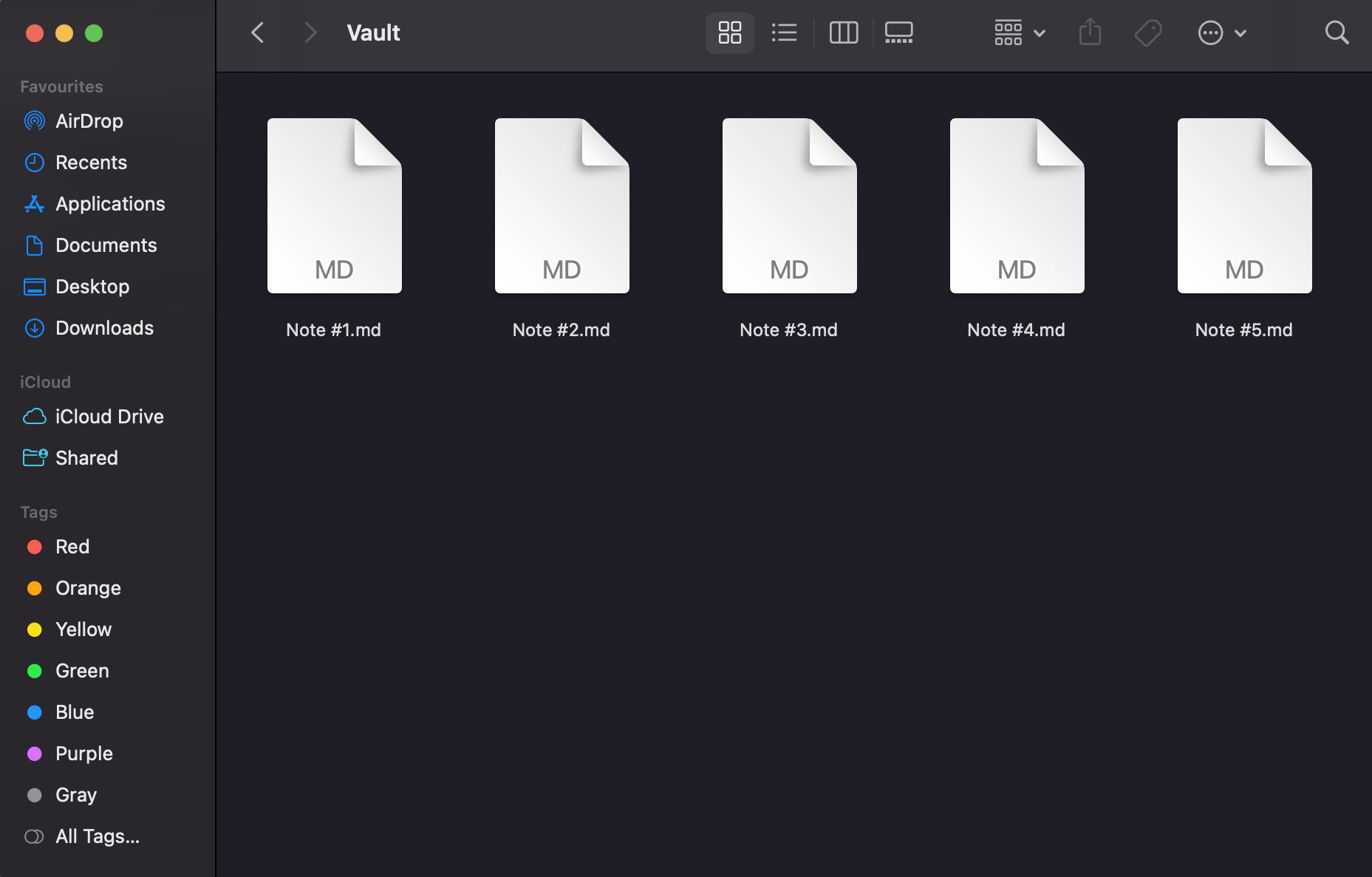
Your Vault folder holds all your notes as .md files. If you use Obsidian's folder structure, they sit in subfolders. You need no separate export step, because the files are already in Markdown format.
Import to Taskade
Go to your workspace or folder.
Click the arrow next to the ➕ New Project button.
Select Import, then drag your .md files into the Import with AI tab. To paste content instead, click Paste Text & Markdown.
- You can select multiple files for batch import.
Click Create Project to finish.
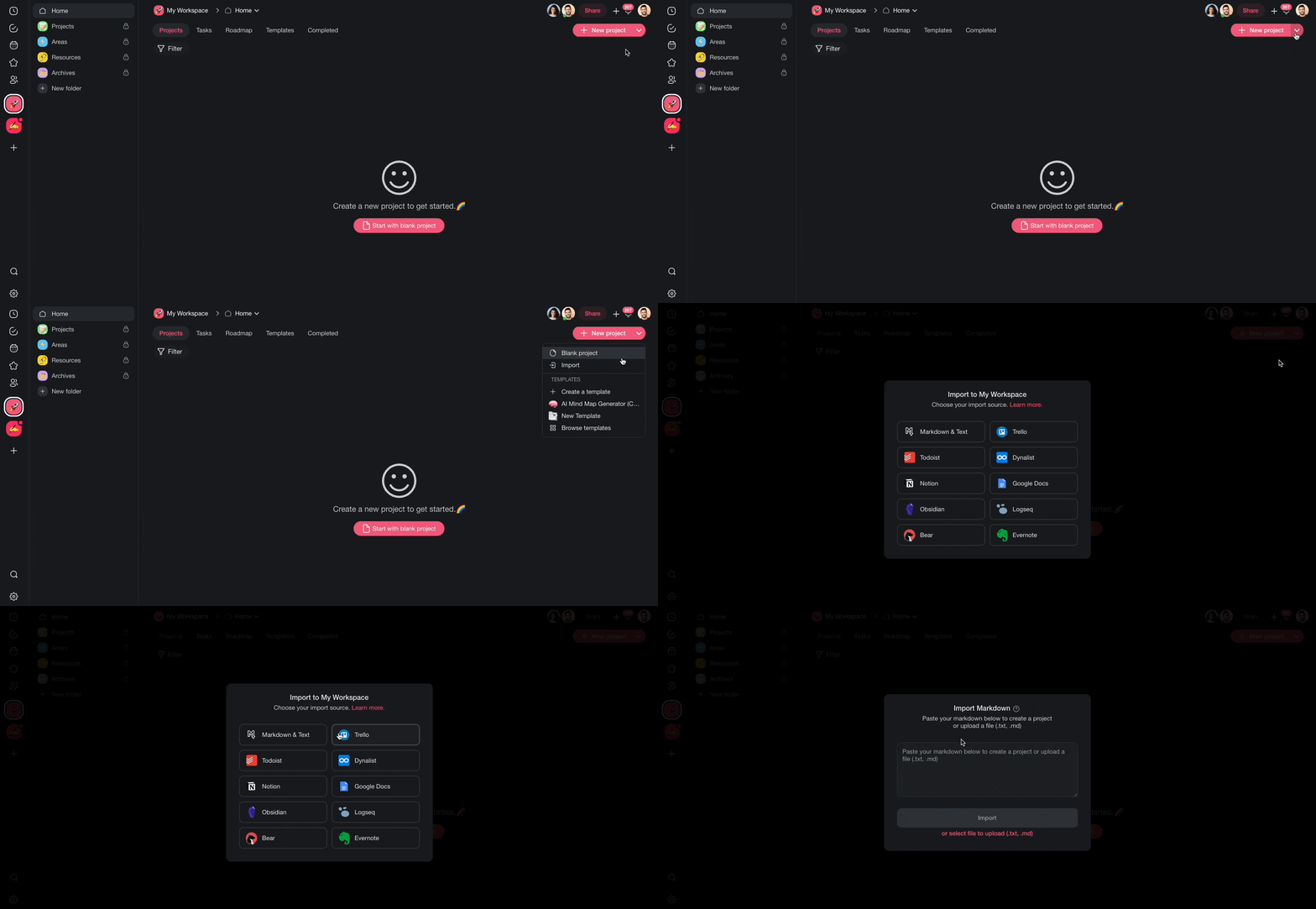
Each imported .md file becomes a new Taskade project. Taskade keeps your headings, lists, links, and formatting.
What Transfers From Obsidian
Most of your notes move over cleanly. Markdown content lands as-is. A few Obsidian-only features need a quick cleanup pass after your notes arrive in Taskade. Use this table to know what to expect before you import.
| From Obsidian | Lands in Taskade as | Status |
|---|---|---|
Headings (#, ##, ###) |
Project headings and outline structure | Transfers cleanly |
| Bullet and numbered lists | Tasks and sub-tasks | Transfers cleanly |
| Bold, italic, and inline code | Same formatting | Transfers cleanly |
| Code blocks | Code blocks | Transfers cleanly |
| Links to websites | Clickable links | Transfers cleanly |
| Footnotes | Inline text | Transfers cleanly |
Checkboxes (- [ ]) |
Taskade tasks you can check off | Transfers cleanly |
Tags (#tag) |
Taskade tags | Transfers, review after import |
[[wikilinks]] |
Plain text | Re-link by hand after import |
| Frontmatter (YAML at top) | Plain text or a note | Tidy up if you want it as a field |
| Embedded images (attachments) | Not included | Re-attach the images you need |
| Plugins, themes, custom CSS | Not included | Content only moves, not plugins |
The short version: your words, structure, and formatting come across. Obsidian's app-specific extras like wikilinks, plugins, and local images need a light touch-up. The next section shows how to rebuild those connections fast.
After Import
After your Obsidian notes land in Taskade, you can organize and extend them:
- Switch views: Toggle between List, Mind Map, Board, and other views to visualize your notes in new ways.
- Rebuild your graph: Use Taskade's project hierarchy to reconnect notes and recreate the connections from your Obsidian graph.
- Enhance with AI: Ask Taskade AI to summarize long notes, extract action items, or generate new content based on your imported knowledge.
- Add to agent knowledge: Upload your vault files as agent knowledge so custom AI agents can reference your notes in conversations.
- Collaborate: Share imported projects with teammates for real-time editing.
Tips
- Obsidian's
[[wikilinks]]export as plain text. Use Taskade's project hierarchy to reconnect related notes after import. - Obsidian plugins and custom CSS do not transfer. Import your content files (.md) only.
- For large vaults, organize imports into Taskade folders that mirror your Obsidian folder structure.
- Embedded images from your vault (stored in an attachments folder) do not come across. Re-attach the ones you still want.
Check Your Import
Run this quick check after your first import. It tells you what to look at and exactly what to do if something is off.
| Check | Looks right when | If not, do this |
|---|---|---|
| Projects created | One project per note you imported | Re-drag any files that did not appear |
| Headings and lists | Outline matches your original note | Paste the note text into a fresh import |
| Links | Website links are clickable | Re-paste the source if a link is plain text |
| Wikilinks | Old [[links]] show as text |
Re-link them with project hierarchy |
| Images | Pictures you need are present | Re-attach images from your attachments folder |
| Views | List, Board, and Mind Map all open | Switch views from the top of the project |
| Agent knowledge | Your agent answers from the notes | Add the imported projects to agent knowledge |
If every row checks out, your vault is fully moved in. If a row needs work, the fix is in the right-hand column. Most fixes take a few seconds.
For more on turning vaults into agent knowledge and automations, see Custom AI Agents/GPTs and Import Markdown, Sort & Add Notes.
Obsidian Field Mapping
| Obsidian | Taskade Equivalent |
|---|---|
| Vault | Workspace / Folder |
| Note (.md) | Project |
[[wikilink]] |
Hierarchy |
| Tag (#) | Tag |
| Frontmatter | Custom field |
| Daily note | Project in dated folder |
Carries over vs needs cleanup
- Imports cleanly: Markdown content (headings, lists, bold/italic, code, links, footnotes).
- Needs cleanup: Wikilinks (re-link to internal projects), Dataview queries (rebuild as agents), embedded attachments, plugin-specific syntax.
How the Import Works
Read it left to right. Your local notes go through the importer, become one project each, open in any view, and feed your agents. The last hop is the one that compounds. Notes become memory, and memory makes Taskade EVE smarter every time your workspace grows.
Bring It Into Taskade Genesis
Your old vault was a place to store knowledge. In Taskade, that same knowledge can answer questions and do work. After you import your notes, add them as agent knowledge so an AI agent reads from them in every chat.
Open the Agents tab and create an agent. Then point its Knowledge at the projects you imported. The agent indexes your notes once and keeps persistent memory. When you update a note, the agent picks up the change. Ask it to summarize a topic, find a buried idea, or draft something new from what you already wrote.
This is the payoff of moving in. Taskade agents ship with a large built-in toolkit and reach 15+ frontier models from OpenAI, Anthropic, and open-weight providers. Your notes stop being a static archive and become a teammate you can ask. See Agent Knowledge & Memory and the Build an AI Agent playbook for the full setup.
Your imported notes are now part of your Workspace DNA. A faster route to the same result: open the project's ··· menu and choose Add to Agent Knowledge so a custom agent answers from that note. Start an automation from the project to act on new or changed tasks. Then open Taskade Genesis and describe the app you want on top of your notes, such as a knowledge base, a research tracker, or a client portal. For a web page or a video you reference often, save the link in the Media Files tab (see Import a Website URL).
Common Questions
How do I import from Obsidian?
Open your Obsidian Vault folder on your computer, then go to a workspace in Taskade. Click the arrow next to New Project, choose Import, and drag your .md files into the Import with AI tab. Each note becomes its own project. No export plugin and no file conversion are needed, because Obsidian notes are already Markdown.
Does my formatting carry over?
Yes. Headings, bullet and numbered lists, bold and italic text, code blocks, checkboxes, and website links all transfer cleanly. Your outline lands the same way it looked in Obsidian. Obsidian-only extras like [[wikilinks]], plugins, and local images are the few things that need a quick cleanup pass.
Can I import my whole vault?
Yes. You can select many .md files and import them in one batch. Each file becomes a separate project. For a large vault, organize the imports into Taskade folders that mirror your old Obsidian folder layout, so everything stays easy to find.
What happens to my Obsidian wikilinks?
Obsidian [[wikilinks]] come in as plain text, because they point to files in your local vault. To reconnect notes inside Taskade, use project hierarchy to nest related projects. This rebuilds the connections from your old graph in a structure you can see and click through.
Are my Obsidian images and files kept?
No. Images stored in your vault's attachments folder are not pulled in automatically. The text and structure of every note transfer, but you re-attach the pictures you still need. Open the note in Taskade, then drag the image back in from your computer.
Do Obsidian plugins or themes import?
No. Plugins, custom CSS, and themes are part of the Obsidian app, not your notes. Only your content moves. Most plugin features have a built-in Taskade equivalent. Dataview tables, for example, become live projects you can sort and filter. You can also ask an AI agent to rebuild a query as a saved view.
Can notes feed AI knowledge?
Yes, and this is where Taskade goes beyond a note app. Add your imported projects as agent knowledge, then ask Taskade EVE or a custom agent questions about them. The agent reads your notes, keeps persistent memory, and answers in plain language using 15+ frontier models.
Can I view notes as a mind map?
Yes. Every imported project opens in any of the project views. Switch to Mind Map to see your note branch out visually, like Obsidian's graph but built from your outline. You can also use List, Board, Table, Docs, Calendar, Gantt Chart, Actionsheet, and Org Chart. Gantt Chart, Actionsheet, and Org Chart need a paid plan.
How is Taskade different from Obsidian?
Obsidian is a local note app. Taskade is a shared workspace where notes, AI agents, and automations live together. Your notes become projects you can assign, automate, and ask questions about. Taskade also adds real-time collaboration, multiple project views, a large agent toolkit, and 100+ bidirectional integrations that pull events in and push updates out.
How much does Taskade cost?
Taskade has a Free plan you can start on right away. See the pricing page for current plans and prices. Importing your Obsidian notes works on every plan, including Free, so you can move your whole vault in before you ever upgrade.
Related guides
- Import from Logseq: move another Markdown-based outliner into Taskade.
- Import from Roam: bring your Roam graph and blocks across.
- Import from Bear: import notes from the Bear Markdown app.
- Import from Notion: migrate Notion pages and databases.
- Import Markdown Files: the general guide for any
.mdimport. - Build an app with Taskade Genesis: describe the app you want on top of your notes.
- Explore AI agents: see what a custom agent can do with your imported knowledge.