
Overview
iA Writer is a minimalist Markdown writing app available on Mac, iOS, Windows, and Android. Because iA Writer already uses Markdown files, the move to Taskade is short. Export individual notes, or open your iA Writer library folder. Then import the .md files into your Taskade workspace.
TL;DR: Because iA Writer already stores notes as plain Markdown, you can export a single
.mdfile or grab files straight from your library folder, then drag them into Taskade to create projects with formatting intact. Upload many files at once for bulk migration. See Import Markdown for the full flow.
Export a Note
- Open iA Writer and select a note from the list on the left.
- Click File ➡ Export in the top menu bar (Mac).
- Choose the Markdown format and click Export to confirm.
- Save the .md file to your computer.
- You can also copy the contents of your iA Writer note directly to your clipboard.
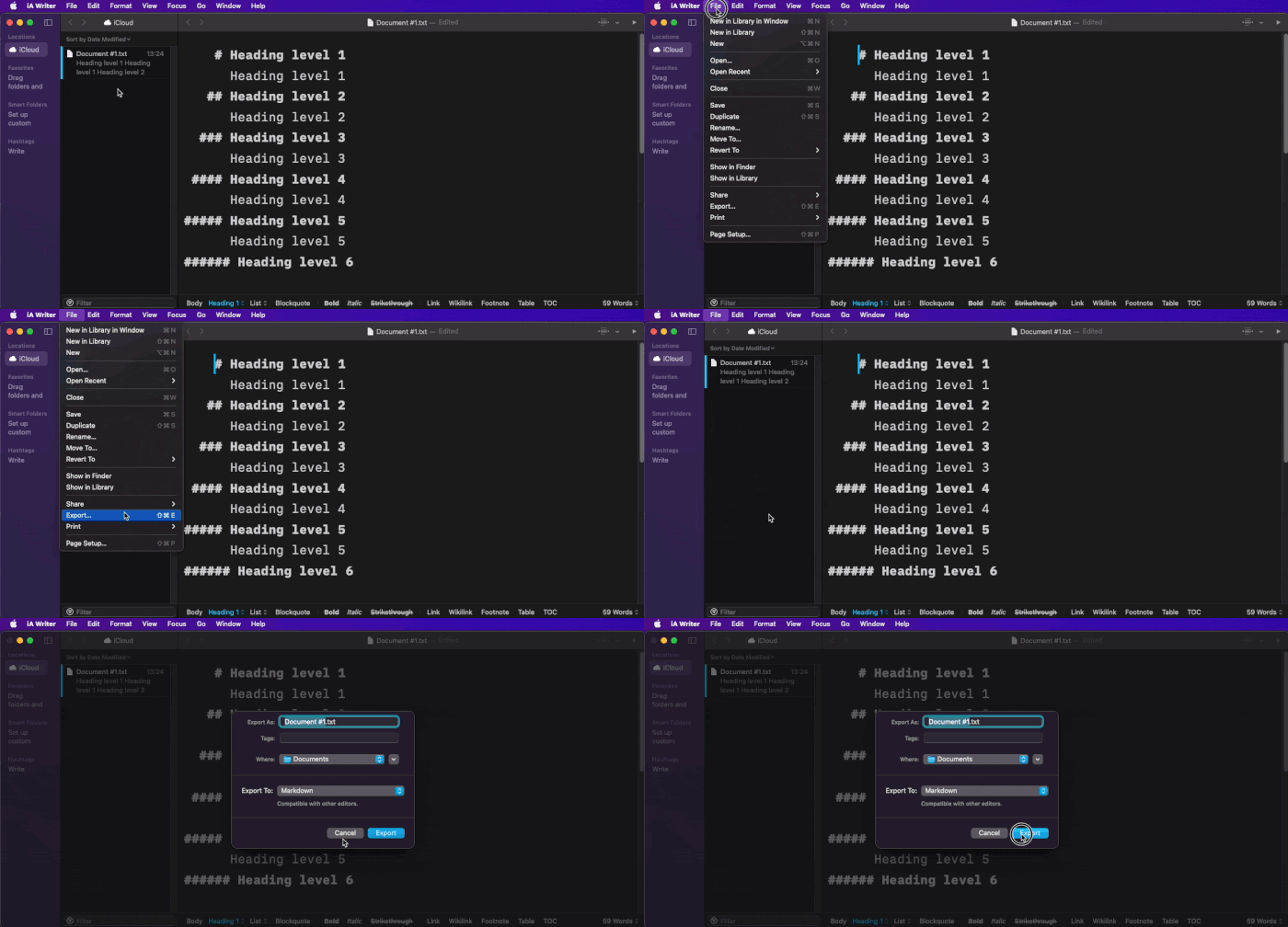
iA Writer stores files as plain Markdown on your computer. You can open your iA Writer library folder and copy the .md files directly, without the export menu.
Import to Taskade
Go to your workspace or folder.
Click the arrow next to the ➕ New Project button.
Select Import, then drag your iA Writer .md files into the Import with AI tab. To paste content instead, click Paste Text & Markdown.

- You can upload multiple files at once.
Click Create Project to finish.
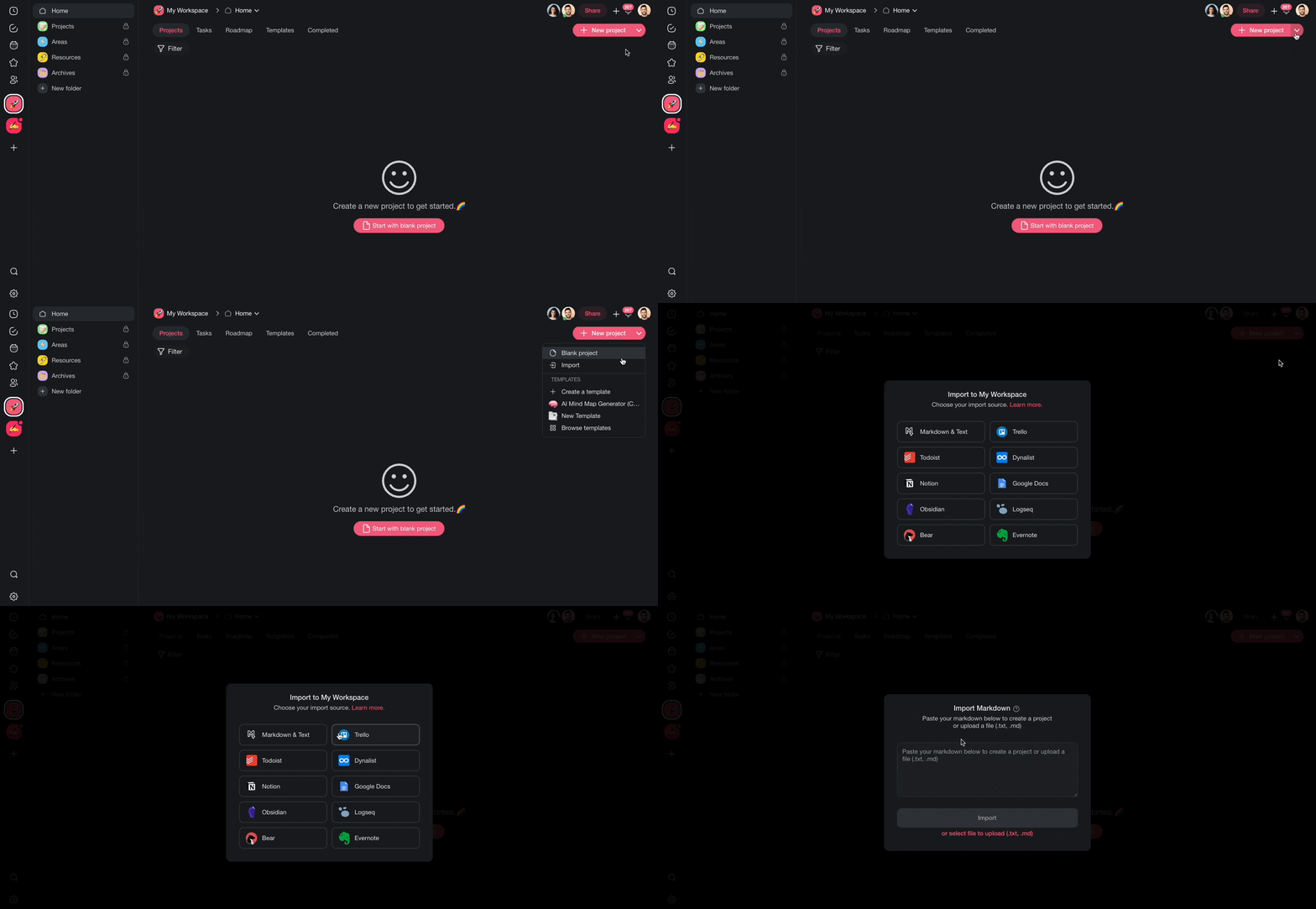
Each imported .md file becomes a new Taskade project. Taskade keeps your headings, lists, bold text, links, and other Markdown formatting.
After Import
After your iA Writer notes land in Taskade, use these features:
- Switch views: See your content in List, Mind Map, or any of Taskade's project views for a new perspective on your writing.
- Collaborate in real time: Share projects with editors or teammates for real-time collaboration.
- Enhance with AI: Use Taskade AI to summarize, expand, proofread, or restructure your imported content.
- Add to agent knowledge: Upload your notes as agent knowledge to give custom AI agents context about your writing.
Tips
- iA Writer uses standard Markdown, so formatting translates cleanly into Taskade with no extra conversion.
- For bulk migration, go to your iA Writer library folder on disk and upload all .md files at once.
- Use Taskade folders to organize imported notes by topic or project.
For more on turning notes into automations, see Import Markdown, Sort & Add Notes.
iA Writer Field Mapping
| iA Writer | Taskade Equivalent |
|---|---|
| .md file | Project |
| Heading (#) | Project heading |
Task - [ ] |
Task |
| Footnote | Task description |
| Link | Link |
| Inline image | Re-upload after import |
Carries over vs needs cleanup
- Imports cleanly: Standard Markdown, including headings, lists, checklists, bold, italic, code, and links.
- Needs cleanup: Inline images, and content blocks added via
/importdirectives. Re-attach these manually.
How the Import Works
Bring It Into Taskade Genesis
Each imported note is now part of your Workspace DNA. Open the project's ... menu and choose Add to Agent Knowledge so a custom agent answers questions from your writing. Start an automation from the project to act on new tasks. Then open Taskade Genesis and describe the app you want on top of it, such as an editorial calendar, a content tracker, or a client portal. For a web page or YouTube video, save the link in Media Files instead.