
Overview
Workflowy is an outliner app for nested lists and bullet-based note-taking. Taskade has a dedicated Workflowy import option. It reads OPML files and keeps your outline hierarchy. Your nested bullets, notes, and structure become a Taskade project. You can view it, edit it, and enhance it with AI.
TL;DR: Bring your Workflowy outlines into Taskade by exporting them as OPML, then using the dedicated Workflowy import option. Every nested bullet, note, and completion state stays intact, so you can pick up in List view or expand the tree visually in Mind Map view.
Export a Workflowy Project
Open your Workflowy outline.
Hover over the bullet point of any item and use the 3-dot menu to the left of the bullet.
- (optional) Click the vertical ellipsis ⋮ (top right) ➡ Export all.
Select OPML and click download.
Save the .opml file to your computer.
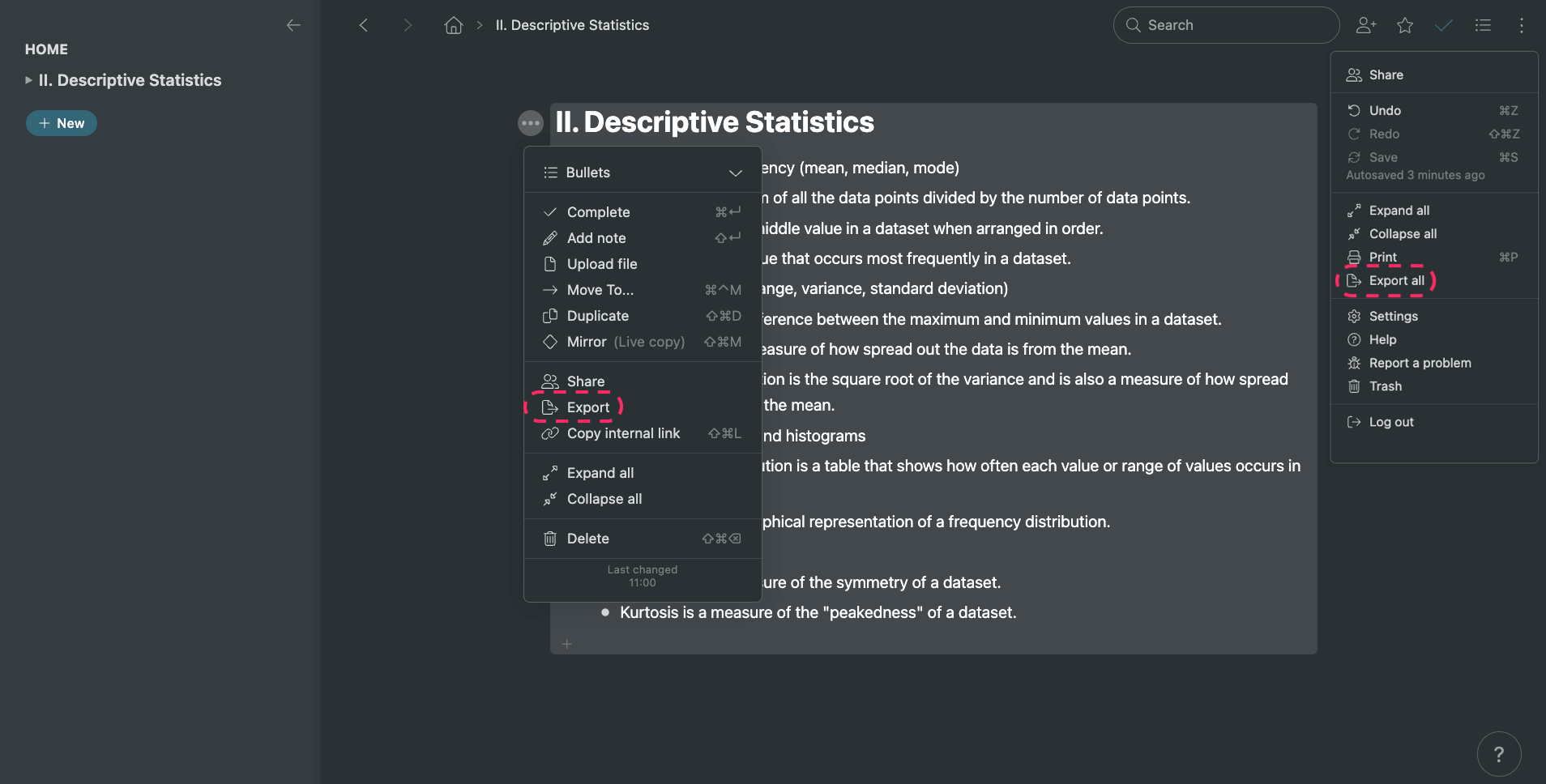
To download your entire Workflowy account in one file, use the Export all option. To move only part of it, export individual branches.
Import to Taskade
- Go to your workspace or folder.
- Click the arrow next to the ➕ New Project button.
- Select Import and choose Workflowy.
- Upload the exported .opml files and click Import.
- (optional) You can also paste the contents of your .opml file.
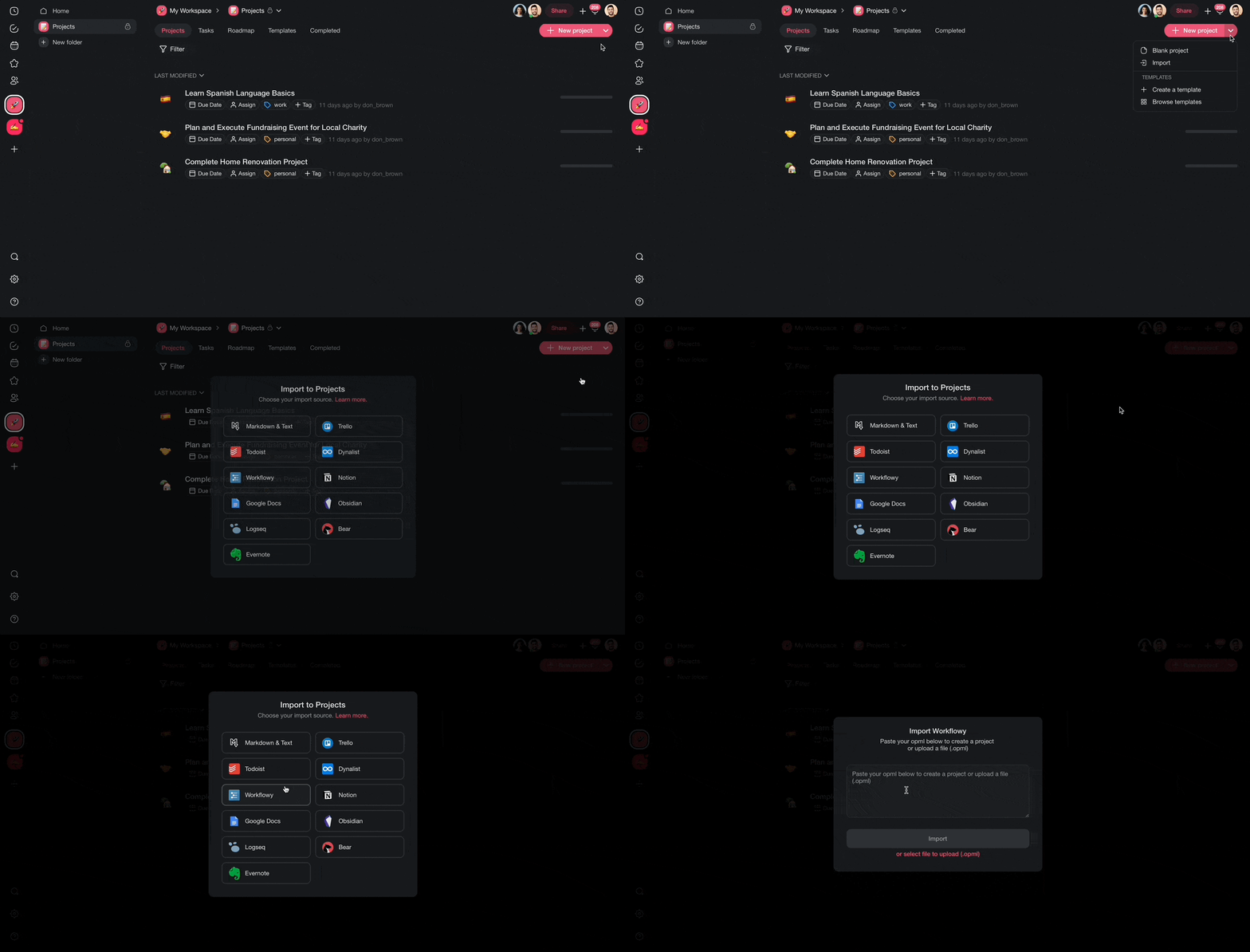
Taskade reads the OPML structure and recreates your outline with all nested levels intact.
After Import
After your Workflowy outlines land in Taskade, every level stays intact in a project you can keep working:
┌──────────────────────────────────────────────┐
│  🗂 Q3 Plan                      List ▾     ⚙ │
├──────────────────────────────────────────────┤
│  • Research                                   │
│     ↳ Interviews             ☑ done           │
│     ↳ Survey                                  │
│  • Build                                      │
│     ↳ Prototype                               │
│  • Ship                                       │
└──────────────────────────────────────────────┘
From here you can use more features:
- Switch views: Your outline works natively in List view, but you can also switch to Mind Map to see your bullet hierarchy as a visual tree, or Board view for a kanban layout.
- Add tasks and due dates: Convert outline items into actionable tasks with due dates and assignees.
- Use AI to expand: Ask Taskade AI to elaborate on bullet points, generate subtasks, or restructure your outline.
- Set up automations: Use automations to act on tasks as they are completed or updated.
Tips
- The OPML export leaves out Workflowy mirrors and tags. Recreate the important connections with Taskade's project hierarchy.
- For large outlines, split them into separate projects by topic with folders.
- You can paste OPML content instead of uploading a file. This is handy for small, selective imports.
For background, see Import Markdown, Sort & Add Notes.
Workflowy Field Mapping
| Workflowy | Taskade Equivalent |
|---|---|
| Outline | Project |
| Bullet | Task / Sub-task |
| Note | Task description |
| Tag (#/@) | Tag |
| Mirror | Hierarchy |
| Completed | Task done state |
Carries over vs needs cleanup
- Imports cleanly: Outline hierarchy, nested bullets, bullet notes, completion state.
- Needs cleanup: Mirrors and shared bullets (rebuild via internal links), backlinks, custom colors.
How the Import Works
Bring It Into Taskade Genesis
Your imported outline is now part of your Workspace DNA. Open the project's ··· menu and choose Add to Agent Knowledge so a custom agent answers questions from it. Start an automation from the project to act on tasks as they are completed or updated. Then open Taskade Genesis and describe the app you want on top of that data, such as a client portal, a project tracker, or a knowledge base. For a web page or a video you want to keep alongside it, save the link in the Media Files tab (see Import a Website URL).