
Overview
Logseq is an open-source, privacy-first knowledge management tool that stores notes as Markdown files in a local graph. Because Logseq already uses Markdown, the move to Taskade is short. Export your graph as standard Markdown files. Then import them into your Taskade workspace.
TL;DR: Move your Logseq graph into Taskade in three steps. Export your pages as standard Markdown, then drag the .md files into the Import with AI tab. Each page becomes a project with headings and bullets preserved. From there, switch views, restructure with AI, or save notes as agent knowledge.
Export a Logseq Graph
To export your Logseq pages as individual .md files:
- Open Logseq and click ··· (ellipsis) in the top-right corner.
- Choose Export Graph ➡ Export as standard Markdown.
- Unzip the archive to access individual pages in the .md format.
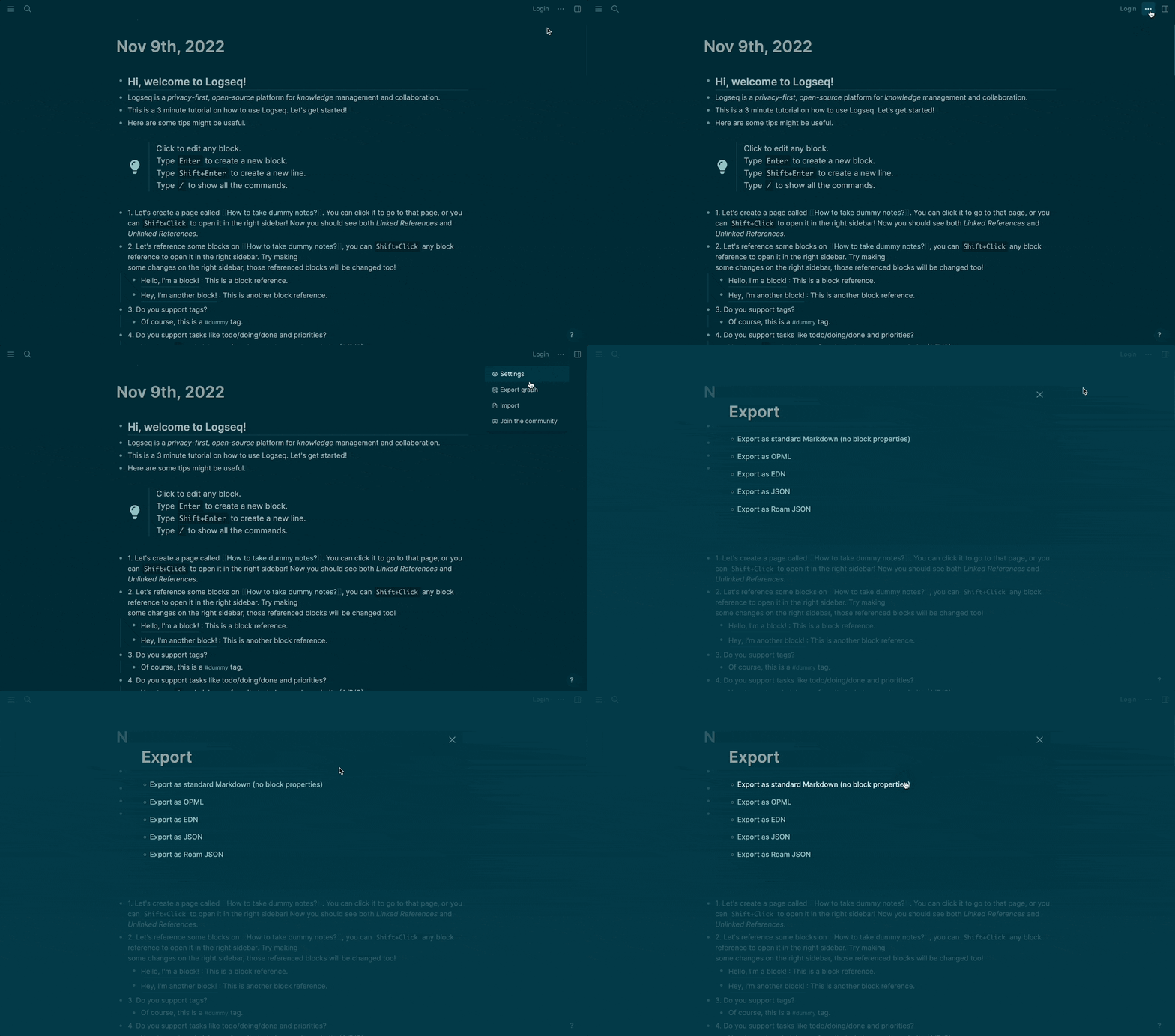
The export creates a ZIP file with one .md file per page. The archive holds both journal pages and regular pages.
Import to Taskade
Go to your workspace or folder.
Click the arrow next to the ➕ New Project button.
Select Import, then drag the .md files from your Logseq graph folder into the Import with AI tab. To paste content instead, click Paste Text & Markdown.

- You can select multiple files at once.
Click Create Project to finish.
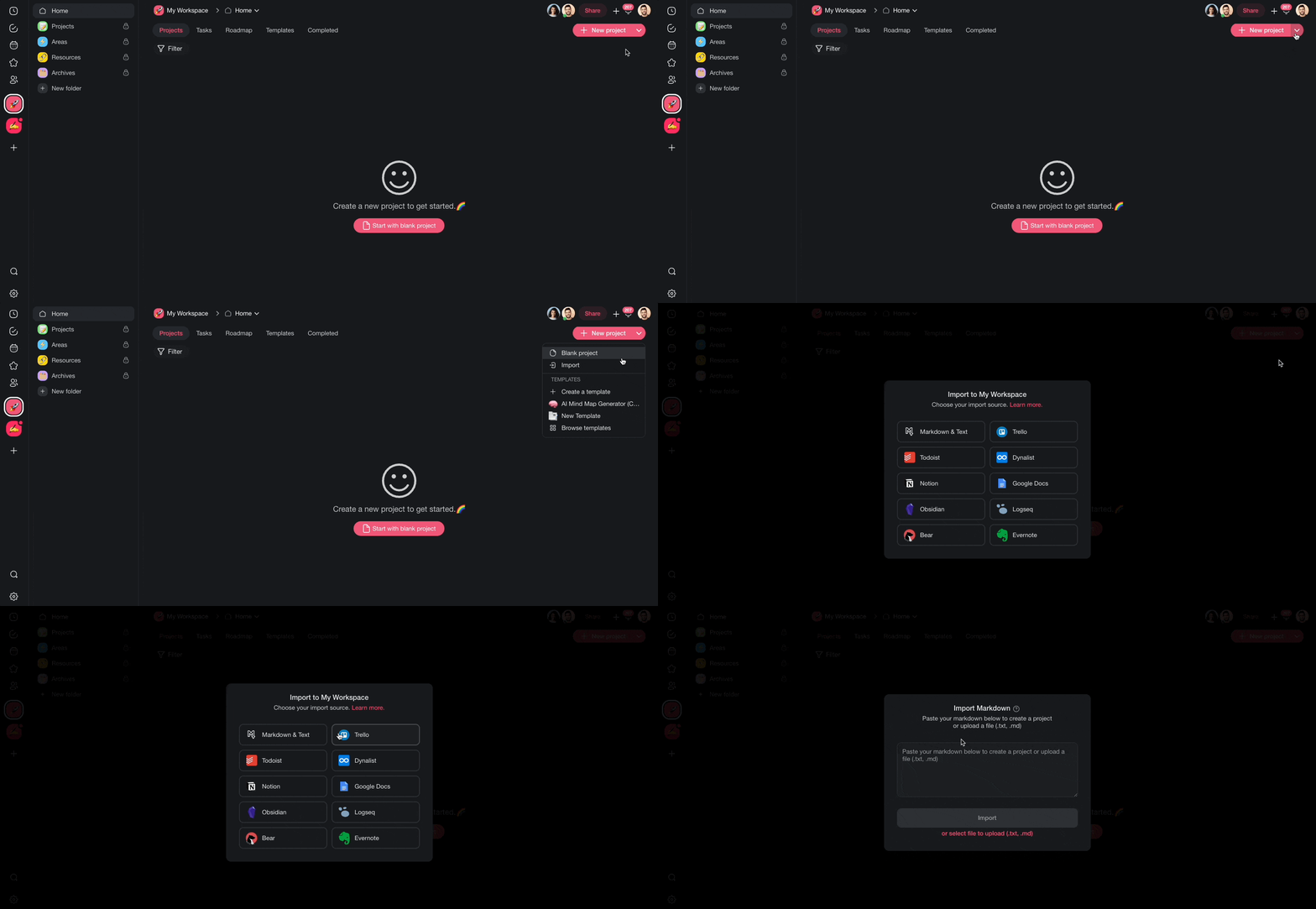
Each imported .md file becomes a new Taskade project. Taskade keeps your headings, bullet lists, and text formatting.
After Import
After your Logseq pages land in Taskade, you can organize and extend them:
- Switch views: Toggle between List, Mind Map, Board, and other views to explore your notes visually.
- Restructure with AI: Use Taskade AI to summarize long pages, extract action items, or reorganize content.
- Build a knowledge base: Upload imported files as agent knowledge so your custom AI agents can reference your Logseq notes.
- Link projects together: Use Taskade's project hierarchy to recreate connections between related pages.
Tips
- Logseq's
[[page references]]and((block references))export as plain text. Use Taskade's internal links to reconnect related content after import. - Import journal and daily note pages into a dedicated folder. This keeps them separate from your regular notes.
- For very large graphs, import in batches by selecting a subset of .md files at a time.
For more on turning notes into automations, see Custom AI Agents/GPTs.
Logseq Field Mapping
| Logseq | Taskade Equivalent |
|---|---|
| Page | Project |
| Block | Task / Sub-task |
[[Page reference]] |
Hierarchy |
((block ref)) |
Plain text (re-link) |
| Tag (#) | Tag |
| TODO / DOING | Task status |
| Journal day | Calendar entry |
Carries over vs needs cleanup
- Imports cleanly: Bullet hierarchy, headings, TODO markers, plain text, links.
- Needs cleanup:
[[wikilinks]]and((block refs))(re-link), graph backlinks (rebuild via internal links), queries (recreate as agent prompts).
How the Import Works
Bring It Into Taskade Genesis
Each imported page is now part of your Workspace DNA. Open the project's ... menu and choose Add to Agent Knowledge so a custom agent answers questions from your Logseq notes. Start an automation from the project to act on TODO items as they change. Then open Taskade Genesis and describe the app you want on top of it, such as a knowledge base, a reading tracker, or a client portal. For a web page or YouTube video, save the link in Media Files instead.