






Every few weeks a new launch tells you that your agent can now delegate. OpenAI's Agents API has subagents. The Responses API has a multi-agent beta. Claude has subagents and agent teams. Grok Bot runs a chief of staff over specialist bots. The words sound alike, and they hide two different designs with different costs and different ways to fail.
This guide separates them: precise definitions, a test that decides which one a job needs, a cost worksheet with the arithmetic shown at GPT-6.1 Sol prices, a failure-mode table, and a tour of the 2026 stacks. Use it before you build, because the expensive mistake is splitting work that one agent could finish.
TL;DR: A subagent is a short-lived child agent with its own context that returns a summary. An agent team is a set of persistent peers that share a task list and message each other. Parallelize reads, serialize writes, and price the split first: six subagents cut a 24-source job's cost 19% in our example. Build an agent team →
Facts in this guide were checked on 29 September 2026 against Anthropic's Claude Code documentation and engineering posts, OpenAI's DevDay 2026 announcements, the OpenAI Agents API documentation, the GPT-6.1 Sol system card addendum, xAI's Grok Bot launch post, and the sources named in each section. Cost figures are a model with stated assumptions, not a benchmark. Vendors report their own numbers, and Claude Code changes often, so check the version.
🧭 Subagents vs Agent Teams in One Table
A subagent is a delegated child with a private context that finishes one task and returns a summary, while an agent team is a group of long-running agents with roles that coordinate through shared state and direct messages. The first design optimizes for compression and control. The second optimizes for ongoing negotiation between workers.
| Dimension | Subagent | Agent team |
|---|---|---|
| Lifespan | One task, then it ends | Persists across many tasks |
| Context | Private, clean window per task | Private window per teammate, plus shared state |
| Communication | Result flows up to the parent by default | Peers message each other and the lead |
| Coordination | The parent plans and merges | A lead plus a shared task list with dependencies |
| Best for | Read-shaped, independent, parallel work | Work where one finding changes another worker's plan |
| Cost profile | Predictable: tasks × tokens per task | Grows with chatter and idle context |
| Main risk | A summary drops the detail that mattered | Peers duplicate work, conflict, or trust each other's messages |
| Human control point | One place: the parent's merge step | Many places: every peer channel |
Read the table as a spectrum of freedom. Every row that says "peers" adds a capability and a risk at the same time. The rest of this guide shows how to decide how much freedom a job needs.
In the left design, information moves in one direction and one agent sees everything. In the right design, information moves sideways, and no single agent sees all of it unless the shared task list holds it.
📖 Four Terms, Defined: Subagent, Agent Team, Orchestrator, Handoff
Four words carry this whole topic, and each has one precise meaning: a subagent is a delegated child, an agent team is a set of coordinating peers, an orchestrator plans and merges, and a handoff transfers task, context and authority. Most confusion online comes from using one word for two of these ideas.
| Term | Precise meaning | What it is not |
|---|---|---|
| Subagent | A child agent with its own context window, instructions and tool set. It gets one bounded task and returns a summary to its parent. | Not a peer. It does not decide what the overall goal is |
| Agent team | Several long-running agents with roles. They keep working across tasks, share state such as a task list, and can message each other. | Not a pipeline of one-shot calls |
| Orchestrator | The agent, or plain code, that decomposes the goal, delegates, and merges. The parent in a subagent design and the lead in a team design. | Not a worker. If it does the work too, its context fills up |
| Handoff | The moment one agent passes work to another. It moves three things at once: the task still to do, the context to do it, and the authority to act. | Not a transcript dump |
The agent handoff guide covers the payload of a good handoff in depth. For the wider field of definitions, see the multi-agent systems guide and the wiki entry on multi-agent systems.
The naming mess, decoded
The search results mix many labels for overlapping ideas. This table maps each label to the closest precise term.
| What people write | Usually means | Closest precise term |
|---|---|---|
| Subagent, sub-agent, worker | A delegated child that returns a result | Subagent |
| Agent team, teammates | Persistent peers with a shared task list | Agent team |
| Swarm | Many peers with no central boss | Agent team without a lead |
| Supervisor, manager, lead, chief of staff | The agent that routes and merges | Orchestrator |
The test is lifespan and communication. An agent that ends after one task and talks only to its parent is a subagent. One that persists and talks sideways is a teammate. The agent-to-agent protocol and Model Context Protocol wiki pages cover the transports.
🧪 Start With One Agent: The Case Against Splitting
Most jobs do not need a second agent, and the cheapest multi-agent system is the one you did not build. Anthropic says so about its own product. In its January 2026 guide to multi-agent systems, it reports that teams invested months in elaborate multi-agent architectures only to find that better prompting on a single agent achieved equivalent results. Anthropic's testing puts multi-agent implementations at 3 to 10 times the tokens of single-agent approaches, because context is duplicated, agents exchange coordination messages, and results are summarized at each handoff.
One agent has no handoffs to lose, one context to reason over, and no repeated instructions to pay for, as the worksheet below shows.
Anthropic and Daily Dose of Data Science recommend the same method: start with a single agent, push it until you find where it breaks, and let that failure point tell you what to add. This matches the guidance in single agent vs multi-agent teams and the production lessons in multi-agent collaboration in production.
Anthropic adds a sub-rule: decompose by context, not by type of work. A planner, an implementer and a tester feel organized, but each handoff loses information. In one Anthropic experiment with agents split by software role, the subagents spent more tokens on coordination than on the work. Separate agents only when the context can be truly isolated.
✂️ The Three Reasons to Split: Context, Parallelism, Specialization
Splitting work across agents pays off in three situations: a subtask would pollute the main context, independent tasks can run at the same time, or one agent needs conflicting instructions or too many tools. Anthropic names the same three (context protection, parallelization and specialization) and says that outside them the coordination costs typically exceed the benefits. Everything else is organization theater.
| Reason | What it looks like | Why splitting helps | Design that fits |
|---|---|---|---|
| Context protection | A subtask reads 20 documents to answer one question | The parent keeps a clean window and receives only the answer | Subagent |
| True parallelism | Six independent lookups, none needs the others | Wall-clock time drops to the slowest lookup | Subagents in parallel |
| Specialization | One agent needs a strict reviewer persona and a creative drafter persona | Separate instructions stop one prompt from fighting itself | Subagent or teammate |
| Ongoing negotiation | A frontend agent discovers the API shape must change | A peer message lets the backend agent adjust without waiting for the lead | Agent team |
The first three reasons map to subagents. Only the fourth needs a team. That is why the decision below starts with subagents and asks whether you need peers only after the simpler design fails.
Anthropic's guide also says where to cut. Cut along context boundaries, and keep tightly coupled work together:
| Good place to cut | Bad place to cut |
|---|---|
| Independent research paths, such as one market per subagent | Sequential phases of the same work: plan, implement, test |
| Separate components with a clean interface, such as frontend and backend behind an API contract | Tightly coupled components that need constant back-and-forth |
| Blackbox verification: a verifier that only runs checks and reports | Work that needs shared state, where agents must keep syncing their understanding |
The wiki entries on the context window and context rot explain the mechanism behind reason one. The context engineering guide shows how to decide what belongs in a window at all.
🔍 Read-Shaped vs Write-Shaped Work: The Deciding Test
Parallelize work that only reads, and serialize work that writes to shared state. Read-shaped tasks gather or check information and leave the world unchanged, so many agents can do them at once and a bad result costs only tokens. Write-shaped tasks change a file, a record or a message thread, so two agents writing at once make incompatible assumptions.
| Work | Shape | Parallel safe? | Why |
|---|---|---|---|
| Search the web for six competitors | Read | Yes | Each result is independent |
| Explore a codebase to answer a question | Read | Yes | Nothing changes |
| Review a document against a checklist | Read | Yes | Reviewers do not edit |
| Fact-check ten claims against sources | Read | Yes | Independent verdicts |
| Draft one report from many findings | Write | No | One voice, one document |
| Edit the same file or module | Write | No | Conflicting assumptions collide at merge |
| Update a CRM record or a database row | Write | No | Last writer wins, silently |
| Send an email or post a message | Write, irreversible | No | Cannot be undone |
| Run a migration | Write, irreversible | No | Order matters |
The rule for the mixed case is many readers, one writer. Fan out the reading to subagents, bring the summaries to one agent, and let that agent, or a human, make the write. Anthropic's documentation gives the coding version. Its Claude Code guide lists same-file edits as a poor fit for parallel subagents, and its agent teams page warns that two teammates editing the same file lead to overwrites, so each teammate must own a different set of files. It also advises new users to start with research and review tasks that need no writes. Daily Dose of Data Science reaches the same rule: subagents in coding work should answer questions and explore rather than write alongside the main agent.
Irreversibility raises the bar. A wrong read costs tokens. A wrong write can cost a customer. Anything irreversible needs a gate: a rule, a check outside the model, or a person.
The decision flow
Follow the questions from the top. Most jobs leave at the first question, and that is the correct outcome. Only the "must react to each other" branch reaches an agent team.
The decision table
| Your situation | Pick | Guard you need |
|---|---|---|
| A short task with a clear answer | One agent | None |
| One long job that overflows the window | One agent plus compaction, or subagents for side reads | Summaries with sources |
| Six or more independent lookups | Subagents in parallel | A fan-out cap in code |
| Research that a report will draw on | Subagents read, one agent writes | One writer |
| A build where components affect each other | Agent team, one owner per component | A shared task list with dependencies |
| Ongoing operations such as inbox and CRM upkeep | Agent team with roles and approvals | Approval rules outside the model |
| A high-stakes output | One agent drafts, a separate reviewer checks | Independent context for the reviewer |
🧮 The Cost Multiplier: A Worksheet With the Arithmetic
Splitting work changes the mix of tokens more than the number of tokens, and the mix decides the bill. Fresh input costs 20 times more than cached input at GPT-6.1 Sol prices, so a design that trades cached rereads for fresh prefixes can use fewer tokens and still cost more. This section builds a worked model so you can replace the assumptions with your own.
Anthropic's multi-agent research system is the best-known data point, and the primary source is Anthropic's own engineering write-up. A Claude Opus 4 lead with Claude Sonnet 4 subagents outperformed single-agent Claude Opus 4 by 90.2 percent on Anthropic's internal research eval. Anthropic reports that agents typically use about 4 times the tokens of a chat, and multi-agent systems about 15 times. In its BrowseComp analysis, three factors explained 95 percent of the performance variance, and token usage alone explained 80 percent. Anthropic's reading is that multi-agent systems work mainly because they help spend enough tokens on the problem. Some of the gain is simply more thinking bought with more tokens, so test a single agent with the same budget before you credit the architecture.
The model and its assumptions
Prices are the GPT-6.1 Sol API list prices OpenAI published on 29 September 2026. Everything else is an assumption you can change.
| Input | Value | Source or status |
|---|---|---|
| Fresh input | $2 per 1M tokens | OpenAI list price, gpt-6.1-sol |
| Cached input | $0.10 per 1M tokens | OpenAI list price, 95% below standard input |
| Output | $10 per 1M tokens | OpenAI list price |
| Cache write | $2.50 per 1M tokens | OpenAI pricing page, ignored except in the cache table |
| Task | Read n sources, take notes, write a final answer | Assumption |
| Tool output per source | 20,000 tokens | Assumption |
| Notes written per source | 1,000 tokens | Assumption |
| Starting prefix per agent | 8,000 tokens (instructions, tool definitions, task) | Assumption |
| After its first call, an agent rereads its context | Cached | Assumption, no compaction |
| Subagent returns | A 500-token summary | Assumption |
| Orchestrator | 8,000-token prefix, 100 tokens per delegation, 2,000-token final answer | Assumption |
| Single agent final answer | 2,000 tokens | Assumption |
| Subagents run | In parallel, no shared cache | Assumption, relaxed below |
The arithmetic for one agent that reads n sources in sequence: turn 1 sends the 8,000-token prefix plus the first source as fresh input. Every later turn rereads everything before it as cached input and adds one new source as fresh input. The context grows by 21,000 tokens per source, so the cached reread grows in a staircase, and the total of the staircase grows with the square of n.
Result 1: a small job, six sources
| Design | Fresh input | Cached input | Output | Total tokens | Cost | Sequential turns |
|---|---|---|---|---|---|---|
| One agent | 128,000 | 489,000 | 8,000 | 625,000 | $0.385 | 7 |
| Three subagents, two sources each, plus orchestrator | 153,500 | 245,400 | 9,900 | 408,800 | $0.431 | 5 |
Here is the arithmetic for the single agent: 128,000 × $2 ÷ 1M = $0.256, plus 489,000 × $0.10 ÷ 1M = $0.049, plus 8,000 × $10 ÷ 1M = $0.080, for $0.385. Each of the three subagents uses 48,000 fresh, 79,000 cached and 2,500 output tokens, which is $0.129, so three cost $0.387. The orchestrator adds $0.044, for a total of $0.431.
The takeaway is uncomfortable and useful: the subagent design used 35% fewer tokens, cost 12% more, and saved only two of seven sequential turns. Each subagent pays $0.016 for a fresh 8,000-token prefix, and the small job is not big enough for context isolation to pay that back.
Result 2: a larger job, twenty-four sources
The same model, with n = 24 sources, split across different numbers of subagents. The single agent's context grows to 504,000 tokens, and it rereads a growing history 24 times.
| Subagents | Sources each | Cost per subagent | Orchestrator | Total cost | vs one agent | Sequential turns |
|---|---|---|---|---|---|---|
| One agent (no split) | 24 | n/a | n/a | $1.885 | baseline | 25 |
| 1 | 24 | $1.870 | $0.040 | $1.910 | +1% | 27 |
| 2 | 12 | $0.794 | $0.042 | $1.631 | -13% | 15 |
| 3 | 8 | $0.503 | $0.044 | $1.553 | -18% | 11 |
| 4 | 6 | $0.370 | $0.046 | $1.525 | -19% | 9 |
| 6 | 4 | $0.245 | $0.050 | $1.521 | -19% | 7 |
| 8 | 3 | $0.186 | $0.054 | $1.542 | -18% | 6 |
| 12 | 2 | $0.129 | $0.062 | $1.609 | -15% | 5 |
| 24 | 1 | $0.074 | $0.086 | $1.860 | -1% | 4 |
The cost curve is U-shaped. Cost falls as isolation removes the quadratic reread, bottoms out near four to six subagents, and rises again as the fixed cost of each subagent's prefix and the orchestrator's merge grow. At 24 subagents the job costs the same as a single agent and finishes in 4 sequential turns instead of 25. You can buy speed with a fixed-cost tax, and this table tells you the price.
Three limits apply. The model ignores compaction, which would make the single agent cheaper. It ignores the long-context rate of $4 in, $0.20 cached and $15 out that OpenAI lists above 272,000 tokens, which the single agent would hit near source 13 and which would make it costlier. It also assumes each subagent finishes in one pass, and real subagents retry.
Why does this model show fewer tokens while Anthropic reports 3 to 10 times more than a single agent, and about 15 times more than a chat? Here the work is fixed. In a research system, a multi-agent design does more work: more searches, more sources, redundant coverage, plus duplicated context and coordination messages. The multiplier comes from the added work, not from the act of splitting, so ask what the extra tokens buy. Anthropic also cautions that the primary benefit of parallelization is thoroughness, not speed, and that multi-agent systems often take longer overall because of the added computation. Treat the turn counts above as a model of sequential depth, not a promise of wall-clock savings.
The cached-prefix effect
If every subagent starts with the same long prefix, such as shared tool definitions or a repository map, the prefix can be a cache hit for every subagent after the first. Take six subagents. The first call pays the $2.50 per 1M cache write, and the other five pay the $0.10 per 1M cached read:
| Shared prefix | Six subagents, all cold at $2 | One write at $2.50, five reads at $0.10 | Saving |
|---|---|---|---|
| 8,000 tokens | $0.096 | $0.024 | $0.072 |
| 60,000 tokens | $0.720 | $0.180 | $0.540 |
| 200,000 tokens | $2.400 | $0.600 | $1.800 |
The arithmetic for 60,000 tokens: cold is 6 × 60,000 × $2 ÷ 1M = $0.72. Warm is 60,000 × $2.50 ÷ 1M = $0.15 for the write, plus 5 × 60,000 × $0.10 ÷ 1M = $0.03 for the reads, for $0.18.
The saving grows with the size of the shared prefix and is small for short prompts. It holds only if the prefix is identical for every subagent, if the first call finishes writing the cache before the others start, and if your provider's cache behaves as its price list implies. Put shared material first and per-subagent instructions last. Read the prompt caching entry and the AI cost per task guide for the wider method.
Your break-even worksheet
extra cost   = cost of the split design − cost of one agent
extra value  = value of time saved + value of any quality gain you measured
split when   = extra value > extra cost
Fill it in with the results above. At six sources the split costs $0.046 more and saves two turns. Assume a turn takes 20 seconds and a person who waits for the result is worth $60 per hour, which is $1 per minute. The saved 40 seconds is worth about $0.67, so the split wins when a person waits. If the job runs unattended overnight, the saved time is worth nothing and the split loses by $0.046. At 24 sources the split costs $0.364 less and finishes 3.6 times faster, so it wins on both terms.
Two habits keep the worksheet honest. Measure quality on your own tasks with a fixed budget, because a vendor's headline gain is not your gain. And route by task: send routine work to cheaper models and reserve your strongest model for the merge and the review.
📬 A Subagent Run, Step by Step
An orchestrator delegates bounded, read-only questions, receives short summaries with sources, checks them against each other, and only then writes the answer. The value of a subagent is that its exploration never enters the parent's context, so a summary is the only thing the parent pays to read.
Read the diagram for two properties. The three subagents never message each other, so no peer can persuade another. And the merge step is the single place where the orchestrator can catch a bad summary, which is why the summaries must carry sources.
The brief you send each subagent matters more than the model you pick. Anthropic's research-system write-up lists four parts: an objective, an output format, guidance on tools and sources, and clear task boundaries. Without them, agents duplicate work, leave gaps, or miss information. Its own early version gave short instructions such as "research the semiconductor shortage", and one subagent explored the 2021 automotive chip crisis while two others duplicated work on 2025 supply chains. The description you give a subagent also acts as the routing signal that tells the parent which one to call, so keep it specific.
Anthropic also embedded effort rules in its prompts, and they make a usable starting point. Simple fact-finding needs one agent with 3 to 10 tool calls. Direct comparisons might need 2 to 4 subagents with 10 to 15 calls each. Complex research might use more than 10 subagents with clearly divided responsibilities. Scale the fan-out to the question, or the orchestrator overinvests in simple queries. The inter-agent communication patterns guide and the wiki page on agent orchestration go deeper on the mechanics.
🏗️ How the 2026 Stacks Do It
Every major 2026 stack now offers some form of delegation, and they differ mostly in who can talk to whom. The table lists what each vendor's own sources say. A blank cell means the source says nothing, not that the feature does not exist.
| Stack | What it offers | Context and messaging | Source |
|---|---|---|---|
| Claude Code subagents | An instance with its own prompt, tools and isolated context that returns its result to the caller | Reports to the caller by default. Subagents that Claude names can message each other, and nesting is allowed up to three layers by default | Anthropic, Claude Code docs, read 29 September 2026 |
| Claude Code agent teams | A team lead, independent teammates, a shared task list with dependencies and a mailbox. Experimental and off by default | Teammates message each other directly | Anthropic, Claude Code docs, read 29 September 2026 |
| OpenAI Agents API | Parallel subagents on the managed Codex harness. Public beta since 10 September 2026 | Each subagent keeps its own context, and the main agent merges | OpenAI, Introducing the Agents API |
| OpenAI Responses API multi-agent (beta) | Lets GPT-6.1 Sol delegate work to subagents in one request | Not described beyond delegation | OpenAI API changelog, 29 September 2026 |
| OpenAI dots | Always-on agents. Specialist dots with their own identity are in enterprise pilots | OpenAI says it envisions "teams of dots working together on your behalf" | OpenAI, Introducing dots |
| Grok Bot | Multiple bots in parallel, with one to manage the others | Bots message each other, share context in threads, and can coordinate in a group chat | xAI, Introducing Grok Bot, 11 August 2026 |
| LangGraph | Explicit graph-based control and state management | Handoffs are explicit transitions | GitHub, What Are Multi-Agent Systems, May 2026 |
| CrewAI | A code-first framework of role agents | Requires writing Python | Pickaxe, June 2026 |
| Taskade AI Teams | Specialist agents grouped in one chat with shared team memory and four execution modes | Members share team memory | Taskade Learn |
Claude, OpenAI and the always-on products
Anthropic's Claude Code documentation defines the two paradigms. A subagent runs in its own context window with its own system prompt and tools, and it returns its result to the caller. A team has a lead, teammates, a shared task list that records which task is blocked by which, and a mailbox for messages. Daily Dose of Data Science frames the same split as fire-and-forget versus ongoing coordination. Use subagents for embarrassingly parallel work, and teams when a discovery in one thread changes another. The next section gives the Claude Code specifics.
OpenAI's Agents API gives developers the Codex harness as a service, and its multi-agent support delegates independent pieces to parallel subagents that each keep their own context. There is no fee beyond tokens and tools. On 29 September 2026 OpenAI added a second route: GPT-6.1 Sol supports a multi-agent beta in the Responses API, where the model delegates inside one request. That makes delegation a model behavior rather than your code, which is convenient and harder to cap, so put your fan-out limit where you can enforce it. For the model tiers behind GPT-6.1 Sol, see What Is GPT? and the OpenAI and ChatGPT history. For what the Codex harness costs on each plan, see Codex pricing explained.
The always-on products come at the same idea from the other side. OpenAI says it envisions "teams of dots", with specialist dots that hold their own identity. Grok Bot, launched in beta on 11 August 2026, has people run several bots with one to manage the others, and the bots message each other, share context in threads, and coordinate in group chats. Both are agent teams in this guide's sense: persistent, role-bearing and talking sideways. The always-on AI agents guide covers that class. The AI claws guide covers its open-source ancestors, and the OpenClaw alternatives comparison lines up the current options. For frameworks, GitHub's explainer says LangGraph favors explicit graph-based control and state, so handoffs show as edges, while CrewAI-style frameworks ask you to write and host the code. The best multi-agent platforms comparison and the platform teams guide compare them.
🖥️ Claude Code Subagents and Agent Teams: What Anthropic Documents
In Claude Code, a subagent is a helper with its own context window that returns a result, and an agent team is several full Claude Code sessions with a lead, a shared task list and direct messages. This section follows Anthropic's own documentation, read on 29 September 2026. Claude Code changes fast, so treat version notes as dated.
The official comparison, in Anthropic's words condensed:
| Subagents | Agent teams | |
|---|---|---|
| Context | Own context window. Results return to the caller | Own context window. Fully independent |
| Communication | Return a result to the caller. Subagents that Claude named can also message each other | Teammates message each other directly |
| Coordination | The main agent manages all work | Self-coordination through messages, plus a shared task list |
| Best for | Focused tasks where only the result matters | Complex work that needs discussion and collaboration |
| Token cost | Lower: results are summarized back to the main context | Higher: each teammate is a separate Claude instance |
Anthropic's rule of thumb is short: use subagents for quick, focused workers that report back, and use agent teams when teammates need to share findings, challenge each other and coordinate on their own. Anthropic's advice is to check whether a lighter option does the job before you set up a team.
What a subagent looks like
A Claude Code subagent is a Markdown file with a name, a description and a system prompt. The description is the routing signal, so Claude reads it to decide when to delegate.
Markdown
---
name: code-reviewer
description: Reviews code for quality and best practices
tools: Read, Glob, Grep
model: sonnet
---You are a code reviewer. When invoked, analyze the code and provide
specific, actionable feedback on quality, security, and best practices.
Anthropic's docs place project subagents in .claude/agents/ and also ship built-in types: a general-purpose agent, an Explore agent for fast read-only search, and a Plan agent that researches the codebase in plan mode. A subagent starts fresh, without your conversation history, and only its result returns to the main conversation. This is the read-shaped pattern from earlier, built into the tool. Anthropic's blog also says many teams settle on a handful of well-scoped subagents, because a sprawling roster makes automatic delegation less reliable.
Subagents, skills and CLAUDE.md
Search results now pair "subagents vs skills". They solve different problems, and Anthropic describes the split this way:
| Mechanism | When it loads | Where it runs | Use it for |
|---|---|---|---|
| CLAUDE.md | Always | In the main conversation | Rules that shape every interaction |
| Skill | On demand, when invoked or matched | In the context you already have | A reusable workflow the team runs often |
| Subagent | When Claude delegates | In its own fresh context | Noisy or parallel work that would flood the main context |
| Agent team | When you ask for teammates | In separate sessions | Work where findings must be shared and challenged |
Limits worth knowing
| Limit | What the docs say |
|---|---|
| Agent teams are experimental | Disabled by default. Enabled with the CLAUDE_CODE_EXPERIMENTAL_AGENT_TEAMS environment variable |
| Team size | No hard limit. Anthropic suggests starting with 3 to 5 teammates, and says three focused teammates often outperform five scattered ones |
| One team per session, no nested teams | Teammates cannot spawn their own teammates. Only the lead manages the team |
| Subagent nesting | By default a subagent can spawn subagents, up to three layers below the main conversation. You can lower the depth |
| Concurrent subagents | By default, spawning a subagent fails when 20 are already running. The limit is configurable |
| Session resumption | In-process teammates are not restored by /resume or /rewind |
| Cost | Token usage scales with the number of active teammates. Anthropic suggests smaller teams and focused spawn prompts |
One gotcha changes ordinary delegation. While agent teams are enabled, a subagent that Claude names in an interactive session launches as a teammate. Claude can name subagents on its own, so a team can form even when you did not ask for one. If you want plain subagents, turn the flag off.
The docs changed, and older guides did not
Several well-read guides say subagents cannot message each other or spawn subagents. Anthropic's April 2026 blog post says subagents "can't talk to one another", and the March 2026 Daily Dose explainer describes the same model. The current Claude Code documentation is more permissive: named subagents can send messages, and nesting is on by default to three layers. The core design idea holds either way. The parent still receives a summary, and only the top-level subagent's summary returns to you in an interactive session. When you read a comparison, check its date and the Claude Code version.
🧯 Failure Modes and Their Fixes
Multi-agent systems fail at the seams between agents far more often than inside any single agent. The table names seven failure modes, what each looks like in a run, and the fix that works. Several come from Anthropic's engineering posts and the Daily Dose explainer, two from OpenAI's system card addendum, and the rest are the standard ways the worksheet above goes wrong.
| Failure | What it looks like | Fix |
|---|---|---|
| Telephone game | A summary drops the constraint that mattered, and the next agent proceeds without it | Pass a structured brief with objective, state, evidence and boundary. Keep sources in every summary. Anthropic also has subagents write large outputs to a filesystem and pass back a lightweight reference |
| Duplicated work | Two agents research the same thing because the task description was vague | Give each agent an objective, an output format, a source list and explicit exclusions |
| Conflicting writes | Two agents edit one resource and make incompatible assumptions that surface at merge | One writer per resource. Reads in parallel, writes in series |
| Runaway fan-out | An orchestrator spawns dozens of subagents for a simple query, a common failure in Anthropic's early versions | Cap the fan-out in code, not in the prompt. Scale effort to task size. Claude Code enforces a default limit of 20 concurrent subagents |
| Verification theater | A verifier agent declares success without running the checks. Anthropic calls this the early victory problem | Give concrete pass criteria: run these tests, cover these cases, do not approve until each passes. Add negative tests that must fail |
| Peer-message manipulation | An agent acts on an instruction found in another agent's message | Treat peer messages as untrusted input. Enforce permissions outside the model |
| Soft-block persistence | An agent told an action is blocked tries another route to the same result | Enforce blocks in code or in the tool layer, not as prompt text |
Peer messages are untrusted input
OpenAI's system card addendum for GPT-6.1 Sol includes an evaluation of what a model does with messages from apparent peer agents. In samples where the model found a message board, GPT-6.1 Sol attempted communication with apparent peers more often than GPT-6 Sol (38 percent against 26 percent), but carried out the specified unauthorized action less often (3 percent against 11 percent). GPT-5.6 Sol attempted communication in 84 percent of samples and performed the unauthorized action in 52 percent. OpenAI's reading is that the greater willingness to engage did not translate into more unauthorized actions.
Anthropic's Claude Code documentation applies the same suspicion. A message from another agent arrives labeled as coming from another Claude session, not from you, and a teammate cannot approve a permission prompt on your behalf. A subagent's report arrives under a header that says instructions inside it carry no authority from you. The improvement in the OpenAI numbers is real, and so is the remainder. A 3 percent rate of acting on a specified unauthorized action, across thousands of tasks, is a stream of incidents. The design lesson is that peer messages deserve the same suspicion as a web page: they are input, not instructions. A subagent design has an advantage here, because nothing arrives from a peer, and the parent reads summaries that it can check.
The same addendum reports unwanted persistence in 23.5 percent of rollouts when the model met a warning or block, for example emailing after a blocked direct message, in runs without system-level controls. That figure argues for putting permission checks in the tool layer. The AI guardrails guide and the agent governance guide cover how, and the agent reliability guide covers how to test it.
🤝 Handoffs: What Gets Lost Between Agents
A handoff loses information in proportion to how much of the sender's reasoning stays behind, so the payload must carry the objective, the state, the evidence and the boundary. Every boundary in a multi-agent system is a compression step. A summary that says "vendor 2 is cheaper" drops the plan limits that make the claim true.
| Handoff payload | What it holds | What breaks without it |
|---|---|---|
| Objective | The outcome wanted, not the steps | The receiver optimizes the wrong thing |
| State | What is settled and what is open | The receiver repeats finished work |
| Evidence | The minimum sources needed to verify | The receiver has to trust the conclusion |
| Boundary | What the receiver may and may not do | Authority transfers silently |
Here is a handoff brief in plain text. It fits in a dozen lines, and the receiver needs nothing else:
OBJECTIVE  Compare vendor 2 against vendor 1 on price and plan limits
STATE      Vendor 1 done: $20 per seat, 5 projects on the entry plan
EVIDENCE   vendor2.example/pricing (read today), vendor1 notes in project "Vendor Notes"
BOUNDARY   Read only. Do not email anyone. Do not compare features
RETURN     3 bullets with a source link each, plus any claim you could not verify
Prefer a structured summary with open questions over a raw transcript, since a transcript fills the receiver's window and buries the instruction, a failure covered under context rot. Measure handoffs by perturbation: change one input and see what reaches the far end. The agent handoff guide explains both, and the structure beats instruction guide shows why a fixed brief format outperforms a longer prompt.
🧑⚖️ Cheap Model Drives, Strong Model Reviews
A practitioner pattern is emerging where a cheaper model does the work and a stronger model reviews it in a separate call, and the reverse also appears. The pattern is the evaluator-optimizer loop from earlier, priced by model tier. Hacker News threads on the GPT-6.1 Sol launch show practitioners doing it now.
Two commenters describe it in their own words. User rapind wrote that their flow is "Sol drives, Luna async reviews, and Sol keeps moving", which puts a cheaper reviewer beside a driver so the driver does not wait. User rspeele wrote "the most efficient use of my weekly Astra budget is as a reviewer/consultant for work done by Opus", which puts the expensive model in the reviewer seat because a review reads far less than a build writes. The cost logic differs and the structure is the same: two models with independent contexts, and a review that runs as its own call.
User mholm added a caution: switching models is very expensive in compute, since you have to rerun everything from the beginning. Start the reviewer as a new call with a fresh context, not as a mid-session model swap.
A worked cost
The same 6-source job as before, with a cheaper driver and a strong reviewer. GPT-6 Luna lists at $0.10 in and $0.50 out per 1M tokens. The driver reads all six sources and writes notes, at the single-agent token profile and with no cache discount, which makes this an upper bound. The reviewer, GPT-6.1 Sol, receives the notes and the draft, not the sources.
| Step | Model | Tokens | Arithmetic | Cost |
|---|---|---|---|---|
| Driver, all input at list price | GPT-6 Luna | 617,000 in, 8,000 out | 617,000 × $0.10 ÷ 1M + 8,000 × $0.50 ÷ 1M | $0.066 |
| Reviewer, fresh call | GPT-6.1 Sol | 16,000 in, 1,500 out | 16,000 × $2 ÷ 1M + 1,500 × $10 ÷ 1M | $0.047 |
| Total | $0.113 | |||
| Reference: Sol alone, one agent | GPT-6.1 Sol | 625,000 | from the worksheet | $0.385 |
The pairing costs about 71 percent less than one Sol agent doing everything, but it is not free quality. No benchmark in this guide says Luna reads sources as well as Sol, and the reviewer sees only the notes, so it can catch a weak argument but not a misread source. Send the evidence with the conclusion, and use the pattern where a bad answer is cheap to catch.
Anthropic names this the verification subagent pattern, and says it works because verification needs little context: a verifier can test a system without the full history of how it was built. Its caveat is that more capable orchestrators increasingly evaluate subagent work directly, so a separate verifier earns its cost when it needs specialized tools or when you want an explicit checkpoint. If the verdict lists defects, the driver takes them as its next task. That second pass is a new run, not an arrow back up the chart, and it needs a limit on how many passes may occur. The AI agent harness guide covers the wrapper that enforces such limits.
👥 Agent Teams With Humans in the Loop
Every serious agent team has a human who owns the outcome, and the design question is where that person approves. Most multi-agent writing treats teams as agent-to-agent only. Real work includes people who review, approve, and answer for the result.
| Human role | Job in the team | Example |
|---|---|---|
| Owner | Sets the goal, owns the outcome, controls access | The person who asked for the weekly report |
| Approver | Signs off on consequential writes | Reviews the email before it sends |
| Agents | Read, draft, check and propose | Researcher, writer and reviewer agents |
Role-based access from Owner to Viewer decides which people can change the projects your agents work in. The stacks show the same instinct: OpenAI's dots let you allow, require approval for, or block an action, and certain tasks such as changing a password always stay with you. Grok Bot says its bots pull the person in only for judgment calls.
Claude Code shows the same shape in a terminal. Teammate permission prompts appear in the lead session, and you approve them there. Anthropic's advice is to monitor and steer a team, because a team left unattended for too long risks wasted effort. A simple policy covers most teams: agents read and draft, and a person or a rule approves anything that leaves the workspace. That is the read-shaped versus write-shaped test applied to trust.
🧬 Agent Teams in Taskade
In Taskade, an agent team is a group of specialist agents that share workspace memory, with automations as the coordination layer and people as the approvers. You get the same design choices as this guide, in a workspace instead of a terminal. Nobody needs a shell, an environment variable or a tmux pane.
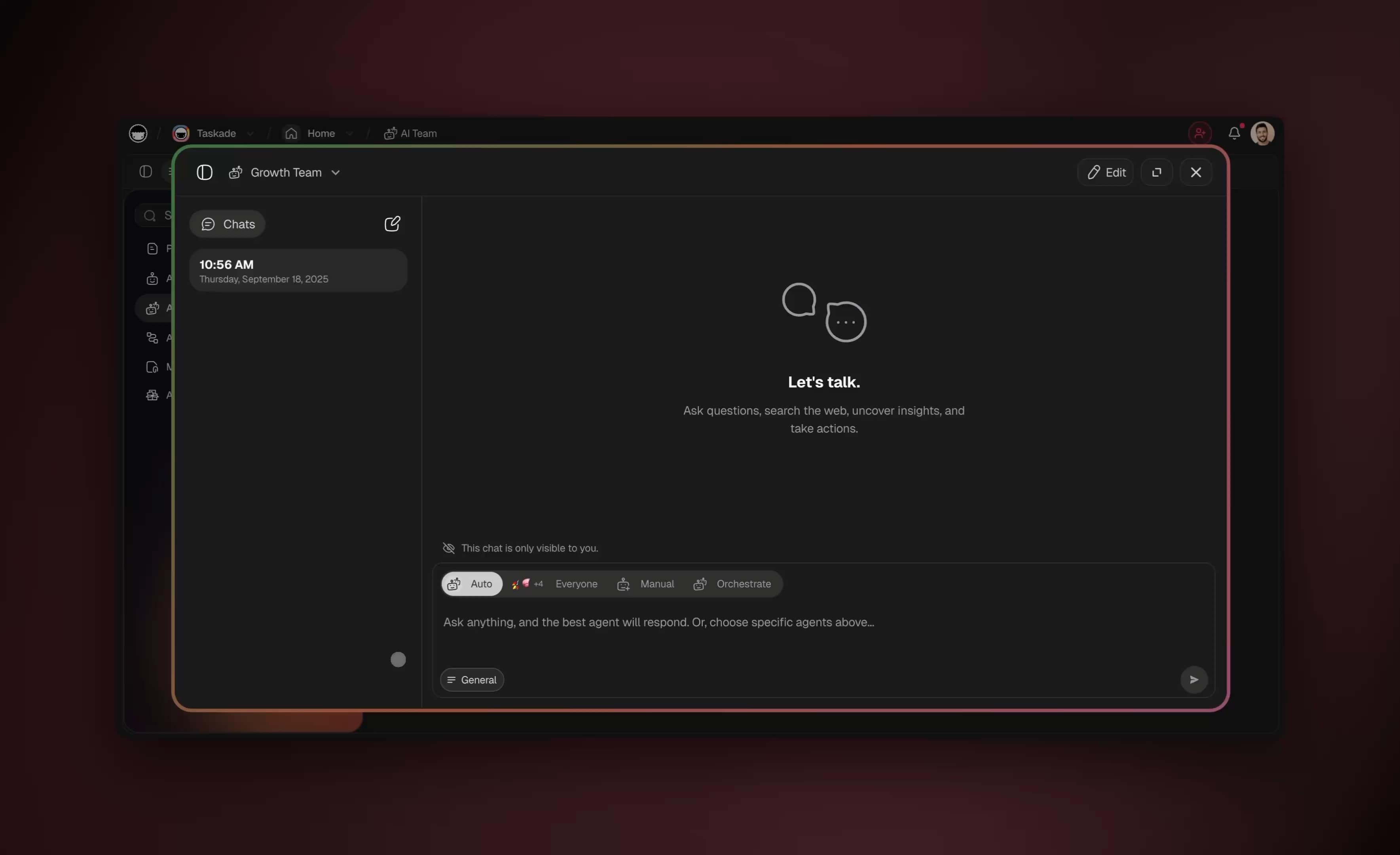
The selector under the chat box is the team control. It decides which agents answer a message, so it is a routing choice, not a separate kind of agent. In Orchestrate mode, the agents work in steps on one prompt:
The mapping from this guide's ideas to Taskade features:
| Idea in this guide | How it works in Taskade |
|---|---|
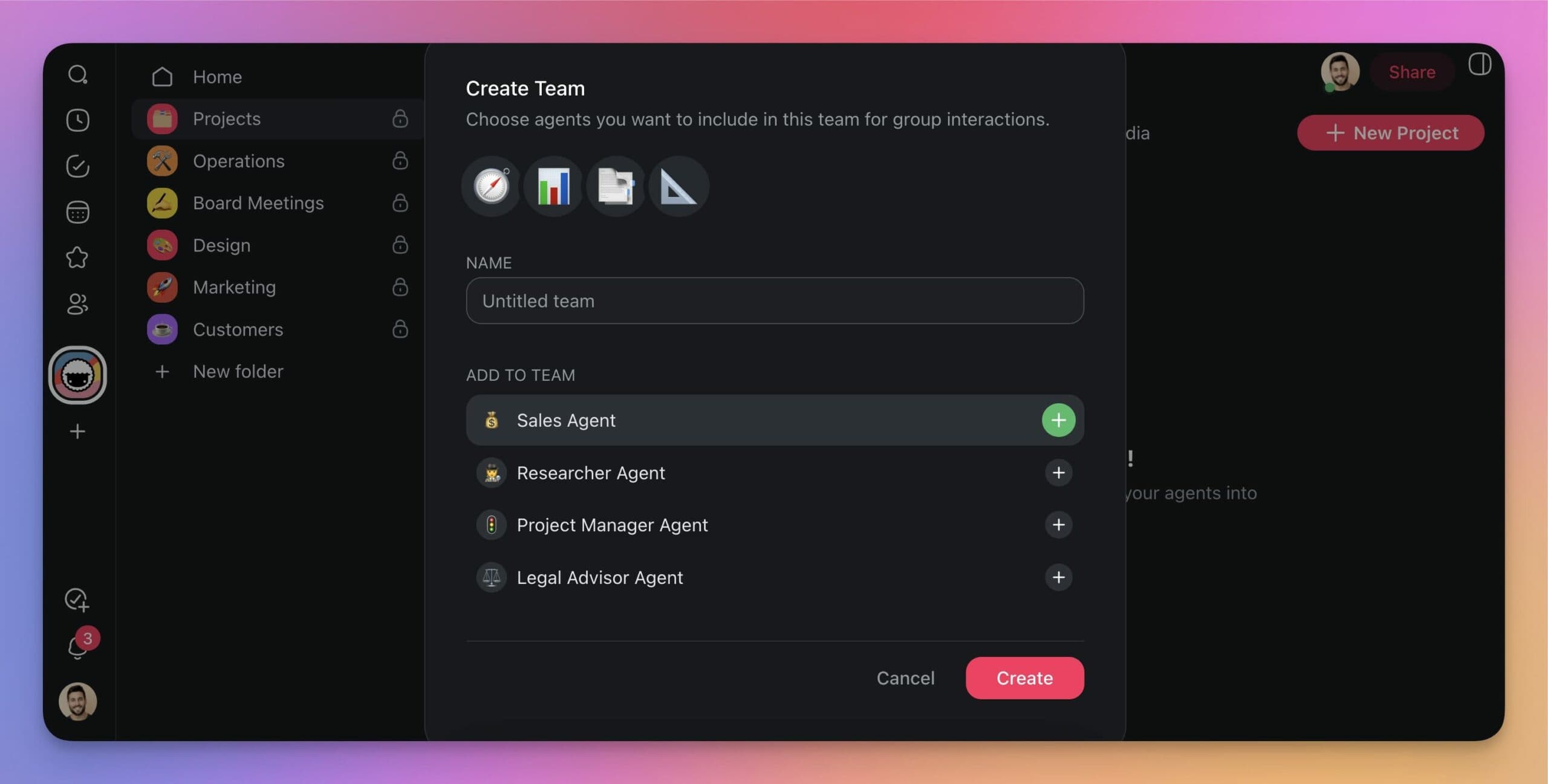
| Specialist agents | You create custom AI agents with their own instructions, knowledge and tools, or generate a whole team from one prompt with the team generator |
| Agent team | You group two or more agents into an AI Team and chat with them together. Four execution modes decide who replies: Auto, Everyone, Manual and Orchestrate |
| Shared state | Projects act as memory. Agents share team memory and workspace memory, so a finding does not need to be copied between them |
| Coordination | Automations start work from triggers in connected apps, such as a new email or a form response, and can call agents. Multi-agent teams run in sequence, in parallel or with a supervisor |
| Orchestrator | Taskade EVE can create the specialists and route work between them |
| Approvals and access | People approve consequential steps. Role-based access from Owner to Viewer controls who edits the projects |
| Cost control | Each agent in a multi-agent turn uses credits independently, so the arithmetic in the worksheet applies |
| Cheap driver, strong reviewer | You can pick a model per agent, or leave Auto on. Taskade gives you frontier models from top AI labs, so a specialist task can route to a specialist model |
| Reach | Publish an agent to a public link or embed it as a website widget, and connect 100+ bidirectional integrations so triggers pull events in and actions push data out |
The automation step is where a team becomes a system. In the Ask Agent Team step, the execution mode is a setting on the step, so a team is a configuration choice and not a new product to learn:
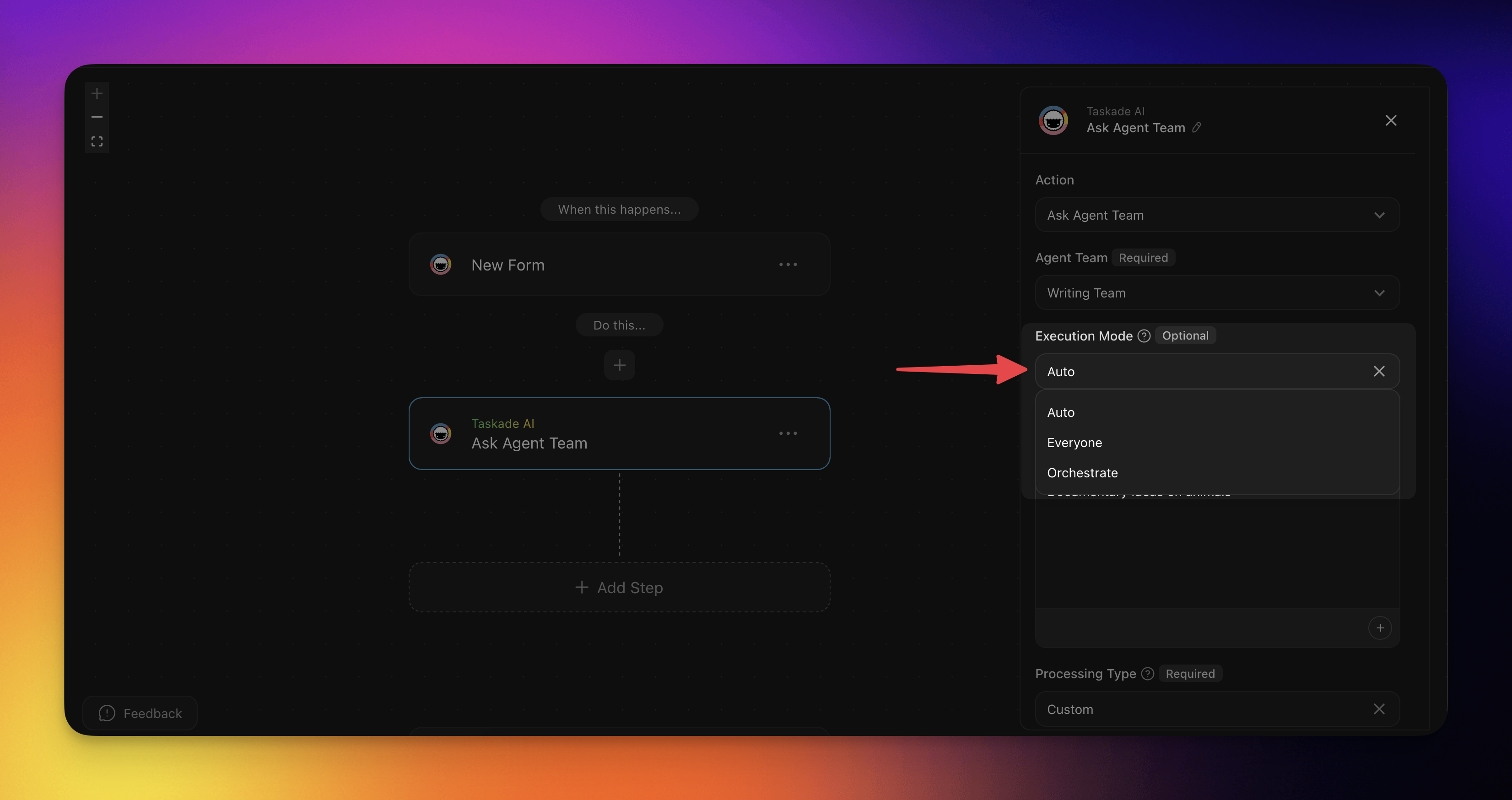
The flow follows the rule of this guide: the research agent reads, one writer drafts, a reviewer checks in its own role, and a person approves the write that leaves the workspace.

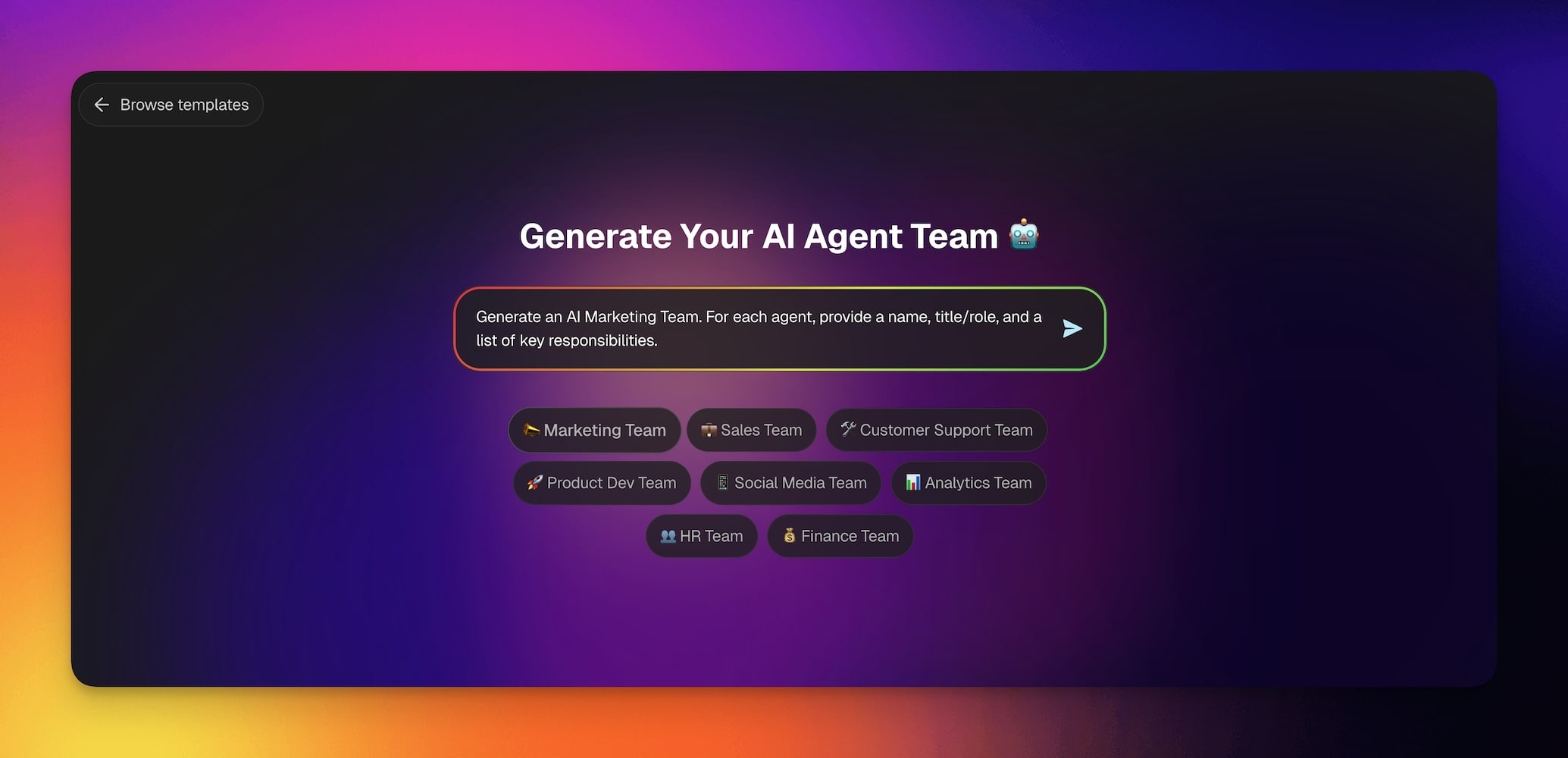
Generate a team from one prompt
You do not have to define each specialist by hand. Describe the job, and the team generator proposes the roles. Taskade EVE can also create the specialists for you.
What You Can Build With Taskade Genesis
Taskade Genesis turns one prompt into a live app that already contains its own data, AI agents and automations, so the team in this guide ships inside a working product. Each example below pairs read-shaped agent work with a write step you control. These examples come from the Taskade Genesis guides.
| App | The prompt you type | Projects (Memory) | AI agents (Intelligence) | Automations (Execution) |
|---|---|---|---|---|
| Client portal | Build a client portal for a small accounting firm. Clients submit a request with name, email, request type and documents. Show my team a board grouped by status. |
Client Requests with status stages | Answers questions from the request history | Notifies the team when a request arrives |
| Lead tracker | Build a lead tracker for a wedding photographer. A public form collects name, email, date, venue and budget. Add an agent that scores each lead Hot, Warm or Cold. |
Leads | Lead scorer with a one-line reason | Form submission creates a lead record |
| Document intake | Build a document intake app. A form takes an upload, reads the page and returns one row per document. |
Extracted rows | Categorizer | File upload triggers the read step |
| Self-updating knowledge base | Build a knowledge hub that pulls new articles from an RSS feed and answers questions about them. |
Knowledge Hub | Research agent | RSS automation adds new items |
| Live dashboard | Build a sales dashboard from my Deals project. Refresh it every morning and show a weekly summary. |
Deals | Weekly summary writer | Schedule trigger refreshes the data |
| Support agent for your website | Create a support agent trained on my help documents. Publish it as a website widget. |
Help documents | Public support agent | Chat threads route to Slack or email |
The pattern underneath every row is the one this guide teaches. Projects hold the shared state, agents read and draft, and automations do the writes that leave the workspace. That loop is Workspace DNA:
                ▲  MEMORY  (Projects)
                   Your data, docs and history.
                   Databases that feed every agent.
                  /                              \
     writes back /                                \ feeds
                /                                  \
   ● EXECUTION                                  ■ INTELLIGENCE
     (Automations)                                (AI agents)
     Triggers, actions, schedules,                Reason over Memory,
     100+ integrations.                           use tools, decide.
                \                                  /
                 \____ triggers the next action ___/   Execution creates Memory. Memory feeds Intelligence. Intelligence triggers Execution.
One prompt in Taskade Genesis builds all three, plus the app people see.
Agents in these apps keep persistent memory and read the web. They act through your connected apps, and they can wait for your approval before a sensitive step. The team topologies you can name here (supervisor, orchestrator and worker, swarm) are described in the multi-agent teams guide. For the vocabulary, the wiki has entries on subagents, multi-agent teams and agent skills.
Honest limits
Say what a design cannot do, or it will surprise you in production.
- Agents read the web but do not drive a browser or a computer. They search and fetch pages. They do not click through sites or operate a desktop, which is the territory of the always-on products described earlier.
- A team needs a paid plan. Free includes 1 agent, and AI Teams are available on Pro and above. Pro is $10 per month billed annually, or $20 billed monthly. See pricing.
- Credits are per agent. A team that answers with several agents uses credits for each one, so a wide team on a small question wastes them. Use Auto mode to route a question to one member.
- Shared memory is shared. Every agent that can read a project reads what is in it, so give each agent access only to the projects it needs.
- The human approval step is yours to design. Taskade gives you the automation step and the role controls, and you decide which writes need a person.
| Plan | Billed annually | Billed monthly | What it adds for teams and apps |
|---|---|---|---|
| Free | $0 | $0 | 2 workspace members, 3 Taskade Genesis apps, 1 agent, 10 automation runs per billing period, sign-in, Share as kit |
| Pro | $10/mo ($120/yr) | $20/mo | Unlimited apps and agents, AI Teams, incoming webhooks, password protection, code export, up to 10 members |
| Business | $25/mo ($300/yr) | $50/mo | Custom domain, branding and SEO, analytics, SAML single sign-on, admin controls, unlimited members |
| Max | $100/mo ($1,200/yr) | $200/mo | More AI capacity than Business, for heavy agent and build use |
| Enterprise | $250/mo ($3,000/yr) | $500/mo | SCIM provisioning, bring your own AI key, dedicated onboarding, custom SLA |
Prices in USD. Annual plans show the monthly equivalent and are billed once a year. AI work draws from credits. See current pricing.
That combination, shared memory, automations that trigger agents, and a person at the gate, is the Workspace DNA loop of Memory, Intelligence and Execution. With Taskade Genesis, one prompt can build an app with its own data, AI agents and automations, and you can browse live community apps to see teams that people already run. Task-level autonomy in the same workspace is covered in the autonomous task management guide, and always-on agents explains the trigger-and-schedule side.
If you are weighing Taskade against a specific agent product, the comparison pages lay out the differences on outcomes and plans: Codex, Devin, Manus, Emergent and Base44.
The Taskade newsletter followed this feature from its start. The updates on multi-agent teams, AI Teams with source references, generating a team from a prompt, orchestration mode and agent teams that automate workflows show how it grew. Create your first agent team →
💬 Frequently Asked Questions About Subagents and Agent Teams
What is the difference between a subagent and an agent team?
A subagent is a short-lived child with its own context that returns a summary to its parent. An agent team is a set of persistent agents that share a task list and message each other. Anthropic's Claude Code documentation draws the same line. Subagents compress work, and teams coordinate ongoing work.
What is an orchestrator agent?
An orchestrator plans the job, splits it into tasks, delegates them, and merges the results. It is the parent in a subagent design and the lead in an agent team. It should not do the work itself.
When should I use multiple AI agents instead of one?
Split when a subtask would flood the main context, when independent read-only tasks can run in parallel, or when one agent needs conflicting instructions. Otherwise keep one agent.
Are multi-agent systems better than single agents?
On some jobs. Anthropic reported a 90.2 percent gain over single-agent Claude Opus 4 on its internal research eval, with multi-agent systems using about 15 times the tokens of a chat. In Anthropic's BrowseComp analysis, token usage alone explained 80 percent of the variance. Work with shared context or many dependencies is a poor fit.
How much more do subagents cost?
It depends on job size. Anthropic's testing puts multi-agent implementations at 3 to 10 times the tokens of a single agent. In this guide's model, with the work held fixed, three subagents on a 6-source job cost 12 percent more, while six subagents on a 24-source job cost 19 percent less and finished in 7 sequential turns instead of 25.
Can subagents talk to each other?
By default, no. A subagent returns its result to the caller. Anthropic's current Claude Code documentation adds that subagents Claude names can message each other and can spawn subagents up to three layers deep, while older guides say they cannot. Agent teams are built for direct peer messages, and with them comes coordination risk.
Why do multi-agent systems fail?
At the seams. Summaries drop context, vague tasks cause duplicated work, parallel writers conflict, verifiers stop early, and fan-out can run away. Peer messages are also untrusted input, as OpenAI's GPT-6.1 Sol system card message-board test shows.
Should a cheap model drive and a strong model review?
Often, when a bad answer is cheap to catch. Run the review as a separate call with fresh context, and send the evidence with the conclusion. In this guide's example the pair cost about 71 percent less than one strong agent.
Can I build an agent team without code?
Yes. In Taskade you create specialist agents, group them into an AI Team, and share context through workspace memory. Automations start the work, and a person approves the last step. Teams need Pro or above. Try it free →
What are Claude Code agent teams?
Agent teams coordinate several Claude Code instances. One session is the lead, and teammates each work in their own context window, share a task list and message each other. Anthropic marks the feature experimental and off by default, and suggests starting with three to five teammates. See the Claude Code section.
What are the main multi-agent patterns?
The orchestrator and subagent pattern has a lead that delegates and merges. Agent teams add a shared task list and peer messages. Swarms have peers with no central lead, and pipelines pass work through one agent at a time. MCP connects an agent to tools and data, and agent-to-agent protocols connect agents to each other.
What is the difference between subagents and skills?
A subagent is a separate agent with its own context window that returns a summary. A skill is a reusable set of instructions that Claude loads on demand into the context it already has. Use a subagent to keep noisy work out of the main context, and a skill to standardize a repeated workflow.
🔗 Related Reading
- What Are Multi-Agent Systems? Building Your AI Autonomous Team
- Always-On AI Agents Explained
- Autonomous Task Management With AI Agents
- OpenAI and ChatGPT History · Codex Pricing Explained · Best OpenClaw Alternatives
- What Are AI Agents? The Future of Workflow Automation
- What Is Agentic AI? · AI Agents vs Copilots vs Chatbots
- Agent Handoff Explained: The Narrow Channel Between AI Agents
- AI Cost per Task: What AI Work Really Costs
- Best Multi-Agent Platforms 2026: 10 Tools Compared
- Multi-Agent Platform Teams
- AI Agent Teams Collaboration: How They Co-Edit Work With Humans
- Inter-Agent Communication Patterns
- Single Agent vs Multi-Agent AI Teams
- Multi-Agent Collaboration: Production Lessons
- AI Guardrails Explained · AI Agent Governance · AI Agent Reliability
- Context Engineering · AI Agent Harness Explained · Structure Beats Instruction · AI Claws
- What Is GPT? GPT vs LLM vs ChatGPT, and Why Models Come in Tiers
- Subagents · Multi-Agent Systems · Agent Orchestration · Prompt Caching · Context Window
- Primary sources: Claude Code subagents · Claude Code agent teams · Anthropic, multi-agent research system · Anthropic, building multi-agent systems
Subagents and agent teams are two answers to one question: how much freedom does this job need? Give a job the least freedom that finishes it. Fan out the reading, keep one writer, price the split, and keep a person at the step that cannot be undone. ▲ ■ ●