






Last reviewed 26 September 2026. The method below is vendor-neutral and does not change between releases. Every model name, price and benchmark lives in one dated case study near the end, which is refreshed each quarter.
Every AI price list answers the wrong question. It tells you what a token costs. It does not tell you how many tokens a model will spend on your work, how often it will need a second try, or how long someone will wait for the answer.
Cost per task answers the right one: what does it cost to get one piece of work done? This guide gives you the formula, the multipliers price lists leave out, a 20-task test to measure your own number, and a real case study from the week two frontier labs led their launches with the same metric.
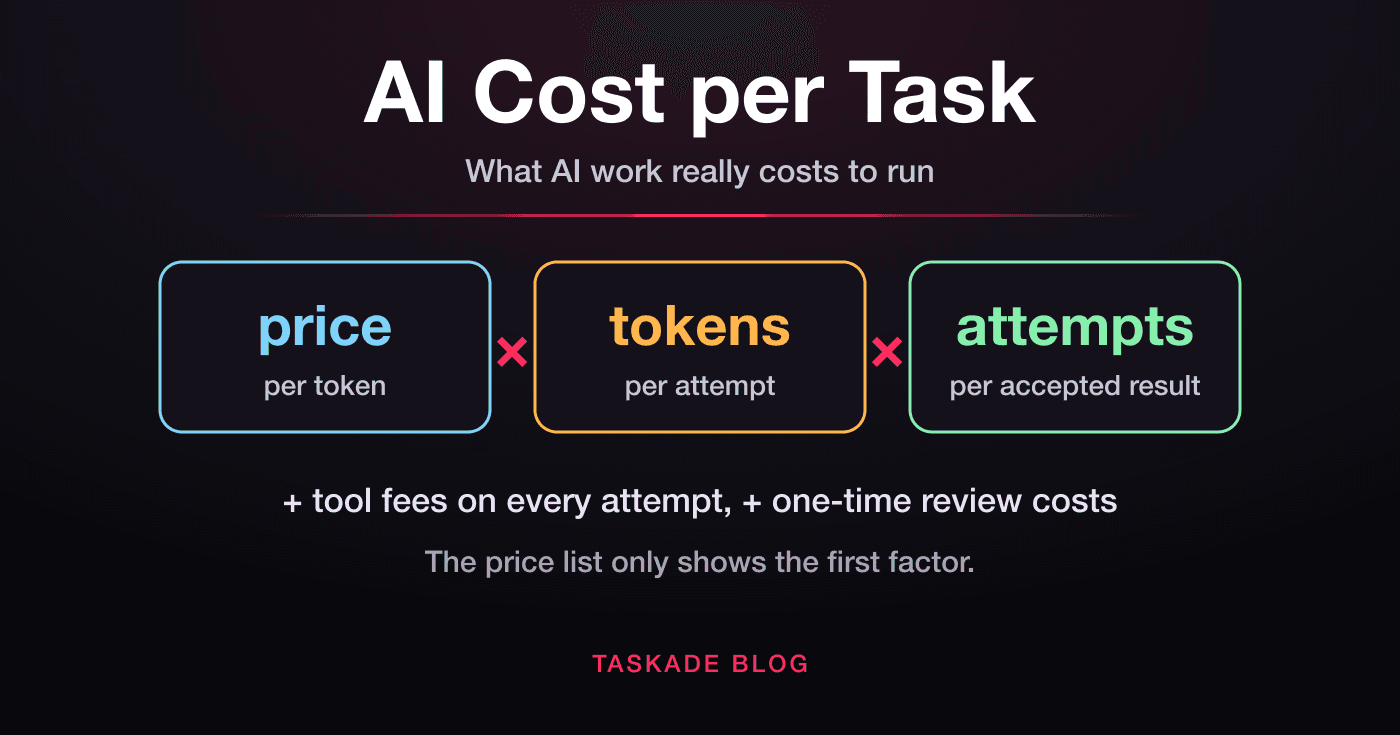
TL;DR: Cost per task = price per token × tokens per attempt × attempts per accepted result, with tool fees counted on every attempt. Token prices are only the first factor. In the dated case study below, the same model cost 4.5× more per task at its highest reasoning setting than at its default. Build cost-aware AI apps →
🧮 What Is AI Cost per Task?
AI cost per task is the total you pay to finish one piece of work with a model: every fresh input token, cached token, reasoning token and output token, across every attempt it takes to get a result you accept, including each attempt's tool fees, plus any one-time costs such as human review. It is the unit that decides what AI work really costs, because models spend very different amounts of tokens on the same job.
The whole idea fits in one formula:
cost per task
  =  ( price per token × tokens per attempt
       + tool fees per attempt (search, code runs) )
  ×  attempts per accepted result
  +  one-time costs per task (human review, storage)
Each factor is set by a different party, and each moves on its own:
| Factor | Who sets it | What moves it |
|---|---|---|
| Price per token | The vendor | Launches, price cuts, caching, batch and speed tiers |
| Tokens per attempt | The model and your settings | Reasoning effort, verbosity, prompt length, agent loops |
| Attempts per accepted result | Model quality on your task | Error rate, how strictly you check the output |
| Tool fees per attempt | Your tools | Web searches, code execution, file processing |
| One-time costs per task | Your process | Human review, storage, setup |
A price list only shows you the first row. The other three are where most of the money goes, and they are exactly the rows a benchmark chart cannot fill in for you. For the underlying vocabulary, see our explainers on tokens, inference cost and test-time compute.
⚖️ Cost per Token vs Cost per Call vs Cost per Task
Cost per token is the vendor's rate, cost per call is one request's bill, and cost per task is what a finished, accepted result costs across every call and retry. Only the last one tells you whether a model is cheap for your work. The first two are ingredients.
| Unit | What it measures | Who publishes it | What it hides |
|---|---|---|---|
| Cost per token | The rate for 1M input or output tokens | Every vendor's pricing page | How many tokens the model will use |
| Cost per call | The bill for one API request | Your usage logs | Retries, and multi-step agent loops |
| Cost per task | Everything spent to get one accepted result | Only you (and a few benchmarks) | Nothing, if you measure it honestly |
The gap between the units is widest for agents. A chat reply is one call. An agent that researches, plans, writes and checks its work can make dozens of calls for one task, re-reading its growing context each time. Our guide to LLM vs RAG vs AI agents shows why each step up that ladder multiplies calls per task.
📒 The Cost-per-Task Formula, Line by Line
A complete cost-per-task ledger has seven lines: fresh input, cache writes, cache reads, visible output, reasoning output, tool fees, and retries. Most bills are dominated by one or two of them, and which ones depends on the kind of work.
cost per attempt
  =  fresh input tokens     × input price
  +  cache-write tokens     × cache-write price  (often a small premium)
  +  cache-read tokens      × cache-read price   (often ~90% cheaper)
  +  visible output tokens  × output price       (several × input)
  +  reasoning tokens       × output price       (billed, often hidden)
  +  tool fees                                   (search, code, files)cost per task
=  cost per attempt  ×  (1 ÷ success rate)
| Ledger line | Billed as | What drives it | Dominates in |
|---|---|---|---|
| Fresh input | Input price | Prompt and document length | Long documents, first turns |
| Cache write | A premium over input | Stable prompt prefixes | The first call of a session |
| Cache read | A deep discount on input | Reused system prompts, tools, history | Agents and long chats |
| Visible output | Output price | Answer length | Writing, code generation |
| Reasoning output | Output price | The effort setting | Hard problems at high effort |
| Tool fees | Per call | Searches, code runs, file work | Research agents |
| Retries | Everything above, again | Error rate on your task | Anything you check strictly |
Two lines surprise people most. Reasoning tokens are billed at the output price even when you never see them. Retries are billed in full, so a failed attempt costs as much as a successful one. Both are invisible on a price list and obvious on a real bill.
🎯 The Three Numbers Behind Every AI Bill
Every AI bill comes down to three numbers you can measure: the blended price per token, the tokens one attempt uses, and the success rate on your task. Change any one and the cost per task moves in proportion, which is why a 50% price cut can matter less than a 20-point jump in success rate.
Here is what each lever is worth, with made-up but realistic round numbers for one task type:
| Change | Before | After | Effect on cost per task |
|---|---|---|---|
| Vendor halves token prices | $0.40 per attempt | $0.20 per attempt | −50% |
| Cache hit rate rises from 0% to 80% | $0.40 | ~$0.26 | about −35% (input-heavy work) |
| Reasoning effort drops from max to medium | $0.40 | ~$0.10 | about −75%, if quality holds |
| Success rate rises from 50% to 95% | $0.80 per success | $0.42 per success | about −47% |
Illustrative figures to show proportions, not quotes from any vendor.
The last row is the one most teams miss. A better prompt, a clearer spec or a stronger check that lifts success rate saves as much as a price cut, and it compounds with every other lever.
📤 Why Output Tokens Cost More, and Why Agents Flip the Ratio
Output tokens cost more because a model writes one token at a time but reads the whole prompt in a single parallel pass. Each generated token needs its own trip through the model, so serving output is slower and more expensive. Vendors price it accordingly — on the current OpenAI and Anthropic flagships, output costs five times as much as input.
Reading the prompt (prefill)            Writing the answer (decode)
────────────────────────────            ───────────────────────────
[ all 10,000 tokens at once ]  ──▶      token → token → token → token …
one parallel pass                       one pass per token, in order
cheap per token                         expensive per token
That asymmetry points one way for chat and the other way for agents:
| Workload | Typical shape | What dominates the bill |
|---|---|---|
| Chat answer | Short prompt, long answer | Output tokens |
| Document Q&A | Long document, short answer | Fresh input tokens |
| Coding agent | Re-reads a growing context on every step | Input tokens, mostly cacheable |
| Reasoning task | Short prompt, long hidden thinking | Reasoning output tokens |
Agents flip the ratio because every step re-sends the conversation so far. A 30-step agent run can read the same system prompt and tool definitions 30 times. That is why prompt caching matters more for agents than for chat: the repeated beginning of each call is exactly what a cache discounts. Our context engineering guide covers how to keep that beginning stable.
🧠 Reasoning Tokens and Effort Levels: The Output You Never See
Reasoning tokens are the thinking a model does before it answers, and they are billed as output tokens even when the thinking is hidden from you. The reasoning effort setting — usually low, medium, high and one or two higher levels — controls how many of them a model spends, so it is the largest cost dial most teams control.
Higher effort buys accuracy with steeply falling returns. Across published effort curves, the pattern repeats: the step from low to medium buys a lot of quality cheaply, and each step above that costs more per extra point than the one before.
quality
  ▲                                   ● max
  │                          ● xhigh      ← each step up buys less
  │                  ● high
  │          ● medium                     ← usually the best value
  │  ● low
  └──────────────────────────────────────────────▶ cost per task
| Effort | What the model does | Use it for |
|---|---|---|
| Low | Answers with little planning | Classification, extraction, formatting |
| Medium | Plans briefly and checks key steps | The default for most real work |
| High | Plans in depth and tests more cases | Complex coding, multi-step analysis |
| Highest levels | Explores alternatives and re-checks | The hardest problems, high cost of error |
Two habits keep this dial honest. Start at medium — several vendors now make it the default for their newest models — move up only when a check you can measure fails, and step back down one level once a task type has run clean for a week. And re-run your effort sweep on every new model, because a new model has a new curve. Our guide to AI reasoning models and the reasoning effort explainer go deeper.
🔁 Retries and Failures: Pricing the Success Rate
Retries multiply cost per task by one divided by the success rate: at 50% success you pay for two attempts per accepted result, and at 25% you pay for four. A failed attempt is billed in full, so success rate belongs in the cost formula next to price.
| Model option | Cost per attempt | Success rate | Attempts per success | Cost per accepted result |
|---|---|---|---|---|
| Budget | $0.05 | 40% | 2.5 | $0.125 |
| Mid-tier | $0.12 | 85% | 1.18 | $0.141 |
| Frontier | $0.40 | 97% | 1.03 | $0.412 |
Illustrative figures. Add review time before you pick a winner.
On tokens alone, the budget option wins. Add the human side and the picture changes: if each failed output takes a person two minutes to spot and discard, the budget option adds three minutes of review for every accepted result, while the frontier option adds almost none. For work a person must check, cost per accepted result should include review time, and that is where cheap-and-unreliable loses.
The cheapest way to raise success rate is usually not a bigger model. It is a clearer specification, a worked example in the prompt, retrieval of the right facts, or an automated check that catches failures before a person has to. Our LLM-as-a-judge and agent evaluation explainers cover the checking side.
🗄️ Caching, Long Context, and Service Tiers: The Price Multipliers
Five multipliers sit on top of every token price — cache reads, cache writes, long-context tiers, batch processing and speed tiers — and together they can swing the same work by 10× or more. None of them changes the model. All of them change the bill.
| Multiplier | Typical effect | When it applies | How to use it |
|---|---|---|---|
| Cache read | Often ~90% off fresh input, sometimes more | A repeated prompt prefix inside the cache window | Put stable content first |
| Cache write | A small premium over input | The first call that stores a prefix | Worth it when the prefix repeats |
| Long-context tier | Higher rates, sometimes for the whole request | Prompts above a vendor's size threshold | Summarize history before the line |
| Batch or flex | Often 50% off | Work that can wait minutes or hours | Nightly jobs, bulk processing |
| Fast or priority | Often about 2× | Latency-sensitive work | Only where speed pays for itself |
Typical ranges across major APIs as of 2026. Exact rates change per vendor and per model — see the case study for dated figures.
Two more costs hide behind these:
- Safety refusals. Models with safety classifiers can decline certain requests. On some APIs a declined request still returns a normal, billed response with a refusal reason unless you configure an automatic fallback. If your code never checks for it, you pay for an answer you cannot use.
- Settings that break the cache. Changing a request-level setting mid-conversation can force a cold, full-price resend of the whole context. Some vendors now let you change settings without breaking the cache, but only through a specific documented path.
⏱️ Time Is a Cost Too: Latency, Wall-Clock Minutes, and Review
Time is the cost no token meter shows: the minutes a person waits for an answer, and the minutes they spend checking it. A model that finishes cheaper but slower can still cost more once someone's attention is on the line.
full cost per task  =  token cost per task
                    +  (waiting minutes that block a person × hourly rate)
                    +  (review minutes per accepted result × hourly rate)
Time and tokens do not track each other. A model that re-checks its own work many times can burn a long wall-clock run on relatively few tokens. A faster model can finish in a fraction of the time while spending more tokens. Measure both: a model that is 20% cheaper in tokens but twice as slow is a bad trade for any task a person sits and waits on, and a fine trade for an overnight batch.
| Task type | Does waiting cost you? | What to optimize |
|---|---|---|
| Interactive help, live chat | Yes, directly | Latency first, then tokens |
| Background agent, nightly job | Rarely | Tokens and success rate |
| Work a person must review | Yes, through review time | Success rate first |
📏 How to Measure Your Own Cost per Task (A 20-Task Test)
The only cost-per-task number that matters is the one measured on your own work, and about 20 real tasks are enough to find it. The protocol takes an afternoon: pick the tasks, write pass criteria first, run every candidate configuration, and divide spend by accepted results.
- Pick 20 real tasks from last month's work — not demos. Include a few hard ones.
- Write pass criteria before running anything: "totals match the source," "compiles and passes tests," "no factual errors against the attached document." Decide in advance, or you will grade on vibes.
- Choose 3–4 configurations across price tiers and effort settings.
- Run every task on every configuration with the same prompt and the same tools. Log tokens, dollars, wall-clock time, and pass or fail.
- Compute cost per accepted result: total spend divided by passing results. Note median time as well.
- Pick the cheapest configuration that clears your bar, and route only the failures to a stronger model.
task  config           in_tok   cached   out_tok   cost_usd   seconds   pass
────  ───────────────  ───────  ───────  ────────  ─────────  ───────  ────
01    fast-tier/med      8,200    6,100     2,900     0.0017       14    yes
01    workhorse/med      8,200    6,100     3,400     0.0394       22    yes
01    frontier/med       8,200    6,100     4,800     0.1056       31    yes
02    fast-tier/med     12,500    9,800     5,100     0.0029       19    no
...
────────────────────────────────────────────────────────────────────────────
cost per accepted result = sum(cost_usd) / count(pass = yes)   per config
Illustrative rows priced at $0.10/$0.01/$0.50, $2/$0.20/$10 and $4/$0.20/$20 per million input, cached and output tokens.
Repeat the test whenever a vendor ships a new model or changes prices. The protocol stays the same; only the rows change.
🔎 How to Read a Vendor's Cost-per-Task Claim
A vendor's cost-per-task claim is only as good as the five choices behind it: the benchmark and its version, the effort level on each side, the competing model's configuration, whose test setup ran it, and whether the number is per task or per token. Change any one and the ranking can flip.
| Check | The question to ask | Why it matters |
|---|---|---|
| Benchmark and version | Which test, and which version of it? | Index versions change scales; scores across versions do not compare |
| Effort on each side | Default against default, or default against best? | "Our default beats their best" is a common, legitimate, chosen framing |
| Competitor configuration | Safeguarded, fallback, fast or batch? | A rival run in a restricted mode scores lower |
| Who ran it | The vendor, the rival, or an independent evaluator? | Each lab's harness favors its own models slightly |
| Unit | Per task, per token, or per session? | "40% cheaper" can mean any of the three |
The case study below applies this checklist to three real claims from one week. For the broader discipline of reading benchmark claims, see the TSK-1 methodology and the TSK-1 benchmark we run ourselves.
🧭 Choosing a Model by Cost per Task
Choose by the cost of a wrong answer, not by the prestige of the model: high-volume, checkable work belongs on a fast low-cost tier, everyday work on a workhorse model at medium effort, and only high-stakes work on a frontier model at high effort. Most labs now ship exactly these three tiers, so the pattern outlives any one release.
| Job | Tier | Effort | Why |
|---|---|---|---|
| Tagging, routing, extraction | Fast | Low → medium | Checkable output at huge volume |
| Sub-steps inside an agent | Fast or workhorse | Medium | Many calls; each is small and checkable |
| Writing, analysis, research | Workhorse | Medium | Quality matters, errors are recoverable |
| Everyday coding and automations | Workhorse | Medium → high | Checks exist; escalate only on failure |
| Planning, code review, security | Frontier | High | Errors are expensive; pay for thinking |
| The hardest problems | Frontier | Highest | Verify every output |
The pattern that saves the most money is routing: a cheap model for the many easy steps and an expensive one for the few hard ones. That is how well-built agents work too — see multi-agent systems and AI agent cost optimization. Once you know your number, how to reduce LLM costs covers the tactics, and GPT vs Claude and DeepSeek vs ChatGPT run the same cost math across model families.
📅 Case Study, September 2026: Claude Opus 5.5 vs GPT-6 Sol and Luna
Prices and claims checked on 22–24 September 2026 against Anthropic, OpenAI and Artificial Analysis. Next review: December 2026.
On September 22, 2026, Anthropic and OpenAI released new models within an hour of each other, and both led with cost per task rather than token price. Anthropic shipped Claude Opus 5.5; OpenAI shipped GPT-6 Sol and GPT-6 Luna below GPT-6 Astra. The week is a clean test of every section above.
The rate cards.
| Model | Input / output per 1M | Cached input per 1M | Tier |
|---|---|---|---|
| GPT-6 Luna | $0.10 / $0.50 | $0.01 | Fast |
| GPT-6 Sol | $2 / $10 | $0.20 | Workhorse |
| Claude Opus 5.5 | $4 / $20 | $0.20 | Frontier (daily driver) |
| GPT-6 Astra | $10 / $50 | $1.00 | Frontier |
| Claude Fable 5.1 | $10 / $50 | $0.25 | Frontier (specialist) |
From the vendors' pricing pages. OpenAI bills cache writes at 1.25× input and a request above 272K input tokens at 2× input and 1.5× output. Batch and flex cost 50% less on both labs; fast modes cost about 2×.
What one task actually cost. Artificial Analysis runs every model through the same index of tasks and publishes the average cost per task:
| Model and effort | Index score | Cost per task | Output tokens per task |
|---|---|---|---|
| GPT-6 Luna, max | 37.3 | $0.07 | — |
| GPT-6 Sol, max | 47.5 | $1.06 | — |
| Claude Opus 5.5, medium (default) | 51.2 | $1.34 | — |
| GPT-6 Astra, max | 52.7 | $3.26 | ~27,000 |
| Claude Opus 5.5, max | 57.6 | $5.98 | ~119,000 |
| Claude Fable 5.1, max | 53.4 | $7.63 | ~78,000 |
Artificial Analysis Intelligence Index v4.3.2, weighted average cost per index task; Claude models run "with fallback." GPT-6 Sol and Luna costs from Artificial Analysis's September 22 launch analysis.
The first lesson of the article is right there: Claude Opus 5.5's tokens cost 60% less than GPT-6 Astra's, yet at max effort it costs 83% more per task, because it spends about 4.4× the output tokens. At its default medium effort, it delivers 97% of Astra's score for 41% of the cost.
| Opus 5.5 effort | Index score | Cost per task | Extra cost per extra point |
|---|---|---|---|
| Low | 42.3 | $0.55 | — |
| Medium (default) | 51.2 | $1.34 | $0.09 |
| High | 53.6 | $1.82 | $0.20 |
| xhigh | 56.0 | $3.46 | $0.68 |
| Max | 57.6 | $5.98 | $1.58 |
That is the effort curve from the reasoning section, measured: medium gives 89% of the max score for 22% of the cost, and the last 1.6 points cost $2.52. OpenAI's own charts show the same shape for GPT-6 Sol on FrontierCode: 45.9% at medium for $0.80 a task, 49.3% at max for $2.14.
Three vendor claims, read with the checklist.
| Claim | The number | What the checklist finds |
|---|---|---|
| Anthropic: Opus 5.5 "beats GPT-6 Astra at roughly 20% of the cost per task" | FrontierCode, 54.6% vs 53.3% | Opus at its default effort against Astra's top score, on Anthropic's setup |
| OpenAI: GPT-6 Sol "exceeds Claude Fable 5.1 at far lower cost" | AutomationBench, 33.2% vs 31.4% | Fable plotted "with Opus 5 fallback," its safeguarded configuration |
| OpenAI's Astra launch: Astra scores 61.2 on Artificial Analysis | Index v4.1.1 | The current v4.3.2 scores Astra 52.7 — a different scale |
All three are real results. All three are also carefully chosen, which is exactly why the checklist exists.
Time, in the field. Two hands-on reports from the same weeks show the time axis. In a 15-task field test, Nate Herk found GPT-6 Astra $186 cheaper than Claude Fable 5.1 in total ($326.98 against $513.36) but 1 hour 43 minutes slower, with one Fable task costing $46 for six minutes of agent time. In Arena AI's side-by-side runs, GPT-6 Sol finished a scene in 11 minutes that took GPT-5.6 Sol about an hour. Neither the clock nor the token meter predicted the other.
A worked example with the formula. An agent task reads 50,000 input tokens (80% cached) and writes 5,000 output tokens, including reasoning:
| Model | Fresh input | Cached input | Output | Cost per attempt |
|---|---|---|---|---|
| GPT-6 Luna | $0.0010 | $0.0004 | $0.0025 | $0.0039 |
| GPT-6 Sol | $0.0200 | $0.0080 | $0.0500 | $0.0780 |
| Claude Opus 5.5 | $0.0400 | $0.0080 | $0.1000 | $0.1480 |
At a 60% success rate, Luna costs $0.0065 per accepted result; at 90%, Sol costs $0.087; at 97%, Opus 5.5 costs $0.153. Which one wins depends entirely on your success rates — which is why the 20-task test beats any chart. For the full launch context, see what GPT is and where GPT-6 fits and our Anthropic and Claude history.
🧬 Run Cost-Aware AI Work in Taskade
The simplest way to benefit from falling cost per task is to stop hard-coding one model into your work. Taskade gives you 15+ frontier models from OpenAI, Anthropic, and open-weight providers in one workspace. Auto handles the default model choice, and you can pin a specific model to any AI agent when a task needs one.
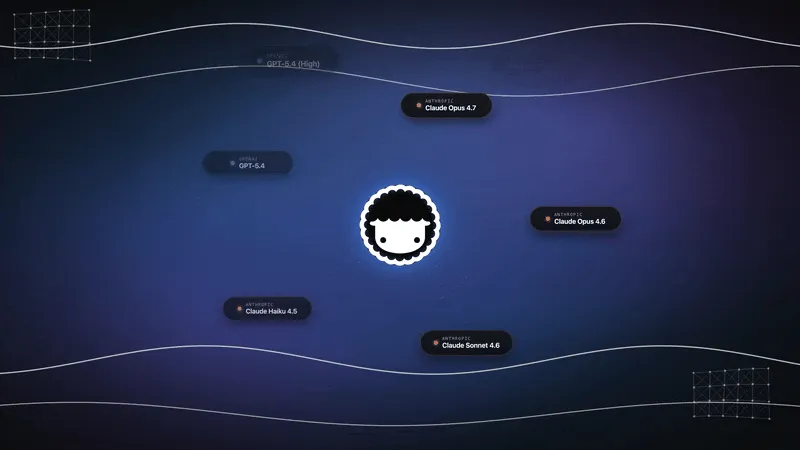
That matters because the right model changes every quarter. A workspace where agents, automations and your project data live together keeps working through those changes — Workspace DNA, where projects remember, agents think, and automations execute. With Taskade Genesis, one prompt builds a live app on top of that workspace.
Taskade plans start free, and Pro is $10 per month billed annually. Browse live community apps for ideas, or build your first app.
💬 Frequently Asked Questions About AI Cost per Task
What is cost per task in AI?
Cost per task is the total you pay to finish one piece of work with an AI model: every fresh input, cached, reasoning and output token, across every attempt it takes to produce a result you accept, including each attempt's tool fees, plus one-time costs such as human review.
What is the difference between cost per token and cost per task?
Cost per token is the price list. Cost per task is the price list multiplied by what the model actually used and by how many attempts it needed. A lower token price can still mean a higher cost per task.
How do you calculate AI cost per task?
Multiply the blended price per token by the tokens one attempt uses, add that attempt's tool fees, and multiply by the attempts per accepted result (one divided by the success rate). Then add one-time costs such as human review. Check the estimate by dividing real spend by accepted results.
Why do output tokens cost more than input tokens?
A model reads the prompt in one parallel pass but writes output one token at a time, and each output token needs another pass through the model. Output is more expensive to serve, so vendors price it several times higher.
Are reasoning tokens billed?
Yes. Thinking tokens are billed as output tokens even when the reasoning is hidden. Raising the effort setting raises their number, which is why one model can cost several times more per task at its highest effort.
How do retries and failures change the cost of AI work?
They multiply it by one divided by the success rate. At 50% success you pay for two attempts per accepted result. Add the time a person spends checking failed outputs, and an unreliable cheap model can cost more than a reliable pricier one.
What do prompt caching, long context and batch processing do to cost?
Cached input usually costs a tenth of fresh input or less, cache writes cost slightly more than input, very long prompts can move a request into a higher price tier, batch processing typically halves the price, and fast tiers typically cost about double.
How can I measure cost per task for my own work?
Run about 20 real tasks on each configuration you are considering, with pass criteria written first. Divide total spend by passing results, then choose the cheapest configuration that clears your bar.
Is the cheapest AI model always the best value?
No. It is the best value only when it passes your checks nearly as often as the alternatives. For expensive-to-get-wrong work, a stronger model at moderate effort often costs less per accepted result.
How should I read a vendor's cost-per-task claim?
Check the benchmark and version, the effort setting on each side, the rival's configuration, who ran the test, and whether the figure is per task or per token. The case study above shows all five in action.
How does Taskade handle AI model costs?
Taskade gives you 15+ frontier models from OpenAI, Anthropic, and open-weight providers in one workspace, with Auto handling the default and per-agent model choice when you need it. Plans start free, and Pro is $10 per month billed annually. Try it free →
🔗 Related Reading
- What Is GPT? GPT vs LLM vs ChatGPT
- How Do LLMs Work? Transformers Explained
- AI Agent Cost Optimization
- How to Reduce LLM Costs
- AI Reasoning Models Explained
- LLM vs RAG vs AI Agent vs Agentic AI
- The Best AI Model for Building Apps
- What Are AI Agents?
Cost per task turns model choice from a loyalty question into a measurement question. Measure it on your own work, route the easy steps to cheap models, save the expensive ones for the steps that deserve them, and every price cut in the next release becomes your margin. ▲ ■ ●