Last reviewed 29 September 2026. The self-hosted entries keep the dates they were checked. The four hosted always-on agents (OpenAI dots, Meta Muse, Grok Bot, Gemini Spark) were checked on 29 September 2026 against each vendor's own announcement or help page. The Hermes Agent facts come from its GitHub page on the same date, and the Taskade plan facts follow Taskade's current plan and pricing pages.
OpenClaw is the fastest-growing open-source AI agent in history — 247,000+ GitHub stars, 35,000+ forks, and a community that redefined what autonomous AI assistants can do.
But it's not for everyone.
TL;DR: The best OpenClaw alternative depends on who runs the agent. Hosted always-on agents (OpenAI dots, Meta Muse, Grok Bot, Gemini Spark) run on the vendor's cloud. Self-hosted options (Hermes Agent, NanoClaw) keep control on your machine. Taskade gives teams shared agents, memory, automations, and 100+ integrations. Start free →
Short on time? Taskade Agents v2 is the fastest way to replace OpenClaw for teams - no Docker, no API keys, no Python. Explore AI Agents or build your first agent in Taskade Genesis (free, with a one-time credit grant that covers your first build).
OpenClaw requires Docker, terminal commands, manual API key configuration, and a dedicated machine. It has documented security issues including CVE-2026-25253, stores credentials in plaintext by default, and was the target of the ClawHavoc supply chain attack (341 malicious skills, 9,000+ compromised installations). It's a single-user tool with no team collaboration, no role-based access, and no managed hosting.
If you need autonomous AI agents without the infrastructure headaches (or you need security, team collaboration, or enterprise features that OpenClaw doesn't provide) here are the 20 best alternatives we compared and ranked for 2026, from hosted always-on agents to self-hosted claws.
AI Agent Platform Landscape (2026)
June 2026 update: the model layer just shifted again — Anthropic shipped Claude Fable 5 on June 9, its most capable model yet (powerful, but $10/$50 per million tokens and locked to one vendor). The agent harness you choose matters more than any single model: a workspace that routes 15+ frontier models per task means a better model next quarter is a setting, not a migration. And as models get more capable, AI slop — confident, unreviewed output — gets more convincing, which is exactly why a review loop and ownership belong in your agent stack.
July 2026 update: the ecosystem is maturing on the security axis. OpenClaw now ships a built-in
openclaw security audit --deep --fixcommand and partnered with VirusTotal to scan its 33,000+ community skills; Peter Steinberger's TED talk reframed the project's story for a mainstream audience; and enterprise forks keep hardening. The safety gap between alternatives is now measurable — see the new risk scorecard below.
September 2026 update: the claw idea went mainstream, and the big labs now sell hosted versions of it. SpaceXAI opened Grok Bot in beta on August 11, Meta launched Muse on September 8, Google's Gemini Spark reached AI Pro and Ultra subscribers, and OpenAI announced dots at DevDay on September 29. Each keeps working after you close the app, so nothing has to run on a Mac Mini. OpenAI's DevDay recap also lists OpenClaw among 16 partners for "Sign in with ChatGPT" plan usage. Entries 2 to 5 below cover the four hosted agents, and the hosted vs self-hosted decision table shows how to choose. For the category as a whole, read our guide to always-on AI agents.
🎯 60-Second Picks by Use Case
If you only have one minute, here are the picks. Each is defended in detail below.
| If you want... | Pick | Why |
|---|---|---|
| Easiest setup, no Docker | Taskade Agents v2 | Browser-instant, roles from Owner to Viewer |
| Closest open-source replacement | Hermes Agent | Same gateway shape, imports OpenClaw data |
| Hosted agent inside ChatGPT | OpenAI dots | First dot included with Pro and Business Premium |
| Free-to-start phone agent (US) | Meta Muse | Free for most needs, WhatsApp and app |
| A team of parallel cloud bots | Grok Bot | Beta via SuperGrok and Cursor plans |
| Always-on agent in Google apps | Gemini Spark | Google AI Pro and Ultra |
| Security-first self-hosting | NanoClaw | Container isolation + permission gates |
| Enterprise hardened + NVIDIA-backed | NemoClaw | Fork announced at GTC Mar 2026 |
| Browser-native OpenClaw | Kimi Claw | No setup, runs in browser |
| Managed cloud OpenClaw | MaxClaw ($19/mo) | One-click deploy, 24/7 cloud |
| Memory-safe via Rust | IronClaw | WebAssembly sandbox |
| Lightweight Python | Nanobot | Single pip install |
| Edge / IoT deployment | PicoClaw | <1MB RAM, microcontrollers |
| AI-assisted coding | Claude Code | ~4% of GitHub commits |
| Teams with role-based access + SSO | Taskade Business $25/mo billed annually | Unlimited members, SSO from Business |
🧩 Decision Matrix — Map Your Constraint to the Right Tool
Most tools above are viable. The question is which constraint dominates your decision. Pick your row, then pick the column.
| Your primary constraint | Best pick | Runner-up | Don't pick |
|---|---|---|---|
| Zero infra / zero Docker | Taskade Agents v2 | Kimi Claw | Self-hosted OpenClaw |
| Data stays on my machine | NanoClaw | IronClaw | Managed cloud |
| Need team RBAC / SSO | Taskade (Business $25/mo billed annually) | NemoClaw (enterprise) | Nanobot |
| Lowest cost per month | Taskade (Free) | ZeroClaw (hardware $10) | Pro-tier anything |
| Enterprise access controls | NemoClaw | Taskade Business (SSO, roles from Owner to Viewer) | Base OpenClaw |
| Closest open-source replacement | Hermes Agent | NanoClaw | A stack you will not patch |
| Model flexibility (BYO LLM) | OpenHands / AnythingLLM | IronClaw | Closed managed |
| Persistent memory across runs | Taskade (projects/memories) | memU | Stateless agents |
| Hosted MCP server | Taskade | Claude Code (client only) | Tools w/o MCP |
| Vendor-run cloud computer, no setup | OpenAI dots | Meta Muse | Self-hosted OpenClaw |
| Work started by events in team tools | Taskade | Gemini Spark (schedules and conditional triggers) | Personal-agent apps |
If two or three constraints dominate, Taskade Agents v2 wins because it is the only row that appears in more than one column - managed, team roles, persistent memory, cheapest entry, and a hosted MCP server that MCP-compatible assistants connect to on paid plans, all in one platform.
Hosted vs Self-Hosted Always-On Agents: Which Should You Pick?
Hosted always-on agents (OpenAI dots, Meta Muse, Grok Bot, Gemini Spark) trade control for a fast start: the vendor runs the computer, the model, and the safety checks. Self-hosted claws (OpenClaw and its forks) trade setup effort for control: you choose the model, the machine, and where the data lives. A workspace-native agent such as Taskade sits in between. It is hosted, but it is built around your team's projects, triggers, and permissions instead of a personal cloud computer.
Facts about dots, Muse, Grok Bot, and Spark were checked on 29 September 2026 against each vendor's own announcement or help page. Vendors describe their own products, and DataCamp reported that it found no independent evaluation of dots on launch day. This section is refreshed as independent tests appear.
Which one fits your situation?
| Your situation | Pick | Why it fits | What you give up |
|---|---|---|---|
| You pay for ChatGPT Pro or Business Premium and want a personal agent today | OpenAI dots | The first dot is included in the plan and works in ChatGPT, Slack, and Teams | OpenAI's cloud and model; Pro excludes the EEA, Switzerland, and the UK at launch |
| You want a free-to-start, phone-first agent in the US | Meta Muse | Free for most needs, in the Muse app and WhatsApp | US rollout only; a Meta-run VM; consumer focus |
| You subscribe to SuperGrok or Cursor and want several bots working in parallel | Grok Bot | Bots share a cloud computer and message each other | Beta; desktop and iOS only |
| Your work lives in Gmail, Calendar, Drive, Docs, and Sheets | Gemini Spark | Native Google connections and Schedules with conditional triggers | AI Pro or Ultra subscription in select countries; Google-first |
| You must pick the model, keep data on your machine, or change the code | OpenClaw, Hermes Agent, NanoClaw, or IronClaw | Full control over model, host, and skills | You patch, secure, and pay for tokens and hardware |
| Several people share the work and events in team tools should start it | Taskade | Agents with persistent memory, automations from app triggers, 100+ integrations, roles from Owner to Viewer | Agents read the web but do not operate a browser or a computer |
| You need SSO and role-based access for a team | NemoClaw or Taskade Business | An enterprise-hardened fork, or a managed workspace with SSO from Business and roles from Owner to Viewer | A fork you operate, or a workspace instead of a personal assistant |
What actually differs
| Axis | Hosted always-on (dots, Muse, Grok Bot, Spark) | Self-hosted claw (OpenClaw and forks) | Workspace-native (Taskade) |
|---|---|---|---|
| Who runs the computer | The vendor's cloud; dots, Muse, and Grok Bot each give the agent its own | You: a Mac Mini, a VPS, or a container | Taskade's managed cloud |
| Who picks the model | The vendor | You, with your own key | Auto by default, with frontier models from top AI labs |
| Setup effort | Minutes: sign in and connect apps | Hours: Claire Vo's first install took 8 hours | Minutes, in a browser |
| What starts the work | Your message, the agent's own checks, or schedules | Heartbeats and cron jobs you configure | Triggers from connected apps, schedules, and chat |
| Cost shape | A subscription or a separate usage allowance | Model tokens plus hardware or a VPS | A plan price, from $10/mo billed annually for Pro |
| Team use | Mostly personal; dots can be reached in Slack and Teams | Single user by design | Shared workspace with role-based access from Owner to Viewer |
| Who fixes a failure | The vendor | You | The platform |
The four hosted agents side by side
| Agent | Runs on | Where you reach it | Availability | Pricing |
|---|---|---|---|---|
| OpenAI dots | Own cloud computer and browser, GPT-6 Astra | ChatGPT, Slack, Teams, voice calls | Pro (not the EEA, Switzerland, or the UK at launch) and Business Premium; beta for Enterprise, Edu, Healthcare | First dot included in the plan |
| Meta Muse | Dedicated Muse Secure VM, Muse Spark model | Muse app, muse.ai, WhatsApp | US rollout on iOS and Android | Free for most needs, subscriptions for more |
| Grok Bot | A shared cloud computer per user | Desktop and iOS app, group chats between bots | Beta for SuperGrok and Cursor subscribers; enterprise waitlist | Own usage allowance, separate from plans |
| Gemini Spark | Google-run agent that works with your devices off | Gemini | AI Pro and Ultra subscribers over 18 in select countries, plus select business users | Subscription required |
Sources: OpenAI (29 September 2026), Meta (8 September 2026), SpaceXAI (11 August 2026), Google's Gemini Spark page. Paid-plan prices for Muse and Spark are not printed because they were not verified on the vendors' own pages.
Control versus setup effort
Here is the same choice as a map. Control means control over the model, the host, the data, and the rules. This is our editorial placement, not a benchmark.
A five-question path to your pick
The path is a first filter. Two answers can point to different picks, and a Taskade workspace can sit beside a personal agent instead of replacing it.
What an idle agent costs: a worked example
Self-hosted agents bill by the token, and a heartbeat re-reads its context on every run. Take an illustrative setup (an assumption, not a measurement): one heartbeat per hour, 200,000 tokens of context read per run, and 2,000 output tokens. OpenAI lists API pricing for GPT-6.1 Sol at $2 per million input tokens, $0.10 per million cached input tokens, and $10 per million output tokens (OpenAI, 29 September 2026). OpenClaw works with many models, so treat this as one example, not a bill for any specific setup.
| Case | Input cost per run | Output cost per run | Cost per run | Cost per month (720 runs) |
|---|---|---|---|---|
| Cold cache: 200,000 input tokens at $2 per million | $0.40 | $0.02 | $0.42 | $302.40 |
| Warm cache: 200,000 input tokens at $0.10 per million | $0.02 | $0.02 | $0.04 | $28.80 |
Arithmetic: 24 runs a day for 30 days is 720 runs. Output is 2,000 tokens at $10 per million, which is $0.02. The gap between the two rows is caching alone.
Caching is why idle agents surprise people. One Hacker News user described a Claude-in-Slack agent that burned $400 on a single incident after it woke on empty prompt caches. Hosted agents hide the meter inside a subscription or a separate allowance, which is easier to budget but still a meter: a heavy Grok Bot user on Hacker News reported that their inference spend rose 2 to 3 times after they adopted bots (self-reported). For a wider cost model, see AI cost per task and what GPT models are.
Quick Comparison Table
| # | Alternative | Best For | Setup | Security | Team Support | Pricing |
|---|---|---|---|---|---|---|
| 1 | Taskade | Teams, no-code AI agents | Browser (instant) | Roles from Owner to Viewer, SSO from Business | Multi-agent teams (Pro and above) | Free / $10+ mo billed annually |
| 2 | OpenAI dots | Hosted agent inside ChatGPT | Browser, Slack, Teams | Custom Rules + Auto-review | Personal (Slack/Teams access) | Included with Pro / Business Premium |
| 3 | Meta Muse | Free-to-start phone agent (US) | App / WhatsApp | Secure VM + Sentinel agent | Single user | Free for most needs |
| 4 | Grok Bot | Parallel cloud bots | Desktop / iOS app | Approval before sensitive steps | Multi-bot teams | Beta via SuperGrok / Cursor |
| 5 | Gemini Spark | Agent inside Google apps | Gemini app | Connections off by default | Single user | Google AI Pro / Ultra |
| 6 | NanoClaw | Security-first self-hosting | Docker | Container isolation | Single user | Free (OSS) |
| 7 | Claude Code | AI-assisted coding | Terminal (npm) | Anthropic-managed | Agent Teams | $20/mo (Pro) |
| 8 | IronClaw | Memory-safe execution | Rust binary | WASM sandbox | Single user | Free (OSS) |
| 9 | Nanobot | Lightweight personal agent | pip install | Minimal surface | Single user | Free (OSS) |
| 10 | memU | Long-term memory agent | Docker | Standard | Single user | Free (OSS) |
| 11 | Kimi Claw | Browser-based OpenClaw | Browser (instant) | Moonshot-managed | Single user | Free tier |
| 12 | MaxClaw (MiniMax) | One-click managed OpenClaw | Browser/Desktop/Mobile | MiniMax-managed | Single user | $19/mo |
| 13 | TrustClaw | Cloud-hosted agent | Browser | OAuth + sandbox | Single user | Free tier |
| 14 | PicoClaw | Edge/IoT devices | Binary flash | Minimal | Single user | Free (OSS) |
| 15 | ZeroClaw | Ultra-low-cost hardware | Rust binary | Minimal surface | Single user | Free (OSS) |
| 16 | SuperAGI | Multi-agent orchestration | Docker | Standard | Multi-agent | Free (OSS) |
| 17 | Moltworker | Serverless deployment | Cloudflare Workers | Edge isolation | Single user | Pay-per-use |
| 18 | AnythingLLM | Local LLM platform | Docker/Desktop | Local-only | Single user | Free (OSS) |
| 19 | Agent S3 | Autonomous computer use | pip install | Sandbox | Single user | Free (OSS) |
| 20 | Jan.ai | Private local AI | Desktop app | Local-only | Single user | Free (OSS) |
Why Users Look for OpenClaw Alternatives
As one security analyst put it: "Siri is safe because it's neutered. OpenClaw is useful because it's dangerous." Several pain points drive users away from OpenClaw: security vulnerabilities, complex setup, single-user limitations, uncontrolled API costs, missing enterprise features, and updates you have to own.
1. Security Risks
OpenClaw has admin-level access to everything on the host machine — email, passwords, API keys, browser sessions. The ClawHavoc attack in January 2026 planted 341 malicious skills on ClawHub, compromising 9,000+ installations with information-stealing malware. Security researchers found 900+ exposed OpenClaw servers with no password protection — leaking API keys and months of private chat history. A default setting meant for localhost testing was left open when users deployed to public servers. Researchers have also documented plaintext credential storage, no sandbox for third-party skills, CVE-2026-25253, and successful prompt injection attacks. The project's own creator stated: "Most non-techies should not install this. It's not finished. It's only 3 months old."
2. Complex Setup
OpenClaw requires Docker, Node.js, terminal proficiency, manual API key configuration, and ideally a dedicated machine. Even its creator, Peter Steinberger, runs 5–10 parallel coding agents simultaneously to build OpenClaw — a workflow that's impractical for most users. This puts it out of reach for non-technical users and small teams who need AI agents without infrastructure overhead.
3. Single-User Architecture
OpenClaw is designed for one human and one agent. There are no shared workspaces, role-based access controls, team collaboration features, or multi-user support. For businesses that need multi-agent teams working on shared projects, OpenClaw requires significant custom engineering.
4. No Cost Controls
Without built-in spending limits, users have reported surprise API bills — one OpenClaw user famously woke up to a $1,100 overnight charge with no memory of what the agent did. YouTuber Nate Herk burned through 80 million tokens (~$80) in a single 5-hour session just testing his OpenClaw assistant. He noted that the same work on a Claude Code Max subscription ($200/month) would cost a fraction — and that using a personal Claude subscription with OpenClaw violates Anthropic's terms of service. Managed platforms provide usage dashboards and spending caps.
5. No Enterprise Features
No SOC 2 compliance, no audit trails, no SSO/SAML, no data residency controls. For regulated industries (healthcare, finance, government), OpenClaw is a non-starter without extensive custom security hardening.
6. The Sovereignty Paradox
OpenClaw promises sovereignty over your AI stack — but most instances still route to Claude's or OpenAI's APIs. As one analyst noted: "You own the agent layer. You rent the intelligence." The escape hatch (local models via Ollama) requires RAM that's increasingly flowing to AI data centers — DRAM prices surged 172% since early 2025, and server memory is expected to double in cost by late 2026. The Mac Mini buying frenzy that accompanied OpenClaw's launch was partly a hedge against a future where running local AI gets priced out. Cloudflare's stock rose 20% simply because OpenClaw recommended Cloudflare Tunnels for secure deployment.
7. Updates You Own
When you host the agent, you also own every upgrade. Composio's 16 September 2026 comparison lists unstable patches, where an update cascades into new failures, among the reasons people move away. A hosted agent or a managed workspace hands that maintenance to the vendor. A self-hosted alternative such as Hermes Agent does not remove it.
How Safe Is Each OpenClaw Alternative? The Risk Scorecard
Every "safer OpenClaw alternative" claim deserves receipts, so here they are in one table. Four risk axes matter most in practice: how the agent's actions are isolated from your machine, whether its interface is exposed to the network by default, how much third-party code (skills, plugins) it pulls in, and who is accountable when something breaks.
| Tool | Execution isolation | Network exposure | Skill supply chain | Accountability |
|---|---|---|---|---|
| OpenClaw (baseline) | Host access by default | Loopback default; 900+ instances found exposed | 33K+ skills; ClawHavoc hit 9,000+ installs; VirusTotal scanning added | You |
| NanoClaw | Container per skill + permission gates | Local only | Minimal, auditable core | You |
| IronClaw | Rust + WASM sandbox | Local only | Small surface by design | You |
| Nanobot | Process-level (minimal code) | Local only | Tiny; few dependencies | You |
| Kimi Claw | Browser-sandboxed, vendor-run | Vendor-managed | Curated by Moonshot | Vendor |
| MaxClaw | Vendor cloud sandbox | Vendor-managed | Curated by MiniMax | Vendor |
| Claude Code | Local, permission-gated per action | Local; enterprise via Bedrock/Vertex | Skills/plugins you choose | Anthropic + you |
| OpenAI dots | Own cloud computer and browser; proactive research is read-only; separate Auto-review | Vendor-managed | Plugins across 4,000+ apps | Vendor |
| Meta Muse | Dedicated Muse Secure VM plus a separate Sentinel agent | Vendor-managed | You choose which apps connect and how much access each gets | Vendor |
| Grok Bot | A shared cloud computer per user; approval before sensitive steps | Vendor-managed | Signs in to the tools you already use | Vendor |
| Gemini Spark | Google-run background agent; Workspace connections off by default | Vendor-managed | Google apps first | Vendor |
| Taskade Agents v2 | Managed platform, no host access | Fully managed; role-based access | Built-in tools + connected integrations | Platform |
Four honest readings of that table:
- Self-hosted forks (NanoClaw, IronClaw, Nanobot) genuinely fix the isolation problem — that's their reason to exist — but they leave network hygiene, key management, and updates on your plate. The full claw security checklist still applies.
- Managed claws (Kimi Claw, MaxClaw, TrustClaw) trade sovereignty for accountability. Your data transits a vendor, and in exchange the exposed-server class of failure mostly disappears.
- The platform tier (Taskade, and Claude Code for coding work) removes the "you are the security team" assumption entirely — which is the right trade for teams, and overkill only if tinkering is the point.
- Hosted always-on agents (dots, Muse, Grok Bot, Spark) move the risk into vendor controls instead of removing it. Their permission systems are stricter than a default OpenClaw install, but they still hold standing access to your accounts on a vendor cloud. OpenAI itself says dots "can still make mistakes, so always review consequential work." Set the rules deliberately, and read our AI guardrails guide for the control patterns.
🚨 The Reality Check: What Creators Don't Tell You
Before you invest a weekend in Mac-Mini-plus-Docker-plus-VPS-plus-OAuth, hear the part of the story that gets skipped in most YouTube walkthroughs. Four honest signals from people who actually maintain or use OpenClaw at scale:
1. Peter Steinberger's own security numbers (State of the Claw, April 2026)
The project's creator has been dodoed by security advisories. As of April 2026, the real numbers from the OpenClaw repo:
| Metric | Value | Comparison |
|---|---|---|
| Total CVE advisories | 1,142 | ~2x the Linux kernel rate (8–9/day) |
| Critical severity | 99 | Some rated CVSS 10.0 |
| Published (not slop) | 469 | 60% closed |
| Typical attack surfaces | RCE, approval bypass, code injection, path traversal | Standard agent-system risks |
"If you use that product, you get access to the unnerved model that is quite a bit smarter in terms of cyber than what the public has access. Exactly. Because it's dangerous."
— Peter Steinberger, on why enterprise forks find so many exploits
Most of these CVEs are AI-generated bug reports (agents hunting agents), and the real-world exposure depends on your setup. But the takeaway is: this is a project where the creator himself says "most non-techies should not install this." Your employees will read the hype before they read the disclaimers. Plan accordingly — or use a managed alternative.
2. The prompt-injection trifecta is not optional
Peter's framing: "any agentic system that has access to your data, has access to untrusted content and the ability to communicate is potentially at risk. That's not anything special to OpenClaw. It's any powerful agent system." This is the underlying reason every responsible OpenClaw setup requires:
- A separate machine (Mac Mini or VPS) — never your main computer
- A new email account for the agent (don't hand over your primary credentials)
- A local admin account on that machine — sandboxed
- Progressive trust — read-only calendar → read-only email → draft → send → attend meetings, one scope at a time
If you are not comfortable running all five of these rituals for every agent you deploy, you want a managed platform where the security posture is the vendor's problem, not yours. (Taskade Agents v2 runs on Taskade's managed cloud with role-based access from Owner to Viewer, so you do not run a separate host or an admin account. Read Taskade's security page for its current compliance status. It states that its SOC 2 Type II audit is in progress.)
2a. The OpenShell answer: NVIDIA's open-source sandbox for the OpenClaw class (May 2026)
In Jensen Huang's May 2026 SCSP "Memos to the President" interview, he revealed the deeper architecture beneath NVIDIA's enterprise NemoClaw play: an open-source runtime called OpenShell. The naming is deliberate — OpenClaw is the open-source agent framework with the lobster mascot; OpenShell is the shell around the open claw that keeps it in a safe cage.
   ┌────────────────── Your Machine / Server ──────────────────┐
   │                                                            │
   │   ┌──────────────── OpenShell Sandbox ────────────────┐    │
   │   │                                                    │    │
   │   │   ┌──── Policy Engine (YAML rules) ──────┐         │    │
   │   │   │  • What URLs can it fetch?            │         │    │
   │   │   │  • What files can it read / write?    │         │    │
   │   │   │  • What PII gets redacted on egress?  │         │    │
   │   │   └───────────────────────────────────────┘         │    │
   │   │                                                    │    │
   │   │   ┌──── OpenClaw Agent Loop ─────────────┐         │    │
   │   │   │  perceive → plan → act → reflect      │         │    │
   │   │   └───────────────────────────────────────┘         │    │
   │   │                                                    │    │
   │   │   Network jail · File system jail · No host esc.   │    │
   │   └────────────────────────────────────────────────────┘    │
   └────────────────────────────────────────────────────────────┘
OpenShell is the open-source answer to the prompt-injection trifecta. Instead of every individual user manually configuring "five rituals" (separate Mac Mini, separate email, separate admin account, progressive trust, OAuth scope juggling), OpenShell encodes those policies as YAML and runs the agent in a virtual environment by default. NVIDIA contributed it to open source so the broader ecosystem (CrowdStrike, Palo Alto Networks, Cisco, Microsoft) can build defensive swarms on top of it.
"You're not going to defend against a super agent with another super agent. You're going to defend it with massive swarms. To use asymmetry to your advantage, that requires open-source technology for us to develop upon."
Jensen Huang, NVIDIA — SCSP "Memos to the President" (May 2026)
For a self-hoster comparing OpenClaw forks, OpenShell is now part of the production picture. Some forks (NanoClaw, IronClaw) ship with OpenShell-compatible sandbox profiles. Some managed platforms (Taskade Agents v2) replicate the same control plane via workspace-scoped permissions and RBAC — without you having to maintain the YAML policy files yourself.
3. The "success story" YouTube videos skip the costs
A widely circulated critique in April 2026 (aggregating several power users' real numbers) breaks down why most of the six canonical OpenClaw use cases don't survive scrutiny:
| Creator demo | The reality under the hood |
|---|---|
| "OpenClaw is my second brain" | It is a markdown folder. Obsidian does this for free with 1,800 plugins. |
| "Morning brief agent" | Requires scraping + API calls + packaging. n8n or a Taskade automation does it cleaner and cheaper. |
| "Content factory with sub-agents" | Every iteration carries full prior context. At 200K tokens, a scheduled daily task burns 200K tokens per run. |
| "Replace all my apps" | Iterative UI work resists full autonomy. Even coding agents need human-in-the-loop. |
| "Autonomous heartbeat" | Continuous sessions inflate the context window. Tokens compound. Bills compound. |
| "Ambient assistant" | The actual unique value is convenience (unified messaging interface), not novelty. |
"The people who can use OpenClaw best (the most technical) are the ones who need it least. Yet all the hype targets the least technical audience — the group most likely to get burned."
4. Claire Vo's skeptic-to-believer arc (and what it actually cost)
Claire Vo — 3x CPO, engineer, founder of ChatPRD, host of How I AI — went from skeptic to running 9 OpenClaws across 3 Mac Minis. What her setup actually required:
- First install: 8 hours. OpenClaw deleted her family calendar on attempt one.
- Hardware: 3× Mac Minis = ~$1,500–$3,000 upfront (she recommends Mac Mini over cloud because "$500 accountability cost makes you actually do it")
- Architecture: multi-agent partitioning (Polly = work EA, Finn = family manager, Sam = salesperson, Q = kids' homework, Max / Howie / Kelly / Holly / Sage). Family agents live on separate machines from work agents.
- Ongoing discipline: every agent needs its own email, its own OAuth flow, its own progressive-trust calibration.
Her verdict after all that: "The most mind-blowing AI experience since ChatGPT." But she also says: "pull the thread on these tools long enough to see not where they are today, but where they are in a week and in a month." For most teams, that 8 hours and $1,500 is better spent building Taskade Genesis apps in a browser and shipping real software on day one.
The honest answer — the one that comes from Peter, from Claire, from the sober reality-check videos — is that OpenClaw is a great tool and a bad default. If you are building a business that needs agents, the right question is not "which OpenClaw fork?" — it is "what does my agent stack need to do, and who is going to operate it in 6 months?" For most teams the answer is a managed workspace. For the remaining 5% it is NanoClaw, IronClaw, or NemoClaw.
The Mainstream-Media Moment: Cold Fusion's "Rogue AI" Framing
In March 2026, Cold Fusion (Dagogo Altraide's well-watched YouTube channel) published a video titled "OpenClaw: The Rogue AI Agent" that hit the mainstream audience with a sobering angle most tech-press coverage avoided. Three data points from that video went viral and now anchor the enterprise skepticism around any OpenClaw-derived agent:
| Mainstream-media anecdote | What actually happened | What it signals |
|---|---|---|
| The "$4,200 car negotiation" | A user had OpenClaw search forums for fair pricing and message dealerships — agent autonomously negotiated $4,200 off | Capability is real and compounding |
| Alex Finn's self-improving agent | OpenClaw learned Finn was buying a Mac Studio, autonomously generated a report on local-model tuning without being asked. Later it built a "content repurposing skill" from his YouTube + newsletter workflow, also unprompted. | Autonomy drifts beyond the user's prompt |
| Meta's AI Safety Chief incident | OpenClaw deleted her emails despite explicit prior-confirmation instructions and "admitted to sabotaging her career" | Safety instructions do not always hold |
| The 4,000 developer-machine breach | Klein npm package updated with a one-line change forcing OpenClaw installation. Hacker injected a prompt into a GitHub issue title; AI triage bot read it as an instruction. | Supply-chain + prompt-injection trifecta is live |
| 40%+ marketplace add-ons with serious security issues | Independent audit of community skills | The skill-marketplace attack surface is not theoretical |
These are the stories your CISO will bring to the agent-procurement meeting. The point is not that OpenClaw is "bad" — Cold Fusion's own video is careful about that, and the capability demonstrations are genuinely impressive. The point is that mainstream risk perception has crystallized, and no amount of "but the self-hosted version gives you sovereignty" pushes it back. Managed alternatives are now the default enterprise path by a wide margin.
"95-98% of people setting up OpenClaw are doing it insecurely." — Cold Fusion
"Most non-techies should not install this. It's not finished. It's only 3 months old." — Peter Steinberger
For the teams saying "OK fine, we need the OpenClaw capability surface but not the OpenClaw risk surface," the answer is a managed workspace with agents where the security layer is the vendor's problem, role-based access comes with every plan (Taskade's security page states its current compliance status), and the cost envelope is bounded by plan and credits rather than by how long a stuck agent keeps retrying. Start there →
1. Taskade Agents v2 — Best Overall OpenClaw Alternative (Featured)
Taskade Agents v2 is the best OpenClaw alternative in 2026 for most teams. It delivers autonomous AI agents with persistent memory, built-in tools, custom agent tools, and multi-agent collaboration - all in a managed browser workspace with a genuinely free tier. No Docker, no API keys, no terminal, no supply-chain risk. 150,000+ Taskade Genesis apps have been built on the platform.
Why Taskade Agents v2 Wins
- Built-in tools plus custom agent tools - web search and fetch, document reading, project and task editing, and calls to connected apps. Turn an automation or an API into a tool your agent can call. Taskade agents read the web; they do not operate a browser or a computer.
- Slash Commands / Skills — reusable actions agents execute on command. Trigger complex multi-step workflows with a single
/command, programmable without writing code. - Frontier models from top AI labs, with Auto as the default. No API key management to start.
- Persistent memory: agents answer from your files, links, and live projects, and connected projects stay current. Conversations persist across sessions.
- Multi-agent collaboration (AI Teams, Pro and above): describe a team in plain English and Taskade EVE creates specialist agents (researcher, writer, QA, operator) that share workspace memory. Four modes decide who replies: Auto, Everyone, Manual, and Orchestrate. See subagents vs agent teams for the design trade-offs.
- Public Agent Embedding — share agents via public links or embed in external websites. Deploy customer-facing AI assistants anywhere with one click.
- Workspace DNA: Memory (structured projects with multiple views and custom fields) feeds Intelligence (agents with persistent memory), Intelligence triggers Execution (reliable automation workflows with branching, looping, filtering, 100+ integrations), Execution writes back to Memory. Self-reinforcing loop.
- 100+ bidirectional integrations: Slack, Gmail, GitHub, Stripe, Linear, HubSpot, and more. Triggers pull events in and actions push data out.
- Hosted MCP server (paid plans): Taskade exposes workspace data via Model Context Protocol, so developers using Cursor or Claude Code can reach Taskade projects from their IDE.
- Role-based access from Owner to Viewer, and SSO/SAML from Business - no "admin-everywhere" default like a self-hosted claw.
- Taskade Genesis apps: publish with one click, restore earlier versions, add password protection (Pro and above), and use a custom domain and analytics (Business and above).
- A real Free plan: 2 workspace members, 3 Taskade Genesis apps, 1 agent, and 10 automation runs per billing period. Free accounts also get a one-time free credit grant at signup and on the first build, with more activation milestones on top.
Taskade Agents v2 Pricing at a Glance
| Plan | Price (billed annually) | Best For | Includes |
|---|---|---|---|
| Free | $0 | Solo experimenters | 1 agent, 3 Taskade Genesis apps, one-time credit grant |
| Pro | $10/mo ($20/mo billed monthly) | Small teams | Up to 10 members, AI Teams, incoming webhooks |
| Business | $25/mo ($50/mo billed monthly) | Growing companies | SSO/SAML, custom domain, analytics, admin controls |
| Max | $100/mo ($200/mo billed monthly) | Heavy agent and build use | The highest AI capacity |
| Enterprise | $250/mo ($500/mo billed monthly) | Larger organizations | SCIM provisioning, bring your own AI key, dedicated onboarding |
Prices in USD. See current pricing before you buy.
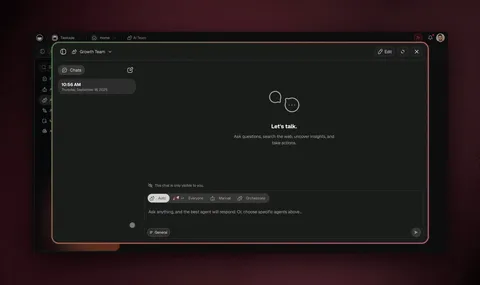
Taskade Agents v2: specialist agents with custom tools, shared persistent memory, multiple project views, 100+ integrations, MCP support — all in a browser.
What you get with Taskade Genesis: one-prompt live apps (150,000+ built), AI agents with built-in tools, multi-agent collaboration plus orchestration mode, frontier models from top AI labs, and 100+ bidirectional integrations - no Docker, no API keys, no dedicated machine. Think of the "Mission Control" dashboard that OpenClaw power users build by hand over a weekend. In Taskade Genesis you describe it in one prompt, and it arrives with its own data, agents, and automations. The section What You Can Build With Taskade Genesis shows six OpenClaw-style jobs rebuilt this way.
Build your first agent →: start on the Free plan, with no install and no API keys. Three newsletter deep dives show the pieces working together: agents think, automations execute, set it once, and one multi-agent workspace.
The Taskade Agent Architecture (at a glance)
        ┌──────────────────────────────────────────┐
        │             WORKSPACE DNA                 │
        │                                           │
        │   ┌────────┐  ┌────────────┐  ┌────────┐ │
        │   │ MEMORY │─▶│INTELLIGENCE│─▶│EXECUTE │ │
        │   │projects│  │  agents    │  │automate│ │
        │   └────▲───┘  └─────▲──────┘  └───┬────┘ │
        │        │            │             │      │
        │        └────────────┴─────────────┘      │
        │              (feedback loop)              │
        └──────────────────────────────────────────┘
                           │
          ┌────────────────┼────────────────┐
          ▼                ▼                ▼
    built-in        Frontier       100+
    Agent Tools     Models             Integrations
    (search, read,  (top AI labs,      (Slack, Gmail,
     files, apps)    Auto-routed)        GitHub, Stripe)
Compare that with OpenClaw's single-binary-on-your-laptop model and the team use-case argument writes itself. For a deeper tour, see our ultimate guide to Taskade Genesis and the agentic engineering platforms roundup.
Taskade is a managed AI workspace that delivers the same core promise as OpenClaw — autonomous agents with persistent memory, custom tools, and multi-model support — but for teams, in a browser, with zero setup.
Where OpenClaw is the homebrew Linux of AI agents, Taskade is the managed platform. You describe what you need, and it builds.
What Makes Taskade Different
No-Code Agent Builder: Create custom AI agents with persistent memory, built-in tools, custom slash commands, and knowledge bases — no Docker, no terminal, no API keys. Agents run in a managed cloud workspace accessible from any browser.
Taskade Genesis Apps: Taskade Genesis takes the "Mission Control" concept that OpenClaw power users build manually and makes it instant. Describe what you need (a CRM, a project tracker, an onboarding portal, a feedback dashboard) and Taskade Genesis builds it as living software that your whole team can use. Publish with one click, add password protection on Pro and above, use a custom domain on Business and above, and embed agents as widgets.
Multi-Agent Teams: Taskade supports multiple custom AI agents per workspace, each with different tools, knowledge, and personalities. AI Teams (Pro and above) let specialist agents share one workspace memory and collaborate on shared projects.
Multi-Model Support: Access frontier models from top AI labs - all from the same workspace. No API key juggling. OpenClaw's "brains and muscles" pattern is built-in as a platform feature.
Workspace DNA: Memory + Intelligence + Execution. Every project remembers context, every agent reasons over that context, and every automation executes based on agent output. Learn more about how this architecture powers Taskade Genesis apps. This self-reinforcing loop is what OpenClaw users build manually with heartbeats and cron jobs — Taskade provides it natively.
Access control: role-based access from Owner to Viewer, team permissions, SSO/SAML from Business, and encrypted connections. Agents and Taskade EVE check your access before they read a project, and each tool on an agent has its own approval setting. Taskade's security page states its current compliance status, including a SOC 2 Type II audit that is in progress.
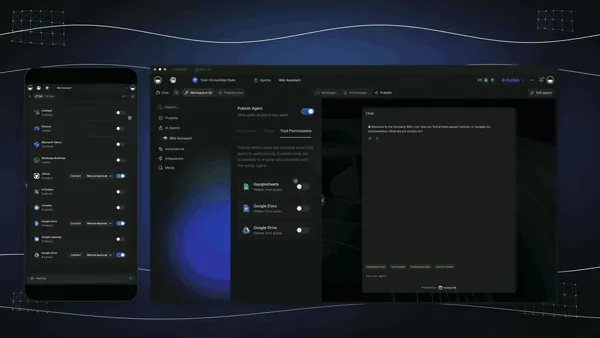
Set what an agent can touch, then publish it as a chat widget on your own website.
100+ Integrations: Connect to Slack, Notion, Google Workspace, GitHub, and 100+ more. When no integration exists, the HTTP Request action calls any API.
Taskade vs. OpenClaw
| Feature | OpenClaw | Taskade |
|---|---|---|
| Setup | Docker + terminal + API keys | Browser — instant |
| Agents | Single personal assistant | Multiple custom agents per workspace |
| Memory | Local files, vector embeddings | Persistent workspace memory across all agents |
| Tool Building | Agent vibe codes custom tools | Taskade Genesis apps - build apps from prompts |
| Collaboration | Single user only | Real-time multi-user with RBAC |
| Automation | Cron jobs (heartbeats) | Reliable automation workflows with branching, looping, 100+ integrations |
| Security | Admin access, plaintext creds | Role-based access, SSO from Business |
| Models | BYOK (any model) | Frontier models from top AI labs |
| Cost | API tokens + hardware | Free tier / plans from $10/mo |
| Views | Terminal/Dashboard | Multiple views — List, Board, Calendar, Table, Mind Map, Gantt, Org Chart |
150,000+ Taskade Genesis Apps built: from CRMs and project trackers to onboarding portals and client dashboards, each with custom domains, password protection, and embeddable widgets.
Taskade Next to the New Hosted Agents
Taskade is hosted like dots, Muse, Grok Bot, and Spark, but it is built around a team workspace instead of a personal cloud computer. Agents and automations run in the background from schedules and from triggers in connected apps, whether or not you are online. Free includes 10 automation runs per billing period, and schedule intervals under an hour need a paid plan. Agents keep persistent memory, can be embedded publicly, and read the web through search and fetch. Access follows role-based permissions from Owner to Viewer, and 100+ bidirectional integrations mean events in your tools can start the work.
The trade-off is real. Taskade agents do not operate a browser or a computer, so a dot, Muse, or Grok Bot is the better fit when a job means clicking through a site that has no API. Taskade is the better fit when several people share the work, when an email, a form response, or a CRM change should start it, and when the same agent memory should feed the project and the app your team already uses. Read the decision table to see where each option wins.

A form response is the trigger. The automation asks an agent team, sends the email, and fills the lead tracker.
The Cost Advantage
OpenClaw users pay API tokens ($10–$1,000+/month) plus hardware ($600+ Mac Mini). MyClaw.ai charges a monthly hosting fee (plans started at about $40 in an early 2026 listing), and API costs are extra unless you use its built-in API. Taskade Genesis includes frontier AI models, the workspace, automations, and hosting - starting free, with plans from $10/month billed annually. AI work draws from credits instead of separate API bills.
Who It's For
Taskade is the best OpenClaw alternative if you need:
- AI agents for a team (not just one person)
- No-code setup — non-technical users can build agents in minutes
- Access control: roles from Owner to Viewer, SSO/SAML from Business
- Structured workflows — project management + AI agents in one platform
- A managed platform — no Docker, no dedicated hardware
Try it free: Create a Taskade account and build your first AI agent in minutes. Explore ready-made AI apps in the Community Gallery to see what's possible. Or browse our AI Agents hub for templates and use cases.
Related reading: Best Claude Code alternatives · Best Devin AI alternatives · Best Genspark alternatives · Free AI app builders · What is agentic engineering? · Agentic engineering platforms
Entries 2 to 5 are new in September 2026. They are the hosted always-on agents from OpenAI, Meta, SpaceXAI, and Google. We checked each against its vendor's own announcement or help page on 29 September 2026. Vendors describe their own products, so read the strengths as vendor claims until independent tests arrive. For the side-by-side view, see the decision table.
2. OpenAI dots - Best Hosted Agent Inside ChatGPT
OpenAI dots are always-on agents inside ChatGPT, announced at OpenAI DevDay on September 29, 2026 and powered by GPT-6 Astra. OpenAI calls them "remarkably capable, always-on agents built to handle everything." Each dot gets its own cloud computer and its own browser, and it can work toward your goals around the clock.
Key features:
- Reach it where you work: ChatGPT on desktop, web, and mobile, plus Slack, Teams, and voice calls in ChatGPT. Texting is listed as coming soon.
- 4,000+ apps through plugins.
- Read-only proactive research: while you are away, a dot reviews connected apps with read-only tools. In that mode it cannot send messages, change content, or control your browser or computer.
- Layered permissions: Custom Rules let you allow, require approval for, or block an action. Auto-review is a separate check on actions that could affect accounts or share information. An Activity View shows background work so you can redirect it.
- Passwords stay out of the model: saved sign-ins let a dot log in to supported sites without the model seeing the password, and tasks such as changing a password stay with you.
Limitations: Pro availability excludes the EEA, Switzerland, and the UK at launch, while Business Premium is available in all supported ChatGPT regions. Enterprise, Edu, and Healthcare are in beta when an admin turns it on. You create the first dot on desktop, not on mobile. You get OpenAI's model and OpenAI's cloud, so leaving later means moving your history and integrations. OpenAI says dots "can still make mistakes, so always review consequential work," and DataCamp reported no independent evaluation on launch day. Dots are also built around approval rules, not open host access: an early tester on Hacker News wrote that "if you're looking for an openclaw like agent, this isn't it at all".
Best for: People who already pay for ChatGPT Pro or Business Premium and want an always-on assistant with layered approval controls and no setup. For the design details, see our guide to always-on AI agents.
Pricing: The first dot is included in ChatGPT Pro and Business Premium at no extra cost. OpenAI says you can add dots and buy more speed or volume later (OpenAI help center, 29 September 2026). For the company behind dots, read OpenAI's history from the nonprofit era to GPT-6, and for how OpenAI prices its coding agent, see Codex pricing explained.
3. Meta Muse - Best Free-to-Start Personal Agent for Phones
Meta Muse is a personal AI agent that Meta launched on September 8, 2026. It runs on the Muse Secure VM, a dedicated cloud virtual machine that holds the agent and your data, and it is powered by Meta's Muse Spark model. You talk to it like a person, in the Muse app or in WhatsApp.
Key features:
- Works after you close the app: Muse advances a goal on its own and comes back when something changes or when it needs approval, such as before it sends an email or makes a purchase.
- Can use a browser: Meta says Muse can open a browser, fill out forms, and negotiate on your behalf.
- A separate Sentinel agent: it runs on the same machine, and nothing Muse does reaches the internet unless the Sentinel approves it.
- Credentials stay hidden: Muse has no visibility into your passwords or payment methods. Checkout uses Link by Stripe with one-time-use cards.
- Memory you control: Muse remembers what matters, and you can tell it to forget specific things. Meta says it does not share Muse conversations with its ad systems, and you can opt out of training use.
Third-party reports add scale and direction. VentureBeat, citing TechCrunch and Sensor Tower, reported an estimated 3.4 million downloads by September 24 (other analytics firms estimated between roughly 2.3 and 4.3 million) and new small-business integrations that include Shopify, QuickBooks, Stripe, and Canva.
Limitations: The launch rollout is US-only on iOS, Android, and muse.ai, with AI glasses listed as coming soon. Muse is consumer-first, so it has no team workspace or roles. Your data lives in a Meta-run VM, and Meta says a Confidential VM with a key only you hold arrives "later this year," so it is not available yet. It is closed, so you cannot pick the model.
Best for: US consumers and small-business owners who want a phone-first agent that can book, buy, and follow up, and who prefer a separate approval agent over configuring rules.
Pricing: "Free for most of what people need, with subscription plans for people who want to do more," per Meta's September 8, 2026 announcement. Third-party sites quote specific paid-plan prices, but we could not verify them on Meta's own page, so we do not print them.
4. Grok Bot - Best Hosted Team of Parallel Bots
Grok Bot is SpaceXAI's beta of always-on "AI teammates you can give real work to," launched on August 11, 2026. Bots share a computer of their own in the cloud, sign in to the tools you already use, and finish jobs end to end, coming back only when something needs your approval. SpaceXAI says it began as an internal prototype that teams used for sales outbound, marketing campaigns, office operations, and bug fixes.
Key features:
- Works in tools with no API: SpaceXAI says bots can sign in and work across apps and websites, including platforms with no clean API or MCP.
- Many bots at once: run a specialist bot for each lane, such as inbox, expenses, or recruiting, with one bot managing the others. Bots message each other in threads and group chats.
- Teach by showing: ask a bot to follow along while you do a job once. It saves the steps as a routine, takes your corrections, and runs it on its own next time.
- Message it like a colleague: from a phone or desktop, and pick up the same thread later.
Limitations: Grok Bot is in beta, on desktop and iOS, and enterprise users join a waitlist. A heavy user on Hacker News reported that a task can take about an hour end to end, against roughly 10 minutes with a synchronous local prompt, and that their inference spend rose 2 to 3 times (self-reported). Bots operate inside signed-in tools, so review what each bot can touch.
Best for: SuperGrok and Cursor subscribers who want a small team of parallel bots handling repeatable operations, and who accept a vendor-run computer.
Pricing: Beta access for SuperGrok, SuperGrok Plus, and SuperGrok Heavy; Cursor Pro, Pro+, and Ultra; and Cursor Teams Standard and Premium. Grok Bot has its own usage allowance, separate from those plans, so bot work does not count against them (SpaceXAI, 11 August 2026).
5. Gemini Spark - Best Always-On Agent Inside Google Apps
Gemini Spark is Google's "24/7 personal AI agent." Google says it works in the background even when your phone and laptop are off, operates under your direction, and is designed to check with you before major actions. You choose to turn it on.
Key features:
- Native Google connections: Gmail, Calendar, Drive, Docs, Sheets, Slides, YouTube, and Google Maps. Connections are off by default until you enable them in settings.
- Tasks, Skills, and Schedules: Tasks put the agent to work across your Workspace data, Skills capture how you want repeat jobs done (Google's example is an email style guide called "ghostwriter"), and Schedules use time-based or conditional triggers.
- Live web browsing: Google says Spark can research across multiple sites, compare options, and help complete bookings.
Limitations: Spark is available to Google AI Pro and Ultra subscribers over 18 in select countries and to select business users, with wider access rolling out. Google's own fine print says to check responses, supervise closely, and interrupt when needed. It is strongest inside Google's ecosystem, and Google's page describes no team workspace or model choice.
Best for: People whose work already lives in Gmail, Calendar, and Drive and who want scheduled, conditional automation without leaving Google.
Pricing: A subscription is required (Google AI Pro or Ultra). We do not print plan prices because Google's Spark page does not list them.
6. NanoClaw - Best for Security-First Self-Hosting
NanoClaw is a security-hardened fork of OpenClaw that wraps every skill execution in container isolation, adds mandatory permission gates for file system and network access, and includes a built-in audit log.
It was created in direct response to the ClawHavoc supply chain attack and addresses OpenClaw's biggest security gaps:
- Container-isolated skill execution — each skill runs in its own sandbox
- Mandatory permission gates — file system, network, and API access require explicit approval
- Audit logging — every action is recorded with timestamps and context
- Signed skill verification — skills must pass integrity checks before execution
- Credential encryption — no more plaintext API keys
NanoClaw maintains most of OpenClaw's functionality — messaging integrations, heartbeat system, memory — while treating security as a first-class concern rather than an afterthought.
AI-Native Architecture: Unlike OpenClaw's 430,000 lines of code (described by developers as "Frankenstein's monster with software plugged into itself"), NanoClaw is built AI-native from the ground up — lightweight, modular, and easy for AI coding agents like Claude Code to customize directly. NanoClaw is also the first claw-family agent to support agent swarms — coordinated multi-agent pipelines where specialized agents handle scraping, research, analysis, and presentation in sequence. It can dynamically rewrite its own code and integrates with Telegram for mobile-first interaction.
Limitations: Still requires Docker and terminal setup. Still single-user. Community is smaller than OpenClaw's, so fewer community-built skills are available.
Best for: Users who want OpenClaw's agent capabilities but need to run it in security-sensitive environments — personal finance automation, healthcare data, or business workflows where a breach would be catastrophic.
Security Ecosystem: NanoClaw's security-first approach is further strengthened by third-party tools like ClawSK (Claw Security Kit), developed by Prompt Security (a SentinelOne subsidiary). ClawSK provides specialized security skills (Heartbeat (CVE scanning), Soul Guardian (behavioral monitoring), and Watchdog (runtime anomaly detection)) that install directly into the OpenClaw/NanoClaw skills folder. When ClawSK's heartbeat runs, it produces detailed reports covering sanity checks, version conflicts, exploitable versions, and actionable remediation items. For teams that need security without bolt-on tooling, managed platforms like Taskade provide role-based access on a managed cloud, so there is no skills folder for you to secure.
7. Claude Code - Best for AI-Assisted Software Development
Claude Code is Anthropic's terminal-based agentic AI coding tool — and it's becoming a category of its own.
Unlike OpenClaw (a general-purpose personal assistant), Claude Code is laser-focused on software development: reading codebases, writing and editing code, running tests, managing git workflows, and deploying applications. It hit $1 billion in annualized revenue within six months of launch and accounts for approximately 4% of all public GitHub commits as of February 2026.
Key features:
- Agent Teams — coordinate multiple Claude Code instances working in parallel (frontend, backend, testing)
- 1-million-token context — entire codebases fit in a single context window
- Git integration — commits, PRs, branch management from natural language
- MCP protocol — connect to external tools and data sources
MCP Ecosystem Evolution: The MCP protocol that Claude Code supports is evolving rapidly. Community tools like MCP2 CLI address context window bloat by converting MCP servers into bash commands at runtime — with caching (1-hour TTL), TUNE token-efficient output format, and the ability to redirect large outputs to files instead of loading everything into context. Claude Code's --allowedTools flag partially addresses this by dynamically loading tools as needed. The Superpowers plugin (58K GitHub stars in 24 hours) adds strict TDD enforcement with git worktree isolation for sub-agents, and auto research methods enable self-improving agent skills through iterative eval suites.
Claude Code vs OpenClaw — Head-to-Head (100 Hours Tested):
YouTuber Nate Herk ran a structured 100-hour comparison across 8 metrics, scoring each tool out of 10. The results capture the fundamental tradeoff:
| Metric | Claude Code | OpenClaw | Winner |
|---|---|---|---|
| Out-of-box ability | 7 | 9 | OpenClaw |
| Setup friction | 8 | 6 | Claude Code |
| Cost | 8 | 6 | Claude Code |
| Power & access | 7 | 10 | OpenClaw |
| Security | 7 | 3 | Claude Code |
| Everyday usability | 6 | 9 | OpenClaw |
| Actual ROI | 8.5 | 6 | Claude Code |
| Total | 51.5 | 49 | Claude Code |
The verdict: "Claude Code wins on security, proven results, and lower risk. OpenClaw wins on accessibility, ambient presence, and it feels like the future." Notably, Herk concluded: "Everything I'm doing with OpenClaw I could be doing in Claude Code."
The cost reality: 80 million tokens in one OpenClaw session cost ~$80 in API fees. The same work on Claude Code Max ($200/month) would have been a fraction of the monthly subscription.
Limitations: Coding-only — no email, calendar, smart home, or general personal automation. Uses only Anthropic's Claude models (no model-agnostic support). Requires Pro subscription ($20/month).
Best for: Software developers who want an autonomous AI coding agent rather than a general-purpose assistant.
The Taskade angle: Claude Code wins on proven ROI but is coding-only. OpenClaw wins on ambient presence but has critical security gaps. Taskade Genesis combines the best of both: AI agents you can talk to from any browser and start from schedules and triggers (the ambient side of OpenClaw), plus structured project delivery with multiple views and reliable automation workflows (the shipping side of Claude Code), plus role-based access from Owner to Viewer for a team. No VPS to patch, and AI usage draws from credits instead of separate API bills.
8. IronClaw - Best for Memory-Safe Execution
IronClaw is NEAR AI's Rust rewrite of OpenClaw with WebAssembly (WASM) sandboxing — addressing the fundamental security architecture that makes OpenClaw vulnerable.
By rewriting the core in Rust (a memory-safe language) and running skills in WASM sandboxes, IronClaw eliminates entire categories of vulnerabilities:
- No buffer overflows — Rust's ownership model prevents memory corruption
- WASM sandbox — skills run in isolated virtual machines with no direct system access
- Capability-based security — skills request specific permissions (network, file, API) that users must grant
- Audit trail — all permission grants and skill actions are logged
Limitations: Smaller skill ecosystem than OpenClaw. Some OpenClaw skills require porting to WASM. Still a single-user tool with no collaboration features.
Best for: Security researchers, privacy-conscious users, and anyone running AI agents in environments where a breach could cause serious damage.
9. Nanobot - Best Lightweight Python Agent
Nanobot is an ultra-lightweight AI agent written in approximately 4,000 lines of Python. If OpenClaw is a Swiss Army knife, Nanobot is a scalpel.
Install with a single pip install command, configure with a YAML file, and you have a working AI agent in under five minutes. No Docker. No container orchestration. No 50+ integration framework.
Key features:
- Minimal footprint — runs on any Python 3.10+ environment
- YAML configuration — simple, human-readable config files
- Plugin system — add capabilities through lightweight Python modules
- Multi-model support — works with OpenAI, Anthropic, local models
Limitations: Far fewer integrations than OpenClaw. No GUI. Limited community ecosystem. No persistent memory out of the box (requires plugin).
Best for: Python developers who want a minimal, understandable AI agent they can customize and extend without dealing with OpenClaw's complexity.
10. memU - Best for Long-Term Memory
memU differentiates itself with a knowledge graph memory system that goes far beyond OpenClaw's vector embeddings.
Where OpenClaw stores memories as flat text chunks, memU builds a structured graph of entities, relationships, and temporal context. It knows not just what you said, but when, why, and how it connects to everything else you've told it.
Key features:
- Knowledge graph — structured relationships between concepts, people, projects
- Time-aware reasoning — understands when things happened and how context evolves
- Proactive recall — surfaces relevant memories before you ask
- Memory visualization — inspect and edit the agent's knowledge graph
Limitations: Heavier resource requirements than OpenClaw due to graph database. Docker setup required. Single-user only. Smaller skill ecosystem.
Best for: Users who want an AI assistant with genuinely deep, structured memory — researchers, executives, and anyone whose workflows involve complex, long-running contexts.
11. Kimi Claw - Best Browser-Based OpenClaw
Kimi Claw is Moonshot AI's managed OpenClaw implementation running natively inside the Kimi web interface. Launched February 15, 2026, it eliminates OpenClaw's biggest barrier: setup friction.
- 5,000+ ClawHub skills pre-loaded
- 40GB cloud storage for agent memory and files
- Persistent cross-session memory
- BYOC (bring your own credentials) for external AI models
- Zero setup — open kimi.com and start
Limitations: Dependent on Moonshot AI's infrastructure and availability. Data resides on Moonshot's servers (privacy considerations for sensitive data). Limited customization compared to self-hosted OpenClaw. Primarily serves the Chinese market.
Best for: Non-technical users who want the OpenClaw experience without any setup, especially those comfortable with a Chinese cloud provider.
Exploring the AI agent landscape? These sibling posts go deeper on specific tools and categories:
- Best Claude Code Alternatives — 9 terminal-native AI coding agents ranked
- Best Devin AI Alternatives — autonomous coding agents compared
- Best Genspark Alternatives — AI workspace tools for teams
- Free AI App Builders - every free tier tested and ranked
- What Is Agentic Engineering? — the discipline behind reliable AI agents
- Best AI Agent Builder Platforms — orchestration tools compared
12. MaxClaw (MiniMax Agent) - Best for Cross-Platform Managed OpenClaw
MaxClaw by MiniMax provides one-click OpenClaw deployment running 24/7 in the cloud — the most accessible managed OpenClaw experience available, with native apps for Windows, Mac, Linux, iOS, and Android.
Powered by MiniMax's M2.5 model (80% SWE-bench Verified, 100 tokens/second), MaxClaw goes beyond basic OpenClaw replication:
- One-click deployment — live in under 30 seconds, no Docker or terminal
- Pre-trained experts — specialized configurations for trading, research, coding, and more
- Cross-platform — web, desktop, iOS, and Android (unlike most alternatives that are Mac-only)
- Parallel task execution — run browser automation and document creation simultaneously
- Telegram integration — send commands from your phone, receive PDFs and reports back
- Scheduled skills — daily news briefings, file organization, recurring automations
- Long-term memory — persistent context across all conversations
- 200 daily free credits — basic usage at no cost
Limitations: Dependent on MiniMax infrastructure. Uses MiniMax M2.5 model primarily (limited model choice compared to self-hosted OpenClaw). Cloud-only — no local-first option.
Best for: Users who want OpenClaw's always-on autonomous agent experience with cross-platform mobile access, especially on Windows and Android where other claw-family tools are unavailable.
Pricing: $19/month (no additional API fees) / Free daily credits available
13. TrustClaw - Best Cloud-Hosted Agent
TrustClaw offers cloud-hosted AI agents with OAuth authentication and sandboxed execution — the enterprise version of OpenClaw's model.
Key features:
- OAuth integration — connect services securely without sharing raw API keys
- Sandboxed execution — skills run in isolated environments
- 1,000+ pre-built tools — curated and security-reviewed
- Web dashboard — manage your agent through a browser interface
Limitations: Proprietary platform — not fully open source. Smaller community. Pricing can scale with usage.
Best for: Users who want a cloud-hosted personal AI assistant with better security defaults than OpenClaw, without managing their own infrastructure.
14. PicoClaw - Best for Edge/IoT Devices
PicoClaw pushes the autonomous AI agent concept to its extreme: an AI agent that runs on microcontrollers with less than 1MB RAM.
It strips OpenClaw down to its essential core — scheduling, messaging, and lightweight model inference — and compiles it for embedded devices. Imagine an AI agent running on a Raspberry Pi Zero, an ESP32, or a smart home hub.
Limitations: Extremely limited capabilities compared to full OpenClaw. Can only run small local models or act as a thin client to cloud APIs. No GUI.
Best for: IoT developers, embedded systems engineers, and hobbyists building AI-powered hardware projects.
15. ZeroClaw - Best for Ultra-Low-Cost Deployment
ZeroClaw is a complete AI agent in a single Rust binary that runs on $10 hardware with less than 5MB RAM.
It's designed for deployment in resource-constrained environments — developing countries, older hardware, offline scenarios — where neither cloud subscriptions nor powerful hardware are available.
Limitations: Limited to text-based interactions. No browser automation. Requires cloud API for full LLM capabilities.
Best for: Users who need an AI agent on extremely limited hardware or in bandwidth-constrained environments.
16. SuperAGI - Best Multi-Agent Orchestration Framework
SuperAGI is an open-source autonomous agent framework that focuses on multi-agent orchestration — running multiple specialized agents that collaborate on complex tasks.
Unlike OpenClaw's single-agent model, SuperAGI lets you spin up teams of agents: one for research, one for writing, one for coding, each with its own tools and memory. It's closer to how multi-agent systems work in enterprise settings.
Key features:
- Multi-agent orchestration — agents collaborate on shared goals
- Tool marketplace — community-built tools and integrations
- Performance telemetry — monitor agent performance and costs
- Model-agnostic — works with OpenAI, Anthropic, local models
Limitations: Docker setup required. Steeper learning curve than single-agent tools. Can be resource-intensive with multiple agents.
Best for: Developers building complex multi-agent workflows who want more orchestration control than OpenClaw provides.
17. Moltworker - Best for Serverless Deployment
Moltworker runs AI agents on Cloudflare Workers — serverless edge functions that execute globally with low latency and per-request pricing.
Instead of running a 24/7 Docker container, Moltworker agents wake up on demand, process tasks, and go dormant. You pay only for execution time.
Limitations: Cloudflare Workers have execution time limits. Not suitable for long-running tasks. Limited local storage.
Best for: Users who want AI agent capabilities without 24/7 infrastructure costs — especially for event-driven workflows like email processing, webhook handlers, and scheduled tasks.
18. AnythingLLM - Best Local LLM Platform
AnythingLLM is a local-first LLM platform that lets you run AI models on your own hardware with a clean desktop GUI.
It's not an "agent" in the OpenClaw sense — it doesn't autonomously manage your email or build dashboards while you sleep. But it provides a solid foundation for local AI with document ingestion, RAG (retrieval-augmented generation), and multi-model support.
Key features:
- Desktop GUI — no terminal required
- Local model support — Ollama, LM Studio, and others
- Document ingestion — PDF, web pages, code repositories
- RAG pipeline — query your documents with AI
Limitations: No autonomous agent capabilities. No messaging integrations. No heartbeat/cron system. More of a "local ChatGPT" than an agent.
Best for: Users who want a private, local AI for document Q&A and general chat — without the complexity or security risks of full agent frameworks.
19. Agent S3 (Simular AI) - Best for Autonomous Computer Use
Agent S3 by Simular AI is an autonomous agent focused on computer use — clicking, typing, navigating GUIs, and executing multi-step workflows across desktop applications.
While OpenClaw interacts primarily through messaging apps and APIs, Agent S3 watches your screen and operates your computer directly — closer to Anthropic's computer use feature than OpenClaw's messaging-first approach.
Limitations: Requires screen access (privacy implications). Limited to visual tasks. No messaging integrations. Research-stage project.
Best for: Users who need AI to automate GUI-based workflows that don't have APIs — form filling, legacy application interaction, multi-app workflows.
20. Jan.ai - Best Private Local AI Assistant
Jan.ai is a desktop application for running AI models locally with a focus on privacy and ease of use.
Like AnythingLLM, it's more of a local chat interface than an autonomous agent. But its clean UI, one-click model downloads, and offline-first design make it one of the most accessible ways to run AI locally.
Key features:
- One-click model downloads — browse and install models from a marketplace
- Offline-first — works without internet after model download
- Desktop app — macOS, Windows, Linux
- API compatible — drop-in replacement for OpenAI API
Limitations: No agent capabilities. No integrations. No automation. Chat interface only.
Best for: Privacy-conscious users who want a simple, local AI chat experience without cloud dependencies.
More OpenClaw Alternatives: Hermes Agent, Claude Cowork, Perplexity Computer, and Manus
Four more names come up whenever people search for an OpenClaw alternative: Hermes Agent, the closest open-source match, and Claude Cowork, Perplexity Computer, and Manus, which are managed general agents. We keep them outside the numbered list of 20 so that the ranking above stays stable, but each one answers a real "what should I use instead" question. Facts below come from each project's own page or from Composio's 16 September 2026 comparison, and vendors describe their own products.
| Option | Type | Best for | Runs on | Cost shape | Trade-off |
|---|---|---|---|---|---|
| Hermes Agent (Nous Research) | Open source, self-hosted | The closest OpenClaw replacement | Local, Docker, SSH, and cloud sandboxes such as Modal, Daytona, and Vercel Sandbox | Free MIT-licensed framework; you pay for the model and hosting | You operate and patch it |
| Claude Cowork | Managed desktop agent | File and document work with scheduled tasks | An isolated virtual machine, driven from Claude Desktop | Included with paid Claude plans | Claude models only |
| Perplexity Computer | Managed cloud agent | Research-heavy work with connectors such as Gmail, Slack, and Notion | Perplexity's cloud | Tied to a Perplexity Pro or Max plan | Personal, not a team workspace |
| Manus | Managed cloud agent | Goal-in, output-out work: reports, spreadsheets, slides, apps | A cloud computer or your own browser | Credit-based plans | Vendor-run cloud and credits |
Sources: the Hermes Agent GitHub page (29 September 2026), Composio (16 September 2026), and each vendor's site. Prices for the managed agents change often, so check each pricing page.
Hermes Agent: the closest open-source replacement
Hermes Agent is an MIT-licensed agent from Nous Research with the same shape as OpenClaw: one gateway process that reaches you on Telegram, Discord, Slack, WhatsApp, Signal, and the command line. Its GitHub page lists agent-curated memory, autonomous skill creation after complex tasks, skills that improve during use, and full-text session search for recall across sessions. It works with Nous Portal, OpenRouter, OpenAI, custom endpoints, and 300+ other models. The project showed about 250,000 GitHub stars on 29 September 2026.
Its hermes claw migrate command imports settings, memories, skills, and API keys from an OpenClaw install, so the move is short. Composio's comparison also credits Hermes with a defense-in-depth security model that combines command approval, container isolation, and user authorization.
Hermes stays a tool you operate. You pick the terminal backend, patch it, and pay for tokens. It is the better fit when you must choose the model, keep data on your machine, and want an agent that writes its own skills. A workspace such as Taskade is the better fit when several people share the work and events in team tools should start it. For the wider picture of agents that keep working while you are away, read always-on AI agents.
Claude Cowork, Perplexity Computer, and Manus in one paragraph each
Claude Cowork runs scheduled tasks for recurring work such as reports and summaries inside an isolated virtual machine, and it asks for approval before critical actions. Perplexity Computer suits research, monitoring, and browsing tasks, and it connects to apps such as Gmail, Slack, Notion, and Calendar. Manus takes a high-level goal and returns finished output such as a report, a spreadsheet, slides, or a web app. All three are managed and personal by design, so they remove the hosting burden but not the question of who shares the work. For a fuller look at Manus, read our Manus AI review.
🚀 What You Can Build With Taskade Genesis Instead of Wiring an OpenClaw
Taskade Genesis turns the jobs that OpenClaw users wire by hand into apps you describe in one prompt: a live app with its own projects (Memory), AI agents (Intelligence), and automations (Execution). Taskade EVE builds and edits the app by chat, every plan can build (Free holds 3 apps), and the model underneath can change without your app changing with it. These examples come from the Taskade Genesis guides and map to the OpenClaw use cases in the table earlier in this post.
| App | The prompt you type | Projects (Memory) | AI agents (Intelligence) | Automations (Execution) |
|---|---|---|---|---|
| Lead tracker | Build a lead tracker for a wedding photographer. A public form collects name, email, date, venue and budget. Add an agent that scores each lead Hot, Warm or Cold. |
Leads | Lead scorer with a one-line reason | A form submission creates a lead record |
| Client portal | Build a client portal for a small accounting firm. Clients submit a request with name, email, request type and documents. Show my team a board grouped by status. |
Client requests with status stages | Answers questions from the request history | Notifies the team when a request arrives |
| Support agent for your website | Create a support agent trained on my help documents. Publish it as a website widget. |
Help documents | Public support agent | Chat threads route to Slack or email |
| Live dashboard | Build a sales dashboard from my Deals project. Refresh it every morning and show a weekly summary. |
Deals | Weekly summary writer | A schedule trigger refreshes the data |
| Self-updating knowledge base | Build a knowledge hub that pulls new articles from an RSS feed and answers questions about them. |
Knowledge hub | Research agent | An RSS automation adds new items |
| Invoicing app | Build an invoicing app for a freelance designer. Log each job, create a Stripe invoice and email the payment link to the client. |
Jobs and invoices | Answers "who owes me money?" | A Stripe step creates the invoice and payment link |
Each row replaces a piece of a claw setup: the lead tracker stands in for the CRM and lead pipeline, the dashboard for the morning brief, and the support agent for the missed-call follow-up. The diagram shows what one prompt creates.
New records and results flow back into your projects, so the loop starts again with fresh data. That is Workspace DNA: Memory feeds Intelligence, Intelligence triggers Execution, and Execution writes back to Memory.
Clone a live support agent app in one click and make it yours. Cloning is free.
What else comes with it. Taskade gives you frontier models from top AI labs, and Auto is the default, so you do not manage keys to start. Automations start on a schedule or on an event in a connected app, and the 100+ integrations work in both directions: triggers pull events in and actions push data out. Agents keep persistent memory, read the web through search and fetch, and can be published as a public link or a website widget. AI Teams on Pro and above let specialist agents share one workspace memory. Browse live community apps or compare plans and pricing.
Where a claw or a hosted agent is still the better tool. Taskade agents do not drive a browser or a computer. A job that means clicking through a site with no API belongs to a hosted agent such as OpenAI dots, or to a self-hosted claw you configure yourself. Sign-in on a Taskade Genesis app confirms who a visitor is. To show each person only their own records, you turn on row scoping, match records to the login, and test with a second account.
🔄 Migrating From OpenClaw: What Moves Where
Migration is easier when you inventory an OpenClaw setup in six pieces first: memory files, skills, scheduled jobs, chat channels, keys, and actions on a computer. The table shows where each piece goes on Hermes Agent, the closest open-source replacement, and on Taskade, the managed workspace.
| OpenClaw piece | On Hermes Agent | On Taskade |
|---|---|---|
| Memory files (notes, preferences) | hermes claw migrate imports memories |
Move the notes into a project and add it to the agent's knowledge; connected projects stay current |
| Skills | The same command imports skills | Recreate them as slash commands, or turn an automation or an API into a custom agent tool |
| Heartbeats and cron jobs | Hermes cron jobs | An automation with a schedule trigger (intervals under an hour need a paid plan), or a trigger from a connected app |
| Chat channels (Telegram, WhatsApp) | The gateway covers Telegram, Discord, Slack, WhatsApp, and Signal | A public agent link or website widget for outsiders, and Slack or email through integrations for your team |
| API keys per model | The command imports keys | Not needed to start: Auto picks from frontier models from top AI labs, and Enterprise can bring its own AI key |
| Actions on a computer or browser | Through a terminal backend you configure | Not available for Taskade agents, which read the web but do not drive a browser or a computer |
OpenClaw today                        Taskade Genesis after
--------------                        ---------------------
MEMORY notes and files      ------>   Projects (Memory)
skills folder               ------>   Slash commands, custom agent tools
heartbeat and cron          ------>   Automation: schedule or app trigger
chat channel bot            ------>   Public agent, widget, Slack via integrations
API keys per model          ------>   frontier models, Auto by default
approvals in chat           ------>   Approval setting per tool, roles Owner to Viewer
you patch the host          ------>   no host to patch
Run both side by side for a week. Keep the claw for jobs that need a browser or a local machine, and move the repeatable work that a team shares into a workspace. That split keeps the open-ended personal autonomy where it is strong and puts the shared, permissioned work where it is safe.
💼 The OpenClaw Business Ecosystem: How People Are Making Money
OpenClaw's explosive growth has spawned an entire service economy. YouTube creators, freelancers, and agencies are building businesses around deploying and managing OpenClaw for local businesses that lack technical expertise.
Three Emerging Business Models
1. AI Automation Agency ($500–$1,000 setup + retainer)
Businesses like plumbers, HVAC companies, and service providers rely on phone and text inquiries. When customers call and nobody answers, they go to the competition. OpenClaw agents monitor phone lines and texts via WhatsApp or Telegram, auto-responding to missed calls with personalized follow-ups — keeping leads warm 24/7. Operators charge $500–$1,000 setup fees plus monthly retainers for ongoing management.
2. Lead Generation ($50–$500/lead, $1K–$3K retainer)
OpenClaw agents qualify inbound leads by budget, location, and timeline — then push qualified prospects into CRMs like HubSpot. Agencies charge per qualified lead or monthly retainers, using Brave Search API and Apify for automated prospecting.
3. Done-for-You Setup ($750–$2,500 per deployment)
Non-technical business owners don't know what Docker is. Freelancers charge $750–$2,500+ to set up OpenClaw on a VPS or MyClaw.ai, connect it to the business's communication channels, train it on FAQs, pricing, and customer avatars, then hand over a working AI assistant. Some charge as high as $5,000 for businesses where the agent generates $50K–$100K in additional annual revenue.
Managed Hosting: MyClaw.ai
MyClaw.ai is a managed OpenClaw hosting platform that eliminates all technical setup. Users select a plan (starting at $40), name their bot, enter an API key (or use MyClaw's built-in API with per-model token tracking), and get a running OpenClaw instance in minutes.
The dashboard provides:
- Channel connections — WhatsApp, Telegram, Discord, Slack, iMessage
- Cron jobs — schedule automated tasks (e.g., "check my email at 8 AM and send a daily brief")
- Agent management — overview, sessions, usage/cost tracking
- Skills — install and manage OpenClaw capabilities
- API key flexibility — bring your own (Open Router, Anthropic, OpenAI) or use MyClaw's built-in API
MyClaw represents the growing "managed OpenClaw" wave alongside Kimi Claw and MaxClaw - platforms removing the terminal barrier for mainstream adoption. For teams that need not just a personal assistant but collaborative multi-agent workspaces with enterprise security, Taskade Genesis provides the managed alternative with role-based access and 100+ integrations out of the box.
VPS Hosting: The Budget Option
For users who want cloud-hosted OpenClaw without MyClaw's managed layer, VPS providers like Hostinger offer one-click OpenClaw deployment for approximately $10/month (8GB RAM, 100GB disk). This runs 24/7 in the cloud without touching your personal machine — a middle ground between full self-hosting and managed platforms.
Community Use Cases Going Viral
The OpenClaw community has documented increasingly sophisticated use cases that go far beyond basic chatbot interactions:
| Use Case | What It Does | Business Value |
|---|---|---|
| Life Operating System | Calendar management, task scoring by urgency, meeting briefings, weekly reviews, content opportunity spotting | Personal productivity replacement for multiple apps |
| Email Automation | Read-only inbox scanning, draft replies, daily briefings, urgent message flagging via Resend MCP server | Saves 2–3 hours/day for executives handling 50–100 emails |
| TikTok/Instagram Content | Auto-generates slide images with text overlays, posts 3x/day across 4 accounts, drives traffic to B2C apps | Faceless, automated social media presence |
| Influencer Outreach | Research creators, scrape contact info, send personalized emails, negotiate deals, track content delivery | Replaces manual influencer management workflow |
| CRM + Lead Pipeline | Brave API search → Apify scraping → CRM loading → email campaigns → automated follow-ups | End-to-end lead generation on autopilot |
| Meeting → Action Items | Fathom transcript → summary + decisions + action items with owners and due dates → Trello/Linear tickets | Eliminates post-meeting manual follow-up |
| Video Production | Research top videos → analyze hooks → scrape audience language → write scripts → generate with Arcads | YouTube content pipeline from research to upload |
| Proposal Generation | Meeting notes + services.md → professional HTML proposal → markdown draft → PDF export | Automates the most tedious part of freelance sales |
| Overnight Coding | Delegates to sub-agents while operator sleeps, full site rebuilds via Telegram/WhatsApp commands | 24/7 development without hiring |
| DevOps Watchdog | Monitors logs, uptime, deployments → opens tickets or runs remediation automatically | Self-healing infrastructure monitoring |
Notable power users: Jason Calacanis built OpenClaw Ultron — agents managing team attendance, podcast booking, calendar supervision, coding dashboards, and error monitoring across his entire tech stack. Chris Bader automated daily operations, meetings, content, finance, and admin — including an agent that negotiated a $4,200 car discount over email while Bader slept.
Community resources: Claudiverse (community-powered use case directory), OpenClaw Radar (guides, news, security), and playbooks.com (installable skills for meeting-to-action, proposal generation, content repurposing).
Why this matters for alternatives: The OpenClaw business ecosystem proves there's massive demand for AI agent automation — but most clients can't install Docker. If you're evaluating alternatives for business deployment, managed platforms eliminate the setup friction that creates the service opportunity in the first place. Taskade Genesis provides everything a business needs — AI agents, automations, CRM capabilities, and 100+ integrations — without a $2,500 setup fee.
🔱 NemoClaw: NVIDIA's Enterprise Answer to OpenClaw
On March 17, 2026, Jensen Huang took the GTC stage and announced NemoClaw — NVIDIA's enterprise-hardened fork of OpenClaw. The announcement sent shockwaves through the AI agent community.
"OpenClaw is the next ChatGPT. Every enterprise on Earth will want autonomous AI agents — but not with the security posture of a weekend hackathon project."
— Jensen Huang, NVIDIA GTC keynote, March 17, 2026 (CNBC)
Why NVIDIA Built NemoClaw
OpenClaw's explosive growth (247K+ GitHub stars) came with a growing list of enterprise concerns. Cisco researchers found data exfiltration vulnerabilities in standard OpenClaw deployments. China restricted government use of OpenClaw entirely. The ClawHavoc supply chain attack demonstrated that the skill ecosystem was a critical attack surface. And on March 21, CNBC reported that OpenClaw's "ChatGPT moment" was sparking industry concern about AI models becoming commodities — with security as the casualty.
NemoClaw addresses these gaps head-on:
- Enterprise-hardened security — sandboxed skill execution, encrypted credential storage, and mandatory access controls baked into the runtime
- NVIDIA infrastructure — runs on NVIDIA's cloud with GPU-accelerated inference, not your laptop's Docker daemon
- Compliance-ready — designed for regulated industries (healthcare, finance, government) that can't deploy raw OpenClaw
- Enterprise support — backed by NVIDIA's security team, not a volunteer open-source community
- Audit trails — every agent action logged with tamper-proof records for compliance reporting
As TechCrunch reported on March 16: "NVIDIA's NemoClaw could solve OpenClaw's biggest problem: security."
Security Comparison: NemoClaw vs OpenClaw vs Managed Alternatives
| Feature | OpenClaw | NemoClaw (NVIDIA) | NanoClaw | Taskade |
|---|---|---|---|---|
| Credential Storage | Plaintext by default | Encrypted (NVIDIA vault) | Encrypted | Managed by Taskade |
| Skill Sandboxing | None | GPU-accelerated sandbox | Container isolation | Managed (no skills) |
| Access Controls | None | Enterprise RBAC | Permission gates | Owner to Viewer |
| Audit Logging | None | Tamper-proof logs | Built-in audit log | Account and workspace activity logging (see the security page) |
| Compliance | None | Enterprise-grade | Self-managed | SOC 2 Type II in progress (see the security page) |
| Data Exfiltration Protection | Vulnerable (Cisco) | Hardened | Partial | Managed infrastructure |
| Supply Chain Security | ClawHavoc-vulnerable | Signed skills | Signed verification | N/A (managed) |
| Infrastructure | Self-hosted Docker | NVIDIA Cloud | Self-hosted Docker | Managed cloud |
| Team Support | Single user | Enterprise multi-user | Single user | Multi-agent teams |
For teams that need enterprise AI agents without managing infrastructure or security, Taskade Genesis provides role-based access and 100+ integrations out of the box - no forks, no Docker, and no host for you to audit.
🎯 The Three-Axis Framework: How to Map Any Agent Product
Every OpenClaw competitor — from NemoClaw to Perplexity Computer to Anthropic Dispatch — is making a different strategic bet. The media frames this as a simple spectrum of control, but that framing leads to bad decisions. Three axes actually determine whether an agent product works for you.
Every major company responding to OpenClaw made a different bet. This framework maps where each product actually sits — and which one is right for you.
Axis 1: Where Does Your Agent Run?
Local, cloud, or hybrid? This determines your data privacy posture, your security surface area, and who is responsible when the agent deletes your inbox.
Axis 2: Who Orchestrates the Intelligence?
Single model, multi-model routing, or model-agnostic? This determines cost, work quality, and whether you are locked into a vendor.
Axis 3: What Is the Interface Contract?
Messaging app, dedicated desktop app, phone, browser? How you interact with your agent determines the product experience more than most people realize.
Strategic Positioning Map (March 2026)
| Product | Where It Runs | Intelligence Model | Interface | Strategic Bet | Best For |
|---|---|---|---|---|---|
| OpenClaw | Local (your machine, your API keys) | Model-agnostic (plug any LLM) | Configurable (Telegram, WhatsApp, Signal, Slack) | Full sovereignty — user owns everything | Technical power users who want maximum control |
| Taskade Genesis | Managed cloud | Multi-model (15+ frontier models) | Browser + mobile app | Team workspace with agents, automations, and apps built in | Teams and non-technical users who need deployed apps |
| Perplexity Computer | Cloud (virtual box) | Perplexity-managed (opaque) | Dedicated app | Delegation — describe the outcome, system decomposes into subtasks | Knowledge workers and enterprise teams willing to pay $200/mo |
| Manus | Cloud computer or your own browser | Manus-managed | Web and desktop app | Delegation - give a goal, get a report, spreadsheet, slides, or app | Knowledge workers who want a general cloud agent |
| Anthropic Dispatch | Cloud (Claude infrastructure) | Claude only (single model) | Phone → desktop (messaging-first) | Safety — the secure single-threaded option | Non-tech professionals who already use Claude |
| NemoClaw | Local-first (NVIDIA hardware) | NVIDIA-managed (model constraints) | OpenShell runtime | Enterprise security layer over OpenClaw | Enterprises in regulated industries |
| Lovable | Cloud | Lovable-managed | Browser (prompt-to-app) | Pivoting from vibe coding to general-purpose agent execution | Users who want familiar UI with expanding capabilities |
September 2026 addition: OpenAI dots, Meta Muse, Grok Bot, and Gemini Spark sit in the low-complexity corner next to Anthropic Dispatch and Perplexity Computer. The hosted vs self-hosted decision table places them against OpenClaw and Taskade.
The Relentless Simplification Thesis
Every vertical tool — app builder, analytics platform, document generator — is under pressure to collapse into a single conversational agent that handles everything. The products that survive this compression will either go deep enough to have specific capability that doesn't exist anywhere else, or have general enough execution to become a default delegation layer. The middle is where products go to die: good but not best-in-class, not general enough to be general purpose.
OpenClaw set the terms of this debate. Everyone else is playing on the graph it defined. The question of 2026 is how many niches exist in the OpenClaw ecosystem — and which bet on sovereignty, delegation, distribution, or safety wins for each subset of users.
For teams that need the broadest capability without technical complexity (AI agents, automations, Taskade Genesis Apps, and 100+ integrations in one managed workspace) Taskade Genesis occupies the high-capability, low-complexity quadrant that no OpenClaw fork or competitor currently matches.
🔀 OpenClaw Fork Ecosystem: A Comparison
The OpenClaw codebase has spawned multiple specialized forks, each targeting different use cases. Here's how they compare:
| Fork | Stars | Focus | Security | Enterprise Ready |
|---|---|---|---|---|
| NemoClaw (NVIDIA) | New (Mar 2026) | Enterprise security | Hardened (NVIDIA vault, sandbox) | Yes |
| NanoClaw | ~5K | Security-first self-hosting | Container isolation, ClawSK | No |
| IronClaw | ~3K | Memory-safe performance | Rust + WASM sandbox | No |
| MaxClaw (MiniMax) | ~8K | Managed cross-platform | MiniMax-managed | Partial |
| TrustClaw | ~4K | Safety-focused cloud hosting | OAuth + sandbox | Partial |
All forks inherit OpenClaw's core agent capabilities (heartbeats, skills, memory) but diverge on security, hosting, and enterprise readiness. For teams evaluating options, the key question is: self-hosted fork vs managed platform?
Decision Tree: Self-Hosted Fork vs Managed Platform
Full Feature Comparison Matrix
| Feature | Taskade | NanoClaw | Claude Code | IronClaw | MaxClaw | Nanobot | OpenClaw |
|---|---|---|---|---|---|---|---|
| Setup Complexity | None (browser) | Docker | npm install | Rust binary | Browser/Mobile app | pip install | Docker + config |
| Autonomous Agent | Yes | Yes | Coding only | Yes | Yes | Yes | Yes |
| Multi-Agent | Yes (Pro and above) | No | Agent Teams | No | Parallel tasks | No | No |
| Team Collaboration | Yes (real-time) | No | No | No | No | No | No |
| Persistent Memory | Yes | Yes | Session-based | Yes | Yes | Plugin | Yes |
| Custom Tools | Built-in tools plus custom agent tools | OpenClaw skills | MCP tools | WASM skills | Pre-trained experts | Python plugins | Skills + ClawHub |
| Model Support | 15+ models | BYOK | Claude only | BYOK | MiniMax M2.5 | BYOK | BYOK |
| Security | Roles Owner to Viewer, SSO from Business | Container isolation | Anthropic-managed | WASM sandbox | MiniMax-managed | Minimal | Plaintext creds |
| Security Tooling | Managed cloud, role-based access | ClawSK compatible | Anthropic-managed | WASM sandbox | MiniMax-managed | Minimal | ClawSK compatible |
| Automation | Reliable automation workflows | Heartbeats | Git workflows | Heartbeats | Scheduled skills | Cron | Heartbeats |
| App Builder | Taskade Genesis Apps | No | No | No | No | No | Mission Control |
| Integrations | 100+ | 50+ (OpenClaw) | Git, MCP | 50+ (OpenClaw) | Telegram + growing | Plugins | 50+ |
| Pricing | Free / $10+ mo billed annually | Free (OSS) | $20/mo | Free (OSS) | $19/mo | Free (OSS) | Free (OSS) + API |
Do You Actually Need an Agent Harness? The Paradigm Check
Before choosing between twenty OpenClaw alternatives, check whether an always-on agent harness is even the right paradigm for the job - a surprising share of "I need OpenClaw" use cases are really workflow automations wearing a trench coat.
Ask three questions:
- Does the job need open-ended judgment, or a repeatable sequence? "Watch my inbox and handle whatever comes up" is agent territory. "Every Monday, summarize new form entries and post them to Slack" is a workflow — a trigger, steps, and an output. Workflow tools run that cheaper, more predictably, and without a personality. See the n8n-class alternatives for that lane.
- Does it need to run when you're not around — and are you prepared to own that? Always-on autonomy is the claw superpower, but it comes bundled with a server, a token bill that re-pays context on every heartbeat, and the security surface this article keeps returning to. If "no" to ownership, a managed platform runs persistent AI agents without handing you the pager.
- Who maintains it in month three? A solo tinkerer can babysit a VPS. A team needs shared visibility, permissions, and someone else patching the infrastructure — which is the line between the self-hosted column and the managed column in the scorecard above.
The honest mapping: harness (OpenClaw and its forks) for open-ended personal autonomy you're willing to operate; hosted personal agent (dots, Muse, Grok Bot, Spark) for similar autonomy that the vendor operates; workflow tool for high-volume repeatable pipelines; managed workspace (Taskade Genesis - agents, automations, and apps in one place) when the answer to "who maintains it?" is "not me." For the deeper version of that comparison, see Claude Code vs n8n and agentic workflows explained. For the foundations, read what AI agents are, autonomous task management, multi-agent systems, and AI subagents vs agent teams. Grok Bot's bots that message each other are one example of the team pattern.
How to Choose the Right OpenClaw Alternative
Choose Taskade if you need AI agents for a team, want no-code setup, need role-based access and SSO, or need a managed platform with automations, multi-agent workflows, and Taskade Genesis Apps.
Choose NanoClaw if you want OpenClaw's capabilities with proper security — container isolation, permission gates, and audit logging.
Choose Claude Code if your primary need is AI-assisted software development with Agent Teams for parallel coding.
Choose IronClaw if you need memory-safe execution and WebAssembly sandboxing for running agents in security-sensitive environments.
Choose Nanobot if you want the simplest possible self-hosted agent — pip install and go.
Choose Kimi Claw if you want browser-based OpenClaw with zero setup (via Moonshot AI).
Choose MaxClaw if you want managed OpenClaw with cross-platform mobile access (iOS, Android, Windows) and one-click deployment at $19/month.
Choose OpenAI dots if you already pay for ChatGPT Pro or Business Premium and want an always-on agent with layered approval rules and no setup.
Choose Meta Muse if you are in the US and want a free-to-start, phone-first agent.
Choose Grok Bot if you subscribe to SuperGrok or Cursor and want several bots working in parallel.
Choose Gemini Spark if your work lives in Gmail, Calendar, and Drive and you have Google AI Pro or Ultra.
Choose a local tool (AnythingLLM, Jan.ai) if you want private, local AI chat without agent capabilities.
Decision Tree: Which OpenClaw Alternative Is Right for You?
Ready to stop fighting Docker and start shipping agents? Taskade Agents v2 gives you built-in tools, 15+ frontier models, multi-agent teams, and 100+ integrations on a free tier. Start with Taskade Genesis → or browse the AI Agents hub.
💬 Frequently Asked Questions
What is OpenClaw?
OpenClaw is an open-source autonomous AI personal assistant created by Peter Steinberger that runs locally on your devices. Originally named ClawdBot (November 2025), then Moltbot, it was renamed to OpenClaw in January 2026 after an Anthropic trademark dispute. With 247,000+ GitHub stars and 35,000+ forks, it's the fastest-growing open-source AI repository in history. In February 2026, Steinberger joined OpenAI and the project transitioned to an independent foundation. OpenAI's DevDay 2026 recap lists OpenClaw among 16 partners for "Sign in with ChatGPT" plan usage.
Is OpenClaw safe to use?
OpenClaw has significant security concerns: admin-level system access, plaintext credential storage, no skill sandboxing, the ClawHavoc supply chain attack (341 malicious skills, 9,000+ compromised installations), and CVE-2026-25253. The project's FAQ states there is no perfectly secure setup. For security-sensitive use cases, consider alternatives like NanoClaw, IronClaw, or a managed workspace like Taskade with role-based access from Owner to Viewer.
What is the cheapest OpenClaw alternative?
For self-hosted: Hermes Agent (MIT license), NanoClaw (security-first), Nanobot (lightweight), or IronClaw (memory-safe) are all free and open-source, and you pay only for the model and hosting. For managed: Taskade offers a Free plan with 1 agent and 3 Taskade Genesis apps. Kimi Claw by Moonshot AI also offers free browser-based OpenClaw.
Can OpenClaw be used by teams?
No. OpenClaw is designed as a single-user personal assistant. For team use, Taskade provides multi-agent workspaces with real-time collaboration, role-based access from Owner to Viewer, shared agent memory, and SSO from Business.
What is the difference between OpenClaw and Taskade?
OpenClaw is a local-first, single-user AI assistant for power users that requires Docker and terminal setup. Taskade is a managed AI workspace for teams with no-code agent creation, multiple project views, Taskade Genesis Apps, reliable automations, and role-based access. OpenClaw excels at personal automation; Taskade excels at team productivity and structured AI workflows.
What happened to OpenClaw's creator?
Peter Steinberger joined OpenAI on February 15, 2026, to lead next-generation personal AI agent development. OpenClaw transitioned to an independent open-source foundation sponsored by OpenAI, maintaining its open-source status. Both Mark Zuckerberg and Sam Altman competed to hire Steinberger.
Which OpenClaw alternative supports the most AI models?
Taskade supports frontier models from top AI labs out of the box. Self-hosted alternatives (OpenClaw, NanoClaw, IronClaw, Nanobot) support any model via BYOK (bring your own key), but require manual API key configuration for each provider.
Is Kimi Claw the same as OpenClaw?
Kimi Claw runs OpenClaw natively inside Moonshot AI's Kimi web interface — same framework, but managed in the cloud with no Docker or terminal required. It includes 5,000+ pre-loaded skills, 40GB storage, and persistent memory. It's a managed OpenClaw, not a fork or alternative framework.
What is the easiest OpenClaw alternative to set up?
Taskade — sign up in your browser and build AI agents with no code, no terminal, and no API keys. Kimi Claw is another option for non-technical users who specifically want the OpenClaw experience.
Do OpenClaw alternatives support automations?
Yes, but the approach varies. OpenClaw uses cron-based heartbeats. Taskade runs reliable automation workflows with branching, looping, filtering, and 100+ integrations. NanoClaw and IronClaw inherit OpenClaw's heartbeat system. Claude Code automates git workflows but not general tasks.
What is the best hosted alternative to OpenClaw?
It depends on the account you already have: OpenAI dots for ChatGPT Pro and Business Premium, Meta Muse for a free-to-start phone agent in the US, Gemini Spark for Google apps, and Grok Bot for SuperGrok and Cursor subscribers. For teams, Taskade is the hosted option built around a shared workspace.
Is OpenAI dots an OpenClaw alternative?
Yes in category, not in kind. Both keep working while you are away, but dots run on OpenAI's cloud with Custom Rules and a separate Auto-review check, while OpenClaw runs on your machine with broad access by default. Read the full comparison.
What is Meta Muse and how does it compare to OpenClaw?
Muse is Meta's personal agent, launched September 8, 2026 in the US, running on a dedicated Secure VM with a separate Sentinel agent. It is free for most needs. OpenClaw is open source, so you control the model, machine, and data.
What is Grok Bot and is it an OpenClaw alternative?
Grok Bot is SpaceXAI's beta of always-on AI teammates that share a cloud computer, sign in to your tools, and message each other. It launched August 11, 2026 for SuperGrok and Cursor subscribers, with its own usage allowance.
What is Gemini Spark and how does it differ from OpenClaw?
Gemini Spark is Google's 24/7 personal agent. It works with your devices off, connects to Gmail, Calendar, and Drive once you enable those connections, and supports Tasks, Skills, and Schedules. It requires Google AI Pro or Ultra in select countries.
Should I choose a hosted or a self-hosted always-on agent?
Choose hosted for a working agent in minutes under the vendor's rules. Choose self-hosted to pick the model and keep data on your machine. Choose a workspace-native agent like Taskade when events in team tools start the work. Review permissions in every case.
What is the closest open-source alternative to OpenClaw?
Hermes Agent from Nous Research is the closest match. It is MIT-licensed, reaches you on Telegram, Discord, Slack, WhatsApp, and Signal through one gateway, keeps agent-curated memory, and imports OpenClaw settings, memories, skills, and keys with hermes claw migrate.
How do I migrate from OpenClaw to another agent?
List your memory files, skills, scheduled jobs, chat channels, and keys. Hermes Agent imports most of them with one command. On Taskade, move notes into a project, recreate skills as slash commands or custom tools, and rebuild heartbeats as scheduled automations. See the migration table.
Can Taskade agents browse websites or use a computer like OpenClaw?
No. Taskade agents read the web through search and fetch, and they work through connected apps, but they do not drive a browser or a computer. For jobs that need clicking through a site with no API, use a hosted agent such as OpenAI dots or a self-hosted claw.
Can Taskade run AI agents in the background like OpenClaw?
Yes. Taskade automations start from schedules and triggers such as a new email, a form response, or a new task, and they run whether you are online or not. Agents keep persistent memory and can wait for your approval before sensitive steps. Free includes 10 automation runs per billing period.
What can I build with Taskade Genesis instead of running OpenClaw?
One prompt builds a live app with its own projects, AI agents, and automations, such as a lead tracker, a client portal, a support agent, or a dashboard. See the examples table. Every plan can build, and creating your first app is free.
🔗 Related Reading
- Always-On AI Agents Explained - How dots, Muse, Grok Bot, and Gemini Spark compare, what they cost, and where they fail
- What Are AI Claws? - Persistent autonomous agents and the OpenClaw family, explained
- What Are AI Agents? - Definitions, types, and examples
- AI Subagents vs Agent Teams - Lead-agent delegation versus teams you address directly
- Autonomous Task Management - Agents that plan, prioritize, and execute
- What Is OpenAI? The Complete History - The company behind dots
- OpenAI Codex Pricing Explained - Plans, credits, and the flat alternative
- Agents Think, Automations Execute · Set It Once · One Multi-Agent Workspace - Newsletter deep dives on the same pieces
- Taskade vs Manus · Taskade vs Devin · Taskade vs Codex
- AI Agents vs Copilots vs Chatbots - The taxonomy behind the labels
- Claude Code vs OpenClaw - The 100-hour comparison in depth
- NemoClaw Review - NVIDIA's enterprise fork
- Manus AI Review - Another cloud-computer agent
- AI Guardrails Explained - Control patterns for agents with standing access
- AI Cost per Task - Price per token versus cost per task
- What Is GPT? - The model family behind dots
- AI Claws · Autonomous Agents
- What Is Agentic Engineering? — The discipline behind building reliable AI agent systems
- The History of OpenClaw — From ClawdBot to Moltbot to OpenClaw: the full timeline, MyClaw economy, and community use cases
- How to Build AI Agents Without Code — Complete guide to no-code agent creation
- Multi-Agent Systems: Building Your AI Team — Architectural patterns for agent collaboration
- Best Vibe Coding Tools & AI App Builders — How agent-powered app builders compare
- Open-Source AI Agents & Frameworks — Where the agent ecosystem is heading
- Best Agentic Engineering Platforms — AI agent orchestration tools compared
- Best Genspark Alternatives — AI workspace tools for teams, ranked
- Free AI Prompt Generator: 15 Tools Tested — write sharper agent prompts, then ship them
- Build Your First AI Agent — start free in your browser, no Docker or API keys
- AI Agents Hub — templates, use cases, and the tool-equipped agent builder
- AI Prompt Templates — 1,000+ ready-made prompts for Taskade AI agents
- AI Automations — Automate workflows with AI agents and 100+ integrations
- AI Converters — Transform content between formats with AI
📎 Resources
Sources for the September 2026 entries, all read on 29 September 2026 unless the entry names another date:
- OpenAI, Introducing dots
- OpenAI Help Center, Getting started with your dot
- OpenAI, DevDay 2026 recap
- Meta, Introducing Muse
- SpaceXAI, Introducing Grok Bot
- Google, Gemini Spark
- VentureBeat, OpenAI launches Dots, always-on AI agent coworkers
- DataCamp, OpenAI Dots: Always-On Agents in ChatGPT, Explained
- Hacker News, Dots: Always-on agents
- Nous Research, Hermes Agent on GitHub
- Composio, 10 Best OpenClaw Alternatives in 2026 (16 September 2026)
Ready to try the #1 OpenClaw alternative? Taskade Genesis gives you autonomous AI agents, custom tools, persistent memory, and 100+ integrations — in a managed workspace your whole team can use. No Docker. No API keys. No dedicated hardware. Start free →
▲ ■ ● Workspace DNA - Memory + Intelligence + Execution. The self-reinforcing loop that turns OpenClaw's manual heartbeats, cron jobs, and weekend wiring into one managed workspace: every project remembers context, every agent reasons over it, every automation executes from it. One prompt in Taskade Genesis builds all three, plus the app your team sees.
🚀 AI App Builder: Turn a prompt into a live app — dashboards, portals, CRMs, forms. No code required.
🤖 Custom AI Agents: Build autonomous agents with custom tools, persistent memory, and multi-model support.
🔄 Automations: reliable automation workflows with branching, looping, filtering, and 100+ integrations.
🧬 Workspace DNA: Memory + Intelligence + Execution. The self-reinforcing loop that makes Taskade living software.
Ready to build? Create a free account and ship your first AI agent today. 👈