






Last reviewed 29 September 2026. The taxonomy, cost method and safety model below hold beyond this week. Vendor facts are dated and refreshed when new sources appear. Prices marked "not published" are not in the vendor's own launch material.
Always-on AI agents are personal AI agents that keep a goal, memory and app connections between conversations, and that start work without a fresh prompt: from an event, a schedule or their own proactive judgment. Between 11 August and 29 September 2026, three labs shipped one. xAI launched Grok Bot, Meta launched Muse, and OpenAI launched dots on the same day as a new price list for its models. Google's Gemini Spark and Anthropic's Claude Tag had already arrived. The word "always-on" now covers products that behave very differently.
This guide separates them. It gives one taxonomy for background, proactive, ambient, always-on and claw agents, a vendor-neutral comparison built from each vendor's own launch material, a worked cost model with the arithmetic shown, a failure-mode table, and a decision framework. It ends with what you can build today in a shared workspace.
TL;DR: Always-on AI agents keep a goal, memory and connections between conversations and wake through events, schedules or their own judgment. OpenAI dots, Muse, Grok Bot and Spark host one for you. On GPT-6.1 Sol list prices, a polling agent costs about $50 to $187 a month, and gating it cuts that to about $9. Build a workspace agent →
🌙 What Are Always-On AI Agents? The Short Answer
An always-on AI agent is a persistent assistant that keeps a goal, a memory and a set of app connections between conversations, and starts work without a fresh prompt when an event, a schedule or its own judgment says so. The difference from a chatbot is not intelligence. It is who starts the work, and where the state lives while you are away.
A useful test has five questions. If the answer to all five is yes, the product is an always-on agent. If only the first two are yes, it is a background agent.
| Test question | Chatbot | Background agent | Always-on agent |
|---|---|---|---|
| Does it keep working after you leave? | No | Yes, until the task ends | Yes, with no end date |
| Does it remember you across sessions? | Sometimes | Rarely | Yes, it is the point |
| Can something other than you wake it? | No | No | Yes: events, clocks, its own judgment |
| Does it hold connections to your apps? | Per session | Per task | Standing, until you disconnect |
| Does it come back only when needed? | No | On completion | On approval, change or finding |
The table shows why the label is slippery. A cron job with an AI call inside passes question three. A hosted agent with its own computer passes all five. Both get called "always-on" in headlines, and they cost, fail and need supervision in different ways. For the long-standing definition of an AI agent itself, see What Are AI Agents?. For the persistent, self-hosted branch, see What Are AI Claws?.
🧭 Background, Proactive, Ambient, Always-On, Claw: One Taxonomy
These five words describe different things: who starts the work (you, the world, or the agent), where the loop runs (vendor cloud or your server), and what breaks first. Sources define them differently. Tanay Jaipuria, Zylos Research and the LangChain team each draw the lines in a slightly different place, so the table below reconciles them by asking three questions for each type.
| Type | What starts the work | Who owns the loop | Typical example | First failure mode |
|---|---|---|---|---|
| Background agent | You assign a task, then leave | Vendor cloud, ends when done | A coding agent that returns a pull request | The task finishes wrong and late, and you find out at review time |
| Ambient agent | The world changes: a new email, a page edit, a metric crossing a line | Vendor cloud or your automation platform | A monitor that summarizes a changing web page | Over-triggering: an event storm wakes it hundreds of times |
| Proactive agent | The agent's own judgment that you would want to hear something | Vendor cloud | Gemini Spark's proactive updates, dots' proactive research | Noise: interruptions you did not want, or a wrong "helpful" nudge |
| Always-on agent | All three, on one persistent identity with memory and connections | Vendor cloud | OpenAI dots, Meta Muse, Grok Bot, Gemini Spark, Claude Tag | Idle burn, credential exposure, lock-in, an approval queue you cannot clear |
| Claw | The same triggers, on hardware and files you control | You: your server, your keys, your config | OpenClaw, Hermes Agent | The security surface and the setup burden fall on you |
Two rules make the table easy to apply. First, "background" is about duration, "ambient" is about triggers, and "proactive" is about initiative. The three combine freely: a background agent can be ambient, and an ambient agent can be proactive. Second, "always-on" and "claw" describe the same shape of agent. The difference is who runs it and who carries the risk.
Read the diagram from the top. Most confusion in September 2026 comes from skipping the second question: two products can both keep working while you are away and still start their work in completely different ways. For the wider ladder of agents, copilots and chatbots, see AI Agents vs Copilots vs Chatbots and the agentic AI guide.
📜 How Always-On Agents Got Here: From Cron to Dots
Always-on agents are the fourth wave of one idea: let software act without being told, each time, to act. Schedules and rules came first, then model loops, then persistent claws, and in August and September 2026 the hosted versions arrived. Each wave kept the earlier triggers and added a smarter thing to run on them.
The diagram compresses seventy years into four boxes. The cheap part of each wave was the trigger, which existed long before the models did. The hard part was always the judgment about what to do when the trigger fired. For the deeper history of the loop itself, read The History of AI Agents and What Is OpenClaw?.
The September 2026 launches, each with a dated primary source:
| Date | Launch | What shipped | Primary source |
|---|---|---|---|
| 11 Aug 2026 | Grok Bot (beta) | Bots with a shared cloud computer, messaged like colleagues | x.ai launch post |
| 3 Sep 2026 | GPT-6 Astra | The top model that later powers dots; limited rollout at launch | OpenAI |
| 8 Sep 2026 | Muse | Meta's personal agent on a dedicated Muse Secure VM, US only | Meta newsroom |
| 29 Sep 2026 | Dots | OpenAI's always-on agents, first dot included in Pro and Business Premium | OpenAI |
| 29 Sep 2026 | GPT-6.1 Sol | Near-Astra intelligence at one-fifth of Astra's price | OpenAI |
Gemini Spark and Claude Tag sit earlier in the year. Google positions Spark as a 24/7 personal agent for Google AI Pro and Ultra subscribers, and Anthropic launched Claude Tag as a persistent Claude teammate in Slack on 23 June 2026, according to TechCrunch. The shape converged fast: a persistent agent, its own computer, connected apps, approval rules and a chat channel.
🔵 OpenAI Dots: What It Does, and What It Does Not Do Yet
Dots are OpenAI's always-on agents, launched on 29 September 2026 at DevDay: each dot runs on GPT-6 Astra, has its own cloud computer and Chrome browser, connects to more than 4,000 apps through plugins, and "can work towards your goals 24/7." Your first dot is included in a Pro or Business Premium plan at no extra cost.
Facts in this section come from OpenAI's launch post, its safety post and its Help Center, read on 29 September 2026. OpenAI's benchmark claims are vendor-reported.
| Property | What OpenAI says |
|---|---|
| Model | GPT-6 Astra, OpenAI's top tier |
| Compute | Its own cloud computer with Chrome and a Linux OS that OpenAI maintains. You can open the computer to inspect the work. Connecting your own laptop is optional and starts off |
| Reach | ChatGPT on desktop, web and mobile, plus Slack, Teams and voice calls. Texting is "coming soon" |
| Apps | "Over 4,000 apps" through the plugin ecosystem, shared with ChatGPT Work and Codex |
| Proactive work | Read-only research tasks that write private notes. Limits are "enforced in code": no messages to people, no app changes, no browser or desktop control |
| Control | Custom Rules, Auto-review, secure sign-in, and an Activity View to follow and redirect work |
| Plans | Pro and Business Premium now. Enterprise, Edu and Healthcare as an admin-enabled beta. Pro excludes the EEA, Switzerland and the UK at launch. Business Premium is in "all supported ChatGPT regions" |
| Metering | Conversations with a dot do not count toward ChatGPT usage limits. Tasks it starts in Codex or ChatGPT Work do. For the first month, dot usage does not count toward plan allowances, per OpenAI's release notes |
| Naming | You name your primary dot. The default handle is @yourname-dot |
OpenAI also describes a second species. Specialist dots get their own identity, credentials and IT-provisioned hardware, and work on one well-defined responsibility such as procurement, invoice processing or customer support. They are in enterprise pilots, and a Microsoft Agent 365 integration is in progress with no date.
What dots cannot do yet. OpenAI's own wording is direct: "Dots can still make mistakes, so always review consequential work." The first dot must be created on desktop, because mobile creation is not supported at launch. Enterprise access is off by default and beta. Dots are a product for people and teams, not an API: developers who want the same architecture use OpenAI's separate Agents API. DataCamp's reading of the Help Center adds more launch-day limits: a dot cannot start calls to you, it has no standalone email address of its own, texting is a limited US beta for some Pro users, and deleting a dot's own memories requires deleting the dot. As of launch day, DataCamp found no third-party evaluation of dots, so every capability claim in the launch post is still the vendor's.
OpenAI also states a direction: "Over time, we envision teams of dots working together on your behalf." That is the same design question that AI Subagents vs Agent Teams works through for agents in general. One more piece of context: CNBC reported on 28 September that OpenAI dropped a planned GPT-6.1 Astra release over its safety bar, the day before dots launched.
Dots versus building your own. A dot is not the only way to get this shape of agent, and OpenAI itself points developers elsewhere. The table compares four routes for the same recurring job.
| Route | What it is | Pick it when | How you control cost |
|---|---|---|---|
| A dot | A ChatGPT product for people and teams, not an API | The work recurs and was never worth building: the forgotten invoice, the weekly sweep | The first dot is bundled. Deep work draws on plan allowance |
| OpenAI's Agents API | The developer route to a similar architecture | You need exact per-task cost, custom tool permissions and reproducible tests | Metered tokens, as in the cost model below |
| A self-hosted claw | Open-source agent on your own server | You want your keys, your files and your rules | Your own token and hosting bill |
| A workspace agent with triggers | An agent in a shared workspace, started by an automation | The work lives in email, forms, tickets and projects | Cost follows events, not a clock |
The first two rows follow DataCamp's split of dots against the API. The last two rows are covered in the sections below.
Two threads to read next: the what is GPT guide explains why Astra, Sol and Luna exist, and the OpenAI history puts dots in the company's product line. The ChatGPT side of the pricing is in ChatGPT Models Explained and Codex Pricing Explained.
🟣 Meta Muse, Grok Bot, Gemini Spark and Claude Tag: What Each One Publishes
Each rival publishes a different slice of the design, so a fair comparison lists what each vendor states about itself and marks the rest "not published." The facts below come from the vendors' own launch pages. Where a price appears only in press summaries, this guide leaves it out.
Meta Muse (Meta newsroom, 8 September 2026). Muse is a "personal AI agent that proactively helps with people's goals and suggests ideas." It runs on Muse Secure VM, a dedicated virtual machine that houses both the agent and the person's data. A separate Sentinel agent runs on the same machine, kept apart from Muse at the system level. Meta says nothing Muse does reaches the internet unless Sentinel approves it. Muse checks with the person before sending an email or making a purchase, shows an audit trail, lets the person tell it to "forget" things, and can check out with Link built by Stripe using one-time-use cards. It works in the Muse app and in WhatsApp, and it launched in the US on iOS, Android and muse.ai. Meta calls it "free for most of what people need, with subscription plans." A Muse Confidential VM, encrypted with a key only the person holds, is promised "later this year."
Grok Bot (xAI, 11 August 2026). Grok Bot is a beta of "AI teammates you can give real work to." Bots "share a computer of their own in the cloud," sign in to tools including "platforms with no clean API or MCP," and you message them like a colleague. You can run many Bots at once, with one to manage the others, or put them in a group chat where they pass work and assign ownership. A Bot can watch you do a job, save it as a routine, and run it on its own next time. It is available on desktop and iOS for subscribers to the plans in the FAQ below, with its own usage bucket separate from Grok and Cursor plans. Enterprise users join a waitlist.
Gemini Spark (Google). Google's page describes "your 24/7 personal AI agent": give it a task and it "works in the background 24/7, even if your phone and laptop are turned off," and it is "designed to check with you before taking major actions." It supports one-off tasks, recurring schedules, reusable skills and event rules such as logging a new client inquiry to a sheet. It is available to Google AI Pro and Ultra subscribers aged 18 or over in select countries, plus select business users. Zylos Research reports that Spark was announced at Google I/O in May 2026. Price: not published on the Spark page.
Claude Tag (Anthropic, 23 June 2026). TechCrunch describes Claude Tag as a persistent Claude teammate that learns a company through Slack, in beta for Enterprise and Team plans. This guide has no primary-source detail beyond that, so the comparison table marks its fields "not verified here." One first-hand cost report exists and is covered in the cost section below.
🦞 OpenClaw and Hermes: The Self-Hosted Claws
A claw is an always-on agent you run yourself: your server, your keys, your config files, and your responsibility for the blast radius. OpenClaw is the best-known example. The corpus history covers it in full: What Is OpenClaw? tells the story from the November 2025 Clawdbot launch onward, and What Are AI Claws? explains the pattern Andrej Karpathy named in March 2026.
| Property | OpenClaw | Hermes Agent |
|---|---|---|
| What it is | Open-source personal agent framework by Peter Steinberger | Open-source agent with a CLI and an always-running gateway |
| Where it runs | Your own devices or server | Your own machine or server |
| Reach | Messaging apps such as WhatsApp, Telegram, Discord and Slack | Telegram, email and Slack through its gateway, plus a CLI and an API |
| Wake-up mechanism | Scheduled "heartbeats" and cron jobs | Cron jobs |
| Memory | A soul document and a memory system | Session transcripts, optional external memory providers, and files such as soul.md and user.md |
| Price | Software: free. You pay for model tokens and hosting | Software: free. You pay for model tokens and hosting |
Sources: the Taskade OpenClaw history and claws guides, and a creator walkthrough of Hermes architecture. Both are self-hosted, so the "price" is your own token and server bill.
Press reports say OpenClaw's creator, Peter Steinberger, joined OpenAI in mid-February 2026, and OpenAI's DevDay recap lists OpenClaw among the launch partners for Sign in with ChatGPT. Several Hacker News readers call dots "hosted OpenClaw," but that is commentary, not an OpenAI statement. One reader who tried dots for two hours wrote that "if you're looking for an openclaw like agent, this isn't it at all," and reports that a rule checker rejected broad standing permissions. See neom on Hacker News.
The trade is plain. A claw gives you the most control and the most portability. It also gives you the setup burden and the security surface. If that surface matters to you, compare the field in Best OpenClaw Alternatives and the harness comparison in Claude Code vs OpenClaw.
📊 Six Agents Side by Side
Six always-on agents now exist, and the fastest way to compare them is two tables: where each one runs, and what you give up to use it. Every cell below comes from a vendor's own material. "Not published" means the launch material does not state it, not that the answer is no.
Table 1: Where it runs and how you reach it.
| Agent | Maker and date | Where it runs | Reach | Apps |
|---|---|---|---|---|
| Dots | OpenAI, 29 Sep 2026 | Own cloud computer with Chrome, on GPT-6 Astra | ChatGPT, Slack, Teams, voice | 4,000+ through plugins |
| Muse | Meta, 8 Sep 2026 | Dedicated Muse Secure VM | Muse app, WhatsApp | Connectors, count not published |
| Grok Bot | xAI, 11 Aug 2026 | A shared cloud computer for a user's Bots | Desktop app, iOS | Signs in to tools, including ones with no API |
| Gemini Spark | Google, announced May 2026 | Google's cloud, works when your devices are off | Gemini apps | Google apps, plus MCP per Zylos Research |
| Claude Tag | Anthropic, 23 Jun 2026 | Not verified here | Slack | Not verified here |
| OpenClaw and Hermes | Open source | Your own server | Messaging apps, CLI | Whatever you install and connect |
Table 2: Access, controls and what you give up.
| Agent | Access and price | Permission model | Regions | What you give up |
|---|---|---|---|---|
| Dots | First dot included in Pro and Business Premium. Separate dot price: not published | Custom Rules, Auto-review, secure sign-in, Activity View | Pro excludes EEA, Switzerland, UK. Business Premium: all supported ChatGPT regions | Context lives inside the dot. Runs on Astra only |
| Muse | Free for most needs, subscription plans. Prices: not published in the launch post | Sentinel approves outbound actions, audit trail, "forget" | US at launch | US-only for now. Data sits in a Meta-hosted VM |
| Grok Bot | Beta for listed SuperGrok and Cursor plans, own usage bucket. Separate price: not published | Approvals before it acts, trust grows over time | Not stated | Beta status. Bot context lives in the vendor's cloud |
| Gemini Spark | Google AI Pro and Ultra. Prices: not published on the Spark page | Checks before major actions, you choose to turn it on | Select countries, 18 or over | Tied to a Google subscription |
| Claude Tag | Beta for Enterprise and Team. Price: not verified here | Not verified here | Not verified here | A Slack-shaped surface |
| OpenClaw and Hermes | Free software. Tokens and hosting are yours | Whatever you configure | Anywhere you can run it | Setup, patching and the security surface |
The pattern across both tables is a trade between convenience and control. The hosted four give you a working agent in minutes and keep the runtime, the memory and the permission layer on the vendor's side. The claws give you all of it and hand you the bill and the risk. Neither camp publishes an independent evaluation yet.
🧰 What People Actually Hand to an Always-On Agent
The best jobs for an always-on agent are recurring, event-shaped and reversible: an invoice that needs chasing, a feed that needs summarizing, a lead that needs a first reply. OpenAI's own launch examples, as DataCamp summarizes them, include a dot that watches customer feedback for recurring requests and returns pull requests, a dot that prepares revised assets after a launch scope change, and a dot that finds clip moments and drafts show notes. OpenAI adds a small one: an early tester's dot noticed he had forgotten to invoice a publication, prepared the invoice, and sent it after his approval. MindStudio lists proactive use cases such as daily digests, CRM follow-ups and competitor watching.
The table maps each job to the ladder rung it touches and to the way you would build it in a workspace.
| Job | What starts it | Highest action rung | Best-fit agent type | The workspace version |
|---|---|---|---|---|
| Chase an overdue invoice | A due date passes | 3, send, after your approval | Dot, or a workspace agent | A schedule trigger starts an automation. The agent drafts the email into a project. You approve it |
| Turn customer feedback into scoped tasks | A form response or email arrives | 2, draft | Workspace agent. Code changes go to a coding agent | A form trigger, an agent that categorizes, and a task in a shared board |
| Daily or weekly digest | A clock | 1, read | Ambient agent | A schedule trigger and an agent that reads the web, with the digest saved in a project |
| Lead intake and first reply | A public form | 3, send, after review | Workspace agent | A form trigger, an agent that scores the lead, and a row in a lead tracker |
| Support questions around the clock | A visitor opens a chat | 2, answer from your knowledge | Public agent | A public agent trained on your documents, with every chat in the Agent Inbox |
| Repurpose a recording | A file is added | 2, draft | Dot with a cloud computer, or a workspace agent | A file-added trigger, media steps, and an agent that drafts show notes and posts |
Most rows stop at rung 1, 2 or 3 of the action ladder that the safety section describes below. That is the pattern to copy: give an always-on agent read and draft rights first, and add send rights last.
💵 What an Always-On Agent Costs: A Worked Model
An always-on agent costs money in three places: the plan, the model tokens for every wake-up, and the human minutes you spend approving. The token bill is the one nobody publishes, so this section builds it from public list prices, states every assumption, and shows the arithmetic. The numbers are a model, not a quote.
Prices used (OpenAI list prices per 1M tokens, September 2026, from OpenAI's pricing page):
| Model | Input | Cached input | Output |
|---|---|---|---|
| GPT-6.1 Sol | $2 | $0.10 | $10 |
| GPT-6 Astra | $10 | $1 | $50 |
Cache writes on Sol cost $2.50 per 1M tokens, which this model ignores. Dots run on Astra. Sol is the cheaper near-Astra option that Artificial Analysis scored one point below Astra on its Intelligence Index.
Assumptions for one model call: 30,000 tokens of input, of which 25,000 are a cached prefix (instructions, memory, tool definitions) and 5,000 are new; 500 tokens of output. A "warm" call finds that prefix in the cache. A "cold" call pays full input price for all 30,000 tokens. A month has 30 days.
Sol, warm call  = (25,000 x $0.10 + 5,000 x $2 + 500 x $10) / 1,000,000
                = ($2.50 + $10.00 + $5.00) / 1,000
                = $0.0175
Sol, cold call  = (30,000 x $2 + 500 x $10) / 1,000,000  = $0.065
Astra, warm call = (25,000 x $1 + 5,000 x $10 + 500 x $50) / 1,000,000 = $0.10
The first line reads as: $0.0025 for the cached prefix, $0.01 for the new input, and $0.005 for the output. Now put those calls into five realistic agent designs:
| Scenario | Calls per month | Cost per call or event | Monthly cost |
|---|---|---|---|
| A. Poll every 15 minutes on Sol, cache warm | 2,880 | $0.0175 | $50.40 |
| B. Poll every 15 minutes on Sol, cache cold | 2,880 | $0.065 | $187.20 |
| C. Poll every 15 minutes on Astra, cache warm | 2,880 | $0.10 | $288.00 |
| D. Event-driven on Sol: 40 events a day, 4 calls each, first call cold | 1,200 events | $0.1175 per event | $141.00 |
| E. Gated polling on Sol: a cheap non-model check every 15 minutes wakes the model on 5 percent of ticks, cold | 144 | $0.065 | $9.36 |
Scenario arithmetic: 96 ticks a day x 30 = 2,880. D: $0.065 + 3 x $0.0175 = $0.1175 per event, x 1,200 = $141.00. E: 2,880 x 5 percent = 144 wakes x $0.065 = $9.36.
Three lessons come out of the chart. First, the cache decides the bill: the same agent costs $50.40 or $187.20 depending on whether its prefix is still warm. Second, the model tier decides it again: Astra costs 5.7 times Sol on the same warm call. Third, the design decides it most: gating the model behind a cheap check cut $187.20 to $9.36, a factor of 20, because the agent stopped paying to look at nothing.
Heavy tasks are a different meter. For long jobs, OpenAI's own chart for Terminal-Bench Science at maximum effort shows GPT-6.1 Sol at $5.47 per task, against $23.21 for Opus 5.5 and $23.80 for Astra. Artificial Analysis measured $0.72 per Intelligence Index task for Sol against $3.26 for Astra at maximum effort, a 4.5 times gap. Twenty heavy tasks a month at those Terminal-Bench figures come to $109.40 on Sol and $476.00 on Astra. These are vendor and analyst figures for coding-style work, so treat them as a scale, not a forecast. The method for turning list prices into cost per task is in AI Cost per Task.
Bundled versus metered. A dot's first copy is included in a plan, and conversations with it do not count against ChatGPT usage limits. That makes the plan price a ceiling for conversational use. Suppose the plan costs $200 a month (an assumption for the arithmetic, not a dots price). The break-even against metered calls is the plan price divided by the cost per call:
| Metered call type | Cost per call | Calls that equal $200 | Per day over 30 days |
|---|---|---|---|
| Sol, warm | $0.0175 | about 11,400 | about 381 |
| Sol, cold | $0.065 | about 3,100 | about 103 |
| Astra, warm | $0.10 | 2,000 | about 67 |
| Astra, cold | $0.325 | about 615 | about 21 |
Astra cold: 30,000 x $10 / 1,000,000 = $0.30, plus 500 x $50 / 1,000,000 = $0.025, so $0.325.
A bundle wins when an agent makes many calls on the top model. A metered API agent wins when calls are few, cheap or gated. The bundle also buys a cloud computer, plugins and an interface that a raw API loop does not include, so the comparison is a floor, not a verdict.
The idle-burn failure. The cost that hurts is the one the agent spends on nothing. A Hacker News user, bilalq, left Claude Tag in an incident channel and reported "$400 burned by Sonnet 5 on a single incident." It woke on empty prompt caches and did nothing useful, and the human fix took ten minutes (Hacker News comment). The report is one person's account, not an Anthropic figure. For scale only, $400 buys about 6,150 cold Sol calls at this model's $0.065, so an agent woken by every message in a busy channel can reach that count quickly.
Self-hosted costs. For claws, the Taskade claws guide reports tutorial-grade setups at roughly $10 to $20 a month, and power users reporting single days above $90 on frontier models, because every heartbeat re-pays the accumulated context. A heavy Grok Bot user, jjcm, wrote that "since using Grok Bots my inference spend has 2-3x'd" and that a task takes "an hour end to end" against about ten minutes for a synchronous local prompt (Hacker News comment).
⚠️ Ten Ways Always-On Agents Fail
Always-on agents fail in ten repeatable ways, and each one maps to a control that a buyer can check for before signing up. Fortune's February 2026 reality check and the Zylos research describe several of these in prose. The table pairs each with a control and marks who supplies it.
| # | Failure | What it looks like | Control that stops it |
|---|---|---|---|
| 1 | Idle burn | A busy channel wakes the agent on every message, and the cache is cold each time | A wake budget per day, a "no new input, no wake" rule, a cheap gate before the model |
| 2 | Runaway loop | The agent retries a failing step until the bill or the rate limit stops it | A step cap per run, a circuit breaker, a spend ceiling |
| 3 | Credential exposure | A password or key sits in a prompt, a project or a readable document | Secure sign-in that keeps secrets out of model context, scoped tokens |
| 4 | Prompt injection | A web page or email carries instructions that redirect the agent | Read-only tools while browsing, a checker outside the agent |
| 5 | Approval fatigue | You say yes to everything because the queue never clears | Rules for the routine, approvals only for high-consequence steps |
| 6 | Silent wrong action | The agent sends the right email to the wrong recipient | Recipient-class rules, a separate action check, an audit trail |
| 7 | Memory poisoning | A false note from a bad source becomes a standing belief | Readable memory you can inspect and edit, source tags on notes |
| 8 | Scope creep | The agent finds it has more permissions than you thought and uses them | Least-privilege connections, read before write, review of scopes |
| 9 | Lock-in | Your history and integrations live inside one vendor's agent | Exportable memory, workspace-held context, an offboarding path |
| 10 | Notification fatigue | Proactive nudges arrive too often and you stop reading them | Selective interruption, batching, escalation tiers |
Failure 8 has a first-hand report. On Hacker News, petesergeant wrote about a different agent: "the agent I gave it to discovered it had more permissions than I thought, and made use of those permissions" (comment). Failure 3 has a subtle version. OpenAI's own safety post says secure sign-in protects only its own flow: "a secret placed separately in a readable message or document may still be visible to the model." A password manager cannot rescue a secret you paste into a chat. For the wider guardrails and governance picture, see AI Guardrails Explained, AI Agent Governance and AI Agent Reliability, plus the wiki entries on guardrails and circuit breakers.
🪜 The Safety Architecture, Drawn: Action Ladder, Auto-Review, Secure Sign-In
OpenAI's safety post for dots describes an action ladder in which harmless steps run freely, consequential steps need authorization, irreversible steps need confirmation every time, and the most sensitive steps go back to the human. The most useful idea in it is the checker: a separate system, kept outside the environment the agent can change, that reviews each planned step.
The ladder gets stricter as an action becomes harder to undo. The table below lists what each rung means in practice, using OpenAI's published rules as the reference design.
| Rung | Example | Rule in the reference design | Why it sits here |
|---|---|---|---|
| 1. Read | Scan a connected inbox for invoices | Allowed within app permissions | No side effect on the world |
| 2. Draft | Prepare an invoice in the conversation | Allowed | Nothing leaves your view |
| 3. Send | Email a customer | Authorization must cover the information and the recipient class. Health data needs a named recipient. An email address needs a class such as "any airline company" | Information cannot be recalled |
| 4. Purchase | Buy with a card saved on a merchant site | Needs your approval | Money moves |
| 5. Destroy or grant | Permanently delete data, install unknown software, grant new access | Confirmation every time | Hard to reverse, widens access |
| 6. Hand back | Change a password, move money between accounts | The agent helps with the surrounding task, and you do the step | Highest consequence |
Meta's Muse follows the same shape with a different mechanism: Sentinel approves every outbound action and asks the person when needed, and Muse checks before "sensitive actions like sending an email or making a purchase." Grok Bot says it "only come[s] back when something needs your approval." Gemini Spark says it is "designed to check with you before taking major actions." The vendors agree on the ladder and differ on where the checker lives.
The checker outside the agent. Here is the sequence OpenAI describes for a single email:
Read the diagram for one property: the agent never grades its own homework. Two claims from the safety post explain why that matters. Dots "run code in environments that are separate from the systems that coordinate their work and enforce key safeguards," and "your approval cannot override core safety requirements." A Hacker News reader, lukebuehler, inferred the same architecture from the launch post: the agent loop runs outside the workspace (comment).
Secure sign-in in one paragraph. For supported sign-ins, the model is paused while you complete a secure login form. The form sends credentials directly to the browser environment, so they never enter the model's context. Saved passwords come from an encrypted credential service with the same separation. One Hacker News reader, fnordpiglet, called the vault "convenient and likely appropriate but it feels like a bit of theater" (comment). That is a fair caution: the design protects one flow, and it does nothing about a secret you paste elsewhere.
Two limits OpenAI states itself. Disconnecting an app stops new sharing, but "information a dot has already learned remains in its own context." And authorization "stays tied to your instructions for the task; continuing later or delegating work does not expand it."
🚦 The Approval Problem: Custom Rules, Sentinel and Notification Fatigue
The hardest problem in always-on agents is not capability. It is that a human has to approve the steps that matter, and human attention is the scarcest resource in the system. A Hacker News user, jwpapi, put it this way: "I have very little need to run Agents over night, as my throughput is limited by my approval" (comment). Another, dbmnt, replied that "most of the time, I wind up saying yes anyway" (comment). Both describe the same failure from two sides.
An illustrative sum shows the ceiling. If an agent asks for approval 30 times a day and each approval costs 20 seconds of real attention, that is 10 minutes a day, which is fine. If it asks 300 times a day, that is 100 minutes, and rubber-stamping becomes the rational response. The agent did not get less capable. The approval budget ran out.
Five control styles trade attention for safety differently:
| Control | Who checks | Attention cost | What breaks |
|---|---|---|---|
| Approve every step | You | Very high | Fatigue, then blind approval |
| Standing rules (Custom Rules) | A policy you wrote once | Low after setup | Rules drift from what you meant |
| A separate checker (Auto-review, Sentinel) | A system outside the agent | Near zero for routine steps | The checker can be wrong, and you may trust it too much |
| Audit trail and activity view | You, after the fact | Medium, on your schedule | Problems found late |
| Scope by design (read-only tools) | The permission model | Zero at run time | The agent cannot do the tasks that need write access |
OpenAI describes Custom Rules as choosing one of four behaviors per action, in DataCamp's summary of the Help Center: take action without asking, take action if pre-approved, ask before taking action, or hand off to you. OpenTools names the design point behind them: "'Always on' describes availability and observation, not standing permission to mutate every connected system." Its advice reduces to a five-step adoption checklist that works for any always-on agent:
- Give the agent one bounded responsibility.
- Connect the fewest apps that the job needs.
- Write an explicit approval matrix: allow, ask, block.
- Review read access and write access separately.
- Read the full task history before you widen the scope.
The Zylos research names the shift: from human-in-the-loop, where a person approves each step, to human-on-the-loop, where the agent acts inside boundaries a policy sets and the person supervises. The wiki entry on human-in-the-loop covers the pattern. The practical rule is to spend approvals only on rungs 3 to 6 of the ladder, and to let rules and a checker handle rungs 1 and 2 without asking.
Domain-separated agents cut the queue. The best first-hand result in the dots thread came from jjcm, a heavy Grok Bot user: "I have one for my biz admin and one for my personal admin. They don't intertwine, which is quite nice." The same user wrote that "collaboration between always-on agents is a really, really powerful thing" (comment). Splitting by domain keeps each agent's context small, its permissions narrow, and its approvals relevant to one kind of work. It is the same principle behind multi-agent systems, the delegation patterns in AI Subagents vs Agent Teams and the handoff rules in Agent Handoff Explained. There is also honest skepticism in the thread. TomGarden wrote "Still haven't seen a killer use case for these solutions" (comment), and that is the right bar for the decision framework below.
🔒 Lock-In vs Portability: Where the Memory Lives
An always-on agent is only useful because it holds your context, and whoever holds the context holds the switching cost. The deepest Hacker News sub-thread on the dots launch was about exactly this. aditya_rs wrote that "with an agent because of the integrations to other platforms, work history and so on it would be harder to switch, since in effect they are essentially your computer on the cloud" (comment). leokennis added that "the AI itself is quickly becoming a commodity. The ecosystem is what will keep people tied to one of the companies" (comment).
The counter-argument came from lxgr, who reported an exit path that works today: "I can (so far) literally ask them to create me a tarball with a README.md and hand it to an agent on the new provider and have it do the rest" (comment). lxgr also says he has seen explicit "offboarding prompts" from Meta Muse, and warns that future moats may be "exclusivity deals with service providers." Both are reader reports, not vendor claims.
Where the memory lives decides how hard leaving is:
| Where the memory lives | Who can read it | Exit path | Examples |
|---|---|---|---|
| Inside the agent's own context | Mostly the agent | Ask the agent to write out what it knows, then re-import it | Hosted always-on agents. OpenAI says a dot's learned information "remains in its own context" after you disconnect an app, and DataCamp reports that deleting a dot's own memories requires deleting the dot |
| A vendor memory you can edit | You, through settings | Forget specific items, use an export or offboarding prompt | Muse says you can tell it to "forget" |
| Files on your own disk | You and the agent | Copy the folder | Claws such as OpenClaw and Hermes, with files like soul.md and user.md |
| Workspace projects and documents | You, your team and the agent | Open, edit, export | A shared workspace, described below |
A portability checklist for any always-on agent:
- Can you read what it has learned about you, in plain text?
- Can you correct one wrong note without wiping everything?
- Can you export the memory and the list of connections?
- Do the integrations belong to your accounts, or to the agent's identity?
- Can a teammate see and edit the same context you do?
Readable, shared memory is the argument for a workspace-held design. When context lives in projects that people can open, a wrong note is visible to a human, and a departing agent leaves its work behind as ordinary project content. That is the direction of agentic workspaces and the workspace as runtime idea. The memory topic has its own history in The History of Agent Memory and a wiki entry on persistent memory.
🧮 Is an Always-On Agent Worth It? A Decision Framework
An always-on agent is worth running when four things are true: the events are frequent, each one is cheap to check, most of the results are reversible, and you can state the rule in a paragraph. If any of the four is false, an interactive assistant, a plain automation or a person is the better tool. This score turns that into a number.
| Question | Score 1 if yes | Score 0 if no |
|---|---|---|
| Does the work arrive as frequent, separate events (10 or more a week)? | Yes | Rare or one-off |
| Can a cheap check tell "act" from "ignore" without a model? | Yes | Every item needs a model to judge |
| Are most outcomes reversible, or a draft a human sends? | Yes | Most are irreversible |
| Can you write the rule in one paragraph? | Yes | It needs your daily judgment |
A score of 4 means build it. A score of 3 means build it with a human review step. A score of 2 or below means keep a person or an interactive assistant in charge. Now match the job to the agent type:
| Job | Best fit | Why | Watch out for |
|---|---|---|---|
| Personal errands on sites with no API: forms, bookings | Cloud-computer agent (dots, Grok Bot) | It can sign in and work where an integration does not exist | Region limits, permission design, lock-in |
| Team triage of email, forms or tickets | Event-triggered workspace agent | You pay per event, and the team shares the context | It reads and acts through integrations, so it needs an integration for each app |
| Overnight coding and repository work | A background coding agent | Built for pull requests and long runs | Review time is the bottleneck. See Codex Pricing Explained, the free Codex alternative and the free Devin alternative |
| Full control, private data, tinkering | Self-hosted claw | You own the files and the keys | Security and upkeep are yours |
| Work where your approval is the bottleneck | No always-on agent | An overnight agent only adds a queue | See jwpapi above |
Read the flowchart as a filter, not a ranking. Cloud-computer agents are the right pick when the job lives on a site that only a browser can reach. Workspace agents are the right pick when the job lives in apps and projects that already have integrations. Neither is better in general. For the wider autonomy ladder, see Autonomous Task Management.
🐑 Always-On Agent Workflows in Taskade Today
Taskade builds always-on behavior from three parts that already ship: AI agents with persistent memory, automations that start from triggers, and shared projects that hold the memory where people can read it. The trade is deliberate. Taskade agents read the web, through search and page fetch, and act through integrations and automations. They do not drive a browser or operate a computer. In return, the work stays in a workspace your team can see.
| Always-on ingredient | What it looks like in Taskade |
|---|---|
| A persistent identity | A custom AI agent with persistent memory and project knowledge. Taskade EVE builds it from a plain-English description |
| A way to wake up | An automation starts from a Schedule trigger, a new email, a form response, a webhook, or a project event such as a new task |
| App connections | 100+ bidirectional integrations: triggers pull events in, actions push results out |
| Memory people can read | Projects and documents the agent and the team both edit |
| A review point | The agent writes a draft into a project, and a person approves it |
| A public front door | A public agent answers visitors around the clock. Every chat lands in the Agent Inbox. A website widget puts it on any page |
| A team of specialists | AI Teams group agents that share one workspace memory, with four modes: Auto, Everyone, Manual and Orchestrate. Pro and above |
| Access control | Role-based access from Owner to Viewer |
The Schedule trigger runs on a clock you set: hourly, daily, weekly or monthly, with every 5 to 30 minutes on paid plans. The Schedule guide, the Ask Agent step and the project-event triggers cover the setup. A Mailhook gives an automation its own email address, so a forwarded email can start a run. Custom agents explains how to give an agent its instructions and knowledge.

This pattern applies the ideas from the earlier sections. The trigger and filter give you the gated design from scenario E, where the model runs only when an event matters. The draft-then-approve step puts a human on rung 3 of the action ladder, so nothing is sent on the agent's say-so alone. The shared project is readable, editable memory, which answers the lock-in question. And a person can split work by domain, one agent for support triage and another for weekly reporting, the way jjcm describes.
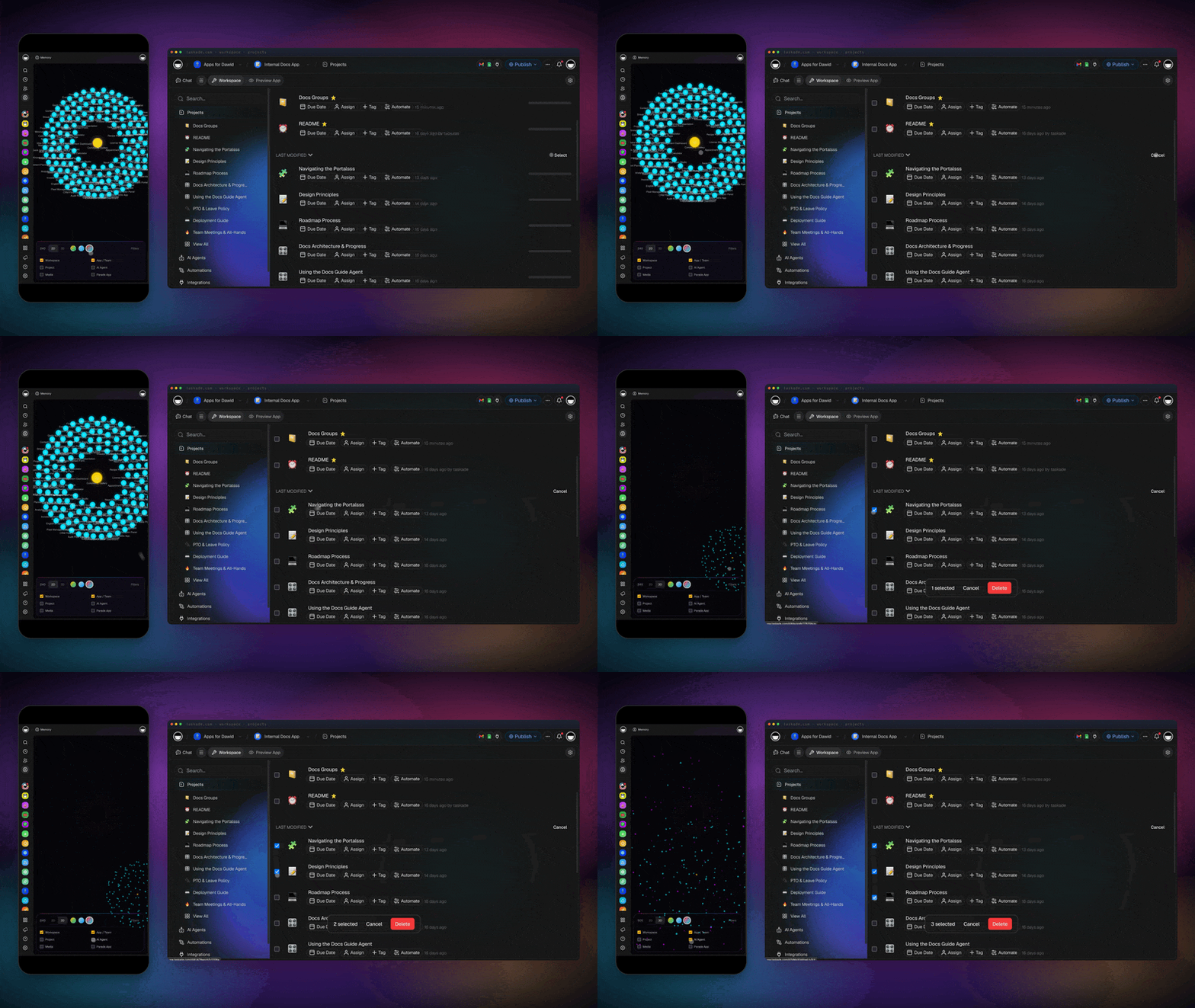
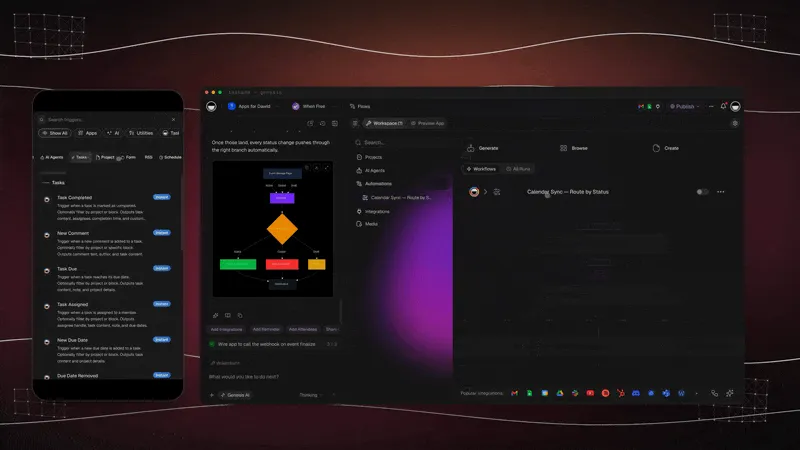
The same product ships the control layer. Each tool an agent uses has an approval mode, so a sensitive action can wait for you, and the finished agent can go live on a website as an embedded chat widget.
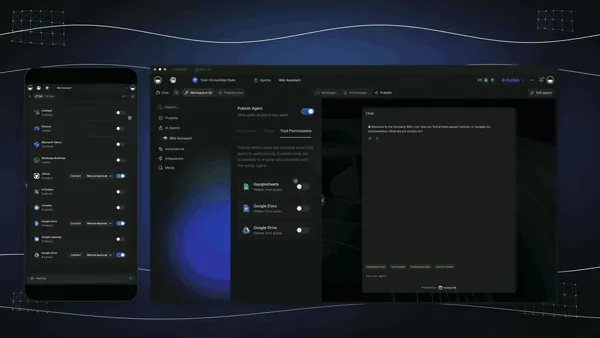
What a workspace agent does not do. Dots and Grok Bot each work on a cloud computer of their own and can sign in to sites that have no clean API. Taskade agents do not. If your job needs a site that has no integration and no API, a cloud-computer agent is the right tool, and this guide says so. If the job lives in email, forms, tickets, projects and the 100+ apps Taskade connects, a trigger-driven workspace agent gives you memory the team can read, review before send, and a cost that follows events rather than a clock. The agent-action guide shows the Ask Agent step, and the autonomous agents guide covers the plan-and-execute loop.
What you can build with Taskade Genesis. One prompt builds a live app with its own projects (Memory), AI agents (Intelligence) and automations (Execution), and the app is where an always-on agent meets your customers or your team. Each row below starts from a prompt you can type into Taskade Genesis. The examples come from the Taskade Genesis guides.
| App | The prompt you type | Projects (Memory) | AI agents (Intelligence) | Automations (Execution) |
|---|---|---|---|---|
| Client portal | Build a client portal for a small accounting firm. Clients submit a request with name, email, request type and documents. Show my team a board grouped by status. |
Client requests with status stages | Answers questions from the request history | Notifies the team when a request arrives |
| Lead tracker | Build a lead tracker for a wedding photographer. A public form collects name, email, date, venue and budget. Add an agent that scores each lead Hot, Warm or Cold. |
Leads | Lead scorer with a one-line reason | A form submission creates a lead record |
| Invoicing app | Build an invoicing app for a freelance designer. Log each job, create a Stripe invoice and email the payment link to the client. |
Jobs and invoices | Answers "who owes me money?" | A Stripe step creates the invoice and payment link |
| Live dashboard | Build a sales dashboard from my Deals project. Refresh it every morning and show a weekly summary. |
Deals | Weekly summary writer | A schedule trigger refreshes the data |
| Document intake | Build a document intake app. A form takes an upload, reads the page and returns one row per document. |
Extracted rows | Categorizer | A file upload starts the read step |
| Support agent for your website | Create a support agent trained on my help documents. Publish it as a website widget. |
Help documents | Public support agent | Chat threads route to Slack or email |
                ▲  MEMORY  (Projects)
                   Your data, docs and history.
                  /                              \
     writes back /                                \ feeds
                /                                  \
   ● EXECUTION                                  ■ INTELLIGENCE
     (Automations)                                (AI agents)
     Triggers, actions, schedules,                Reason over Memory,
     100+ integrations.                           use tools, decide.
                \                                  /
                 \____ triggers the next action ___/   Execution creates Memory. Memory feeds Intelligence. Intelligence triggers Execution.
The ASCII diagram is the Workspace DNA loop. An always-on agent in Taskade is one corner of it: the trigger and the action belong to Execution, the judgment belongs to Intelligence, and the shared project that holds the result is Memory. Publish the finished app with a link, on a custom domain (Business and above), or as an App Kit that others can clone.
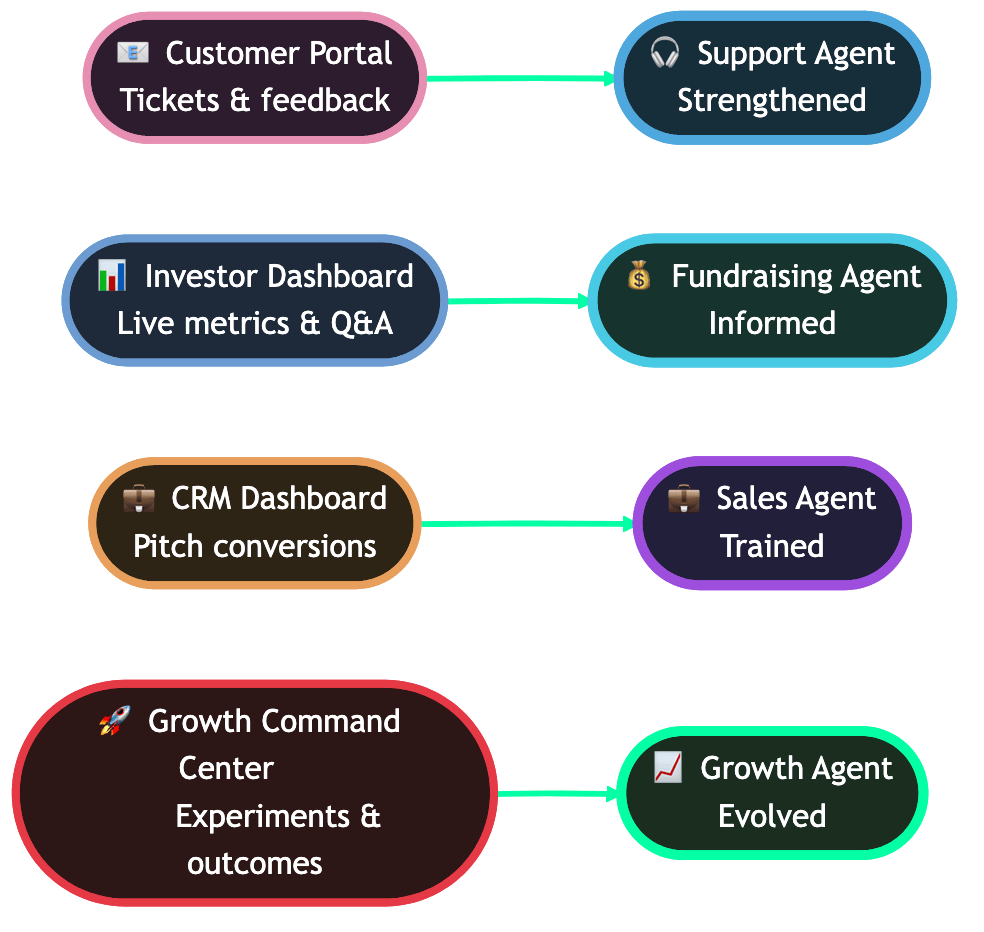
Each app feeds its own agent: the customer portal feeds a support agent, the investor dashboard a fundraising agent, the CRM a sales agent and the growth dashboard a growth agent.
What it costs to start. The Free plan includes one agent and three Taskade Genesis apps for up to two members. Pro is $10 a month billed annually ($20 billed monthly), Business is $25 billed annually, Max is $100 billed annually and Enterprise is $250 billed annually. See pricing. Taskade gives you frontier models from top AI labs, with Auto choosing by default, so the model under an agent can change without the workflow changing. With Taskade Genesis, one prompt can also build a live app that wraps the agent and its data, and you can browse community apps for examples. Workspace DNA is the frame: Memory in projects, Intelligence in agents, Execution in automations.
Related comparisons for readers weighing options: Taskade vs ChatGPT Work, Taskade vs OpenClaw, Taskade vs Manus, Taskade vs Emergent and Taskade vs Base44. For the cloud-computer generalist, see the Manus AI review.
The product updates behind these features are in the newsletter archive: agents think, automations execute, set it once, remember, reason, run, agent memory and connected tools, multi-agent workspace memory and agent widgets and branded links.
Support Agent is a live Taskade Genesis app. Clone it for free and point it at your own documents.
🔭 What We Do Not Know Yet
Six things about always-on agents are unknown as of 29 September 2026, and they decide which of them earn trust. Naming them is more useful than guessing.
| Open question | Why it matters | Where the gap is |
|---|---|---|
| Independent evaluation of dots | Every capability claim is the vendor's own | DataCamp found none on launch day |
| Real per-month usage cost of a dot's deeper work | Plans say "included" but tasks in Codex and ChatGPT Work count | OpenAI has not published token or dollar limits for the allowance |
| Which Pro tier includes dots | The Help Center says "Pro" without a tier | Reports conflict, and the question is unresolved |
| Muse and Spark subscription prices | Buyers cannot model total cost | Launch pages do not list them |
| Grok Bot regions and price | Availability and cost are unclear | The launch post lists plans, not prices or regions |
| Failure rates in the wild | Nobody publishes wrong-action rates | Only anecdotes such as the $400 incident |
Readers on the Hacker News Pro threads asked for the fix that would matter most: publish limits in tokens or dollars, not in multiples of another plan. We will review this guide against new independent evaluations and vendor price pages on 13 October 2026, and record what changed.
💬 Frequently Asked Questions About Always-On AI Agents
What are always-on AI agents?
Always-on AI agents are persistent assistants that keep a goal, memory and app connections between conversations. They wake on events, schedules or their own judgment, and come back when done or when they need approval. OpenAI dots, Meta Muse, Grok Bot and Gemini Spark are the September 2026 examples.
What is the difference between an always-on agent and a chatbot?
A chatbot waits for your message and forgets the task when the session ends. An always-on agent keeps working between conversations, reads connected apps while you are away, and returns only when it finishes or needs a decision.
What is OpenAI dots and who can use it?
Dots are OpenAI's always-on agents, launched 29 September 2026 on GPT-6 Astra. Each has its own cloud computer and Chrome browser and reaches 4,000+ apps. They roll out to Pro and Business Premium, with Enterprise, Edu and Healthcare in beta. Pro excludes the EEA, Switzerland and the UK.
How much do OpenAI dots cost?
OpenAI publishes no separate dots price. Your first dot is included in a Pro or Business Premium plan, and later you can add dots or buy more speed or monthly work. Conversations with a dot do not count toward usage limits, but Codex and ChatGPT Work tasks do.
OpenAI dots vs Meta Muse: which is better?
It depends on region, channel and trust. Dots run on GPT-6 Astra inside ChatGPT, Slack and Teams. Muse runs on a private Muse Secure VM with a Sentinel agent, in its own app and WhatsApp, and launched in the US only.
Is Grok Bot free? What does Grok Bot cost?
Grok Bot is a beta for SuperGrok, SuperGrok Plus, SuperGrok Heavy, Cursor Pro, Pro+, Ultra, and Cursor Teams Standard and Premium subscribers, with its own usage bucket. The launch post lists no separate price, and enterprise users join a waitlist.
What is the difference between background, proactive and ambient agents?
A background agent runs a task you assigned. An ambient agent wakes when the world changes. A proactive agent decides on its own to interrupt you. Always-on agents combine all three on a persistent identity, and claws are the self-hosted version.
Is it safe to give an AI agent my passwords and inbox?
Safer designs keep secrets out of model context and place a checker outside the agent, as dots do with secure sign-in and Auto-review. Both OpenAI and Meta still say mistakes are possible. Start read-only, add send rights last, and never paste secrets into readable text.
Can I run an AI agent 24/7 without leaving my computer on?
Yes. Hosted agents such as dots, Muse, Grok Bot and Gemini Spark run in the vendor's cloud, and event-triggered workspace automations also run without your device. Self-hosted claws need a server you run.
What does an always-on agent cost to run per month?
It depends on wake frequency and cached context. In this guide's model on GPT-6.1 Sol list prices, a 15-minute polling agent costs about $50 warm and $187 cold, and a gated design costs about $9. See the cost section for the arithmetic.
What is the best alternative to OpenAI dots for a team?
Match the job. For work in apps and projects, an event-triggered workspace agent with shared memory and human review fits a team. For sites with no API, a cloud-computer agent fits. For full control, self-host a claw.
Can I run an always-on agent workflow in Taskade?
Yes. Build an agent with persistent memory, trigger it from a schedule or a connected app event, and send drafts to a shared project for review. Taskade agents read the web but do not drive a browser. Try it free →
🔗 Related Reading
- What Are AI Agents? The Future of Workflow Automation
- What Are AI Claws? Persistent Autonomous Agents Explained
- What Is OpenClaw? The Complete History
- Best OpenClaw Alternatives
- Claude Code vs OpenClaw
- What Are Multi-Agent Systems?
- AI Subagents vs Agent Teams
- Codex Pricing Explained
- AI Agents vs Copilots vs Chatbots: The Taxonomy
- What Is Agentic AI?
- Agentic Workspaces
- What Is OpenAI? The Complete History
- What Is GPT? Tiers, Effort and GPT-6
- AI Cost per Task: What AI Work Really Costs
- Autonomous Task Management
- AI Guardrails Explained
- Manus AI Review
- AI Claws · Autonomous Agents · Computer Use Agents · Inference Cost
🔎 Sources
- Introducing dots and How we build safety, security, and privacy into dots, OpenAI, 29 September 2026.
- Introducing GPT-6.1 Sol and the API pricing page, OpenAI, 29 September 2026.
- Introducing Muse, Meta, 8 September 2026.
- Introducing Grok Bot, xAI, 11 August 2026.
- Gemini Spark, Google.
- GPT-6.1 Sol replaces GPT-6 Sol after just 7 days, Artificial Analysis, 29 September 2026.
- Dots: Always-on agents, Hacker News discussion, 29 September 2026.
- Introducing Claude Tag, Anthropic, 23 June 2026, and TechCrunch's coverage of the beta.
- OpenAI Dots: Always-On Agents in ChatGPT, Explained, DataCamp, 29 September 2026.
- OpenAI Dots are always-on agents. Their most important launch feature is the control boundary, OpenTools.
- What Is Proactive AI?, MindStudio, and Proactive AI Agents, Zylos Research.
Always-on agents turn a simple idea into a hard design problem: who starts the work, where the memory lives, who checks the action, and who pays when nothing happens. The vendors will keep shipping and the prices will keep moving, but those four questions stay the same. Ask them of every agent you meet, and the next launch becomes easy to read. ▲ ■ ●