






Hi Taskaders,
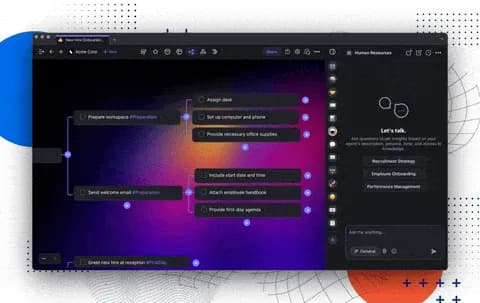
Big news! Now, you can create dynamic AI Teams, access detailed knowledge references, apply precise filters to your automations, and supercharge your productivity. Watch our quick video overview and get all the insights!
TL;DR: Taskade introduces multi-agent AI Teams that collaborate on tasks, cite knowledge sources with references, and apply precise data filters to automation workflows. Build your custom AI workforce with built-in tools. Try it free →
👥 Introducing AI Teams for Taskade
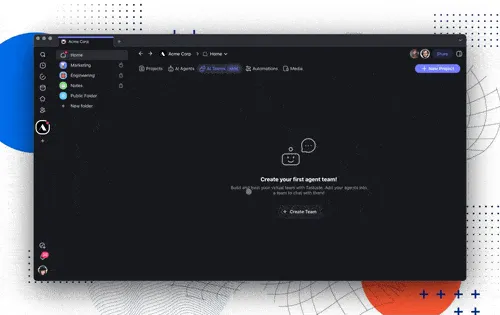
Meet AI Teams—your new powerhouse for collaboration. These aren’t just any teams; they're your customized crew of AI Agents, each with its unique commands, tools, and dynamic memories integrated with third-party apps.
Imagine a team that adapts, learns, and grows with you. Ready to see it in action? Build your own AI Team today! Learn more.
Click on the AI Teams tab in your workspace and hit 'Create Team.' This is where you begin assembling your AI workforce.
Name your team, invite your AI Agents, and start collaborating! Get creative and choose the agents that best fit your workflow needs.
Once set up, your AI Teams will take over handling requests. They'll collaborate and coordinate internally, ensuring the best agent steps up for each task—every single time. Sit back and enjoy!
This is just the beginning—there's so much more to come. ✨
🔗 Source References for AI Agents
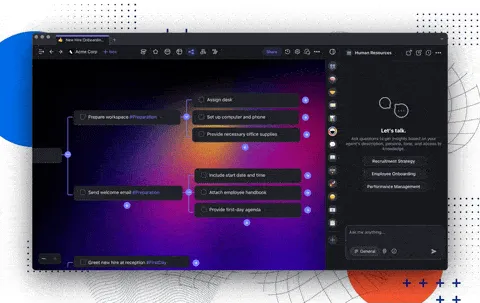
Ever curious about the sources behind your AI's advice? Our AI Agents now include source references, ensuring that you know exactly where your information is coming from, enhancing transparency and trust. Learn more.
📱 New Widgets and Agents for Mobile Apps
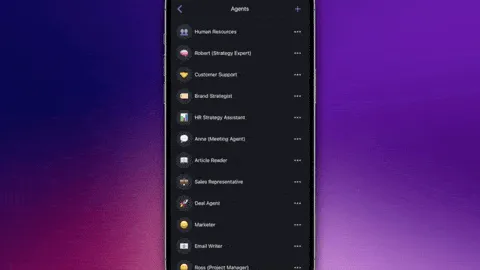
Download Taskade for iOS and Android and take your AI Agents with you on the go! Our latest mobile update introduces new widgets, custom fields, and enhanced support threads for AI Agents. Explore the new mobile features.
✔️ Data Filters for AI Automation
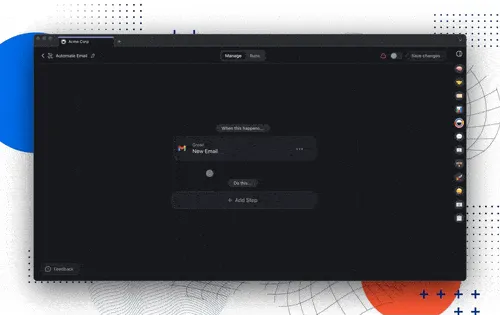
Customize your automations with precision. Our new data filters let you control when your automations trigger, ensuring that everything from email processing to task management happens just the way you need it.
For instance, activate tasks only when emails from '@acmecompany.com' are received in your Gmail Automation Account. Learn more.
⚡️ TLDR: Watch Video Summary
In a hurry? Check our latest video summary for a step-by-step guide to the new changes:
🤝 Taskade Communities
Explore our vibrant community. Connect, share experiences, and grow together with other Taskaders.
Check out our official community forums:
Join our Facebook Group
Join our Official Subreddit
Post in our Community Forum
Subscribe to our Youtube Channel
✨ Other Improvements
AI Agent Enhancements:
New Agent Sidebar: The all-new agent sidebar is now global and follows you across the entire application. This gives you quicker access to your agents and makes the experience more consistent
Agent Full-Screen: You can now open the Agent Chat in full-screen mode for a distraction-free experience. Click the Open in New Window button in the new agent sidebar to experience it
Knowledge Sources: Agents now show the knowledge sources used in replies. You can preview the sources directly within the message.
Better Table Support: We’ve improved the size and legibility of tables in agent responses to improve the output in data-oriented tasks.
AI Automation Enhancements:
Automation Filters: Use new data filters to add granularity to your workflows based on predefined conditions.
Slack: Fixed an issue where selecting a channel by channel ID directly limited the ability to select channels.
Looking for additional integrations? Let us know here.
Improved project creation workflows and fixed stability issues.
Various bug fixes and performance improvements.
We can’t wait for you to try the new update — dive in and let us know what you think! Remember, our Help Center and Feedback Forum are always here for your questions and suggestions.
Here's to making this year the most productive yet with Taskade! 🚀
— Team Taskade 🐑
P.S. If you're loving Taskade, share your experience on our testimonials page to get featured, or dive into our Affiliate Partnership program today!

Frequently Asked Questions
How do I create an AI Team in Taskade?
Go to your workspace, click the AI Teams tab, and hit Create Team. Name your team, invite your AI Agents, and start collaborating. Each agent brings unique commands, tools, and knowledge. Once set up, the team handles requests automatically — the best agent steps up for each task based on its specialization.
What are Agent Source References in Taskade?
Source References show where AI Agent responses come from — citing specific documents, web pages, and knowledge sources used to generate each answer. This provides transparency into how agents arrive at their responses, helping you verify accuracy and understand the reasoning behind AI-generated insights.
How do automation filters work in Taskade?
Automation filters let you apply precise conditions to workflow data. Filter incoming data by fields, values, and patterns to route tasks to the right agents or actions. Combined with AI Teams, filters enable intelligent workflow routing — ensuring each piece of data reaches the most appropriate handler automatically.
Can Taskade AI Teams handle complex multi-step projects?
Yes. AI Teams coordinate internally to handle multi-step projects. Different agents can research, draft, review, and execute in sequence. Teams adapt, learn, and grow alongside your projects, combining specialized knowledge and tools. This is the foundation of Taskade's multi-agent collaboration system.