


Introducing TSK-1Introducing TSK-1·Taskade's intelligence layer.
taskade
Create
Connect
Clone
PricingHelpDashboard →Dashboard →
PricingLoginSign up for free →Sign up for free →
Dashboard →Dashboard →
Sign up for free →Sign up for free →
Loved by 1M+ users·Hosting 150,000+ apps·Deploying 500K+ AI agents·Running 1M+ automations·Backed by Y Combinator·Powered by TSK-1
Taskade
AppsTSK-1AI ModelsBuilderPricingFeatures
See all▾
Contact usIntegrationsMCP ServerAgent skillllms.txtPressAboutConnectProductivityVideosReviewsFAQ
Learn
GenesisProjectsAI AgentsAutomationConnectorsVideo Tutorials
See all▾
Import & ExportSearch ArticlesAccount & Billing
App Factory
FeaturedDashboardsOperations
See all▾
CommerceFinanceSalesCRMsInventoryPortalsInvoicesBookingToolsCreators
Downloads
Mobile appsDesktop appsAndroid
See all▾
iOSMacWindowsChromeFirefoxEdge
Compare
vs Cursorvs Boltvs Lovable
See all▾
vs V0vs Windsurfvs Replitvs Emergentvs Devinvs Claude Codevs ChatGPTvs Claudevs Perplexityvs GitHub Copilotvs Figma AIvs Notionvs ClickUpvs Asanavs Mondayvs Trellovs Jiravs Linearvs Todoistvs Evernotevs Obsidianvs Airtablevs Basecampvs Mirovs Slackvs Bubblevs Retoolvs Webflowvs Framervs Softrvs Glidevs FlutterFlowvs Base44vs Adalovs Durablevs Gammavs Squarespacevs WordPressvs UI Bakeryvs Zapiervs Makevs n8nvs Jaspervs Copy.aivs Writervs Rytrvs Manusvs Crewvs Lindyvs Relevance AIvs Wrikevs Smartsheetvs Monday Magicvs Codavs TickTickvs Any.dovs Thingsvs OmniFocusvs MeisterTaskvs Teamworkvs Workfrontvs Bitrix24vs Process Streetvs Toggl Planvs Motionvs Momentumvs Habiticavs Zenkitvs Google Docsvs Google Keepvs Google Tasksvs Microsoft Teamsvs Dropbox Papervs Quipvs Roam Researchvs Logseqvs Memvs WorkFlowyvs Dynalistvs XMindvs Whimsicalvs Zoomvs Remember The Milkvs Wunderlist
AI Agents
FeaturedProject ManagementProductivity
See all▾
MarketingTranslatorContentWorkflowResearchPersonalOperations IntelligenceSalesSocial MediaTo-Do ListCRMTask AutomationCoachingCreativityTask ManagementBrandingFinanceLearning and DevelopmentBusinessCommunity ManagementMeetingsAnalyticsDigital AdvertisingContent CurationKnowledge ManagementProduct DevelopmentPublic RelationsProgrammingHuman ResourcesE-CommerceEducationLegalEmailSEODeveloperVideo ProductionDesignFlowchartDataPromptNonprofitAssistantsTeamsCustomer ServiceTrainingTravel PlanningUML DiagramER DiagramMath TutorLanguage LearningCode ReviewerLogo DesignerUI WireframeFitness CoachLead EnrichmentFounder OSSales DevelopmentBookkeepingRecruitingWebsite MonitoringField ServiceLicensingAll Categories
Automations
FeaturedAI Workflow AutomationLogic Automations
See all▾
AI Agent AutomationTrigger AutomationsAgentic Process AutomationAction AutomationsAI Models in WorkflowsAgentic AutomationMulti-Agent AutomationSocial MediaBusiness-in-a-BoxOperations IntelligenceInvestor OperationsEducation & LearningHealthcare & ClinicsReal EstateStripeSalesHR & People OpsField Service & DispatchRenewals & LicensesE-commerceContentMarketingEmailCustomer SupportHubSpotProject ManagementAgentic WorkflowsAppointment SchedulingCalendarReportsSlackWebsiteFormTaskWeb ScrapingWeb SearchChatGPTText to ActionYouTubeLinkedInX (Twitter)GitHubDiscordMicrosoft TeamsWebflowIndustry News & RSS FeedsGoogle WorkspaceManufacturing & OperationsAI Agent TeamsNotion AutomationsProposalBookkeeping & ExpensesClient OnboardingGoogle SheetsGoogle DriveGoogle CalendarGoogle FormsShopifyAsanaAirtableTrelloTodoistMailchimpClickUpGoogle DocsGmailGoogle TasksJiraLinearMicrosoft OutlookTelegramCalendlyTypeformSalesforceMonday.comTwilioWhatsApp BusinessWordPressZoomHTTP and WebhooksMCP AutomationFacebook PagesRedditApolloPipedriveFigmaAttioBrevoCal.comConfluenceHighLeveliCal FeedJotformOutlook CalendarMicrosoft To DoPushoverResendSendGridSMTPSupabaseTallyAll Categories
Prompts
Client PortalsDocument IntakeField Service
See all▾
Operations IntelligenceCRMAdvertisingDesignInvoicing and PaymentsSocial MediaQuotes and EstimatesCalculatorsCodingBooking and SchedulingConsultingCustomer SupportComplianceTime TrackingRetail OperationsSaaS and SubscriptionsInsuranceGovernance and OversightNonprofitPatient IntakeBlog WritingBrandingPersonal FinanceHuman ResourcesPublic RelationsTeam CollaborationProduct ManagementSupportAgencyReal EstateMarketingResearchSalesCopywritingContentProject ManagementWebsite CreationStrategyE-commerceEngineeringSEOEducationEmail MarketingUX/UIProductivityInfluencer MarketingAnalyticsEntrepreneurshipLegalVibe CodingRecruitingAll Categories
Templates
FeaturedChatGPTTable
See all▾
PersonalProject ManagementSalesFlowchartTask ManagementEngineeringOperations IntelligenceInventory ManagementEducationDesignTo-Do ListMarketingMind MapGantt ChartOrganizationalPlanningMeetingsTeam ManagementStrategyGamingProductionProduct ManagementStartupRemote WorkY CombinatorRoadmapCustomer ServiceLegalEmailBudgetsContentConsultingE-CommerceStandard Operating Procedure (SOP)Human ResourcesProgrammingMaintenanceCoachingSocial MediaHow-TosResearchMusicTrip PlanningCRMClient OnboardingEmployee OnboardingSOPBug TrackerRecruitment TrackerFormSales PipelineContent CalendarMarketing PlanProduct RoadmapBusiness PlanSWOT Analysis30-60-90 Day PlanInterviewNotion AlternativeKPIStrategic PlanMeeting AgendaInvoiceRisk RegisterIT Asset ManagementKanban BoardChange ManagementCommunication PlanRFPScope of WorkStatement of WorkHelpdeskKnowledge BaseCreative BriefGoal SettingExecutive SummaryGap AnalysisBooking SystemEvent ManagementPortfolio TrackerCustomer Onboarding PortalsClient PortalAgency OperationsFinance TrackingAll Categories
Generators
AI SoftwareNo-Code AI AppAI App
See all▾
AI WebsiteAI DashboardAI FinanceAI Operations IntelligenceAI FormAI AgentAI Client Portal BuilderAI WorkspaceAI ProductivityAI To-Do ListAI WorkflowsAI EducationAI Mind MapsAI FlowchartAI Scrum Project ManagementAI Agile Project ManagementAI MarketingAI Project ManagementAI Social Media ManagementAI BloggingAI Agency WorkflowsAI ContentAI Software DevelopmentAI MeetingAI PersonasAI Outline GeneratorAI SalesAI ProgrammingAI DesignAI FreelancingAI ResumeAI Human ResourceAI SOPAI E-CommerceAI EmailAI Public RelationsAI InfluencersAI Content CreatorsAI Customer ServiceAI BusinessAI PromptsAI Tool BuilderAI SEOAI Gantt ChartAI CalendarsAI BoardAI TableAI ResearchAI LegalAI ProposalAI Video ProductionAI Health and WellnessAI WritingAI PublishingAI NonprofitAI DataAI Event PlanningAI Game DevelopmentAI Project Management AgentAI Productivity AgentAI Marketing AgentAI Personal AgentAI Business and Work AgentAI Education and Learning AgentAI Task Management AgentAI Customer Relations AgentAI Programming AgentAI SchemaAI Business PlanAI Pitch DeckAI InvoiceAI Lesson PlanAI Social Media CalendarAI API DocumentationAI Database SchemaAI Marketing PlanAI Sales Pipeline GeneratorAI Course BuilderInternal ToolsBooking SystemReal Estate CRMInventory ManagementAI CRM BuilderAI TimesheetAI DispatchAI NewsletterAI Clinic OperationsAI Directory BuilderAll Categories
Taskade AI
Video GuideAI App BuilderVibe Coding
See all▾
Agent BuilderDashboard BuilderCRM BuilderWebsite BuilderForm BuilderWorkflow AutomationWorkflow BuilderBusiness-in-a-BoxAI for MarketingAI for Developers
Converters
AI Featured ConvertersAI PDF ConvertersAI CSV Converters
See all▾
AI Markdown ConvertersAI Prompt to App ConvertersAI Data to Dashboard ConvertersAI Workflow to App ConvertersAI Idea to App ConvertersAI Flowcharts ConvertersAI Mind Map ConvertersAI Text ConvertersAI YouTube ConvertersAI Knowledge ConvertersAI Spreadsheet ConvertersAI Email ConvertersAI Web Page ConvertersAI Video ConvertersAI Coding ConvertersAI Task ConvertersAI Kanban Board ConvertersAI Notes ConvertersAI Education ConvertersAI Language TranslatorsAI Business → Backend App ConvertersAI File → App ConvertersAI SOP → Workflow App ConvertersAI Portal → App ConvertersAI Form → App ConvertersAI Schedule → Booking App ConvertersAI Metrics → Dashboard ConvertersAI Game → Playable App ConvertersAI Catalog → Directory App ConvertersAI Creative → Studio App ConvertersAI Agent → Agent App ConvertersAI Audio ConvertersAI DOCX ConvertersAI EPUB ConvertersAI Image ConvertersAI Resume & Career ConvertersAI Presentation ConvertersAI PDF to Spreadsheet ConvertersAI PDF to Database ConvertersAI PDF to Quiz ConvertersAI Image to Notes ConvertersAI Audio to Notes ConvertersAI Email to Tasks ConvertersAI CSV to Dashboard ConvertersAI YouTube to Flashcards ConvertersURL to NotesVideo → SummaryAI Receipts to Expense Tracker ConvertersAI Docs to Knowledge Base ConvertersAI Form to Client Portal ConvertersSpreadsheet to CRMAll Categories
Wiki
Taskade GenesisAI Agent ExamplesLiving DNA
See all▾
AI AgentsAutomationProjectsAutonomous Workspaces, Agents & AppsQuantum AI & Taskade Genesis QuantumFoundations: The Theory Under Modern AICognitive Science: Mind, Brain and AIPlatformAI InfrastructureIntegrationsProductivityMethodsProject ManagementAgileScrumAI ConceptsCommunityTerminologyFeatures
Docs
Getting StartedREST APIAction API
See all▾
MCP ServersGuides & SDKModels
Blog
Introducing Taskade TSK-1: The System Kernel Behind Every App (2026)Your Business. Your Software. (November 2026)Open Knowledge Format (OKF) Explained (2026): Every Rule in Google's Spec for Agent-Readable Knowledge
See all▾
History of Microsoft Copilot: Clippy to Agents (2026)Is Taste the New Moat? What Still Defends Software When AI Builds Everything (2026)How to Build a Safety and Compliance Tracker Without Code (2026)History of Clay.com: From a Spreadsheet to a $7.1B GTM Platform (2017 to 2026)What Is x402? The HTTP 402 Payment Protocol for AI Agents, Explained (2026)How to Build an AI Lead Qualification Agent (No Code, 2026)LLM Wiki Explained (2026): Karpathy's Pattern, Google's OKF, and When a Folder Beats RAGWhat Is Spec-Driven Development? Tools and Evidence (2026)The Workspace Is the Runtime: What AI Agents Need After the Prompt (2026)Best AI Story Games 2026: 20 Tools to Play, Write, BuildHow to Build an Inventory Tracker Without Code (2026 Guide)Best AI Handwritten Notes to Text Apps 2026: 12 ComparedYour CRM. Your Dashboard. Your Workspace. (November 2026)Meta Muse History: From Llama to the Muse Agent (2026)History of Browserbase: The Browser for AI Agents, 2023 to 2026Best Free AI Agent Builders 2026: 12 Free Plans CheckedRun Your Whole Business in One App with Taskade Genesis (June 2026)
AIAutomationProductivityProject ManagementRemote WorkStartupsKnowledge ManagementCollaborative WorkUpdates
Changelog
Read PDFs in Taskade & File Previews in Chat (Nov 14, 2026)Approve From Activity & Steadier App Kit Copies (Nov 13, 2026)Locked List Alerts & Safer Published Apps (Nov 12, 2026)
See all▾
Automation Setup Checklist & PayPal Signature Checks (Nov 11, 2026)One-Click App Connections & Date Fields Over MCP (Nov 10, 2026)Public Agent Chat Privacy & Cleaner Kit Copies (Nov 9, 2026)App Password Status & Phone-Friendly Apps (Nov 8, 2026)
Integrations
Slack AutomationGmail AutomationGoogle Sheets Automation
See all▾
Google Calendar AutomationGoogle Drive AutomationHubSpot AutomationStripe AutomationDiscord AutomationGitHub AutomationNotionYouTube AutomationZapier
© 2026 TASKCADE INC.
PrivacyTermsSecurity
Made withTaskade AIforBuilders
BlogProduct UpdatesYour Business. Your Software.…

Your Business. Your Software. (November 2026)

Build your own business software in Taskade: a portal for your clients and a dashboard for your team, with your data, AI agents, and automations built in.

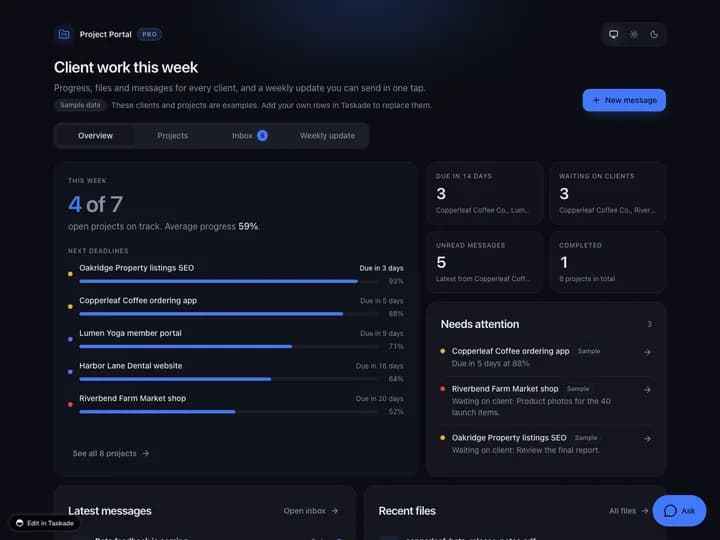
Project Portal Pro, a Taskade App Kit for client work, with project progress, next deadlines, messages, and files on one screen
November 17, 20267 min readJohn XieProduct Updates#product updates#genesis#app kits
On this page (7)
What Business Software Can You Build With One Prompt?Which App Kits Can You Clone for Your Business?How Do Your Clients Sign In to Your App?How Does Your Team Build in the Same Workspace?Make It YoursFrequently Asked QuestionsRead Next

Run a business, an agency, or a team? Now you can build your own software with Taskade Genesis: your data, AI agents, and automations in one app. One prompt. One app. No code.

TL;DR: Write one prompt, or clone an App Kit from Taskade App Factory. You get a live business app with its data, AI agents, and automations. Give your clients their own sign-in on every plan, Free included, and invite your team to build with you. Free includes 3 Taskade Genesis apps. Build yours →

What Business Software Can You Build With One Prompt?

Your Business. Your Workflows. Taskade Genesis builds a working app for your business from one prompt: a portal for your clients, a dashboard for your team, or both. Taskade EVE builds the projects that hold your data, AI agents that read that data, and automations that act on it. The app runs live in your workspace.

You need Taskade builds
A portal for your clients Sign-in, their projects, files, and invoices in one place.
A dashboard for your team Today's jobs, open deals, and what is late.
Your data, connected Customers, jobs, and invoices that link to each other.
Work that runs on its own AI agents that answer, and automations that send the reminder.

Here is the prompt from this week's product update:

Build an app for my business that connects customers, jobs, invoices and my team. Link each job to its customer and each invoice to its job. Show today's jobs first and flag overdue invoices. Add client sign-in, and tell me how to test it with a second account.

Try this prompt →

The diagram shows how one prompt turns into one app that your clients and your team both use.

One prompt Your business app Your data in projects AI agents that answer Automations that act Clients sign in to the app Your team works in the workspace

More first prompts for a business live in Learn: App Starter Prompts. Your Data. Your Agent. Your Automation. explains how the three parts work together.

Which App Kits Can You Clone for Your Business?

Clone Apps. Make It Yours. Taskade App Factory is the gallery of App Kits: live business apps that you clone, customize, and run. Many kits clone free. The six kits below are Pro Edition kits from this week's product update. Each one carries a PRO badge.

App Kit What it does Start
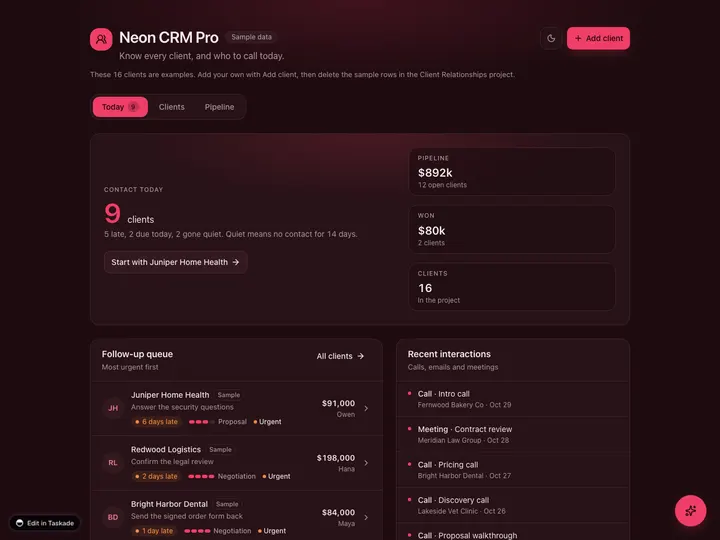
Neon CRM Every client, and who to call today. Clone →
Invoice Generator Send invoices and chase late ones. Clone →
Sales Pipeline What closes this quarter. Clone →
Project Portal Progress, files, and messages for each client. Clone →
Maintenance Tracker What is due, and what it costs. Clone →
Store Manager Orders, clients, and revenue. Clone →

Neon CRM Dashboard Pro, a Taskade App Kit with clients, deals, and the follow-ups for today

A PRO kit clones into a workspace on a paid plan. A kit with no price and no PRO badge clones free, on every plan. Compare plans on the pricing page.

After you clone, tell Taskade EVE what to change in plain words:

  • "Rename Clients to Patients and add an insurance field."
  • "Add a Proposal sent stage to the pipeline."
  • "Email me every Monday with the overdue invoices."

Some automations in a cloned kit ask you to connect an account first, such as Gmail. The automation then shows a Needs setup tag, and its checklist offers Connect. See Needs setup checklist.

Browse more kits by category, such as Client Portals and CRMs. Introducing Taskade App Factory has the full launch story.

How Do Your Clients Sign In to Your App?

Your App. Your Clients. Every Taskade Genesis app can give your clients their own sign-in, on every plan, Free included. Publish the app and choose Each person signs in. Clients create an account, or you add them by email on the App users tab.
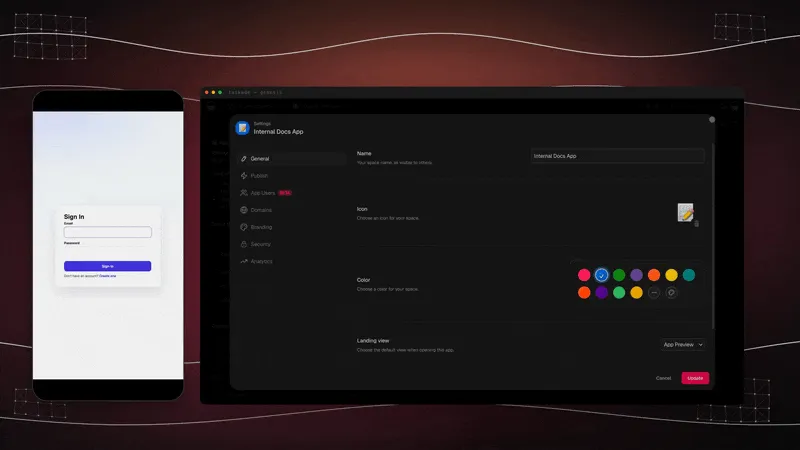
An app sign-in screen on a phone, next to the App Users tab in the app settings

Under Who can open it in the Publish menu, pick one choice:

Choice What visitors do Plan
Anyone with the link Open the app. No account needed. Every plan
Each person signs in Sign in with their own account. Under Who can join, you choose who can create one. Every plan

Add your first client in three steps:

  1. Click Publish, then choose Each person signs in.
  2. Under Who can join, keep sign-up open or make it invite-only.
  3. Open App settings → People & access → App users, and add the client by email.

Sign-in confirms who a client is. It does not split the rows between clients. To show each client only the rows that match their login, turn on Private entries. Find it under More options on the live app. Pick the owner field, then test with a second account. Learn: App Users and Learn: Build a Customer Portal walk through each step.

New this week: if your app has no sign-in screen, some of its lists cannot show or save data. The Publish menu now tells you how many lists are locked, and offers Add sign-in with EVE. See Locked lists.

Your domain. Put the app on your own domain on Pro and up. Pro connects up to 10 custom domains, and Business and up connect unlimited custom domains. See Learn: Custom Domains.

How Does Your Team Build in the Same Workspace?

Your Workspace. Your Team. Your team joins your workspace as members. They build and change the app with you, and your AI agents work beside them on the same projects. Your clients use the published app. They never see your workspace.

Workspace members App Users
Who You and your team Your clients and customers
What they use Projects, AI agents, automations, and settings Only the app screens you publish
How they join A workspace invite Sign-up, or you add them by email

Free includes 2 workspace members, and Pro includes up to 10. See Learn: Invite People to Your Workspace and Learn: Workspace DNA for how projects, agents, and automations feed each other.

Make It Yours

Start with a prompt, or clone an App Kit. Bring in your clients. Invite your team. Your business keeps changing, and now your software can change with it. Tell Taskade EVE what to change, and the app updates.

Build your app → · Clone an App Kit → · See more AI apps →

Frequently Asked Questions

What business software can I build with Taskade Genesis?

A working app for your business, from one prompt. For example, a client portal, a CRM, an invoice tracker, a sales pipeline, or a maintenance tracker. Each app comes with the projects that hold your data, AI agents that read that data, and automations that act on it.

Can my clients sign in to my app?

Yes, on every plan, Free included. Publish the app and choose Each person signs in. Clients sign up, or you add them by email in App Users. Sign-in confirms who a client is. To show each client only the rows that match their login, turn on Private entries. Then pick the owner field, and test with a second account.

Are App Kits free to clone?

A kit with no price and no PRO badge clones free, on every plan. A kit with a PRO badge clones into a workspace on a paid plan. The six kits in this post carry a PRO badge. Learn: Browse and Clone Community Apps shows each step.

Can I use my own domain for my app?

Yes, on Pro and up. Pro connects up to 10 custom domains, and Business and up connect unlimited custom domains. Client sign-in does not need a custom domain. It works on every plan.

How do my team and my clients differ in Taskade?

Your team joins your workspace as members and builds the app with you. Your clients are App Users of the published app. They sign in to the app and do not see your workspace. Free includes 2 workspace members.

Read Next

  • Introducing Taskade App Factory
  • Your Data. Your Agent. Your Automation.
  • Your Customer Is Your Next Competitor: The Rise of Customer-Built Software
  • Run Your Business in One Living System
  • How to Build a Quote and Invoice App Without Code

▲ ■ ● Your data. Your agents. Your automations. Your software.

0%

On this page

What Business Software Can You Build With One Prompt?Which App Kits Can You Clone for Your Business?How Do Your Clients Sign In to Your App?How Does Your Team Build in the Same Workspace?Make It YoursFrequently Asked QuestionsRead Next

Related Articles

The Taskade App Factory launch film showing Simple Store Manager, a Store and Inventory app kit with orders, clients, and revenue on one screen
November 5, 2026Product Updates

Introducing Taskade App Factory (November 2026)

Taskade App Factory (taskade.com/apps) is live. Clone CRMs, dashboards, client portals, and trackers with AI agents and ...

A live business system built with Taskade Genesis, embedded and running with connected projects, AI agents, and automations in one workspace
July 29, 2026Product Updates

Run Your Business in One Living System with Taskade Genesis (July 2026)

Your business is already a system. One prompt turns it into software you run: sales, field service, client portals, fina...

Neon CRM Dashboard, a Taskade Genesis app that shows clients, active deals, and pipeline value by stage on one screen
November 10, 2026Product Updates

Your CRM. Your Dashboard. Your Workspace. (November 2026)

Build a CRM, an invoice tracker, or a dashboard from one prompt. New: add a Wait for approval step to any automation, so...

Simple Store Manager, a running business app built with Taskade Genesis, with revenue, orders, and clients on one dashboard
October 27, 2026Product Updates

Your Data. Your Agent. Your Automation. (October 2026)

Taskade Genesis builds a running business app from one prompt: your data, an agent that answers, and an automation that ...

A storefront website URL pasted into Taskade Genesis, and the live app Taskade EVE builds from it with its projects, agents, and automations
September 15, 2026Product Updates

Paste Your Website, Clone an App Kit, Launch It Live (September 2026)

Paste your website URL into Taskade Genesis and Taskade EVE reads the page, understands your business, and builds a live...

The All Runs tab in a Taskade workspace listing every automation run newest first, with one run opened to show each step and its result
September 2, 2026Product Updates

Connect It, Start It, Watch It Run: Every Automation Run in View (September 2026)

Your apps run live now. Connect the work, let the automations carry it, and open any run to see what happened at every s...

View All Articles