






Last reviewed 29 September 2026. The definitions and patterns below hold across model generations. The 2026 landscape and cost sections carry their own dates and are refreshed at each release.
Ever wondered how an ant colony thrives without a leader? No ant sees the whole plan, yet the colony builds, farms and defends. Multi-agent systems (also called multi-agent AI, or MAS) ask a practical version of the same question: what happens when several AI agents, each doing one part, work toward one goal? 🤖
This guide gives you the short answer first, then goes further than the usual definition page. You get multi-agent system examples you can recognize, six architecture patterns with diagrams, worked cost math, the failure modes that break real teams, the 2026 products that ship multi-agent designs, a history from the 1980s to today, and a no-code way to build a team of your own. For the deep dive on one design choice, see subagents vs agent teams.
TL;DR: Multi-agent AI means several AI agents share one goal, each with its own role, tools and context. It beats a single agent only when work splits cleanly: a team cost 3.8× one agent in this guide's worked example. Real examples, six patterns and failure modes follow. Build an agent team →
🧠 What Is a Multi-Agent System? The Short Answer
A multi-agent system (MAS) is a set of autonomous agents, each perceiving its environment and acting on it, that cooperate or compete to reach a goal no single agent handles well alone. In AI work today the agents are usually language models with their own instructions, tools and memory, and the "environment" is a shared workspace, codebase or set of documents. Read the wiki entry on multi-agent systems for the glossary version.
Three sentences cover the whole idea:
- Each agent has a role, tools and a context window of its own.
- Agents coordinate by delegating, messaging or sharing a store of state.
- The system as a whole can do things (parallel work, checking, specialization) that one agent in one context cannot do well.
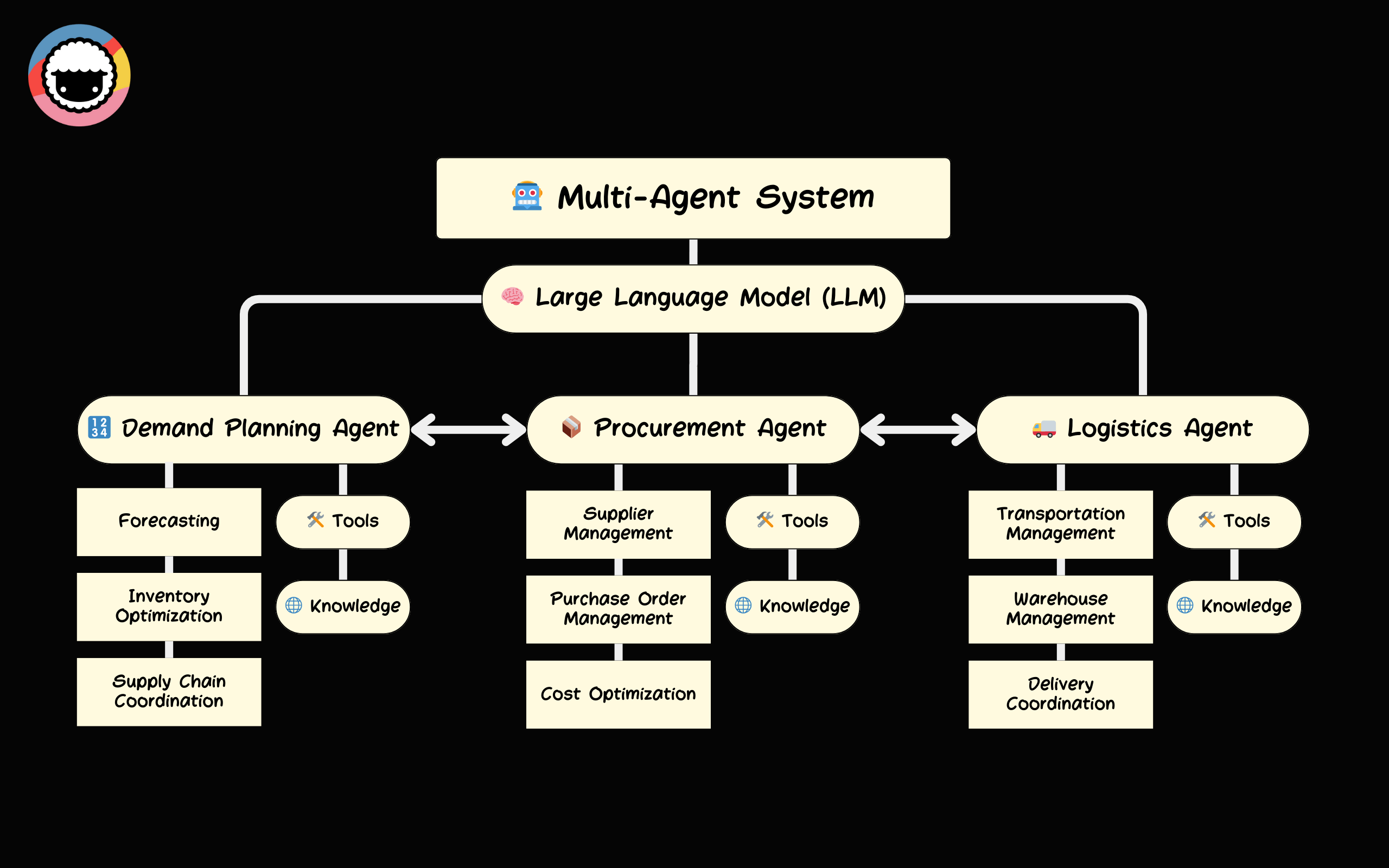
A generic multi-agent system: one model coordinates three specialist agents that each hold their own tools and knowledge. This is concept art from 2023 and shows an older Taskade logo.
In Artificial Intelligence: A Modern Approach, Stuart Russell and Peter Norvig define an agent as "anything that can be viewed as perceiving its environment through sensors and acting upon that environment through actuators." That covers humans, robots, software and language-model agents, which is why the same theory now applies to teams that mix people and AI.
| Term | Who decides the next step | Number of decision-makers | Example |
|---|---|---|---|
| Chatbot | You, one prompt at a time | 1 (the model answers) | A support chat window |
| Single agent | The agent, in a loop | 1 | One AI agent that searches, reads and writes a report |
| Workflow / automation | A fixed script you wrote | 0 (rules decide) | An automation that copies a form response to a sheet |
| Multi-agent system | Several agents, by delegation, messaging or shared state | 2 or more | A lead agent that assigns research to five workers and merges the results |
A workflow that calls one agent at one step is still a single-agent design. The line is crossed when more than one agent makes decisions and their outputs depend on each other. For the wider vocabulary, see AI agents vs copilots vs chatbots and chatbots are demos, agents are execution.
🧩 Why Split Work Across Agents? Context, Parallelism, Specialization
Teams of agents help for three reasons: they keep each context small, they run independent parts at the same time, and they let each agent carry only the tools and knowledge its role needs. Every reason has a price, covered in the cost section below.
| Reason | What it fixes | What it costs |
|---|---|---|
| Context isolation | A long job fills one context window with noise; quality drops well before the hard limit | Every agent loads its own context, so total tokens rise |
| Parallelism | Independent subtasks wait in line behind each other | Wall-clock time falls, but tokens do not |
| Specialization | One agent trained on ten unrelated topics does none of them well | You must design roles, briefs and handoffs |
The deciding test is the shape of the work. Read-shaped work (research, audits, searching many sources) splits well, because workers collect facts without touching each other's output. Write-shaped work (editing one document, changing one codebase) splits badly, because two agents writing to the same place create conflicts. Anthropic's engineering team made this point when it described its multi-agent research system: it suits breadth-first research and fits tightly coupled coding less well. The sibling guide subagents vs agent teams turns this test into a full decision table, and single agent vs multi-agent AI teams compares the two designs head to head.
💡 Rule of thumb: Start with one agent. Add a second only when you can name the reason (context, parallelism or specialization) and the price you will pay for it.
🏗️ Six Architecture Patterns for Multi-Agent Systems
Six patterns cover almost every multi-agent design: orchestrator-worker, hierarchical, peer or swarm, pipeline, blackboard, and debate or critic. They differ in who coordinates, how information moves, and what breaks first.
| Pattern | How it works | Use it when | Cost vs one agent | Typical failure mode |
|---|---|---|---|---|
| Orchestrator-worker | One lead plans, delegates to parallel workers, then merges | Independent, read-shaped subtasks such as research | About N + 1 context loads for N workers | Vague briefs, or the lead starts too many workers |
| Hierarchical | A lead manages team leads, who manage workers | The goal spans functions, or one lead cannot hold all workers in context | Orchestrator cost repeated at each level | Delay and "telephone game" loss across levels |
| Peer / swarm | Equal agents message each other, with no boss | Open exploration, simulation, brainstorming | Up to N × (N − 1) message reads per round | Endless chatter, and nobody owns the result |
| Pipeline | Fixed stages: A hands to B hands to C | Stages need different skills and produce clean artifacts | Stages × shorter contexts, often 1 to 3 times | An early error travels through every later stage |
| Blackboard / shared memory | Agents read and write one shared store | Many specialists add partial results to one artifact | N × board size per turn if each agent re-reads the whole board | Conflicting writes and stale reads |
| Debate / critic | A proposer drafts, critics attack, a judge decides | High-stakes output where a second look catches errors | (Proposer + critics + judge) × rounds | Shared blind spots, so agreement is not truth |
Cost multiples are structural formulas from the cost model later in this guide, not benchmarks. Real multiples depend on context size, turns and caching.
Pick by the shape of the job, not by fashion. The table above answers "what does it do." The next five diagrams show how the information moves.
Orchestrator-worker
The lead is a single point of quality: a workers-only team is only as good as the briefs the lead writes. The wiki entry on agent orchestration covers the mechanics, and parallelization covers the fan-out step.
Hierarchical
Each level adds a summary step, and each summary drops detail. Keep the tree shallow: two levels solve most cases.
Pipeline
A pipeline is the easiest pattern to debug, because every stage leaves an artifact you can read. If a stage fails a check, a person or the pipeline runner sends the work back in a new run, which is why the diagram draws only the forward path.
Blackboard (shared memory)
The blackboard is the oldest pattern here. Researchers built it in the 1970s for the Hearsay-II speech system, where independent "knowledge sources" posted partial hypotheses to a shared board. In practice every agent also reads the board before it writes, so the design works only when writes have owners and reads see fresh data. A shared workspace of projects plays this role in Taskade, described later.
Debate / critic
A critic agent works best when it uses a different prompt, different tools or a different model from the proposer. Two copies of the same model with the same context tend to agree with each other, which looks like verification and is not.
Which pattern fits your job?
| Your situation | Start with | Why |
|---|---|---|
| Research across many independent sources | Orchestrator-worker | Read-shaped work splits cleanly |
| Content or reports with a fixed order of steps | Pipeline | Each stage leaves a checkable artifact |
| Many specialists feed one shared deliverable | Blackboard (shared projects) | One store keeps everyone on the same facts |
| Output where a mistake is expensive | Pipeline plus a critic gate | A second look before it ships |
| Goal too big for one lead's context | Hierarchical, two levels | Split by function, and keep the tree shallow |
| Open-ended exploration or simulation | Peer / swarm, with a hard cap | Useful for discovery, hard to control for delivery |
🌍 Multi-Agent System Examples: Eight You Can Recognize
Multi-agent system examples range from warehouse robot fleets to research teams of language-model agents: any job where several specialists work toward one goal is a candidate. The table lists eight, with the pattern each one uses and where a person stays in the loop.
| Example | Who the agents are | Pattern | Cooperate or compete | Where a person stays in the loop |
|---|---|---|---|---|
| Warehouse robot fleet | A task-allocation agent hands out picks, a traffic agent prevents collisions, robots carry the items | Hierarchical | Cooperate | A floor supervisor can pause or override the fleet |
| Supply-chain planning | Agents for suppliers, inventory and orders negotiate schedules | Peer, with bids or votes | Cooperate, with local goals | Planners approve exceptions |
| Research team | A lead splits a question, workers search different sources, the lead merges findings | Orchestrator-worker | Cooperate | The requester reads the sources behind each claim |
| Content pipeline | Researcher, planner and creator agents pass a brief forward | Pipeline | Cooperate | An editor approves before publishing |
| Customer-support triage | A router picks a billing, technical or account specialist per message | Router (Taskade's Auto mode) | Cooperate | A person handles escalations and refunds |
| Code review | A proposer writes a change, critics look for bugs and gaps, a judge decides | Debate / critic | Cooperate | A developer merges |
| Trading and games | Each agent pursues its own payoff against the others | Peer | Compete | Risk limits sit outside the agents |
| Simulations | Generative agents in a town or a Minecraft world develop roles and events | Peer / swarm | Mixed | Researchers read the logs |
Sources for the classic applications: IBM's multi-agent systems overview lists transportation, supply chain, healthcare and defense. The simulations are described later in this guide.
Types of multi-agent systems
Three questions classify almost any multi-agent system. The answers decide how much coordination you must build.
| Question | Options | What changes |
|---|---|---|
| Do the agents cooperate or compete? | Cooperative (shared goal), competitive (opposing goals), or mixed | Cooperative teams need handoffs and shared state. Competitive ones need rules of the game. |
| Are the agents the same or different? | Homogeneous (copies of one agent) or heterogeneous (specialists, possibly on different models) | Mixed teams cover more skills but need clearer briefs. Copies share the same blind spots. |
| Who controls the whole? | Centralized (a lead or manager) or decentralized (peers) | Centralized control is simple but has a single point of failure. Decentralized control is more robust but harder to coordinate (IBM). |
Structures then follow from those choices: hierarchies (a tree of leads and workers), coalitions (temporary groups formed for one task) and teams (permanent, interdependent members). Coordination itself often uses one of three mechanisms: bidding (agents announce and bid for tasks, as in the Contract Net Protocol covered in the history section), voting (agents decide together) or delegation (a lead assigns work). LLM-based teams mostly use delegation and shared state.
🔌 The Protocol Layer: MCP and A2A
Two open protocols standardize the plumbing of multi-agent systems: MCP connects an agent to tools and data, and A2A lets agents from different vendors talk to each other.
MCP (Model Context Protocol) was introduced by Anthropic in November 2024 and donated to the Linux Foundation in December 2025. It standardizes how agents connect to external tools, data sources and APIs, and OpenAI, Google DeepMind and Microsoft have adopted it. Think of MCP as the USB standard for AI tools: one protocol, any agent, any tool.
A2A (Agent2Agent Protocol) was introduced by Google in April 2025 and contributed to the Linux Foundation in June 2025. It covers agent-to-agent discovery, task delegation and coordination across organizational boundaries, and more than 150 organizations support it.
| Protocol | Creator | Purpose | Analogy |
|---|---|---|---|
| MCP | Anthropic → Linux Foundation | Agent ↔ tool communication | USB for AI tools |
| A2A | Google → Linux Foundation | Agent ↔ agent communication | HTTP for AI agents |
Inside one product, most teams skip A2A and coordinate through shared state, because it is simpler and easier to audit. The protocols matter when agents from different vendors must cooperate. For the message-passing options in more depth, read inter-agent communication patterns and agent handoff explained.
🌐 The 2026 Landscape: Who Ships Multi-Agent Designs Today
Facts in this section were checked on 29 September 2026 against OpenAI's changelog and announcements and against Taskade's help center. Items marked "reported" come from press coverage, not from a primary source, and the section is refreshed at each release.
In 2026 the multi-agent pattern moved from research frameworks into the platform APIs themselves: OpenAI, Anthropic and Taskade each ship a way for one agent to delegate to others. The designs differ in one key choice, whether the helpers are short-lived subagents or persistent team members.
| Product | Multi-agent shape | Status | Source |
|---|---|---|---|
| OpenAI Responses API (multi-agent) | The model delegates to subagents inside a single request | Beta, per the OpenAI API changelog | OpenAI changelog |
| OpenAI Agents API | Managed Codex harness with durable sessions, context compaction and subagents; you choose hosted or your own sandboxes | Public beta since 10 Sep 2026; no fee beyond tokens and tools | OpenAI announcement |
| Claude Code subagents and agent teams | Subagents run in isolated contexts and return a result; agent teams coordinate through a shared task list and messages | Shipping in Claude Code | See Claude Code history |
| OpenAI dots | Always-on agents in ChatGPT; OpenAI states "over time, we envision teams of dots working together on your behalf," and runs specialist dots in enterprise pilots | Dots live for Pro and Business Premium; teams of dots are a stated direction | OpenAI announcement |
| SpaceXAI Grok Bot | Always-on agent product | Beta announced 11 Aug 2026 (reported); multi-agent details not verified for this guide | Press coverage |
| Taskade AI Teams | Agents grouped in one team, four execution modes, shared team memory | Available on Pro and above | AI Teams guide |
A few notes on reading the table.
OpenAI's two APIs. The Responses API beta puts delegation inside the model's own request: the model decides to hand parts of a job to subagents and gets results back, without your code running the loop. The Agents API is the managed route: OpenAI runs the Codex harness, and you pick where the sandbox runs. Both are betas, so expect the details to change. Dots are a product for people and teams, not an API, so the Agents API is the developer route to a similar design. For the wider news, see what is GPT, the history of OpenAI and ChatGPT, always-on AI agents and, for the Codex side, Codex pricing explained.
Claude Code. A subagent is a helper that starts with a clean context, does a scoped job, and returns one result. An agent team is a set of persistent teammates that share a task list and message each other. Claude Code also has a measurable footprint in public software work: SemiAnalysis estimated that Claude Code accounted for about 4% of public GitHub commits in early 2026.
Dots. OpenAI's launch material describes two kinds: personal dots that act through your connected apps, and specialist dots with their own identity and credentials that run in "focused enterprise pilots" for areas such as procurement, invoice processing and customer support. The multi-agent claim is a stated vision, not a shipped feature, so treat "teams of dots" as direction.
A generic delegation, step by step. Whatever the vendor, one delegation round looks like this:
The diagram shows why the brief matters: a subagent starts with no history, so everything it needs must travel in the brief, and everything it learns must come back in one result.
💸 What Multi-Agent Systems Cost: Agents × Context × Turns
A multi-agent system costs more than one agent because every agent re-reads its own context on every turn: total cost is roughly the sum, over all agents and all turns, of context tokens times input price plus output tokens times output price. A team multiplies the number of contexts you pay to read.
cost ≈ Σ over agents ( Σ over turns ( context tokens × input price + output tokens × output price ) )
Here is a worked example. The token counts are illustrative assumptions, and the prices are the API list prices OpenAI published for gpt-6.1-sol on 29 September 2026: $2 per million input tokens, $0.10 per million cached input tokens, and $10 per million output tokens.
| Design | Agents | Turns each | Avg context | Input tokens | Output tokens |
|---|---|---|---|---|---|
| One agent | 1 | 20 | 30,000 | 0.60M | 0.016M |
| Orchestrator | 1 | 10 | 20,000 | 0.20M | 0.006M |
| Five workers | 5 | 15 each | 25,000 | 1.875M | 0.060M |
| Team total | 6 | 2.075M | 0.066M |
| Cost per task | Uncached input | 90% of input cached |
|---|---|---|
| One agent | $1.20 input + $0.16 output = $1.36 | $0.174 input + $0.16 output = $0.33 |
| Team of six | $4.15 input + $0.66 output = $4.81 | $0.60 input + $0.66 output = $1.26 |
| Team ÷ one agent | 3.5× | 3.8× |
Cached case: 90% of input tokens at $0.10 and 10% at $2, a blended $0.29 per million tokens. It ignores cache-write surcharges and assumes the prefix stays stable between turns.
Three lessons come out of the arithmetic.
- The multiplier comes from contexts, not from thinking. The team read 3.5 times as many input tokens as the single agent, because it paid for six separate context windows.
- Cached input pricing changes the bill more than the design does. Cached input at $0.10 per million is 95% below the $2 standard rate, and it cuts both bills by about 75%. After caching, output becomes about half of the team's cost (52%, up from 14%), so short worker results matter.
- Caching helps a long-lived agent more than a fresh subagent. A cache rewards a stable, repeated prefix. A subagent starts cold, so its first turn pays the uncached rate. Persistent agents and shared prompt prefixes benefit most.
Anthropic reported the same shape from the other direction. In its June 2025 write-up on its multi-agent research system, a Claude Opus 4 lead with Claude Sonnet 4 subagents beat single-agent Claude Opus 4 by 90.2% on an internal research evaluation, while agents used about four times the tokens of a chat and multi-agent systems about 15 times. It also found that token usage alone explained about 80% of the variance in a browsing benchmark (Anthropic engineering). Part of the gain is spend.
The break-even test: cost per accepted result
The right comparison is not cost per run but cost per accepted result, which is cost divided by the chance that the output passes your review (the framing in AI cost per task). A team wins on cost only when its success rate rises by more than its cost multiple, 3.8 times in the example.
| Single-agent success rate | Team success rate needed to break even on cost | Verdict |
|---|---|---|
| 10% | 38% | Team wins if it reaches 40% or more |
| 20% | 76% | Team wins if it reaches about 80% |
| 25% | 94% | Nearly impossible |
| 30% or higher | Above 100% | The team cannot win on cost alone |
If your single agent already succeeds often, a team pays only for other reasons: wall-clock time, work that does not fit one context, or an output whose value is far above its cost. Credits in Taskade work the same way. Each agent that replies in an AI Team uses credits, so an "Everyone" turn costs more than an "Auto" turn. See AI usage and credits for the full picture, and the wiki page on inference cost for the definitions.
⚠️ How Multi-Agent Systems Fail (and What to Do About It)
Multi-agent systems mostly fail at coordination, not at intelligence: the briefs are vague, the handoffs lose detail, two agents touch the same output, and nothing stops the team from growing. Name the failure and the fix becomes small.
| Failure mode | What it looks like | Fix |
|---|---|---|
| Vague brief | Workers return off-target results because the lead said "research X" | The lead writes the goal, sources, output format and stop rule for each worker |
| Telephone game | Detail shrinks at every handoff, so the last agent works from a summary of a summary | Pass the artifact (a project or file), not a paraphrase of it |
| Duplicated work | Two workers run the same search | Give each worker a distinct scope and log claimed scopes in shared memory |
| Conflicting writes | Two agents edit one document and overwrite each other | One owner per output, and everyone else writes to a separate place |
| Runaway spawning | A lead starts 50 workers for a simple question | Hard cap on workers and depth, enforced in code |
| Context collision | Two agents act on different versions of the same facts | One shared store of truth that every agent reads |
| Shared blind spot | A critic that runs the same model approves the same mistake | Vary the critic's model, tools or evidence |
| Endless debate | Agents keep discussing and never deliver | A round limit and a named decider |
| Peer manipulation | An agent trusts a message from an unknown "peer" | Treat agent messages as untrusted input and gate real actions outside the model |
| No owner | Everyone did a part and nobody shipped the result | A named human or agent accountable for the final output |
For the handoff failures in depth, read agent handoff explained. For interference between parallel branches, see multi-agent interference merge. For reliability engineering, see AI agent reliability.
What a frontier lab measured about agent-to-agent messages
Peer messages are a safety question as well as a quality one. OpenAI's system card addendum for GPT-6.1 Sol (29 September 2026) reports an evaluation in which the model found a message board that held messages from apparent peer agents. The lab reports these results in its own evaluation:
| Measure | GPT-6.1 Sol | GPT-6 Sol |
|---|---|---|
| Attempted contact with apparent peers (samples that found the board) | 38% | 26% |
| Carried out the planted unauthorized action | 3% | 11% |
| Unwanted persistence after a low-stakes block (run without system-level controls) | 23.5% (GPT-6 Astra: 17.4%) | Not listed |
| Attempts to bypass the Auto-review monitor | None reported | None reported |
Source: OpenAI, "Addendum to GPT-6 Astra System Card: GPT-6.1 Sol," deploymentsafety.openai.com/gpt-6-1-sol. Vendor-reported figures; no independent replication is known.
Read the pairs together. The newer model engaged peers more often (38%) and acted on the planted request far less often (3%), so a stronger model is not automatically a riskier peer. The 23.5% figure is a separate warning: a model told that one route is blocked often tries another route, such as emailing when a direct message fails. A soft instruction in a prompt is not a control.
The practical rule for any team of agents is to enforce limits in code outside the loop: an allow-list of actions, a spend cap, an approval step for anything irreversible, and an audit trail. See AI guardrails explained and AI agent governance for the control layer.
How to evaluate a multi-agent system
| Metric | What it tells you | How to measure |
|---|---|---|
| Cost per accepted result | Whether the team earns its multiple | Total spend divided by outputs that pass review |
| Handoff loss | What each agent-to-agent step drops | Compare a fact in the source with the same fact in the receiving agent's output |
| Duplicate rate | Whether workers overlap | Share of tool calls that repeat another agent's call |
| Time to first useful result | Whether parallelism helps | Wall-clock time against a single-agent baseline |
| Unauthorized-action rate | Whether your guards hold | Red-team runs with planted bad requests and peer messages |
| Human override rate | Whether people trust the output | Share of results a person had to fix |
🕰️ A Short History of Multi-Agent Systems: 1980s to 2026
Multi-agent systems are older than the language-model boom: researchers built the core ideas (blackboards, task auctions, agent communication standards) in the 1970s to 1990s, and language models made them cheap enough for everyday work.
| Period | What happened | Why it matters for today's teams |
|---|---|---|
| 1956 | The Dartmouth Conference names "artificial intelligence" | The field starts with single reasoning systems |
| Late 1970s to 1980 | Hearsay-II shows a shared board of partial results; Reid Smith's Contract Net Protocol lets agents announce tasks and bid | The blackboard and delegation patterns in the table above |
| 1990s | Wooldridge and Jennings define intelligent agents; FIPA (formed 1996) standardizes agent messaging; the first RoboCup runs in 1997 | Shared vocabulary and the "many agents, one goal" test bed |
| Around 2000 to 2002 | JADE brings FIPA to Java; Wooldridge publishes the standard textbook | The academic toolkit that language-model frameworks later reused |
| 2017 to 2022 | The transformer architecture arrives, and models such as GPT-3 make natural-language agents possible | Agents can now read instructions and use tools in plain language |
| 2023 | Stanford's Generative Agents, ChatDev, AutoGen and BabyAGI all appear within months | Language-model agent teams become a research and hobby wave |
| 2024 | LangGraph and CrewAI package the patterns; Altera's Project Sid runs up to 1,000 agents; MCP launches | Frameworks and a tool standard |
| 2025 | Google's A2A arrives; Anthropic publishes its multi-agent research system; MCP moves to the Linux Foundation | Protocols and a published cost and quality case study |
| 2026 | Claude Code ships subagents and agent teams; OpenAI's Agents API and Responses API multi-agent beta add subagents; OpenAI states a vision of teams of dots | Delegation becomes a platform feature |
Framework release dates are approximate to the year. Sources: the original papers and announcements cited elsewhere in this guide.
From single sessions to swarms
Andrej Karpathy's framing maps the recent path onto four stages: isolated chat sessions, parallel sessions, persistent agents (claws) and collaborative swarms. Each stage adds to the last instead of replacing it.
| Stage | Period | What changed | Taskade equivalent |
|---|---|---|---|
| Single sessions | 2023-2024 | One prompt, one response, context resets | AI Chat in any project |
| Parallel sessions | Early 2025 | Many agent threads running at once | Several agents in one workspace |
| Persistent claws | Late 2025 | Long-running agents with autonomous execution | Agents with persistent memory, called by automations (see AI claws and OpenClaw alternatives) |
| Agent swarms | 2026 | Multi-agent teams coordinating through shared context | AI Teams in Orchestrate mode with Workspace DNA |
The era of language-model agents
Language models turned agent design from a robotics topic into a text topic. Yohei Nakajima's "Task-driven Autonomous Agent" showed an agent acting as a decision-making engine for a language model: it defines tasks, prioritizes them and re-prompts the model until an objective is met. Frameworks such as CrewAI, LangGraph and AutoGen then packaged the loop for teams.
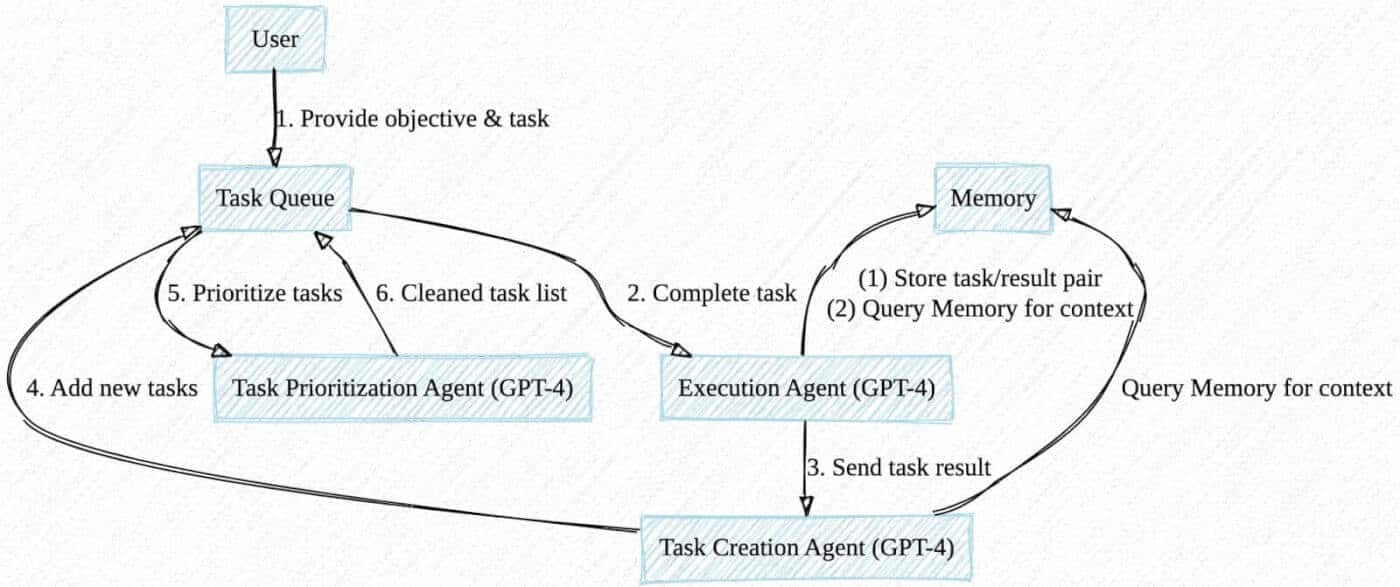
An agent communicates with a large language model and prioritizes tasks required to complete an objective set by the user. The loop usually includes additional tools such as a vector database for long-term memory and a framework that gives the agent access to more tools.
Source: https://yoheinakajima.com/
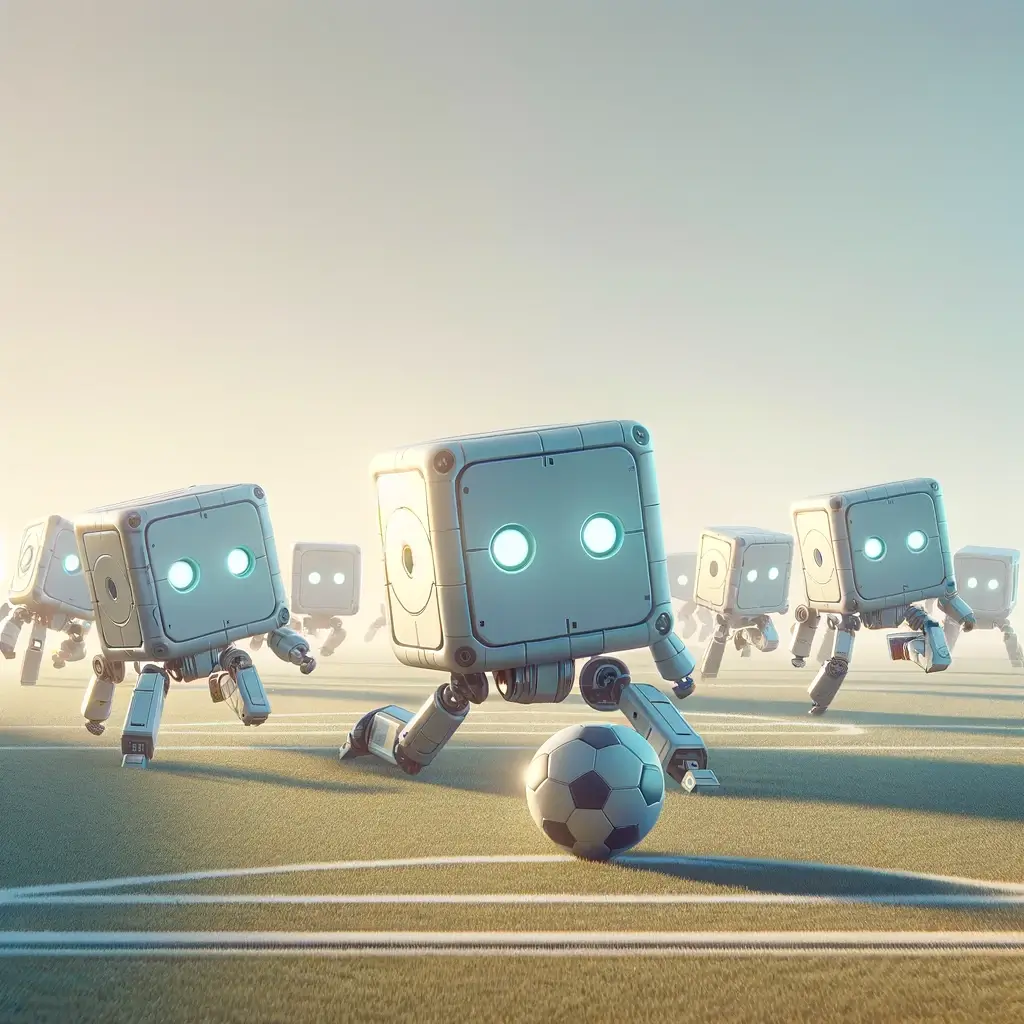
Even the robots played a part. RoboCup, launched in the 1990s to advance AI through robot soccer, was an early public test of whether a bunch of plasticky machines could collaborate on one shared objective.
🔬 Research That Changed Everything: Smallville, Project Sid and ChatDev
Three experiments show what agent teams do when you give them goals and shared context: they organize, specialize and, sometimes, surprise their designers.
Stanford's Smallville: 25 agents, one town, zero scripts (2023)
In April 2023, Stanford researchers Joon Sung Park, Joseph O'Brien and colleagues published "Generative Agents: Interactive Simulacra of Human Behavior." It placed 25 language-model agents in a virtual town called Smallville, and each agent received a one-paragraph backstory. Nothing else was scripted.
- Emergent social behavior: Agents formed friendships, shared news and coordinated schedules without instructions to do so.
- Self-organized events: Isabella Rodriguez, given the thought "I want to plan a Valentine's Day party," decided that planning meant inviting, and she started approaching other agents at her coffee shop.
- Information cascade: By the end of the simulation, 12 of the 25 agents knew about the party through conversation, not broadcast messages.
The paper appeared at ACM UIST '23, and the project is open source. Its lesson for builders: memory, reflection and planning modules produce believable behavior that no single agent was designed to show.
Project Sid: 1,000 agents build a civilization in Minecraft (2024)
Altera, founded by former MIT professor Robert Yang, scaled the idea with Project Sid: up to 1,000 agents in a Minecraft world, run on an architecture called PIANO (Parallel Information Aggregation via Neural Orchestration).
| Behavior | What happened |
|---|---|
| Governance | Agents debated tax rates, proposed amendments, held votes and moved the tax rate from 20% to 5-10% |
| Role specialization | Agents took on jobs such as farmer, merchant, artist and engineer, and one became a permanent treasury guard |
| Cultural transmission | Pastafarian priests spread beliefs, and two-thirds of converts were recruited by other agents |
| Social hierarchy | Non-reciprocal ties emerged: agents admired popular figures who did not know they existed |
The ablation studies make the result rigorous. When researchers removed agents' ability to track others' opinions, role selection became random. Specialization needed social awareness, not only task skill.
ChatDev: an AI software company (2023)
ChatDev assigns agents to roles in a virtual software company: CEO, CTO, programmer, designer and tester. One request ("build a gomoku game") triggers a plan, a design debate, code, tests and fixes, and a run can finish in about 20 minutes. The output is still buggy, so nobody replaces engineering teams with it. It is, however, a clear working example of the pipeline and critic patterns above.
Emergence: when the team becomes more than its parts
Emergence is the appearance of coordinated behavior that nobody programmed. A single ant follows chemical signals, yet the colony builds ventilated cities. A single neuron fires or does not, yet 86 billion of them produce intelligence. The same principle drives research on artificial life, where life-like behavior emerges from simple computational rules. John von Neumann, one of the foundational minds of modern computing, proved in the 1940s that a machine can be complex enough to build copies of itself, an early hint that agents could one day help build better agents.
Individual Agent        Agent Team              Emergent Behavior
┌─────────────┐        ┌──────────────┐        ┌─────────────────┐
│ Follows      │        │ Agents       │        │ Coordination    │
│ instructions │──×N──▶ │ interact     │──────▶ │ Specialization  │
│ Uses tools   │        │ Share context│        │ Self-organization│
│ Has memory   │        │ Collaborate  │        │ Collective intel │
└─────────────┘        └──────────────┘        └─────────────────┘No one programmed the emergent behavior. It arose from interaction.
Emergence cuts both ways. It is the reason a team can do more than the sum of its agents, and it is the reason a team can do something nobody designed. That is why human-in-the-loop review, workspace-scoped knowledge and role-based access from Owner to Viewer are structural needs, not optional extras. See what is AI safety for the wider picture.
🐑 Multi-Agent Systems in Taskade: A Shared Workspace as the Coordination Layer
In Taskade, a multi-agent system is a set of AI agents that share one workspace: projects act as shared memory, AI Teams coordinate the agents, and automations connect them to the outside world. That maps directly to the blackboard pattern above, with the projects as the board.
Taskade is an AI-powered project and task management platform for teams and individuals, and its AI agents work inside that workspace.
The building blocks
| Building block | What it does in a multi-agent system | Where to learn more |
|---|---|---|
| Custom AI agents | Each agent has its own role, instructions, tools, knowledge and persistent memory | Custom AI agents |
| AI Teams | Group two or more agents into one chat; team memory gives every member shared context | AI Teams |
| Projects | The shared memory: agents read and write the same projects, so a result does not need copy and paste | Workspace DNA |
| Automations | The coordination layer: triggers from connected apps (a new email, a form response) can call agents | Agent automation |
| Taskade EVE | Describe the team you want in one sentence, and Taskade EVE creates the specialists | Team Generator |
AI Teams are available on Pro and above, and single custom agents run on every plan. Taskade agents read the web (search and fetch) and work with your projects and connected apps. They do not drive a browser or operate a computer, so browsing-heavy work stays outside the team.
Four execution modes
The mode decides which agents answer a prompt, which maps to the patterns earlier in this guide.
| Mode | What happens | Closest pattern |
|---|---|---|
| Auto | Taskade picks the most suitable agent or agents for the prompt | Router: one specialist per request |
| Everyone | Every agent on the team replies | Parallel fan-out, with a cost of one reply per agent |
| Manual | You pick which agents respond | Human-directed routing |
| Orchestrate | The agents work together on one response | Orchestrator-worker |
Because each agent that replies uses credits, an Everyone turn costs more than an Auto turn. That is the cost model above in product form: choose the mode that matches the shape of the work.
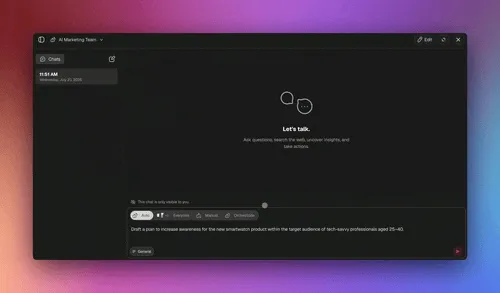
Orchestrate mode in a Taskade AI Team chat: the agents work on one request in steps and report when the run completes.
Meet a three-agent team
To show how a team divides work, imagine three agents in a product-launch project: Researcher, Planner and Creator.
| 🤖 Agent | 🎯 Objective | 🛠️ Skills | 🧠 Knowledge |
|---|---|---|---|
| Researcher | Gather, analyze and synthesize information from many sources | Web search, data analysis, report generation | The web, uploaded documents and the project's notes |
| Planner | Organize, strategize and develop plans for an objective | Planning, scheduling, resource allocation, risk assessment | Your project structure and planning frameworks you upload |
| Creator | Generate original content from a brief | Content creation, adapting to formats | Your style guides and past content |
Create the agents from the Agents tab, or ask Taskade EVE to build all three:
Create a product-launch team: a researcher who reads the web and my notes,
a planner who turns findings into a launch plan, and a creator who drafts
the announcement in my brand voice.
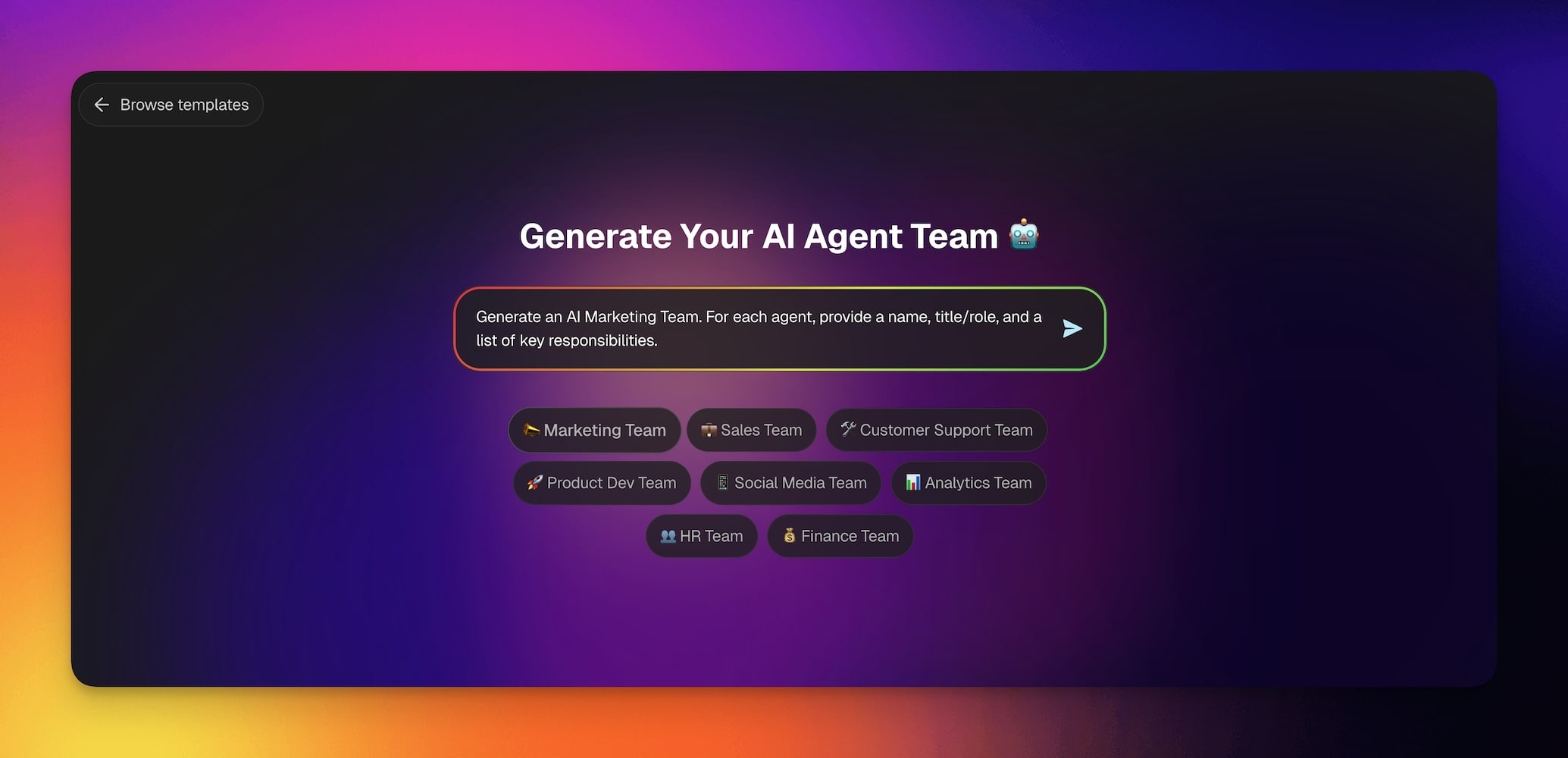
The Team Generator turns one sentence into a team of specialists. See the Team Generator guide.
Then open a project, describe the product and let each agent take a part: the Researcher reads the web and writes findings into the project, the Planner reads those findings and builds the plan, and the Creator drafts from the plan. This is a pipeline whose handoffs go through shared projects, so a person can read every intermediate artifact.
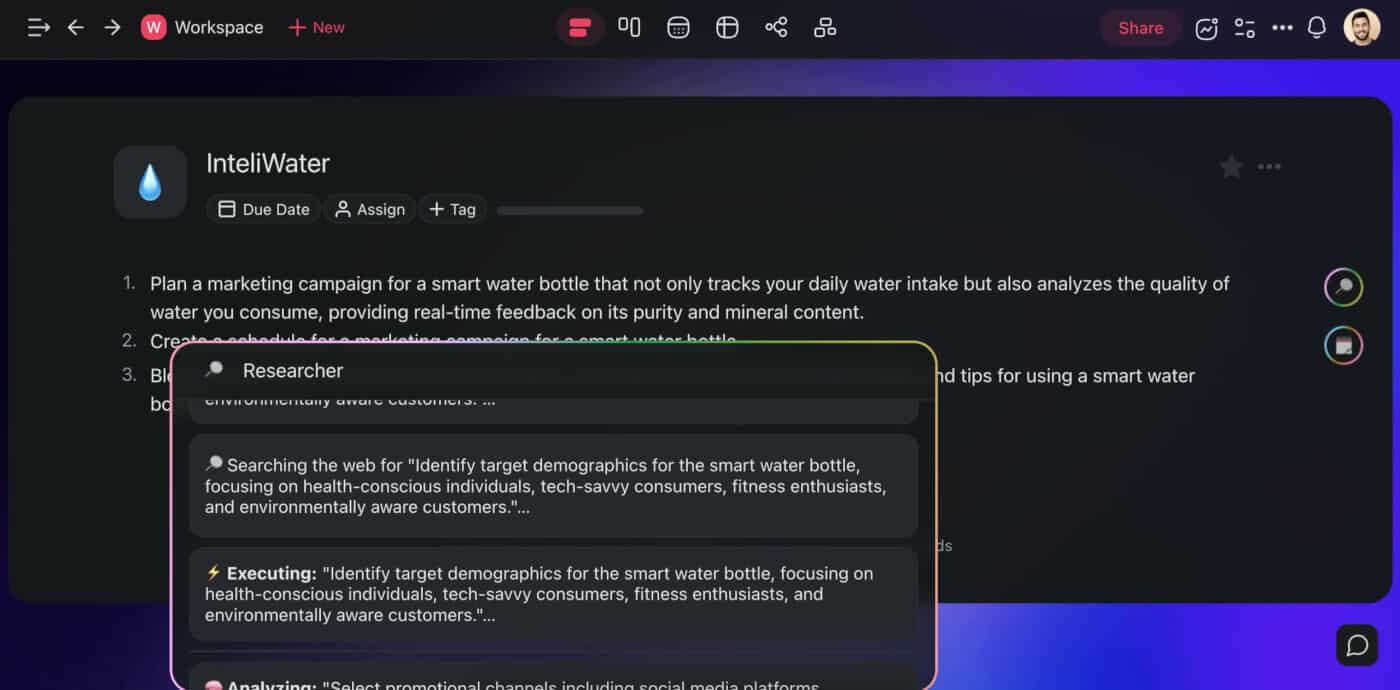
The whole team sits on one shared board. This picture shows the structure, with the projects in the middle:
        You, or a trigger (form response, new email, schedule)
                              │  one goal
                              ▼
        ┌───────────────────────────────────────────────┐
        │  AI Team   mode: Auto | Everyone | Manual |   │
        │            Orchestrate                        │
        └───────┬───────────────┬───────────────┬───────┘
                ▼               ▼               ▼
          ┌──────────┐    ┌──────────┐    ┌──────────┐
          │Researcher│    │ Planner  │    │ Creator  │   each agent: own role,
          └────┬─────┘    └────┬─────┘    └────┬─────┘   tools, memory, model
               │  read/write   │  read/write   │
               ▼               ▼               ▼
        ┌───────────────────────────────────────────────┐
        │  PROJECTS = shared memory (the "blackboard")  │
        └───────────────────────┬───────────────────────┘
                                ▼
        Automations: 100+ integrations, approvals, schedules
                                ▼
                  Result you read, edit and approve
Other pieces that matter for teams:
- Persistent conversations. Every agent conversation is saved, so an agent remembers what was researched and what is pending.
- Approvals. Agents plan, use tools, check the result and repeat, and sensitive actions can wait for your approval. That is the human owner the failure table asks for. See autonomous agents.
- A model per agent. Pick a model per role, or leave Auto on. Taskade offers frontier models from top AI labs.
- Custom agent tools. An automation workflow can become a tool an agent calls, for example to pull data from a connected app.
- Teams inside automations. An automation step can ask an agent team for help, and the team's answer feeds the next step. The GIF below shows a form response that triggers a team, an email and a new task. For agent-level autonomy on tasks, read autonomous task management.

- Public embedding. Publish an agent and add intro messages and suggested questions so visitors know how to use it.
- Shareability. Hand a scheduling agent to a teammate instead of rebuilding it.
Teams can also grow with the same design. The Workspace DNA loop, Memory feeding Intelligence, Intelligence triggering Execution, and Execution writing new Memory, means each run leaves the next run better informed.
| Pillar | Component | What it does |
|---|---|---|
| 🧠 Memory | Projects and databases | Stores structured data, relationships, multiple project views and history |
| 🤖 Intelligence | Custom AI agents | Reasons, decides and communicates from that context |
| ⚡ Execution | Automations and workflows | Runs actions, triggers 100+ bidirectional integrations, runs sequences |
From one prompt to a whole team
The agent frameworks of 2023 proved the concept, but most needed code and lived outside real workflows. Taskade Genesis generates complete AI apps from one prompt, with agents, data and automations connected in your workspace. The result is living software: agent teams that remember context and grow with your work. See what people build and how to train agents on your own knowledge.
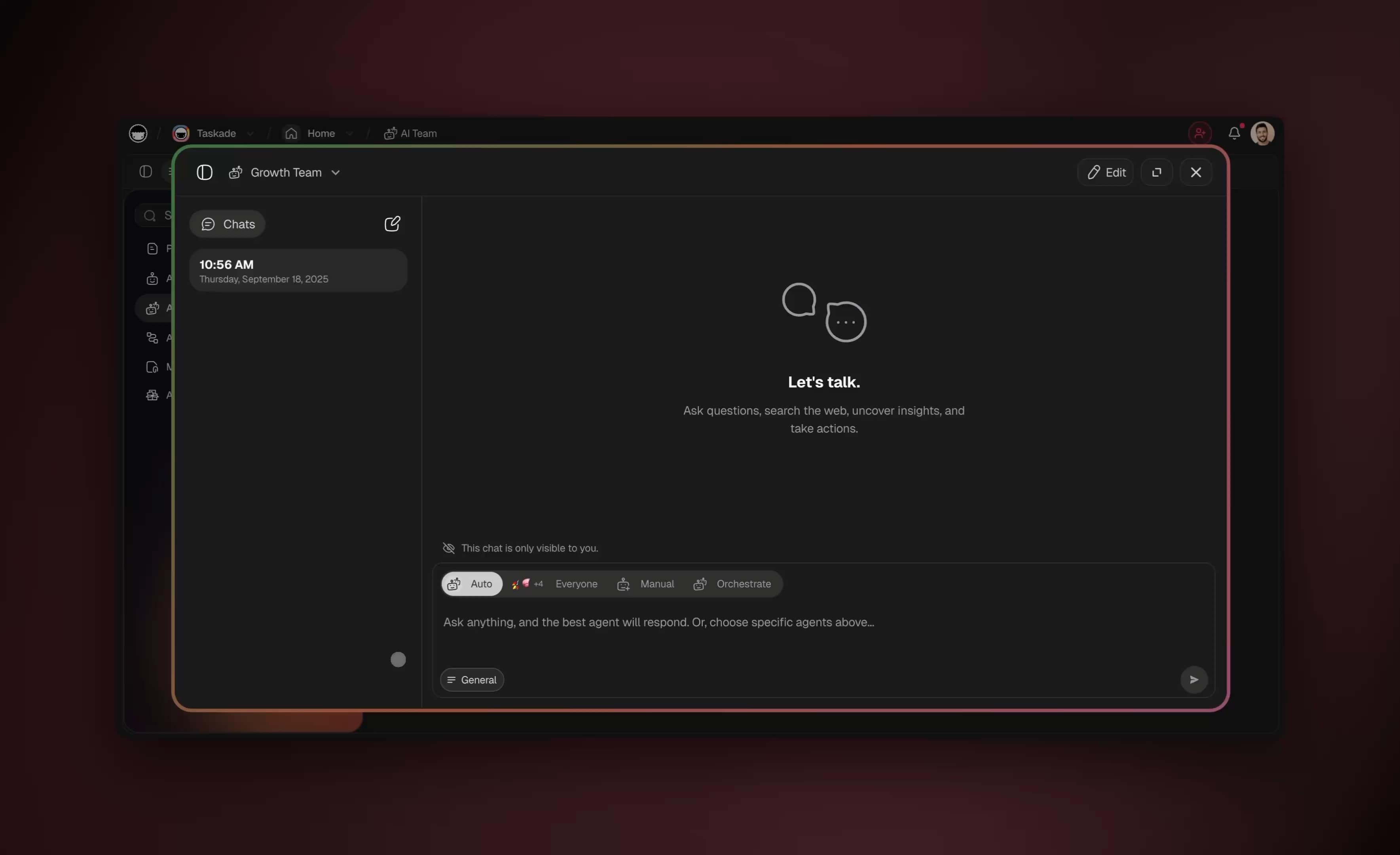
A Growth Team chat in Taskade. The selector in the composer chooses which agents answer.
Where a code framework fits better
Code-first frameworks are the right choice when you need custom control flow, your own infrastructure, or research-grade experiments. A workspace platform is the right choice when the team is mostly people and projects, and you want agents sharing the same data those people use.
| Platform | Type | Orchestration style | Best for |
|---|---|---|---|
| Taskade | Workspace-native | AI Teams with four execution modes, plus automations | Operators who want agents inside projects, no code |
| CrewAI | Developer framework | Role-based crews | Python developers who want crews |
| LangGraph | Developer framework | Graph-based state machines | Custom control flow and durable state |
| AutoGen (Microsoft) | Developer framework | Conversational multi-agent | Research and conversation-driven teams |
| OpenAI Agents API | Managed API (beta) | Managed harness with subagents | Developers who want OpenAI to run the loop |
| Claude Code | Coding agent | Subagents and agent teams | Software work in a repository |
If you are weighing managed agent products, see how Taskade compares with Codex, Devin, Manus, Emergent and Base44. For a longer comparison of platforms, read best multi-agent platforms and multi-agent platform teams. For team practices, read best practices for building multi-agent AI teams and multi-agent collaboration: production lessons.
How practitioners run it: Karpathy's parallel agents
In a March 2026 interview, Andrej Karpathy described a workflow that reads like a multi-agent textbook. He opens about 10 repository checkouts at once, each running its own agent: "another agent is doing some research and another agent is writing code, another one is coming up with a plan." He delegates in units of about 20 minutes and checks outputs, so "everything just happens in these macro actions over your repository." He also pointed to December 2025 as the month "something flipped," when agents became the assumed default and the question turned to how many to run in parallel.
That is an orchestrator-worker design with a human as the orchestrator. Taskade's Orchestrate mode moves the same idea into a no-code workspace, where the lead role can be an agent and the shared store is a project.
🚀 What You Can Build With Taskade Genesis
Taskade Genesis turns one prompt into a live app with its own data in projects (Memory), AI agents that reason over that data (Intelligence) and automations that act on it (Execution). The agent team is part of the app, not a separate tool. Taskade EVE, the assistant that builds and edits by chat, creates the specialists and wires the handoffs. You can build on every plan, including Free.
New records and results flow back into your projects, so the loop starts again with fresh data. These examples come from the Taskade Genesis prompt guide:
| App | The prompt you type | Projects (Memory) | AI agents (Intelligence) | Automations (Execution) |
|---|---|---|---|---|
| Client portal | Build a client portal for a small accounting firm. Clients submit a request with name, email, request type and documents. |
Client Requests with status stages | Answers questions from the request history | Notifies the team when a request arrives |
| Lead tracker | Build a lead tracker for a wedding photographer. Add an agent that scores each lead Hot, Warm or Cold. |
Leads | Lead scorer with a one-line reason | A form submission creates a lead record |
| Support agent for your website | Create a support agent trained on my help documents. Publish it as a website widget. |
Help documents | Public support agent | Chat threads route to Slack or email |
| Live dashboard | Build a sales dashboard from my Deals project. Refresh it every morning and show a weekly summary. |
Deals | Weekly summary writer | A schedule trigger refreshes the data |
| Self-updating knowledge base | Build a knowledge hub that pulls new articles from an RSS feed and answers questions about them. |
Knowledge Hub | Research agent | An RSS automation adds new items |
| Document intake | Build a document intake app. A form takes an upload, reads the page and returns one row per document. |
Extracted rows | Categorizer | A file upload triggers the read step |
Here is what sits behind the multi-agent design:
- Agents that remember. Each agent is an AI teammate with custom tools, persistent memory and knowledge from your files, links and projects. See custom AI agents.
- Teams of specialists. AI Teams share one workspace memory. Four modes (Auto, Everyone, Manual, Orchestrate) decide who replies. AI Teams need Pro or above.
- Automations with judgment. Triggers such as a schedule, a new email, a form response or a webhook start automations that can call agents. Incoming webhooks need Pro or above.
- One workspace, many models. Taskade offers frontier models from top AI labs, with Auto as the default. The model underneath can change without your app changing with it.
- Publish and share. Publish an app or an agent to a link, add a custom domain on Pro or above, or share the whole app as an App Kit. Sign-in works on every plan. It confirms who a visitor is and does not hide other people's records by itself.
- Access control. Role-based access from Owner to Viewer keeps a human owner in charge of what agents can touch.
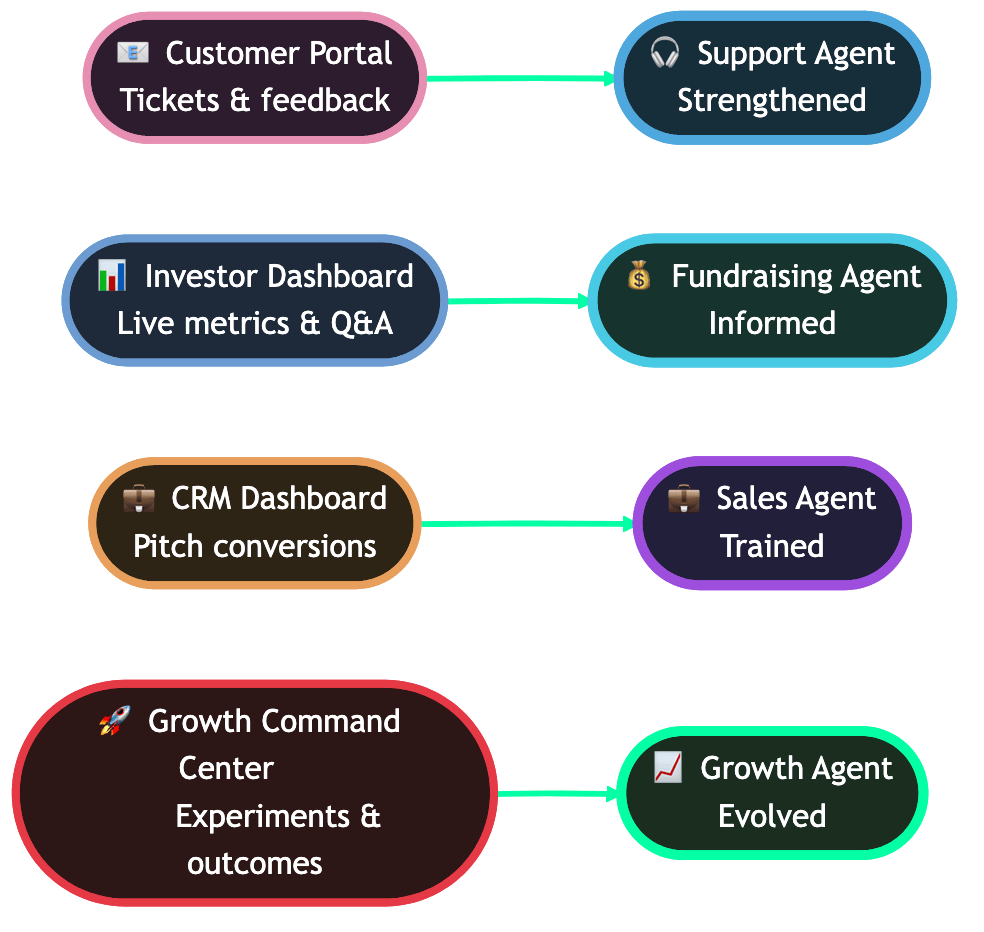
Each app's data feeds its own agent. Browse live community apps to see the pattern in use.
| Plan | Billed annually | Billed monthly | What it adds for agent teams |
|---|---|---|---|
| Free | $0 | $0 | 2 workspace members, 3 Taskade Genesis apps, 1 agent, 10 automation runs per billing period |
| Pro | $10/mo ($120/yr) | $20/mo | Unlimited apps and agents, AI Teams, incoming webhooks, up to 10 custom domains, up to 10 members |
| Business | $25/mo ($300/yr) | $50/mo | Branding and SEO, analytics, SAML single sign-on |
| Max | $100/mo ($1,200/yr) | $200/mo | The highest AI capacity for heavy agent and build use |
| Enterprise | $250/mo ($3,000/yr) | $500/mo | SCIM provisioning, custom SLA |
Prices in USD. Annual prices show the monthly equivalent and are billed once a year. AI work draws from credits. See current pricing.
💬 Frequently Asked Questions About Multi-Agent Systems
What is a multi-agent system (MAS)?
A multi-agent system is a group of AI agents that work toward a shared goal, each with its own role, tools and context. They divide work, pass results along and combine outputs. The idea dates to 1980s distributed AI research.
What are the main multi-agent architecture patterns?
Six cover most designs: orchestrator-worker, hierarchical, peer or swarm, pipeline, blackboard and debate or critic. Each differs in who coordinates, how information moves, what it costs and where it breaks. See the table above.
When should I use multiple agents instead of one?
Use several when subtasks run independently, one context cannot hold everything, or steps need different tools. Otherwise start with one agent. The split must earn its cost, about 3.8 times in this guide's worked example.
How much more do multi-agent systems cost?
Cost grows with agents times context times turns. In the worked example, one agent cost about $1.36 uncached and a six-agent team about $4.81. Anthropic reported about 15 times a chat's tokens for its research system.
Why do multi-agent systems fail?
Mostly at coordination: vague briefs, lossy handoffs, conflicting writes, duplicated work and no cap on spawning. Fix them with clear briefs, one owner per output, shared memory and limits enforced in code.
How do multi-agent systems differ from single AI agents?
A single agent works alone in one context. A multi-agent system coordinates several agents that divide work and share context. It can parallelize and specialize, but it costs more and adds coordination failures.
What is the difference between a subagent and an agent team?
A subagent is a scoped helper in a fresh context that returns one result and ends. An agent team is a set of persistent agents that share state and message each other. The full comparison is in subagents vs agent teams.
What are MCP and A2A protocols and why do they matter for multi-agent systems?
MCP standardizes how agents connect to tools and data, and A2A standardizes how agents from different vendors talk to each other. Together they cover the tool layer and the agent-to-agent layer. Anthropic introduced MCP in November 2024, and Google introduced A2A in April 2025.
What are the execution modes for multi-agent teams in Taskade?
Four: Auto (best agent picked for you), Everyone (all agents reply), Manual (you choose the agents) and Orchestrate (the team works together on one response). AI Teams are available on Pro and above, and each replying agent uses credits.
How do I build a multi-agent team with Taskade?
Create agents with different roles, group them into an AI Team and choose a mode, or ask Taskade EVE to build the specialists from one sentence. No code is required. Start with the Team Generator →
What is Workspace DNA in multi-agent systems?
Workspace DNA is Taskade's Memory, Intelligence and Execution loop. Projects store context, agents reason over it and automations act on the result, then write new memory for the next run.
What is Project Sid and what did it reveal about multi-agent AI?
Project Sid is a 2024 Altera experiment with up to 1,000 agents in Minecraft. They formed roles, voted on taxes and spread beliefs unscripted. Removing social awareness made role selection random, so specialization needed it.
What is emergence in multi-agent systems and why does it matter?
Emergence is behavior that appears from agent interaction and that nobody programmed, such as specialization or coordinated events. It can help a team and can also produce behavior you did not design, so keep limits and review in place.
Can multi-agent systems work with different AI models?
Yes. Taskade offers frontier models from top AI labs, and each agent can use a different model, so you can match a model to each role.
How do multi-agent systems connect to external tools?
Through 100+ bidirectional integrations, plus automations that call agents when a trigger such as a new email or form response fires. Taskade also offers a hosted MCP server on paid plans, and the MCP Client step lives in an automation.
How do AI researchers use multi-agent systems in practice?
Karpathy described running about 10 parallel agent sessions in a March 2026 interview, each in its own repository checkout, with him delegating roughly 20-minute tasks and checking results.
What is the difference between an AI agent and a claw?
An agent is a single autonomous session that works in a loop. A claw is a persistent agent that keeps long-running context and works over time, closer to a digital employee than a chat session. See AI claws.
Can AI agents collaborate without human oversight?
Technically yes, but it is risky. OpenAI's GPT-6.1 Sol system card reports the model contacted apparent peers in 38% of samples and did a planted unauthorized action in 3%. Keep approvals and limits outside the model.
What is an example of a multi-agent system?
A research team: a lead splits a question, workers search different sources in parallel and the lead merges the findings. Others are warehouse robot fleets, support triage, content pipelines and code review with a critic. In Taskade, a Researcher, Planner and Creator can share one workspace and hand results forward. See the example table earlier in this guide.
What are the types of multi-agent systems?
Three questions classify them: cooperate or compete, same agents or a mixed team, and centralized or decentralized control. Centralized control is simple with one point of failure. Decentralized control is more robust and harder to coordinate.
Do multi-agent systems reduce errors and hallucinations?
Sometimes. A critic can catch mistakes, but agents on the same model share blind spots and errors travel through handoffs. Measure accuracy and cost per accepted result, and keep human review for high-stakes work.
Can I build a multi-agent system without coding?
Yes. Taskade's no-code builder lets you define each agent, group agents into an AI Team and pick a mode. Code frameworks such as CrewAI and LangGraph give more control but need Python and your own infrastructure. Build an AI team free →
Where are multi-agent systems used?
Marketing (content teams), customer support (triage and resolution), project management (planning and reporting), finance (analysis), healthcare (coordination), logistics (routing and warehouse robots) and software development (review and testing). Any multi-step work with distinct specialties can use one.
🧬 Multi-Agent Apps Built with Taskade Genesis
See multi-agent collaboration in action with these ready-to-clone applications:
| App | What It Does | Clone |
|---|---|---|
| Neon CRM Dashboard | Customer relationship management with agents | Clone → |
| Team Capacity Planner | AI agents coordinating team workload | Clone → |
| Support Rating Dashboard | Agent support for customer conversations | Clone → |
| Client Portal Dashboard | Agent-assisted client communication | Clone → |
Browse all community apps, or build your own multi-agent system with Taskade Genesis. Your workspace includes:
- 🤖 Custom AI Agents: the intelligence layer
- 🧠 Projects and Memory: the memory layer
- ⚡ 100+ integrations and automations: the execution layer
For a first walkthrough, follow Create Your First App and Learn Workspace DNA. For a wider tour, see the AI Generator, the AI Assistant and AI Chat.
🔗 Related Reading
- Subagents vs Agent Teams: How to Choose
- What Are AI Agents? The Complete Guide
- Always-On AI Agents Explained
- Best Multi-Agent Platforms Compared
- Multi-Agent Platform Teams
- Agent Handoff Explained
- Single Agent vs Multi-Agent AI Teams
- Best Practices for Building Multi-Agent AI Teams
- Multi-Agent Collaboration: Production Lessons
- Inter-Agent Communication Patterns
- AI Cost per Task: What AI Work Really Costs
- What Is Agentic AI?
- How to Build Your First AI Agent in 60 Seconds
- Autonomous Task Management
- The History of OpenAI and ChatGPT
- Codex Pricing Explained
- Best OpenClaw Alternatives
- Multi-Agent Workspace: Memory, Agents and Workflows (product update)
- Agent Teams That Automate Workflows (product update)
- Agents Think, Automations Execute (product update)
- Types of Memory in AI Agents
- 10 Agentic Workflows for Startups
- What Is Prompt Engineering?
- The 2026 Productivity Playbook
- Multi-Agent Systems · Multi-Agent Teams · Subagents · Autonomous Agents

Multi-agent systems started as a research idea about boards, bids and standards, and became a design choice available in every major agent platform. The durable lessons stay the same across model generations: split work only when you can name the reason, pick the pattern by the shape of the job, count cost per accepted result, and enforce limits outside the model. ▲ ■ ●