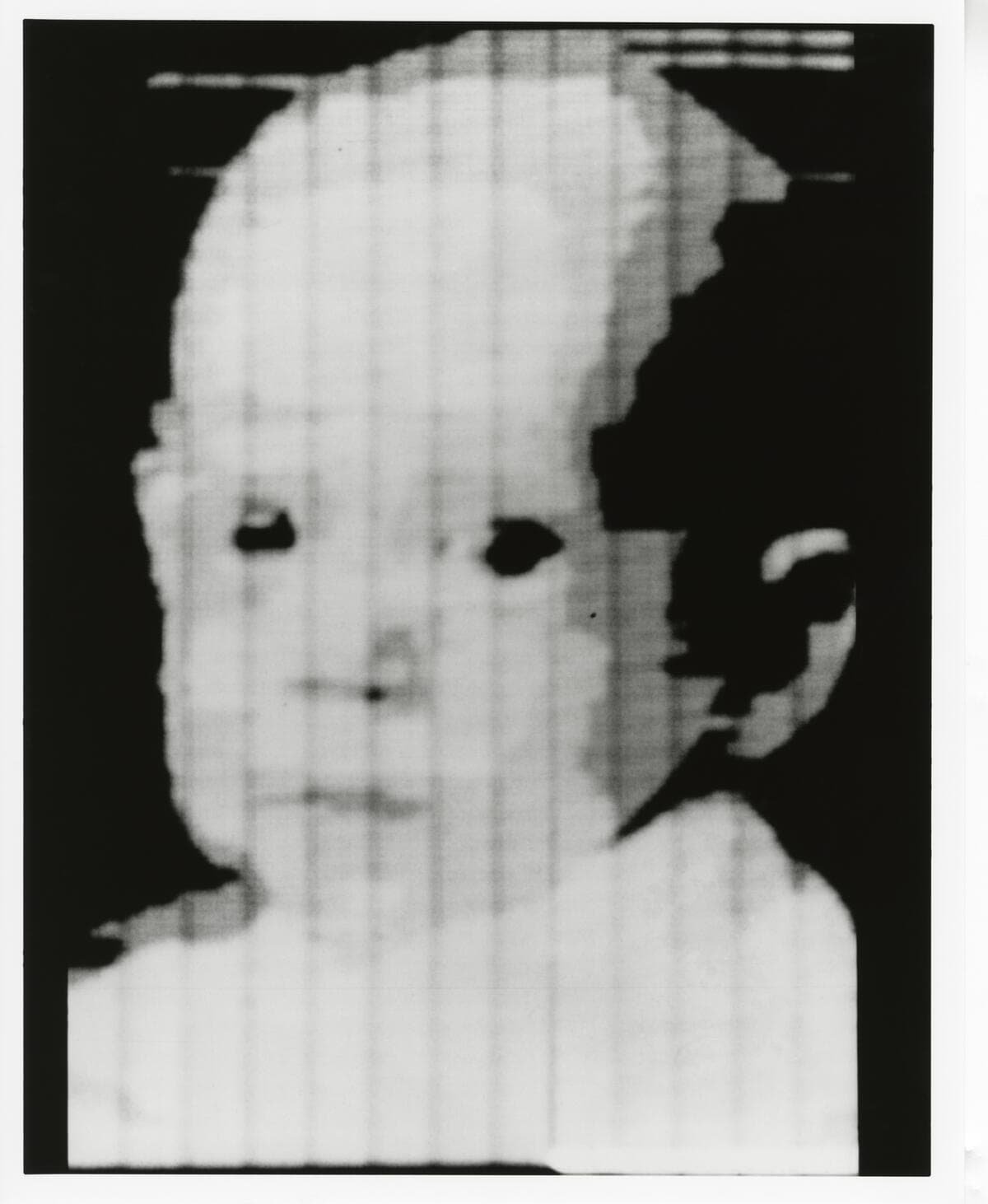
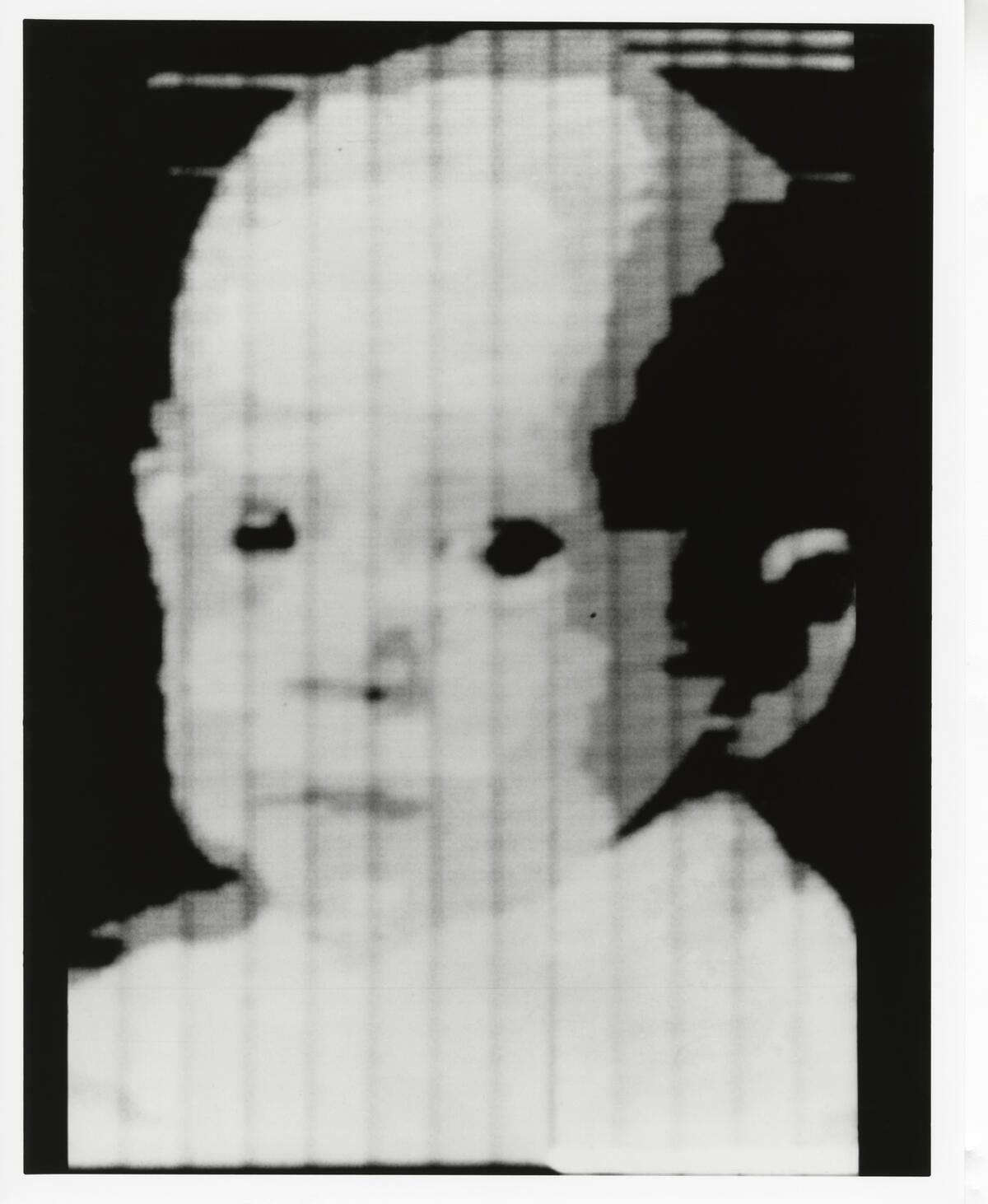
In 1957, Russell Kirsch fed a 5 by 5 centimeter photograph of his infant son through a rotating drum scanner he built at the National Bureau of Standards. The output was a 176 by 176 grid of numbers, each one a brightness value between black and white. It was the first photograph ever converted into data a computer could read, and it took most of a day to produce a single image nobody would call high resolution.
In 2026, you can drag that same kind of photograph into a browser tab and get a finished, model-ready text prompt back in a few seconds: subject, style, lighting, composition, and the flags a specific image generator expects.
That reversal is a different job from the one most "AI prompt generator" roundups cover. A prompt tool starts with an idea in your head. An image to prompt generator starts with a finished picture and works backward to the words that might recreate its look, as JSON, model-specific flags, or dense CLIP-style tags, depending on the vendor.
TL;DR: We compared 10 image to prompt generators by what they return, then ran one February 2026 photo through the free tools. ImagePrompt.org caught 7 of 8 visible details, CLIP Interrogator caught 2. Prices and free tiers re-checked on vendor pages September 24, 2026. Have an idea, not an image? Taskade's image prompt generator works the opposite direction.
Quick Answer: The Best Image to Prompt Generator by What You Need
The right image to prompt generator depends on which image generator you plan to paste the result into, and whether you need the output formatted for that model or just a plain description. For a native Midjourney-flag prompt, Midjourney's own Describe feature is the most direct option, but it requires a paid plan. For a free, multi-format tool, ImagePrompt.org publishes seven output modes, and it was the more accurate of the two free tools in our one-photo test. For Stable Diffusion specifically, CLIP Interrogator's dense tag style remains the community standard, and it is free and open source.
| If you want... | Start with | Why |
|---|---|---|
| A prompt in Midjourney's native flag syntax | Midjourney Describe | Built into Midjourney itself; paid plans only, from 10 dollars a month |
| A free tool with model-specific output modes | ImagePrompt.org | 5 free credits a day, no account; seven modes including Flux, Midjourney, Stable Diffusion, and JSON |
| Dense tags for Stable Diffusion | CLIP Interrogator | Free, open source, built for Stable Diffusion's CLIP model; the hosted Space has a daily GPU quota |
| A structured JSON prompt | Ideogram Describe | Ideogram 4.0 returns a compositional JSON breakdown; describing your own upload needs the Plus plan |
| A quick description with a chat assistant already open | Claude, ChatGPT, or Gemini | Free vision on every plan; ask it to format the result as a prompt |
| A prompt written from an idea, not an image | Taskade image prompt generator | The opposite job — description in, structured prompt out |
What Is an Image to Prompt Generator, and How Is It Different From a Prompt Generator?
An image to prompt generator reverses the usual direction: you upload a finished image, and the tool returns the text prompt that could plausibly recreate it. A vision model reads the picture and extracts what a prompt needs — subject, medium, lighting, camera angle, composition, and color palette — then some tools additionally format that description in a specific image generator's syntax. This is the opposite job from an ordinary AI prompt generator, which starts from a written idea, not a picture, and writes the prompt from scratch.
Searchers use several names for the same job: photo to prompt, picture to prompt, img2prompt, reverse prompting, and "describe image." Two neighbors are easy to mix up with it. An image to image generator feeds your picture into the model as a visual reference and never writes it out as words, which is how Midjourney's Image Prompts and Leonardo's Image Guidance work. An image caption generator or an alt text generator writes one plain sentence for readers and screen readers, not a prompt a model can render from.
The two jobs get confused constantly because both end in a text prompt. The difference is what goes in first:
WHAT GOES IN                        WHAT COMES OUT                       EXAMPLE TOOLS
──────────────────────────────────  ────────────────────────────────    ───────────────────────────────
A finished image (yours or found)   A prompt that could recreate it      ImagePrompt.org, Midjourney
                                                                          Describe, CLIP Interrogator
A rough idea, no image yet          A structured prompt built from       Taskade image prompt generator,
                                     scratch                              Taskade art prompt generator
A finished image, but you want      A caption, not a generation-ready    ChatGPT, Claude, Gemini, unless
just a plain description            prompt                               you ask for generator syntax
If you already have an image and want to riff on its look, keep reading. If you have an idea and no image, Taskade's image prompt generator or the sibling AI prompt generator and art prompt generator solve the opposite problem, and our guide to AI prompt generators covers that side in depth.
How an Image to Prompt Tool Actually Works
Every tool in this list runs the same first two steps. What separates them is the last one: whether the output lands as a specific generator's syntax or as a description you still have to translate yourself.
The same flow, seen as one request from upload to a new image, shows where you step in. The tool hands the prompt back to you, and the edit before you paste it is yours to make:
A Worked Example: What a Reverse Prompt Looks Like
A good reverse prompt names the subject, the medium, the light, and the notable details of an image. Here is the kind of image people feed into these tools, and what a competent tool should pull out of it.
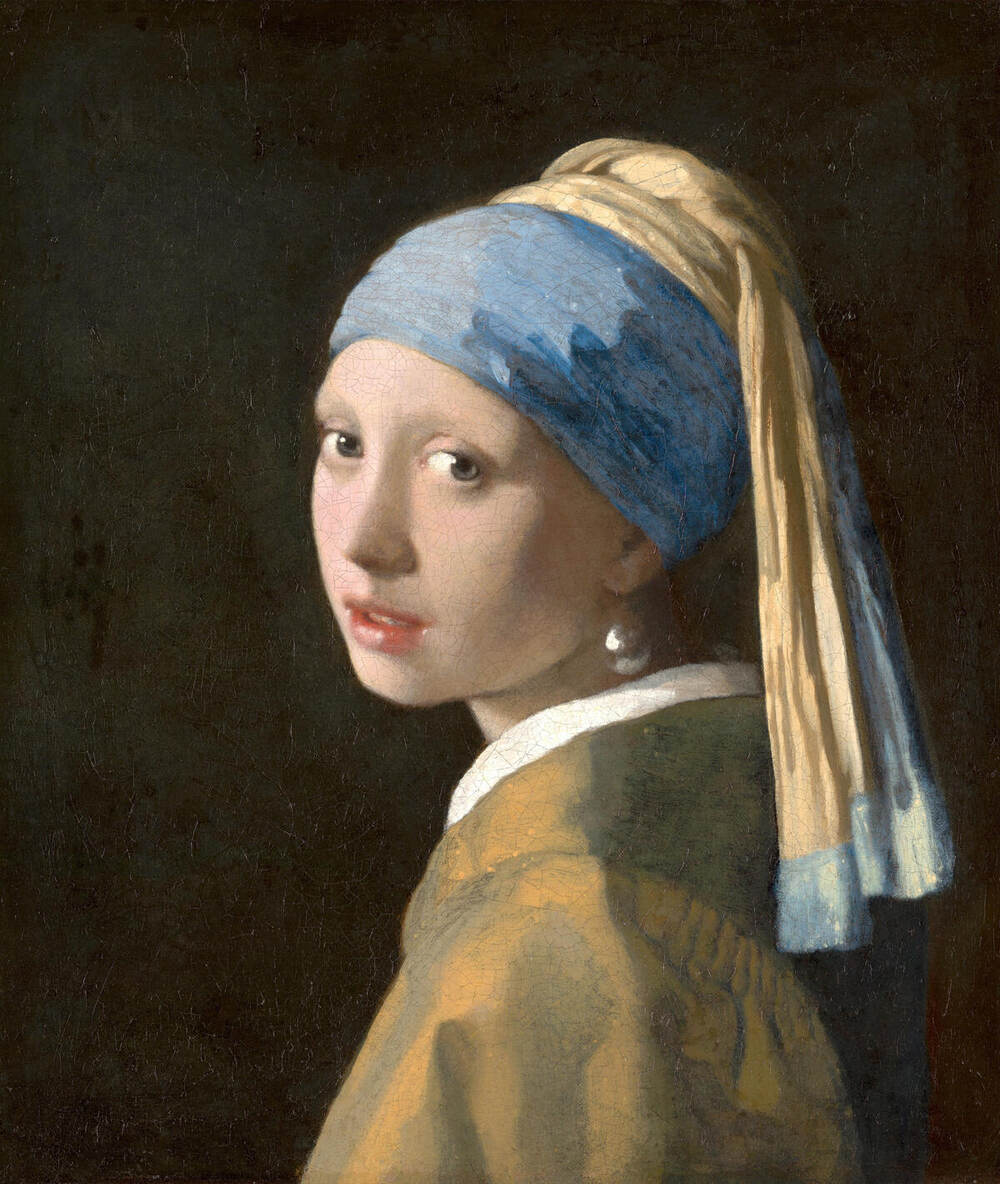
Run a portrait like this through any of the tools below and expect the output to name, at minimum: the subject and pose (young woman, three-quarter turn, direct gaze), the medium and era (oil portrait, Dutch Golden Age painting), the lighting (soft, directional, single light source, dark background), and the notable details (blue and gold head wrap, pearl earring, parted lips). A weaker tool stops at "a painting of a woman." A stronger one gets close to a full image prompt with a subject, style, lighting, and composition line each, the same seven building blocks a written-from-scratch prompt needs. We ran this painting through two free tools as a control, and the results are in the test below.
We Tested It: One Photo Through the Free Image to Prompt Tools
We ran one CC0 photo through the free image to prompt tools we could use without paying, and ImagePrompt.org beat CLIP Interrogator by a wide margin. ImagePrompt.org named 7 of 8 visible details in each of the three modes we tried. CLIP Interrogator named 2 of 8, called a green door red, and added invented artist names.
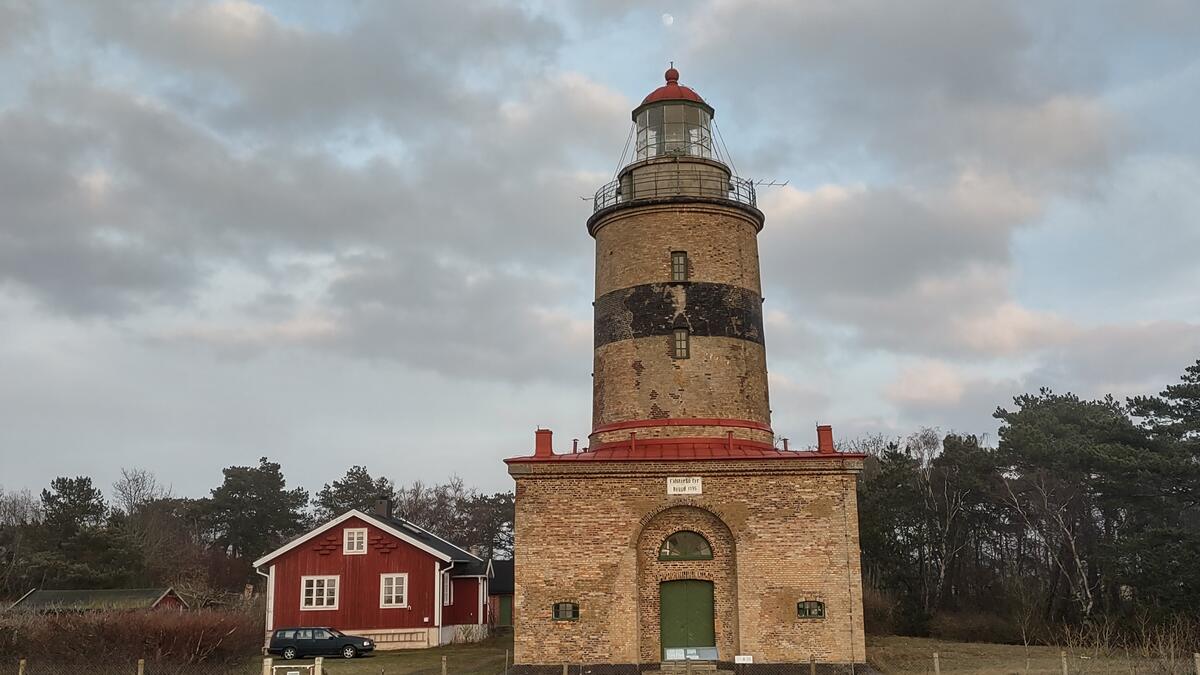
TEST CARD: ONE PHOTO, FREE TOOLS, RUN 2026-09-24
──────────────────────────────────────────────────────────────
Image     Falsterbo lighthouse, 1200 x 675 JPG (16:9), CC0
Tools     ImagePrompt.org: General, Midjourney, Stable Diffusion
          CLIP Interrogator (ViT-L-14): fast and best modes
Access    ImagePrompt.org free web tier, no account
          CLIP Interrogator open-source install, run locally
Score     1 point per visible detail named correctly (8 max)
          [1] brick tower          [5] dark station wagon
          [2] dark band            [6] overcast, cloudy sky
          [3] red roof or cap      [7] faint moon in the sky
          [4] red wooden house     [8] green arched door
Noted     Wrong colors, invented names, wrong flags (not scored)
──────────────────────────────────────────────────────────────
The hosted CLIP Interrogator Space answered three anonymous requests, then hit its ZeroGPU quota, so we ran the same open-source package and model locally. On the control painting below, the local fast mode returned the same terms as the hosted Space.
| Tool and mode | Score (of 8) | Words | Aspect flag | What went wrong |
|---|---|---|---|---|
| ImagePrompt.org, General | 7 | 130 | None | Missed the green door |
| ImagePrompt.org, Midjourney | 7 | 136 | --ar 3:2 |
Wrong ratio for a 16:9 photo; called the house "red-roofed" (its walls are red) |
| ImagePrompt.org, Stable Diffusion | 7 | 148 | None | Full sentences, not the comma tags SD users expect |
| CLIP Interrogator, fast | 2 | 49 | None | "red door" (it is green); three invented artist names |
| CLIP Interrogator, best | 2 | 44 | None | Noise tokens such as "1904, 1 8 0 2, a24"; 73 seconds on a laptop GPU |
Here is the Midjourney-mode prompt ImagePrompt.org returned, verbatim except for one cut sentence. It is ready to paste, but the flag at the end does not match the source photo:
A cylindrical brick lighthouse with a red-capped lantern room stands tall
against a cloudy sky, its stone facade weathered with a dark band around its
midsection and small windows. A red-roofed, white-trimmed cottage sits to its
left, with a dark station wagon parked in front. Pine trees and bare branches
form a dense backdrop to the scene, with a hint of a faint moon in the upper
sky. The composition is frontal, with a slightly low angle, emphasizing the
height and presence of the lighthouse. [...] Shot in a realistic photography
style, capturing the serene yet stoic nature of a coastal landmark.
--ar 3:2 --q 2 --s 750
And here is CLIP Interrogator's best-mode output for the same photo, verbatim. The first clause comes from the BLIP caption model, and the rest comes from CLIP ranking a fixed list of style words and artist names:
there is a small brick building with a red roof and a red door, bold
lighthouse in horizon, swedish, inspired by Friedrich Ritter von
Friedländer-Malheim, panoramic shot, an upright lightbulb, side view
centered, close-up photo, by Sara Saftleven, 1904, 1 8 0 2, a24
The Control Image: A Famous Painting Changes the Result
A famous image gets recognized, not described. We ran the Vermeer portrait above through the same tools. CLIP Interrogator's fast mode wrote "Vermeer" in some form six times and described almost nothing else. ImagePrompt.org never named the painter and described the pose, clothing, light, and background instead.
| Tool and mode | Named the painter? | What it returned |
|---|---|---|
| CLIP Interrogator, fast (hosted and local, same terms) | Yes, repeatedly | "arafed painting of a girl with a pearl earring, ... vermeer painting, by Vermeer, ( ( ( ( ( vermeer ) ) ) ) ), by Johannes Vermeer ..." |
| CLIP Interrogator, best (hosted) | Wrong painter | "... yellow and blue ribbons, digital restoration, by Michiel van Musscher ..." |
| ImagePrompt.org, General | No | 125 words: three-quarter view, blue headscarf, yellow-gold tunic, soft directional light, dark background, "Dutch Golden Age" style |
"Arafed" is a known quirk of the BLIP caption model, not a real word. Delete it before you generate. The broader lesson: on a famous image, a CLIP-style tool returns the title, and a title does not recreate a style on a new subject. Crop or use a lesser-known reference if you want a reusable style prompt.
How to Generate a Prompt From an Image
To generate a prompt from an image, upload it to an image to prompt tool, pick the output format for your target generator, then edit the result before you run it. Our test shows why the edit matters: every tool missed at least one detail, and one added a wrong aspect-ratio flag.
- Pick the target first. Choose Midjourney, Flux, Stable Diffusion, or DALL-E before you upload, because the output mode depends on it.
- Upload a clean image. Use a sharp, uncropped JPG or PNG. ImagePrompt.org accepts files up to 4 MB.
- Choose the matching mode. Use a Midjourney mode for flags, a tag tool for Stable Diffusion, and a plain mode for DALL-E or GPT Image.
- Edit the prompt. Delete invented names and noise words, fix wrong colors, and set
--arto the real ratio of your image. - Add what the tool missed. Compare the prompt with the image and add the missing details, such as the green door in our test.
- Render and compare. Run the prompt, put the new image next to the source, and change one detail at a time.
- Save the prompt that worked. Keep it with the source image and the generator settings, so you can reuse the style.
WORKFLOW CARD: IMAGE → PROMPT → IMAGE
────────────────────────────────────────────────────────────
1  Source image      sharp, uncropped, rights cleared
2  Reverse prompt    tool + mode matched to the generator
3  Edit pass         delete: invented artists, "arafed",
                     stray numbers
                     fix:    colors, --ar, missing details
4  Render            same seed and settings for each retry
5  Compare           source and render side by side
6  Save              prompt + image + settings in one place
────────────────────────────────────────────────────────────
Step 7 is the easiest one to skip. A prompt that recreated a style once is worth keeping with its source image. The ready-made prompts in the design prompt library, the AI prompt generators collection, and Taskade's art prompt generator are good starting points when you want a style without a reference image.
Taxonomy: What Each Tool Actually Outputs
Image to prompt tools do not all return the same shape of text, and the shape matters more than the tool's name. Some format the result for one specific generator. Some return a dense list of tags. Some just describe the picture in a paragraph and leave the reformatting to you.
| Output format | What it looks like | Tools that produce it |
|---|---|---|
| Model-specific flag syntax | a ceramic mug, studio lighting --ar 16:9 --stylize 250 |
Midjourney Describe |
| Structured JSON prompt | A subject field plus a per-element compositional breakdown | Ideogram Describe (4.0 and Auto), ImagePrompt.org JSON mode |
| Multi-format presets | The same image, output in General, Structured, Graphic Design, JSON, Flux, Midjourney, or Stable Diffusion phrasing | ImagePrompt.org |
| Dense CLIP-style tags | oil painting, dramatic lighting, chiaroscuro, by Vermeer, trending on artstation |
CLIP Interrogator, img2prompt |
| Plain-language description | A full sentence or paragraph, no generator syntax | ChatGPT, Claude, Gemini, Google AI Studio, unless prompted otherwise; Leonardo Describe with AI |
| Prompt copied from a known render | The original prompt behind an image already made on that platform | Leonardo (own and community images) |
The practical lesson: if you need Midjourney flags, do not start with a plain-language tool and hope it guesses the syntax. Ask for it explicitly, or use a tool built to produce it.
Is the Free Tier Actually Free?
Most of the dedicated tools cap free use somewhere, and the general AI assistants are, once again, the most generous free option for basic image description. Here is what each free tier includes, verified on vendor pages on September 23, 2026, with the dedicated tools re-checked on September 24.
| Tool | Free tier (vendor's own unit) | Output formatted for a specific generator? | Entry paid tier |
|---|---|---|---|
| ImagePrompt.org | 5 Prompt Credits/day, no account needed | Yes — seven modes, including Flux, Midjourney, Stable Diffusion, and JSON | Standard 14.99 dollars/mo, 300 credits |
| Midjourney Describe | None. No free trial since March 2023 | Yes — native Midjourney flags | Basic 10 dollars/mo, or 8 dollars/mo billed annually |
| Ideogram Describe | Weekly slow credits for eligible accounts; free output is public; describing your own upload needs Plus | Yes — structured JSON on 4.0/Auto | Plus 20 dollars/mo, or 15 dollars/mo billed annually, 1,000 credits |
| CLIP Interrogator | Free, no account; hosted Space capped by Hugging Face's ZeroGPU daily quota (2 minutes unauthenticated, 5 with a free account) | Tuned for Stable Diffusion | Not applicable — open source |
| img2prompt (Replicate) | No hosted free tier — about 0.0088 dollars per run, sign-in required; free if self-hosted via Docker | Tuned for Stable Diffusion | Pay-per-run on Replicate |
| ChatGPT | Vision included; OpenAI publishes no exact daily image-upload cap on the free plan | No, unless you ask for a specific syntax | Paid ChatGPT plans for higher limits |
| Claude | Vision included on every plan, free included; up to 20 images per turn, 10 MB each | No, unless you ask for a specific syntax | Paid Claude plans for higher usage limits |
| Gemini | Vision included on the free plan; exact daily image-analysis caps not consistently published | No, unless you ask for a specific syntax | Paid Google AI plans for higher limits |
| Google AI Studio | Free API tier, no card required, limited-access models | No — returns a description, developer formats it | Paid tier for production rate limits |
| Leonardo | 150 fast tokens/day; free-tier creations are public | Describe with AI returns a plain prompt for Leonardo's models | Essential 12 dollars/mo, or 10 dollars/mo billed annually |
The pattern: general AI assistants with vision are the most generous free way to describe an image, and dedicated tools earn their price in output formatting, batch use, and privacy terms.
Which Image Generator Is the Prompt Actually For?
A prompt tuned for one image generator often under-performs in another, because each model rewards different phrasing. Midjourney reads --ar and --stylize flags. Stable Diffusion and Flux favor dense, comma-separated tags. DALL-E and GPT Image lean on plain description.
| Tool | Midjourney | Stable Diffusion / Flux | DALL-E / GPT Image |
|---|---|---|---|
| Midjourney Describe | Native | General only, needs rewriting | General only, needs rewriting |
| ImagePrompt.org | Dedicated mode | Dedicated SD mode, dedicated Flux mode | General mode |
| Ideogram Describe | General only | General only | General only (JSON is Ideogram-specific) |
| CLIP Interrogator / img2prompt | General only | Native (built for CLIP ViT-L/14) | General only |
| ChatGPT / Claude / Gemini | Only if explicitly asked | Only if explicitly asked | Only if explicitly asked |
| Taskade image prompt generator (opposite direction) | Covered | Covered | Covered |
Taskade's row is listed for context, not comparison: it writes a prompt from a written description, the reverse of every other row in this table.
Which Tool Fits Your Job?
The right image to prompt tool follows from two facts: what you start with, and which generator will render the result. A picture plus a Midjourney plan points to Describe. A picture and no budget points to ImagePrompt.org or CLIP Interrogator. An idea with no picture points the other way, to a prompt generator.
CHEAT SHEET: WHICH IMAGE TO PROMPT TOOL, BY TARGET GENERATOR
──────────────────────────────────────────────────────────────────
Target            Free first try              Paid, most native
──────────────────────────────────────────────────────────────────
Midjourney        ImagePrompt.org MJ mode     Midjourney Describe
                  (fix the --ar flag)         (4 prompts per image)
Stable Diffusion  CLIP Interrogator           img2prompt API
                  (delete noise tokens)       (about $0.0088 a run)
Flux              ImagePrompt.org Flux mode   ImagePrompt.org paid
DALL-E / GPT      Any chat assistant, asked   ImagePrompt.org General
Image             for plain description
Ideogram          Describe on Ideogram images Ideogram Plus (uploads)
Leonardo          Describe with AI            Leonardo paid plans
──────────────────────────────────────────────────────────────────
The reverse prompt is only half the job. Once you know the style you want, the prompt still has to fit a use case. These Taskade generators and prompt pages each cover one common use case, and each starts from a written description, not an uploaded image:
| Use case | Start from an image with | Start from an idea with |
|---|---|---|
| A logo in the style of a reference | ImagePrompt.org General mode | Logo prompt generator, a logo design brief, or Midjourney logo prompts |
| Game characters and concept art | CLIP Interrogator for style tags | Game character design and game art style ideas |
| Illustration style for a series | ImagePrompt.org Structured mode | Illustration style prompts |
| YouTube or blog visuals | A chat assistant, asked for a plain prompt | Thumbnail design ideas and blog image suggestions |
| Photo shoots and interiors | ImagePrompt.org Stable Diffusion mode | Photography theme prompts, a photographer persona, and interior design prompts |
| Marketing and website visuals | ImagePrompt.org Graphic Design mode | Visual content ideas and website image optimization |
How We Verified This
We are a vendor too, listed last, so every price, free tier, and output format here comes from the vendor's own page, and the scores come from one test we ran ourselves.
- Prices and free tiers were checked on vendor pricing or documentation pages on September 23, 2026, and re-checked on September 24, 2026 for ImagePrompt.org, Midjourney, Ideogram, Leonardo, img2prompt, and CLIP Interrogator. Ideogram's and Leonardo's pages block simple fetch requests, so we read them in a headless browser.
- Tools are grouped by output format, not ranked on one scale. A CLIP tag list and a JSON prompt solve the job differently, and one axis would mislead.
- One photo, free tools only. We ran ImagePrompt.org in three modes and CLIP Interrogator in two. Midjourney and Ideogram need a paid plan to describe an upload, and a chat assistant's output depends on the instruction you write, so we left those out. Read the scores as a spot check, not a benchmark.
- Taskade is listed last, in the opposite-direction row, because its agents read images but it has no image to prompt tool.
- Every entry names at least one real strength, including the tools that compete most directly with each other.
A Short History of Turning Images Into Data
Image to prompt tools rest on nearly 70 years of teaching computers to read pictures, from a 1957 drum scan to the CLIP model of 2021. Each step below made the next one possible, and five of the seven landed after 2020.
Kirsch's 1957 scan turned a photograph into a 176-by-176 grid of brightness values — a machine-readable description of an image, just not a prompt, because nothing existed yet that could read a prompt back. The 2009 ImageNet dataset gave computer vision the labeled training data it needed to get good at recognizing what a picture contained, a turn we cover in the ImageNet moment explained. CLIP, released by OpenAI in January 2021, joined images and text in a single model for the first time at scale, which is the technique nearly every tool on this list still depends on to connect a picture to words. The text side of the story, from early templates to today's structured prompts, is in our history of prompt engineering.
Dedicated Image to Prompt Tools
These tools exist for one job: upload an image, get a prompt back.
1. ImagePrompt.org: Best Free Tool With Model-Specific Output Modes
ImagePrompt.org is a dedicated image-to-prompt web tool with seven output modes: General Image Prompt, Structured Prompt, Graphic Design, JSON, Flux, Midjourney, and Stable Diffusion. The same uploaded image can come back formatted for whichever generator you plan to use next.
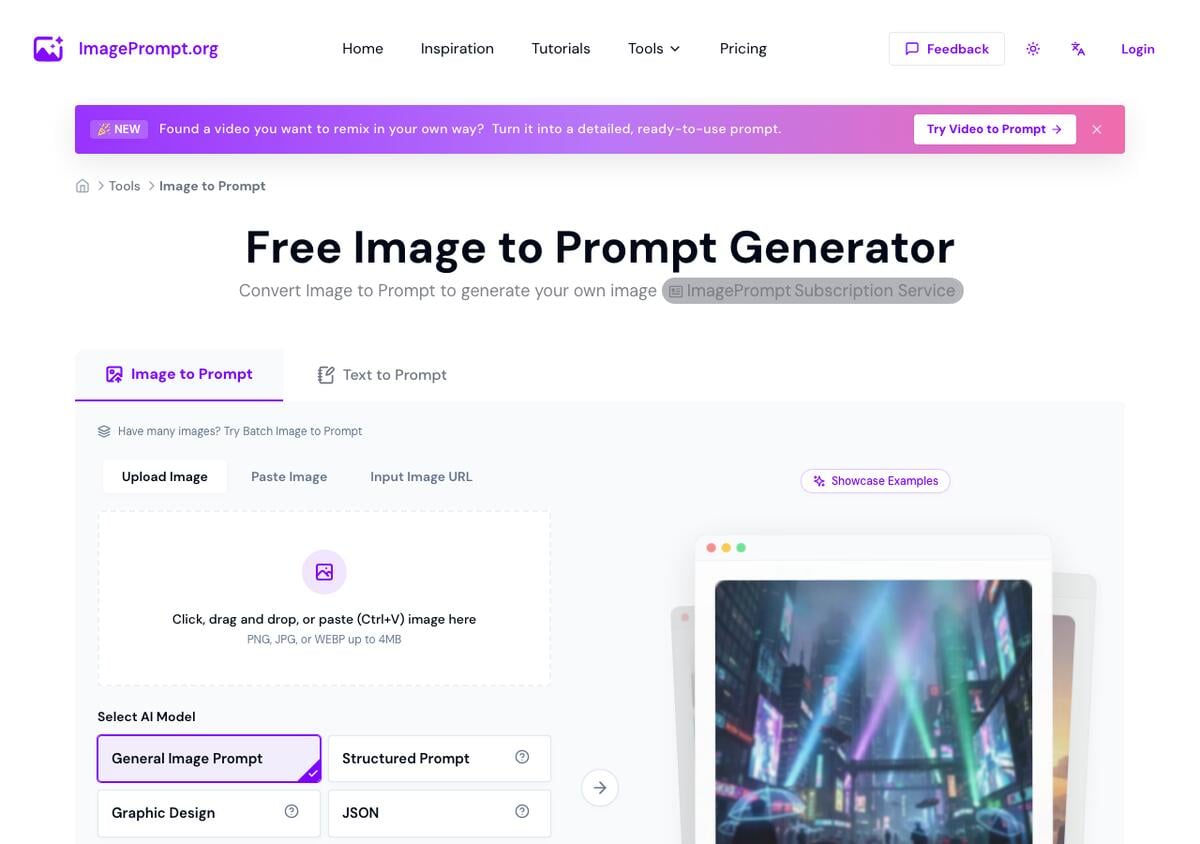
Key features: seven output-format presets; uploads by file, paste, or image URL (PNG, JPG, or WEBP up to 4 MB); a daily free credit allowance shared across its prompt tools; a stated policy that uploads are deleted immediately after processing.
Free plan (verified Sep 24, 2026): 5 Prompt Credits per day, plus unlimited Text-to-Prompt generation, confirmed on the vendor's own pricing page. Our test ran on the free tier with no account.
Pros:
- The widest set of named output formats in this list, seven in one place
- Named 7 of 8 details in our one-photo test, in every mode we tried
- A published, specific deletion policy for uploaded images
Cons:
- 5 credits a day is a small allowance for batch work
- Its Midjourney mode set
--ar 3:2on a 16:9 photo, and its Stable Diffusion mode returned sentences, not tags
Pricing: Standard 14.99 dollars/month for 300 credits; Pro 24.99 dollars/month for 600; Ultimate 39.99 dollars/month, or 20.82 dollars/month billed annually, for unlimited use.
Bottom line: the best starting point when you do not know yet which generator you will paste the prompt into.
2. Midjourney Describe: Best for a Native Midjourney-Ready Prompt
Midjourney's Describe feature, accessed with the /describe command in Discord or by right-clicking any image and choosing "Describe Image" in the web app, turns an uploaded picture into candidate prompts written in Midjourney's own vocabulary and flag syntax, ready to run through /imagine without translation.
Key features: a set of alternative prompts per upload, each clickable to generate a matching image directly; works from an uploaded file or an image URL; available in both the Discord bot and the web app. Midjourney's documentation says Describe gives a new set of suggestions each time you run it, and that the prompts will not copy your image exactly.
Free plan (verified Sep 23, re-checked Sep 24, 2026): none. Midjourney has had no free trial or free tier since March 2023, so Describe requires an active paid subscription.
Pros:
- The only tool here where the output is guaranteed to run correctly in the generator it was written for
- Several prompt variations per upload give you options without a second try
- Works from the same interface you already generate images in
Cons:
- No way to try it without paying first
- Useless if your target generator is not Midjourney
Pricing: Basic 10 dollars/month with 3.3 fast GPU hours; Standard 30 dollars/month adds unlimited Relax mode; Pro 60 dollars/month adds Stealth mode; Mega 120 dollars/month. Annual billing takes 20% off (8, 24, 48, and 96 dollars a month).
Bottom line: the right choice only if Midjourney is where you are going to render the result.
3. Ideogram Describe: Best for a Structured, Compositional Prompt
Ideogram's Describe feature analyzes an uploaded image and, on the 4.0 or Auto model, returns a structured JSON prompt: a high-level description plus a compositional breakdown of the background and each visible element, rather than one flat sentence.
Key features: JSON-structured output on 4.0/Auto for precise element-by-element control; natural-language output on 3.0 and shorter descriptions on older versions; a developer API endpoint that returns a working V4JsonPrompt you can pass straight back into generation.
Free plan (verified Sep 24, 2026): the free plan gets weekly slow credits for eligible accounts, and free generations are public. Ideogram's documentation states that Describe is available to all users, but that uploading your own image requires the Plus plan or higher.
Pros:
- The most structured, editable output format of any tool here
- A documented API path for developers who want to reuse the exact JSON
- Describe works on any image already generated in Ideogram, free plan included
Cons:
- Reversing an outside photo, the core image to prompt job, starts at Plus
- Free-tier output is public, which matters if the source image is sensitive
Pricing: Plus 20 dollars/month, or 180 dollars a year (15 dollars/month), for 1,000 priority credits; Pro 60 dollars/month, or 504 dollars a year, for 3,500. The Basic plan no longer appears on the pricing page.
Bottom line: worth the trade-off if you need to edit individual elements of the description, not just the whole sentence.
4. CLIP Interrogator: Best Free Open-Source Tool for Stable Diffusion
CLIP Interrogator combines OpenAI's CLIP and Salesforce's BLIP to produce a dense, keyword-style prompt describing an image's subject, medium, artist influences, and style — the format Stable Diffusion prompts have favored since the tool's release. It is free, open source, and hosted as a public Hugging Face Space.
Key features: hosted Space needs no account or install; also runnable on Google Colab or locally via pip install clip-interrogator; available as a Stable Diffusion Web UI extension for in-tool use; four modes (best, fast, classic, negative).
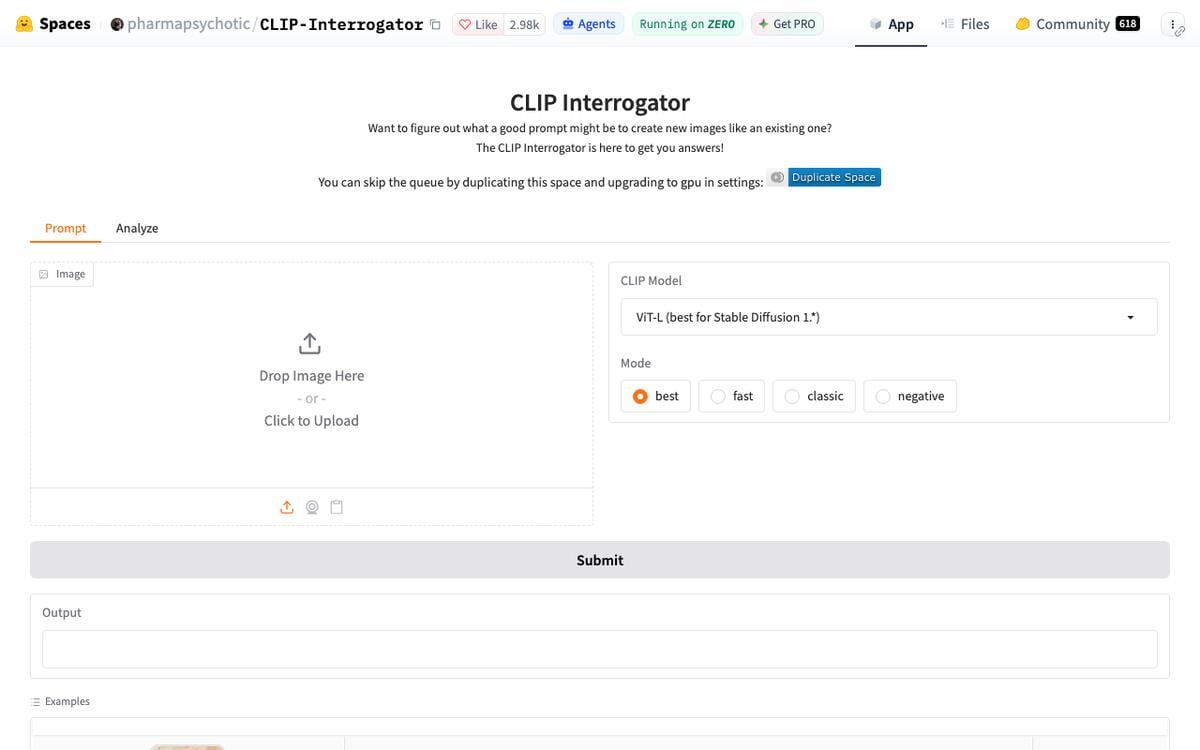
Free plan (verified Sep 24, 2026): free with no account on the hosted Space, which runs on Hugging Face's ZeroGPU hardware. Hugging Face documents a daily GPU quota of 2 minutes for unauthenticated visitors and 5 minutes for free accounts. Our anonymous session got three runs before a quota error. Self-hosting is free and has no quota.
Pros:
- No account and no card on the hosted version
- Open source, so it keeps working even if the hosted Space goes down
- The output style Stable Diffusion communities have standardized on for years
Cons:
- Named only 2 of 8 details in our test, and called a green door red
- Output mixes in invented artist names and noise tokens that you must delete
Pricing: free.
Bottom line: the default choice if your target generator is Stable Diffusion and you do not mind a tag-style prompt.
5. img2prompt on Replicate: Best for Developers Who Want API Access
img2prompt, a Replicate-hosted adaptation of CLIP Interrogator by methexis-inc, returns an approximate text prompt matching an uploaded image's style, built around the same CLIP ViT-L/14 model used for Stable Diffusion. Over 2.7 million runs have gone through the public model as of this writing.
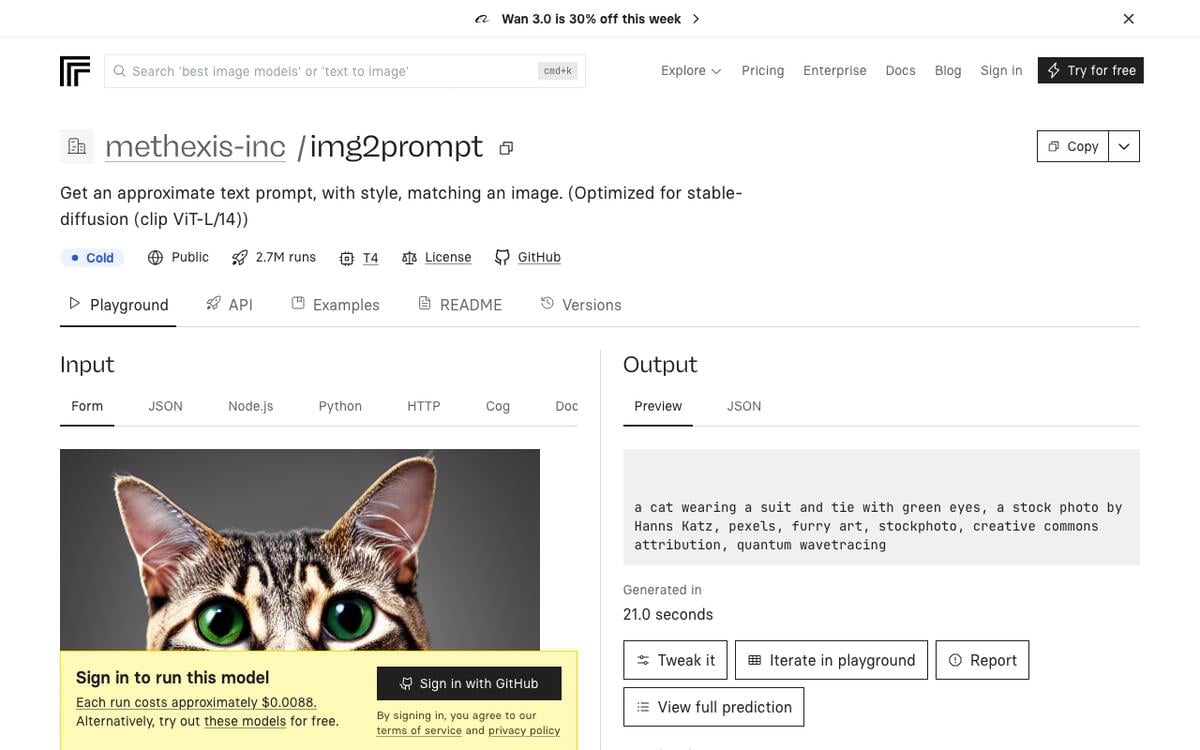
Key features: simple API call, no UI required; runs on Nvidia T4 GPU hardware, with predictions that typically complete within 40 seconds; the underlying code is open source, so you can self-host it for free.
Free plan (verified Sep 24, 2026): no free tier on the hosted Replicate API, and you sign in to run it. Replicate lists the cost at about 0.0088 dollars per run, or 113 runs per dollar. Self-hosting via Docker is free.
Pros:
- API-first, so it slots into a script or pipeline without a browser
- Cheap per run if you do need the hosted version
- Free if you are comfortable self-hosting
Cons:
- Not free on Replicate's hosted infrastructure, unlike CLIP Interrogator's own hosted Space
- Requires basic API or Docker familiarity to use well
Pricing: about 0.0088 dollars/run hosted; free self-hosted.
Bottom line: the pick for a developer who wants this in a pipeline rather than a browser tab.
General AI Assistants That Can Describe an Image
These are not dedicated image-to-prompt tools, but all four read an uploaded image on their free plans and will write a prompt if you ask them to.
6. ChatGPT: Best Free General Assistant Already on Your Phone
ChatGPT reads an uploaded image with its vision-capable models and will describe it in plain language, or in a specific format if you ask — for example, "describe this as a Midjourney prompt with --ar and --stylize flags."
Key features: vision available on the free plan; can be instructed to output JSON, a Midjourney-style prompt, or a plain caption; follow-up questions refine the description in the same conversation.
Free plan (verified Sep 23, 2026): vision is included on the free plan. OpenAI's own help content confirms free-tier access to "limited vision" and "limited file uploads" without publishing an exact daily image cap; treat any third-party number you see for this as an estimate.
Pros:
- Already installed for most people, no new tool to learn
- Flexible output — ask for any format you need
- Conversational refinement if the first description misses details
Cons:
- No dedicated one-click "image to prompt" mode; you write the formatting instruction yourself
- Free-tier upload limits are not clearly published by OpenAI
Pricing: free, with paid ChatGPT plans for higher limits.
Bottom line: the fastest way to get a usable description with zero new sign-ups.
7. Claude: Best for Detailed Analysis and a Stated No-Training Policy
Claude reads uploaded images on every plan, including free, and Anthropic's own documentation states plainly that Claude does not use uploaded images to train its models and that uploads are deleted once a request finishes processing.
Key features: up to 20 images per conversation turn on claude.ai; images up to 10 MB and 8,000 by 8,000 pixels; detailed analysis of charts, screenshots, and handwritten notes in addition to photos.
Free plan (verified Sep 23, 2026, per Anthropic's own documentation): image upload and vision analysis work on every Claude plan, free included, subject to usage-volume limits rather than a feature gate.
Pros:
- The clearest published privacy and retention statement of any general assistant in this list
- Strong at structured, detailed description, useful for the worked-example style breakdown above
- Vision is a full feature on the free plan, not a paid add-on
Cons:
- No dedicated prompt-formatting button; you ask for it explicitly
- Claude cannot generate or edit images itself, only describe them
Pricing: free, with paid Claude plans for higher usage limits.
Bottom line: the pick when you want a careful, structured description and care about what happens to the image afterward.
8. Gemini: Best Free Option on Google's Stack
Gemini analyzes uploaded images on its free plan as part of Google's consumer AI app, alongside document analysis and web browsing.
Key features: image analysis alongside PDF and document understanding; part of the same free plan as Gemini's chat and image-generation features; backed by Google's broader AI Studio for developers who need programmatic access.
Free plan (verified Sep 23, 2026): vision and image analysis are included on Gemini's free plan; Google's own pricing page does not publish an exact daily image-analysis cap for the consumer app, so treat any specific number as a third-party estimate.
Pros:
- Free, with no separate vision add-on
- Useful if you are already inside Google's ecosystem for documents and search
- Fast turnaround for a plain description
- The same app also generates images, so you can describe a reference and render a new version in one chat
Cons:
- No dedicated generator-formatted output mode
- Published rate limits are inconsistent across sources
- Not part of our one-photo test, which left out the chat assistants
Pricing: free; paid Google AI plans upgrade the underlying model and raise limits.
Bottom line: a solid free default if you already use Gemini for other work.
9. Google AI Studio: Best Free Option for Developers
Google AI Studio gives developers a free API tier for Gemini's multimodal models, including image understanding, with no credit card required to start.
Key features: free access to Gemini's Flash-tier models for image analysis; no separate image API needed — send an image alongside a text prompt in one request; a path to paid tiers with higher production rate limits when you need them.
Free plan (verified Sep 23, 2026): confirmed free tier on Google's own pricing page, no card required; the page does not publish exact requests-per-minute or requests-per-day figures for every model, so check the current limits before building a production pipeline on them.
Pros:
- True API access, not just a chat window, useful for batch processing
- No card required to start
- Backed by the same models used in the consumer Gemini app
Cons:
- Free-tier rate limits are not fully published and can change
- Requires basic API familiarity, unlike a drag-and-drop web tool
Pricing: free tier available; paid tiers add higher rate limits and remove the "may be used to improve our products" data clause.
Bottom line: the right choice if you are building an image-to-prompt step into your own tool rather than using someone else's.
Adjacent Tools Worth Knowing
Leonardo sits in its own group because its reverse-prompt feature lives inside an image generator, and its output is tuned for that generator.
10. Leonardo: Best If You're Already Inside an Image Generator's Own Ecosystem
Leonardo has a real reverse-prompt feature, Describe with AI: click the star icon in the prompt bar, upload a photo or pick a generation, and Leonardo writes a detailed prompt describing it. You can also copy the prompt behind any image you or another user generated there. Its Image Guidance feature is different: it steers a new image from a reference, image to image.
Key features: Describe with AI for uploaded photos; prompt copying for images made on Leonardo; Image Guidance for reference-driven generation; an "Improve Prompt" tool that expands a short prompt.
Free plan (verified Sep 24, 2026): 150 Fast Tokens per day on the pricing page, and free-plan creations are public. Leonardo's help article does not list a plan restriction or token cost for Describe with AI.
Pros:
- The most generous daily free allowance of any tool in this list by volume
- Describe with AI works on an uploaded outside photo, not only on Leonardo images
- Multiple related tools (Describe with AI, Image Guidance, Improve Prompt) in one subscription
Cons:
- Describe with AI returns a plain description tuned to Leonardo's own generator, with no Midjourney or Stable Diffusion mode
- Free-plan creations are public, so keep sensitive references off the free tier
Pricing: Essential 12 dollars/month; Premium 30 dollars/month; Ultimate 60 dollars/month. Annual billing lowers these to 10, 24, and 48 dollars a month.
Bottom line: a strong free pick if you plan to render on Leonardo.
What AI Image to Prompt Tools Cost
Among the tools in this list that publish a price, entry paid tiers run from 10 to 20 dollars a month on monthly billing, and Midjourney is the only one with no free tier at all. Ideogram's entry plan is now Plus, which is also the plan that unlocks Describe on your own uploads.
CLIP Interrogator and self-hosted img2prompt do not appear on this chart because they have no paid tier at all. The general assistants — ChatGPT, Claude, Gemini, Google AI Studio — also do not appear, because their vision capability ships free on every plan; you would only pay to raise the surrounding usage limits, not to unlock image reading itself.
A monthly price hides the number that matters for batch work: what 100 reverse prompts cost. This is our calculation from each vendor's published price on September 24, 2026:
| Tool and plan | Published price | Prompts included | Cost per 100 prompts |
|---|---|---|---|
| CLIP Interrogator, self-hosted | Free | Limited by your hardware | 0 dollars |
| img2prompt on Replicate | About 0.0088 dollars a run | Pay per run | About 0.88 dollars |
| ImagePrompt.org Pro | 24.99 dollars a month | 600 Prompt Credits | About 4.17 dollars |
| ImagePrompt.org Standard | 14.99 dollars a month | 300 Prompt Credits | About 5.00 dollars |
| Midjourney Describe | From 10 dollars a month | No per-Describe cost published | Cannot be calculated |
Privacy, Public Outputs, and Rights
Before you upload an image to a reverse-prompt tool, check two things: what the vendor does with the upload, and whether your results are public on the plan you use. The published policies differ widely, and free tiers are often public by default.
| Tool | What the vendor says about your upload | Public on the free tier? | Private option |
|---|---|---|---|
| ImagePrompt.org | Processed to write the prompt, then deleted immediately | Not stated | Not stated |
| Claude | Not used to train models, deleted after the request is processed | No | Not applicable |
| Ideogram | Describe on your own upload needs Plus | Free generations are public | Plus and Pro list private generation |
| Leonardo | No retention statement found for Describe with AI | Free-plan creations are public | Paid plans list private creations |
| Midjourney | Describe runs inside your account | No free tier | Stealth mode on Pro and Mega only |
| CLIP Interrogator, self-hosted | The image never leaves your computer | Not applicable | Always private |
Two rights checks matter too. Anthropic's documentation states that Claude will not identify people in images, so its portrait prompts describe a look, not a person. And a reverse prompt from someone else's artwork can recreate a style close enough to raise copying issues, so keep the source license with the prompt and read the generator's commercial terms before you sell a result.
What Changed When We Re-Checked on September 24, 2026
Six facts below differ from what we first recorded on September 23, or from what popular image to prompt roundups still repeat. Vendor pages move faster than roundups, so we list the current state here, checked on each vendor's own page or documentation.
| Tool | Common assumption | What the vendor page says now |
|---|---|---|
| Ideogram | Basic plan at 8 dollars a month, and Describe on the free plan | Pricing starts at Plus, 20 dollars a month, and uploads to Describe need Plus or higher |
| CLIP Interrogator | Free and unlimited on Hugging Face | Free, with a ZeroGPU quota of 2 minutes a day unauthenticated and 5 with a free account |
| img2prompt | About 0.04 dollars a run | About 0.0088 dollars a run, 113 runs per dollar |
| Leonardo | Copies prompts only from images made on Leonardo | Describe with AI writes a prompt from an uploaded photo |
| ImagePrompt.org | Four output modes | Seven modes, including Structured, Graphic Design, and JSON |
| Midjourney Describe | Four short prompts | Longer, more detailed prompts for use with V8.1 and V8.2 |
Taskade: Best for Writing a Prompt When You Have the Idea, Not the Image
Taskade is not an image to prompt tool. It solves the opposite problem: you describe what you want in plain English, and Taskade's image prompt generator returns a structured, paste-ready prompt with subject, style, lighting, lens, composition, aspect ratio, and a negative prompt, in Midjourney, DALL-E, Stable Diffusion, or Flux phrasing.
Taskade's AI agents can also read images. Upload one through Media Files or a media command, and an agent can describe it, extract text, or answer questions about it, and keep that description in its knowledge. Taskade does not turn that description into Midjourney flags or Stable Diffusion tags. For that job, use one of the ten tools above.
Key features: ten prompt variations side by side in an editable project; a general AI prompt generator, an art prompt generator, and over 500 ready-made prompts.
Free plan (verified Sep 23, 2026): 3 Genesis apps, 1 AI agent, 10 automation runs a month, and 6,000 one-time credits to start, with no credit card required.
Pros:
- Covers the opposite half of the image prompt problem that every tool above skips
- Every prompt lands in an editable, shareable project instead of a text box you lose on refresh
Cons:
- Not an image to prompt tool: none of Taskade's generators reverse a picture into a prompt
- No Midjourney-flag output tuned from an uploaded image the way Describe is
Pricing: Pro 10 dollars/month billed annually for unlimited apps and agents.
Bottom line: the right stop when you have the idea and not the image.
Why Direction Matters More Than the Word "Prompt"
An image to prompt tool and a prompt generator both end in the word "prompt," and that shared word is why people land on the wrong one. One starts from a finished picture and reverse-engineers a prompt. The other, a prompt generator, starts from an idea. And neither is an image generator, the tools covered in our best AI image generators comparison. Know your direction first, and the choice gets short. Browse finished builds in the community gallery, or start building free with Taskade Genesis once you have the words you need.
If your next step after reading is to write a prompt from an idea rather than reverse one from a picture, start with Taskade's image prompt generator free →
Image to Prompt Generator FAQ
What is an image to prompt generator?
An image to prompt generator reverses the normal order: instead of writing text to get an image, you upload an image and get back the text prompt that could plausibly recreate it. A vision model reads the picture and extracts the subject, style, lighting, and composition, and some tools further format that as a specific generator's syntax.
How do I generate a prompt from an image?
Upload the image to an image to prompt tool, pick the output mode for your target generator, and run it. Before you paste the result, delete invented names and noise words, check the aspect-ratio flag, and add missed details. The step-by-step section covers each step.
What is the best free image to prompt generator in 2026?
ImagePrompt.org gives 5 free Prompt Credits a day with no account and named 7 of 8 details in our test. CLIP Interrogator is free and open source but named 2 of 8, and its hosted Space has a daily GPU quota. Claude, ChatGPT, and Gemini also describe images free. Midjourney Describe has no free tier, and Ideogram needs Plus to describe your own upload.
Does Midjourney have a free image to prompt tool?
No. Midjourney has had no free trial since March 2023, so Describe needs a paid plan from Basic, 10 dollars a month or 8 dollars a month billed annually. Its documentation publishes no separate GPU-time cost for Describe and warns that the prompts will not copy your image exactly.
Which image to prompt generator is tuned for Midjourney specifically?
Midjourney Describe is the most native option, because it writes in Midjourney's own vocabulary and you can run its prompts directly. ImagePrompt.org also has a Midjourney mode, but in our test it appended --ar 3:2 to a 16:9 photo, so check the flags first.
Which image to prompt generator works best for Stable Diffusion or Flux?
CLIP Interrogator and img2prompt were built around Stable Diffusion's CLIP model and return keyword-dense tags. ImagePrompt.org has dedicated Flux and Stable Diffusion modes, but its Stable Diffusion mode returned full sentences in our test, so reformat it if your workflow expects tags.
Is CLIP Interrogator still available and free in 2026?
Yes. The Hugging Face Space is free with no account, but it runs on ZeroGPU: 2 minutes of GPU time a day unauthenticated, 5 with a free account. Our anonymous session got three runs. A local install is free with no quota, and img2prompt on Replicate costs about 0.0088 dollars a run.
Can ChatGPT, Claude, or Gemini turn a photo or picture into a prompt?
Yes. All three describe an uploaded image on their free plans, and each will format the result as a Midjourney prompt, a tag list, or a caption if you ask. None has a one-click image to prompt button. For the most structured output of any tool, Ideogram 4.0 Describe returns JSON.
What is the difference between an image to prompt generator and a regular AI prompt generator?
A regular AI prompt generator, such as Taskade's image prompt generator, starts from a written idea and writes the prompt. An image to prompt generator starts from a picture and writes a prompt that describes it. Use the first when you have a concept, and the second when you want to recreate a look.
What is the difference between image to prompt and plain image captioning?
An image caption generator writes one literal sentence for search engines and screen readers. An image to prompt tool adds style, lighting, lens, and composition, often in a generator's syntax. CLIP Interrogator shows both layers: its first clause is a caption, and the rest is style tags. On a famous artwork, it returns the title instead of a style.
Do image to prompt tools keep the images you upload?
Policies vary. ImagePrompt.org states that uploads are deleted after processing, and Anthropic states that Claude does not train on uploaded images. Free-tier generations on Ideogram and Leonardo are public. Check the privacy table and each vendor's own statement before you upload an image you do not own.
Can Taskade turn an uploaded image into a generation prompt?
Taskade AI agents can read an image you upload through Media Files and describe it, extract text, and answer questions about it. Taskade does not format that description as a Midjourney, Stable Diffusion, or Flux prompt. Its image prompt generator works the opposite direction, from a description to a structured prompt.
Sources
- CLIP Interrogator and GitHub repository — pharmapsychotic
- img2prompt on Replicate — methexis-inc
- Midjourney Describe documentation and Comparing Midjourney Plans — Midjourney, re-checked September 24, 2026
- ImagePrompt.org pricing — verified via direct fetch, September 23, 2026, re-checked September 24, 2026
- Ideogram Describe documentation and Ideogram pricing — Ideogram, read in a headless browser, September 24, 2026
- Describe with AI help article and Leonardo pricing — Leonardo, September 24, 2026
- Spaces ZeroGPU usage tiers — Hugging Face, September 24, 2026
- Falsterbo lighthouse test photo — Christian Pietzsch, CC0, Wikimedia Commons
- Claude vision documentation — Anthropic, verified via direct fetch, September 23, 2026
- Contrastive Language-Image Pre-training (CLIP) — Wikipedia
- Russell A. Kirsch — Wikipedia
- Girl with a Pearl Earring — Wikipedia
Further Reading
- AI Prompt Generator: 15 Best Tools + Free Prompts
- The 8 Best AI Image Generators
- Best AI Game Generators 2026
- AI Design Tools 2026
- Best AI Tools for Designers
- Types of Prompt Engineering
- AI Prompting Guide
- What Leaked AI Prompts Reveal
- Taskade Genesis January 2026 Update
- What Is Vibe Coding?
▲ ■ ● Kirsch spent most of a day turning one photograph into 30,976 numbers. Today the same job runs the opposite direction in seconds: picture in, prompt out. Know your direction, then pick the tool. Memory feeds Intelligence, Intelligence triggers Execution. Write your next prompt free →